Car Wash Marketing Specialist Booking Website Template
Suds is a comparison table landing page built for car wash operators who run Facebook ads but lack a page that converts clicks into memberships. It uses an objection-led scroll structure, side-by-side data tables, and a qualifying lead form to turn ad traffic into booked audits and captured prospects across multi-location and franchise operations.
by Rocket studio
Quick summary
Suds is a single-page, B2B landing page template built for car wash operators running Facebook ad campaigns. The page answers real operator objections in sequence, using comparison tables instead of paragraphs. It qualifies leads by budget before capturing identity, and every section removes one more reason for a prospect to leave without taking action.
Who this template is for
This template is designed for operators who are spending money on paid traffic but have no dedicated page to catch it. The audience is professional, data-aware, and skeptical of marketing claims. They need evidence, not inspiration.
- Multi-location car wash owners and franchise operators managing Facebook ad budgets
- Regional chain managers looking to lower cost-per-acquisition on monthly membership campaigns
- Car wash marketing teams who need a fast, focused B2B lead capture page
What problem this template solves
Most car wash operators send Facebook ad traffic to a generic homepage. That homepage was built for walk-in visitors, not paid clicks. The result is a high bounce rate, wasted ad spend, and no clear path to membership sign-ups.
- No dedicated landing page means ad spend leaks through a page built for the wrong audience
- Generic homepages bury the membership offer and give visitors too many places to go
- Without a qualifying form, operators collect low-intent leads that waste sales time
What you get with this template
You get a structured, single-page layout that answers buyer objections in the order they naturally arise. Every section does exactly one job. Nothing competes for attention.
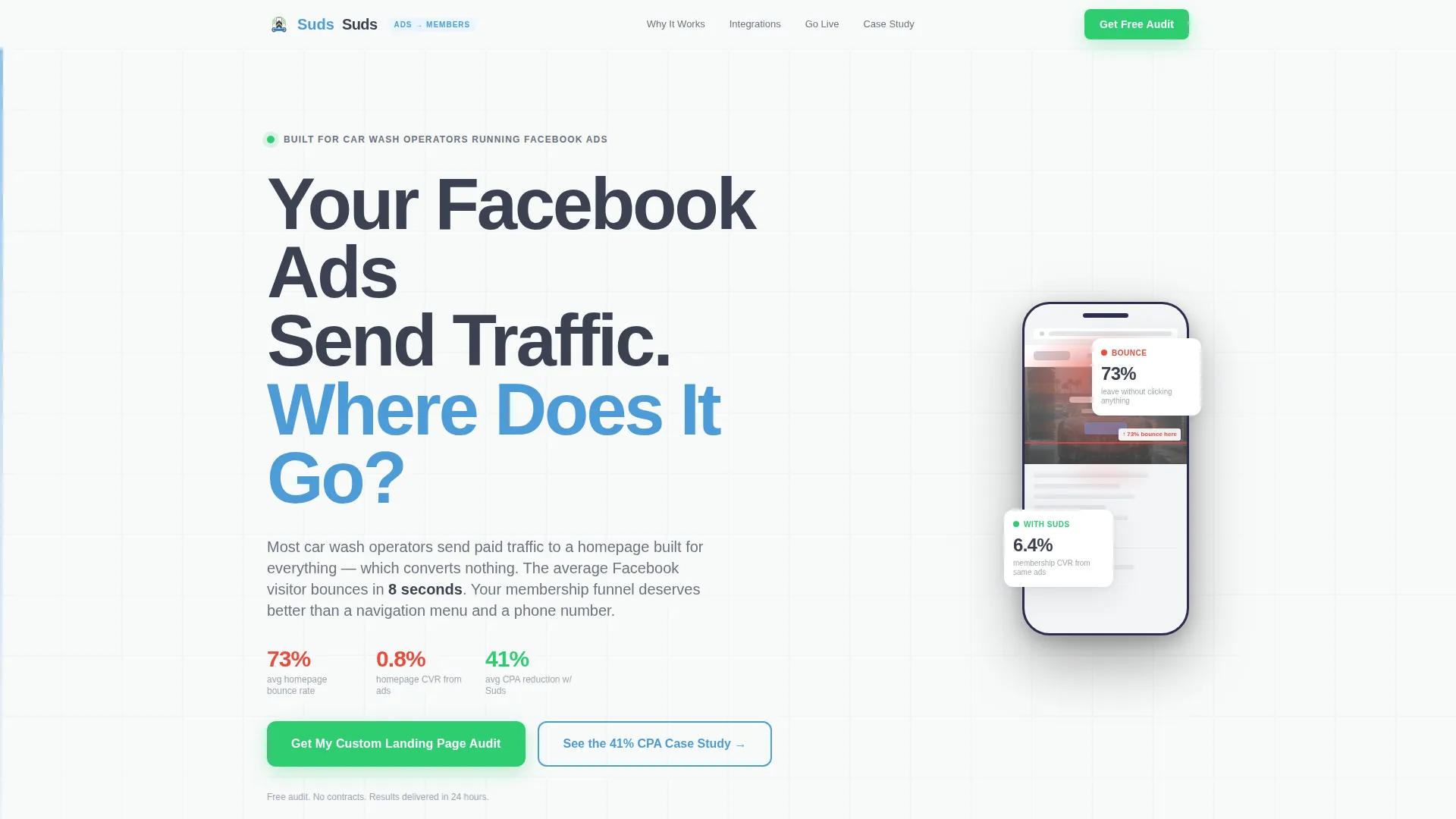
- A giant headline section that immediately frames the digital funnel problem for operators
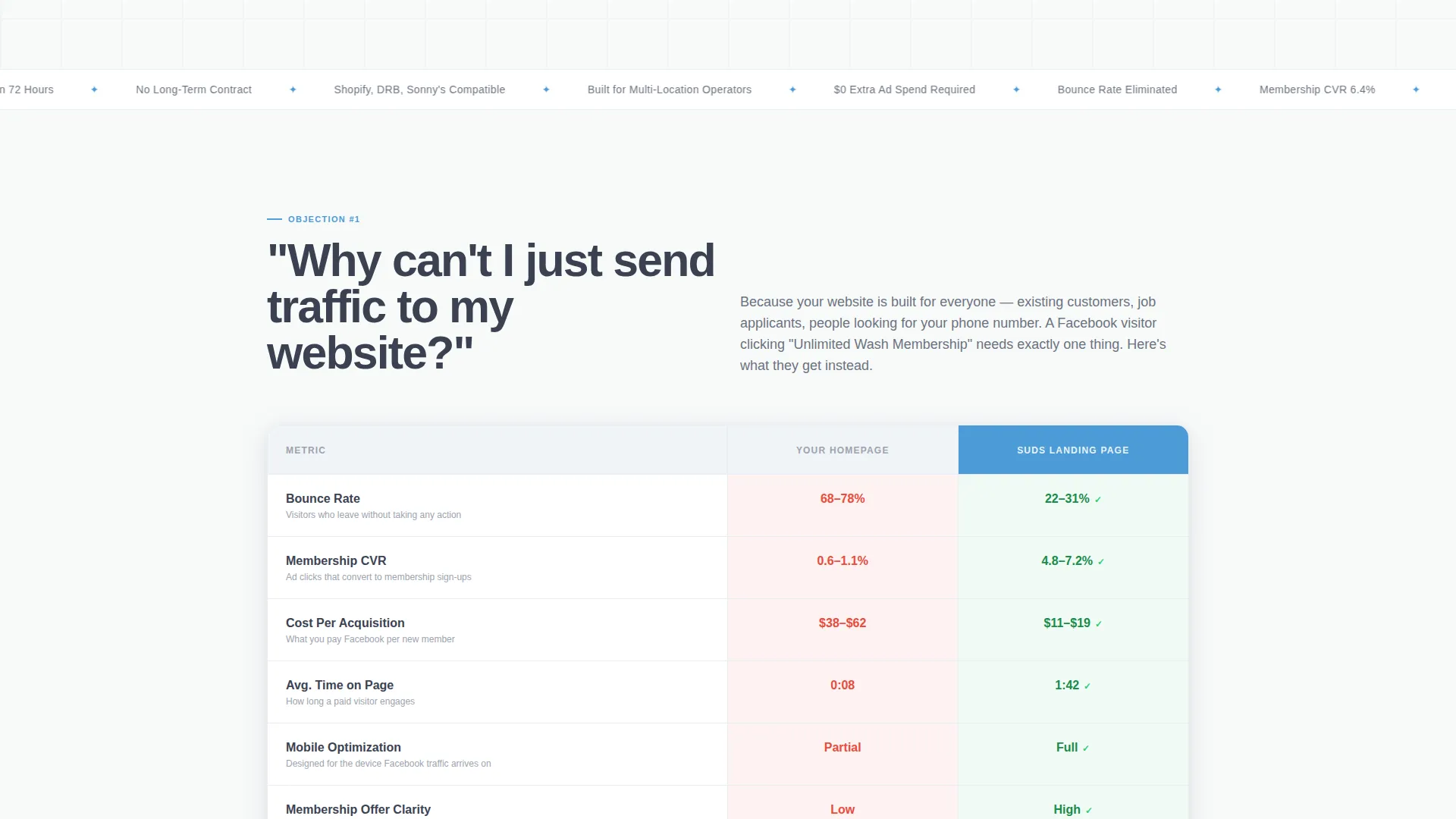
- Comparison tables showing bounce rate, conversion rate, and cost-per-acquisition data side by side
- A primary lead form that collects location count and ad spend range before asking for name and email
- A secondary email gate for a downloadable PDF case study targeting operators not yet ready to talk
- A sticky mobile bottom bar keeping the primary call-to-action visible throughout the entire scroll
Feature list
This template is built around a handful of tightly scoped components that work together without overlap.
Objection-Led Scroll Structure
Each section opens with a real question a car wash operator would ask. The scroll follows the natural objection sequence, moving from funnel awareness to integration concerns to go-live timeline. Every question answered is a reason to stay on the page.
Side-by-Side Comparison Tables
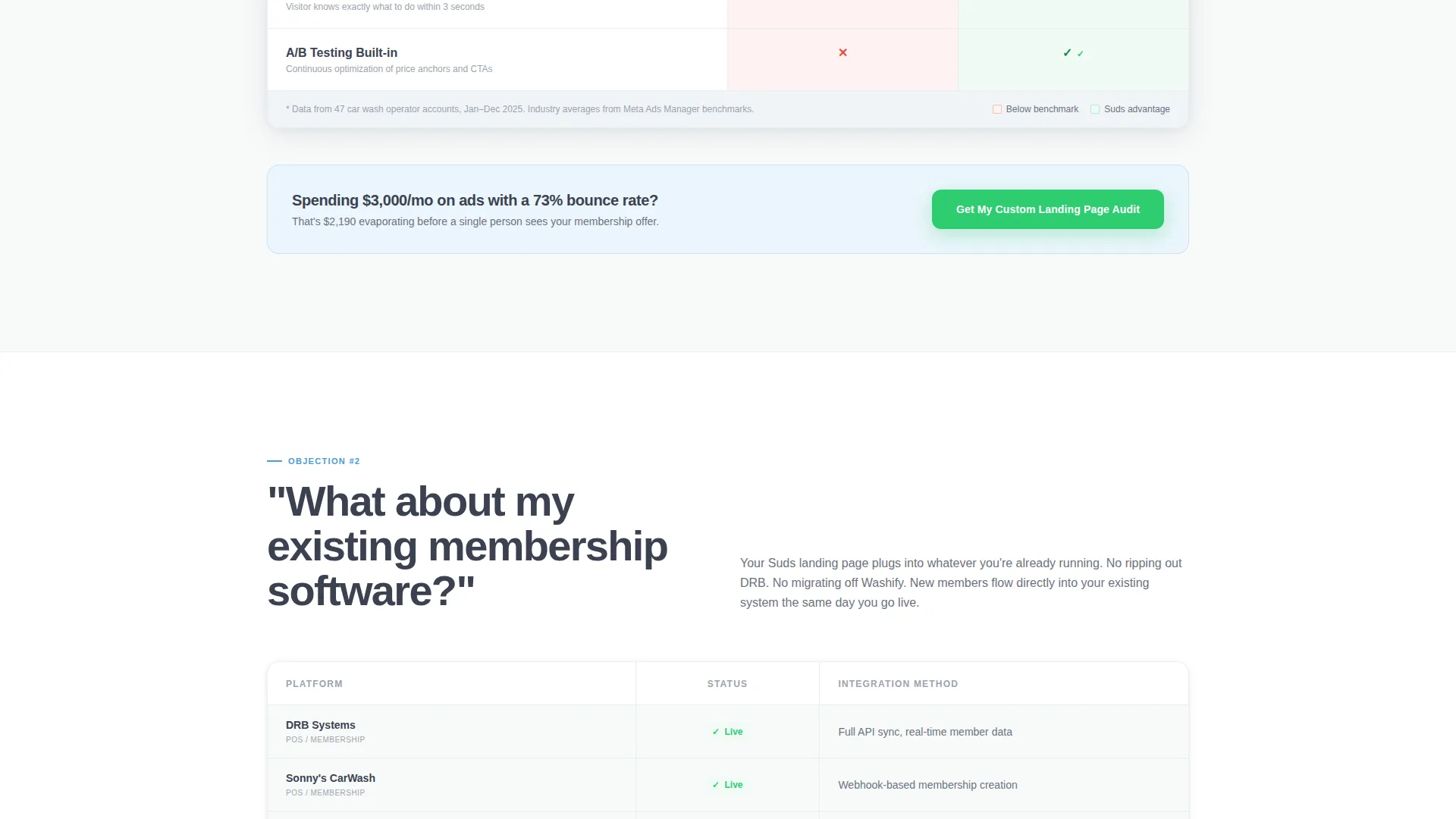
The core persuasion tool is a set of data tables, not paragraphs. Tables compare generic homepages against dedicated landing pages across bounce rate, conversion rate, and cost-per-acquisition. Signal green highlights the winning cells so the eye lands exactly where it should.
Budget-First Qualifying Form
The primary call-to-action form asks for number of locations first, then monthly ad spend range via dropdown, then name and email. This order filters out low-budget prospects before any personal information changes hands, improving lead quality from the first field.
PDF Case Study Gate
A secondary conversion path offers a downloadable PDF case study. It is gated behind email only, which lowers the barrier for operators who want evidence before a conversation. This catches mid-funnel prospects who are reading but not yet ready to book.
Sticky Mobile Call-to-Action Bar
On mobile, the primary call-to-action persists as a fixed bottom bar throughout the scroll. Operators checking the page between jobs or on a tablet between locations always have a clear next step within thumb reach.
Three-Step Go-Live Timeline
A visual timeline section shows how fast the page can be deployed. It directly answers the "How fast can this go live?" objection with a structured, step-by-step layout that reduces perceived friction around getting started.
Page sections overview
| Section | Purpose |
|---|---|
| Giant Headline Header | Frame the funnel leak problem and set operator context |
| First Comparison Table | Show homepage versus landing page performance data |
| Primary call to action Block | Capture qualified leads by location count and ad budget |
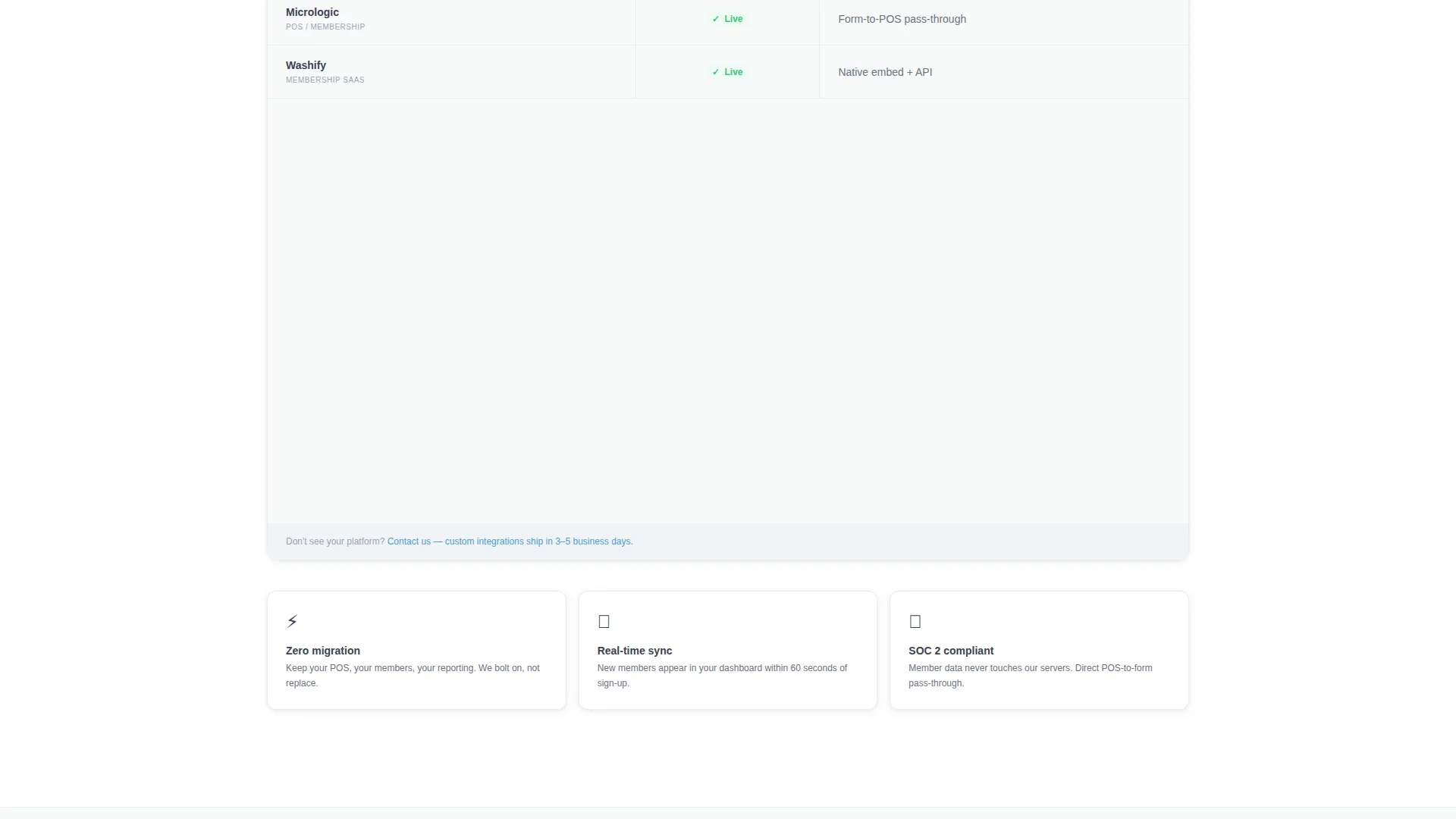
| Integration Compatibility Matrix | Address membership software compatibility concerns |
| Go-Live Timeline | Answer speed objection with a three-step visual sequence |
| PDF Case Study Gate | Capture mid-funnel prospects with a low-barrier email offer |
| Sticky Mobile Bar | Keep primary call to action visible on mobile throughout full scroll |
Design & branding system
The visual identity follows a Service Utility theme. The palette is clinical and high-contrast, built to feel like evidence rather than advertising. Every color has a single job, and nothing decorates without purpose.
- Arctic White background (#F8FAFA) keeps the layout clean and table-forward, like a freshly rinsed bay floor
- Wet asphalt gray (#3B4252) anchors all body text and table borders for maximum readability against white
- Pressurized blue (#4C9BD6) highlights column headers and key data points, directing the eye to the argument
- Signal green (#2ECC71) marks every winning comparison cell and all call-to-action buttons and checkmarks
Mobile & speed optimization
The layout is built with mobile operator behavior in mind. Multi-location managers often review marketing materials between site visits, not at a desk. The template accounts for this with a persistent action bar and a form flow that works cleanly on small screens.
- The sticky bottom bar keeps the primary call-to-action reachable at all times on mobile without mid-page hunting
- The qualifying form uses dropdowns for ad spend range, reducing typing friction on touchscreen devices
- Comparison tables are structured to remain scannable on narrow viewports without losing their persuasive function
How this template helps you convert
The page is engineered around a single belief: operators do not need more inspiration, they need fewer reasons to leave. Every design and content decision reinforces that principle.
- The objection-led scroll removes resistance in sequence, so by the final call-to-action the prospect has already answered their own doubts through the content they just read
- The budget-first form filters for qualified leads automatically, so the sales team receives contacts who have already self-identified their spend level and location count
- The dual conversion path captures both ready-to-talk prospects via the audit form and research-mode operators via the PDF gate, so no viable lead leaves empty-handed
Other information about this template
This template is part of a broader Professional Services category of landing pages designed for service businesses that rely on paid social traffic. It is particularly well-suited for car wash marketing campaigns where the offer is a recurring membership rather than a one-time transaction.
- The template style is Comparison Table, meaning the core persuasion is visual and data-driven rather than narrative
- The creative direction is FAQ-Driven, which means the page structure mirrors the real objection sequence a buyer follows
- The header concept is Giant Headline Left, pairing large stacked typography with a mocked-up phone screen showing a bounced-visitor heatmap
- The landing page direction is Partnership and B2B, so the tone, form design, and content hierarchy are calibrated for a business decision-maker, not a consumer
Theme
Service Utility
Creative direction
FAQ-Driven
Color system
Arctic White
Style
Comparison Table
Direction
Partnership/B2B
Page Sections
Objection-led Scroll Structure
Side-by-side Comparison Tables
Budget-first Qualifying Lead Form
PDF Case Study Email Gate
Sticky Mobile Call-to-action Bar
Three-step Go-live Timeline
Related questions
Who is this landing page template built for?
What makes the comparison table layout effective for this audience?
Why does the lead form ask for ad spend before name and email?
Is the PDF case study document included with the template?
Can this template support a single-location operator?



