Restaurant FAQ & Pre-Visit Questions Website Template
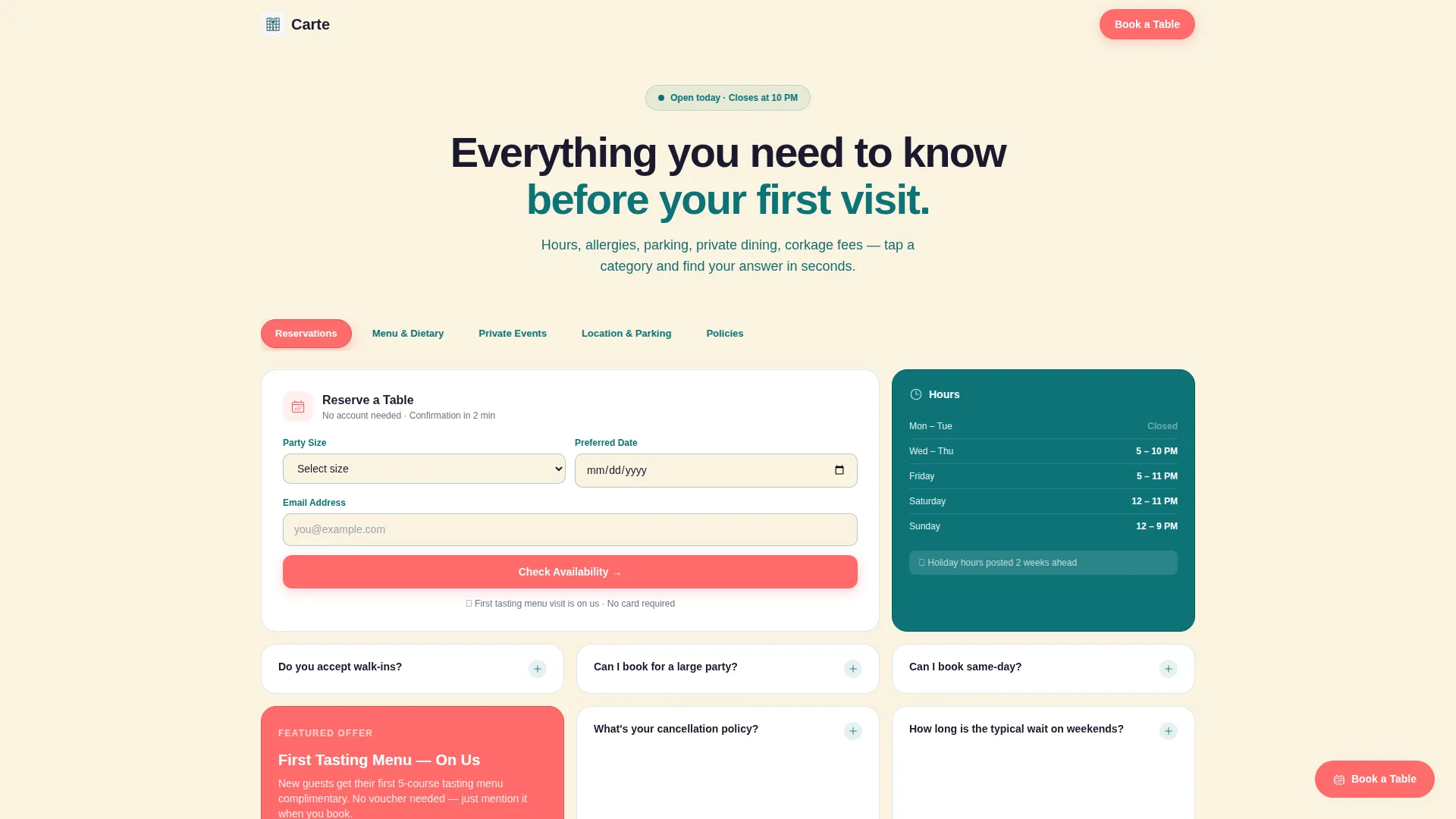
Carte is a bento grid restaurant landing page template built to answer every pre-visit question a guest might have. It combines a Feature Tab Switcher header, expandable answer tiles, and two clear conversion paths into one organized, visually warm single page. First-timers, regulars, and event planners all find what they need without leaving the page.
by Rocket studio
Quick summary
Carte is a single-page restaurant FAQ template built around a bento grid layout and a tabbed navigation header. It organizes every common pre-visit question into discoverable answer tiles, grouped by topic. The design feels warm and legible, and the two built-in conversion paths capture both ready-to-book guests and planners who need more time.
Who this template is for
This template suits restaurant owners and operators who want one dedicated page that handles all the questions their front-of-house team gets daily. It works especially well for restaurants with private dining programs, dietary complexity, or multiple visit occasions to communicate.
- Independent restaurant owners who want a focused pre-visit information page
- Event planners and private dining coordinators looking to publish capacity, pricing, and availability details
- Marketing teams managing a restaurant with a mix of first-time visitors and returning regulars
What problem this template solves
Most restaurant websites scatter essential information across multiple pages, social profiles, and outdated PDFs. Guests abandon the search and call, email, or simply choose somewhere else. Carte consolidates the answers in one organized, always-visible place.
- First-time visitors cannot easily find reservation policies, parking options, or allergy information before arriving
- Event planners waste time chasing prix fixe minimums, party capacity, and corkage fees that are never publicly posted
- Restaurants lose potential bookings because the page does not answer objections before the reservation form appears
What you get with this template
Carte delivers a fully structured single-page layout with every pre-visit question category built in and ready to customize. The page is organized for three distinct visitor types and includes two separate conversion paths so no visitor leaves without an action to take.
- A Feature Tab Switcher header with five labeled tabs: Reservations, Menu and Dietary, Private Events, Location and Parking, and Policies
- A bento grid body with tiles of varying sizes, including double-wide tiles for embedded maps and allergen charts, and tall tiles for step-by-step booking instructions
- Two conversion paths: a short reservation form with three fields and a menu PDF download that requires only an email address
Feature list
This template is built around a small set of purposeful components. Each one is designed to reduce friction and keep visitors anchored on the page rather than hunting for information elsewhere.
Tabbed Category Navigation
A horizontal row of five labeled tabs sits directly beneath the main headline. Clicking any tab instantly reshuffles the bento grid below to show only the tiles relevant to that category. The active tab is highlighted in catalyst coral while inactive tabs rest in muted teal, giving visitors a clear sense of where they are and what is left to explore.
Expandable Bento Grid Tiles
The grid uses tiles of three sizes: single Q&A tiles, double-wide tiles for richer content like maps and allergen charts, and tall tiles for multi-step content like booking instructions. Each tile expands in place on click with a smooth animation, keeping the visitor anchored in the grid rather than jumping to a new page or anchor link.
Visual Seating Map Tile
A dedicated tile displays a visual layout of the dining room. This helps guests and event planners understand table arrangements, private room boundaries, and capacity at a glance without needing to contact the restaurant directly.
Downloadable Menu Tile
A tile inside the grid links to a downloadable sample menu PDF. The download is gated behind a single email field, creating a lightweight lead capture path for planners and curious visitors who are not yet ready to book.
Mini Availability Calendar Tile
A compact calendar tile inside the Private Events section shows private dining availability at a glance. This reduces back-and-forth inquiries and helps planners self-qualify before reaching out or submitting a booking request.
Persistent Reservation call to action
A coral-colored call-to-action button sits in the bottom-right corner of the page at all times and is also repeated as an inline card inside the Reservations tab. The short form behind it asks only for party size, preferred date, and email, with no account creation required.
Page sections overview
| Section | Purpose |
|---|---|
| Tab Switcher Header | Sets topic context and reshuffles the bento grid on click |
| Reservations Tab Grid | Answers booking questions and surfaces the reservation form |
| Menu and Dietary Grid | Covers allergen charts, kids menu, and dietary options |
| Private Events Grid | Shows capacity, pricing minimums, and availability calendar |
| Location and Parking Grid | Provides address, parking details, and an embedded map tile |
| Policies Grid | Covers corkage fees, cancellation terms, and dress code |
| Persistent call to action Button | Keeps the reservation action visible across the full page scroll |
Design & branding system
The visual identity follows a Directory and Discovery theme. The palette is deliberately restrained, using contrast and warmth rather than decoration to communicate reliability and appetite.
- Deep service teal (#0D7377) fills primary category tiles, midnight ink (#1A1A2E) anchors text-heavy answer blocks, and warm linen (#FAF3E0) serves as the background canvas throughout
- Bright catalyst coral (#FF6B6B) is reserved exclusively for interactive toggles, the active tab state, and all call-to-action pulses, making every clickable element immediately recognizable
- The overall effect resembles a chalkboard specials board in a well-lit restaurant: legible, warm, and confident without being loud
Mobile & speed optimization
The bento grid layout is designed to reflow cleanly for smaller screens. Tile sizing and tab behavior adapt so the page remains easy to scan and tap on a phone, which matters because a significant portion of pre-visit searches happen on mobile at evening hours.
- Multi-size grid tiles collapse into a single-column stack on narrow screens, preserving content hierarchy without horizontal scrolling
- Tab navigation remains accessible at the top of the page on mobile, so category switching does not require scrolling back up
How this template helps you convert
Carte earns the conversion by answering every objection before the form appears. By the time a visitor reaches the call-to-action, the only remaining question is which night works best.
- The tabbed grid answers reservation policies, dietary needs, event details, parking, and fees upfront, removing the friction that normally causes visitors to abandon and call instead
- The persistent coral call to action button stays visible throughout the entire scroll, so the path to booking is never more than one click away regardless of which tile the visitor is currently reading
- The secondary email capture through the menu PDF download creates a low-commitment conversion path for planners and researchers who are not ready to commit to a date
Other information about this template
Carte is built as a single-page restaurant FAQ template that fits naturally into an existing restaurant website or stands alone as a dedicated pre-visit information hub.
- The template style is Bento Grid, which suits restaurants with many distinct information categories that benefit from visual separation and variable tile sizing
- It is designed under a Freemium and Trial landing page direction, meaning both conversion paths are intentionally lightweight: no account creation, no long forms, and no required commitment before value is delivered
- The template theme is Directory and Discovery, which treats every FAQ category as a browsable, explorable space rather than a static list of questions and answers
- It is categorized under Restaurant Website Templates within the Technology category, making it suitable for use in template marketplaces, no-code builders, and web design platforms that serve the hospitality industry


Theme
Directory & Discovery
Creative direction
Feature Matrix
Color system
Teal Catalyst
Style
Bento Grid
Direction
Freemium/Trial
Page Sections
Feature Tab Switcher Header
Expandable Bento Grid Layout
Visual Seating Map Tile
Mini Availability Calendar Tile
Dual Conversion Path Design
Persistent Coral Call to Action Button
Related questions
Does this template support multiple restaurant locations?
Can I customize the tab labels and grid tiles?
Is the reservation form connected to a booking system?
What does the menu PDF download tile actually do?
Who is the persistent call to action button designed for?