Local Brick & Mortar Business Pricing & Packages Website Template
Cash is a gallery-plus-detail landing page template built for check cashing and payday loan services. It pairs a Luxe Minimal visual identity with radical fee transparency, showing visitors exact costs on common check amounts before they ever walk through the door. The result is a fast, trustworthy page that turns curiosity into foot traffic.
by Rocket studio
Quick summary
Cash is a single-page landing page template designed for check cashing counters and payday advance services. It leads with a price-anchored header, unfolds into a gallery of service cards with live rate tags, and closes with clear calls to action that push visitors toward your store locator. Transparency is the whole conversion engine.
Who this template is for
This template is built for brick-and-mortar financial service businesses that move real money for people who cannot wait on a bank. It speaks directly to operators who know their customers arrive stressed and leave relieved.
- Check cashing windows and currency exchange counters
- Payday advance and short-term loan storefronts
- Multi-service financial outlets serving hourly workers and gig economy clients
What problem this template solves
Most check cashing websites bury their fees, force visitors to call ahead, or simply look untrustworthy. That friction sends potential customers to a competitor down the street. This template removes every reason to hesitate before walking in.
- Visitors cannot find a clear, upfront fee before they arrive
- Competing sites use vague language that erodes confidence at the door
- No easy way to compare costs across check types and amounts without speaking to staff
What you get with this template
You get a complete, ready-to-customize landing page structured around transparency and speed. Every section is purpose-built to answer the one question your visitor is actually asking: how much will this cost me, right now?
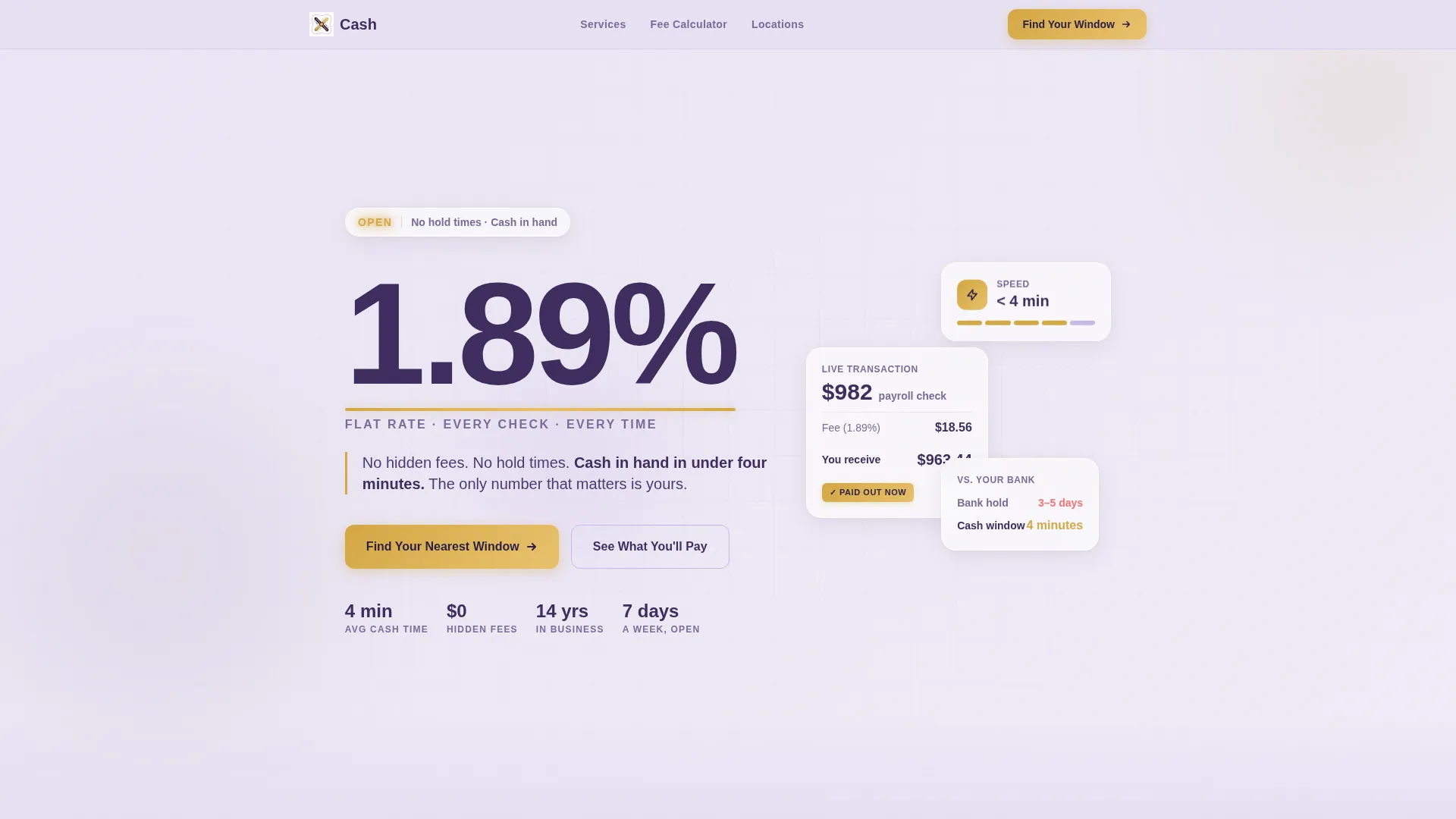
- A price-anchored hero header with an oversized flat-rate figure and a supporting subhead
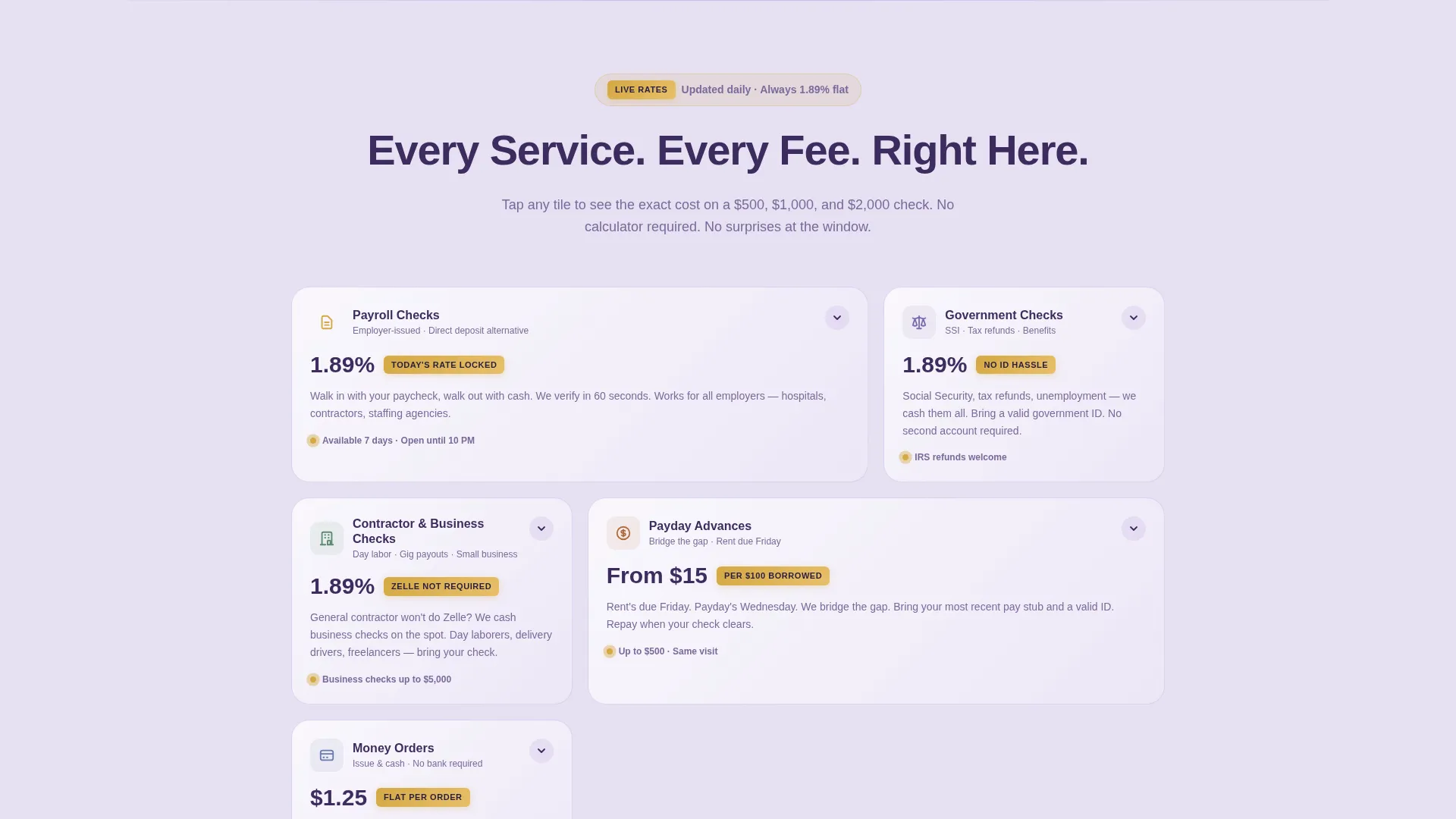
- A scrolling gallery of service cards, each styled as a discrete product tile with a "today's fee" rate tag
- Expandable detail panels showing exact cost breakdowns for $500, $1,000, and $2,000 checks
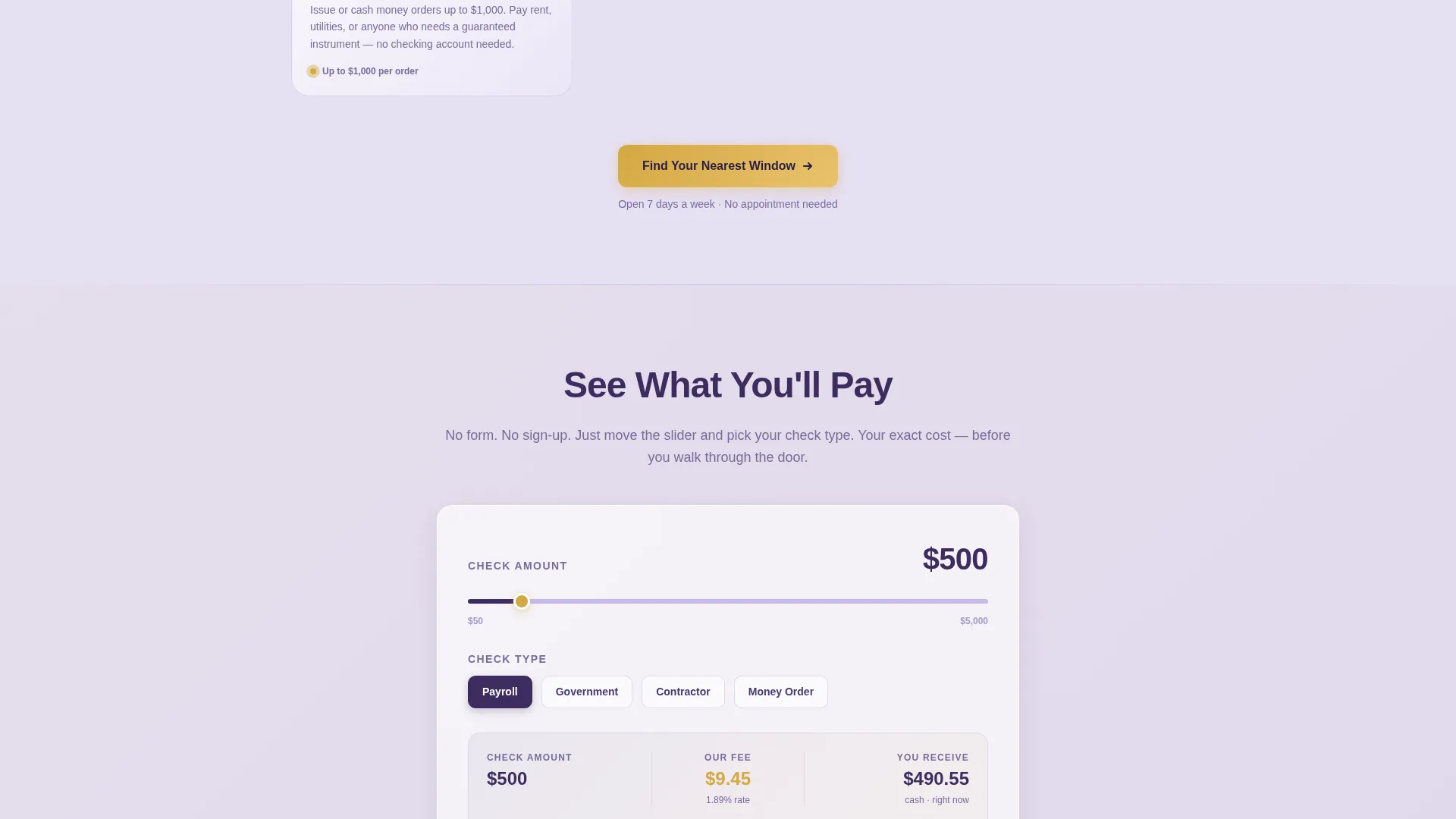
- An interactive fee calculator anchored at the bottom of each detail panel, requiring only check amount and check type
- A pulsing store locator map placed between product tiles to reduce the final friction point
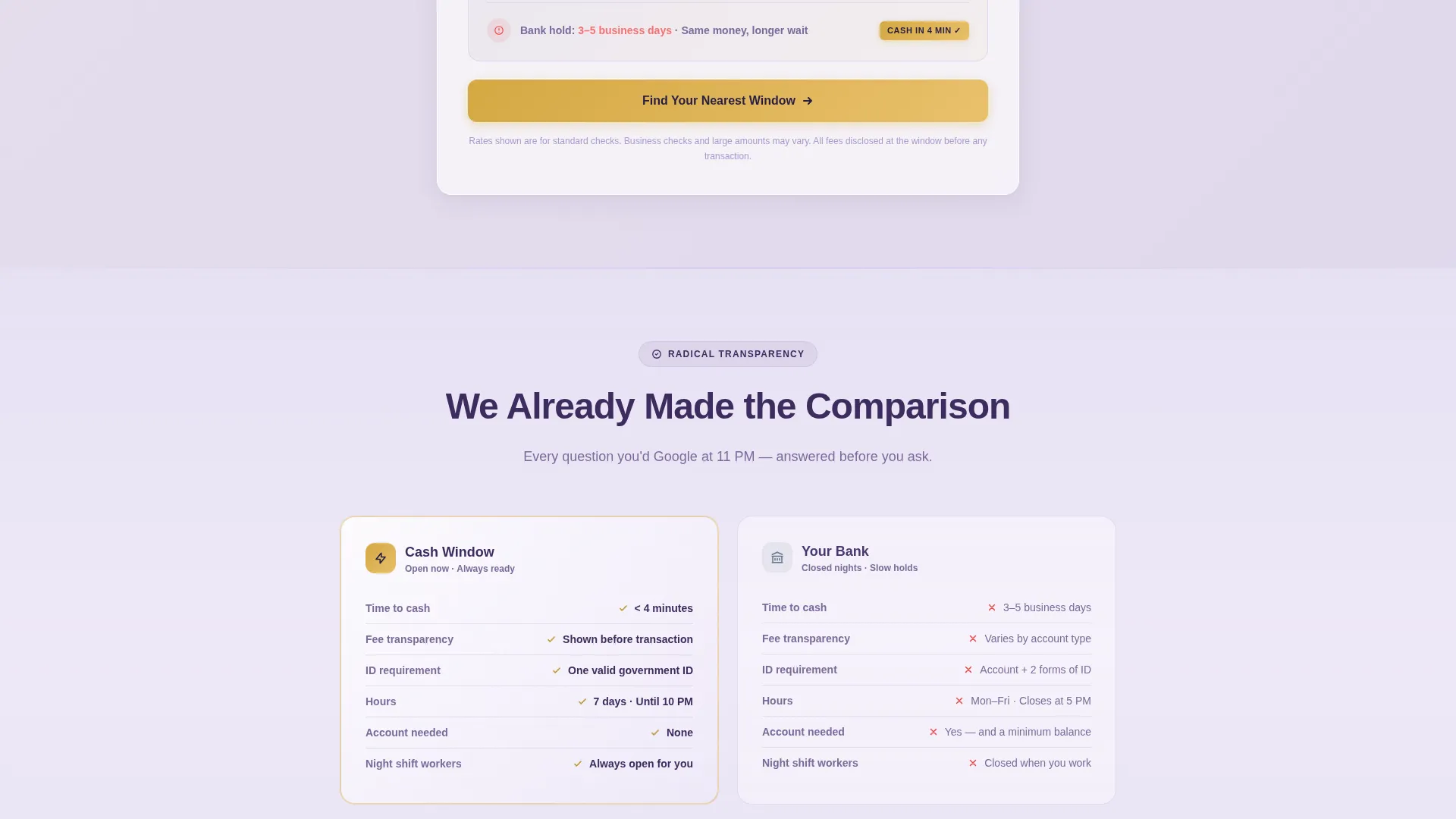
- Repeating primary and secondary calls to action placed strategically after the header and after every third tile
Feature list
This template includes the following purpose-built capabilities drawn directly from the brief.
Price-Anchored Hero Header
The header presents a single oversized flat-rate figure in deep plum on a clean white field. A quiet subhead reinforces the no-hidden-fees promise. A liquid gold accent underlines the rate like a notary's stamp, making the number impossible to miss or misread.
Service Card Gallery
The page reveals a scrolling gallery of individual service tiles, each representing a distinct financial product. Products covered include payroll checks, government checks, money orders, and payday advances. Each card is styled as a limited-availability tile with a visible "today's fee" tag in gold.
Expandable Cost Detail Panels
Tapping any service tile opens a detail panel with pre-calculated fee breakdowns. The panel shows exact costs on a $500, $1,000, and $2,000 check without requiring the visitor to do any math. No surprises, no hidden lines.
Interactive Fee Calculator
A fee calculator is anchored at the bottom of each detail panel. It asks only for check amount and check type, then displays the visitor's exact cost instantly. No form submission and no sign-up are required to see the result.
Pulsing Store Locator Map
A location map pulses gently between product tiles throughout the page scroll. It connects the visitor's decision moment to a nearby physical window, reducing the gap between online browsing and in-person action.
Strategic Call-to-Action Placement
The primary call to action, "Find Your Nearest Window," appears in gold on plum after the header and after every third product tile. A secondary call to action, "See What You'll Pay," anchors each detail panel and scrolls back up to the fee calculator.
Page sections overview
| Section | Purpose |
|---|---|
| Price-Anchored Header | Leads with the flat rate and no-fees promise |
| Service Card Gallery | Shows all financial products as browsable tiles |
| Expandable Detail Panels | Breaks down exact fees per check amount |
| Interactive Fee Calculator | Lets visitors confirm their personal cost |
| Store Locator Map | Connects browsing intent to a nearby location |
| Primary call to action Strip | Repeats the "Find Your Nearest Window" action |
| Secondary call to action Anchor | Scrolls visitors back to the fee calculator |
Design & branding system
The visual identity follows a Luxe Minimal theme built on a soft violet palette. The result feels unexpectedly refined for a cash-handling service, which is precisely the point. Dignity and speed are shown, not just claimed.
- Soft violet mist (#E6E0F3) fills backgrounds; deep plum (#3D2C5E) carries all headlines and primary text; pale wisteria (#C9B8E8) surfaces card backgrounds and section dividers
- Liquid gold (#D4A843) appears exclusively on calls to action and rate callouts, ensuring those elements pull the eye without competing with the content
- Typography is set large enough for the rate figure to be read from across a room, with ample lavender negative space keeping the layout clean and unhurried
Mobile & speed optimization
This template is designed with thumb-friendly interaction in mind. Every tile, panel, and call-to-action button is built to work on the small screen where many of the target visitors will first arrive.
- Service tiles are tap-responsive, expanding into full detail panels without a page reload
- The fee calculator requires only two inputs, keeping mobile interaction minimal and friction-free
- The store locator map is embedded inline so visitors on mobile can act on location data without leaving the page
How this template helps you convert
The template's conversion logic is built on radical transparency rather than pressure tactics. Every structural decision is designed to remove doubt before it forms.
- The price-anchored header answers the fee question immediately, before the visitor has to scroll or search, building trust in the first three seconds of the visit.
- The gallery-to-detail flow lets visitors self-qualify by product type and check amount, so they arrive at your window already knowing what they will pay.
- Repeating calls to action placed after every third tile and at the end of each detail panel keep the next step visible at every scroll depth without feeling pushy.
Other information about this template
This template sits at the intersection of local brick-and-mortar retail and financial services, a combination that rarely gets a polished, purpose-built design treatment.
- The page type is a gallery-plus-detail landing page, optimized for click-through to a store locator and hours page rather than an online form
- No sign-up fields or lead capture forms are present by design; the conversion goal is a physical store visit, not a data submission
- The template supports services including payroll check cashing, government check cashing, money order issuance, and payday advances
- The Luxe Minimal theme paired with the Lavender Dream color system makes this template visually distinct from typical payday loan page designs, which tends to build faster credibility with first-time visitors
- This template is a strong fit for operators who want to compete on transparency and dignity rather than on urgency countdown timers or aggressive pop-up offers
Theme
Neo-Retro
Creative direction
Unboxing Experience
Color system
Citrus Burst
Style
Masonry/Pinterest
Direction
Marketplace/Multi
Page Sections
Price-anchored Hero Header
Service Card Gallery with Rate Tags
Expandable Cost Detail Panels
Interactive Fee Calculator
Pulsing Store Locator Map
Strategic Repeating Calls to Action
Related questions
Does this template include a working fee calculator?
Can I add or remove service tiles from the gallery?
Does this template require visitors to sign up before seeing fees?
Is this template designed for a single location or multiple locations?
What makes this design different from a typical financial services page?



