Kids Party & Entertainment Advanced Booking Website Template
Celebrate is a hero-dominant landing page template built for kids birthday party venues. It features a nine-photo mosaic header, story-format party package cards, a three-step booking flow, and a playful party quiz. Everything is designed to help parents quickly find the right theme and confidently book a date.
by Rocket studio
Quick summary
Celebrate is a single-page birthday party venue template that turns late-night parent browsing into confident bookings. A nine-photo mosaic hero sets the mood instantly. Story-driven package cards, a visual booking calendar, and a short party quiz guide every parent from curiosity to confirmed date without friction.
Who this template is for
This template is built for kids birthday party venues that want a booking-focused page that feels warm, organized, and genuinely fun. It suits venue owners who want parents to feel excited and reassured before ever tapping "book."
- Party venue owners running themed birthday experiences for young children
- Event coordinators who want an online presence that reflects the real joy of their space
- Small venue operators who need a clear, mobile-friendly booking flow without a complex site build
What problem this template solves
Parents shopping for birthday venues at 11pm on their phones need fast answers and an easy path to book. Most venue pages bury details, hide pricing context, and offer cold contact forms. This template solves that directly.
- It removes friction by combining theme discovery, date selection, and contact capture into one three-step flow
- It replaces brochure-style copy with story-format package cards that answer every parent question visually
- It gives hesitant parents a quiz path so no visitor leaves without a recommended theme and a next step
What you get with this template
This template includes every section a birthday party venue needs to convert curious parents into confirmed bookings. The layout is intentionally sequential, guiding visitors from excitement to action without detours.
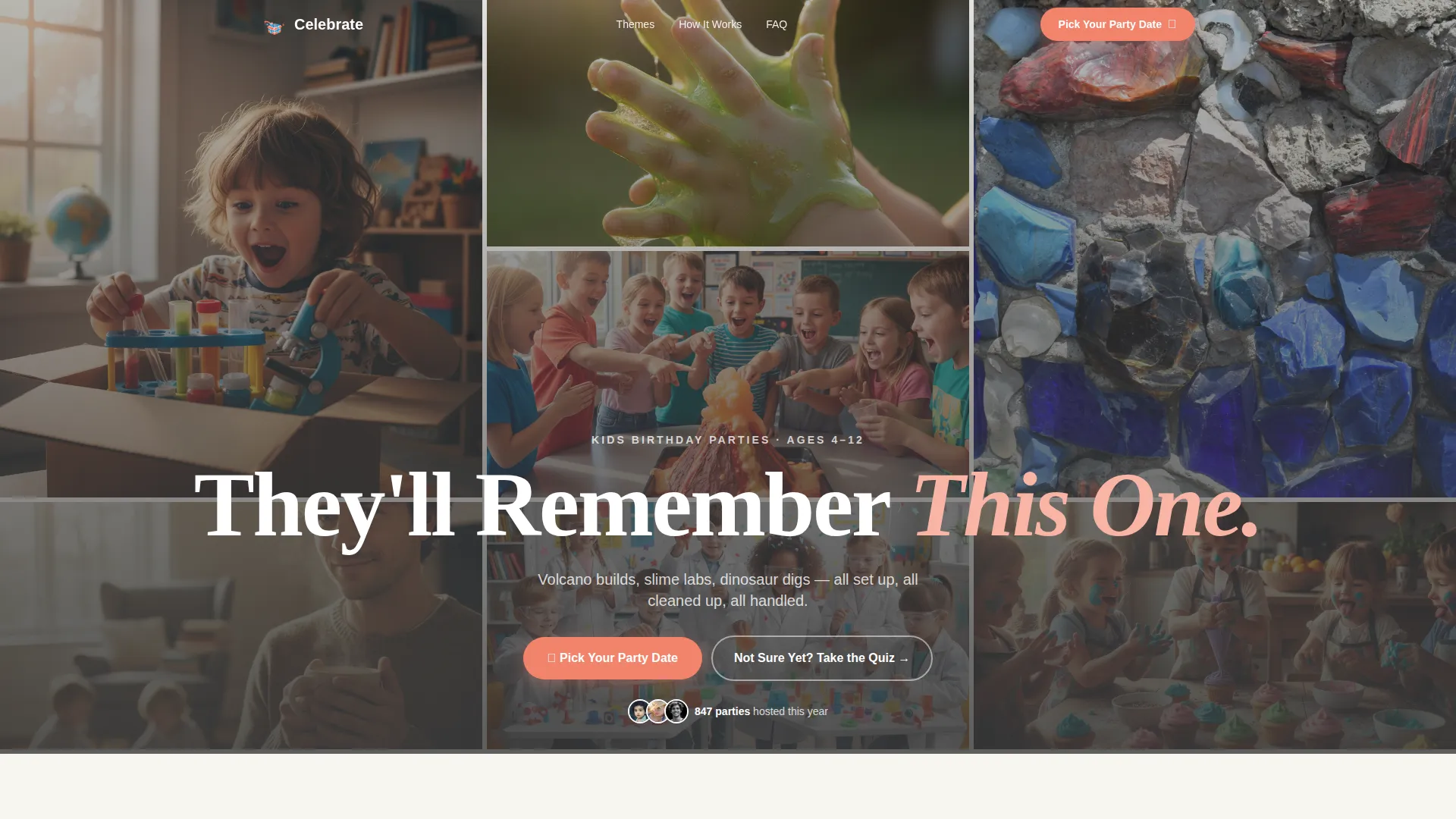
- A nine-photo asymmetric mosaic hero with a floating headline and dual call-to-action buttons
- Flip-card party package sections, a three-step booking modal, parent testimonial cards, and an interactive party quiz
- A sticky mobile call-to-action button and a smooth FAQ section with animated slide-open answers
Feature list
This template ships with six purpose-built features that work together to tell your venue's story and fill your calendar.
Nine-Photo Mosaic Hero
The header fills ninety percent of the viewport with an asymmetric grid of nine candid party shots. Images show real moments: a kid mid-gasp, slime-covered hands, a crooked birthday crown. A single headline floats over the grid in charcoal text, setting the emotional tone before a visitor reads another word.
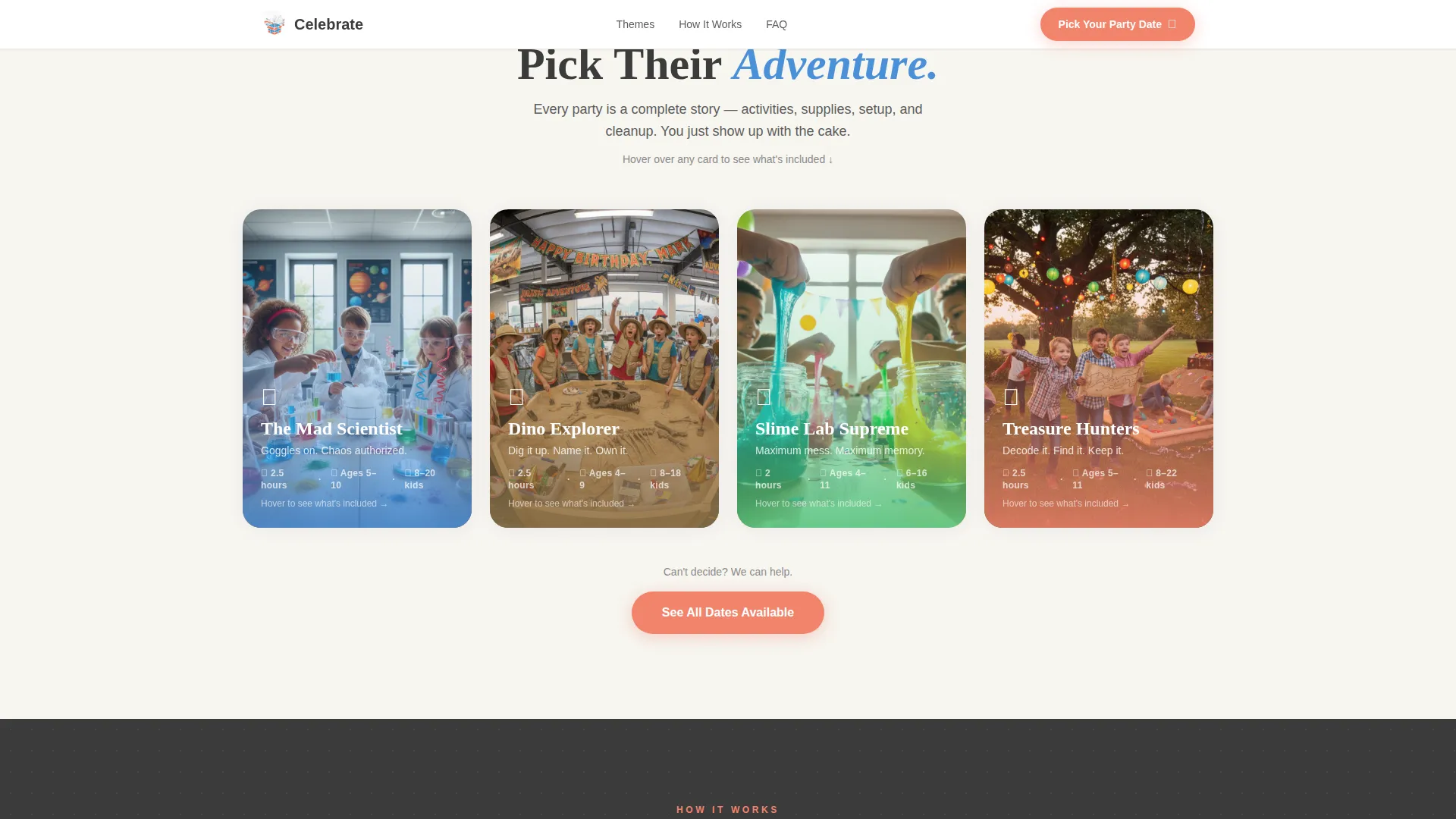
Story-Format Flip Cards
Each party package is introduced as a story, not a pricing tier. Cards show a theme photo on the front and flip on hover to reveal activities, duration, headcount, and what is provided. Packages like "The Mad Scientist" and "Dino Explorer" each get their own narrative arc.
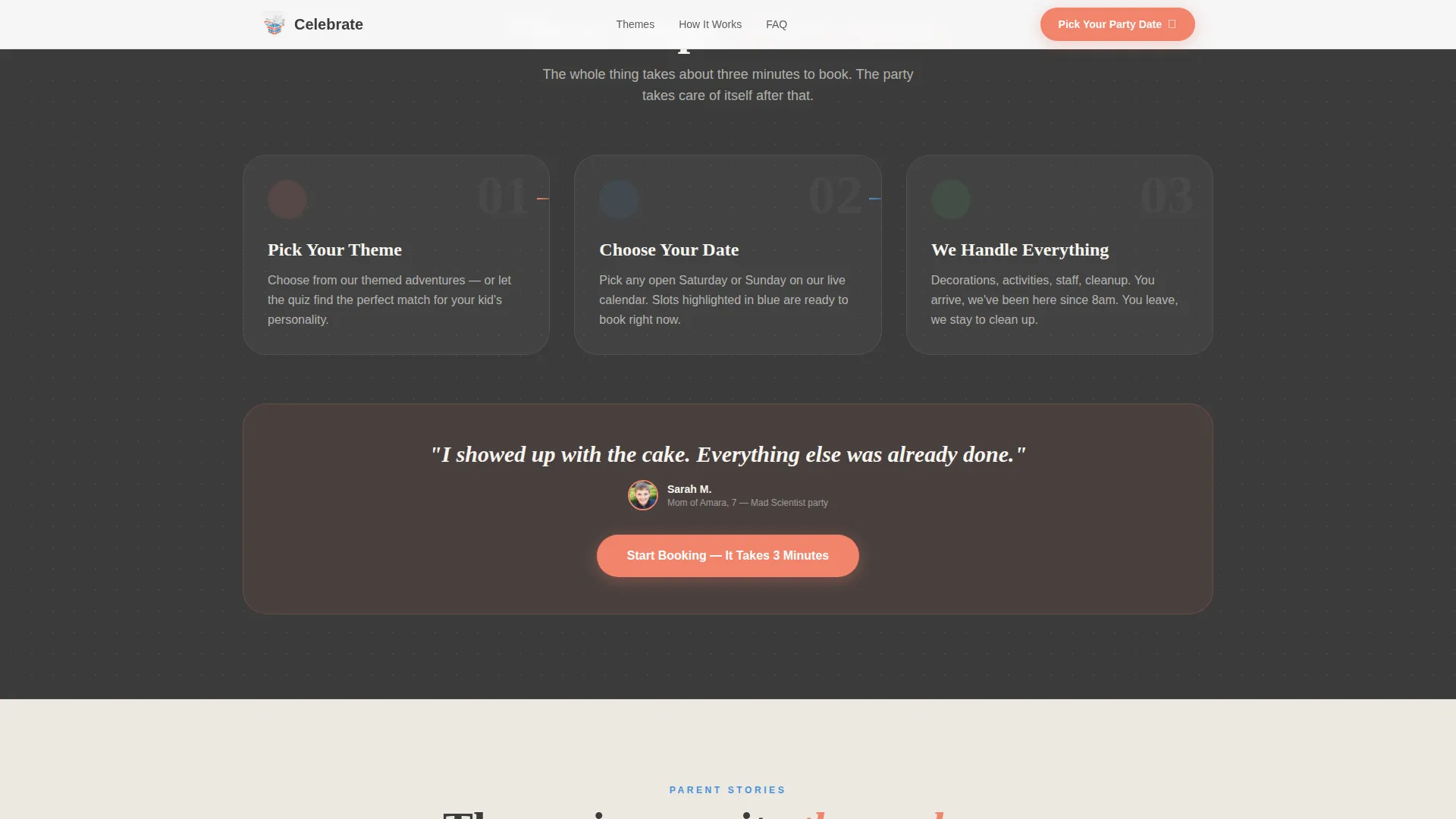
Three-Step Booking Flow
The primary "Pick Your Party Date" button opens a focused modal with three sequential steps. Parents choose a party theme from illustrated cards, select an open Saturday or Sunday on a visual calendar with available slots highlighted in blue, then enter the child's name, age, and contact details.
Interactive Party Quiz
A secondary path labeled "Not Sure Yet? Take the Party Quiz" walks hesitant parents through four short questions about their child's interests. The quiz recommends a matching theme and routes the parent directly into the booking flow with that theme already selected.
Confetti and Scroll Animations
The page uses layered micro-interactions to reward curious scrollers. Confetti particles drift briefly past the age-range selector on scroll. Package card thumbnails flip on hover. FAQ answers slide open with a soft pop. Each animation reinforces the playful tone without slowing the experience.
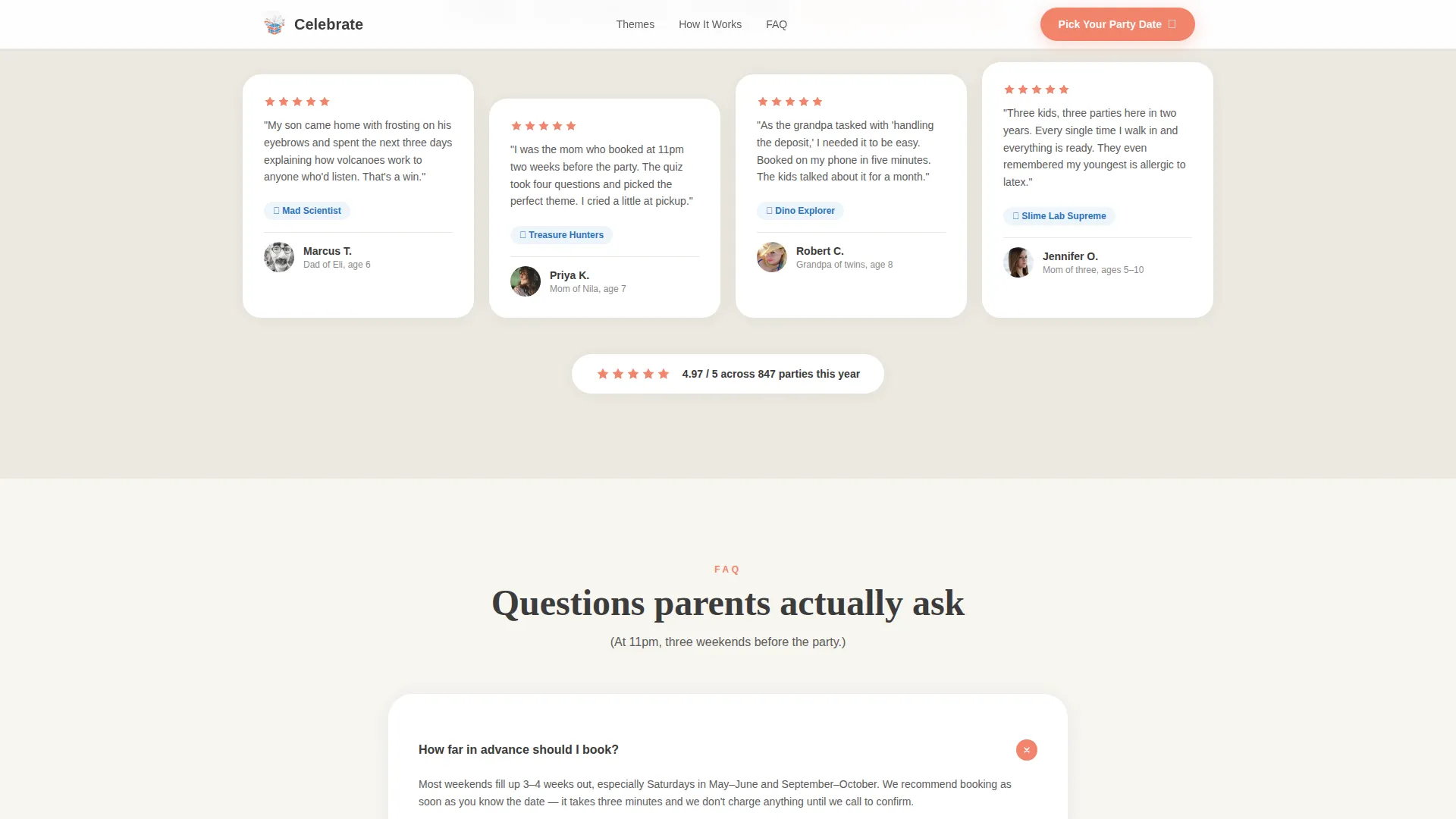
Parent Testimonial Cards
Real quote cards with parent names, child ages, and party themes attended give social proof at a critical point in the page. Testimonials are placed just before the final call-to-action section so trust is high at the moment of decision.
Page sections overview
| Section | Purpose |
|---|---|
| Hero Mosaic Grid | Opens with nine candid party photos and the headline "They'll Remember This One" |
| Dual call to action Block | Places "Pick Your Party Date" and "Take the Party Quiz" buttons directly below the hero |
| Party Package Cards | Introduces each theme as a story through interactive flip cards |
| How It Works | Shows the three-step booking process in a clear visual flow |
| Parent Testimonials | Builds trust with real quote cards tied to specific themes and child ages |
| Party Quiz Section | Routes undecided parents through four questions to a theme recommendation |
| Final call to action Block | Repeats the primary booking button above the footer |
| Footer | Horizontal flow footer with venue contact and navigation links |
Design & branding system
The template uses a Cloud Canvas color system that feels like a freshly opened craft kit. It is bright enough to signal fun and structured enough to reassure parents that the venue is well-run.
- Soft cumulus white (#F7F5F0) forms the dominant background, giving every section generous breathing room
- Construction-paper coral (#F2836B) drives all buttons, countdown elements, and interactive highlights; crayon-box blue (#4A90D9) anchors icons and section dividers
- Typography pairs Fraunces for display headlines with DM Sans for body text, creating a warm editorial feel that is easy to read on any screen size
Mobile & speed optimization
The template is built mobile-first because the primary audience is parents scrolling on phones late at night. Every layout decision prioritizes thumb-friendly tap targets and fast visual scanning.
- The sticky coral "Pick Your Party Date" button stays visible at the bottom of the screen throughout the mobile scroll
- CSS animations are GPU-accelerated for smooth card flips, confetti effects, and staggered section reveals without layout jank
- Images in the mosaic grid are optimized for fast loading so the hero feels instant even on a slower mobile connection
How this template helps you convert
The page is structured to move a hesitant parent from "just browsing" to "date confirmed" through a deliberate sequence of trust-building moments.
- The mosaic hero and headline create an immediate emotional reaction before any text is read, making the visitor feel the venue is worth their time
- Story-format package cards answer every practical question parents have about themes, activities, and headcount without requiring them to call or email
- The party quiz captures parents who are not ready to commit, funnels them into a personalized theme recommendation, and deposits them into the same booking flow with lower resistance
Other information about this template
This template is specifically designed for the kids birthday party venue niche and aligns with how parents actually research and book these experiences online.
- The Educational Guide theme ensures the page feels organized and trustworthy, not chaotic, even while celebrating noise and mess
- The Surprise and Delight creative direction means every scroll interaction adds a small moment of joy that mirrors the real venue experience
- The Hero-Dominant layout (90 percent hero, 10 percent supporting content) puts visual storytelling first and keeps the booking path short
- The template is localized for English-speaking US audiences, using USD pricing context and US date formats throughout the booking flow
- The footer follows a horizontal flow pattern suited to single-page venue sites with minimal navigation needs
Theme
Educational Guide
Creative direction
Surprise & Delight
Color system
Cloud Canvas
Style
Hero-Dominant (90/10)
Direction
Event Registration
Page Sections
Nine-photo Asymmetric Mosaic Hero
Story-format Flip Card Packages
Three-step Booking Modal
Interactive Party Quiz Funnel
Scroll-triggered Confetti and Micro-animations
Parent Testimonial Social Proof Cards
Related questions
How does the party theme booking flow work?
What party themes are included in the template?
Can parents use the template if they are not sure which theme to pick?
Is this template suited for mobile users?
Can I customize the colors and photos in this template?



