Dental Practice Careers & Staff Recruitment Website Template
Chairside is a high-contrast, data-driven dental practice careers landing page built on a Dashboard Pro theme. It uses live-styled stat tiles, benchmarking charts, a daily timeline, and a career-path flowchart to recruit dental professionals. The primary call to action drives candidates to download a proprietary team app, with a secondary SMS link option for mobile users.
by Rocket studio
Quick summary
Chairside is a single-page dental careers landing page that replaces stock photography with hard numbers. Stat dashboards, compensation benchmarks, and a career-path flowchart do the recruiting. The primary call to action sends candidates to a practice team app on iOS and Android. Every section escalates the case for joining, from practice-wide stats to a personal three-year career outlook.
Who this template is for
This template is built for dental practices that want to attract skilled, growth-minded candidates without relying on generic job-board listings. It speaks directly to professionals who already know the work and are ready to evaluate a practice on its merits.
- Newly licensed registered dental hygienists (RDHs) evaluating their first employer
- Experienced dental assistants looking for a multi-doctor practice with a clear growth path
- Office managers with practice management software experience seeking a more operationally mature team
What problem this template solves
Most dental practice careers pages look like a copied-and-pasted job listing. They make promises about culture and teamwork without showing any evidence. Qualified candidates scroll past them because there is nothing to evaluate.
- Candidates have no way to compare compensation or patient volume against regional or national averages
- The daily work structure is invisible, so applicants cannot gauge work-life balance before applying
- There is no clear picture of where a role leads, making long-term commitment hard to justify
What you get with this template
You get a fully structured careers landing page that leads with quantified proof instead of marketing language. Every section is designed to answer a specific question a serious dental professional would ask before applying.
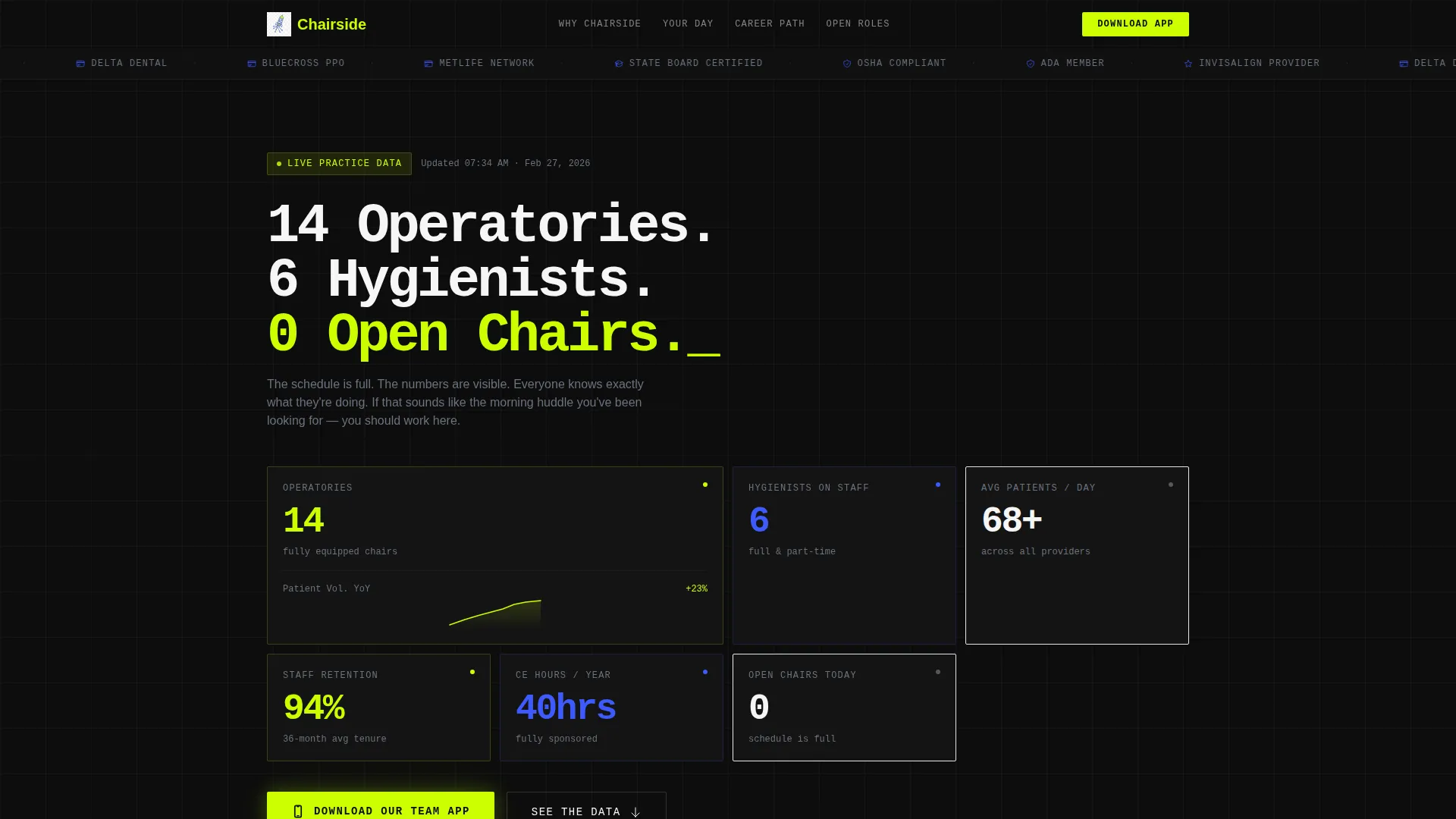
- A header dashboard tile grid showing real practice stats: patients per day, staff retention, continuing education (CE) hours sponsored, and year-over-year growth
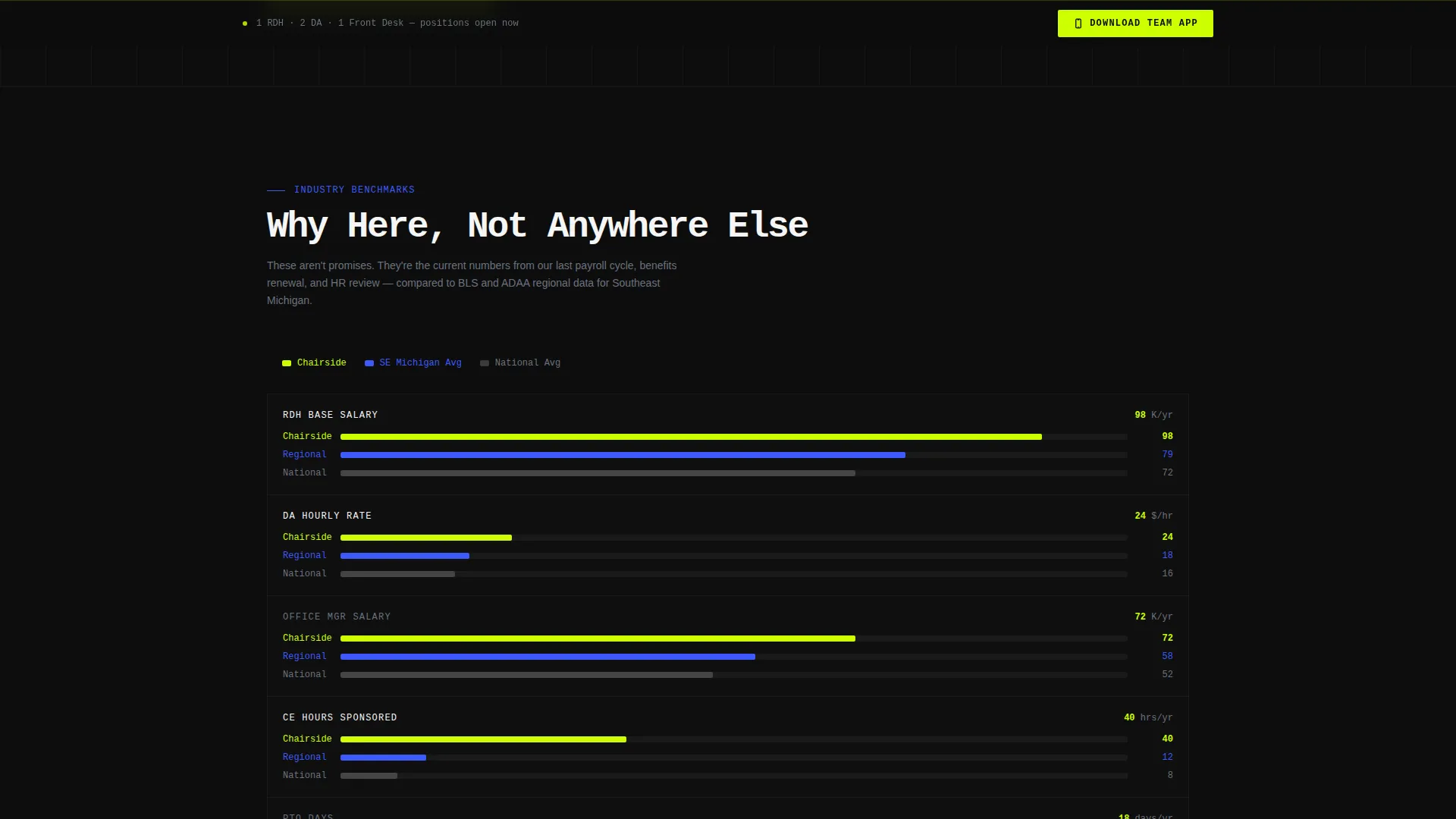
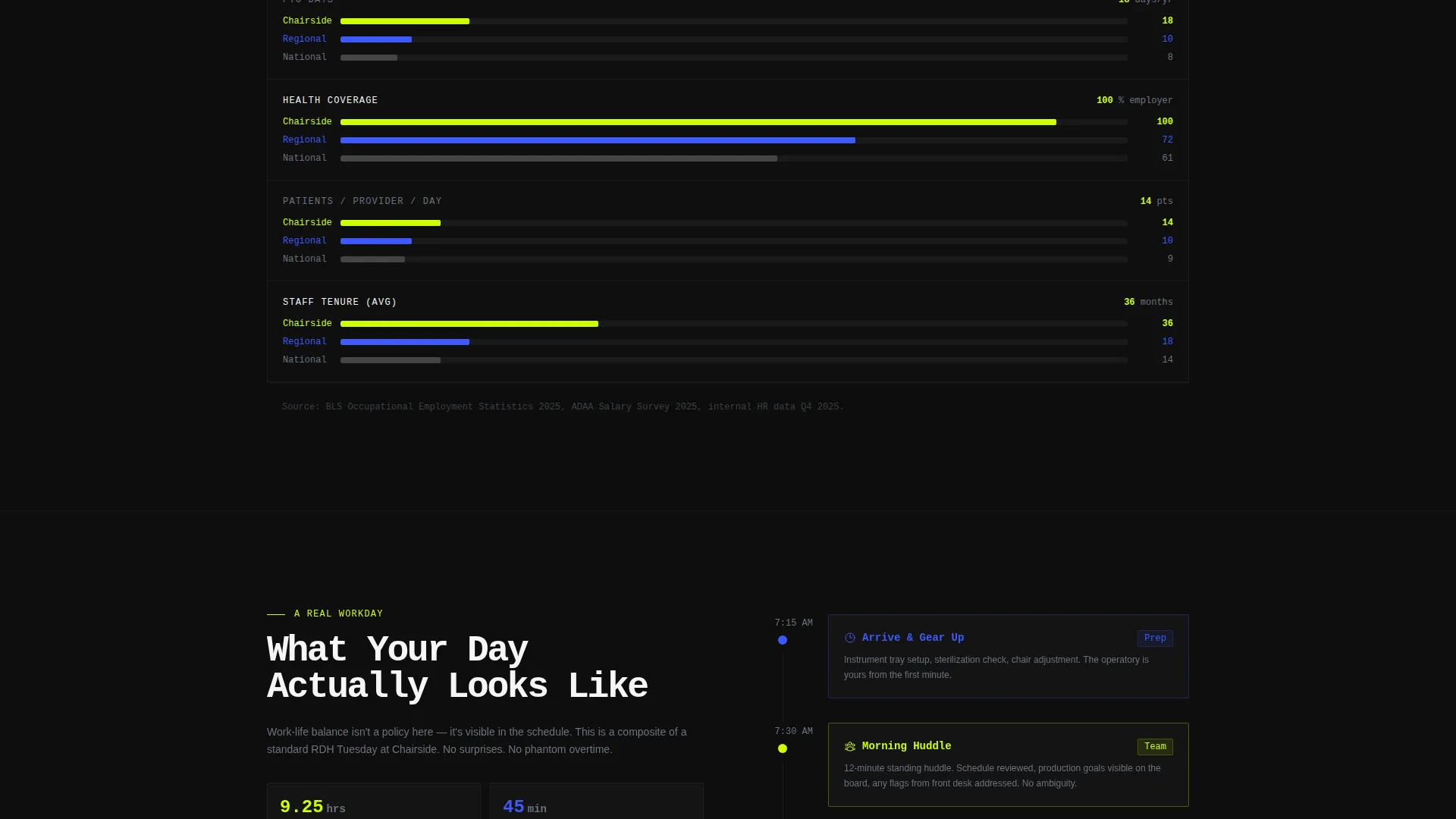
- A benchmarking grid comparing compensation, benefits, and patient volume against regional and national averages, rendered in horizontal bar charts
- A career-path flowchart from dental assistant (DA) to lead assistant to office manager, with salary ranges and certification requirements at each node
Feature list
This template delivers a structured set of visual and functional components drawn directly from the Dashboard Pro design system and Industry Report creative direction.
Header Dashboard Tile Grid
The header opens with a slim logo bar carrying practice credentials, followed by a monospaced headline and a live-styled grid of animated stat tiles. Metrics include average patients per day, staff retention rate, CE hours sponsored annually, and a year-over-year growth chart. The numbers replace photography as the primary recruitment statement.
Benchmarking Comparison Grid
Section one of the content scroll presents a side-by-side benchmarking grid. This practice's compensation, benefits, and patient volume are compared to regional and national averages using horizontal bar charts with electric chartreuse fills. Candidates can evaluate the offer before they ever contact the practice.
Hour-by-Hour Daily Timeline
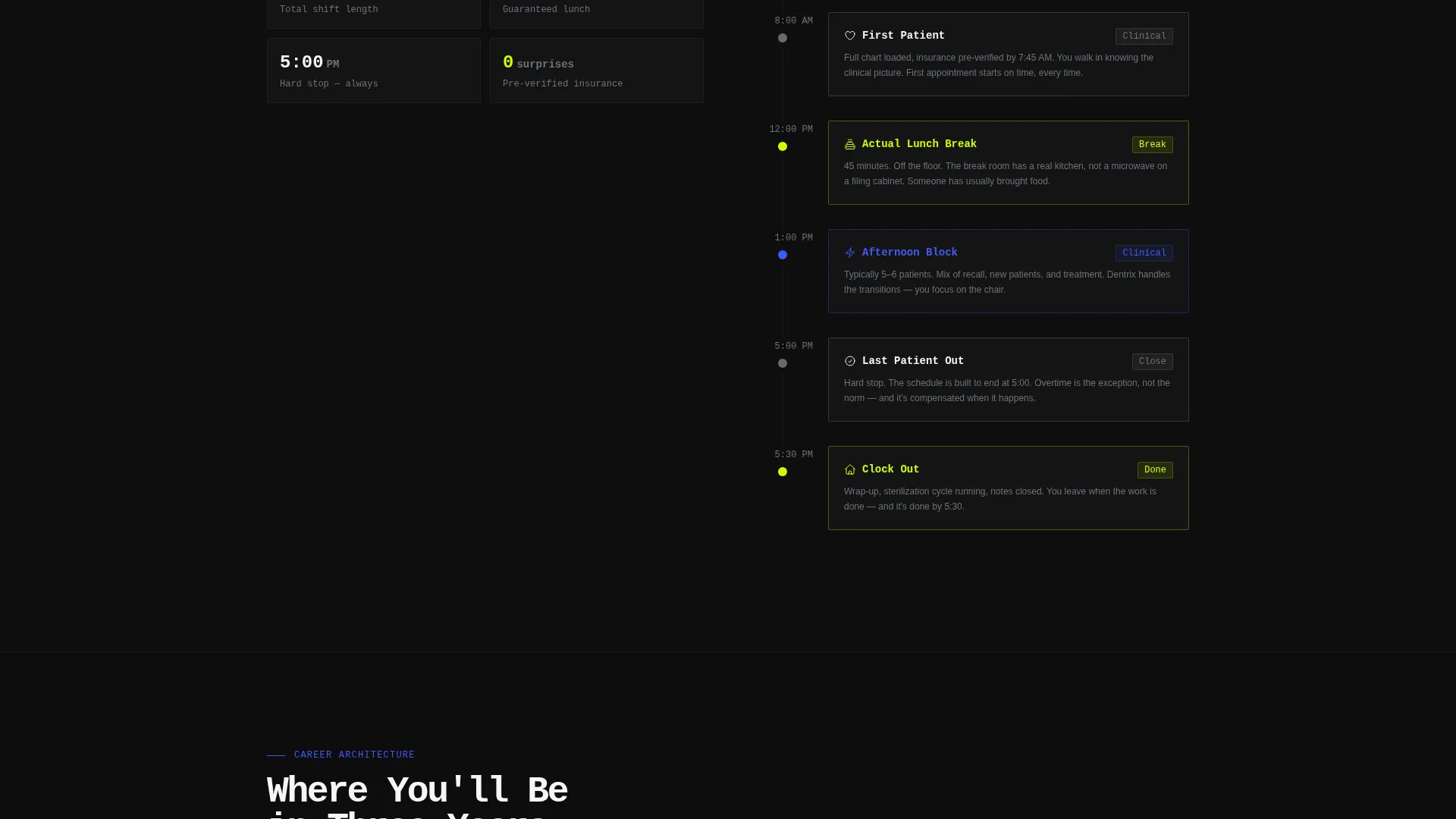
A timeline component breaks down a single representative workday from arrival through clock-out. It shows structured touchpoints: morning huddle, first patient, lunch break, last patient, and end of shift. Work-life balance is demonstrated through visible schedule structure rather than stated promises.
Career Path Flowchart
A clickable flowchart maps career progression from DA to lead assistant to office manager. Each node reveals the associated salary range and required certifications. Candidates see a concrete three-year trajectory, not a vague promise of growth.
App Download Call to Action
The primary call to action is a prominent "Download Our Team App" button with iOS and Android store badges placed side by side. It appears first inside the header dashboard grid and reappears as a sticky bottom bar after the second scroll section. A secondary "Text Me the Link" field lets mobile users receive the download link by SMS.
Sticky Secondary Conversion Bar
After the second scroll section, a persistent bottom bar carries the app download call to action so it is always accessible as candidates read deeper into the page. This keeps the conversion path visible without interrupting the data story.
Page sections overview
| Section | Purpose |
|---|---|
| Logo Bar Header | Display practice credentials and affiliations above the headline |
| Stat Tile Grid | Present live-styled practice performance metrics |
| Benchmarking Grid | Compare compensation and volume to regional and national averages |
| Daily Timeline | Show hour-by-hour workday structure for work-life clarity |
| Career Path Flowchart | Map role progression with salary ranges and certifications |
| App Download call to action | Drive candidate action to the practice team app |
| Sticky Bottom Bar | Keep the app download action accessible throughout the scroll |
Design & branding system
The visual identity follows the Acid Digital color system applied through the Dashboard Pro theme. The palette creates the sensation of reading a live staffing analytics board rather than a static careers page.
- Void black (#0D0D0D) dominates backgrounds, electric chartreuse (#CCFF00) fires on calls to action, stat counters, and hover states, and clinical UV blue (#3D5AFE) marks section dividers and icon strokes
- Sterile white (#F5F5F5) surfaces card backgrounds and body text, producing sharp contrast against the black-dominant layout
- Typography uses a monospaced typeface for the hero headline, reinforcing the data-terminal aesthetic throughout the above-the-fold section
Mobile & speed optimization
The layout is designed to remain functional and readable on small screens, where many dental professionals will encounter it during off-hours job browsing.
- The sticky bottom bar and "Text Me the Link" SMS field address the specific behavior of mobile users who browse late at night and want a friction-free path to the app
- Dashboard tile grids and horizontal bar charts are structured to reflow cleanly on narrower viewports without losing their data-led visual impact
How this template helps you convert
This template earns candidate trust through visible evidence before asking for any commitment. The conversion path is layered to match different levels of candidate readiness.
- The header dashboard tiles deliver immediate credibility with quantified practice stats, replacing generic claims with numbers candidates can actually evaluate.
- The benchmarking grid and daily timeline deepen confidence by answering the two most common candidate questions: how does the pay compare, and what does the day actually look like?
- The app download call to action and SMS fallback offer a low-friction next step that fits candidates wherever they are in the decision process, on desktop or mobile.
Other information about this template
This template sits within the Technology category and the Dental Practice Website Templates subcategory, targeting the Dental Practice Careers Page niche. It is purpose-built for a specific recruiting context that general job-board templates do not address.
- The template style is Dashboard Pro with an Industry Report creative direction, making it distinct from standard careers page layouts that rely on lifestyle imagery
- The header concept is a Logo Bar designed to carry professional affiliations such as ADA membership, state dental board recognition, Invisalign provider tier, and insurance network badges
- The landing page direction follows an App Download flow, prioritizing a proprietary practice app as the primary candidate entry point rather than a résumé upload form
Theme
Dashboard Pro
Creative direction
Industry Report
Color system
Acid Digital
Style
Dashboard/Data Grid
Direction
App Download
Page Sections
Header Dashboard Tile Grid
Benchmarking Comparison Grid
Hour-by-hour Daily Timeline
Career Path Flowchart
App Download Call to Action
Related questions
What type of dental professional is this landing page designed for?
Does this template require real data to work effectively?
Can candidates apply directly through this landing page?
How does the SMS link option work?
Is this template suitable for a multi-location dental group?



