Modern Dental Clinic Dashboard Website Template
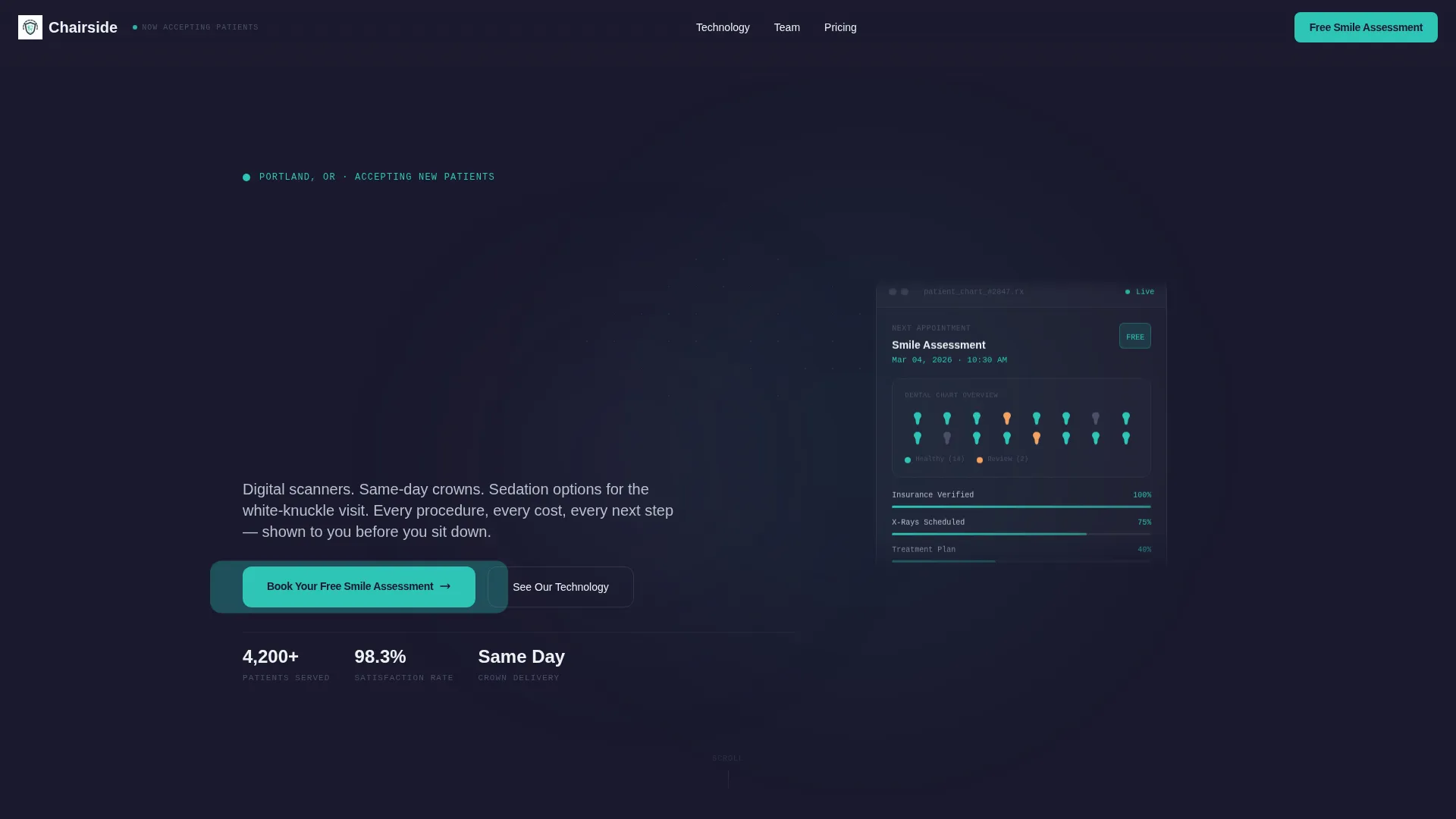
Chairside is a dashboard-style dental practice landing page built on a dark Carbon Fiber color system. It combines a three-tab header switcher, an interactive problem-to-solution scroll arc, and a progressive three-step booking form. The result is a page that feels less like a clinic brochure and more like a patient's own diagnostic screen, clear, calm, and built to convert anxious visitors into booked appointments.
by Rocket studio
Quick summary
Chairside is a single-page dental practice landing page built around a dashboard aesthetic and a problem-first narrative. It opens with a Feature Tab Switcher showing smile health data, technology specs, and team profiles. A diagnostic scroll arc then surfaces real patient concerns, flips them to solutions, and ends with a free assessment booking form and an insurance guide download.
Who this template is for
This template suits dental practices that want to replace generic clinic websites with something that actually earns patient trust. It works for practices offering modern technology, multiple treatment types, and patients who arrive already anxious or skeptical.
- Dental practices with advanced equipment looking to highlight that investment clearly
- Front-desk and marketing teams who need a page that pre-answers patient questions before the first call
- Practices targeting adult patients who research heavily before booking, including cost comparers and treatment-avoiders
What problem this template solves
Many dental practice pages hide the details that patients actually need. Costs are vague, technology is generic, and the booking path asks for too much too soon. Anxious patients close the tab. Chairside flips that dynamic by leading with data, not decoration.
- Patients who haven't visited a dentist in years need reassurance before they pick up the phone
- Cost-comparing visitors need transparent information about financing and insurance before they commit
- Practices lose potential bookings when their page can't answer the midnight Google questions that drive real patient decisions
What you get with this template
You get a fully structured, single-page dental landing page with every section purpose-built for patient conversion. The layout combines dense information delivery with calm visual hierarchy so nothing feels overwhelming.
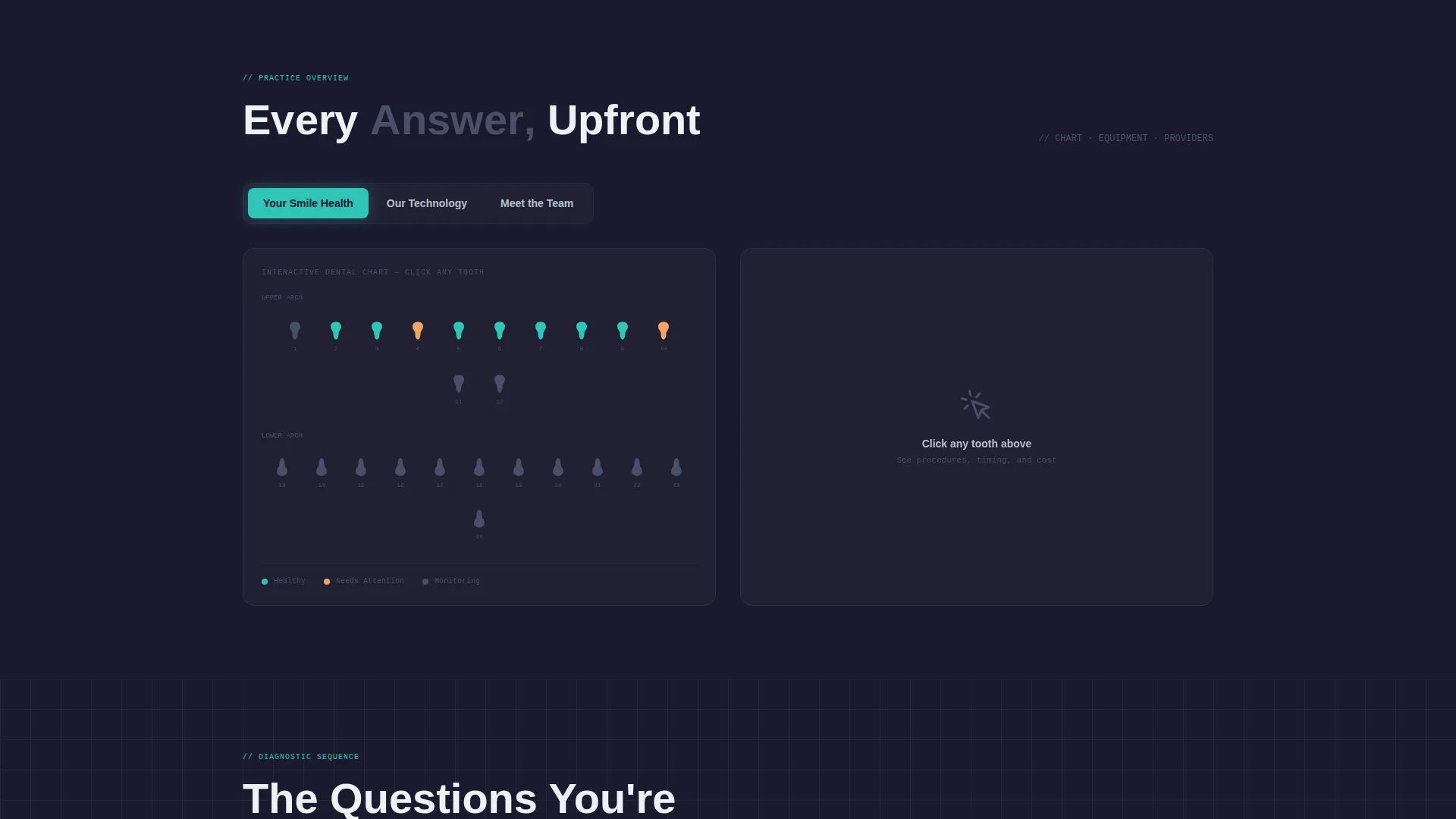
- A three-tab header panel showing a dental chart, technology spec tiles, and provider profile cards
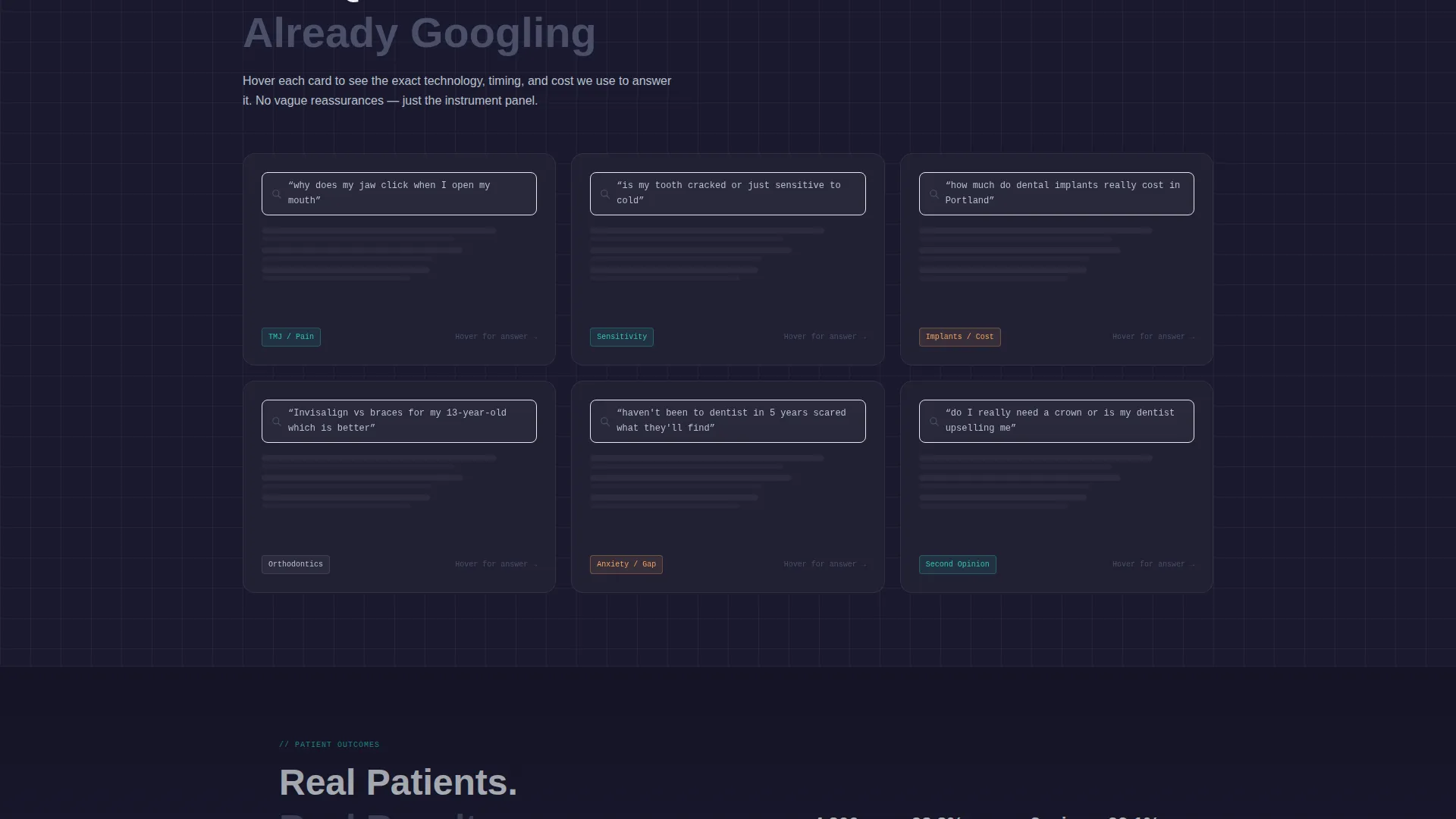
- A problem-and-solution scroll arc with hover-flip cards, financing breakdowns, and procedure time data
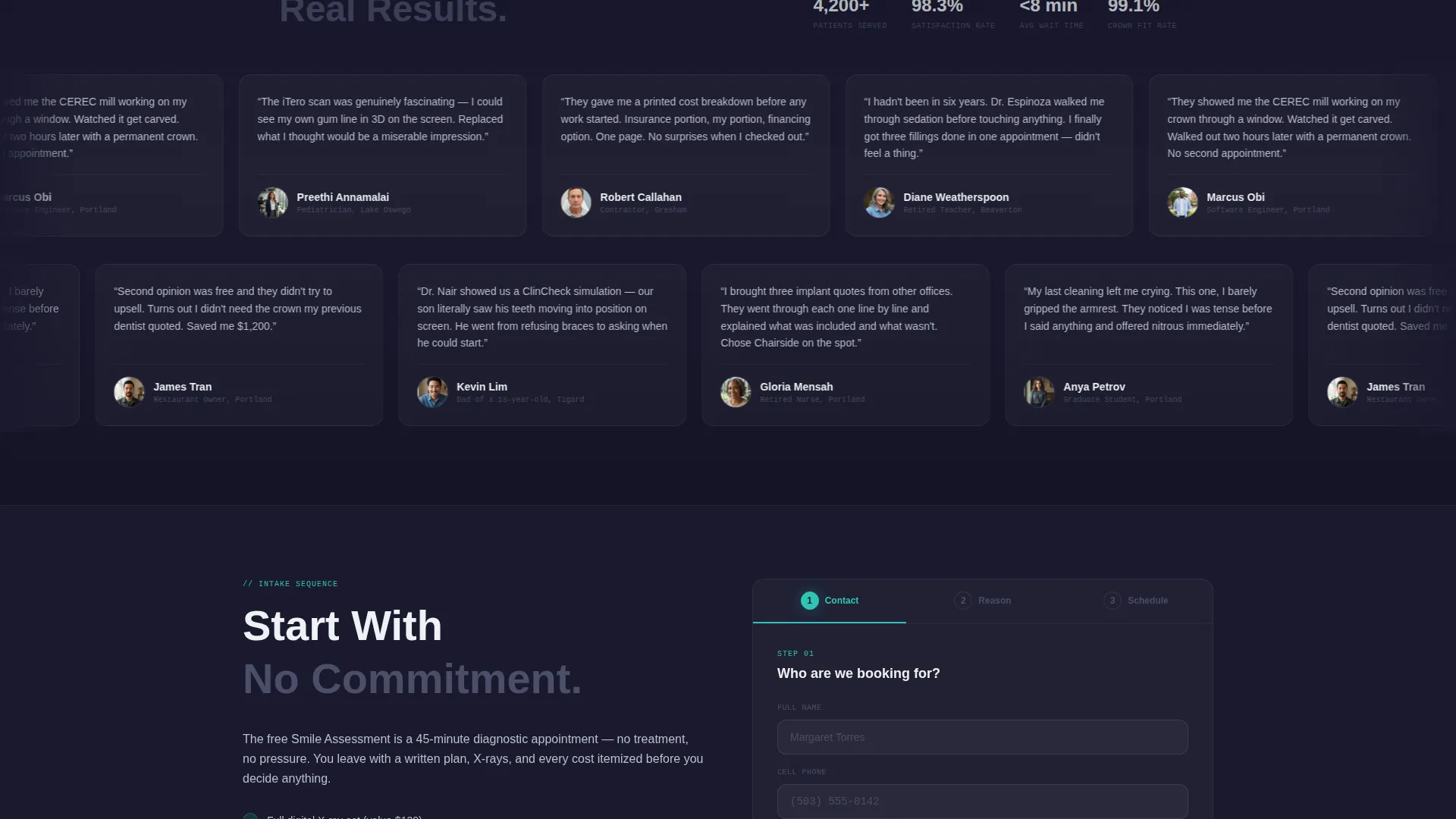
- A progressive three-step booking form and a secondary email-capture path for an insurance guide download
Feature list
This template delivers six core components, each designed to move a hesitant patient closer to a booked appointment.
Three-Tab Feature Header Switcher
The header opens with three clickable tabs: "Your Smile Health," "Our Technology," and "Meet the Team." Each tab reveals a distinct data panel. The default tab shows an interactive stylized dental chart. Tooth icons are clickable and reveal common procedures alongside their average completion times.
Technology Spec Tile Cards
The "Our Technology" tab displays equipment as structured spec tiles. Each tile covers a specific piece of equipment, showing uptime stats and patient-comfort ratings. The format makes technical investment immediately readable for non-clinical visitors.
Provider Profile Cards with Review Quotes
The "Meet the Team" tab renders each provider as a profile card. Cards include credentials, years in practice, and a single patient-review pull quote. This gives prospective patients a human connection before they ever walk through the door.
Problem-to-Solution Scroll Arc
The page body is structured as a diagnostic sequence. Patient search queries appear as styled search-bar elements with real query text. Each problem card flips on hover to show the specific solution, the technology involved, the average appointment length, and the financing math in monthly figures.
Progressive Three-Step Booking Form
The primary conversion path is a three-step form anchored to the "Book Your Free Smile Assessment" call to action. Step one collects name and phone. Step two offers visual treatment selectors for cleaning, pain, cosmetic, or second opinion. Step three presents a preferred date picker.
Secondary Insurance Guide Download
A secondary conversion path invites visitors to download an insurance cheat sheet in exchange for their email address. This captures comparison shoppers who are not ready to call but are actively evaluating their coverage options.
Page sections overview
| Section | Purpose |
|---|---|
| Tab Switcher Header | Reveals dental chart, tech specs, and team profiles by tab |
| Smile Health Panel | Shows interactive tooth chart with procedure and time data |
| Technology Panel | Displays equipment spec tiles with uptime and comfort ratings |
| Team Profile Panel | Shows provider cards with credentials and patient quotes |
| Problem Search Arc | Opens the scroll with real patient search queries as user interface elements |
| Solution Flip Cards | Each problem card flips to reveal technology, time, and financing |
| Primary Booking Form | Three-step progressive form for free smile assessment |
| Insurance Guide Capture | Email opt-in for downloadable insurance coverage cheat sheet |
Design & branding system
The visual identity follows a Carbon Fiber palette built around the feel of a modern dental operatory. Dark backgrounds anchor the layout, clinical white text keeps readability high, and a single teal accent directs the eye to interactive elements and calls to action.
- Background layers use deep cockpit black (#1A1A2E) to titanium instrument gray (#4A4E69), giving the page its matte-dark operatory feel
- Body text and data labels live in clinical LED white (#EDF2F4) for contrast and calm legibility
- Surgical teal (#2EC4B6) appears only on interactive states, progress indicators, and call-to-action pulses to create clear visual hierarchy
Mobile & speed optimization
The dashboard grid layout scales down through breakpoints to keep data panels readable on smaller screens. Heavy visual components like the tab switcher and flip cards are structured to reflow cleanly without losing their informational function.
- Tab panels and spec tiles collapse into vertically stacked layouts on mobile viewports
- The three-step booking form maintains its step-by-step flow on small screens, keeping friction low for mobile visitors
How this template helps you convert
The page is built around two parallel conversion paths that cover different patient readiness levels.
- The "Book Your Free Smile Assessment" form removes the cost barrier and makes the first appointment feel low-stakes, converting visitors who are close to ready but need one final nudge.
- The "Download Your Insurance Cheat Sheet" email capture reaches comparison shoppers who are still in research mode, keeping the practice visible while those visitors make their decision.
Other information about this template
This template belongs to the Dashboard Pro theme family and uses the Carbon Fiber color system, making it a strong fit for practices that want to differentiate from soft-pastel dental website conventions. The template style is a Dashboard and Data Grid layout, which suits data-forward presentation of procedures, technology, and team credentials.
- The template is categorized under dental practice website templates, specifically aligned with the about-us page use case for dental practices
- No stock photography of smiling families is used; all visual elements are information-driven, including charts, spec tiles, and profile cards
- The problem-to-solution arc escalates from cosmetic concerns to urgent clinical interventions, matching the full range of patient intent from routine cleaning to implant research
Theme
Dashboard Pro
Creative direction
Problem→Solution Arc
Color system
Carbon Fiber
Style
Dashboard/Data Grid
Direction
Freemium/Trial
Page Sections
Three-tab Feature Header Switcher
Technology Spec Tile Cards
Provider Profile Cards
Problem-to-solution Scroll Arc
Progressive Three-step Booking Form
Secondary Insurance Guide Download
Related questions
Can I customize the tab labels and panel content for my own practice?
Does the booking form connect to a scheduling system?
Is the insurance guide download ready to use out of the box?
What kind of dental practice gets the most value from this template?
Can the problem-and-solution cards be edited to reflect our specific treatments?



