Lawyers Co-Working Community Landing Page Template
Chambers is a warm, masonry-style landing page built for lawyers co-working communities. It combines a split hero photograph, a cascading community gallery grid, membership tier cards, a testimonial rail, and an inline tour booking form. The parchment-and-terracotta design feels like a well-lit law library, inviting solo practitioners and boutique firms to book a desk tour.
by Rocket studio
Quick summary
Chambers is a single-page, gallery-driven landing page template for a lawyers co-working community. It opens with a candid half-page photo split, then cascades into a masonry grid of member portraits, amenity tiles, and candid moments. A sticky "Reserve a Desk Tour" button and an inline lead-capture form convert curious visitors into booked tours.
Who this template is for
This template is built for legal professionals who want a home base that feels like a real firm without the overhead. It speaks directly to the people who have outgrown a home office but are not ready to sign a long lease.
- Solo practitioners and newly independent attorneys starting their own practice
- Boutique litigation teams and small firms needing shared professional space
- Of-counsel veterans who want collegial energy without partnership obligations
What problem this template solves
Independent attorneys face a hard gap: home offices feel isolated, but full leases are expensive and unnecessary. A generic co-working page does not build the trust that legal professionals need before they hand over a credit card. This template closes that gap.
- It replaces cold feature lists with a living community gallery that shows real member life
- It removes form friction by collecting only what a tour coordinator actually needs
- It gives visitors two clear paths: book a tour or download a membership guide first
What you get with this template
You get a fully structured, single-page layout designed around one conversion goal: getting a solo attorney to reserve a desk tour. Every section earns the next click before asking for a commitment.
- A half-page hero split with a serif headline and a terracotta call-to-action button
- A masonry community gallery with portrait cards, amenity tiles, and candid photo tiles
- A two-tier membership card section, a scrolling testimonial rail, and an inline tour booking form
Feature list
This template covers six purpose-built components that work together to build trust and drive tour bookings.
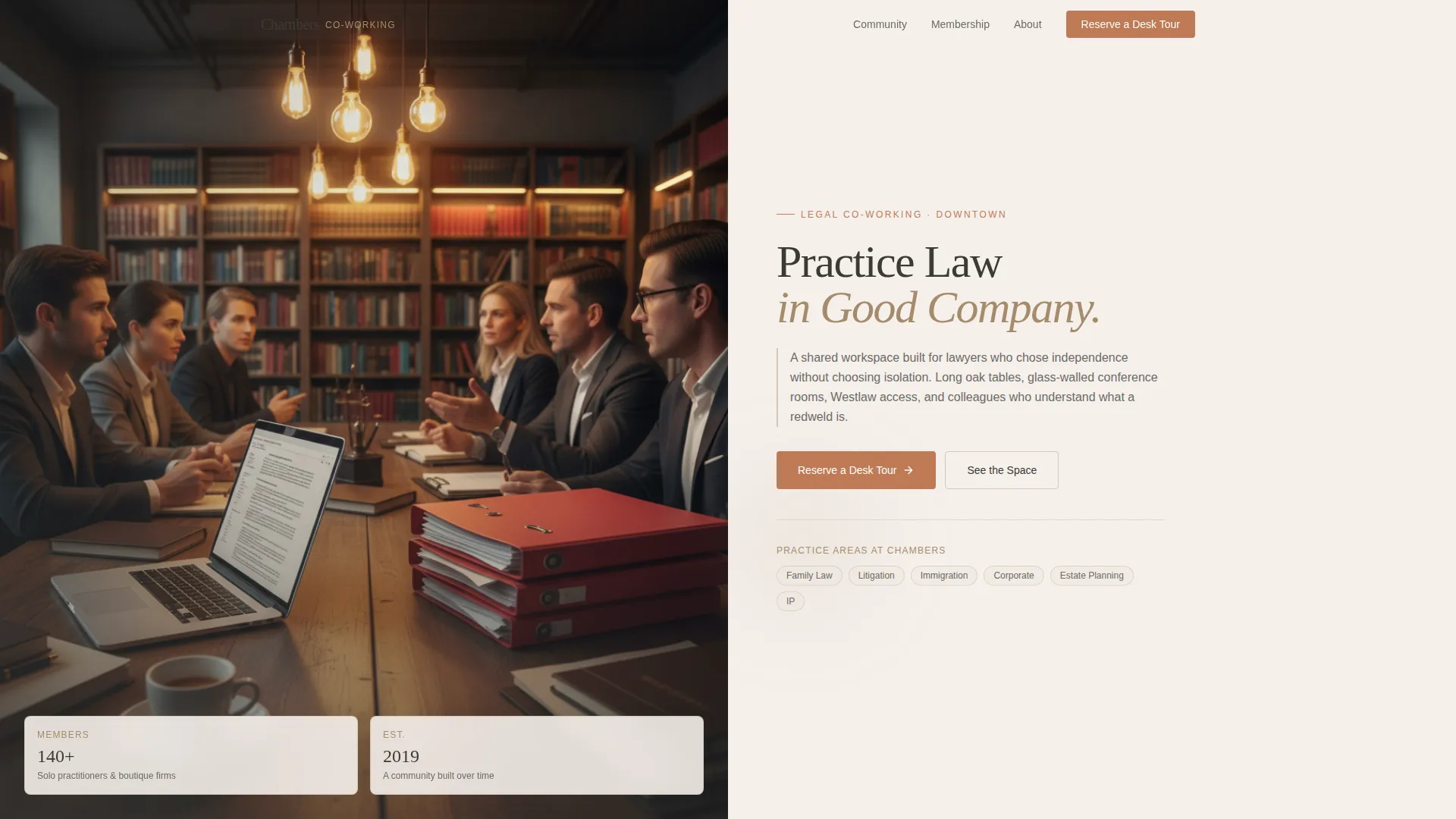
Half-Page Hero Split
The header divides into two balanced halves. The left side holds a shallow-depth-of-field photograph of a communal worktable. The right side presents a large serif headline with a single supporting sentence and a terracotta call-to-action button.
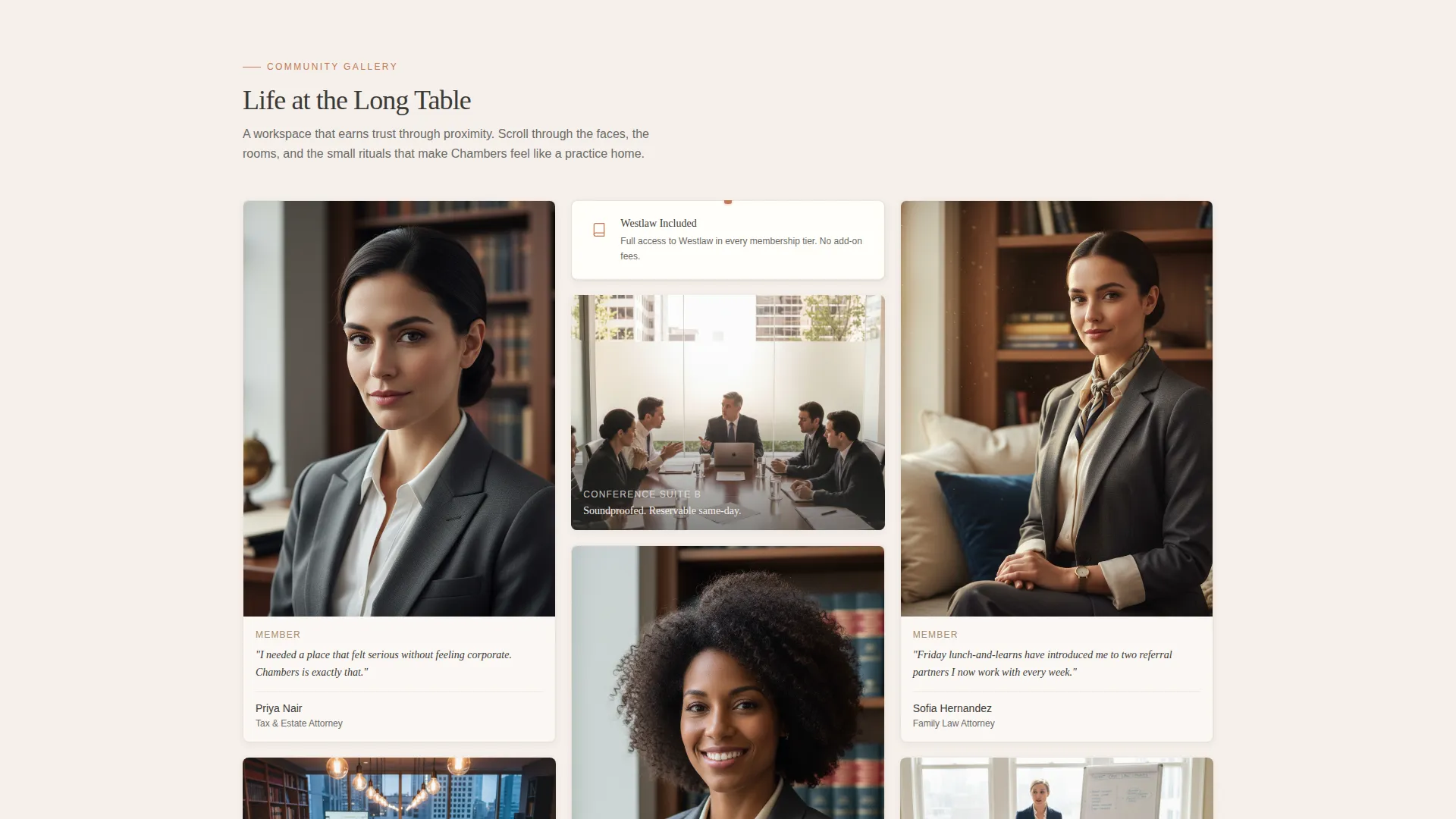
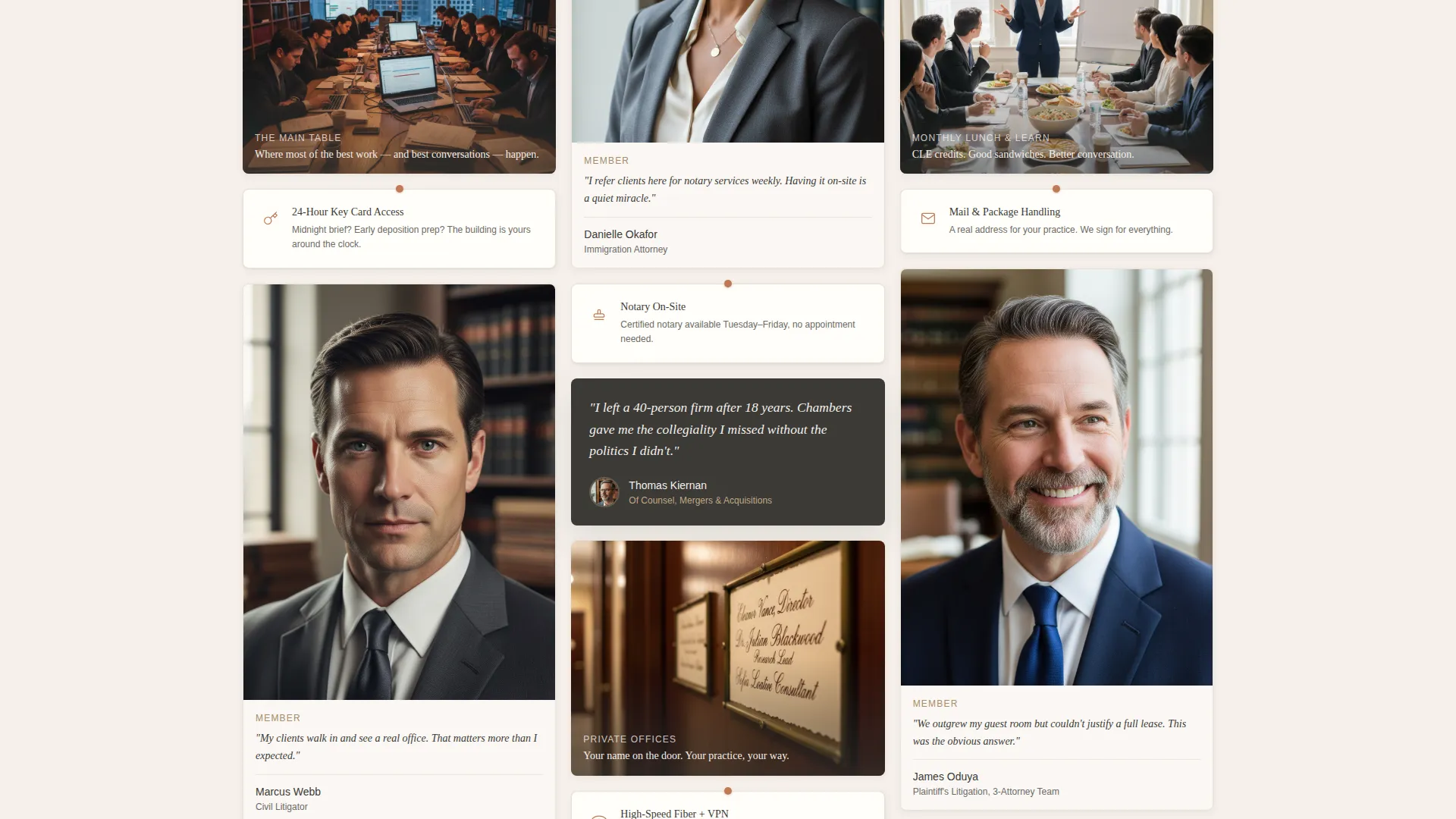
Masonry Community Gallery
Below the hero, the page cascades into a Pinterest-style masonry grid. Member portrait cards with one-line quotes, candid event snapshots, and wide conference-room tiles alternate naturally. Amenity tiles styled like pinned index cards, such as "24-Hour Key Card Access," "Westlaw Included," and "Notary On-Site," are woven throughout the grid.
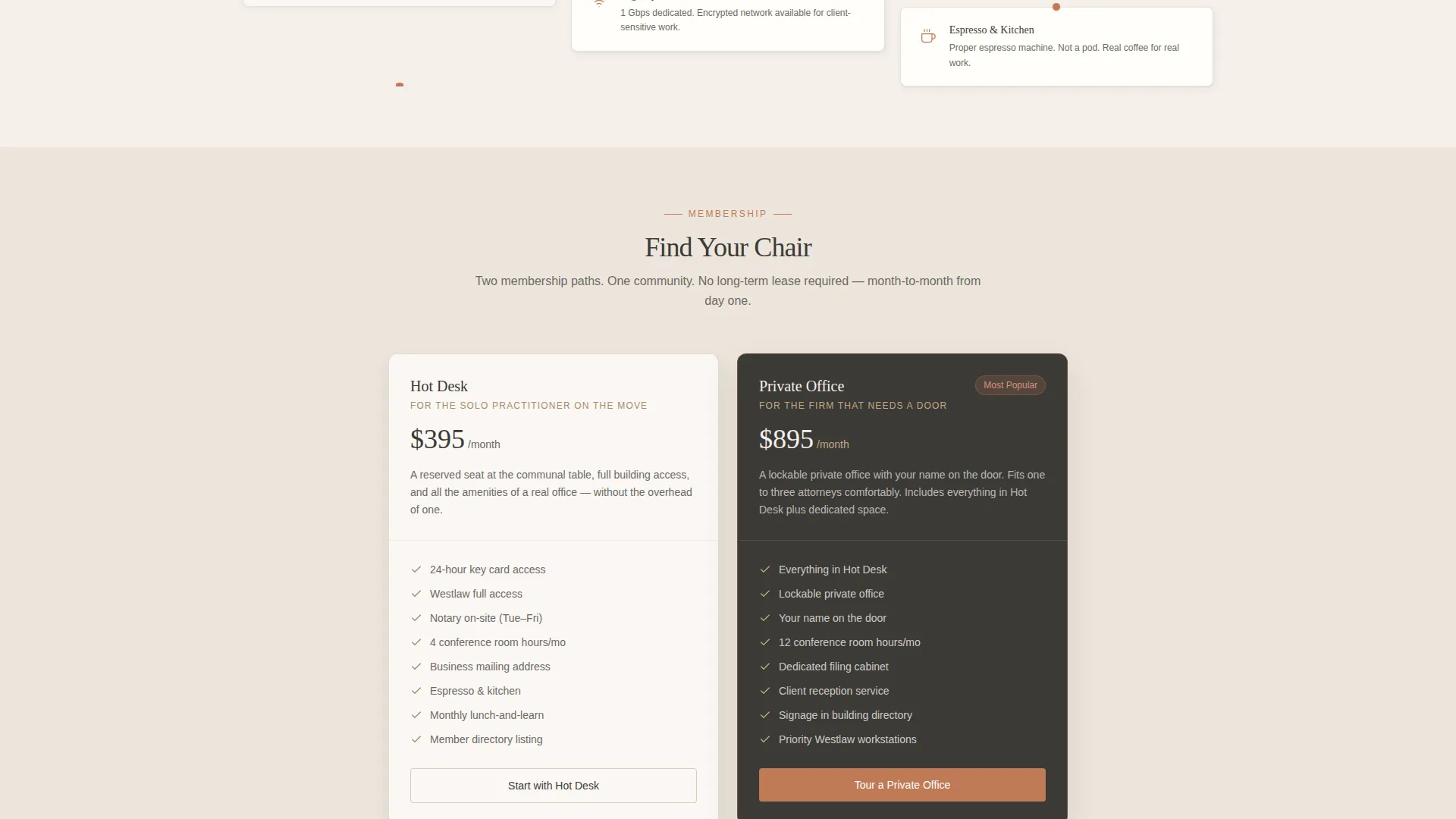
Two-Tier Membership Cards
A dedicated section presents two membership levels side by side: hot desk and private office. The card layout makes it easy for a visitor to compare options before they book.
Scrolling Testimonial Rail
A horizontal testimonial rail displays member quotes on rotated cards. The scroll-triggered reveal adds gentle motion and keeps social proof visible without interrupting the gallery flow.
Inline Tour Booking Form
The lead-generation form sits inline on the page. It collects a visitor's name, practice area from a dropdown (family, litigation, immigration, corporate, or other), current office situation, and preferred tour day. No page redirect is needed.
PDF Membership Guide Capture
A secondary conversion path lets visitors request a one-page PDF membership guide by entering their email. The modal appears without leaving the page, giving hesitant visitors a lower-stakes first step.
Page sections overview
| Section | Purpose |
|---|---|
| Hero Split | Introduces the space with a candid photo and serif headline |
| Masonry Gallery | Showcases member life, amenity tiles, and community moments |
| Membership Options | Compares hot desk and private office tiers side by side |
| Testimonial Rail | Displays scrolling member quotes to reinforce community trust |
| Tour Booking Form | Captures name, practice area, office situation, and tour day |
| Footer | Single-row linear footer with navigation and contact links |
Design & branding system
The visual identity follows a Community Hearth theme built on the Cloud Canvas color palette. Every color choice references tactile, analog materials: heavy cotton paper, warm pendant light, and aged oak.
- Parchment white (#F5F0EB) dominates all backgrounds; charcoal ink (#3B3A37) carries all body text
- Hearthstone (#A68B6B) warms section dividers, secondary type, and decorative accents
- Terracotta (#C07A56) appears exclusively on buttons and hover states, signaling every clickable action
- Typography pairs Fraunces serif for display headings with DM Sans for body copy
Mobile & speed optimization
The template is designed desktop-first, reflecting how attorneys typically research workspace options at a desk. It also delivers a solid mobile experience so the page works well on any device.
- Scroll-triggered reveals and masonry stagger animations use medium-weight motion that does not overload smaller screens
- Static page sections use server-rendered components; the tour form and sticky button use client-side rendering for responsiveness
- The sticky terracotta "Reserve a Desk Tour" button remains visible on scroll across all viewport sizes
How this template helps you convert
The gallery does the persuading before the form ever appears. By the time a visitor reaches the booking section, the community has already made its case.
- The masonry grid builds emotional buy-in through faces, quotes, and shared moments, reducing skepticism before any ask is made
- The sticky call-to-action button keeps the tour booking option accessible throughout the entire scroll journey
- The PDF email capture provides a softer entry point for visitors who are not yet ready to commit to a tour date
Other information about this template
This template is categorized under Community and Nonprofit, with a specific focus on the lawyers co-working community niche. It is well-suited for any legal co-working space operator aiming to build a warm, trust-first online presence.
- The layout is structured as a single landing page, not a multi-page website
- The Community Gallery creative direction makes this template distinct from standard law firm or generic co-working templates
- The color system and typography choices are selected to feel trustworthy and unhurried, matching the expectations of a legal professional audience
- Date and currency formatting follows United States conventions: MM/DD/YYYY and USD
Theme
Community Hearth
Creative direction
Community Gallery
Color system
Cloud Canvas
Style
Masonry/Pinterest
Direction
Lead Generation
Page Sections
Half-page Hero Photo Split
Masonry Community Gallery Grid
Inline Tour Booking Form
PDF Membership Guide Modal
Sticky Call-to-action Button
Scrolling Testimonial Rail
Related questions
Can I edit the practice area dropdown options in the tour booking form?
Does the masonry gallery support both portrait and landscape image tiles?
How does the PDF membership guide download work?
Is this template suitable for a single location or can it represent multiple offices?
What font licenses do I need for Fraunces and DM Sans?



