Oncology Medicine Booking Website Template
Chartnote is a split-screen landing page template built for oncology EMR and software platforms. It pairs a giant centered headline on deep slate with a testimonial mosaic and a lead-generation demo form. The layout guides community oncology practices, IT directors, and practice managers from problem recognition straight to a booked demo in a clean, clinical flow.
by Rocket studio
Quick summary
Chartnote is a single-page landing page template designed for oncology documentation software. It opens with a bold centered headline on deep slate, flows through a 50/50 split screen, builds trust with an alternating testimonial mosaic, and closes with a lead-generation demo form. The entire layout is built to convert burned-out physicians and practice decision-makers into demo bookings.
Who this template is for
This template speaks directly to the people who feel the weight of after-hours charting every single evening. It is built for B2B healthcare software teams who need to reach a focused, skeptical clinical audience and earn their trust quickly.
- Community oncology practices with 3 to 15 providers who need to cut documentation time
- Cancer center IT directors evaluating replacements for existing electronic health record systems
- Practice managers tracking physician burnout and transcription costs
What problem this template solves
Oncology software buyers do not convert on generic product pages. They need to see their exact pain reflected back at them before they engage. This template solves the credibility gap between a software claim and a physician's lived experience.
- Generic software landing pages ignore oncology-specific workflows like regimen management, staging, and RECIST tumor response tracking
- Buyers who are not ready for a demo bounce with no secondary path, leaving pipeline value on the table
- Social proof scattered across a page loses its impact without a clear pairing to the product feature it validates
What you get with this template
You get a fully structured, section-led landing page ready for an oncology EMR or documentation platform. Every section has a defined job, and nothing is decorative without purpose.
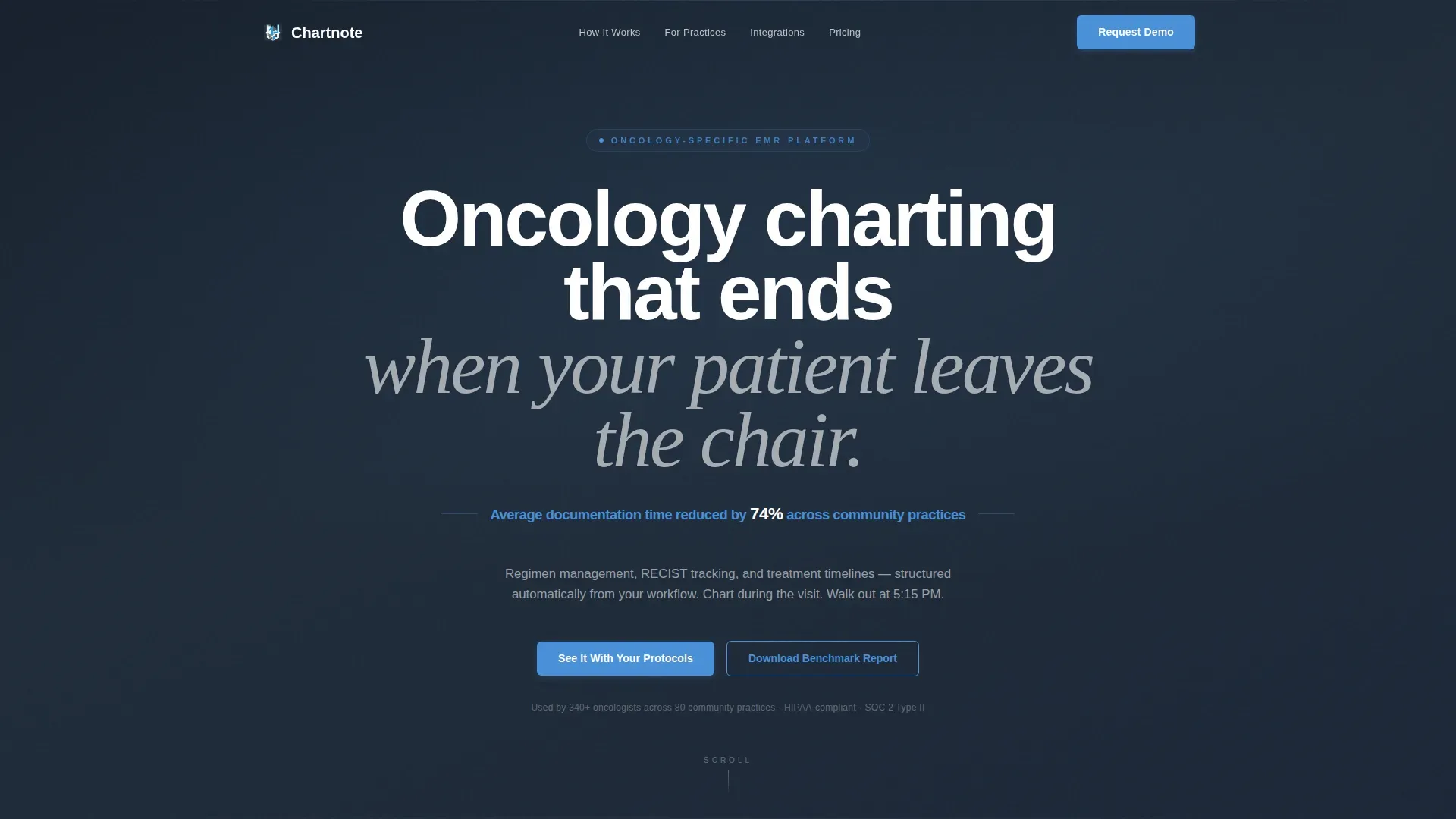
- A centered hero with a headline, sky blue stat highlight, and a primary call-to-action placed immediately beneath
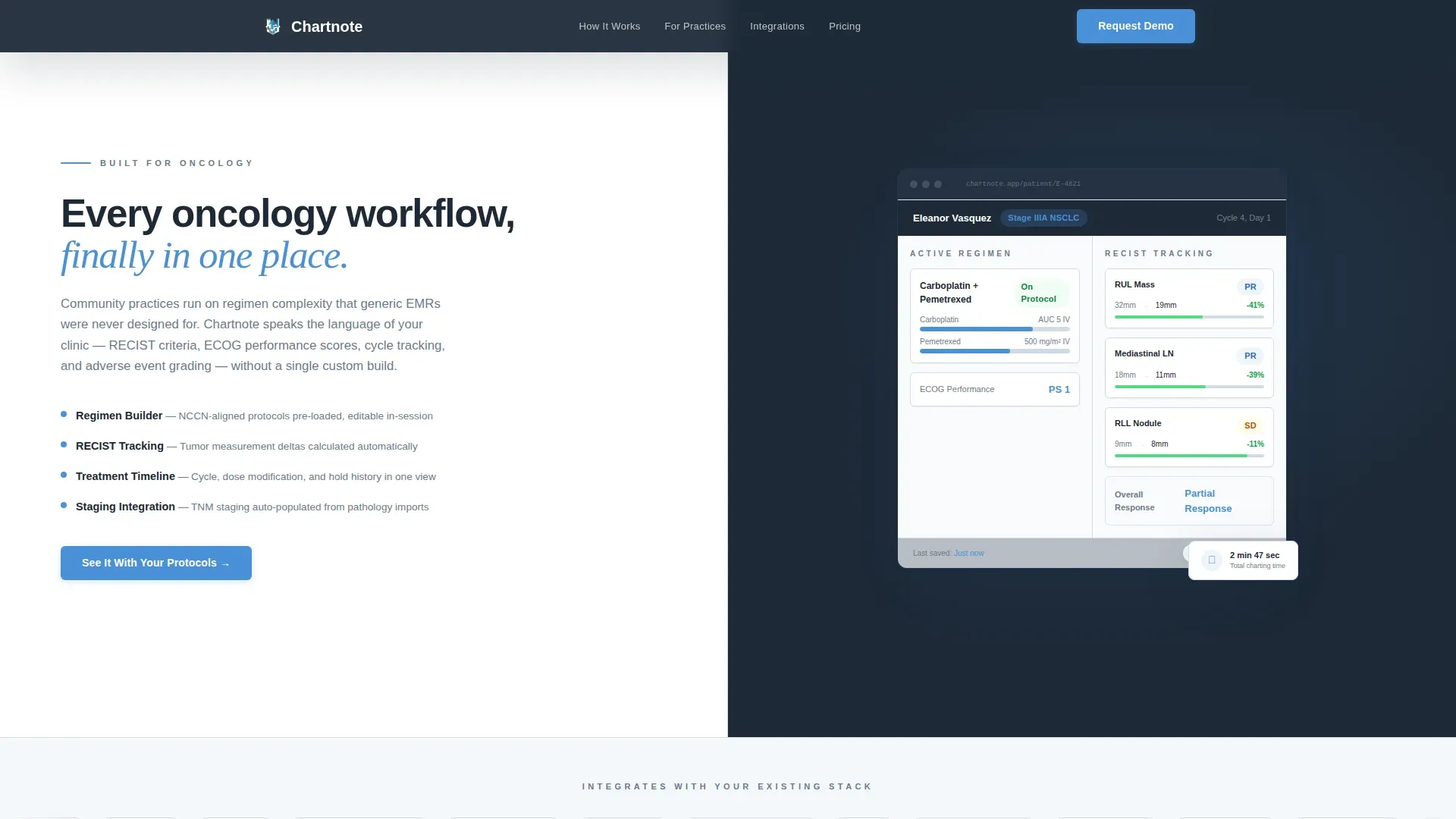
- A 50/50 split screen pairing explanatory copy with an interface screenshot panel
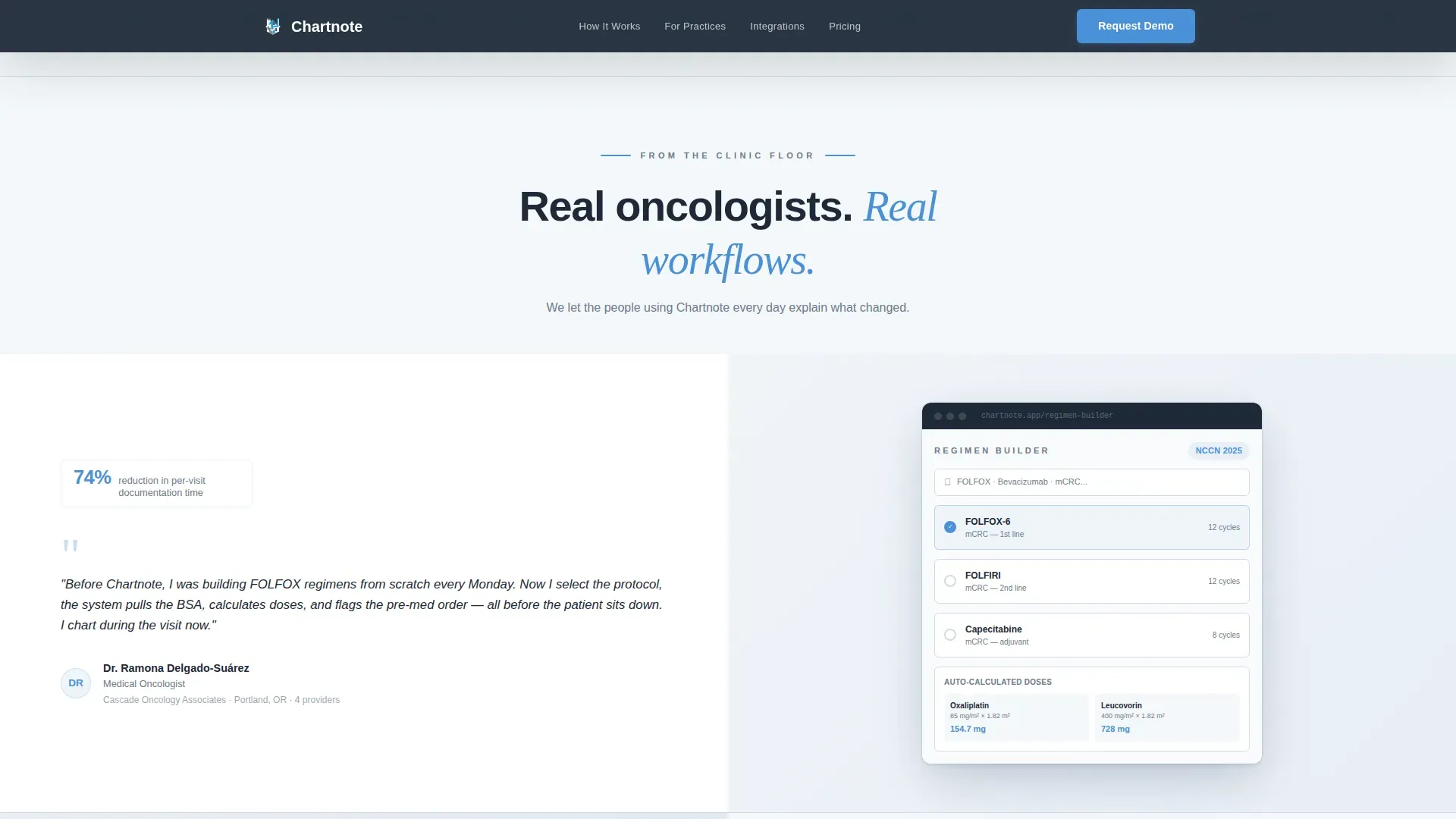
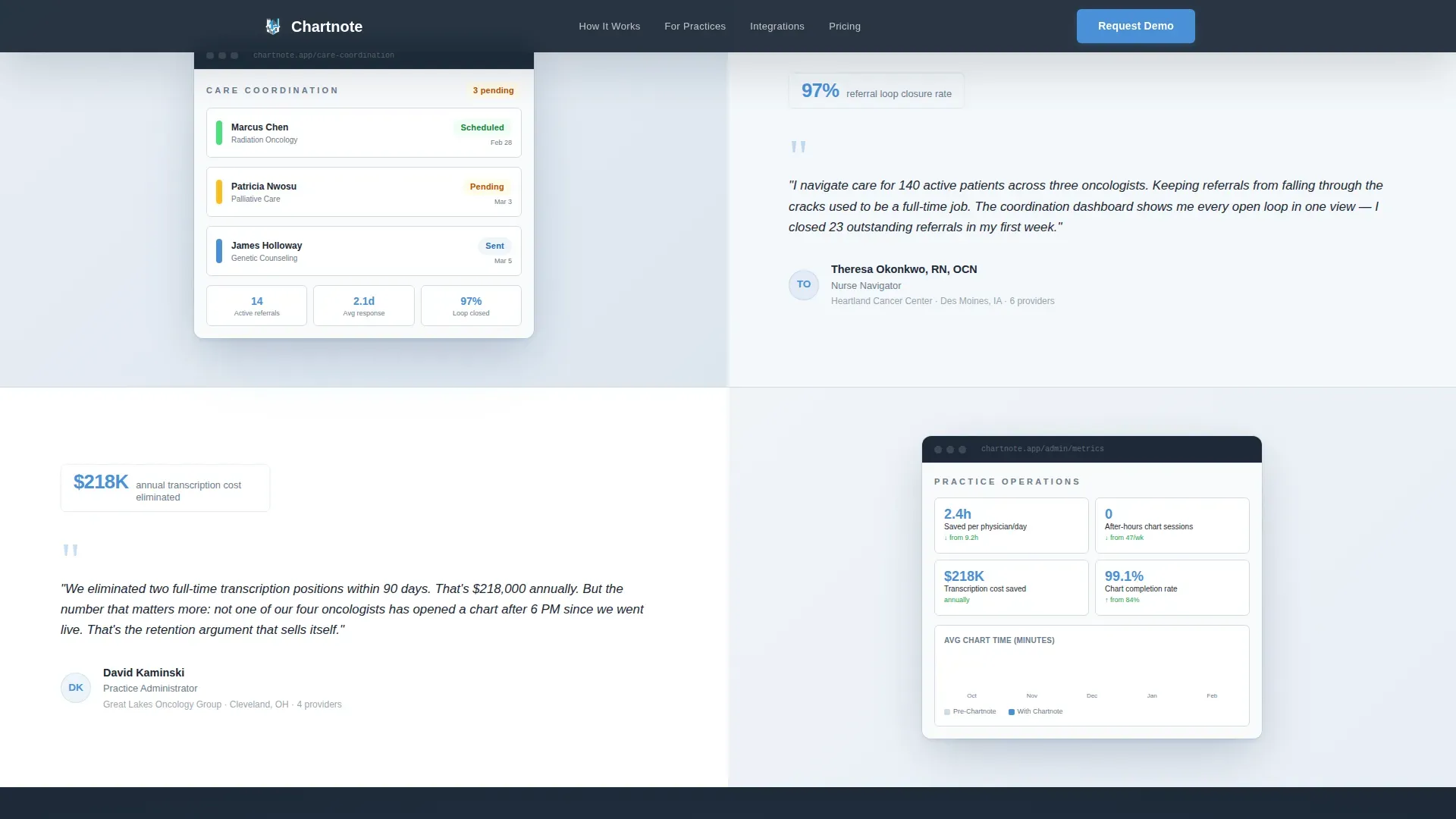
- Three alternating testimonial and screenshot mosaic pairs that escalate from individual relief to practice-level outcomes
- A lead-generation demo form capturing practice name, provider count, current EHR system, and a preferred demo window
- A secondary conversion path offering a gated downloadable PDF benchmark report for visitors researching before committing
Feature list
This template is built around purposeful structural and design decisions. Each feature below is grounded in the brief.
Giant Headline Hero Section
The hero opens with white bold type on deep charcoal slate. No background image. No distraction. A single sky blue stat below the headline signals value before the visitor reads a word of body copy.
50/50 Split Screen Layout
The split screen divides the viewport evenly. The left panel holds the headline and oncology-specific subline. The right panel displays a cropped interface screenshot with tumor response fields and treatment timeline visible. The two halves work together to show and tell simultaneously.
Alternating Testimonial Mosaic
Three testimonial pairs alternate which side carries the physician quote and which carries the product screenshot. The rhythm creates a conversation between real users and the product. Stakes escalate from personal time savings to full practice transformation.
Primary Demo Request Form
The lead-generation form captures four fields: practice name, number of oncology providers, current EHR system via dropdown, and preferred demo window. The dropdown includes Epic, Flatiron, Cerner, Athena, and a paper or hybrid option. The call-to-action reads "See It With Your Protocols."
Gated PDF Secondary Conversion
A secondary path offers a downloadable PDF titled "The Community Oncology Documentation Benchmark." It is gated behind a single email field. This catches visitors who are in research mode but not yet ready to book a demo.
GSAP Scroll Reveal Animations
The template uses medium-intensity GSAP animations including staggered fade-ins and clip-path reveals. These are applied to scroll-driven sections to maintain engagement without overwhelming clinical users who expect precision over flash.
Page sections overview
| Section | Purpose |
|---|---|
| Hero Headline | Anchors attention with bold headline on deep slate and a sky blue stat |
| Split Screen Panel | Pairs benefit copy with an interface screenshot on a 50/50 grid |
| Testimonial Mosaic | Builds trust through three alternating physician quote and product screenshot pairs |
| Primary Demo Form | Captures practice details and books a personalized demo |
| PDF Benchmark Gate | Provides a low-friction secondary conversion for research-stage visitors |
| Compact Footer | Closes the page with a two-row stripe layout |
Design & branding system
The visual identity follows a Corporate Precision theme. The palette references a hospital corridor at dawn, calm and authoritative without feeling cold.
- Deep charcoal slate (#1E2A38) anchors primary backgrounds; cloud white (#F4F7FA) fills content panels; open-sky blue (#4A90D9) marks calls to action and interactive highlights; clinical steel (#6B7B8D) handles secondary text and dividers
- DM Sans in bold weight drives headings; Fraunces in serif italic provides accent contrast for pull quotes and sublines
- The design restraint is intentional: no hero images, no decorative noise, only purposeful visual hierarchy
Mobile & speed optimization
The template is built desktop-first to match how oncologists work at clinical workstations. It is also built to respond cleanly at smaller viewport sizes.
- The 50/50 split screen stacks vertically on mobile so both content panels remain fully readable
- GSAP animations are scoped to client-side components while static structural sections use server-side rendering for fast initial load
- Sticky navigation keeps the primary call-to-action accessible as visitors scroll through the mosaic
How this template helps you convert
This layout earns trust before it asks for anything. The conversion architecture is layered so buyers at different stages of readiness each have a clear next step.
- The hero places the primary call-to-action immediately after the headline stat, catching visitors who already know they have a problem and are ready to act
- The testimonial mosaic lets physician peers do the convincing, making the demo request feel like a logical continuation rather than a cold ask
- The PDF benchmark gate captures email addresses from researchers who are not yet demo-ready, giving the team a second chance to convert them later
Other information about this template
This template is designed for the USA market with localization defaults set to USD, 12-hour time format, and MM/DD/YYYY date format. It suits B2B SaaS teams in the healthcare and oncology medicine space.
- The EHR dropdown in the demo form is pre-configured with named systems commonly evaluated in the oncology practice market
- The PDF gated modal activates as an overlay, keeping the visitor on the page rather than redirecting them
- Animation intensity is set to medium and can be adjusted to suit brand tone or clinical audience preferences
- The two-row compact footer follows a Stripe-style layout, keeping the page close without adding visual weight
Theme
Corporate Precision
Creative direction
Testimonial Mosaic
Color system
Slate & Sky
Style
Split Screen (50/50)
Direction
Lead Generation
Page Sections
Giant Headline Hero with Stat
50/50 Split Screen Section
Alternating Testimonial Mosaic
Lead Generation Demo Form
Gated PDF Benchmark Download
GSAP Scroll Reveal Animations
Related questions
Who is the primary audience for this landing page template?
What conversion paths does this template include?
Can I customize the EHR dropdown options in the demo form?
What animation style does this template use?
Is this template suited for small practices or only enterprise cancer centers?



