Landing Page Template for São Paulo Locksmith Services
Chaveiro is a single-page lead generation landing page built for mobile locksmiths in São Paulo. It pairs a fixed sidebar with a scrollable case study narrative to move stressed visitors straight to action. Award badges, a three-field contact form, and a direct WhatsApp button work together to turn urgency into booked calls in under a minute.
by Rocket studio
Quick summary
Chaveiro is a focused landing page template for São Paulo locksmith services. It combines a credibility-first header, a fixed sidebar companion with a contact form, and a case study scroll layout. The charcoal and amber visual system creates immediate trust. Every section is designed to match the visitor's exact emergency and guide them toward one action: calling for help.
Who this template is for
This template is built for local locksmith professionals who need a page that earns trust fast and captures leads under pressure. It suits solo operators, small locksmith businesses, and service providers who respond to emergencies in São Paulo neighborhoods.
- Mobile locksmiths offering 30-minute arrival for residential, vehicle, or commercial calls
- Locksmith operators who handle coded keys, armored doors, and roll-up security gates
- Local service providers looking to convert stressed, first-time visitors into paying customers
What problem this template solves
When someone is locked out, they open the first result that feels trustworthy and acts fast. Most locksmith pages fail that test: they look generic, take too long to load confidence, and bury the contact option. This template solves that gap directly.
- Visitors arrive anxious and need instant reassurance before they scroll or read
- Standard service pages do not show proof relevant to the visitor's specific situation
- Generic contact forms do not match the urgency or context of a lockout emergency
What you get with this template
You get a complete single-page layout that is ready to present your service, proof, and contact options in one focused flow. Every component is included and positioned to reduce friction between arrival and form submission.
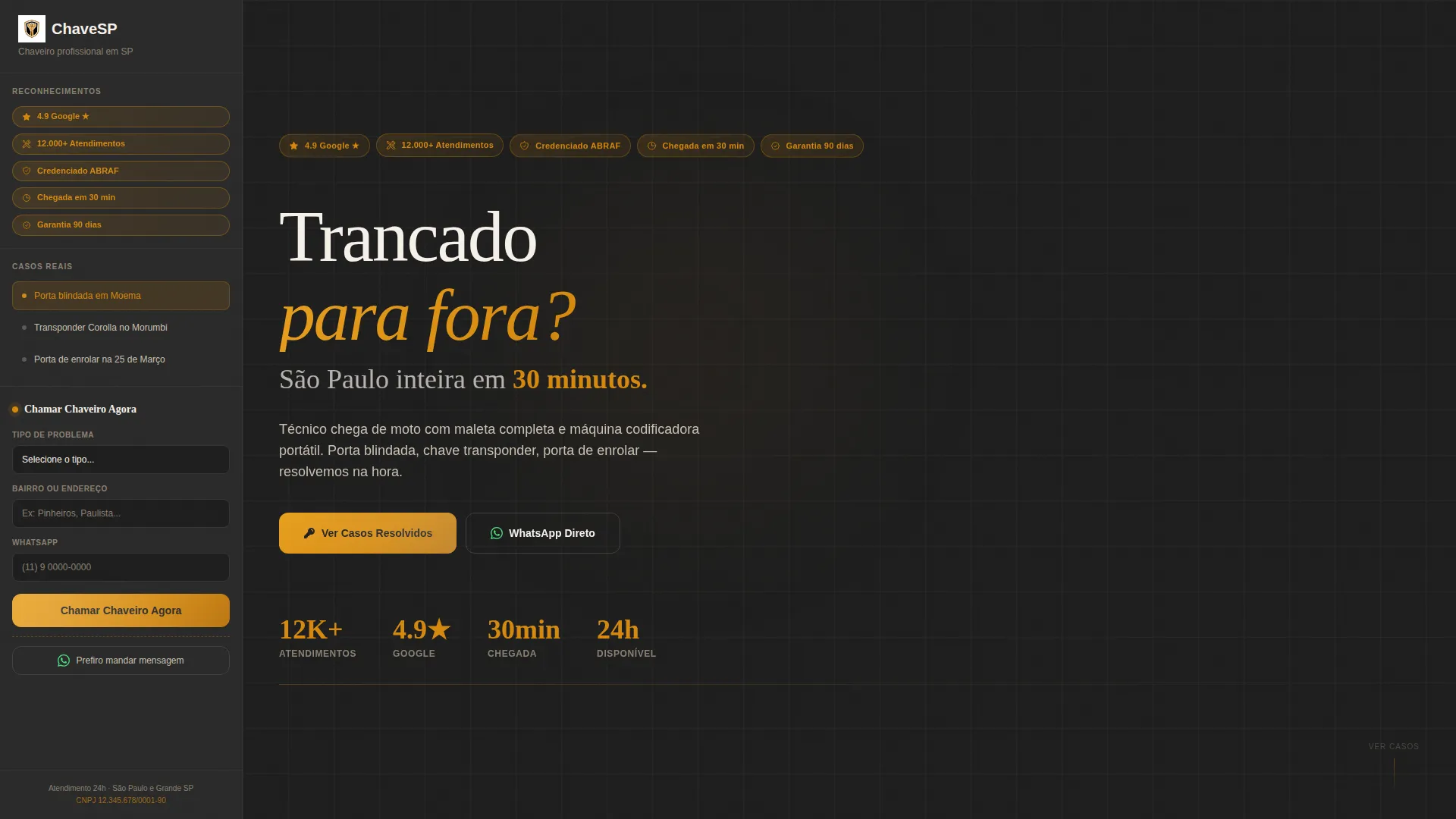
- Award badge header strip with five credibility seals above the main headline
- Fixed sidebar companion with a three-field lead form and a secondary WhatsApp button
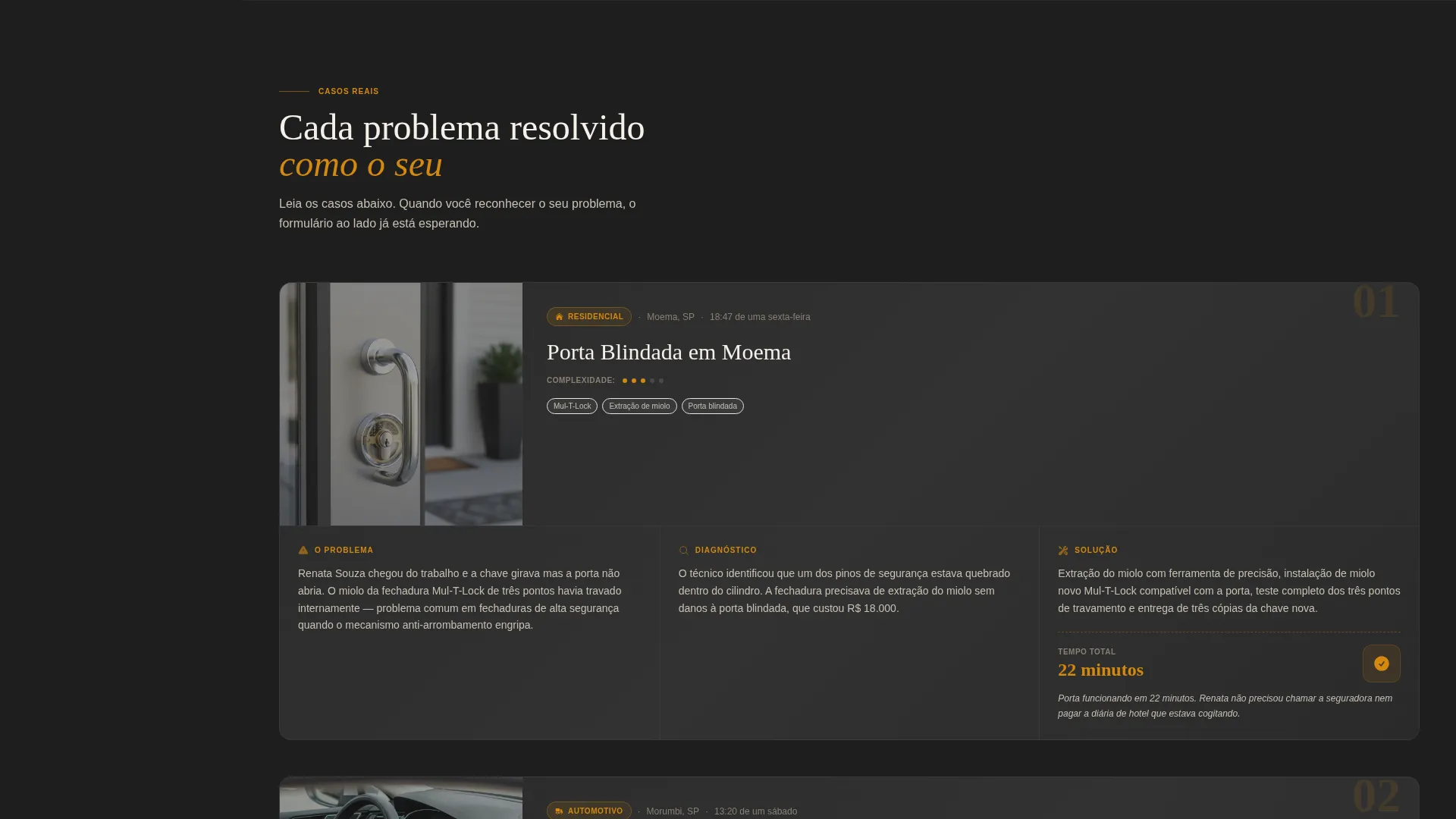
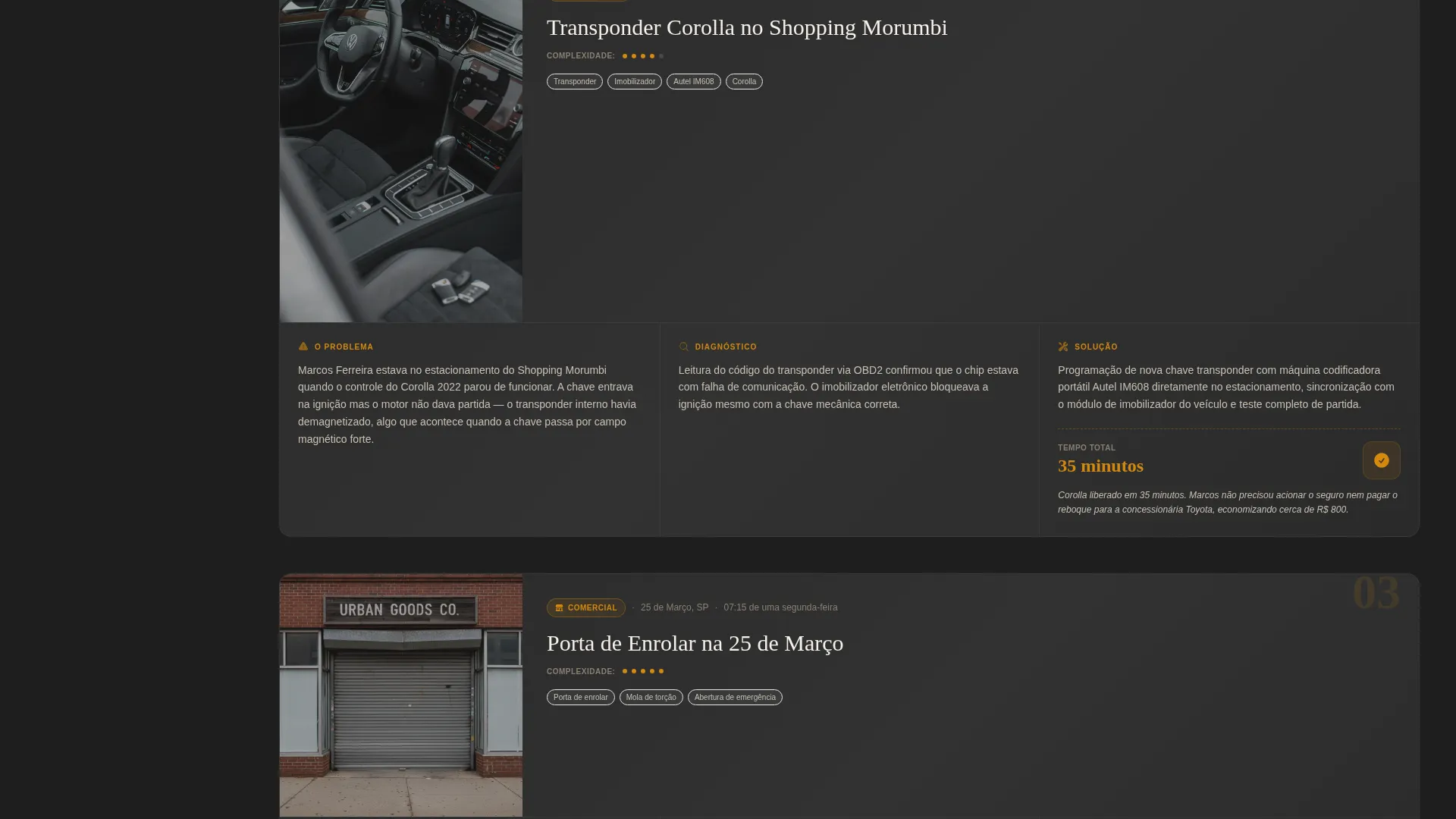
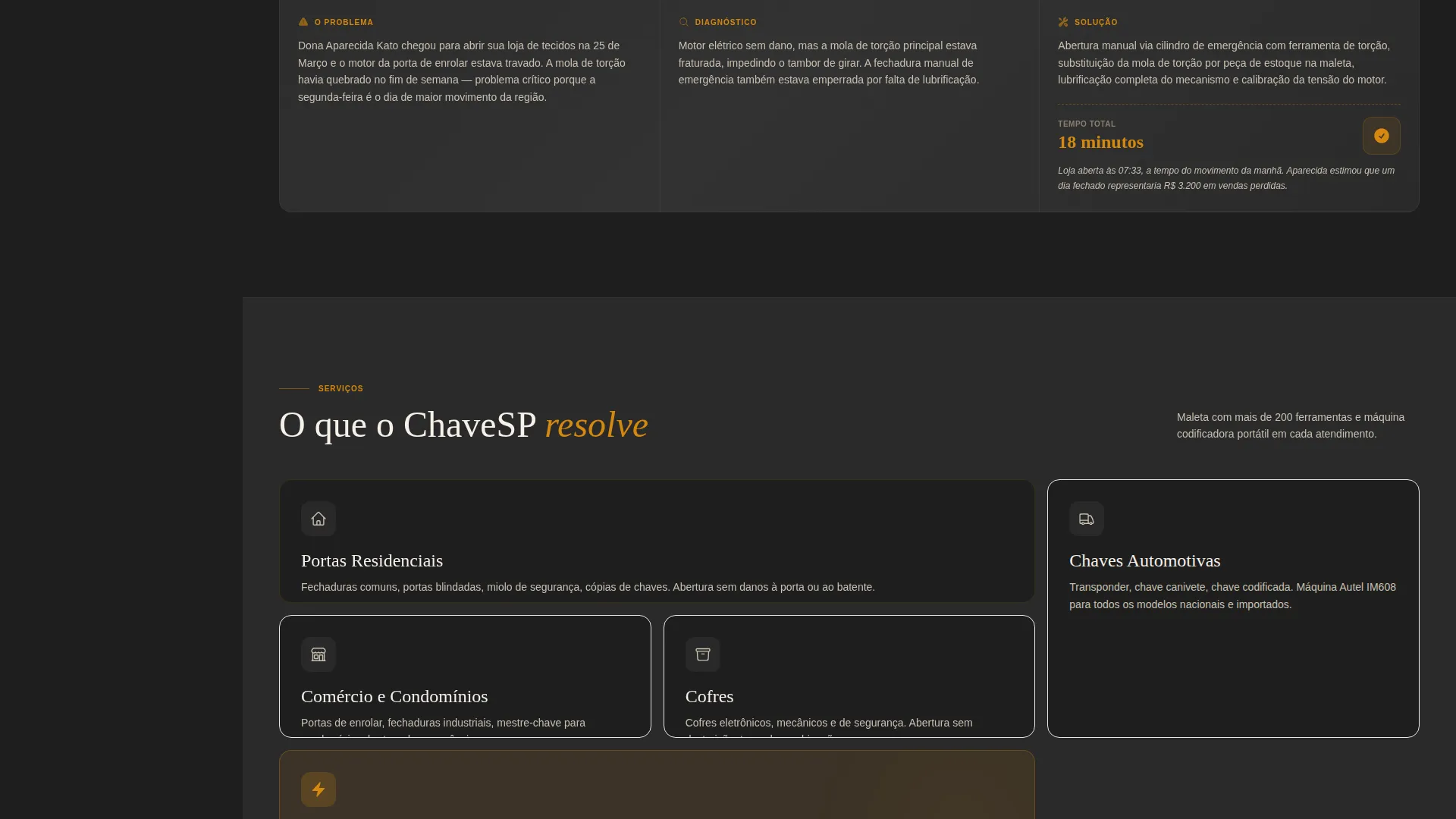
- Scrollable case study narrative section with three detailed real-world service stories
Feature list
This template includes purpose-built components designed specifically for high-urgency local service pages. Each feature addresses a specific moment in the visitor's decision journey.
Award Badge Header Strip
Five credibility seals appear at the very top of the page before any scrolling. Each badge sits in an amber capsule on charcoal and displays a micro-icon alongside a short proof statement. The visitor receives social and operational proof instantly upon arrival.
Fixed Sidebar with Lead Form
The sidebar stays visible as the visitor scrolls through the case study content. It holds a three-field form covering problem type, approximate location, and WhatsApp number. A secondary button labeled "Prefiro mandar mensagem" (I prefer to send a message) lets mobile visitors skip the form entirely.
Case Study Narrative Scroll
The main content area presents three service cases as short structured stories. Each case follows the same format: the problem, the call time, what the technician found on arrival, the solution applied, and total time to resolution. The cases increase in complexity from residential to vehicle to commercial.
Sidebar Case Index
The fixed sidebar includes a navigation index listing the three case titles by neighborhood and problem type. Visitors can jump directly to the case most similar to their own situation. This relevance shortcut reduces bounce and increases form engagement.
Contextual Headline
The main headline is written to address the visitor's situation directly: "Trancado para fora? São Paulo inteira em 30 minutos." It speaks to urgency and geography in one line. No generic imagery is used; the badge strip carries the visual credibility load.
Charcoal and Amber Visual System
The full page uses a cohesive dark-warm palette built on deep charcoal backgrounds, medium graphite panels, burned amber accents, and chalk-white body text. The color system communicates professionalism and urgency without feeling cold or clinical.
Page sections overview
| Section | Purpose |
|---|---|
| Badge header strip | Displays five credibility seals at page top |
| Main headline block | States the core offer and coverage area |
| Fixed sidebar companion | Holds lead form, case index, and WhatsApp button |
| Case study: residential door | Demonstrates armored door resolution in Moema |
| Case study: coded car key | Shows transponder key replacement at Morumbi |
| Case study: commercial gate | Covers roll-up gate failure on 25 de Março |
Design & branding system
The visual identity follows a dark workshop aesthetic that feels purposeful and trustworthy at once. The palette draws from the image of a metalworker's bench lit by a torch at night: warm amber light against organized dark surfaces.
- Deep charcoal (#1E1E1E) as the main page background, medium graphite (#3A3A3A) for sidebar panels, and chalk white (#F5F0E8) for all body text
- Burned amber (#D4880F) applied to buttons, badge capsules, and case highlight callouts to direct the eye toward key actions
- Micro-icons of a padlock, motorcycle, and shield appear inside the badge capsules to reinforce the service promise visually
Mobile & speed optimization
The template layout is structured to work clearly on small screens, which is where most lockout visitors will arrive. Sidebar behavior and form placement are adapted for mobile context.
- The fixed sidebar collapses gracefully on smaller screens so the lead form and WhatsApp button remain accessible without blocking content
- The secondary WhatsApp button is given prominent placement for mobile visitors who need the fastest possible path to contact
- Form fields are limited to three inputs to reduce friction on touch keyboards during stressful moments
How this template helps you convert
The conversion strategy is built around matching the visitor's problem before asking for any action. Trust is established at the top; the form is positioned as the natural next step.
- The badge strip handles credibility before the visitor reads a single word of copy, removing the first barrier to trust with visible proof of ratings, volume, certification, and speed.
- The case study narrative matches the visitor's exact scenario by neighborhood and problem type, so when the sidebar form appears fixed and ready, filling it feels like a logical conclusion rather than a sales push.
Other information about this template
This template is built for the Professional Services category with a focus on São Paulo local services. It is designed to support urgent, high-intent visitors who are searching for immediate help rather than comparing options.
- The layout follows a Lead Generation direction with a sidebar companion format suited to service businesses running single-page presences
- The Educational Guide theme within the case study section positions the locksmith as a knowledgeable expert, not just a fast responder
- Page type is a single landing page, not a multi-page website; all content and conversion elements live within one scrollable view
- The template supports customization of case study locations, badge text, dropdown options, and brand colors to match any local locksmith operation
Theme
Editorial Magazine
Creative direction
Testimonial Mosaic
Color system
Arctic White
Style
Comparison Table
Direction
Lead Generation
Page Sections
Award Badge Header Strip
Fixed Sidebar Lead Form
Case Study Narrative Scroll
Sidebar Case Study Index
Charcoal and Amber Visual System
Related questions
Can I change the neighborhood names and case details to match my service area?
Does the sidebar stay visible while scrolling on desktop?
Can I adjust the dropdown options in the contact form?
Is this template suitable for a locksmith operating outside São Paulo?
What happens when a visitor taps the WhatsApp button?



