Multi-Location Chiropractic Clinic Website Template
Chirocompare is a single-page chiropractor landing page template built around a service comparison table. It organizes six clinic locations, five core services, scheduling details, insurance intake, and verified social proof into one confident, scannable flow. Designed for multi-location chiropractic practices, it answers every logistical question a patient has before asking them to book.
by Rocket studio
Quick summary
Chirocompare is a stats-first chiropractor landing page template that puts a location comparison table at its structural center. Six clinic locations and five services are laid out in a scannable grid. Every section opens with a number, then earns the reader's trust with specifics. The page closes with a two-step insurance and booking form.
Who this template is for
This template is built for established chiropractic practices that operate across more than one location. It works best when the clinic has real numbers to show, verified reviews to display, and a range of services that vary by site.
- Multi-location chiropractic clinics wanting one clear comparison page
- Practice owners targeting office workers, weekend athletes, and post-partum patients
- Clinics that need to communicate insurance acceptance and scheduling availability upfront
What problem this template solves
Patients searching for a chiropractor on their phone are in pain and short on patience. They need one page that answers every logistical question without making them dig. Generic clinic pages bury service details and hide insurance information behind contact forms.
- Visitors leave when they cannot quickly find which location offers the service they need
- Comparison shopping patients bounce when insurance and availability are not immediately visible
- Clinics lose bookings because the path from "I need this" to "I have an appointment" has too many steps
What you get with this template
This template delivers a complete, section-led landing page built around a clinic comparison table. Every scroll stop is tied to a specific patient question, and the visual hierarchy guides readers from awareness to booking without friction.
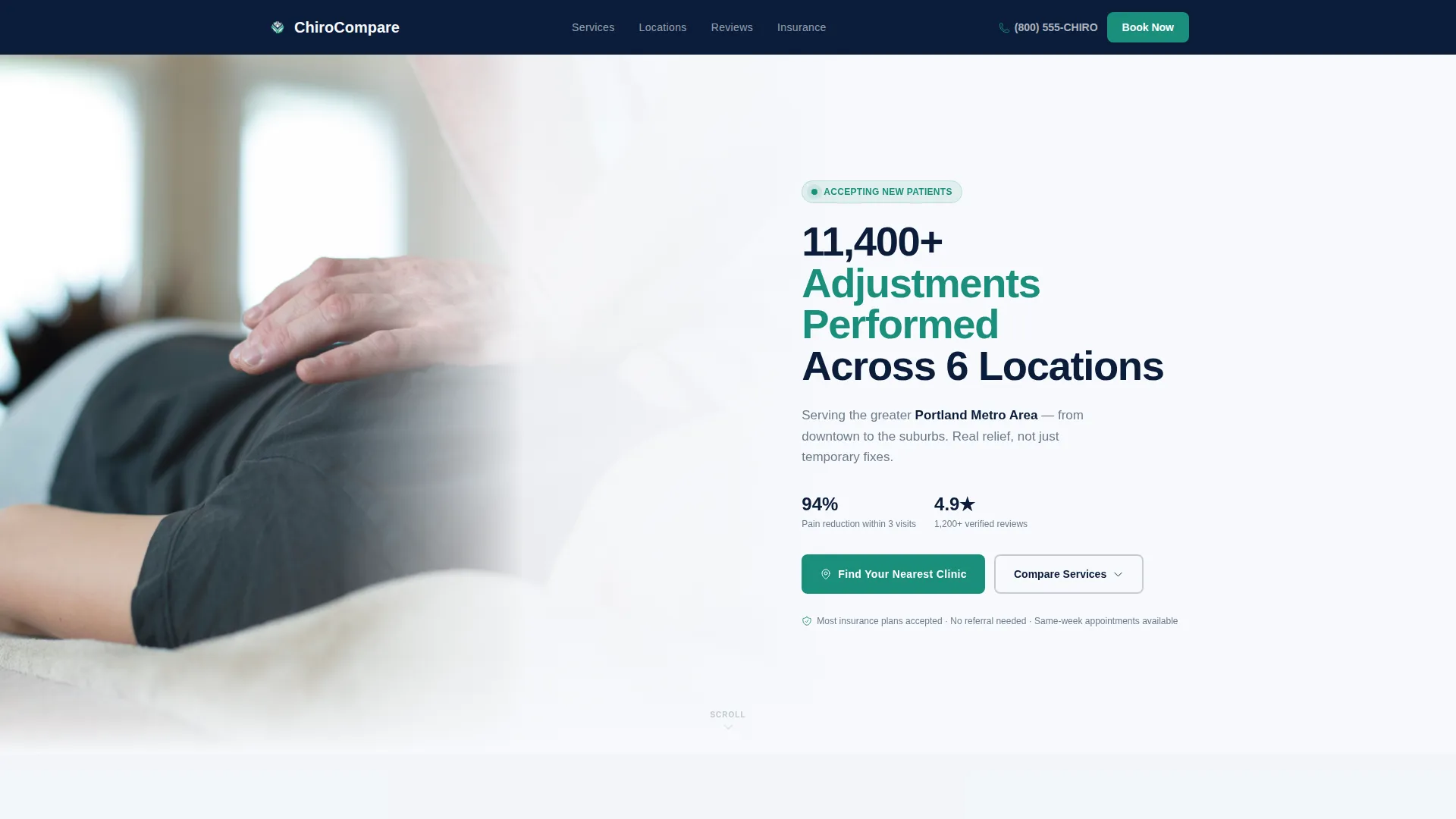
- A hero section with a half-page photo and stat-driven headline paired with a primary call-to-action button
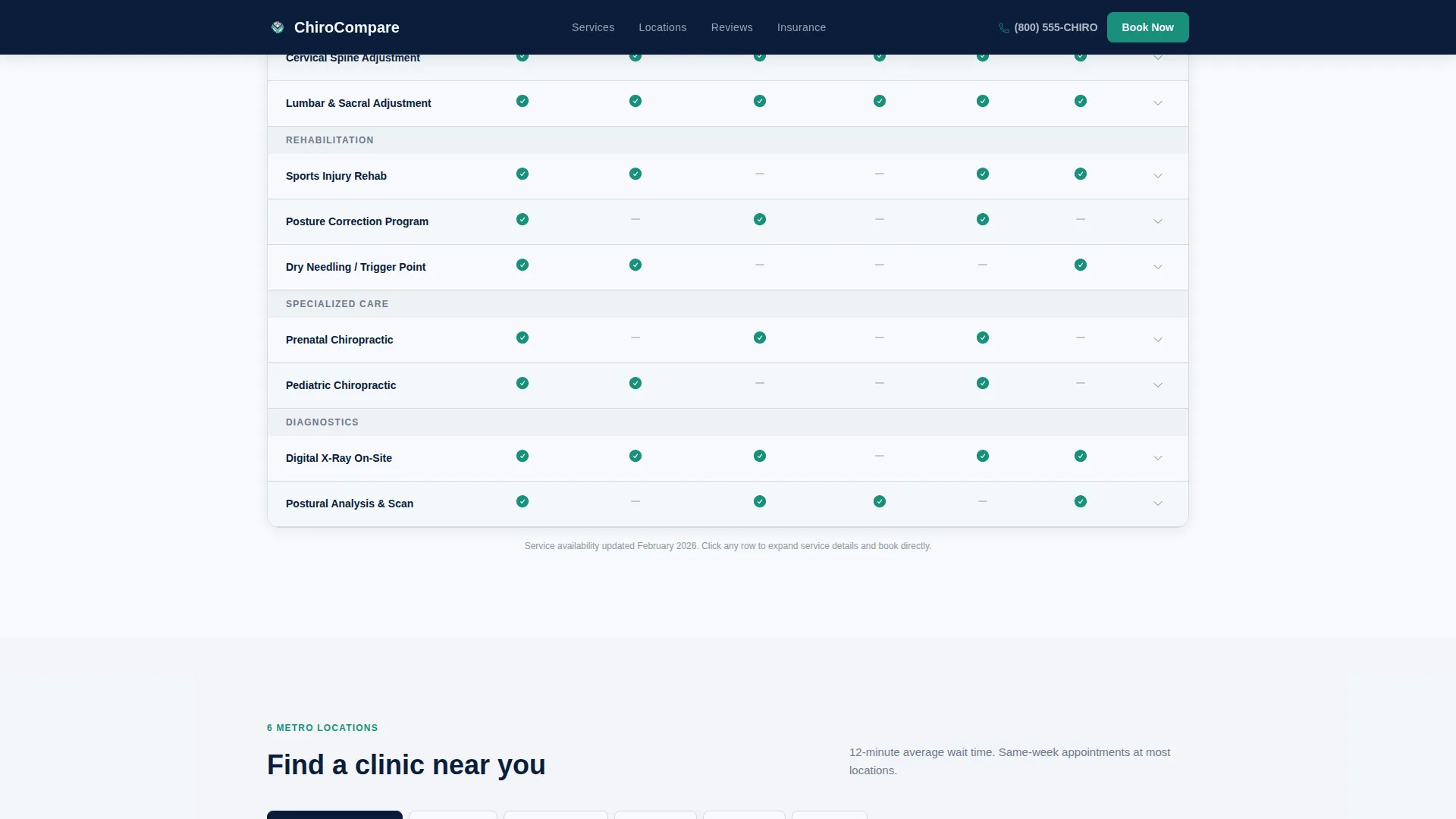
- A six-location by five-service comparison table with teal checkmarks and gray dashes for instant readability
- A two-step booking form that captures zip code and insurance provider, then surfaces the nearest clinic with available slots
Feature list
This template includes purpose-built components drawn directly from the project brief. Each one serves a specific function in the patient decision journey.
Stats-First Impact Headers
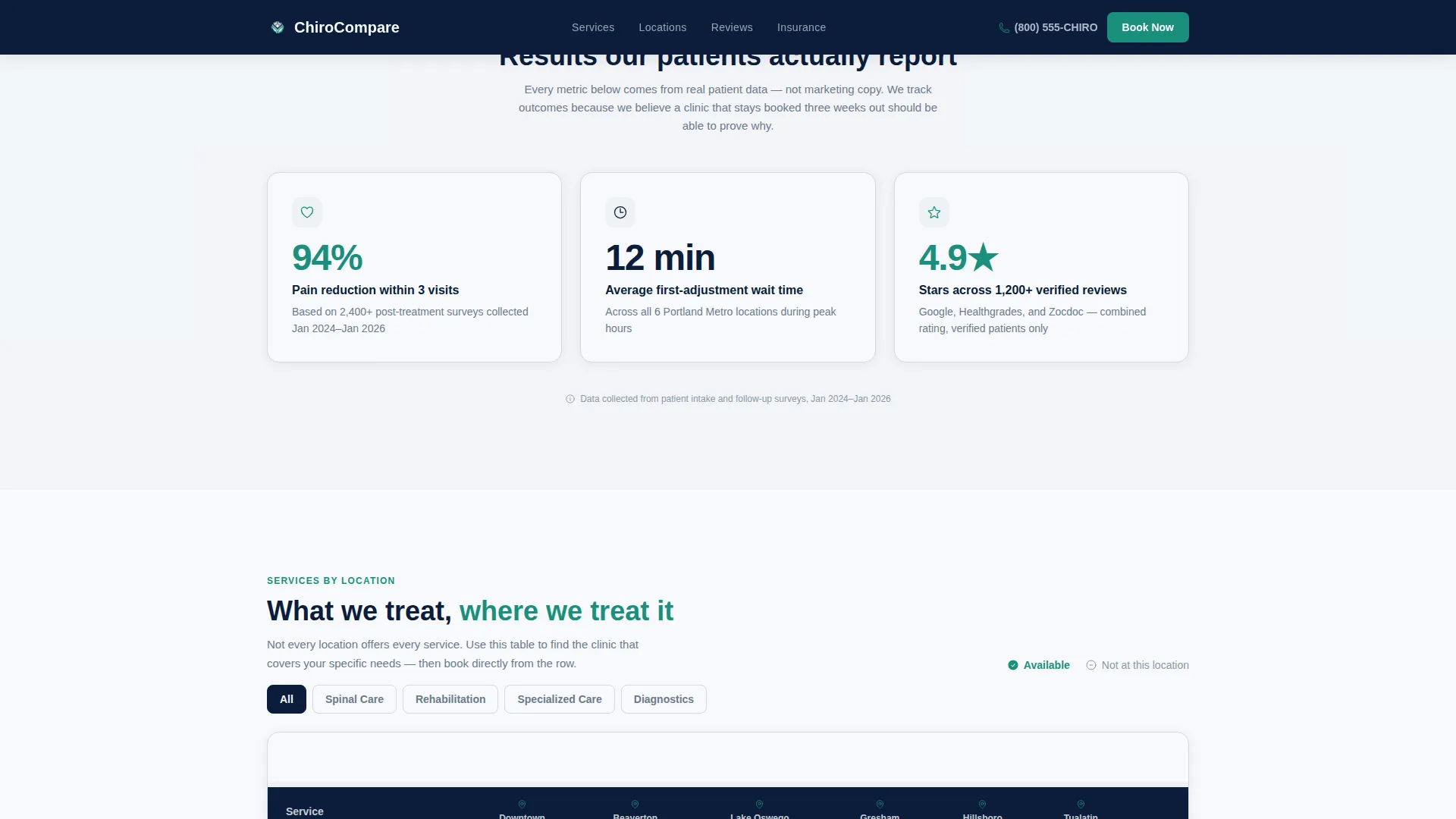
Every major section opens with a key number before narrative text. Examples include 94% pain reduction within three visits, a 12-minute average first-adjustment wait time, and a 4.9-star rating across 1,200-plus verified reviews. This approach stops scroll and builds immediate credibility.
Six-Location Service Comparison Table
The comparison table is the structural backbone of the page. Rows list five services: spinal decompression, sports rehabilitation, prenatal adjustment, pediatric care, and digital X-ray. Columns represent each of the six clinic locations. Teal checkmarks and steel gray dashes make service availability scannable at a glance.
Two-Step Insurance and Booking Form
The primary call-to-action is a two-step form. Step one captures the visitor's zip code and insurance provider from a dropdown of the forty most common regional plans. Step two reveals the nearest clinic location alongside real-time availability slots, reducing booking friction to a single time-slot choice.
Social Proof Block with Reviews
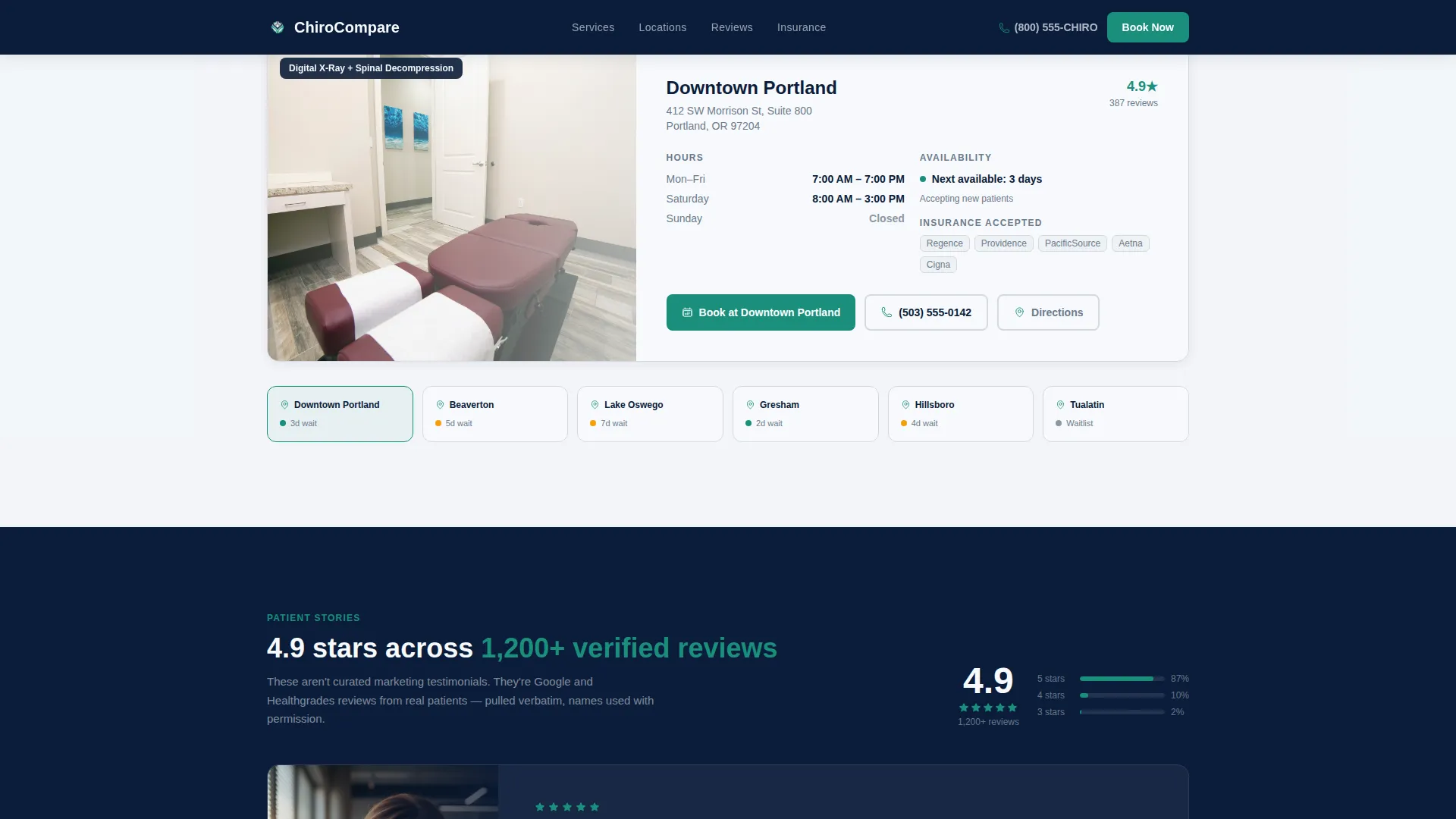
A dedicated social proof section displays a 4.9-star aggregate rating drawn from 1,200-plus verified reviews. Patient testimonials with photos are presented in a slider format. This section is positioned to reassure comparison shoppers before they reach the booking form.
Secondary Lead Capture Path
A downloadable new patient checklist PDF is offered behind an email capture field. This secondary path targets visitors who are still comparing providers and are not yet ready to book. It keeps the practice in the consideration set without requiring an immediate commitment.
Location and Scheduling Section
Each clinic location is presented with its address, hours of operation, and current availability status. Location tabs allow visitors to filter by site. This section answers the most common pre-booking questions without requiring a phone call.
Page sections overview
| Section | Purpose |
|---|---|
| Hero Photo Header | Introduce the practice with a cervical adjustment photo, stat headline, and primary call-to-action |
| Stats Impact Block | Lead each scroll stop with a key number to establish credibility before narrative |
| Service Comparison Table | Display six locations against five services using teal checkmarks for instant coverage scanning |
| Scheduling and Locations | Show clinic addresses, hours, and tab-filtered availability by location |
| Social Proof Slider | Present star ratings and verified patient testimonials with photos |
| Insurance Booking Form | Capture zip code and insurance provider, then surface nearest clinic with available slots |
| Page Footer | Deliver compact two-row footer with contact links and practice details |
Design & branding system
The visual identity follows a Service Utility theme. The palette is built on clinical confidence, not decoration. It communicates nineteen years of practice without saying so directly.
- Deep clinical navy (#0B1D3A) anchors all headers and the primary navigation bar
- Pressed-shirt white (#F7F9FC) covers content backgrounds, with steel instrument gray (#6B7B8D) used for body text and table borders
- A single decisive teal (#1A8F7C) is reserved exclusively for call-to-action buttons, active table highlights, and location pin markers; typography uses DM Sans for headers and Manrope for body text
Mobile & speed optimization
The template is built with a mobile-first device priority. Patients are often searching while in pain, from their phones, in the parking lot or waiting room. The layout responds cleanly to smaller screens without losing the comparison table's utility.
- The comparison table supports horizontal scroll on mobile so all six location columns remain accessible
- Scroll reveal animations and stat count-up effects are set to medium intensity to keep interactions smooth without slowing the initial load
- Image optimization is flagged as a build priority, with the hero photo treated as the heaviest asset and loaded first
How this template helps you convert
This template is structured to eliminate every reason a visitor has to leave before booking. The page earns the click by answering practical questions before asking for anything.
- The stats-first layout establishes trust within the first viewport, so the visitor is already confident in the practice before they reach the service comparison table
- The comparison table removes the need for the visitor to call multiple locations to find out which one offers their needed service, collapsing the research phase into a single scroll
- The two-step booking form reduces the final conversion moment to one decision: choosing a time slot, because zip code, insurance, and location matching are already handled
Other information about this template
This landing page template is part of a broader Professional Services category focused on chiropractor online presence and local search positioning. It is designed specifically for the chiropractor service area and location page niche, where patients are comparing providers by coverage, convenience, and credibility.
- The template uses a Content and Resource hub direction, meaning the page earns the visitor's commitment by organizing information before making a request
- The header concept is a Half-Page Photo and Text composition: a naturally lit cervical adjustment photograph on the left, stat-driven copy on the right
- Localization defaults are set for the United States market, using USD, MM/DD/YYYY date format, and 12-hour time display
- The footer follows a Stripe Two-Row Compact pattern, keeping the bottom of the page clean and functional
- Interactivity is set to high, including a comparison table filter, an insurance provider dropdown, and location tab switching
Theme
Service Utility
Creative direction
Stats-First Impact
Color system
Navy Authority
Style
Comparison Table
Direction
Content/Resource
Page Sections
Stats-first Section Headers
Six-location Service Comparison Table
Two-step Insurance and Booking Form
Social Proof Slider with Reviews
Secondary Email Capture Path
Location Tabs with Hours and Availability
Related questions
Can this template work for a single-location chiropractic clinic?
What services are listed in the comparison table by default?
Does the two-step booking form include live scheduling functionality?
Can the insurance provider dropdown be customized?
Who benefits most from the comparison table layout?



