Chlorine - Precision Poolcleaning Landing Page Template
Chlorine is a Corporate Precision landing page template built for Denver pool cleaning services. It combines a manifesto-style header, case study scroll sections, and stacked comparison tables to turn serious pool owners and property managers into qualified leads. A sticky two-field form captures zip code and pool type, then funnels prospects toward a same-day callback with a custom service plan.
by Rocket studio
Quick summary
Chlorine is a single-page lead generation template designed for professional pool cleaning services in the Denver metro area. It opens with a drone-shot manifesto header, moves through case study scroll sections, and closes with a sticky lead capture bar. The layout is built to establish authority fast and convert homeowners, HOA boards, and property managers into booked service calls.
Who this template is for
This template is built for pool cleaning businesses that serve a mixed client base across residential and commercial properties. If your crew handles everything from backyard plunge pools to large community facilities, this page frames that range credibly.
- Property managers overseeing multi-unit complexes with shared pools
- Homeowners who want their pool ready for the weekend without touching a skimmer
- HOA boards dealing with recurring water quality complaints each season
What problem this template solves
Most pool service pages lead with price lists and vague promises. That approach fails to build the trust needed to hand over a major backyard asset to a stranger. This template solves the credibility gap by leading with proof.
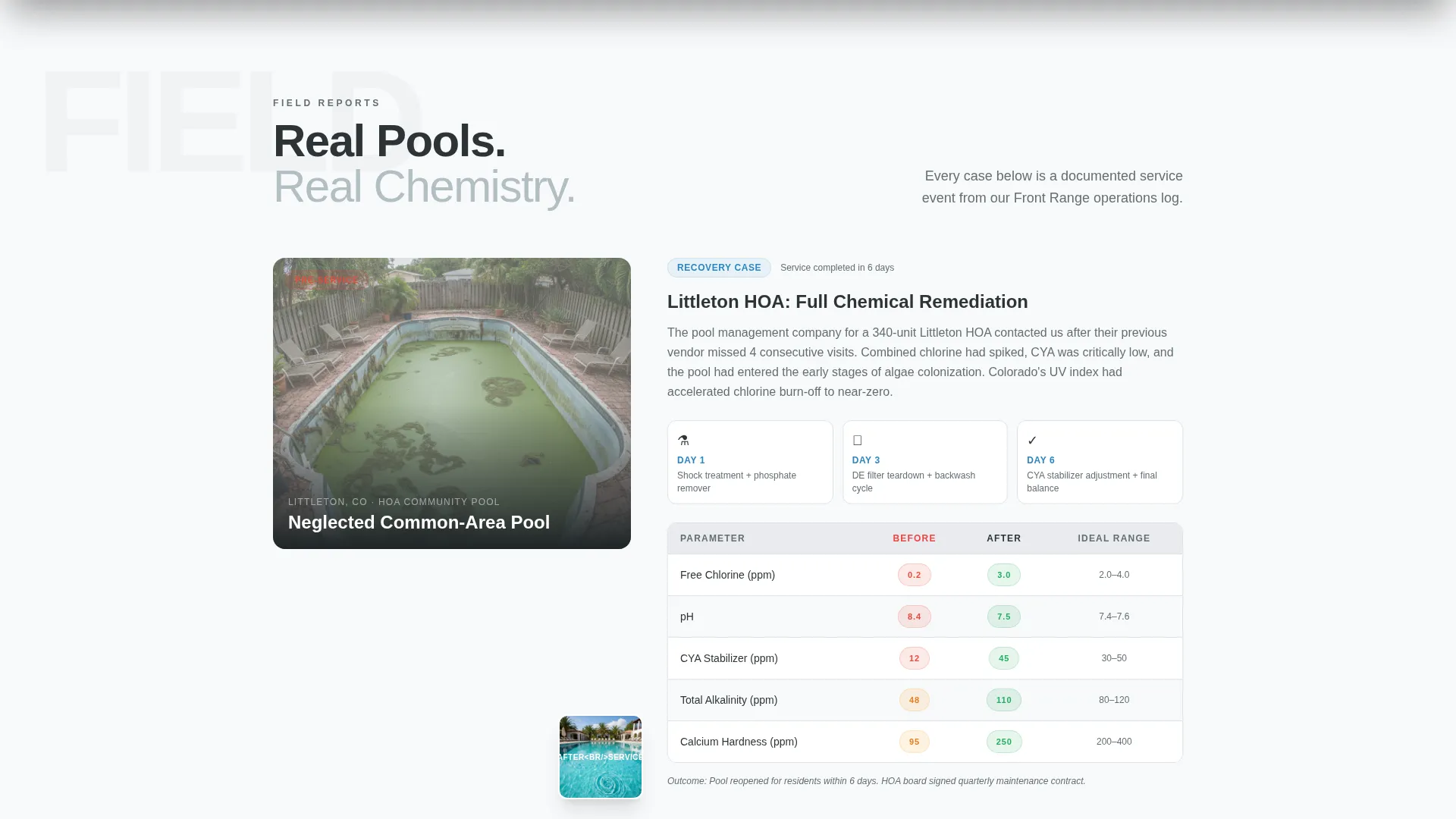
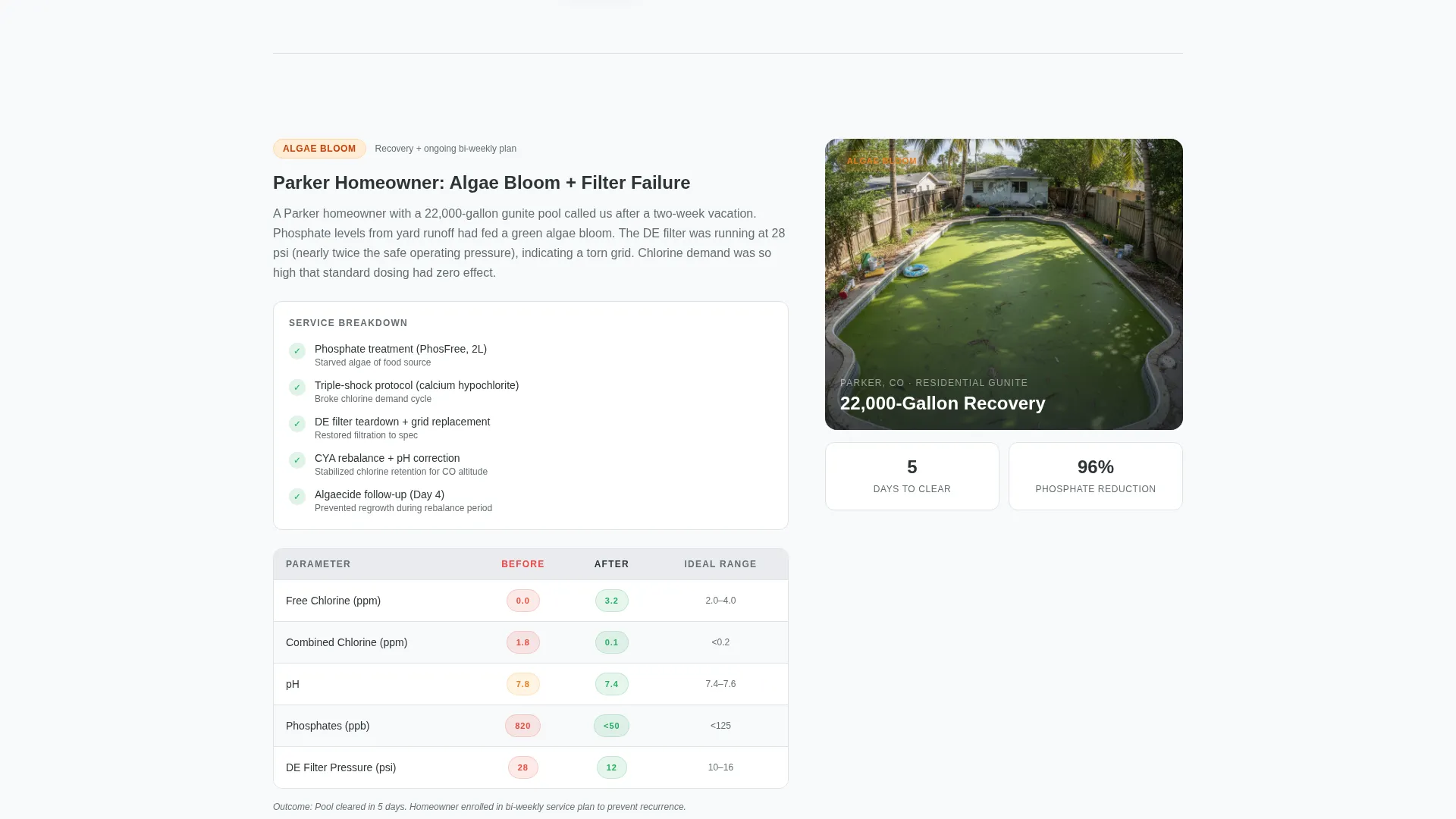
- Visitors see real before-and-after case studies with water chemistry readings and service timelines before they see any form
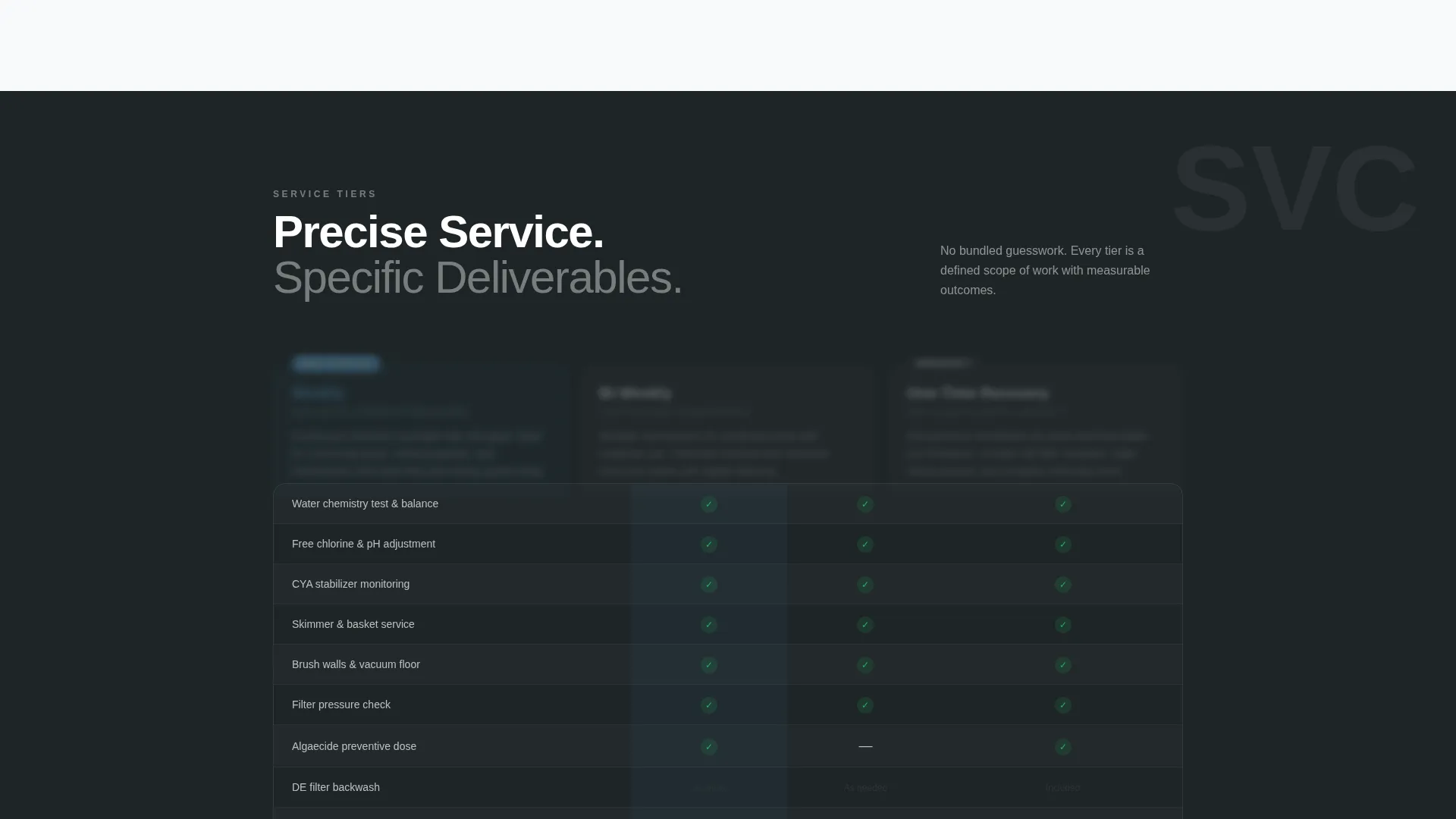
- The comparison table lays out service tiers with specific line items, not marketing language
- The lead form qualifies prospects without showing pricing, reducing drop-off while filtering for serious buyers
What you get with this template
You get a fully structured single-page layout that guides a visitor from first impression to form submission in one confident scroll. Every section is purpose-built to earn trust before asking for anything.
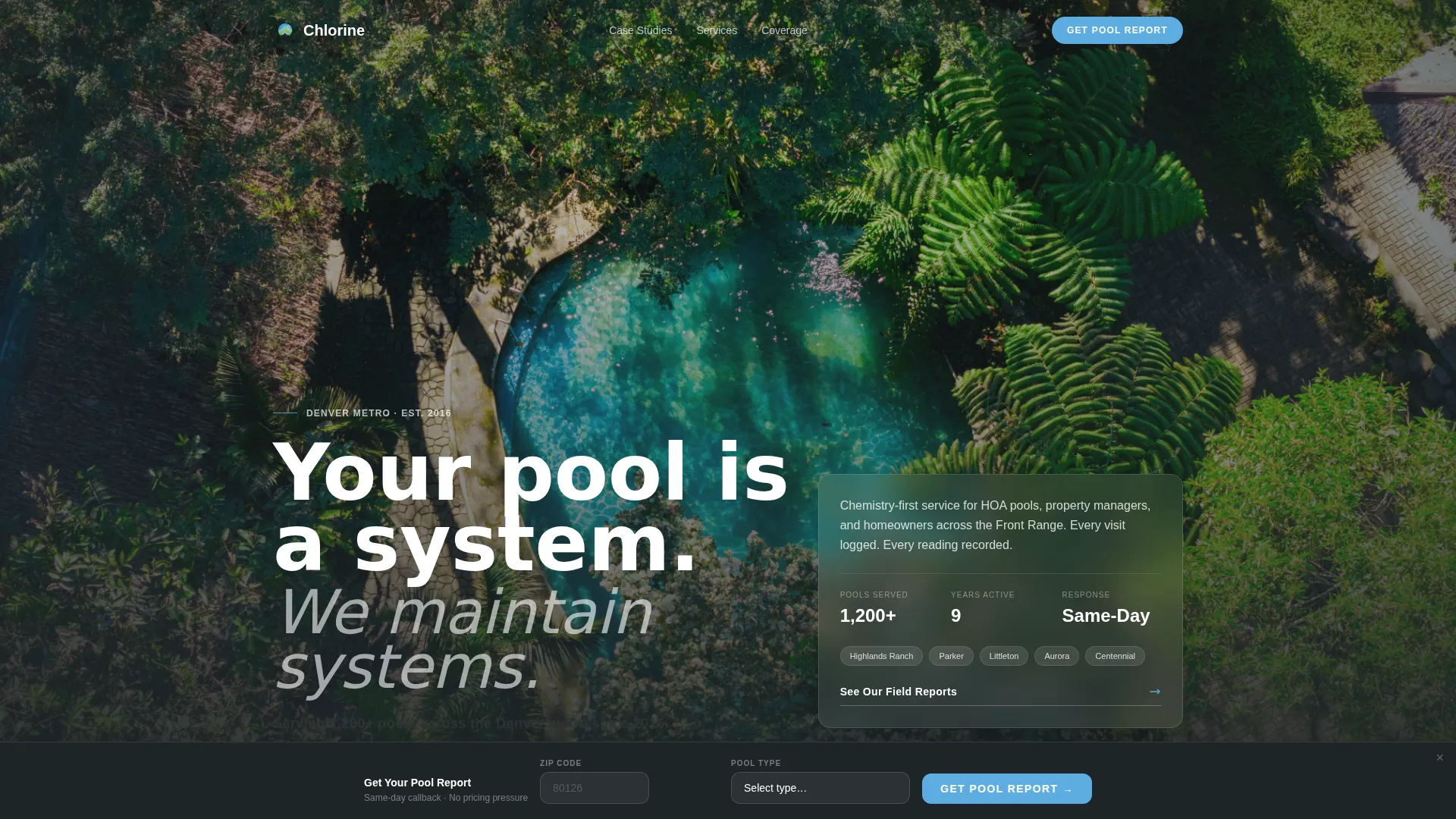
- A quote and manifesto header with headline, trust subline, and drone-shot background
- Mid-page comparison tables stacking Weekly, Bi-Weekly, and One-Time Recovery tiers against specific deliverables
- A sticky two-field lead capture bar with a two-step qualification form and a "Get Your Pool Report" call to action
Feature list
This template is built around a set of core layout and conversion components drawn directly from the brief.
Manifesto Header with Trust Signal
The header opens on a slow-panning aerial drone shot of a maintained residential pool at golden hour. White headline text and a chemical-indicator green subline stating service scale and start year establish authority before the visitor scrolls. No button interrupts the opening statement.
Case Study Scroll Sections
Each scroll section presents a real pool scenario as a before-and-after case study. Sections include water chemistry readings, service timelines, and outcome data. Complexity escalates across sections, from a single-visit algae resolution to a 48-hour HOA pool rescue.
Service Tier Comparison Tables
Mid-page comparison tables stack three service tiers side by side: Weekly, Bi-Weekly, and One-Time Recovery. Each column lists specific deliverables such as CYA stabilizer adjustment and DE filter teardown, not generic feature bullets.
Sticky Lead Capture Bar
After the first case study, a sticky bottom bar surfaces a two-field entry point asking for zip code and pool type. The bar stays visible as the visitor continues scrolling, keeping the conversion path accessible without interrupting reading.
Two-Step Qualification Form
Completing the initial two-field form opens a second step that asks for approximate pool size and current maintenance frequency. This structure qualifies the lead and sets the expectation of a same-day callback with a custom service plan.
Slate and Sky Color System
The visual identity uses a four-color palette applied with precision across every section. Deep charcoal slate and Colorado sky blue handle structure and hierarchy. Clean deck white provides breathing room. Chemical-indicator green is reserved strictly for checkmarks and trust signals.
Page sections overview
| Section | Purpose |
|---|---|
| Manifesto Header | Opens with authority and drone-shot visual |
| Trust Signal Subline | Communicates service scale and tenure |
| Case Study One | Shows a resolved Littleton HOA scenario |
| Case Study Two | Shows a single-visit algae bloom resolution |
| Service Tier Tables | Compares Weekly, Bi-Weekly, Recovery plans |
| Sticky Lead Bar | Captures zip code and pool type on scroll |
| Two-Step Form | Qualifies lead size and maintenance history |
Design & branding system
The Corporate Precision theme is built for a service brand that wants to feel institutional without feeling cold. The palette and layout work together to suggest a crew with a clipboard is already on the way.
- Deep charcoal slate (#2D3436) anchors headers and structural elements; Colorado sky blue (#5DADE2) drives interactive and highlight areas
- Clean deck white (#F8F9FA) provides generous negative space across case study sections
- Chemical-indicator green (#27AE60) appears only on checkmarks and trust signals, keeping its meaning clear and consistent
Mobile & speed optimization
The layout is designed to stay readable and functional on smaller screens. The sticky lead bar is particularly important on mobile, where it keeps the conversion entry point visible without requiring a scroll back to the top.
- Single-column flow for case study sections keeps content digestible on phone screens
- The sticky bar is formatted to sit cleanly above the mobile navigation area without obstructing content
- Comparison tables are structured to allow horizontal scroll on narrow viewports without breaking the column logic
How this template helps you convert
The page is built around a specific conversion sequence. Each section earns a little more trust before asking for a little more commitment.
- The manifesto header establishes credibility in the first three seconds, before any scroll or click is required.
- Case study sections prove capability with specific data points, so by the time the comparison tables appear, the visitor already believes the service works.
- The sticky lead bar and two-step form lower commitment friction by asking only for zip code and pool type upfront, then qualifying further in a second step, with no pricing shown at any point.
Other information about this template
This template is part of a broader set of professional service landing page designs built for local service businesses with strong geographic identity and a need to qualify leads before a sales conversation.
- The "Chlorine" template name signals its niche focus: precision pool maintenance for the Denver metro area, including suburbs such as Littleton, Parker, Highlands Ranch, and communities along the Front Range
- The comparison table layout is especially well-suited for services with multiple recurring plan options that need to be explained clearly without a phone call
- The two-step form structure is designed around the insight that serious property managers and homeowners are willing to share more detail when the first ask is frictionless
- No pricing is displayed anywhere on the page, which keeps the lead form as the primary conversion event and gives the service provider control over the sales conversation
Theme
Corporate Precision
Creative direction
Case Study Narrative
Color system
Slate & Sky
Style
Comparison Table
Direction
Lead Generation
Page Sections
Manifesto Header with Drone Shot Background
Before-and-after Case Study Sections
Service Tier Comparison Tables
Sticky Two-field Lead Capture Bar
Two-step Qualification Form
Corporate Precision Color System
Related questions
Can I replace the case study content with my own service examples?
Does the comparison table support changes to the service tier names and deliverables?
How does the two-step lead form qualify prospects without showing pricing?
Is this template suitable for both residential and commercial pool cleaning businesses?
What does the sticky lead bar look like on a mobile screen?



