Kids Robotics After-School Program Landing Page
Circuit is a modular card grid landing page built for kids robotics after-school programs. It guides parents through a five-step curriculum journey, from wiring a first servo motor to a live robot showcase. Age-group buttons carry visitors straight to an enrollment page. The design blends playful energy with structured trust signals, built for parents scrolling on mobile.
by Rocket studio
Quick summary
Circuit is a single-page, click-through template for elementary school robotics programs. It walks parents through a five-step curriculum using animated flip cards, then sends them to an enrollment page with one tap. The design feels like a kid's science notebook. It is built to earn parent trust before asking for anything.
Who this template is for
This template is built for robotics program operators, enrichment program directors, and maker lab founders running after-school coding and robotics classes for kids in elementary school. It speaks directly to suburban, dual-income parents who want structured, skill-building activities for their children.
- After-school STEM program founders targeting families with children ages 6 to 12
- Maker lab operators running robotics enrichment programs inside elementary schools
- Enrichment directors who need a focused click-through page to drive enrollment sign-ups
What problem this template solves
Parents comparing enrichment options need more than a feature list. They need to see a real learning path and feel confident their child will build something meaningful. Most program pages give vague promises. Circuit replaces vague promises with a walkthrough of the actual curriculum, step by step.
- Parents cannot visualize what their child will actually learn from a typical program page
- Enrollment pages often ask for commitment before trust is established
- Generic after-school program sites fail to differentiate robotics from passive screen-time activities
What you get with this template
You get a fully structured, modular landing page that moves a parent from curious visitor to enrollment click in one confident scroll. Every section earns a little more trust before the call to action appears again.
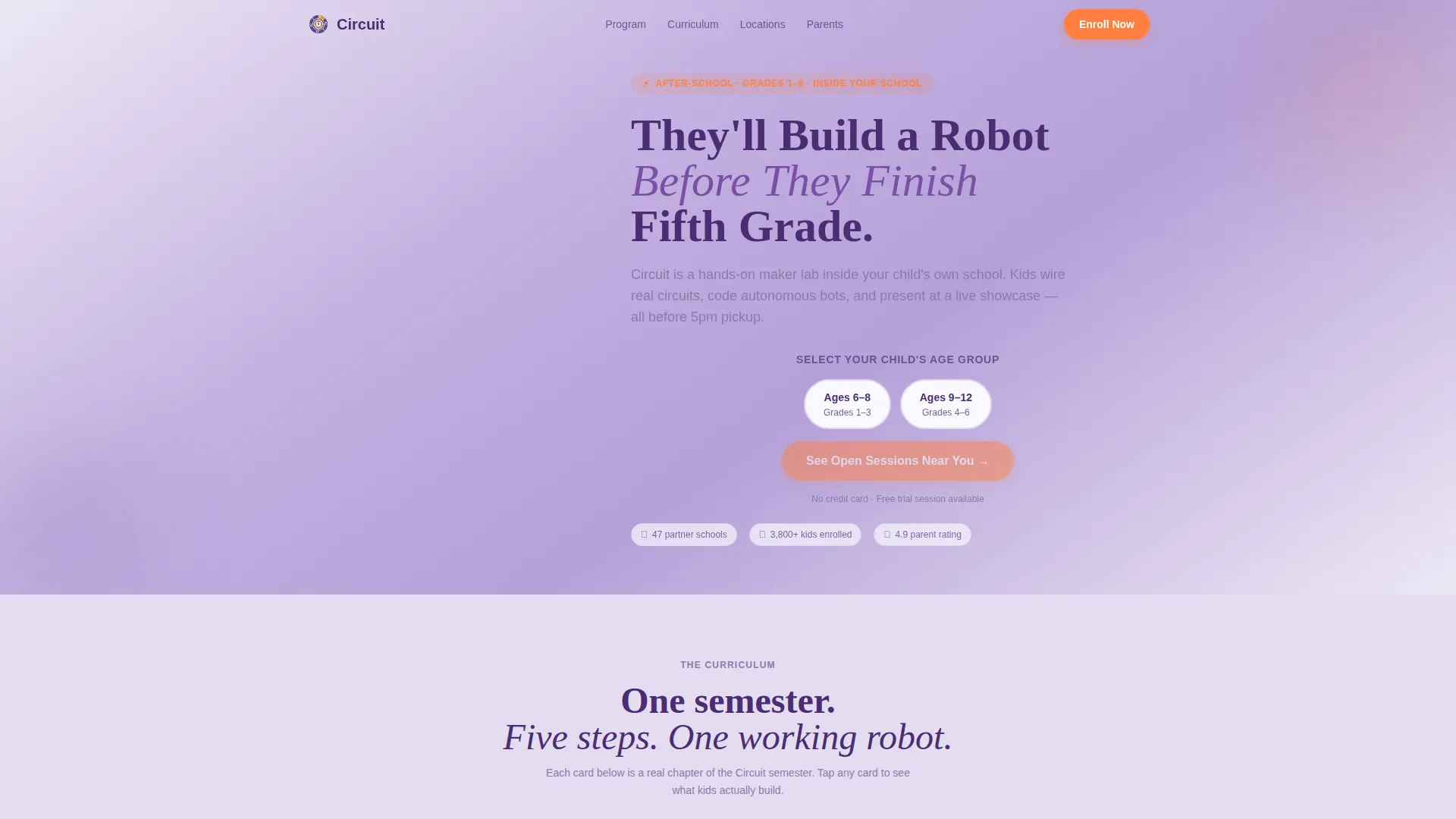
- An animated 4x3 icon grid header with a bold headline and two age-group call-to-action buttons
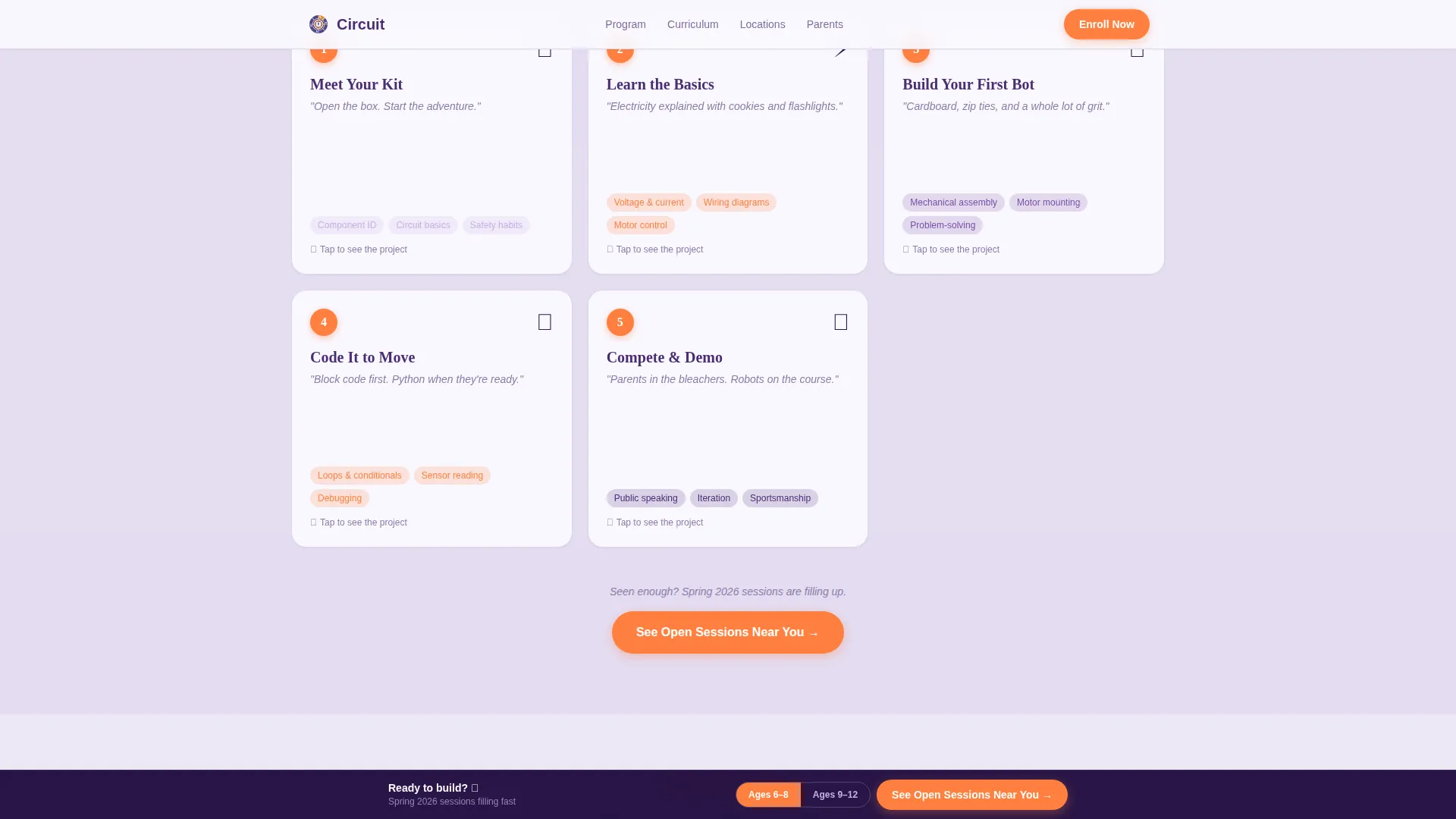
- A five-card curriculum journey section with flip cards that reveal descriptions, age ranges, and student project details
- A sticky bottom bar, a testimonial grid, a bento-style trust section, and an FAQ accordion, all built into the template
Feature list
This template is purpose-built for a kids robotics after-school program and packs several focused, parent-facing components.
Animated Icon Grid Header
A 4x3 mosaic of hand-drawn-style icons, including a gear, circuit board, joystick, lightbulb, wrench, battery, and robot face, animates on page load. Each icon pops in one after another with a staggered sequence. The effect signals a hands-on, craft-focused program without a single stock photo.
Five-Step Curriculum Flip Cards
Five modular cards walk parents through the full program arc: Meet Your Kit, Learn the Basics, Build Your First Bot, Code It to Move, and Compete and Demo. Each card flips or expands to show a short description, an age range, and a student project photo. The sequence builds momentum naturally, raising complexity with every step.
Age-Group Call-to-Action Buttons
Two primary call-to-action buttons let parents select their child's age group, either ages 6 to 8 or ages 9 to 12. The selected group is passed as a parameter to the enrollment page so the next page pre-filters available locations and times. No form is needed on this page.
Sticky Enrollment Bottom Bar
After the third curriculum card, a sticky bottom bar appears and remains visible as the parent continues scrolling. It repeats the primary call to action, "See Open Sessions Near You," keeping the conversion path present without interrupting the content flow.
Bento-Style Trust Grid
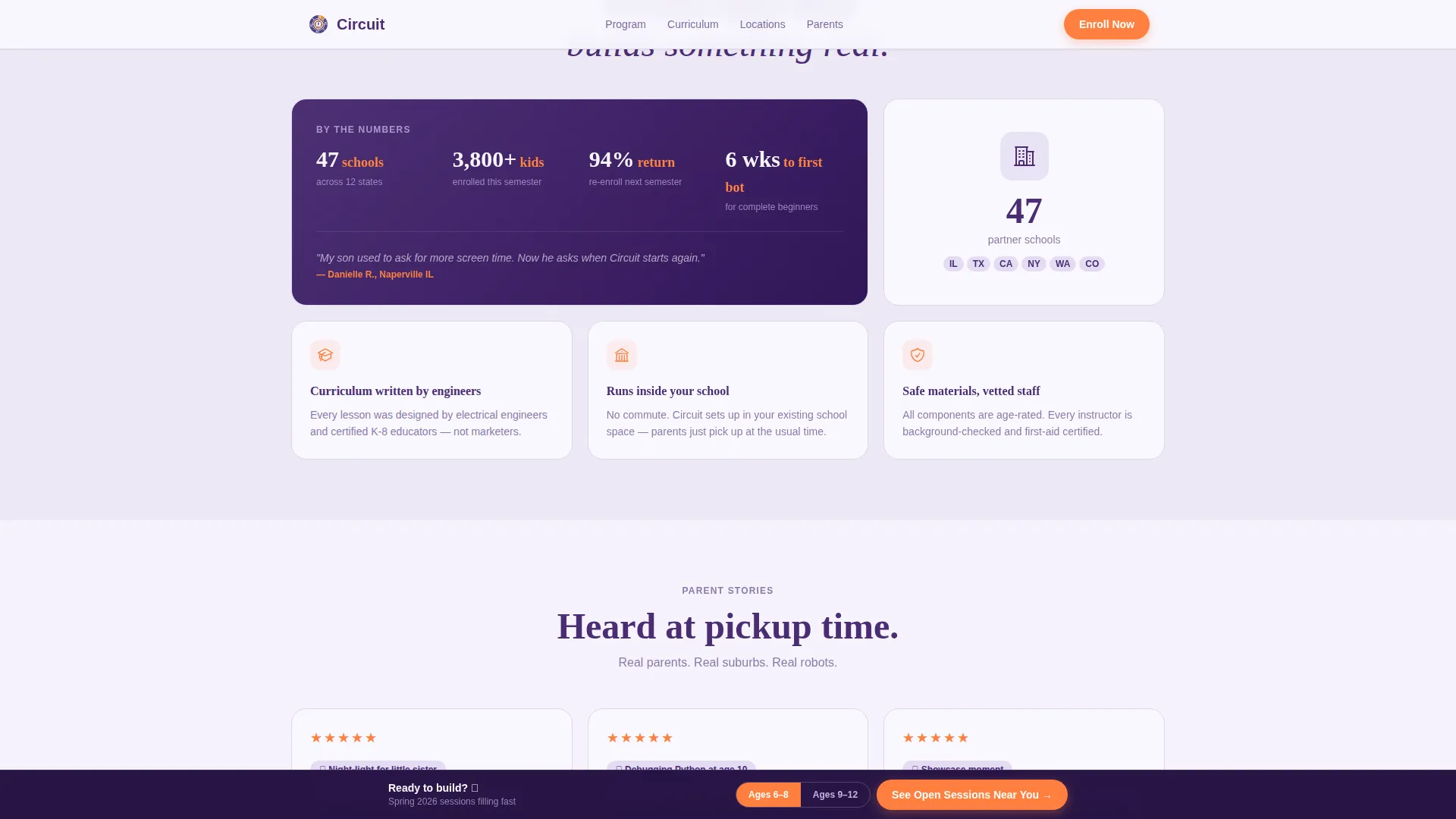
An asymmetric bento grid section presents program stats and parent trust signals in a visually varied layout. This section gives data-oriented parents, who are comparing enrichment program options, the structured proof they need before clicking through.
Parent Testimonial Cards
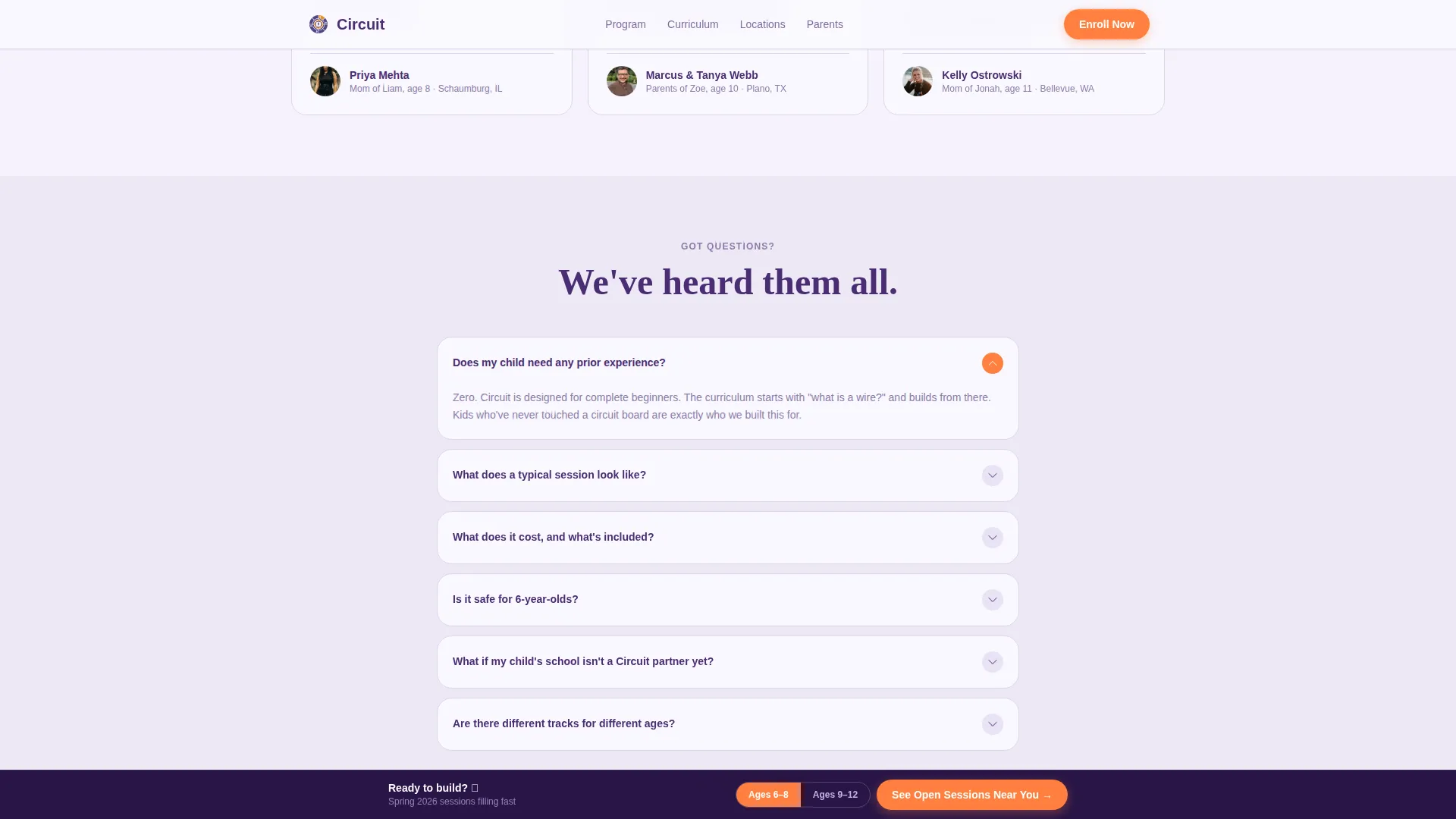
Three testimonial cards display parent feedback with names, suburbs, and specific student outcomes. The testimonials are grounded in real-result language, reinforcing that the program produces visible skills rather than abstract learning.
Page sections overview
| Section | Purpose |
|---|---|
| Hero Icon Grid | Animated mosaic header with headline and age-group buttons |
| Curriculum Journey | Five flip cards covering the full program step by step |
| Why Circuit Works | Bento grid with stats and parent trust signals |
| Parent Testimonials | Three-card grid with named, suburb-specific outcomes |
| FAQ Accordion | Logistics and enrollment questions in an expandable layout |
| Footer | Single-row linear footer with essential links |
Design & branding system
The visual identity follows an Educational Guide theme using the Lavender Dream color system. The palette feels like a science notebook decorated with stickers, structured enough for parents, playful enough for kids.
- Colors: soft digital lavender (#C3B1E1) as the background wash, deep mission-control purple (#4A2D73) for headlines and navigation, chalk-white (#FAF8FF) for card surfaces, and electric tangerine (#FF7F3E) on every button, badge, and interactive accent
- Typography: Fraunces for display headlines and DM Sans for body text, combining editorial warmth with clean readability
- Style: hand-drawn icon aesthetic, card-surface modularity, and sticker-energy accents throughout
Mobile & speed optimization
This template is designed mobile-first, built for parents who scroll during school pickups, soccer practice, or commutes. Animations use CSS and an Intersection Observer approach, keeping the page light without relying on heavy JavaScript libraries.
- Staggered icon pop-in, card flip interactions, and scroll reveals are powered by CSS animations
- The sticky bottom bar is optimized for thumb-reach on small screens, keeping the call to action always accessible
- The modular card grid layout reflows cleanly across phone, tablet, and desktop screen sizes
How this template helps you convert
Circuit does not ask parents to commit before trust is built. The page earns confidence gradually through curriculum transparency, and the call to action lands when parents are already mentally enrolled.
- The five-step flip card journey builds emotional investment before any enrollment button appears, reducing hesitation at the click-through moment
- Age-group parameter passing means the next page feels personally relevant, which lowers drop-off between the landing page and the scheduling page
- The sticky bottom bar ensures the primary call to action is never more than a glance away, without interrupting the trust-building content above it
Other information about this template
Circuit is categorized under Kids and Family, with a specific focus on the kids robotics after-school program niche. It is built as a click-through landing page, meaning its only conversion goal is to move a parent to the enrollment and scheduling page. There is no form on this page. The template is well suited for suburban USA markets using USD pricing and local session filtering.
- Template style: Card Grid (Modular) with a Step-by-Step Guide creative direction
- Header concept: Icon Grid with staggered load animation
- Landing page direction: Click-Through with age-group parameter passing to the next page
- Color system: Lavender Dream, intersection match score of 13 across Kids and Family category alignment
Theme
Educational Guide
Creative direction
Step-by-Step Guide
Color system
Lavender Dream
Style
Card Grid (Modular)
Direction
Click-Through
Page Sections
Animated Icon Grid Header
Five-step Curriculum Flip Cards
Age-group Call-to-action Buttons
Sticky Enrollment Bottom Bar
Bento-style Trust Grid
Parent Testimonial Card Grid
Related questions
Does this template include a sign-up form?
Can I update the curriculum cards to match my own program content?
Is this template built for mobile users?
Can this template support a robotics program running across multiple school locations?
What sections are included in this template?



