Public Works Government Specialist Professional Website Template
Gazette is a hub-and-spoke landing page template built for state public works and infrastructure departments. It gives county engineers, contractors, municipal clerks, and citizens one authoritative entry point. Live-number metrics, anchor navigation, and contextual call-to-action buttons guide every visitor to the right portal section in seconds, without any forms or friction.
by Rocket studio
Quick summary
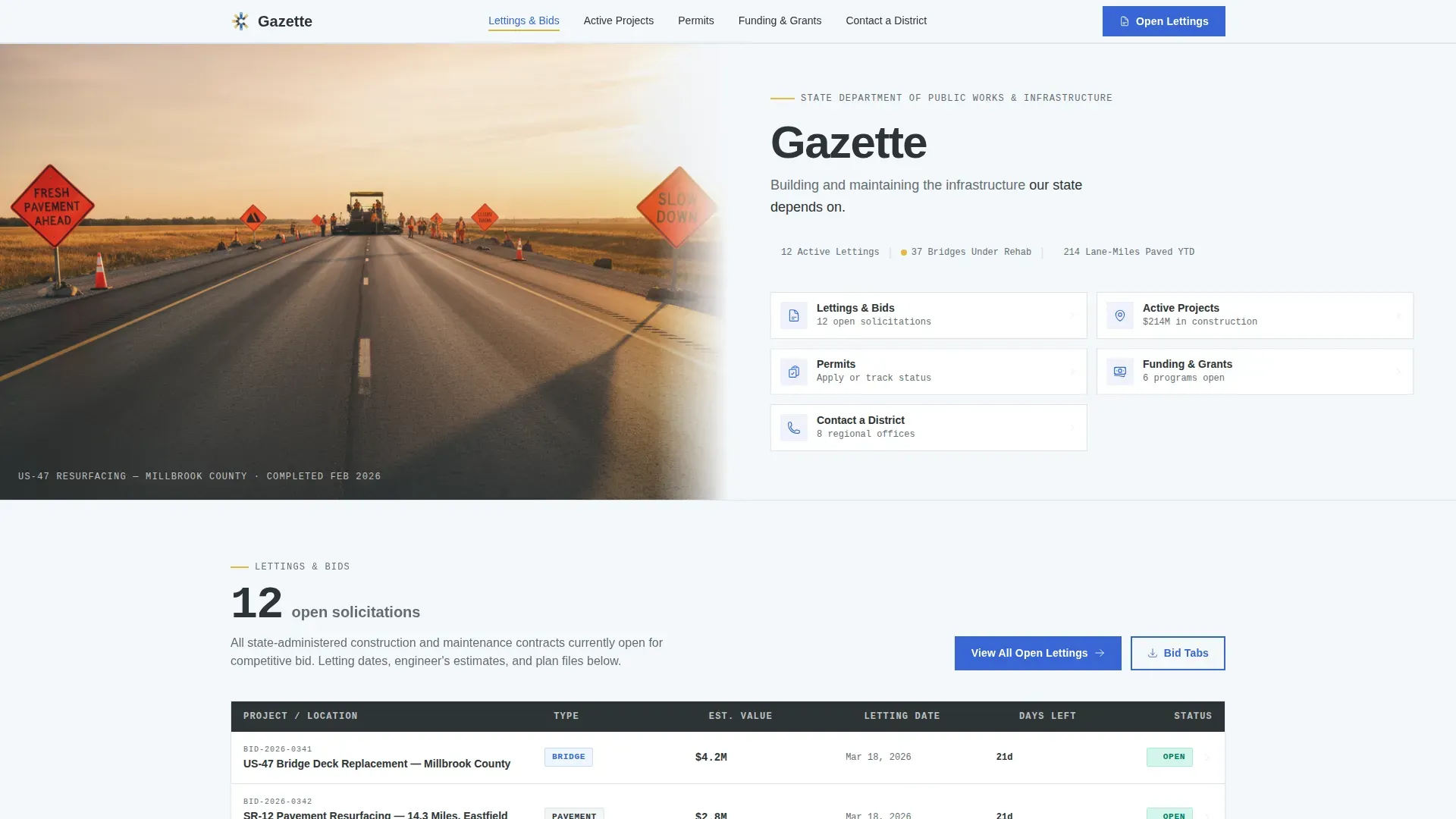
Gazette is a single-page, anchor-nav template designed for a state public works and infrastructure department. It leads with a half-page highway photo and a department headline, then organizes five spoke sections around real data metrics. Every section ends with a clearly boxed next action, so engineers, contractors, clerks, and citizens all find their doorway fast.
Who this template is for
This template serves state and local government teams that need one trusted, always-current digital entry point for their public infrastructure department. It is built for people who move fast and need accurate information on the first click.
- County engineers and contractors refreshing bid tabulations and lettings before the workday starts
- Municipal clerks and grant administrators tracking funding deadlines and disbursement programs
- Taxpayers and general citizens who need to report an issue or find the right district office
What problem this template solves
Public works departments often scatter their information across disconnected portals, buried PDFs, and outdated contact pages. Visitors waste time hunting for bid tables, project maps, and phone numbers that should take seconds to find.
- No single, authoritative entry point means high-urgency users such as contractors and engineers lose trust quickly
- Funding program deadlines get missed because grant information is hard to surface clearly
- Citizens cannot easily identify which district office handles their location or issue
What you get with this template
You get a fully structured, single-page landing page with five named spoke sections, each anchored from the top navigation. The layout is organized like a well-labeled field office: every section opens with a headline metric, and every section closes with a direct call-to-action link to a deeper portal page.
- Half-page hero with a highway photograph, department title block, and anchor navigation bar
- Five content spoke sections covering Lettings and Bids, Active Projects, Funding and Grants, Permits, and Contact a District
- A linear single-row footer and a consistent gold-on-blue interactive system throughout
Feature list
This section covers the core built-in capabilities that define how Gazette works and what makes it effective for a public infrastructure context.
Anchor Navigation System
A fixed anchor nav sits directly below the department headline in the hero. It lists every spoke section by name, allowing power users such as engineers and contractors to jump to the exact section they need without scrolling through unrelated content.
Headline Metric Openers
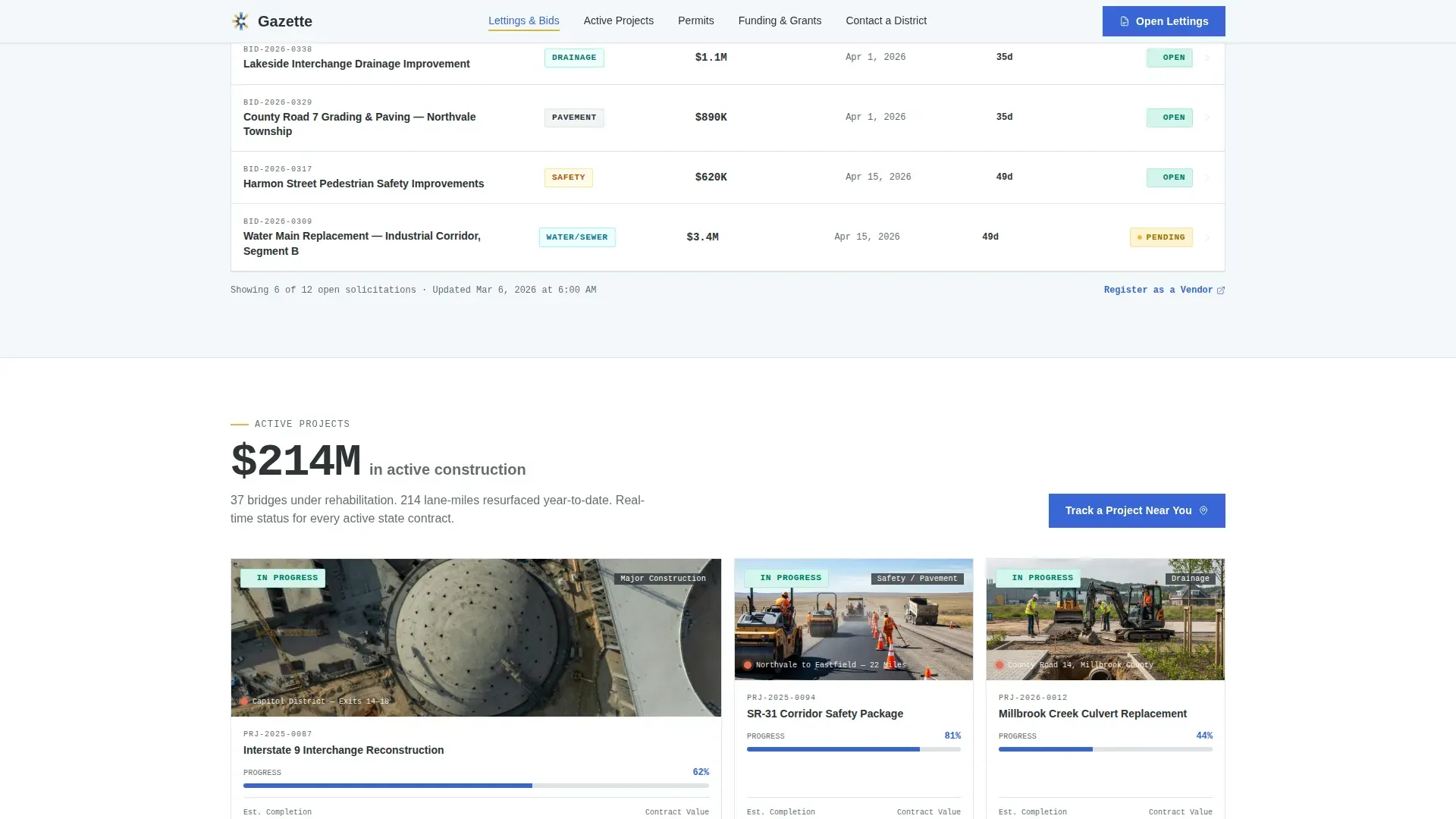
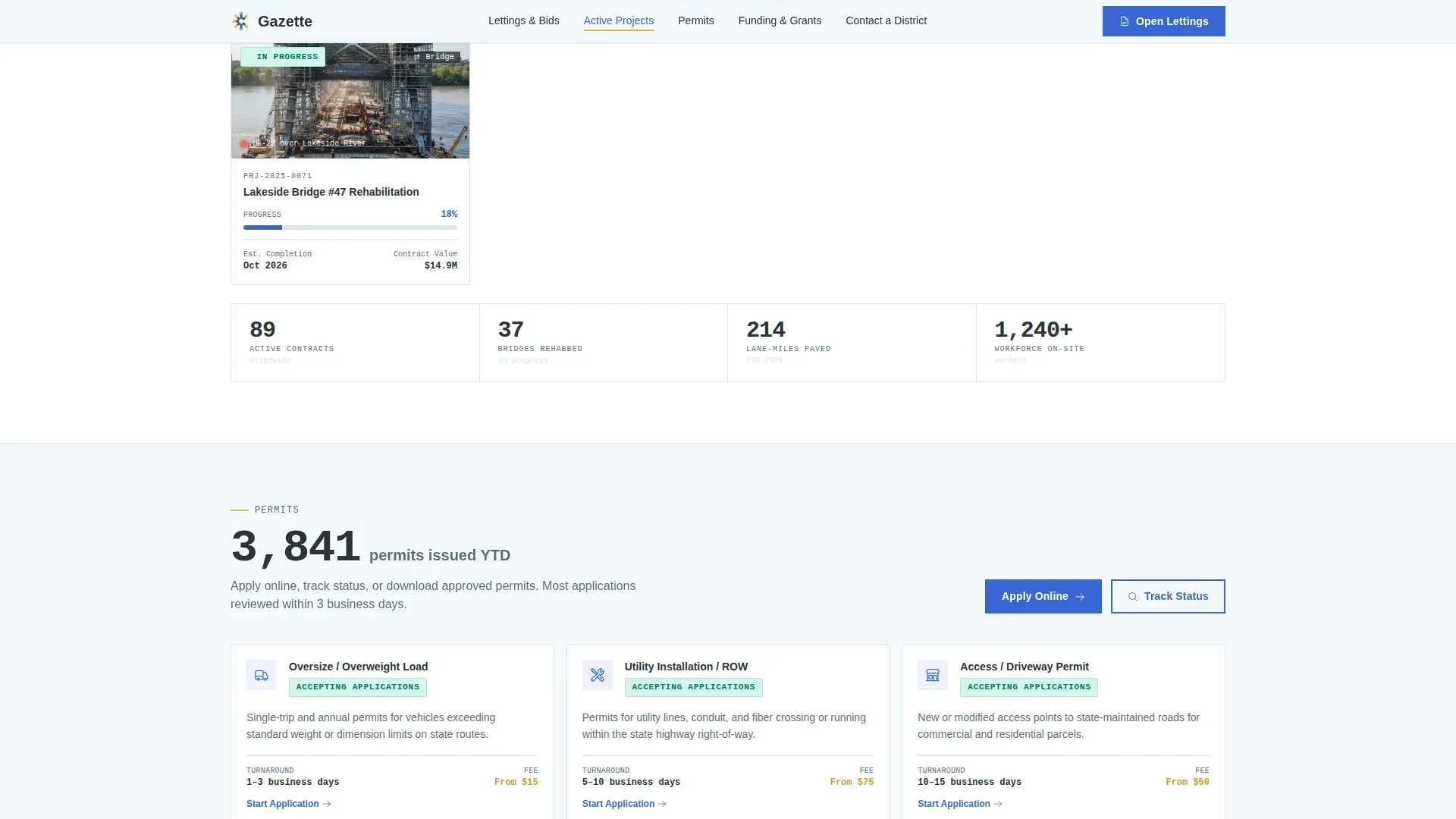
Each spoke section opens with a single bold metric displayed in monospace type: active construction dollar totals, open bid solicitation counts, or bridge rehabilitation figures. These numbers establish departmental credibility before the visitor reads a single line of body copy.
Contextual Call-to-Action Buttons
Every section ends with a clearly boxed button whose label matches the section's purpose. The label shifts contextually: "View Open Lettings" in the bids section, "Track a Project Near You" on the map section, and "Find Your District Office" in the contact section. No generic buttons appear anywhere on the page.
Status Badge and Hover System
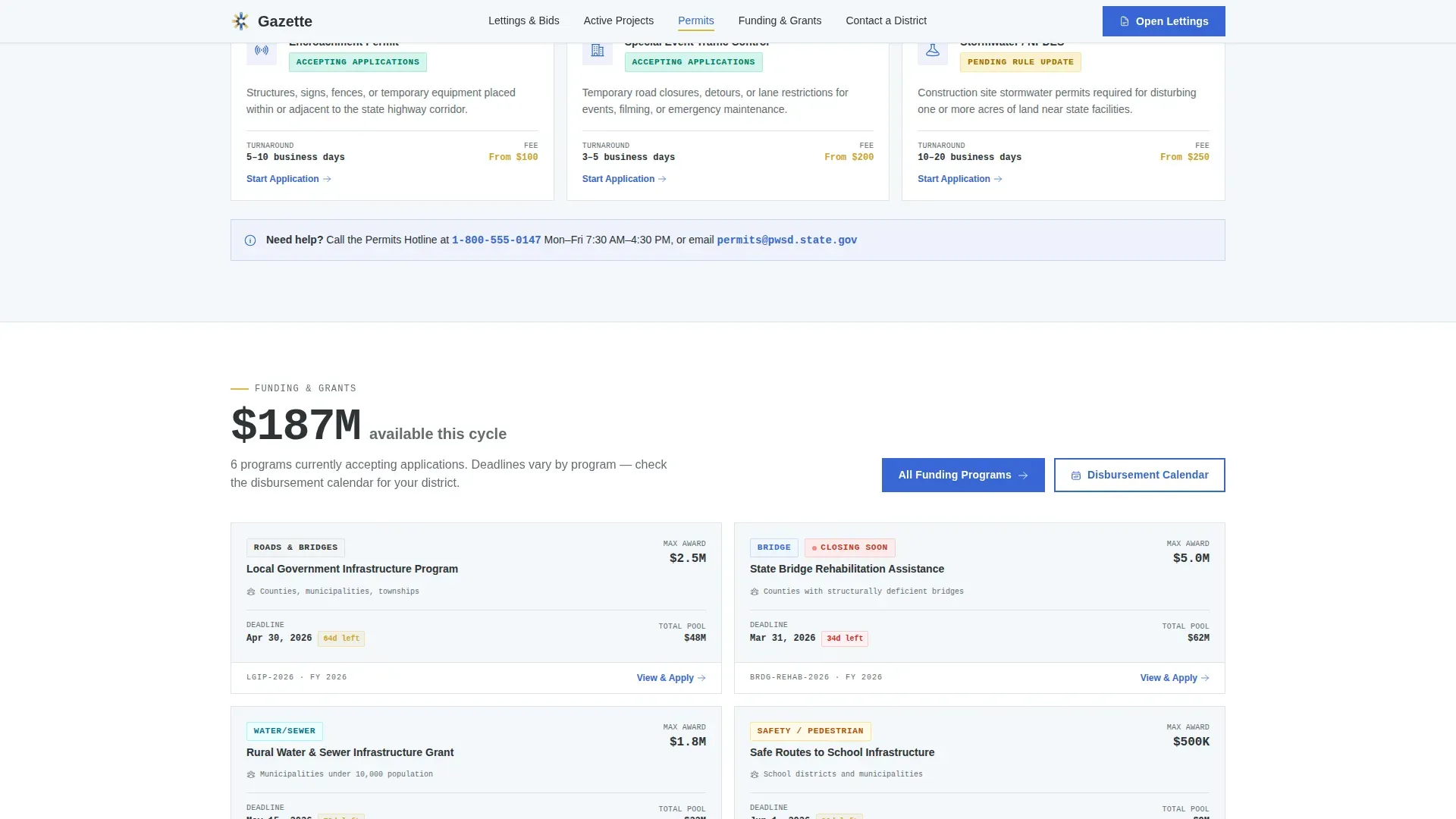
Gold lane-stripe accents appear on deadline badges, project status indicators, and call-to-action hover states. Blue carries every clickable element. Together they form a consistent visual grammar that trains the visitor's eye in seconds.
District Contact Grid
The Contact a District section presents a structured grid of district offices with phone and email quick-links. An accordion interaction lets users expand district details without leaving the page, keeping the layout clean on all screen sizes.
Bento Grid Project Map Cards
The Active Projects section uses a bento-style grid of map marker cards. Each card surfaces a project name, status badge, and location detail, giving contractors and engineers a scannable overview of where construction activity is currently concentrated.
Page sections overview
| Section | Purpose |
|---|---|
| Hero with Anchor Nav | Introduces the department and anchors all spoke sections |
| Lettings and Bids | Surfaces open bid solicitations with a metric and table preview |
| Active Projects | Displays a bento grid of project cards with a dollar-total headline |
| Funding and Grants | Shows program cards with deadline badges for clerks and administrators |
| Permits | Provides a clear entry point to the department's permitting process |
| Contact a District | Lists district offices with phone, email, and accordion detail |
| Footer | Single-row linear footer with department links and legal baseline |
Design & branding system
The visual identity follows a Directory and Discovery theme built on a Cloud Canvas color palette. The style reads as utilitarian-authoritative: neutral and organized at the base, with precise color cues that guide the eye to every interactive element.
- Base background in open-sky white (#F4F7FA), section dividers in asphalt charcoal (#2D3436), and accent touches in lane-stripe gold (#E2B842)
- Civil-engineering blue (#3867D6) carries all links, active nav states, and call-to-action buttons throughout the page
- Headings set in DM Sans bold, data and metrics displayed in IBM Plex Mono, and body copy in DM Sans regular
Mobile & speed optimization
The template is designed desktop-first to match the primary audience of engineers and contractors working on workstations. It is also built to be fully responsive for field use on mobile devices.
- Scroll reveals and hover states use low-to-medium animation weight, keeping motion purposeful rather than decorative
- Static sections use server component architecture so the page loads cleanly without unnecessary client-side overhead
- The district accordion compresses multi-row contact grids into a clean mobile layout without losing any contact information
How this template helps you convert
Gazette earns the click before asking for it. Every design and layout decision is aimed at moving the visitor from landing to the correct portal page in the fewest steps possible.
- Frontloading live numbers and status badges signals that the department is active and current, building trust before the visitor decides to drill deeper into any section
- Contextual call-to-action button labels match each visitor's specific intent, so contractors see "View Open Lettings" and citizens see "Find Your District Office" rather than a single generic button
Other information about this template
Gazette is built with the specific rhythms of government portal users in mind. The Industry Report creative direction gives the page the cadence of an annual infrastructure briefing, while the hub-and-spoke structure keeps it functional as a daily-use directory.
- The template uses an Industry Report creative direction that makes live government data feel authoritative rather than bureaucratic
- A Half-Page Photo and Text header concept pairs a golden-hour highway photograph with clean sans-serif department branding for immediate visual credibility
- The Click-Through landing-page direction means no forms appear on this page; every element is a clearly labeled doorway to a deeper portal
- Localization defaults are set for a United States government context: USD currency, MM/DD/YYYY date format, and imperial measurements throughout
Theme
Directory & Discovery
Creative direction
Industry Report
Color system
Cloud Canvas
Style
Hub & Spoke (Anchor Nav)
Direction
Click-Through
Page Sections
Anchor Navigation with Smooth Scroll
Headline Metric Openers
Contextual Call-to-action Buttons
Status Badges and Gold Hover States
Bento Grid Project Cards
District Accordion Contact Grid
Related questions
Does this template include any forms or intake fields?
Can the live metric numbers be updated to match real department data?
Is the anchor navigation fixed or does it scroll away with the hero?
How many district offices can the Contact a District section display?
Who is the primary audience this landing page is designed for?



