City & Municipal Directory Website Template
City is a modern council landing page template built as a searchable directory for local government. It organizes council members, meeting agendas, voting records, and public documents into one clean, card-grid layout. Designed for civic transparency, it guides residents, journalists, and community leaders to the information they need without friction.
by Rocket studio
Quick summary
City is a single-page council directory template that puts every member, meeting, and public document in one searchable place. The layout follows a card-grid structure with inline filtering, expandable meeting rows, and a targeted email signup for board-specific alerts. It is built for civic clarity, not bureaucratic complexity.
Who this template is for
This template is designed for city and municipal teams that want to publish council information in a way residents can actually use. It works equally well for small city halls and larger multi-board governments.
- Residents tracking rezoning cases, permit ordinances, or neighborhood issues
- Journalists and neighborhood association leaders who need voting records on a deadline
- Small business owners following budget or planning commission decisions
What problem this template solves
Most municipal websites bury critical information inside PDFs, nested menus, or outdated phone directories. Residents give up before they find what they came for, and that erodes trust in local government. This template solves the discoverability problem directly.
- No more hunting through archived PDFs to find a meeting agenda or resolution
- No more guessing which board handles which issue or when office hours are held
- No more generic contact pages when a resident needs a specific council member's schedule
What you get with this template
You get a fully structured, single-page landing page organized around a central search experience. Every section is built to reveal information progressively as the visitor scrolls, earning their trust layer by layer.
- An oversized search input with quick-filter chips for members, meetings, votes, and documents
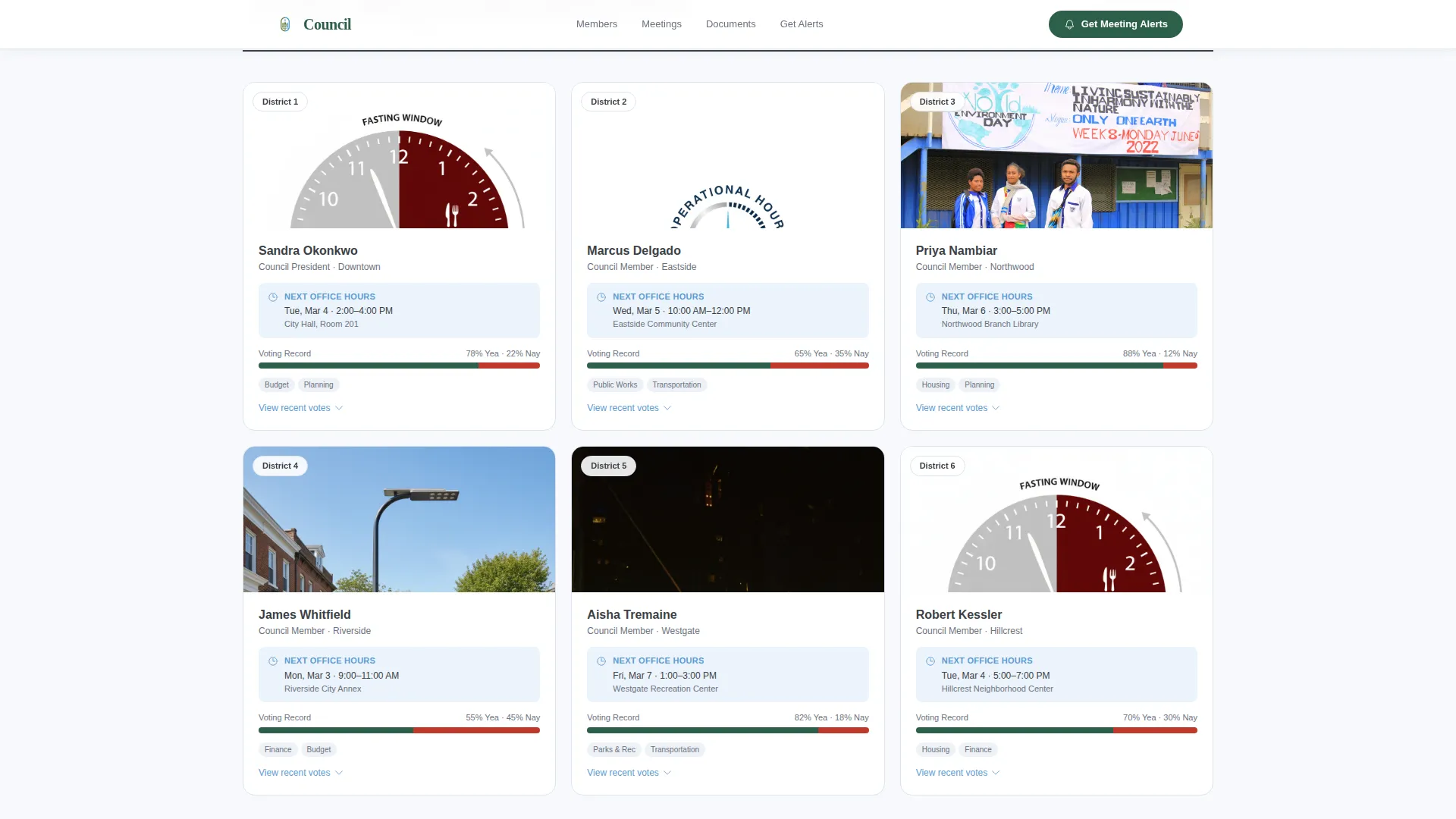
- A modular card grid of council members showing district, office hours, and a voting record snippet
- An expandable meeting timeline, a filterable document archive, and an email signup section with board-specific checkboxes
Feature list
This template ships with a focused set of interactive and structural components drawn directly from the project brief.
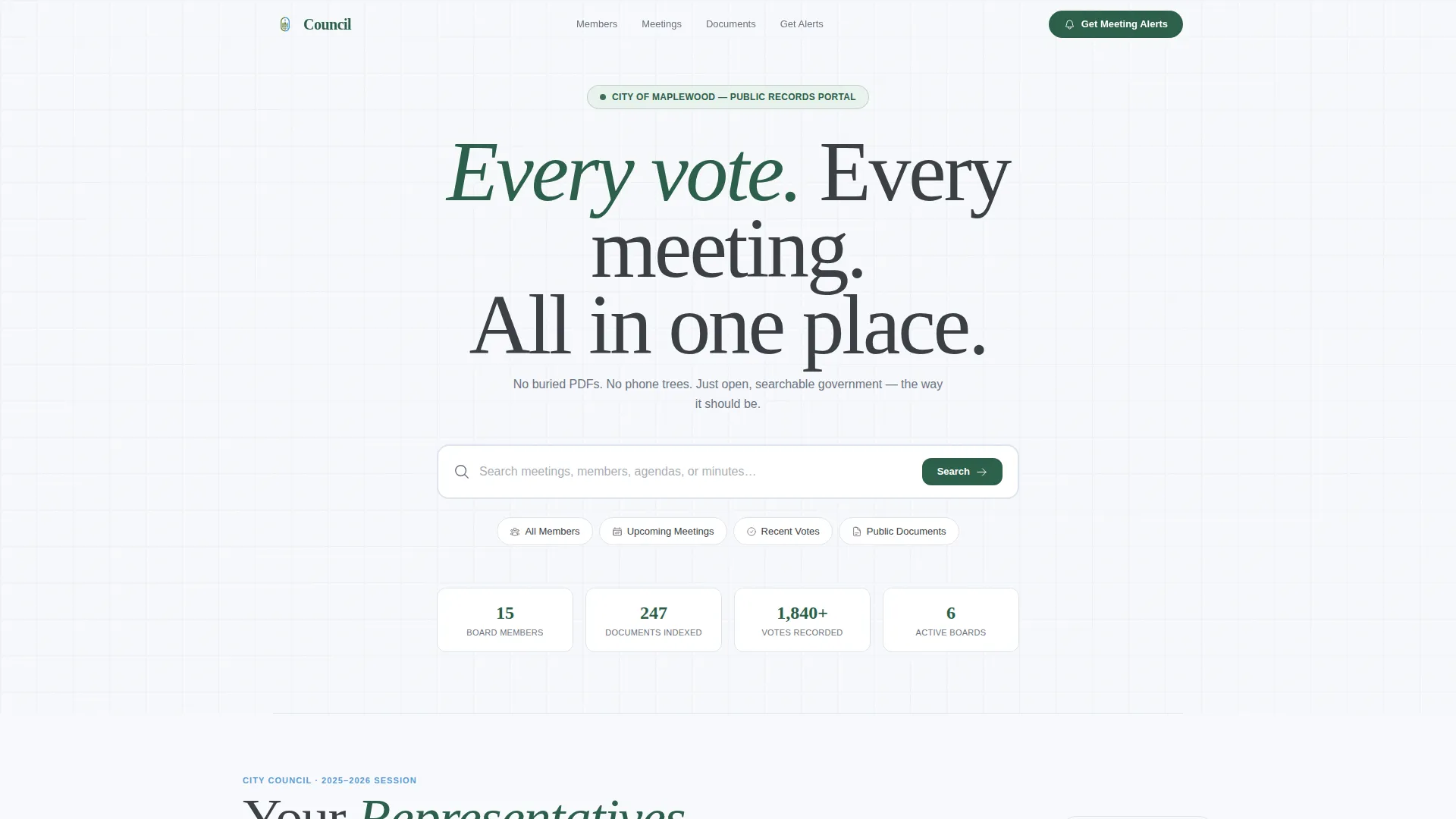
Centered Search Header
The header is a single, tall search input centered on a clean white background. Ghost text reads "Search meetings, members, agendas, or minutes..." and a row of quick-filter chips sits beneath it: All Members, Upcoming Meetings, Recent Votes, and Public Documents. The search box is the visual statement of the page.
Council Member Card Grid
Council members are displayed in an asymmetric card grid. Each card shows a photo, district label, next office hours, and a live voting-record snippet. Cards animate in with staggered GSAP ScrollTrigger reveals as the user scrolls into the section.
Expandable Meeting Timeline
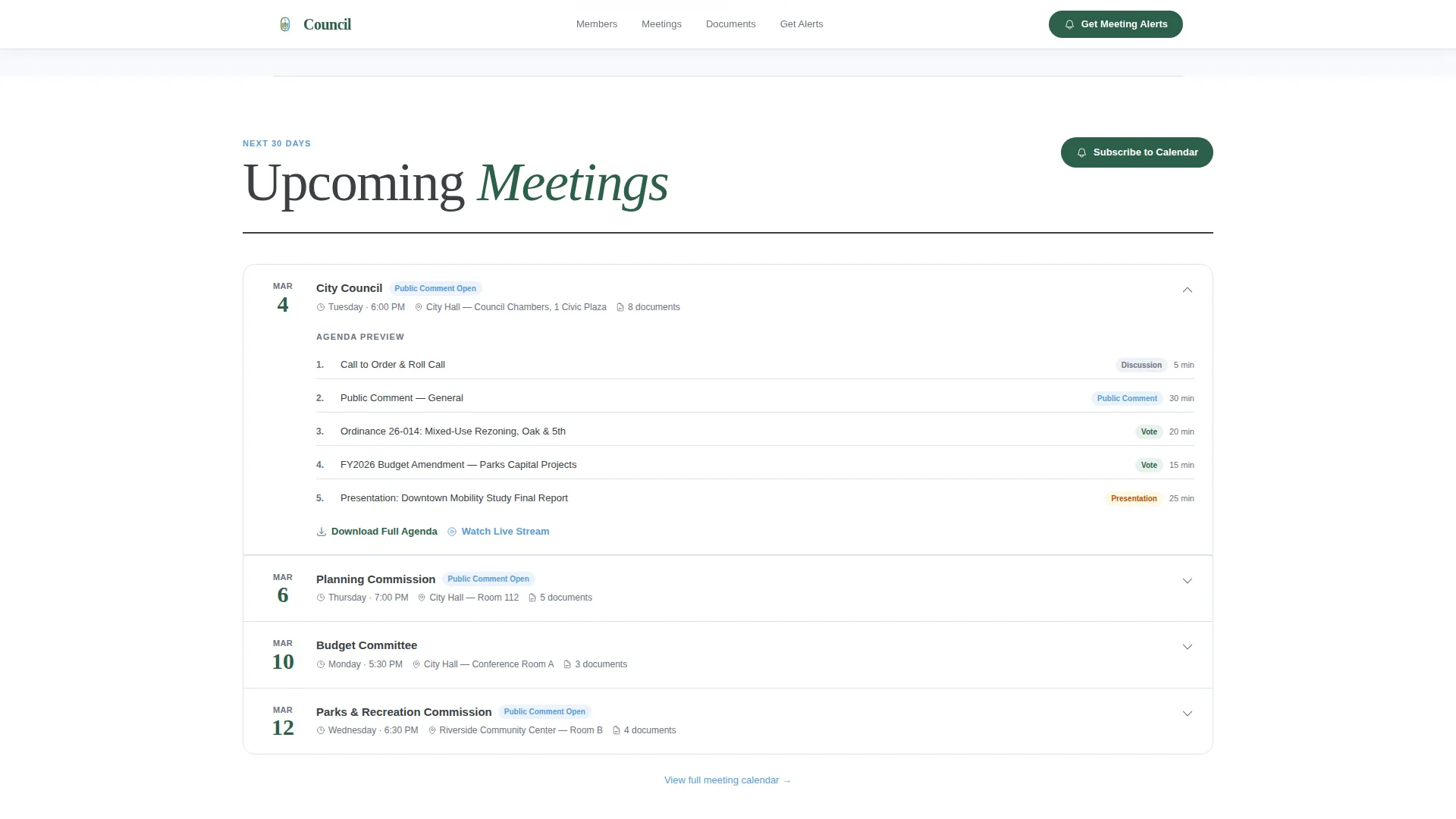
Upcoming meetings are displayed as a scrollable timeline. Each row can be expanded inline to show a preview of the meeting agenda, so visitors can quickly assess whether a specific session is relevant to them.
Filterable Document Archive
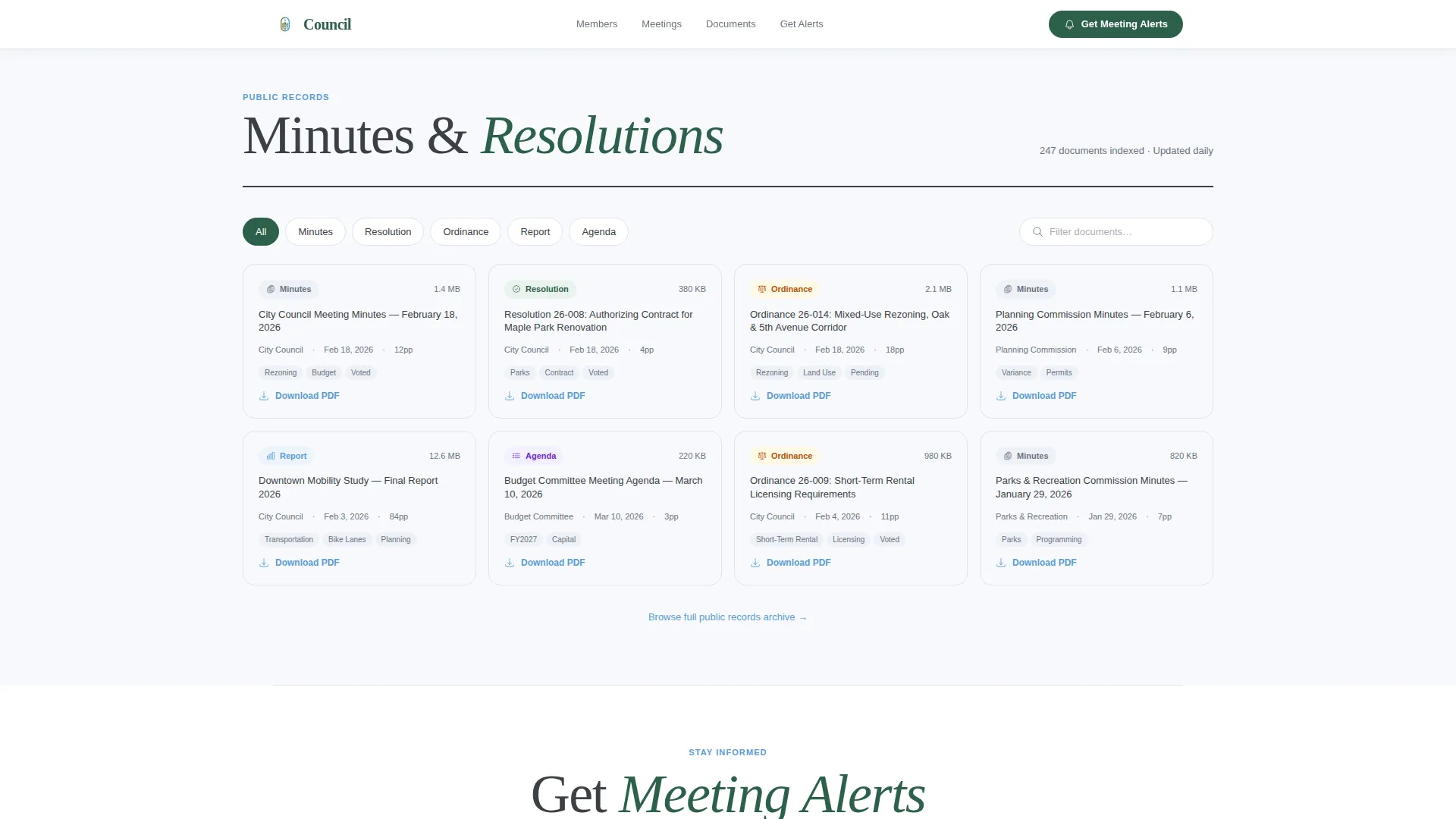
Minutes and resolutions are organized in a filterable grid. Visitors can narrow results by board or document type without leaving the page. This section functions like a well-organized filing cabinet for public records.
Meeting Alert Signup
The primary call to action is a focused email signup. A single email field is paired with a checkbox grid that lets residents subscribe to specific boards, including Planning Commission, Parks and Recreation, and Budget Committee.
Downloadable Council Directory
A secondary conversion path offers a printable PDF download of the full council directory. This gives residents and journalists a portable reference without requiring an account or login.
Page sections overview
| Section | Purpose |
|---|---|
| Search Header | Central search input with quick-filter chips |
| Council Member Grid | Photo cards with district, hours, and voting snippet |
| Upcoming Meetings | Expandable timeline with inline agenda previews |
| Document Archive | Filterable grid of minutes and resolutions |
| Meeting Alert Signup | Email field with board-specific checkbox subscriptions |
| Footer | Single-row linear footer with key links |
Design & branding system
The visual identity follows a Directory and Discovery theme using an Alpine Fresh color system. The palette is cool, airy, and deliberately legible, evoking the clarity of a clear morning above the treeline.
- Background uses crisp mountain air white (#F7F9FC); headers and navigation anchors use evergreen civic (#2D5F4A)
- Interactive card borders and hover states use glacier stream blue (#5B9BD5); body text is set in granite charcoal (#3B3F45)
- Typography pairs DM Sans for body and user interface copy with Fraunces for display headings, giving the page civic authority without feeling stiff
Mobile & speed optimization
The template is designed desktop-first to serve the primary audience of journalists and researchers working at a desk. Full mobile support is included so residents on the go can still access member cards, agendas, and the signup form.
- Server Components handle static content like member cards and document listings for faster initial loads
- Client-side components power the search filtering, chip toggles, expandable meeting rows, and checkbox subscriptions
- GSAP ScrollTrigger handles mid-weight animation including staggered card entries and inline accordion expansion
How this template helps you convert
The page earns conversions by proving its usefulness before it asks for anything. By the time a visitor has searched, browsed member cards, and previewed an agenda, handing over an email address feels natural.
- The search header immediately demonstrates value, showing residents that every piece of information is findable without a phone call
- The council member cards and meeting timeline build credibility through structured, specific content before any signup prompt appears
- The "Get Meeting Alerts" section then converts engaged, informed visitors with a low-friction email field and board-specific checkbox options that feel personally relevant
Other information about this template
This template is suited for any city or municipal government that wants to present council information with transparency and structure. It is particularly well matched to civic technology projects focused on public information access.
- Template style: Card Grid (Modular), which makes it easy to add or remove council members and boards without redesigning the layout
- The Transparent Process creative direction shapes every scroll interaction, revealing governance layer by layer rather than presenting a wall of text
- Numeric social proof elements, such as member count, documents indexed, and meetings tracked, can be placed near the header to reinforce credibility before a visitor scrolls
- The footer follows a linear single-row pattern, keeping the page clean and focused on content rather than navigation sprawl
- Date formatting follows standard American convention (MM/DD/YYYY) and localization is set for United States, English
Theme
Directory & Discovery
Creative direction
Transparent Process
Color system
Alpine Fresh
Style
Card Grid (Modular)
Direction
Content/Resource
Page Sections
Centered Search Header with Filter Chips
Council Member Card Grid
Expandable Meeting Timeline
Filterable Document Archive
Board-specific Meeting Alert Signup
Downloadable Council Directory PDF
Related questions
Can I customize the board categories in the email signup section?
Does this template support multiple council members and districts?
Is this template suitable for a small city or town?
What is the primary call to action on this landing page?
Can residents browse documents without knowing exactly what to search for?



