Step-by-Step Municipal Services Landing Page Template
Civic is a zigzag landing page template built for public works and municipal offices. It guides residents through common city service tasks using a step-by-step layout, an animated SVG city map header, a department-finder quiz, and a unified request form. The warm Alpine Fresh color system and Community Hearth design give the page a professional yet approachable civic feel.
by Rocket studio
Quick summary
Civic is the civic clear step by step municipal services landing page template designed to help residents navigate city services without confusion. It uses an alternating zigzag layout to break complex tasks into three numbered steps each, a department-routing quiz, and a sticky mobile request form, all wrapped in a warm, clean design that feels trustworthy from the first scroll.
Who this template is for
Municipal offices, public works departments, and any local government agency ready to create a more helpful digital experience will find this template a strong fit. It serves the residents who use those services just as much as the staff managing them.
- Homeowners filing pothole reports, stormwater disputes, or property tax appeals
- Small contractors and business owners chasing permit sign-offs and inspection schedules
- HOA representatives and retired residents who need easy access to public records or utility bill guidance
What problem this template solves
Most municipal websites overwhelm residents the moment they land on the page. Dense navigation menus, buried forms, and jargon-heavy website content leave users frustrated before they even find information relevant to their situation. A city's digital presence is its most visible and accessible public utility, and it should function like one.
- Residents cannot quickly determine which department handles their request
- The process for pulling permits, disputing a bill, or requesting records feels unclear and discouraging
- Local governments lose community trust when their site fails to communicate in plain language
What you get with this template
This template gives you a fully structured, single-page layout ready to customize for your municipality. Every section is designed to reduce friction and build trust before asking residents for any personal information.
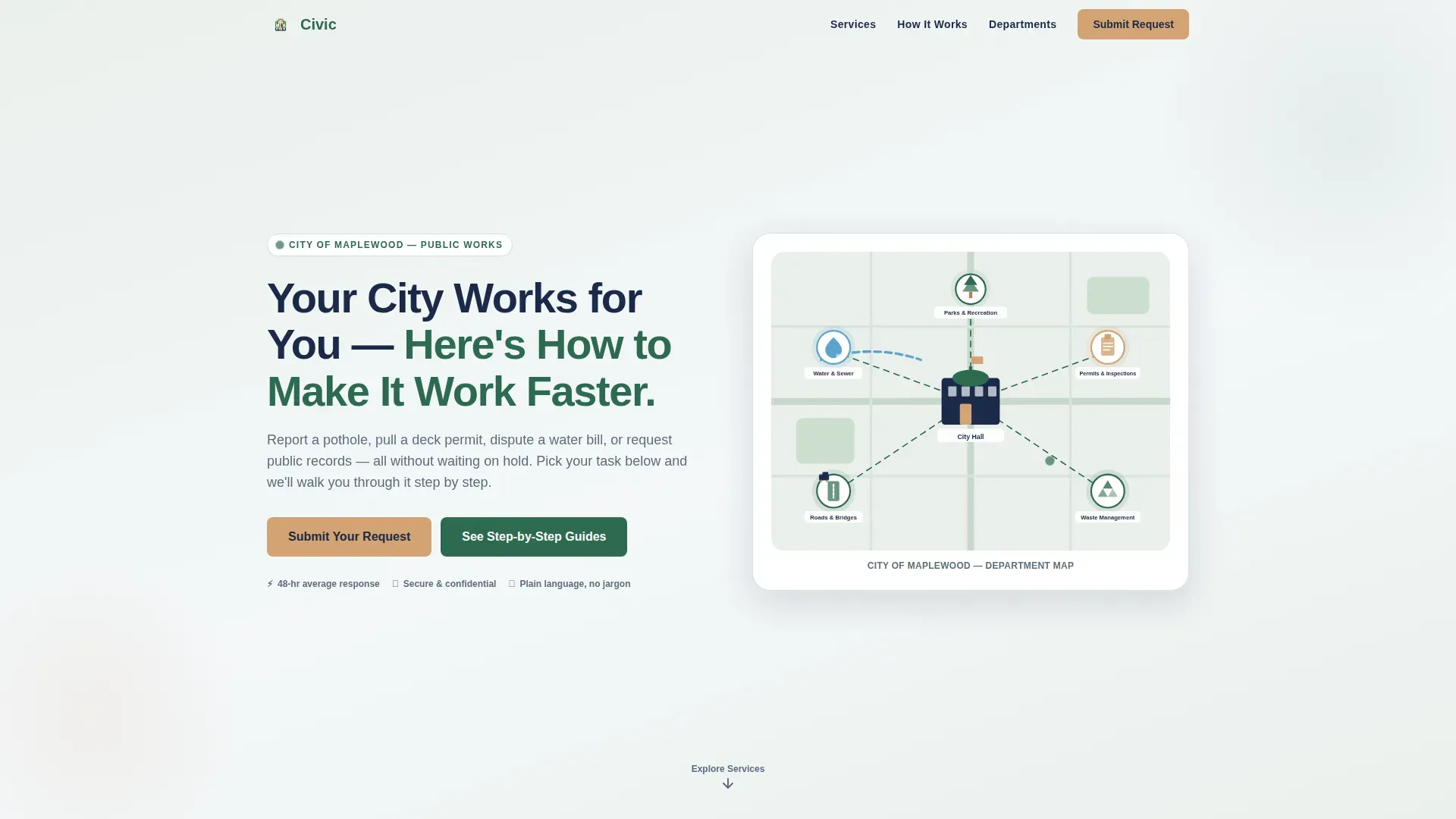
- An animated SVG city map header with labeled department icons and a fading headline
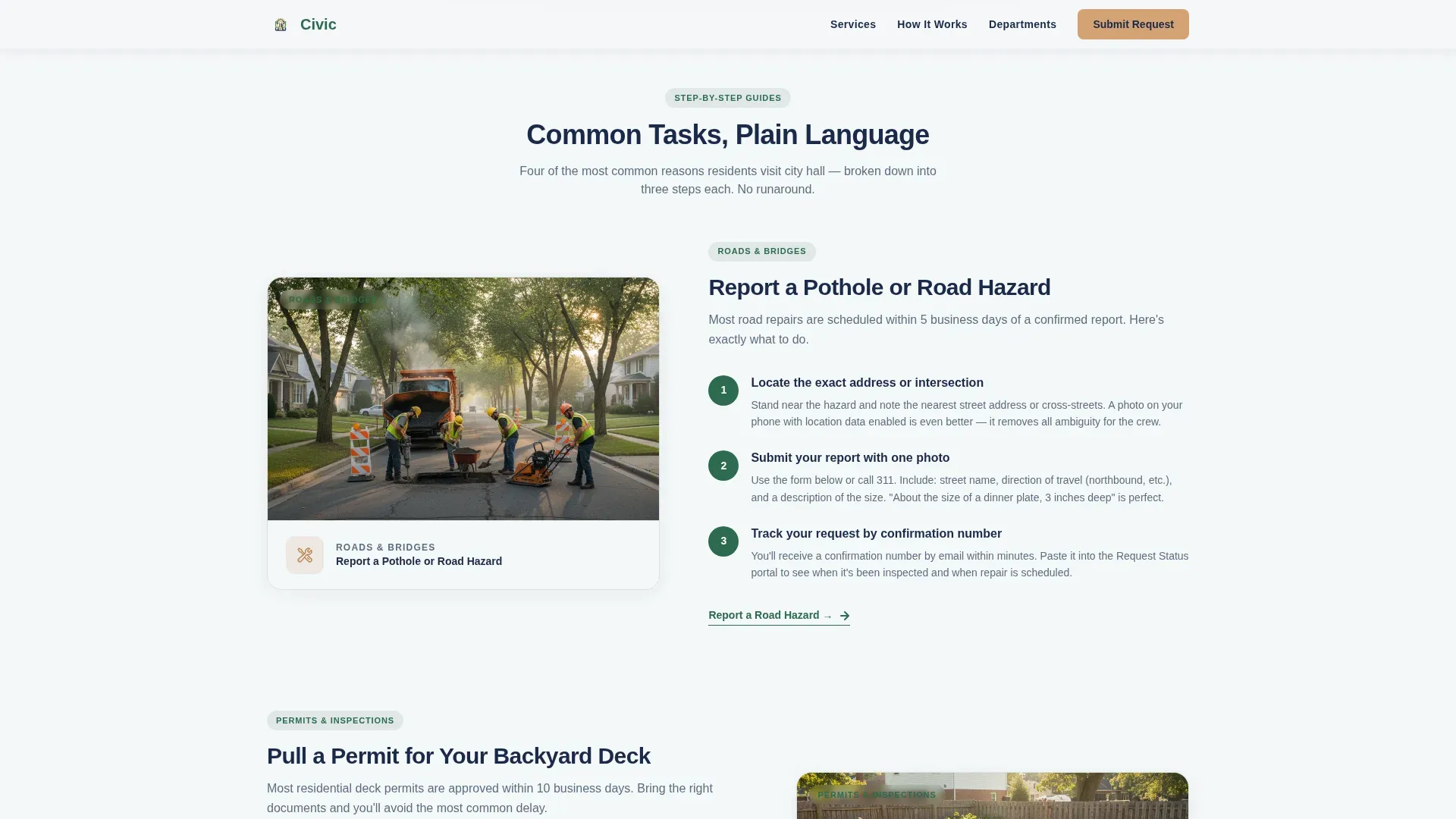
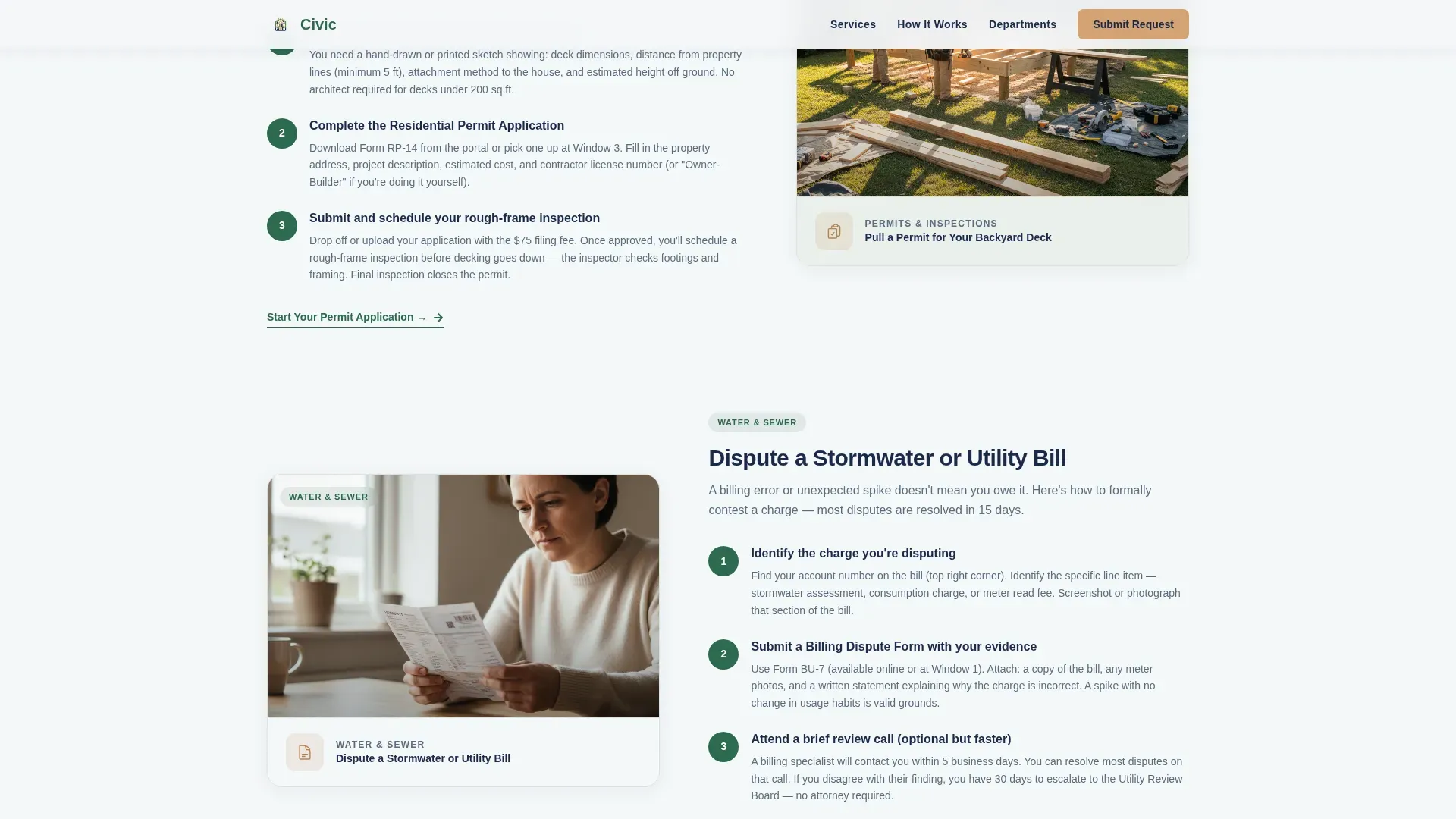
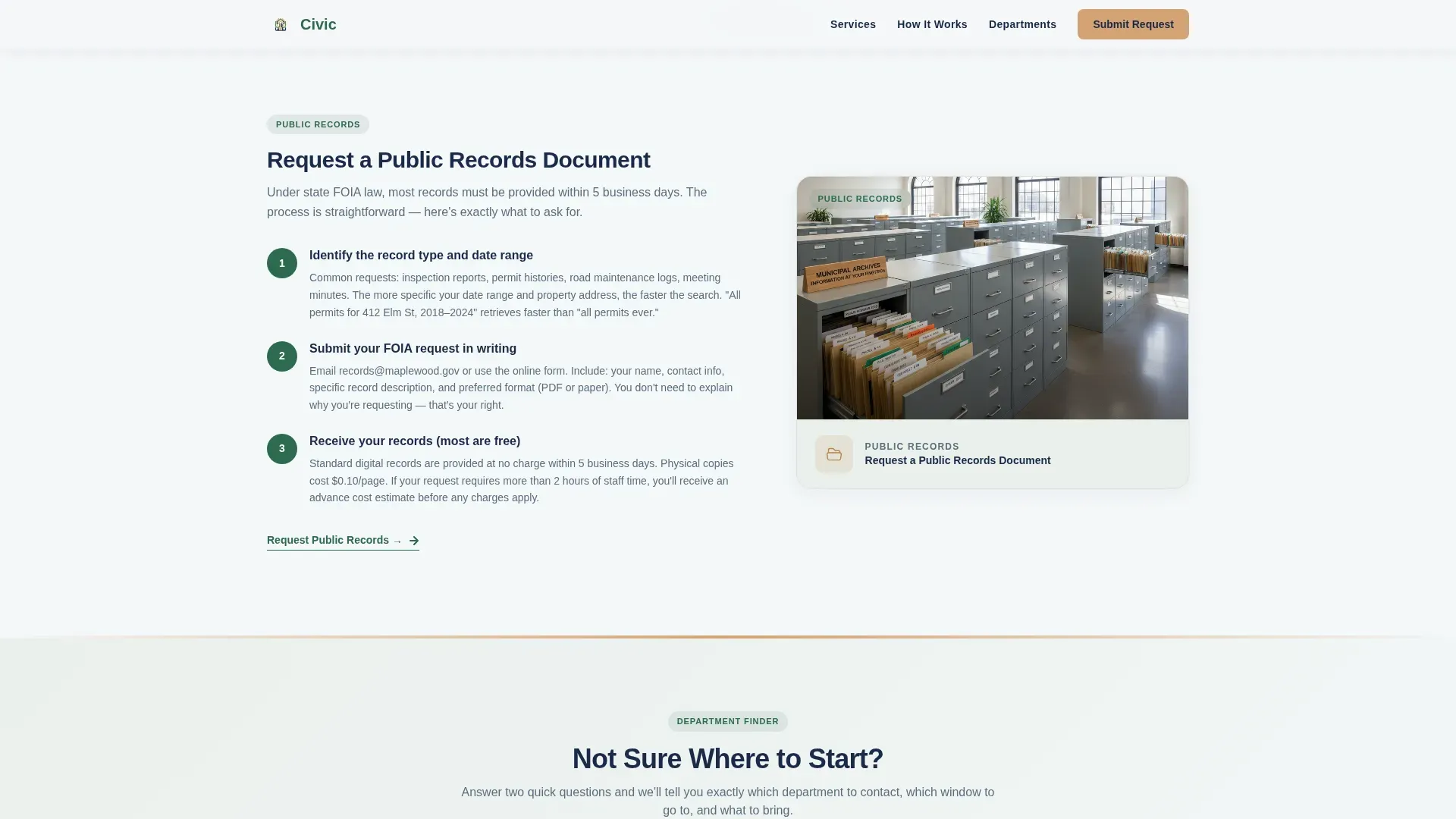
- Four zigzag guide sections covering the most common resident tasks, each with three numbered steps and a micro call to action
- A two-question department-finder quiz, a unified request form with a dropdown selector, and a sticky mobile call-to-action bar
Feature list
This page was built around the essential elements that make municipal websites actually useful to the people they serve.
Animated SVG City Map Header
The hero section opens with a stylized illustrated map rendered in flat, warm vectors. Icons represent Water and Sewer, Roads and Bridges, Permits and Inspections, Parks and Recreation, and Waste Management. Dotted lines connect each icon back to a central city hall. A headline fades in over the map, giving visitors an immediate, confident orientation to the site.
Zigzag Step-by-Step Guide Sections
Each of the four guide sections tackles one resident task: reporting an issue, pulling a permit, disputing a utility bill, and requesting public records. Every section breaks the process into three numbered steps with simple iconography on one side and a short explanatory paragraph on the other. The alternating layout keeps the eye moving and each section ends with a micro call-to-action so users can act immediately.
Department Finder Quiz
A two-question guided quiz helps residents who are unsure where to start. It routes them to the correct department without requiring them to read through the full page. This self service tool reduces misdirected requests and supports communication efficiency across departments.
Unified Request Form with Dropdown
The request form asks for request type first via a dropdown: Report an Issue, Schedule Inspection, Ask a Question, or Request Records. It then collects name, property address with auto-complete, and a free-text description. Implementing online forms directly on the page reduces the need for in-person visits and helps the government agency process requests faster.
Sticky Mobile Call-to-Action Bar
On mobile devices, a sticky bottom bar keeps the primary "Submit Your Request" call to action visible at all times. This feature supports the mobile-first layout and ensures residents on any device can act the moment they are ready, without scrolling back to the top of the page.
Trust Statistics Section
A dedicated section highlights resolved request stats, average response times, and the number of active departments. This social proof helps build trust with residents who expect a professional and transparent experience before submitting personal information.
Page sections overview
| Section | Purpose |
|---|---|
| Hero Map Header | Orient residents with an animated city map and headline |
| Zigzag Guide 1 | Step-by-step flow for reporting an issue |
| Zigzag Guide 2 | Step-by-step flow for pulling permits |
| Zigzag Guide 3 | Step-by-step flow for disputing a utility bill |
| Zigzag Guide 4 | Step-by-step flow for requesting public records |
| Department Finder Quiz | Route residents to the correct city department |
| Trust Stats Bar | Display resolved cases, response times, and departments |
| Unified Request Form | Collect request type, name, address, and description |
| Sticky Mobile Bar | Keep the primary call to action visible on mobile |
| Footer Row | Single-row linear footer with essential links |
Design & branding system
The Alpine Fresh color system gives this template a look that feels like a well-maintained public park in early October. The palette is warm without being casual and professional without feeling cold or corporate.
- Colors: mountain air white (#F4F7F9) and faint sage (#EAF0EC) alternate as section backgrounds; evergreen civic green (#2D6A4F) anchors headers and progress indicators; warm sandstone (#D4A373) highlights call-to-action buttons and icon backgrounds; deep municipal navy (#1B2A4A) is used for body text
- Typography: Plus Jakarta Sans for headers and DM Sans for body copy, creating a clear and readable hierarchy across every section
- Iconography and imagery use flat warm vectors that connect naturally with the Community Hearth visual theme and feel approachable to a wide community audience
Mobile & speed optimization
The layout is built mobile-first, which reflects how most residents interact with city services. Residents searching for help are often standing outside city hall or on a lunch break, using their phones.
- Large tappable buttons and a sticky bottom bar make the page easy to navigate on any device without zooming or pinching
- Scroll-triggered zigzag reveals and staggered fades use medium animation weight, with interactive components like the quiz, form, and sticky bar running as client-side elements while static content renders server-side for fast initial load
- The page structure keeps critical content above the fold and reduces layout shifts that frustrate mobile users
How this template helps you convert
This page earns the request submission by proving its value section by section before asking residents for anything personal. That approach is what separates it from most municipal websites.
- The step-by-step guide sections demonstrate that the city communicates in plain language, which reduces hesitation and helps residents feel confident enough to submit a formal request
- The department-finder quiz creates a self service path for undecided users, keeping them engaged rather than bouncing, and routes them directly to the right form option
- The sticky mobile call-to-action bar and the micro call to action at the end of each guide section multiply the conversion touchpoints across the full page, so residents can act the moment they find their answer
Other information about this template
This template is part of a broader effort to help state and local governments create digital experiences that reflect the quality of the services they provide. Templates are established patterns that help create websites more quickly and easily, and using this one helps any municipality avoid starting from scratch.
- The development process is simplified because the design, layout, and section structure are already in place; your team focuses on customizing website content rather than building from scratch
- The page supports community engagement goals by making public notices, emergency alerts, and event calendars easy to surface in context, keeping residents informed about decisions that affect their lives
- Accessibility is a core consideration in the design: the layout supports keyboard navigation and screen reader compatibility, and teams can assess compliance against the web content accessibility guidelines relevant to their jurisdiction
- The platform supports resident feedback loops, real time updates to service statuses, and a library of self service resources that reduce routine inquiries handled by staff
- A professional, user friendly municipal website projects an image of a modern, forward-thinking community, and this template gives any city the tools to create exactly that
Theme
Community Hearth
Creative direction
Step-by-Step Guide
Color system
Alpine Fresh
Style
Zigzag/Alternating
Direction
Lead Generation
Page Sections
Animated SVG City Map Header
Zigzag Step-by-step Guide Layout
Department Finder Quiz
Unified Request Form
Sticky Mobile Call-to-action Bar
Trust Statistics Section
Related questions
Can this template be customized for any city department?
Does the template include the department-finder quiz and the request form?
Is the layout suitable for mobile users?
How does this template help residents find information faster?
Can this template support accessibility needs?



