Streamlined Municipal Services Landing Page Template
Precinct is a sidebar companion landing page built for county government portals. It gives residents a clear, organized path to local services, from property tax forms to park reservations, without a phone call or office visit. The design follows an industry report structure: a fixed sidebar listing department chapters, a scrolling main panel with civic stats, deadlines, and downloadable forms.
by Rocket studio
Quick summary
Precinct is a county government landing page template built around a fixed sidebar and scrolling department briefs. Residents can locate services, view current deadlines, and submit requests without visiting a government office. The design is authoritative, plain-spoken, and organized like a trusted civic publication. It serves retirees, small business owners, parents, and voters looking for fast, self-service answers.
Who this template is for
This template is built for counties, municipalities, and local government teams that want a modern, organized web presence. It suits small city offices and larger county boards equally well.
- Retirees and homeowners tracking homestead exemptions or property tax deadlines
- Small businesses looking to locate permit applications and submit requests efficiently
- Parents and community members searching for parks, youth programs, and elections information late at night
What problem this template solves
Most government websites bury critical information behind multiple clicks, outdated navigation, and login walls. Residents give up before they find what they need. This template solves that directly.
- Voters cannot easily find their voting location, ballot details, or election day hours in one place
- Citizens need to search across multiple pages just to find information about a single department
- Municipal websites often feel cold and confusing, discouraging self-service and increasing office call volume
What you get with this template
You get a complete, ready-to-customize landing page that puts every county service within one or two clicks. The layout is built for clarity and engagement from the first scroll.
- A fixed sidebar listing department categories like chapters in an annual report
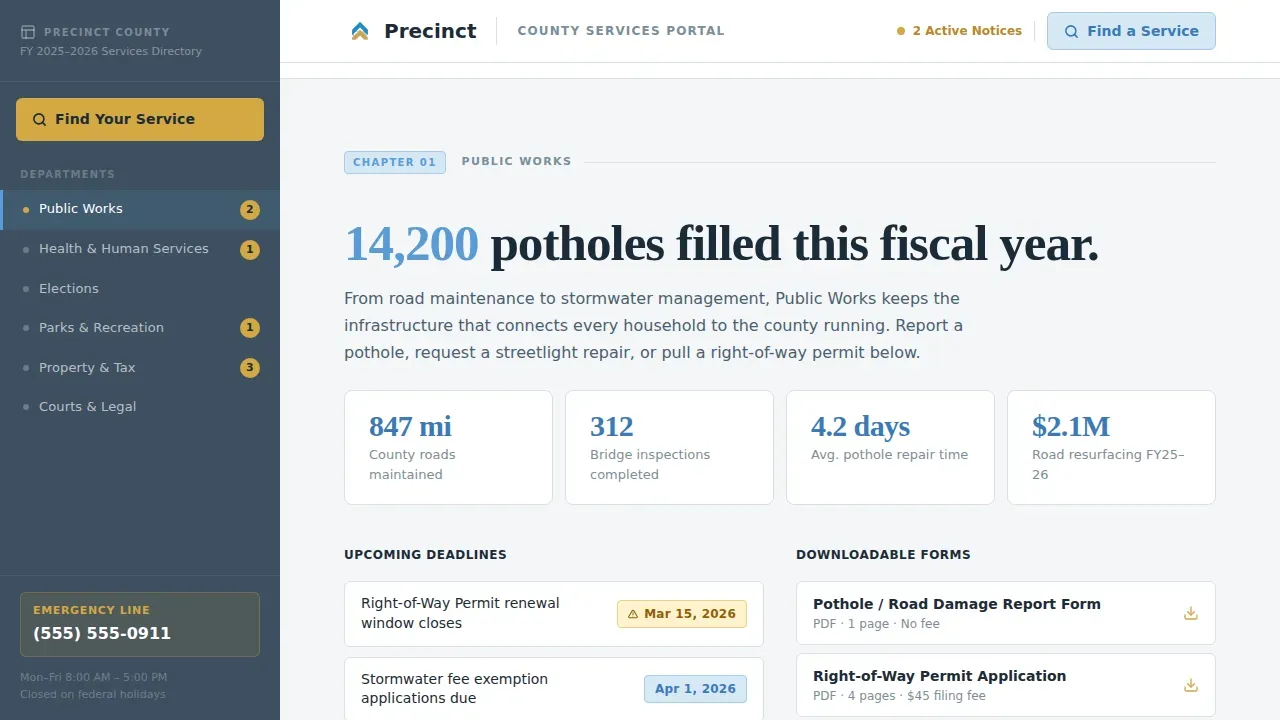
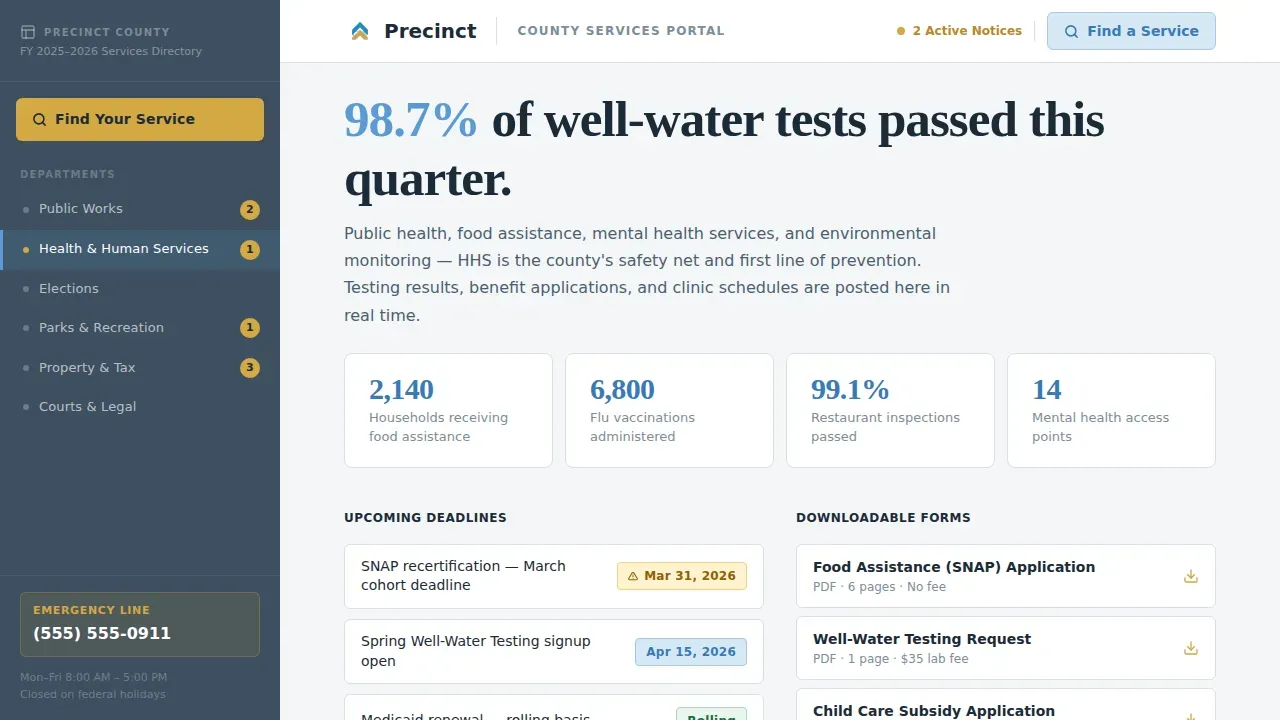
- Department briefs with headline civic stats, key deadlines, downloadable form links, and a single contact per section
- A "Find Your Service" search overlay at the top of the sidebar and a "Subscribe to County Updates" email capture at the bottom of each department section
Feature list
A paragraph introduces the feature set before the individual items below.
This template includes a suite of purpose-built components that help local government portals connect with residents without friction. Each feature is grounded in how real visitors actually use government websites.
Fixed Sidebar Department Navigator
The sidebar stays anchored as visitors scroll, displaying department categories like chapters in a report. Scroll-linked active states update as the reader moves through each section, so users always know where they are on the page.
"Find Your Service" Search Overlay
A prominent search bar sits at the top of the sidebar. Residents can enter plain-language queries to locate services fast. The overlay accepts natural phrasing like "how do I pay my water bill," reducing friction for all visitors.
Department Brief Panels with Civic Stats
Each department section opens with a headline statistic, turning bureaucratic output into a readable civic narrative. Panels display current deadlines, downloadable documents, and a single department contact, including office location details.
Email Subscription Capture per Department
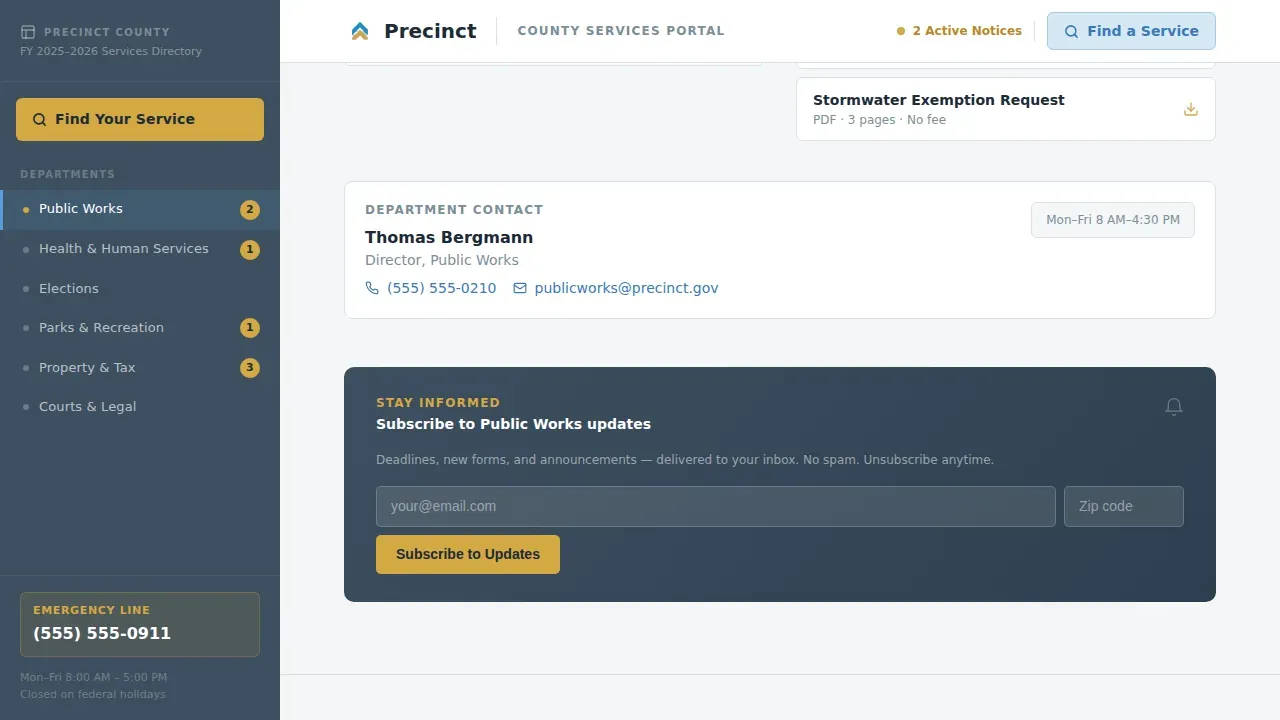
A "Subscribe to County Updates" form appears at the bottom of each department brief. Residents opt in when relevance is highest. The form requests only email and zip code, making submitting quick and low-barrier.
Manifesto Hero with Fiscal Year Dateline
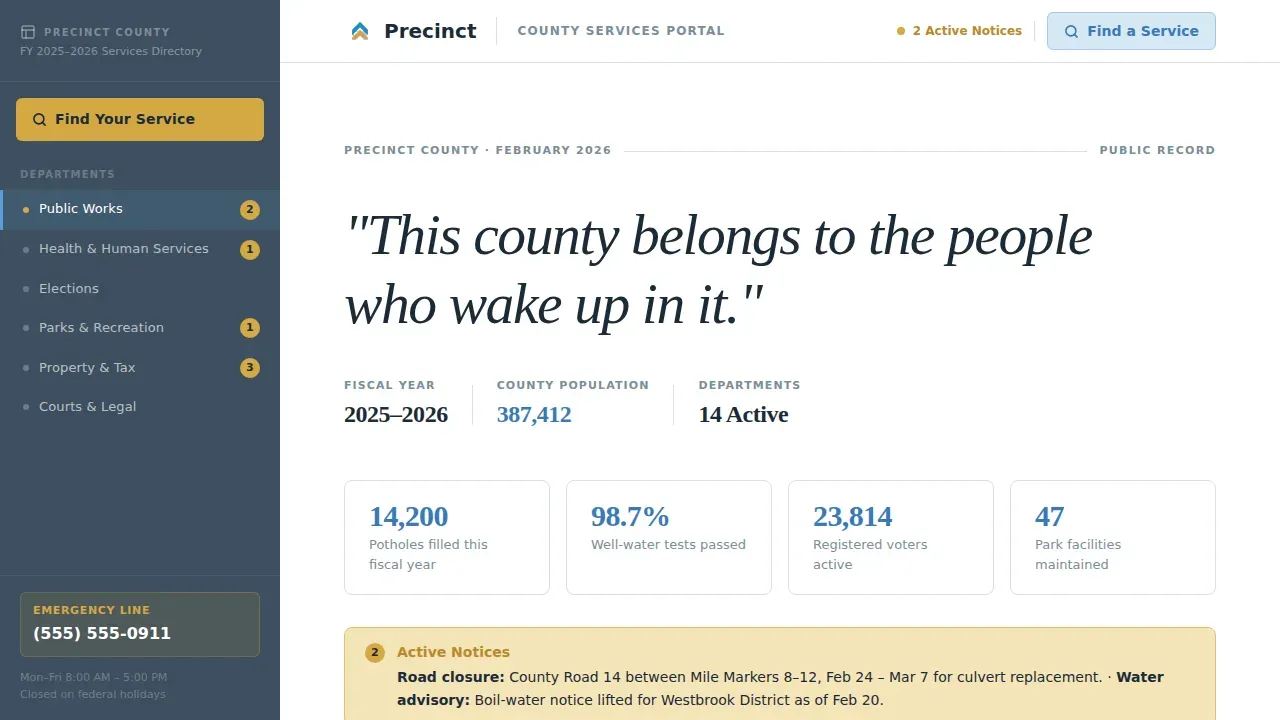
The header displays a single serif manifesto sentence against civic white, anchored by a live fiscal year and population count. The dateline grounds the page in real, current numbers rather than stock imagery or vague promises.
Arrow Slideshow Navigation and Close Arrow Controls
The template includes an arrow slideshow for cycling through featured announcements or department highlights. A close arrow control lets visitors dismiss the overlay or slideshow panel cleanly, keeping the page uncluttered and navigation intuitive.
Page sections overview
| Section | Purpose |
|---|---|
| Manifesto Hero | Displays the county quote, fiscal year dateline, and population count |
| Fixed Sidebar | Lists department chapters; "Find Your Service" search bar anchors the top |
| Public Works Brief | Headline stat, current deadlines, form links, department contact, subscribe |
| Health & Human Services | Headline stat, current deadlines, form links, department contact, subscribe |
| Parks & Recreation | Headline stat, current deadlines, form links, department contact, subscribe |
| Footer Row | Linear single-row footer with links and county contact information |
Design & branding system
The visual identity follows a Directory and Discovery theme. The palette feels like a clear weekday morning outside the courthouse: limestone, open sky, and brass catching the sun.
- Administrative slate (#3D4F5F) anchors the sidebar, typography, and board-level content panels
- Open-sky blue (#5B9BD5) marks interactive pathways, department headers, and search elements; civic white (#F4F6F8) breathes across content panels
- Wayfinding gold (#D4A843) is reserved for active links, arrow indicators, and notification badges where action is needed
Mobile & speed optimization
The template is desktop-first in its sidebar layout, but it stacks responsively on smaller screens. Responsive design ensures the page works across every device size without losing navigational clarity.
- The fixed sidebar collapses into a vertical stack on mobile, preserving department order and search access
- Server components handle static department briefs for fast initial loading; client components power the sidebar, search overlay, and subscribe form
- The arrow slideshow and close arrow controls are touch-friendly, so mobile visitors navigate announcements as easily as desktop users do
How this template helps you convert
County government pages rarely ask residents for anything beyond a phone call. This template changes that by earning engagement first and then capturing it.
- The "Find Your Service" search overlay at the top of the sidebar lets voters and residents locate what they need immediately, reducing exits before a single form is filled
- The per-department email subscribe form appears after residents have already read relevant civic stats, so opt-ins feel natural and the list stays locally relevant
Other information about this template
This template is the Precinct find your civic services county government landing page template, designed for the county government niche within the Government and Public category. It is a sidebar companion landing page built on a Directory and Discovery theme.
- Election day information is displayed separately from early voting details, following best practices for municipal websites and government websites alike
- The Elections department section covers voting location details, including polling place name, address, and hours, so voters registered to a specific precinct can confirm their location without calling the office
- A precinct locator or address-based search tool can be connected to the "Find Your Service" overlay, allowing residents to enter their address and find their precinct number, sample ballot, and district representatives
- Vote Center information and provisional ballot instructions can be surfaced within the Elections brief, keeping all election day guidance in one live section
- Accessibility considerations such as color contrast and readable typography are built into the design system; the slate and sky palette supports clear visual hierarchy across the site
- The fax number, envelope address, and office phone can each be displayed inside department contact blocks, giving citizens every channel they need
- Additionally, the board of supervisors section can be added as a department chapter, giving elected representatives a dedicated brief within the same system
- Local businesses can use the permit and licensing brief to locate documents and begin submitting applications without visiting a government office
Theme
Directory & Discovery
Creative direction
Industry Report
Color system
Slate & Sky
Style
Sidebar Companion
Direction
Content/Resource
Page Sections
Fixed Sidebar Department Navigator
"find Your Service" Search Overlay
Department Brief Panels with Civic Stats
Per-department Email Subscribe Form
Manifesto Hero with Live Dateline
Arrow Slideshow and Close Arrow Controls
Related questions
Can voters find their precinct and voting location using this template?
Does the template display election day information separately from early voting details?
How does the per-department email subscribe form work?
Can residents save form progress if they are interrupted mid-application?
Is this template suitable for a small town or city government as well as a large county?



