City & Municipal Professional Website Template
Civic is a sidebar companion landing page built for municipal services portals. It gives residents a clear, task-first digital front door to pay bills, report issues, and pull permits without visiting city hall. The design leans on a deep navy sidebar, civic sky blue accents, and a radical transparency layout that earns resident trust before asking for a signup.
by Rocket studio
Quick summary
Civic is a single-page, sidebar companion template built for government and public sector portals. It puts the most useful actions first: a centered search box, a transparency dashboard, and a progressive sign-up form. The design and content strategy guide residents from question to completed service request with minimal friction.
Who this template is for
This template serves local government teams, civic tech builders, and public sector designers who need a resident-first digital services portal. It is built for municipal use cases where clarity and trust matter more than style.
- City and municipal website managers building a self-service resident portal
- Civic tech developers creating a government services landing page from scratch
- Public sector communications departments replacing outdated PDF-heavy pages
What problem this template solves
Most government website pages bury services inside department-named menus. Residents end up waiting on hold or driving to city hall because they could not find the right page online. This template solves that by organizing every section around what residents actually need to do, not which department owns it.
- Residents struggle to find information for paying bills or submitting permit forms online
- City departments lose trust when their website feels outdated or hard to navigate
- Municipal websites rarely show performance data, so residents have no confidence the city is responsive
What you get with this template
The template provides a fully structured, single-page layout with six distinct content sections and a persistent sidebar. Every section is a discrete white card. The design is ready to build on without writing code from the beginning.
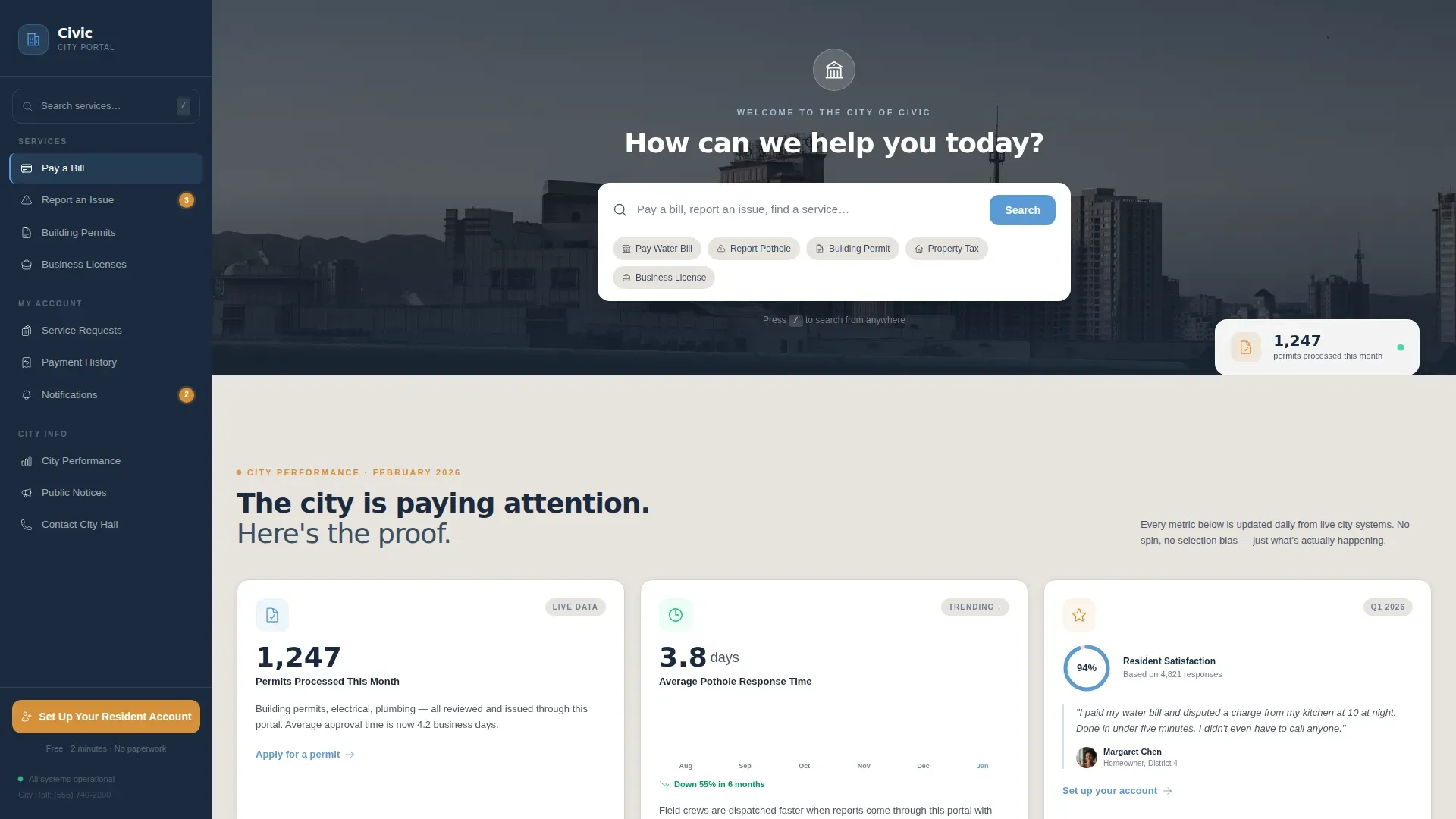
- Hero section with oversized search input and a soft photographic background wash
- Transparency dashboard cards displaying live performance counters and a response-time chart
- Progressive disclosure resident sign-up form and a secondary email-capture section
Feature list
This template provides a focused set of capabilities designed for government self-service portals.
Centered Search-First Header
The header places a single oversized search input directly under the city seal. Ghost text reads "Pay a bill, report an issue, find a service…" so users know exactly what to type without any tutorial.
Transparency Dashboard Cards
Below the hero, individual white cards each display one civic stat, one sentence of context, and one action link. This design reflect the Industry Report creative direction, letting performance data build trust before residents reach the sign-up form.
Persistent Sidebar Navigation
The deep navy sidebar stays anchored while the main content scrolls. It holds the primary call-to-action, "Set Up Your Resident Account," so the prompt to engage is always displayed and never buried.
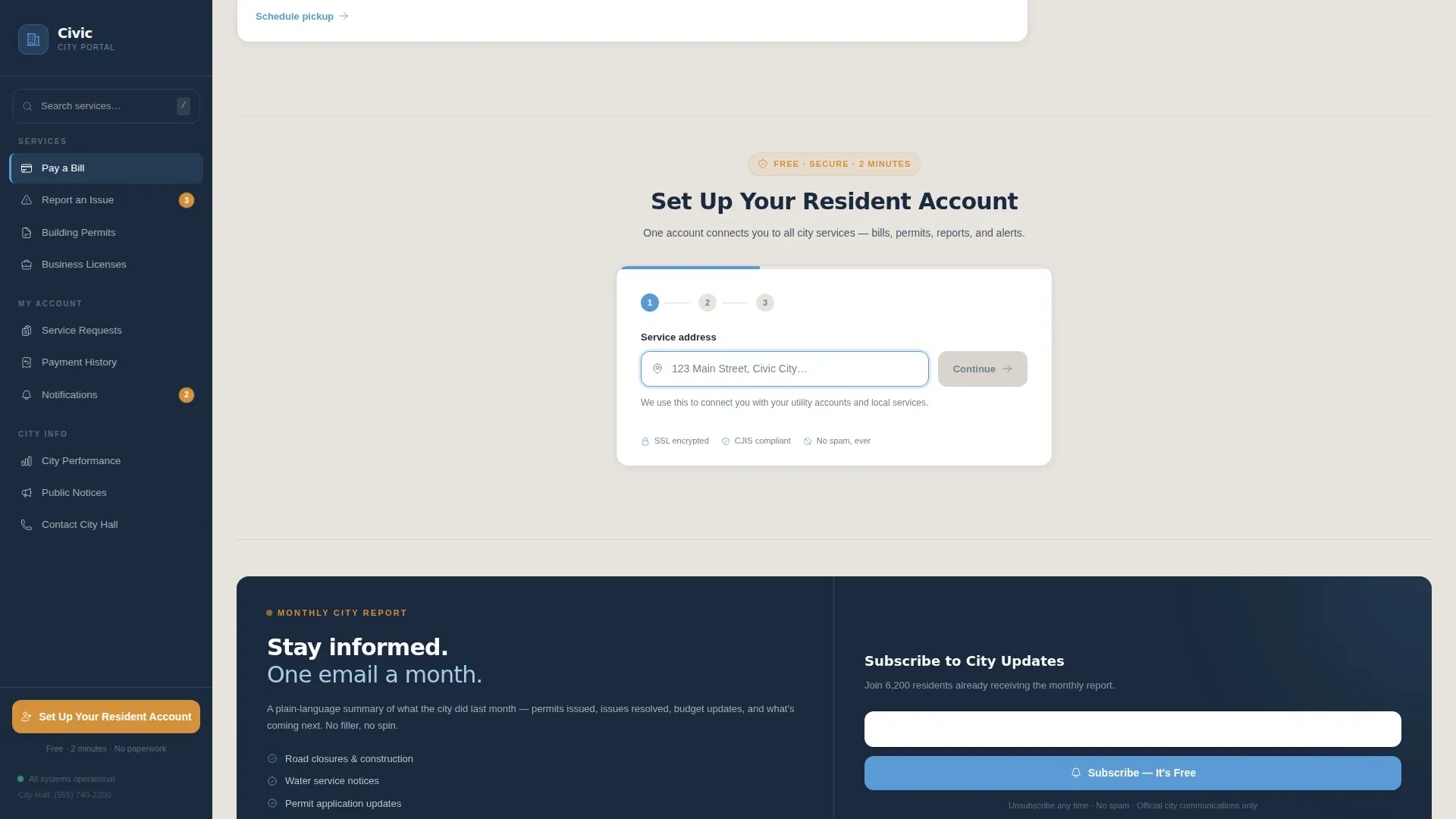
Progressive Disclosure Sign-Up Form
The resident account form asks for a service address first, making the beginning of registration feel like a search. It then collects name and email, reducing form anxiety for all users including elderly residents.
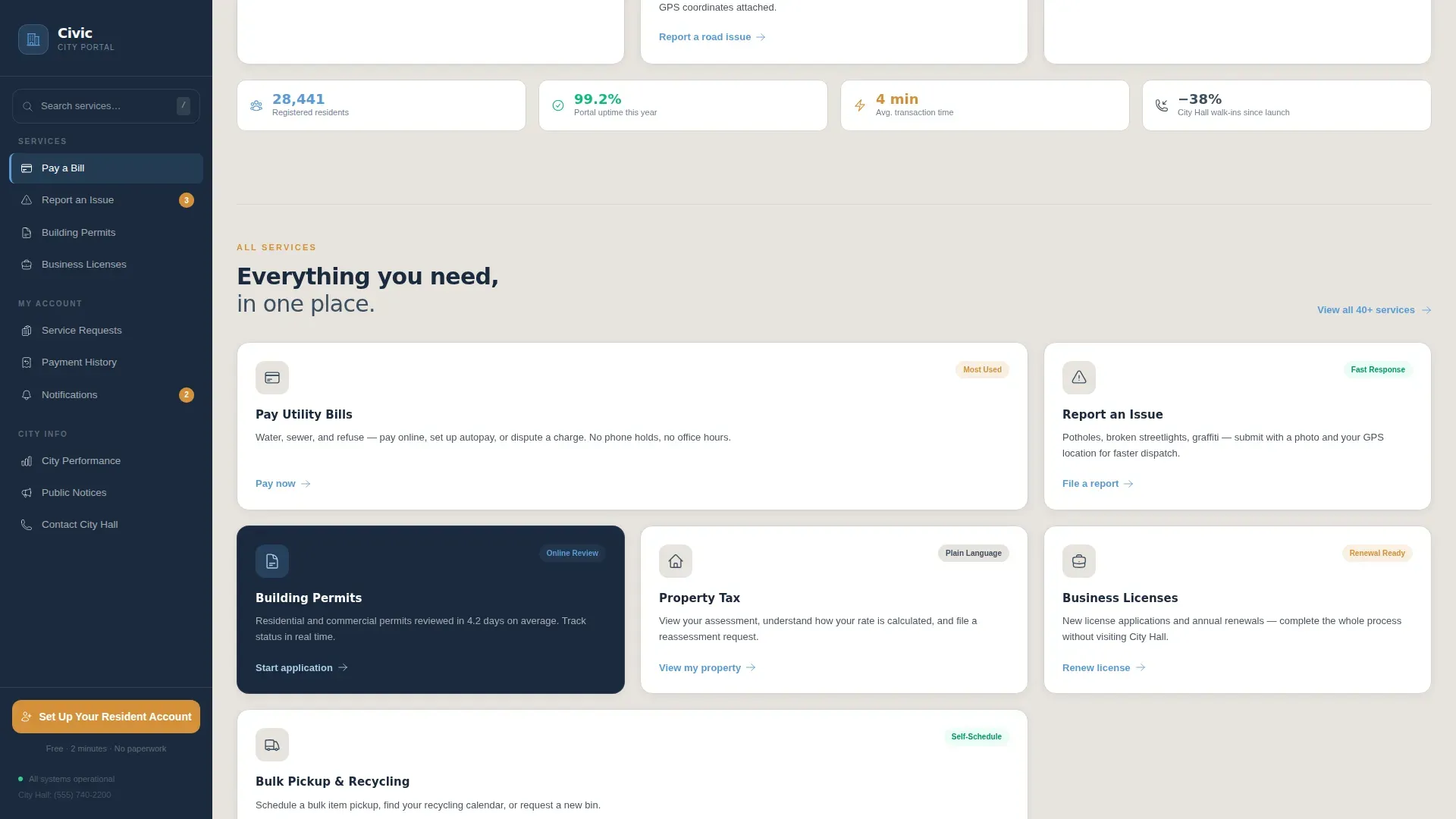
Service Directory Grid
An asymmetric bento-style grid organizes key municipal services by task, not by department. Icons guide users to the most-requested services at a glance, supporting accessibility and faster navigation.
Secondary Email Capture
A dedicated "Subscribe to City Updates" block lets residents opt into a monthly service report with a single email field. This secondary path provides a lower-commitment conversion for residents not yet ready to create a full account.
Page sections overview
| Section | Purpose |
|---|---|
| Hero Search Header | Entry point with oversized search field and city skyline background |
| Transparency Dashboard | Stat cards showing permits processed, response time, and satisfaction rate |
| Service Directory Grid | Task-based bento grid of key municipal services |
| Resident Account Form | Progressive three-step sign-up capturing address, name, and email |
| City Updates Subscribe | Single-field email capture for monthly civic updates |
| Footer | Minimal horizontal flow with contact and policy links |
Design & branding system
The Slate and Sky color system gives this template a polished, institutional feel that still feels warm and approachable. The palette reflects a freshly maintained government building rather than a cold bureaucratic interface.
- Deep trust navy (#1B2A3D) anchors the sidebar; civic sky blue (#5B9BD5) drives interactive elements and links
- Warm sidewalk gray (#E8E4DF) backgrounds the main content area; white cards float above it for clarity
- Honest amber (#D4913A) appears exclusively on action states and notification badges, keeping visual hierarchy strict
Mobile & speed optimization
The template is designed desktop-first with a sidebar layout, but the structure fully collapses for smartphones and tablets. Static sections rely on server-rendered components to keep the page fast, while counter animations and chart reveals use minimal JavaScript.
- Sidebar collapses into a sticky top navigation bar on smaller screens
- Scroll-reveal animations and counter effects are lightweight and do not block content loading
- Service directory grid reflows into a single column for mobile users
How this template helps you convert
The page earns signups by demonstrating government competence before asking for commitment. Every design decision prioritizes resident confidence over visual decoration.
- The transparency dashboard cards build trust through real data, so residents arrive at the sign-up form already convinced the portal works
- Progressive disclosure on the resident account form lowers the psychological barrier by making the first field feel like a search, not a registration
- The persistent sidebar ensures "Set Up Your Resident Account" is always displayed on screen, removing the need to scroll back to find the primary call-to-action
Other information about this template
This civic transparent municipal services landing page template is well-suited for municipalities that want to improve civic engagement and reduce walk-in traffic to city hall. Government communication tools and brochures often rely on printed materials to reach residents, but this template moves that information online in a structured, compliant-ready format. Teams that collaborate across departments can use the layout as a shared starting point and review sections together before launch.
- Templates provide a consistent structure that multiple departments can contribute to without rebuilding from scratch
- A collaborative approach to content management means communications staff, IT teams, and department heads can each maintain their own sections
- Additionally, the color schemes are fully adjustable, so municipalities can reflect their own official branding across all pages without code changes
- Venngage's Government and Civic Information brochure templates and open-source platforms like CivicTheme are examples of government communication solutions that share a similar focus on accessibility, security, and public trust
- The template supports a unified design language across all public-facing pages, making it easier to meet compliance standards and maintain a professional appearance at every level of government communication
Theme
Community Hearth
Creative direction
Industry Report
Color system
Slate & Sky
Style
Sidebar Companion
Direction
Lead Generation
Page Sections
Centered Search-first Header
Transparency Dashboard Cards
Persistent Sidebar Navigation
Progressive Disclosure Sign-up Form
Task-based Service Directory
Secondary Email Capture Block
Related questions
Can I change the colors and branding to match my city's identity?
Does this template include forms for resident sign-up and email capture?
Is this template suitable for small municipalities or only large cities?
How does the sidebar behave on mobile devices?
What sections come ready to edit in this template?



