Test Title Debug
Clamp is a split-screen landing page template built for jig and fixture makers targeting production engineers, manufacturing managers, and aerospace quality leads. It pairs a Before/After case study hero with scrolling timeline sections, live data tickers, a sticky comparison bar, and a direct "Send Us Your Problem Part" lead form to make the cost of outdated fixture design numerically undeniable.
by Rocket studio
Quick summary
Clamp is a precision-focused, single-page template designed for jig and fixture fabricators who sell to industrial buyers. The layout follows a Timeline Progression structure, moving visitors from the pain of poor fixture design through engineering evidence and production results, ending at a high-intent call to action. Every section adds data to the case, so the lead form feels like a logical conclusion.
Who this template is for
This template is built for B2B fixture fabrication shops and precision workholding manufacturers who need to convert technically sophisticated buyers into qualified leads. The audience is skeptical and data-driven, so the template earns trust through specifics rather than generalities.
It fits best when your target buyers include:
- Production engineers and manufacturing managers dealing with high scrap rates and slow changeover times on assembly lines
- Aerospace quality leads who require full geometric dimensioning and tolerancing (GD&T) conformance documentation with every fixture delivery
- Precision machining shops and tool and die makers who want to demonstrate fixture design capability against a measurable standard
What problem this template solves
Engineers and procurement managers evaluating fixture shops face a consistent challenge: every vendor claims precision, but few present verifiable evidence. A generic marketing page fails this audience completely. Buyers at this level need numbers, comparisons, and proof before they consider reaching out.
The template addresses several specific friction points:
- No side-by-side comparison: visitors cannot immediately see how your fixture design differs from their current setup in measurable terms
- No cost quantification: scrap rates, downtime hours, and reject rates are mentioned but never visualized, so the urgency does not register
- No clear lead path: engineers who need internal ROI justification before calling have no gated secondary option and leave without converting
What you get with this template
The Clamp template delivers a fully structured, single-page layout that guides a technical buyer from recognition of pain to submission of a lead, without requiring them to trust anything that is not already proven on the page. Every section is deliberately sequenced to compound the evidence.
The template includes the following built-in sections and components:
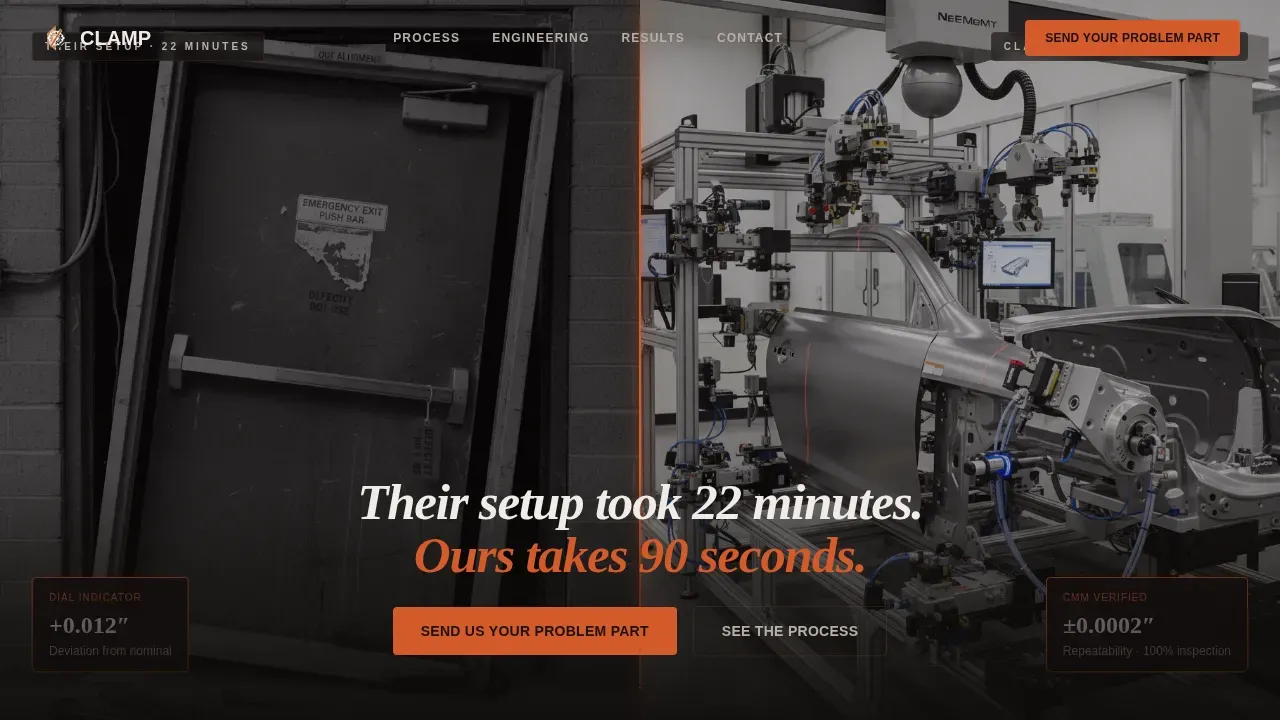
- A split-screen (50/50) Before/After hero with a kiln-orange divider line, a delayed headline fade-in reading "Their setup took 22 minutes. Ours takes 90 seconds," and photographic contrast between an old fixture with visible shim stock and a new modular pneumatic fixture with a coordinate measuring machine (CMM) report overlay
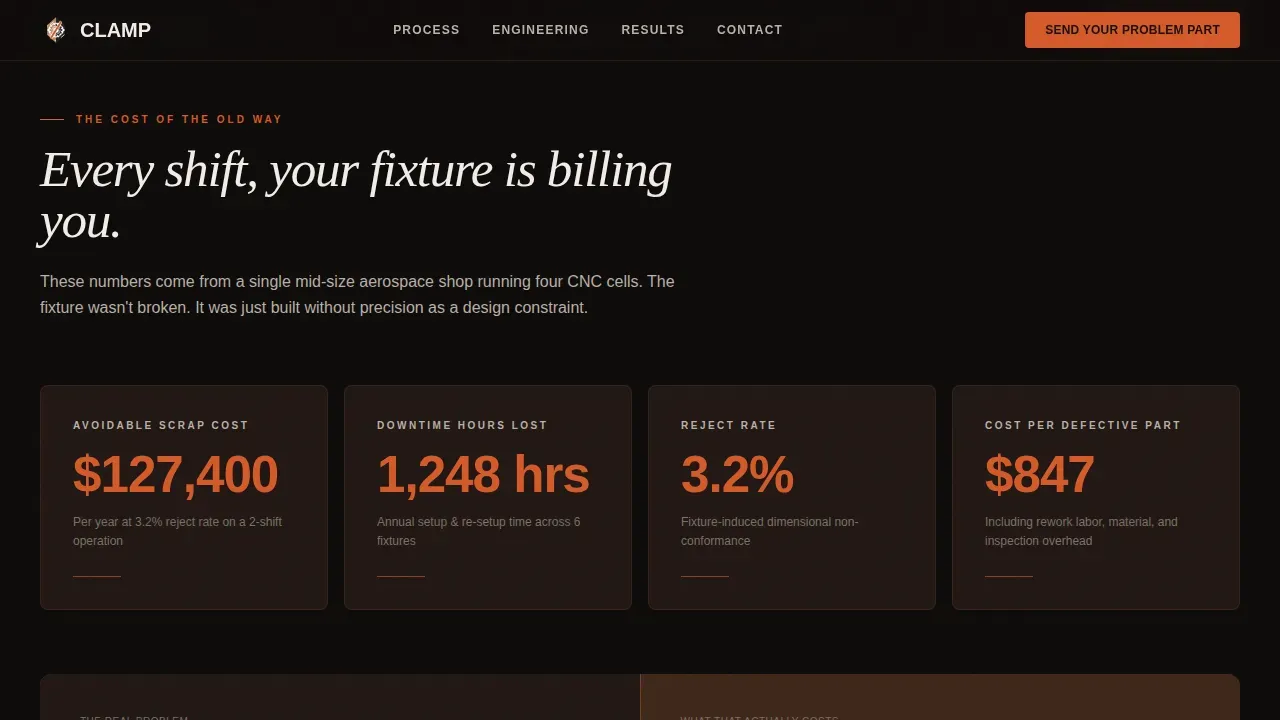
- Live-counting data tickers on a forge-black background displaying scrap dollars, downtime hours, and reject rates as animated countup figures
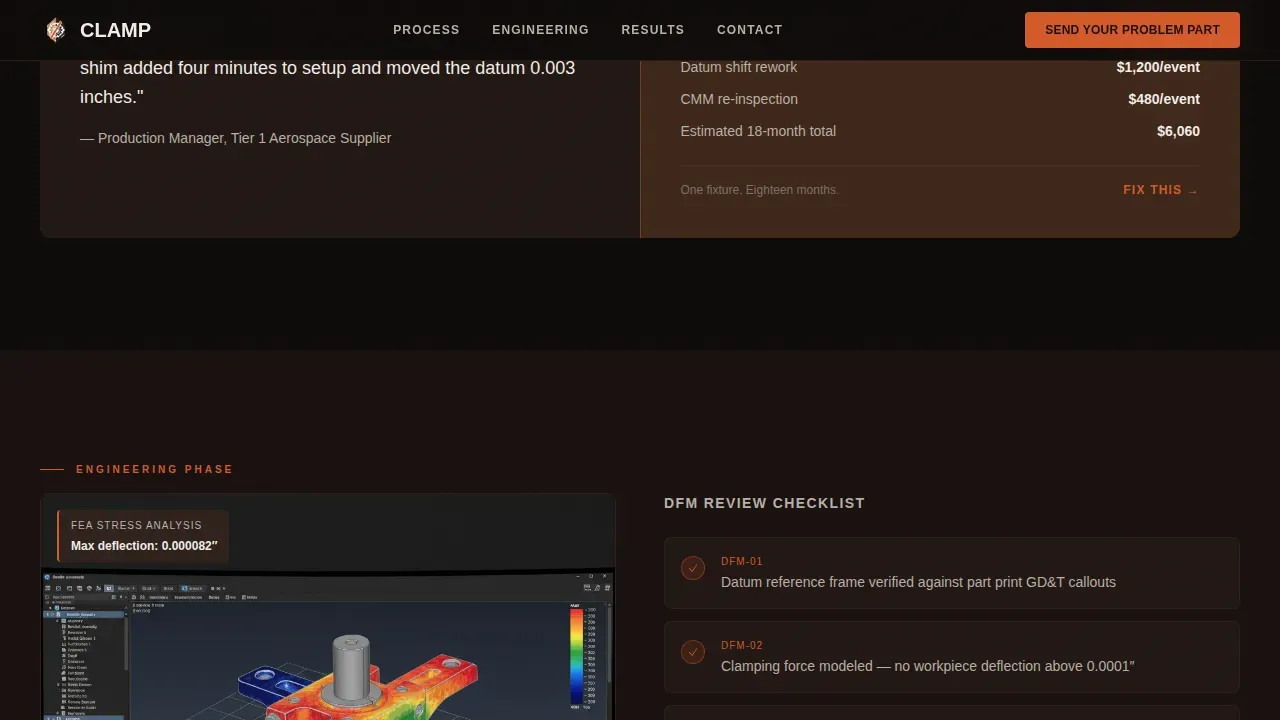
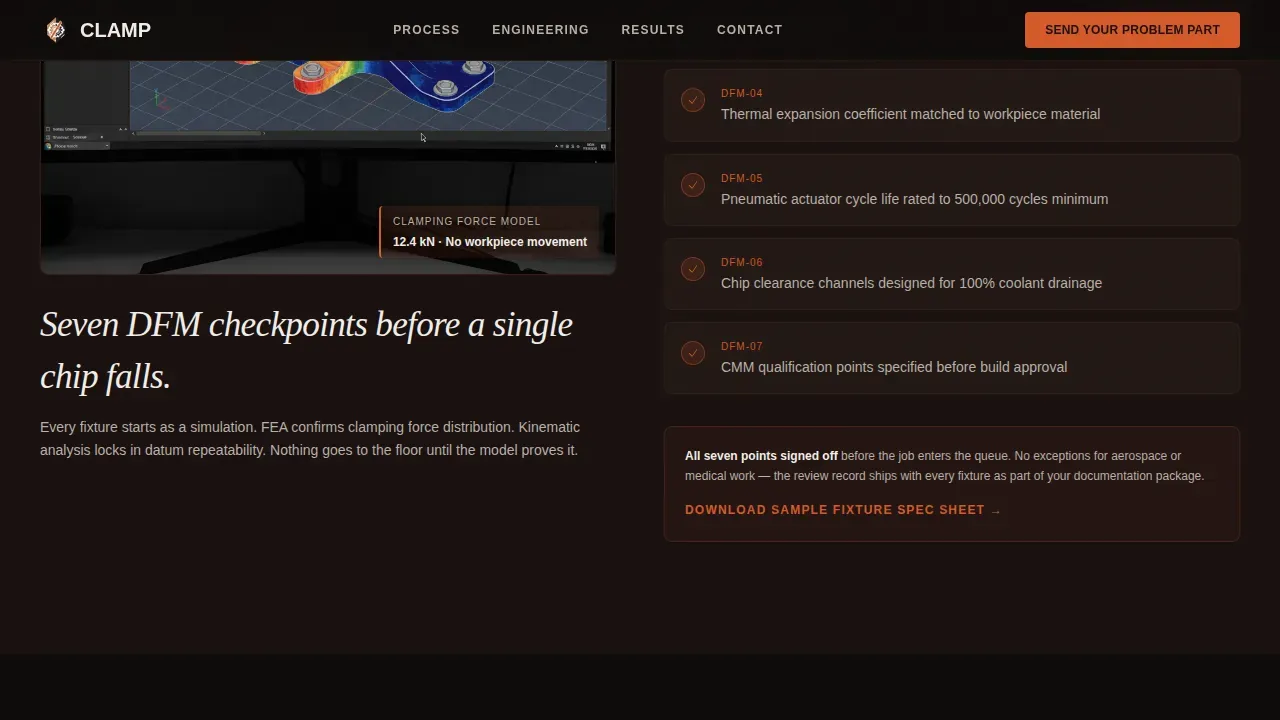
- A CAD and finite element analysis (FEA) split layout for the engineering section, with design for manufacturability (DFM) callouts placed left and right
- A manufacturing and inspection split showing five-axis machining footage on the left and CMM data populating on the right in real time
- A production results section with an ROI timeline bar that fills from earth-brown to kiln-orange, a "Send Us Your Problem Part" short form with a file upload field, and a gated ROI Calculator download behind an email and company name gate
- A sticky comparison bar at the top reading "Your Current Fixture versus. Ours" and a mid-page spec table toggle covering setup time, repeatability, fixture life, and cost-per-part impact
- A minimal single-row footer designed for a developer and engineer audience
Feature list
This section covers the core capabilities built into the Clamp template as described in the project brief.
Split-Screen Before/After Hero
The hero divides the viewport into two equal halves. The left panel shows the old fixture: misaligned clamps, visible shim stock, a dial indicator reading +0.012 inches deviation. The right panel shows the precision replacement: modular, hard-anodized, with integrated pneumatic clamping and a CMM overlay confirming plus or minus 0.0002 inches repeatability. A thin kiln-orange line separates the panels. The headline fades in after a two-second delay, letting the visual contrast establish the argument before words appear.
Live Data Ticker Section
The "Cost of the Old Way" section renders scrap dollars, downtime hours, and reject rates as animated countup tickers against a forge-black background. These figures create an immediate, visceral sense of ongoing loss. The tickers use GSAP ScrollTrigger so they activate on scroll, ensuring the numbers land at the right moment in the visitor's reading journey. This section plays a vital role in converting passive readers into motivated inquirers.
Sticky Comparison Bar and Spec Table Toggle
A persistent sticky bar at the top of the page keeps the comparison frame visible throughout the scroll. Mid-page, a toggleable spec table lets visitors switch between metrics: setup time, repeatability, fixture life, and cost-per-part impact. This is the core Comparison/Versus conversion engine of the template. It keeps the workpiece relative to the visitor's current reality, not an abstract sales pitch.
Engineering Phase Split Layout
The engineering section presents CAD screenshots and FEA stress overlays in a left-right split, with DFM review callouts marking key design decisions. This section lets fixture designers show their methodology before the part is cut. Designers can demonstrate how they approach workpiece geometry, locating constraints, cutting forces, and assembly operations early in the process, building confidence in the final product.
Production Results and ROI Timeline
The final content section visualizes thirty days of post-install production data. An ROI timeline bar fills from machined-earth brown to kiln-orange, representing the payback period in a single horizontal motion. The "Send Us Your Problem Part" form is short and direct: part number or description, current cycle time, and a file upload for a print or STEP file. A secondary path offers a gated ROI Calculator download for engineers building internal justification. Frictionless forms that ask only for essential data consistently improve lead conversion rates.
GSAP ScrollTrigger Animation System
Scroll-based animations drive the timeline progression feel of the entire page. Fill-bar animations, ticker countups, and section transitions are all tied to scroll position using GSAP ScrollTrigger. Client Components handle interactive elements like the spec table toggle, file upload form, and the gated modal, while static sections use Server Components to keep the page lean.
Page sections overview
| Section | Purpose |
|---|---|
| Before/After Hero | Contrast fixtures visually, fade in the headline claim |
| Cost Ticker Section | Quantify the financial pain of outdated fixture design |
| Engineering Phase Split | Demonstrate CAD, FEA, and DFM methodology side by side |
| Manufacturing Inspection Split | Show five-axis machining footage alongside live CMM data |
| Production Results call to action | Deliver ROI visualization and capture the qualified lead |
| Sticky Comparison Bar | Keep the "current versus. ours" frame persistent throughout scroll |
| Spec Table Toggle | Let visitors compare setup time, repeatability, and cost-per-part |
| Gated ROI Calculator | Capture email leads from engineers needing internal approval |
| Minimal Engineer Footer | Provide clean navigation for a technical, developer-style audience |
Design & branding system
The visual identity follows a Data Command theme grounded in a Fire and Earth color system. The palette is built for restraint. Forge-black carries the weight of the page. Kiln-orange appears only where action is required. The result feels like a controlled plasma cut at midnight: dark, deliberate, and precise.
The branding system includes:
- Color palette: forge-black (#1A1110) as the primary background, kiln-orange (#D45A2B) for accent lines, hover states, and the call to action button, machined-earth brown (#6B4226) for secondary panels and dividers, and white-hot steel (#F0EDE8) for all typography and data callouts
- Typography: DM Sans for body copy and interface labels, Fraunces for display headlines, creating a tension between industrial utility and deliberate authority
- Visual tone: high-contrast industrial dark, with kiln-orange reserved exclusively for interactive and action-demanding elements to preserve visual hierarchy and urgency
Mobile & speed optimization
The Clamp template is designed desktop-first, which reflects the real working context of its primary audience. Production engineers and manufacturing managers evaluate fixture vendors from workstations where spec-heavy tables and horizontal split layouts perform best. The template structure respects this context without sacrificing responsive behavior.
Key technical decisions include:
- Desktop-first layout priority, with the split-screen hero and spec table toggle optimized for wide viewports where horizontal comparisons are readable
- Server Components used for static content sections to reduce client-side rendering overhead, with Client Components reserved for interactive elements like data tickers, the spec table toggle, and the lead capture form
- GSAP ScrollTrigger animations scoped to scroll events rather than time-based loops, keeping animation performance tied to user intent rather than background processing
How this template helps you convert
The Clamp template is structured as a Comparison/Versus conversion engine. Every scroll transition functions like advancing through a gate review: the evidence compounds, the stakes clarify, and the lead form appears only after the visitor has already answered their own question.
The conversion architecture works in three stages:
- Establish the gap: The Before/After hero and live data tickers make the cost of the visitor's current fixture setup tangible and personal. By the time they reach the engineering section, they are no longer evaluating a vendor; they are calculating a gap.
- Prove the method: The CAD/FEA split, manufacturing footage, and CMM inspection data show exactly how a new fixture design is built and verified. The sticky comparison bar and spec table keep the "current versus. ours" contrast visible at every scroll position.
- Make the ask easy: The primary call to action asks only for a part description, current cycle time, and an optional file upload. The secondary gated ROI Calculator gives engineers who need internal justification a low-friction path to stay engaged without calling.
Other information about this template
The Clamp template reflects current trends in fixture design and workholding for industrial B2B buyers. Designing fixtures for modern production environments requires balancing precision, durability, and adaptability. The template is structured to communicate all three.
Several engineering principles are embedded in the content structure:
- Locating and clamping play pivotal roles in any workholding system. The 3-2-1 locational method uses six locators to reference and restrict the workpiece's movement effectively, ensuring the fixture holds the workpiece in the correct orientation across every machining operation.
- Clamping devices must provide sufficient force to securely hold the workpiece without causing deformation. Proper clamp placement is critical: clamps must oppose cutting forces, not just resist gravity.
- Jigs are custom-built devices that guide a cutting tool to ensure precise placement of features like holes or cuts. Fixtures hold the workpiece securely during machining without guiding the tool itself. Both serve a crucial role on assembly lines and in mass production environments.
- Drill jigs, strap clamps, c clamps, locating pins, and t slots are all standard components referenced across fixture design disciplines. The template content structure can accommodate technical callouts for each of these within the engineering and spec table sections.
- Modular fixtures allow for rapid reconfiguration, reducing the need for dedicated fixtures for each part. Incorporating adjustable elements into a fixture increases its flexibility and adaptability for future use on different parts or tasks.
- Smart jigs and fixtures equipped with sensors and AI-based systems can continuously monitor machining conditions and make real-time adjustments. Vacuum clamping systems offer an advanced alternative to traditional mechanical clamps, particularly for securing flat or delicate workpieces with minimal deformation risk.
- Precision micro-assembly fixture design addresses specific challenges such as alignment errors, material compatibility, and scalability. These fixtures are critical in industries such as electronics, medical devices, and aerospace, where accuracy and reliability are paramount. By providing a stable and controlled environment, they ensure that micro-components are assembled with minimal error.
- The accuracy of a workholder needs to be higher than that of the workpiece. Using percentage-based tolerances can help maintain a balanced relationship between the workpiece and workholder tolerances.
- Choosing the right materials is crucial for creating a fixture that can withstand the rigors of the manufacturing process while keeping costs down. Selecting durable materials that meet the demands of production ensures long wear resistance and dimensional stability under varying machining forces.
- The clamp precision fixture engineering landing page template is suited for fabricators who need to communicate technical depth quickly, establish credibility with industrial buyers, and reduce development time between first contact and qualified lead submission.
- Social proof, including recognizable industrial partner logos and technical testimonials, can enhance credibility. Client testimonials that showcase successful ROI or precision improvements are especially effective with industrial buyers who require quantified case studies before engaging in business partnerships.
- Clear technical specifications on the landing page, including material, clamping force, and tolerances, give engineers the data they need to make an internal case. Gated downloadable content, like the ROI Calculator included in this template, generates leads from engineers who need internal justification before reaching out directly.
Theme
Data Command
Creative direction
Timeline Progression
Color system
Fire & Earth
Style
Split Screen (50/50)
Direction
Comparison/Versus
Page Sections
Split-screen Before/after Hero
Live Data Ticker Cost Section
Sticky Comparison Bar and Spec Table
Engineering Phase CAD and FEA Split
ROI Timeline and Dual-path Lead Capture
GSAP Scrolltrigger Animation System
Related questions
Who is this template designed for?
Does the template include the lead capture form and file upload field?
Can the spec table toggle and comparison bar be customized?
What animation framework does this template use?
Is this template suitable for aerospace and high-tolerance industries?



