Diagnostic Lab & Imaging Cost Calculator Website Template
Clarity is a single-page landing page template built for MRI and CT scan diagnostic centers. It opens with a functional Scan Cost and Time Estimator tool as the hero, flows through a Problem-to-Solution arc, and anchors on detailed comparison tables. Personalized prep guides, a referring-physician conversion path, and a calm corporate-precision design complete the experience.
by Rocket studio
Quick summary
Clarity is a comparison table landing page template designed for medical diagnostic imaging centers. The hero is a live Scan Cost and Time Estimator tool, not photography. Below it, a structured Problem-to-Solution arc addresses real patient anxieties with specific operational answers. Comparison tables, downloadable prep guides, and a physician referral path round out this clinically precise, conversion-ready layout.
Who this template is for
This template serves diagnostic imaging centers that need to earn patient trust before asking for a booking. It works equally well for centers fielding direct patient inquiries and for practices managing high volumes of physician referrals.
- Imaging centers serving pre-operative orthopedic patients and neurology referrals who need cost and timeline clarity upfront
- Diagnostic labs targeting anxious self-pay patients or insured individuals comparing options before committing to a scan
- Radiology practices that want to streamline the referring-physician workflow with a single shareable estimate
What problem this template solves
Patients and referring physicians face three consistent friction points: unclear pricing, unpredictable wait times, and results that disappear into fax limbo. This template addresses each one directly, using the page structure itself as proof of transparency.
- Opaque scan pricing that forces patients to call before they can plan, answered by a visible estimator and published comparison tables
- Long or uncertain appointment windows that cause patients to delay or abandon booking, countered by same-week appointment messaging
- Confusing choices between MRI and CT scans for specific conditions, resolved by side-by-side clinical scenario tables
What you get with this template
The template delivers a fully structured, single-page layout with five major sections built around the diagnostic imaging patient journey. Every section has a defined role, from the ungated estimator to the gated prep-guide download.
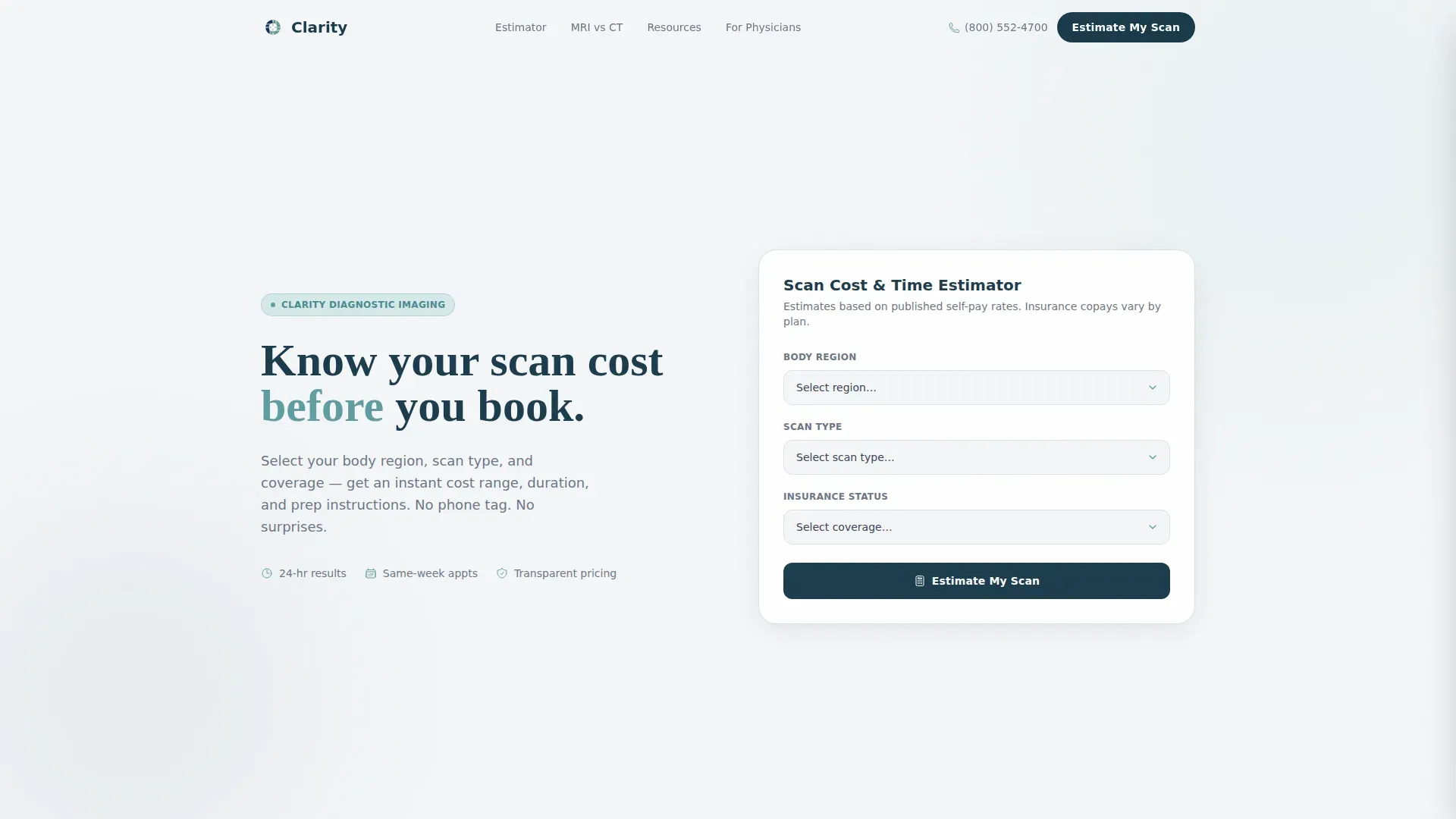
- A functional Scan Cost and Time Estimator in the hero viewport with three dropdown fields: body region, scan type, and insurance status
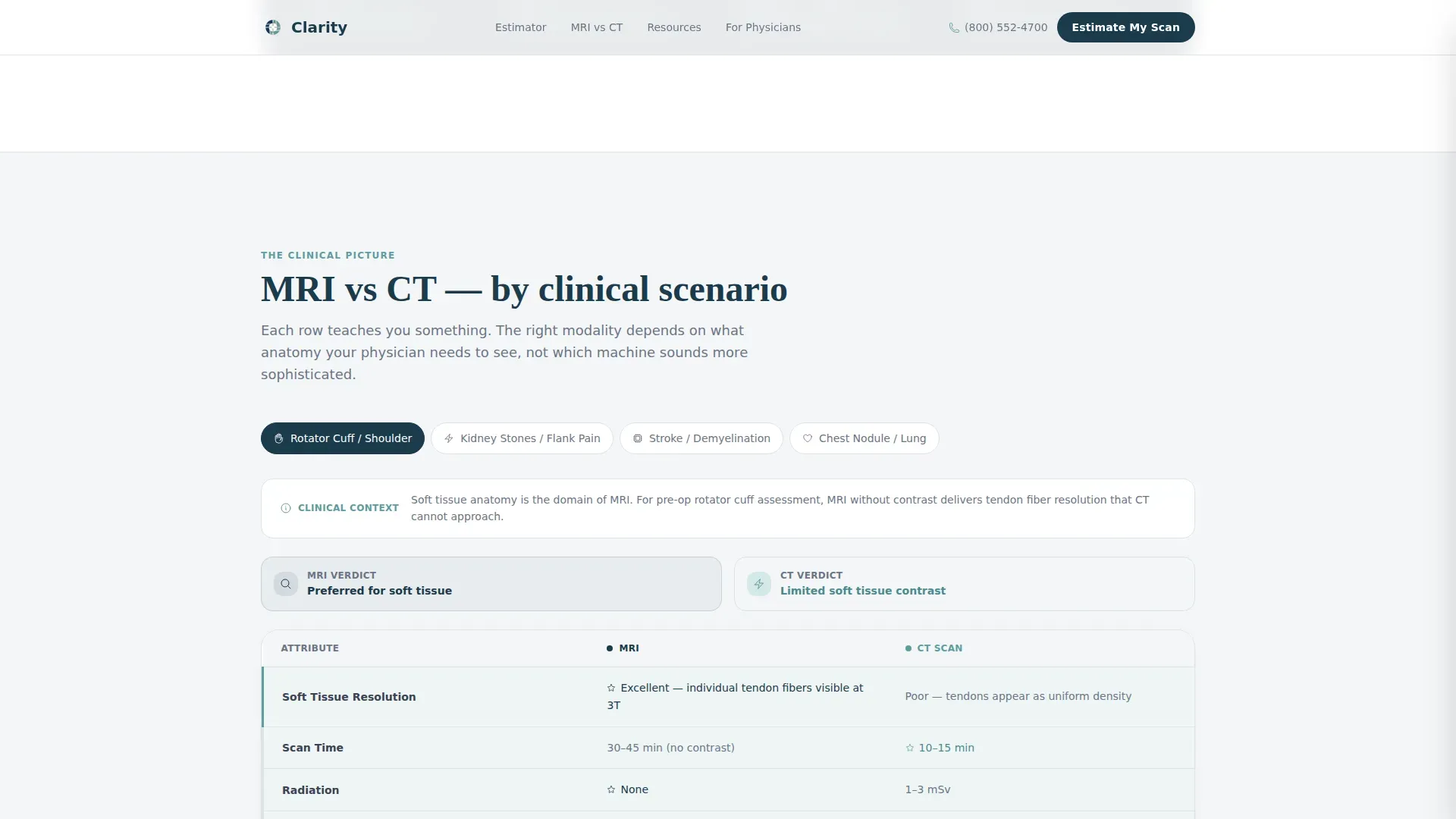
- Side-by-side MRI versus CT comparison tables organized by clinical scenario, showing resolution quality, scan duration, contrast requirements, and cost range
- A dual conversion path: a gated prep-guide download triggered by email and scan-type selection, plus a "Send My Estimate to My Doctor" capture form for physician referrals
Feature list
This section covers the core functional and structural capabilities built into the Clarity template.
Live Scan Cost and Time Estimator
The hero section contains a three-field estimator tool. Visitors choose body region, scan type, and insurance status, then click "Estimate My Scan." A result card slides in showing approximate cost range, scan duration, and prep instructions. The tool is fully ungated, so value is delivered before any contact information is requested.
MRI versus CT Comparison Tables
The centerpiece of the page is a set of side-by-side comparison tables organized by clinical scenario. Scenarios covered include soft tissue injury, kidney stones, and stroke screening. Each row shows resolution quality, scan time, contrast requirements, and cost, turning clinical confusion into informed confidence for both patients and referring physicians.
Problem-to-Solution Arc Section
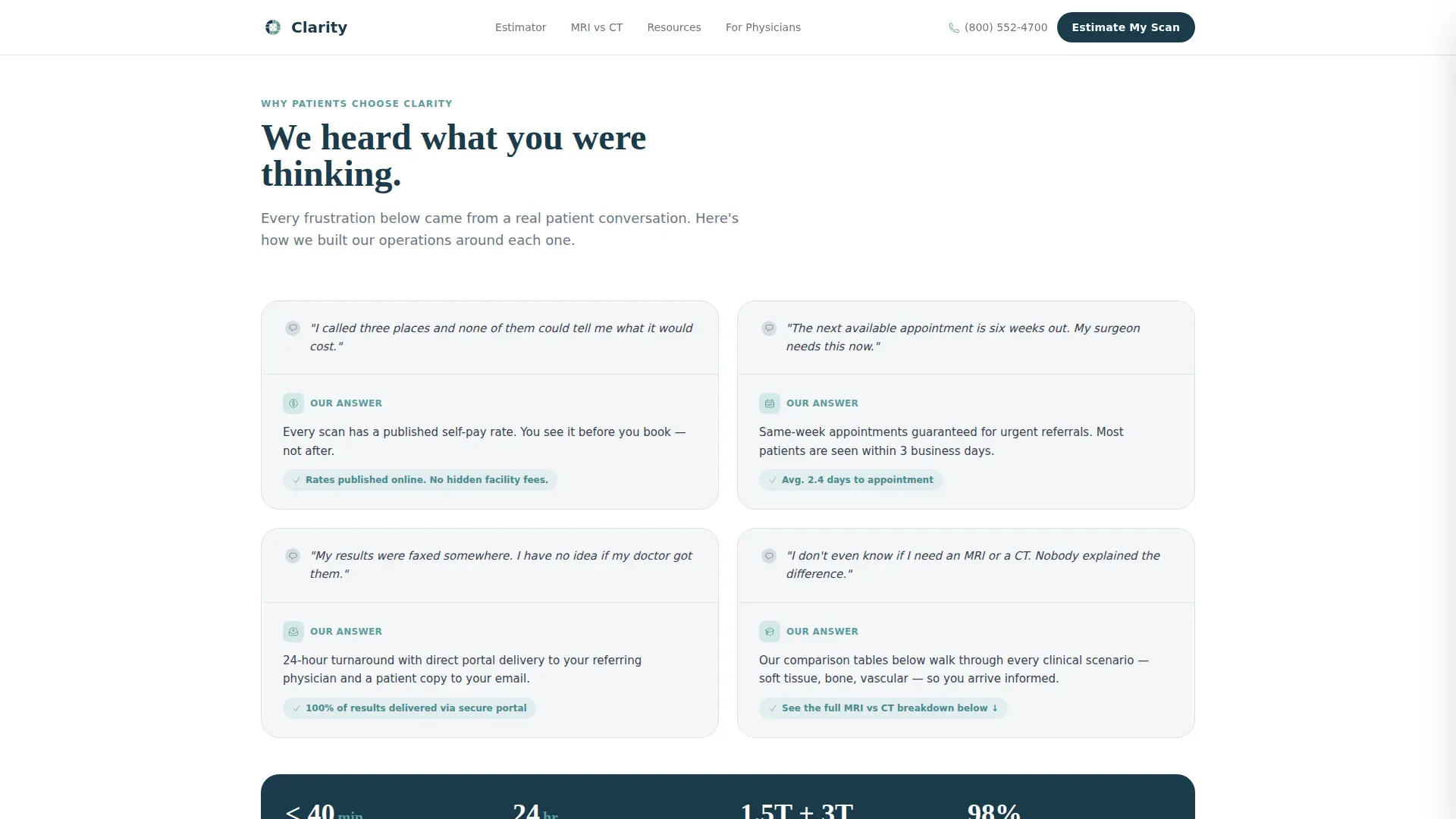
A dedicated scroll section names common patient anxieties in plain language, then answers each with a specific operational fact. The arc covers 24-hour result turnaround with portal access, transparent self-pay rates, and same-week appointment guarantees. This structure builds trust methodically before any conversion ask appears.
Gated Prep Guide Download
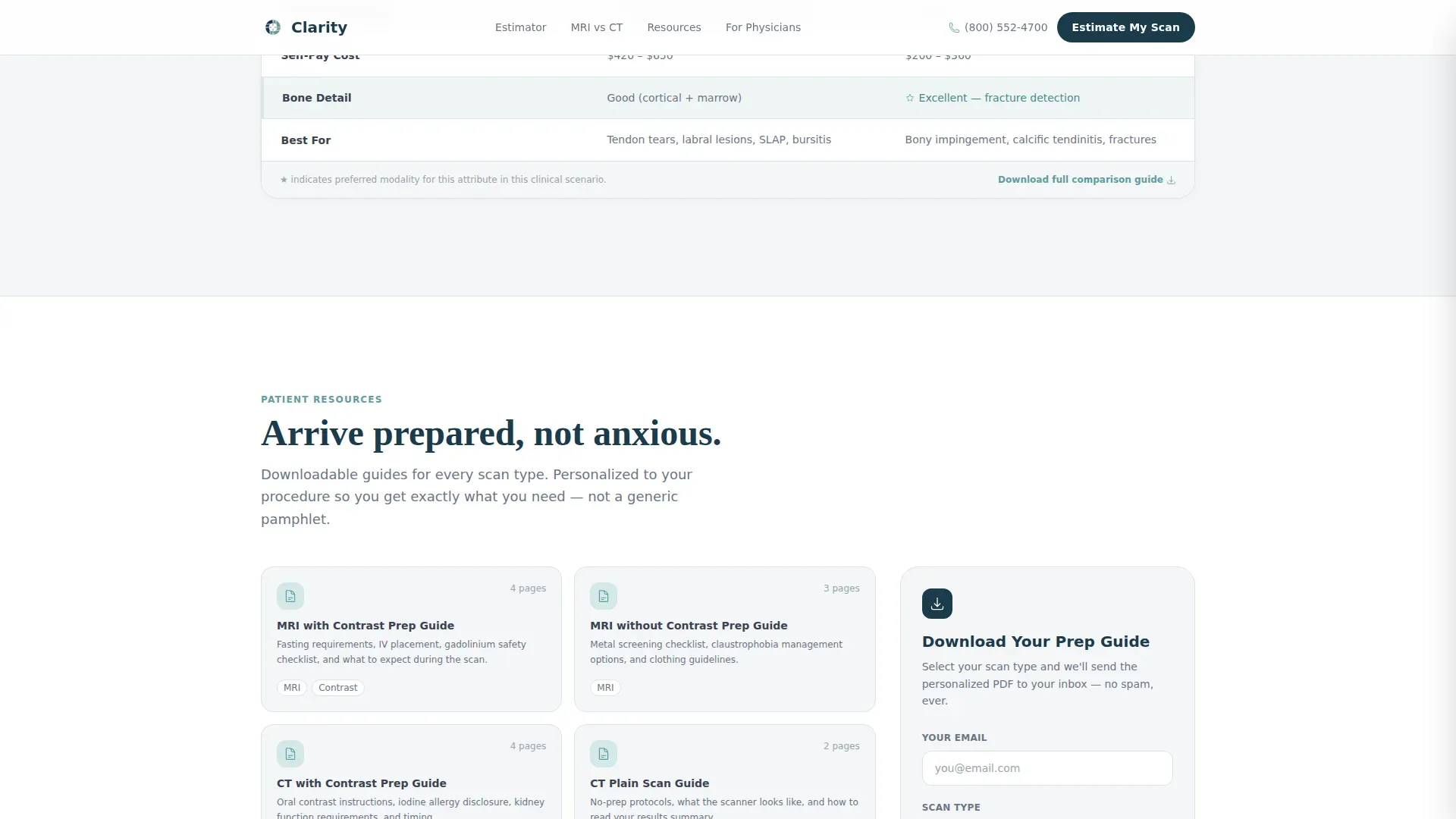
The downloadable resource section offers scan-specific preparation guides, insurance pre-authorization checklists, and a referring-physician packet. Access is gated behind a single email field and a scan-type selector, so the delivered PDF is relevant to the visitor's specific procedure. The gate feels earned because the estimator and tables already delivered value.
Referring Physician Conversion Path
A secondary call-to-action labeled "Send My Estimate to My Doctor" captures the referring physician's fax number or portal address alongside the patient's contact details. This path positions the imaging center as the lowest-friction referral a physician's office will handle, serving both the patient and the clinical relationship simultaneously.
Scroll Reveal Animations and Table Row Highlights
The template uses medium-weight animations: the estimator result card slides in on interaction, comparison table rows highlight on hover or filter, and content sections reveal on scroll. These interactions reinforce the calm, precise reading-room tone without distracting from the clinical information on screen.
Page sections overview
| Section | Purpose |
|---|---|
| Hero Estimator Tool | Let visitors calculate scan cost, duration, and prep before any other action |
| Problem-Solution Arc | Name patient anxieties explicitly and answer each with a specific operational fact |
| MRI versus. CT Tables | Compare imaging modalities by clinical scenario so visitors choose with confidence |
| Downloadable Resources | Deliver personalized prep guides and checklists gated behind email and scan type |
| Referring Physician call to action | Capture physician fax or portal address via "Send My Estimate to My Doctor" form |
| Footer Row | Provide linear single-row footer with essential links and contact anchors |
Design & branding system
The visual identity follows a Corporate Precision theme built on the Soft Mist color system. Every color choice is functional: it directs attention the way a radiologist's pointer traces a finding on a lit display. The typography pairing reinforces the dual register of clinical authority and human clarity.
- Color palette: fog white (#F4F6F8) for backgrounds, quiet graphite (#3B4252) for body text and table borders, muted teal (#5E9CA0) for interactive elements and highlighted table rows, and confident navy (#1B3A4B) reserved exclusively for headers and primary buttons
- Typography: DM Sans handles body text for sharp legibility at small sizes, while Fraunces provides editorial serif weight to section headings, creating a reading-room calm that feels calibrated rather than decorative
- No stock photography of smiling technologists; the estimator tool and data tables carry the visual load of the hero viewport
Mobile & speed optimization
The template is built desktop-first to serve physicians reviewing estimates on workstations and patients comparing options on laptops. Full mobile support is included for patients accessing the page from a phone after a GP appointment. Static sections use server-rendered components for fast initial load, while the estimator and forms run as client components.
- Desktop-first layout with responsive breakpoints that preserve table readability on tablet and mobile viewports
- Static content sections rendered server-side for faster delivery; interactive estimator and gated forms run client-side to keep the experience responsive
- Scroll reveal animations are designed at medium intensity, keeping the page feeling alive without adding perceptible load delay
How this template helps you convert
The conversion architecture respects the visitor's intelligence. Value is demonstrated before any ask is made, and both conversion paths are designed to feel genuinely useful rather than extractive.
- The ungated estimator delivers immediate, personalized information on cost, duration, and prep. Visitors receive real answers before the center asks for anything in return, which builds the trust needed to share an email address or physician contact.
- The gated prep-guide download is earned, not forced. Because the comparison tables and estimator already proved the center's transparency, handing over an email address for a scan-specific PDF feels like a fair and practical exchange rather than a marketing transaction.
Other information about this template
This template is built for the specific intersection of diagnostic imaging and content-driven patient education. A few additional details are worth noting for teams evaluating whether it fits their workflow.
- The footer follows a linear single-row pattern, keeping the bottom of the page clean and uncluttered in keeping with the overall clinical aesthetic
- The comparison table structure supports filtering interactions, allowing visitors to narrow scenarios by body region or scan type without leaving the page
- Social proof is embedded structurally through specific stats: 24-hour result turnaround, same-week appointment availability, and published self-pay rates visible inside the comparison tables
- The "Send My Estimate to My Doctor" form captures both patient contact information and physician fax or portal address in a single step, reducing the number of phone calls a patient needs to make before scheduling
- The template is built in the Health and Medical category under the Diagnostic Lab and Imaging subcategory, specifically matched to the MRI and CT scan center niche
Theme
Corporate Precision
Creative direction
Problem→Solution Arc
Color system
Soft Mist
Style
Comparison Table
Direction
Content/Resource
Page Sections
Live Scan Cost and Time Estimator
MRI Versus CT Comparison Tables
Problem-to-solution Arc
Gated Prep Guide Download
Referring Physician Conversion Path
Scroll Reveal and Table Interactions
Related questions
Does the estimator tool require a login or account to use?
Can I edit the clinical scenarios in the comparison tables?
How does the gated prep-guide download work?
Is this template suitable for a center focused on physician referrals?
What is the animation style used in this template?



