Advanced Law Firm & Attorney Appointment Booking Website Template
Clause is a single-page entertainment law landing page built for firms that negotiate label deals, streaming contracts, and syndication agreements. It pairs an editorial half-page header with a credibility ticker and a three-column comparison table, then drives visitors toward a confidential consult booking through a focused, three-step scheduling flow.
by Rocket studio
Quick summary
Clause is an entertainment law landing page template designed for firms that work behind platinum records, streaming deals, and seven-figure syndication agreements. It combines a commanding editorial header, a scrolling client logo wall, and a three-tier comparison table to move visitors from first impression to booked consult with clear, deliberate confidence.
Who this template is for
This template is built for entertainment law practices that handle high-stakes creative industry work. It suits firms whose clients range from independent artists signing their first label deal to managers protecting rosters worth more than most mid-cap companies.
- Entertainment attorneys representing artists, managers, producers, and labels
- Boutique law firms specializing in music, film, television, and streaming contracts
- Solo practitioners or small practices ready to position themselves as authoritative deal counsel
What problem this template solves
Most law firm pages lead with credentials instead of clarity. Visitors who need deal counsel fast cannot quickly tell what the firm covers, how its tiers compare, or how to book a consult. This template solves all three problems at once.
- No clear service differentiation forces prospective clients to call before they understand the offering
- Generic firm pages fail to communicate deal-level authority to sophisticated creative industry clients
- Buried or complicated booking paths lose visitors who are ready to act but find friction instead
What you get with this template
The template delivers a complete, single-page layout engineered around one outcome: a booked confidential consult. Every section is sequenced to answer the next visitor objection before it forms.
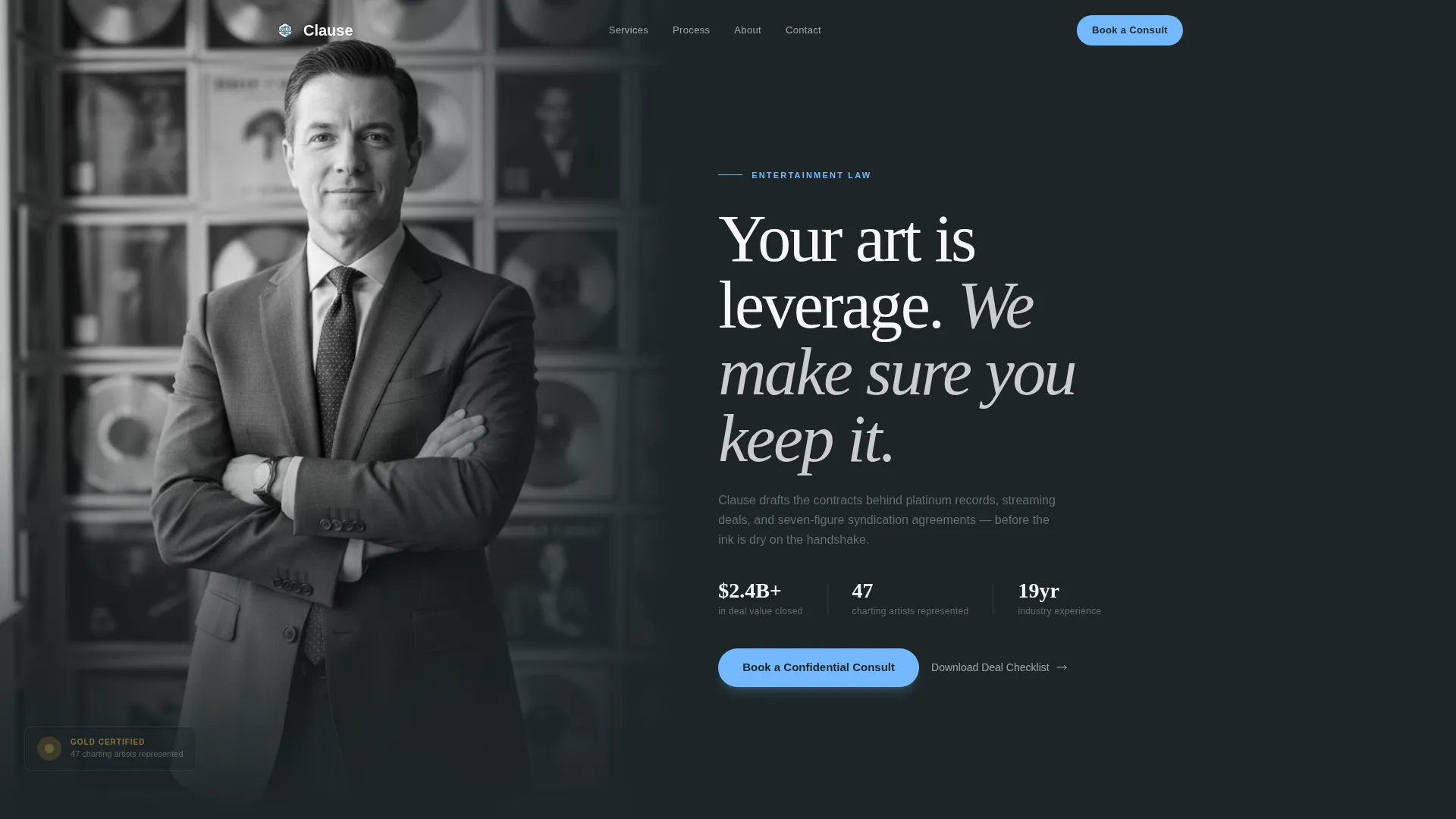
- A half-page editorial header with attorney portrait, a sharp serif headline, a proof statement, and a primary booking button
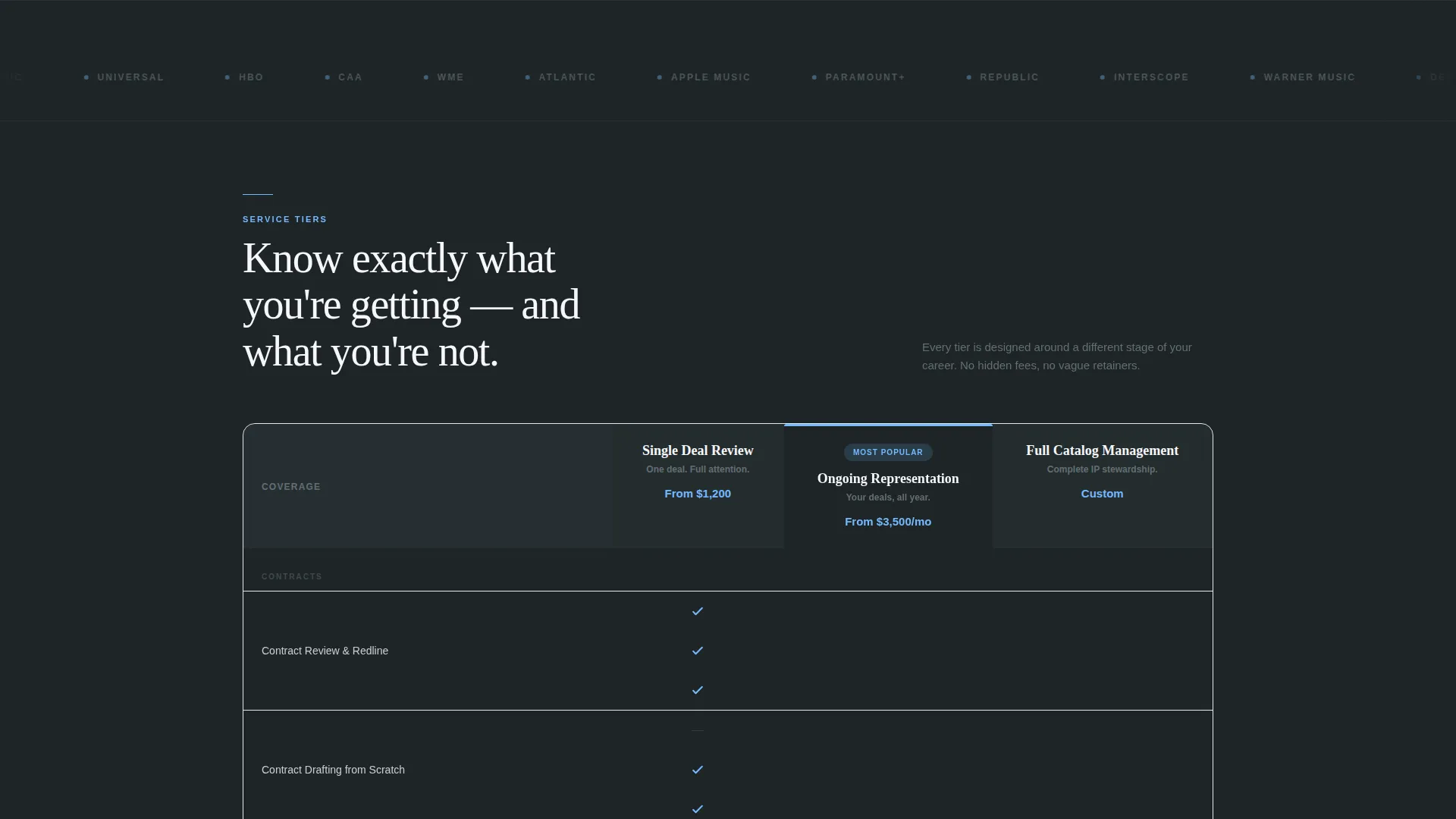
- A scrolling logo wall ticker that registers client and studio credibility at reading pace
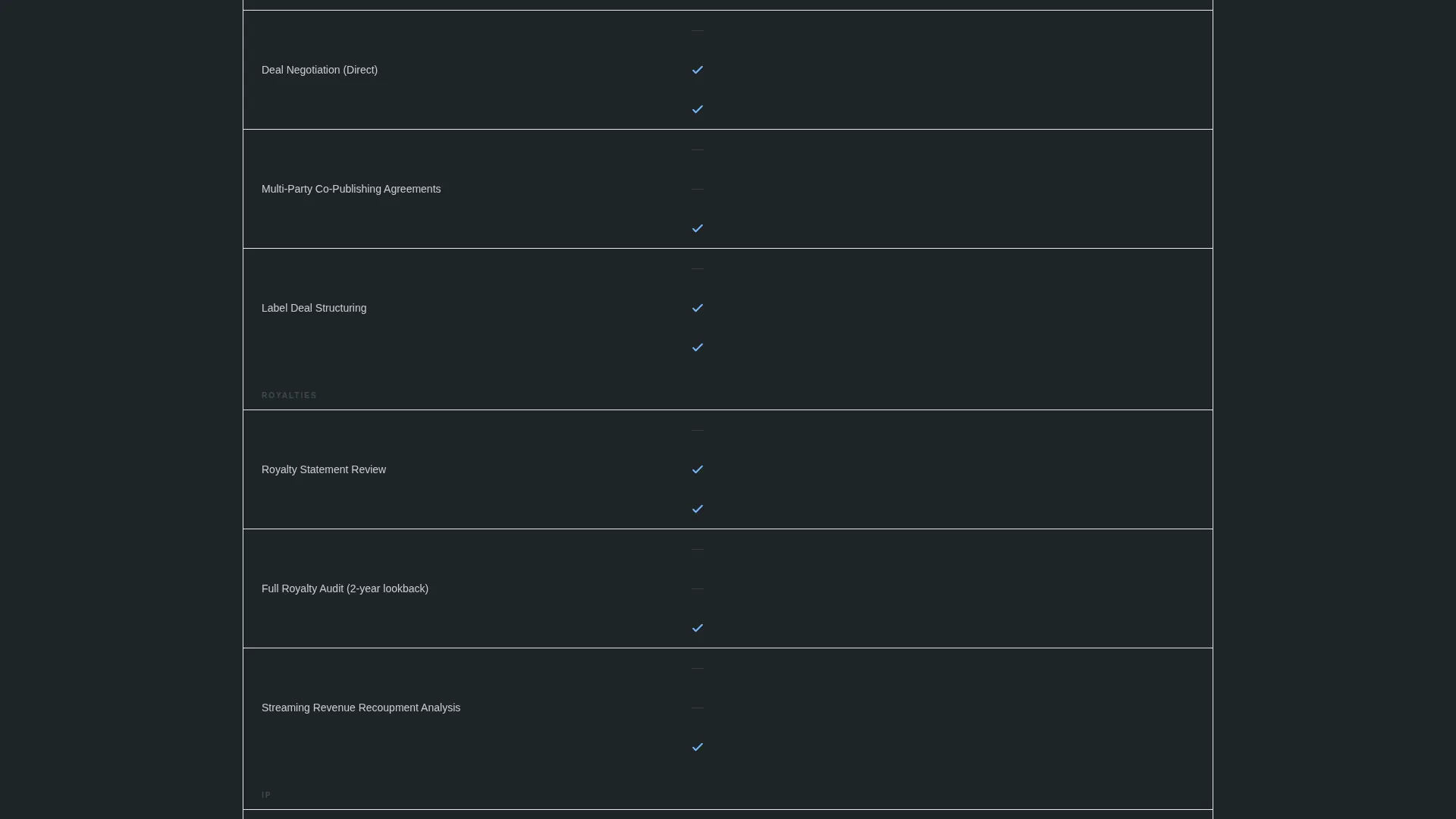
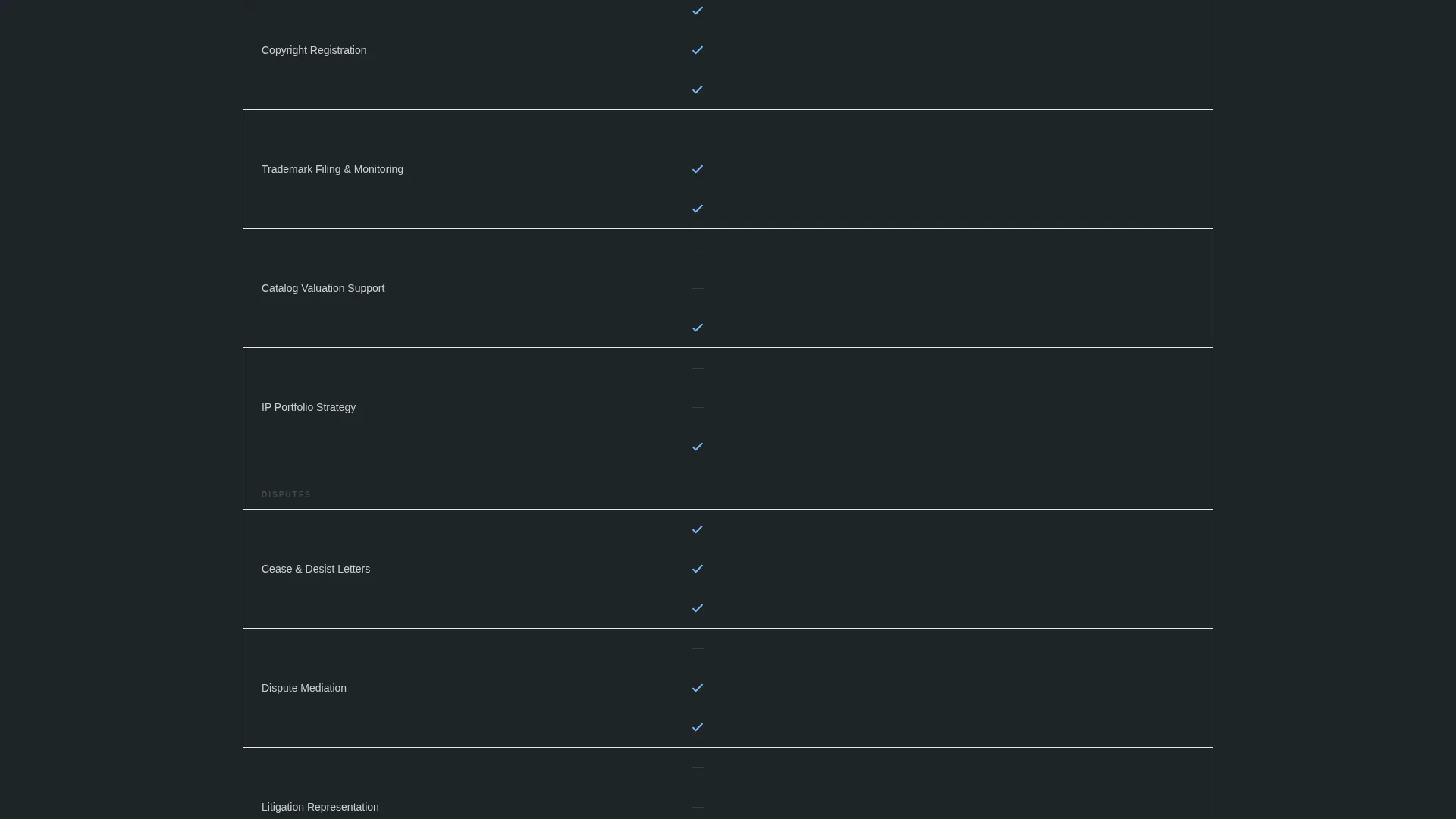
- A three-column comparison table covering Single Deal Review, Ongoing Representation, and Full Catalog Management with sky-blue checkmarks on slate backgrounds
- A three-step progressive booking form and a secondary email capture path for visitors not yet ready to schedule
Feature list
This section covers the core capabilities built into the Clause template.
Three-Column Service Comparison Table
The comparison table organizes the firm's three service tiers side by side. Line items include contract negotiation, royalty auditing, IP (intellectual property) registration, and dispute resolution. Sky-blue checkmarks against slate backgrounds make coverage gaps in lower tiers immediately visible, helping visitors self-qualify before they book.
Half-Page Editorial Header
The header splits the viewport into two halves. The left side holds a black-and-white portrait of the lead attorney, with a shallow depth of field blurring a wall of framed records behind them. The right side carries a sharp serif headline, a single proof statement, and the primary booking call to action.
Scrolling Client Logo Wall
A horizontal ticker runs immediately below the header, displaying client logos and studio marks at reading pace rather than decorative speed. Each name registers individually, building authority before the visitor reaches the comparison table.
Three-Step Progressive Booking Form
The booking flow uses progressive disclosure across three steps. First, visitors select their role from a set of options. Second, they describe their deal or dispute in a free-text field. Third, they choose a 30-minute slot from a live calendar integration. This structure reduces friction and improves the quality of incoming consult requests.
Sticky Booking Bar
After the visitor scrolls past the logo wall, a sticky bar activates at the top of the viewport with the "Book a Confidential Consult" call to action. The bar keeps the primary conversion path visible throughout the rest of the page without interrupting reading.
Secondary Email Capture Path
A "Download Our Deal Checklist" prompt gives visitors who are not yet ready to book a lower-commitment entry point. It captures their email address and delivers immediate utility, warming them toward a future consult without pressure.
Page sections overview
| Section | Purpose |
|---|---|
| Editorial Header | Introduce attorney authority and surface the primary booking call to action |
| Client Logo Ticker | Build immediate credibility by displaying client and studio names at reading pace |
| Comparison Table | Clarify service tiers and surface coverage differences across three deal levels |
| Sticky Booking Bar | Keep the consult booking path visible as the visitor scrolls deeper into the page |
| Progressive Booking Form | Qualify visitors and route them to a live calendar slot in three structured steps |
| Deal Checklist Capture | Offer a lower-commitment email capture path for visitors not yet ready to book |
Design & branding system
The Clause template uses a Service Utility visual identity built around the Slate and Sky color system. The palette feels like a corner office forty floors up, where dark surfaces meet a wide open sky through glass.
- Deep charcoal slate (#2D3436) dominates backgrounds and carries primary text weight, with mid-tone counsel gray (#636E72) used for supporting copy
- Open-sky blue (#74B9FF) marks every clickable element, active state, and checkmark in the comparison table, making interactive areas and tier differences immediately readable
- Contract-paper white (#F5F6FA) breathes across content blocks and creates the visual equivalent of margin space on a carefully drafted agreement
Mobile & speed optimization
The Clause template is built to work cleanly on smaller screens without sacrificing the authority of its desktop layout. The editorial header, comparison table, and sticky booking bar all adapt to mobile viewports.
- The half-page header stacks vertically on mobile, keeping the attorney portrait and headline prominent without crowding the booking button
- The three-column comparison table is designed to remain scannable on narrower screens, preserving the visual contrast between checkmarks and empty cells
How this template helps you convert
Every design and layout decision in Clause points toward a single conversion action: a booked confidential consult. The page is sequenced to address skepticism, establish authority, and remove booking friction in a deliberate order.
- The logo wall immediately follows the header, so visitors who question the firm's track record receive proof before they can scroll away
- The comparison table removes ambiguity about what each service tier includes, reducing the need for a discovery call just to understand the offering
- The sticky booking bar and three-step form keep the conversion path available and low-friction at every point in the scroll, while the secondary checklist download captures visitors who need more time
Other information about this template
Clause is well suited for entertainment law practices looking to establish a premium digital presence without building a multi-page website. The single-page format keeps the visitor journey focused and the booking path short.
- The template is part of the Professional Services category, under the Law Firm and Attorney subcategory, with a specific focus on the entertainment law niche
- The Logo Wall Authority creative direction and Comparison Table template style work together to address both credibility and clarity in one scroll sequence
- The Booking and Scheduling landing page direction means every section is oriented toward the consult form, not general firm information
- The half-page photo and text header concept supports a personal, face-forward positioning that is particularly effective for boutique or solo entertainment law practices
Theme
Service Utility
Creative direction
Logo Wall Authority
Color system
Slate & Sky
Style
Comparison Table
Direction
Booking/Scheduling
Page Sections
Three-column Service Comparison Table
Half-page Editorial Header
Scrolling Client Logo Wall
Three-step Progressive Booking Form
Sticky Booking Bar
Secondary Email Capture Path
Related questions
Who is the Clause template designed for?
What service tiers does the comparison table include?
How does the three-step booking form work?
Can a solo entertainment attorney use this template effectively?
What if a visitor is not ready to book a consult?



