IRB Consultancy Landing Page Template
Clearance is a landing page template built for institutional review board (IRB) and ethics review consultancies. It opens with a multi-step diagnostic quiz that guides researchers through an assessment of their submission readiness, then answers their deepest concerns through a zigzag FAQ layout. The result is a calm, authoritative page that turns late-night protocol anxiety into confident action.
by Rocket studio
Quick summary
Clearance is a single-page template for IRB and ethics review consultancies. It combines a multi-step intake quiz with an alternating FAQ layout to move researchers from confusion to clarity. The Healing Space visual theme, built on a Forest Trust color system, makes the page feel warm and trustworthy rather than clinical and cold.
Who this template is for
This template is built for regulatory consultancies and academic support services that help researchers navigate the IRB submission process. It speaks directly to the people those consultancies serve every day.
- Principal investigators managing protocol revisions under deadline pressure
- Graduate students whose dissertation timelines depend on a single IRB approval
- Startup biotech teams filing their first Investigational New Drug (IND) application without in-house regulatory staff
What problem this template solves
Researchers approaching an IRB submission are often overwhelmed. They face confusing amendment cycles, consent form rejections, and multi-site coordination challenges with no clear guide. A generic consultancy homepage does not address that specific anxiety. This template does.
- It replaces an intimidating contact form with a calm, one-question-at-a-time diagnostic quiz
- It answers real researcher questions in the FAQ sections before they even think to ask them
- It gives visitors a clear next step, whether they engage with the quiz or download a checklist
What you get with this template
You get a fully structured single-page layout designed around a research consultancy's conversion goals. Every section serves a purpose and every visual decision reinforces trust.
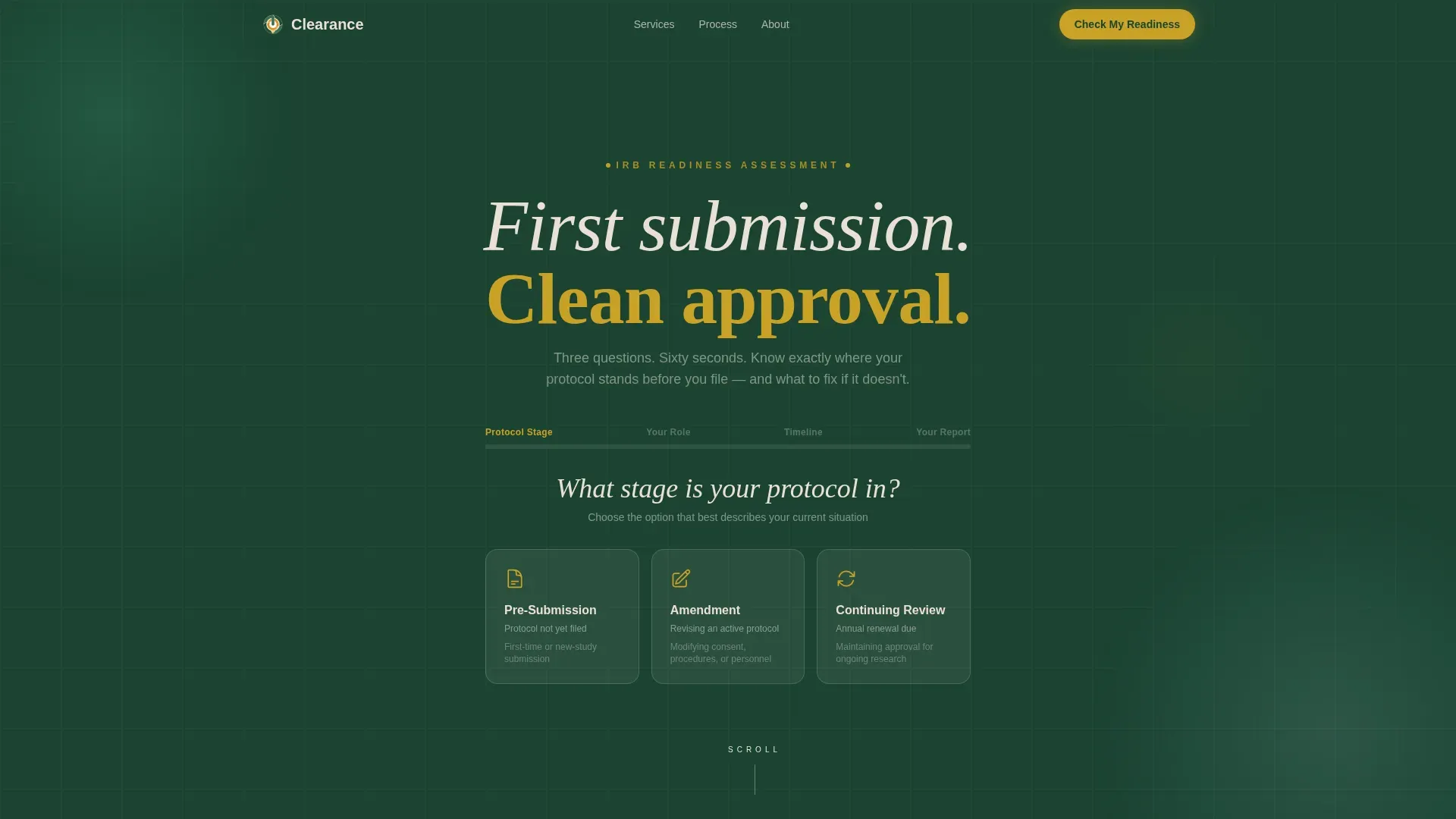
- A multi-step header quiz with a results screen categorizing submission readiness as Green, Yellow, or Red
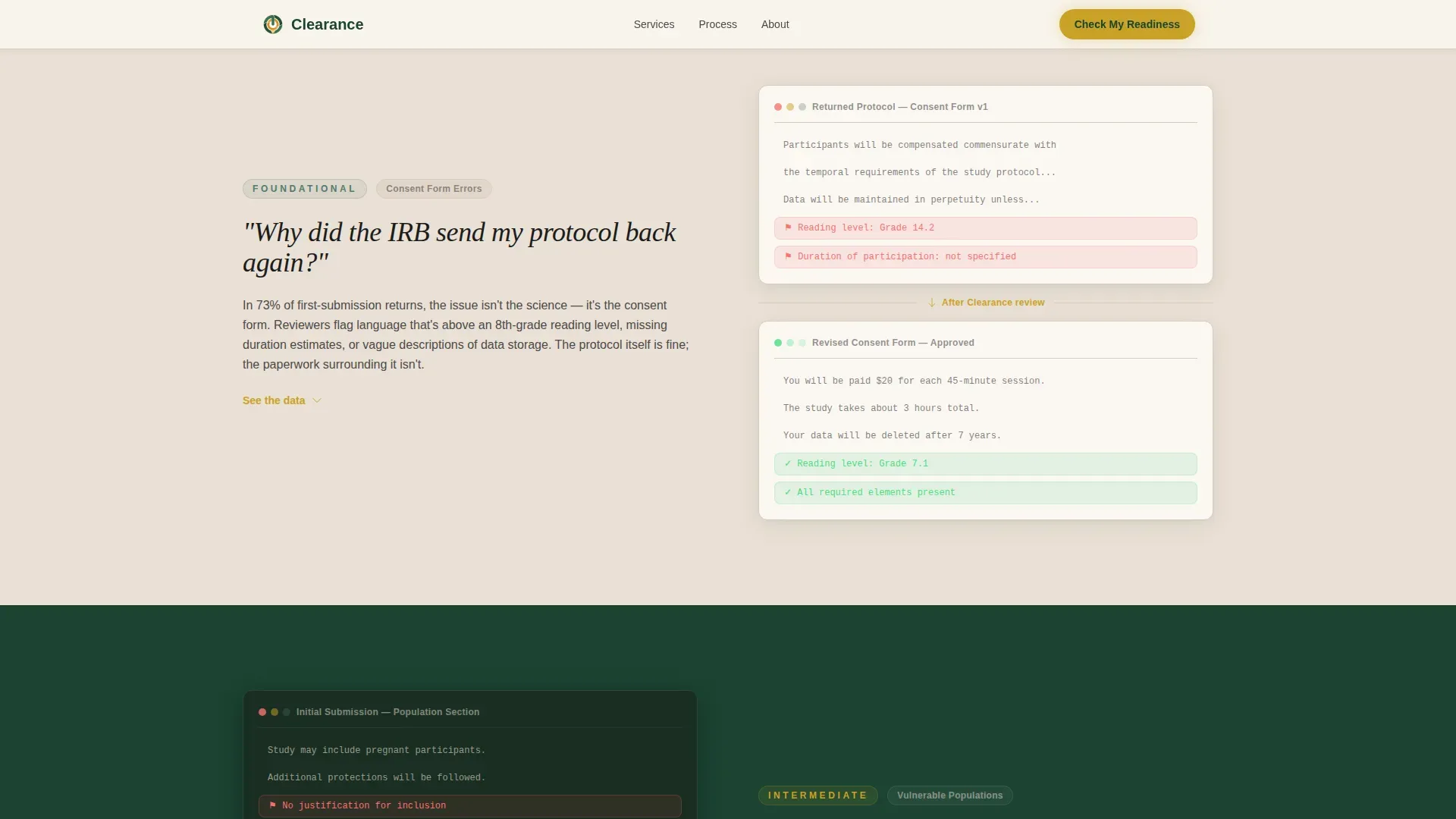
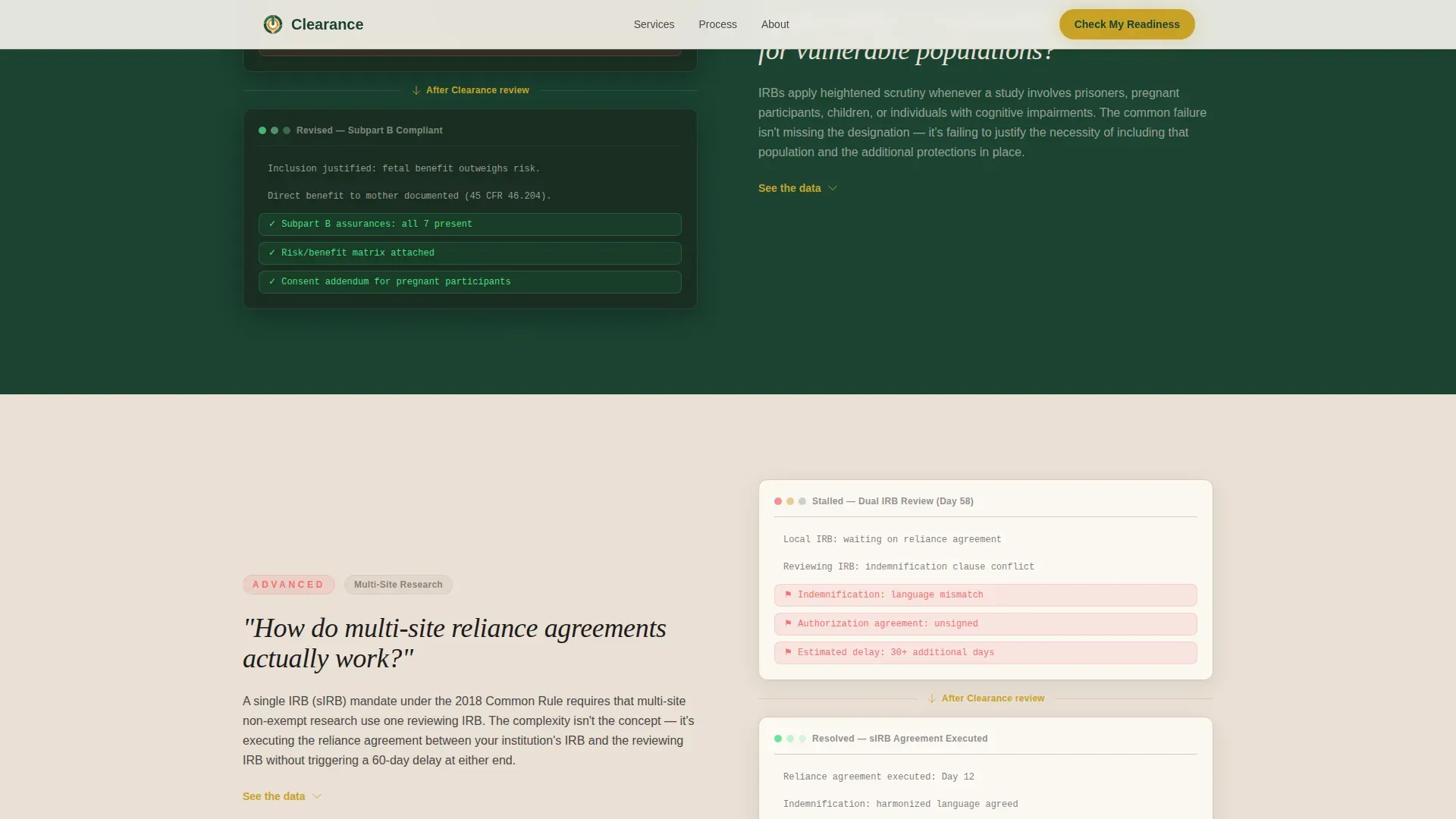
- Three zigzag FAQ rows covering consent form errors, amendment cycles, and multi-site reliance agreements
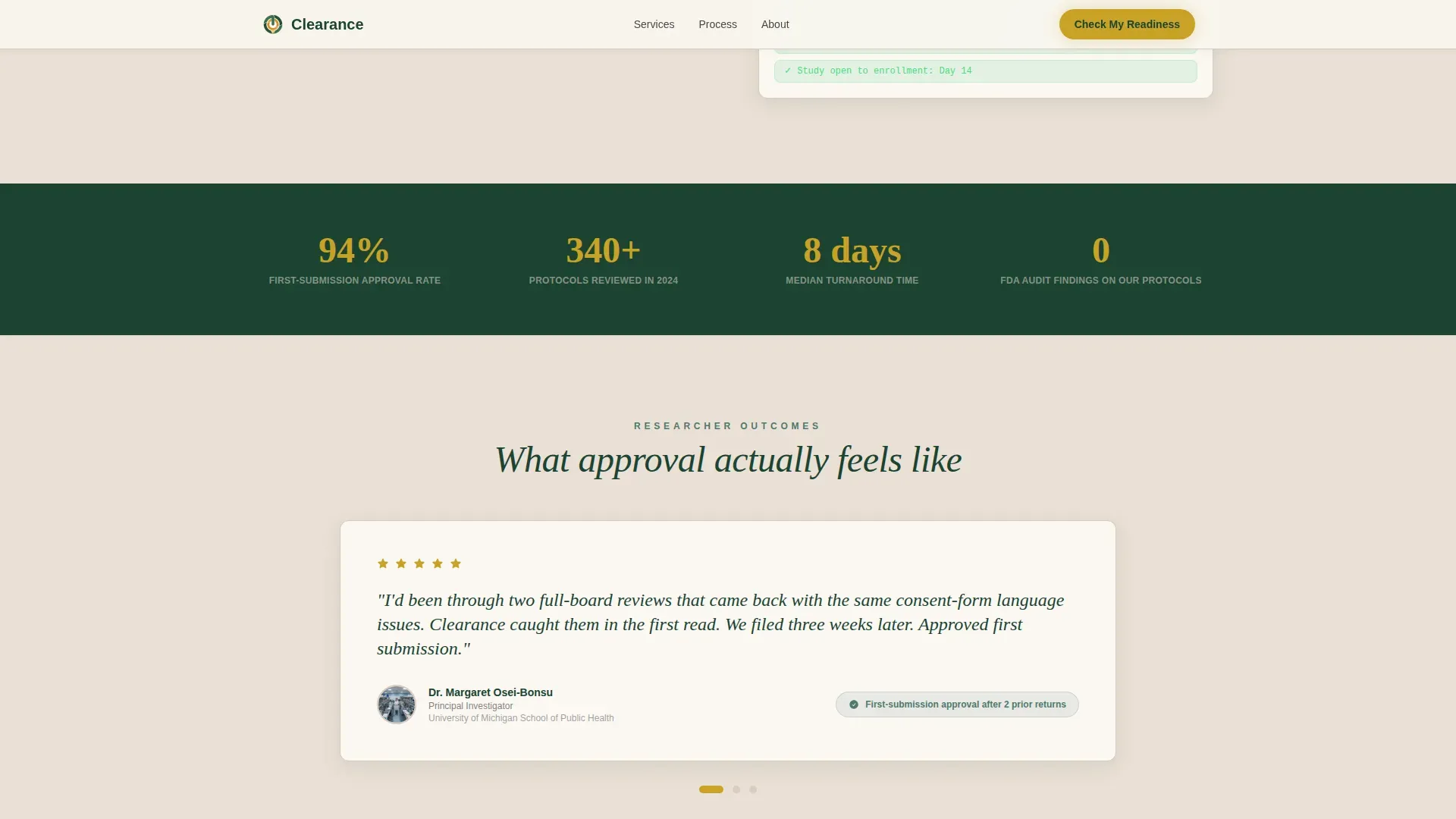
- A social proof section with testimonials and a secondary email capture for a downloadable IRB checklist
Feature list
This template is built around five core capabilities that work together to qualify and convert research professionals.
Multi-Step Diagnostic Quiz
The header quiz opens with a single floating question: "What stage is your protocol in?" Three illustrated cards appear for Pre-Submission, Amendment, and Continuing Review. Each answer slides to the next question. A final results screen labels the visitor's readiness as Green, Yellow, or Red and prompts them to enter their name and institutional email to unlock their full readiness report.
Amber Progress Indicator
An amber progress bar sits at the top of the quiz and fills like a vial as the visitor advances through each step. This visual cue keeps the interaction feeling purposeful without adding pressure. The amber color is reserved exclusively for interactive highlights and calls to action across the page.
Zigzag FAQ Layout
Three alternating rows each open with a real question researchers search for late at night. The first row places the question on the left and the answer on the right. The second row reverses the layout. Each row escalates in complexity, from basic consent form errors to multi-site reliance agreements, mirroring the researcher's own growing concerns and then resolving them.
Readiness Results Screen
After the quiz, visitors see a personalized readiness category with a short explanation of their gaps. This screen is the primary conversion moment. It ends with the call to action "See My Review Readiness" and an email capture field for the full report.
Secondary Email Capture
Visitors who scroll past the quiz reach a social proof section with researcher testimonials and a single-field email capture. The prompt reads "Get the IRB First-Submission Checklist." This secondary path qualifies leads who are already engaged enough to scroll but not yet ready to start the quiz.
Page sections overview
| Section | Purpose |
|---|---|
| Hero diagnostic quiz | Opens the page with a multi-step intake form over an evergreen background |
| FAQ Zigzag Row 1 | Addresses why the IRB returns protocols, question left, answer right |
| FAQ Zigzag Row 2 | Explains consent form flagging criteria, answer left, question right |
| FAQ Zigzag Row 3 | Covers multi-site reliance agreements, question left, answer right |
| Social proof and secondary call to action | Testimonials with outcomes and a checklist email capture |
| Footer | Single-row linear footer with navigation and contact links |
Design & branding system
The visual identity follows a Healing Space theme. It feels like a worn leather journal left open on a wooden desk, trustworthy, unhurried, and alive with quiet competence.
- Deep evergreen (#1B4332) anchors alternating section backgrounds; soft moss (#52796F) softens secondary panels and divider lines; warm parchment (#EAE0D5) fills open space and body text fields
- Amber (#C9A227) appears only on the progress bar, interactive highlights, and call-to-action buttons to direct attention precisely where action is needed
- Typography pairs Cormorant Garamond for headings and questions with Plus Jakarta Sans for body text and user interface elements
Mobile & speed optimization
The template is designed desktop-first, reflecting the reality that researchers work on laptops late at night. It is fully responsive and adapts gracefully to smaller screens.
- GSAP ScrollTrigger powers section reveals and step transitions, keeping animation smooth without overwhelming the layout
- Interactive components including the multi-step quiz, FAQ accordion, and results screen use client-side rendering, while static sections use server components to keep load behavior efficient
- The zigzag layout stacks vertically on mobile so the question-and-answer rhythm stays readable on any screen size
How this template helps you convert
Every structural decision in this template points toward one outcome: turning a stressed researcher into a qualified lead.
- The multi-step quiz removes friction at the top of the page by presenting one calm question at a time instead of a wall of form fields, lowering the barrier to first engagement.
- The zigzag FAQ sections build trust by addressing the exact doubts a researcher has before they decide to hire outside help, so visitors arrive at the call to action already half-convinced.
- The secondary email capture at the bottom ensures that even visitors who skip the quiz have a low-commitment way to identify themselves as active leads through the checklist download.
Other information about this template
This template is a strong fit for consultancies operating in the United States academic and biomedical research market. A few additional details worth knowing before you build with it.
- The template supports English-language copy, United States Dollar (USD) pricing context, and USA academic institutional references out of the box
- Testimonials are designed to include named researchers, their institution, and a specific outcome metric to reinforce credibility
- The footer uses a linear single-row pattern with enough space for navigation links, a contact reference, and brief compliance or disclaimer text
- The quiz state management and results screen logic are built for client-side interactivity, giving you full control over how readiness categories are defined and labeled
Theme
Healing Space
Creative direction
FAQ-Driven
Color system
Forest Trust
Style
Zigzag/Alternating
Direction
Quiz/Assessment
Page Sections
Multi-step Diagnostic Intake Quiz
Amber Progress Bar Indicator
Zigzag FAQ Question Layout
Readiness Results Screen
Secondary Checklist Email Capture
Related questions
What kind of consultancy is this template designed for?
How does the multi-step quiz work on the page?
Can visitors convert without completing the quiz?
What does the FAQ zigzag layout cover?
Is this a single page or a multi-page template?



