Flight School Marketing FAQ Website Template
Clearance is a single-column flight school landing page template built for free estimate campaigns. It leads with animated cost counters, walks prospects through real pricing questions in a FAQ-driven scroll flow, and captures leads through a goal-first form. The design uses a clean Arctic White palette that feels clinical, clear, and trustworthy from the first scroll.
by Rocket studio
Quick summary
Clearance is a lead generation landing page template for flight schools. It opens with three animated data counters showing average cost, timeline, and minimum flight hours. A FAQ-driven scroll flow answers real prospect questions with cost ranges and timeline graphics. Two conversion paths capture ready buyers and research-stage visitors alike.
Who this template is for
This template is built for flight schools that want to turn online curiosity into booked discovery calls. It works especially well when prospects arrive with cost and timeline questions they have not yet had answered.
- Flight schools offering private pilot, instrument rating, commercial, or ATP certification tracks
- Aviation programs competing against Part 141 schools and university aviation degrees
- Admissions teams that want a free estimate page to replace cold inquiry calls
What problem this template solves
Most flight school websites bury pricing behind a contact form. Prospects leave without answers, and schools lose leads to competitors who publish honest numbers. This template fixes that gap directly.
- Prospects can see average costs and timelines before they ever fill in a name
- Every scroll section addresses a specific objection, from fuel surcharges to medical class requirements
- The page earns trust first, then asks for contact details
What you get with this template
You get a fully structured single-column landing page layout with a clear visual hierarchy and two distinct lead capture paths. Every section is purpose-built for a flight school estimate funnel.
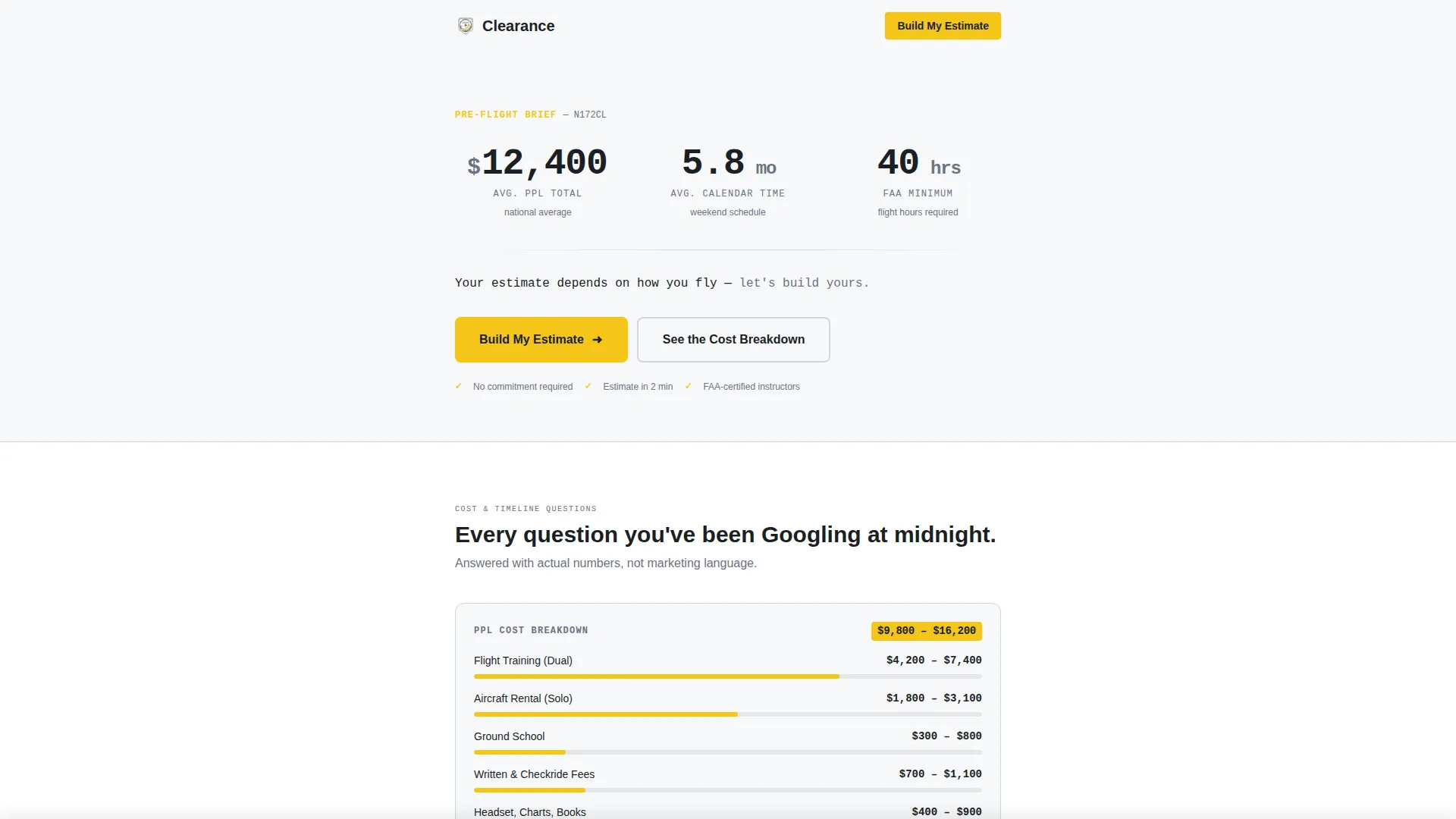
- Animated header counters displaying average total cost to private pilot license (PPL), calendar months, and minimum flight hours
- A FAQ-driven scroll sequence where each section poses one real prospect question and answers it with a cost range or timeline graphic
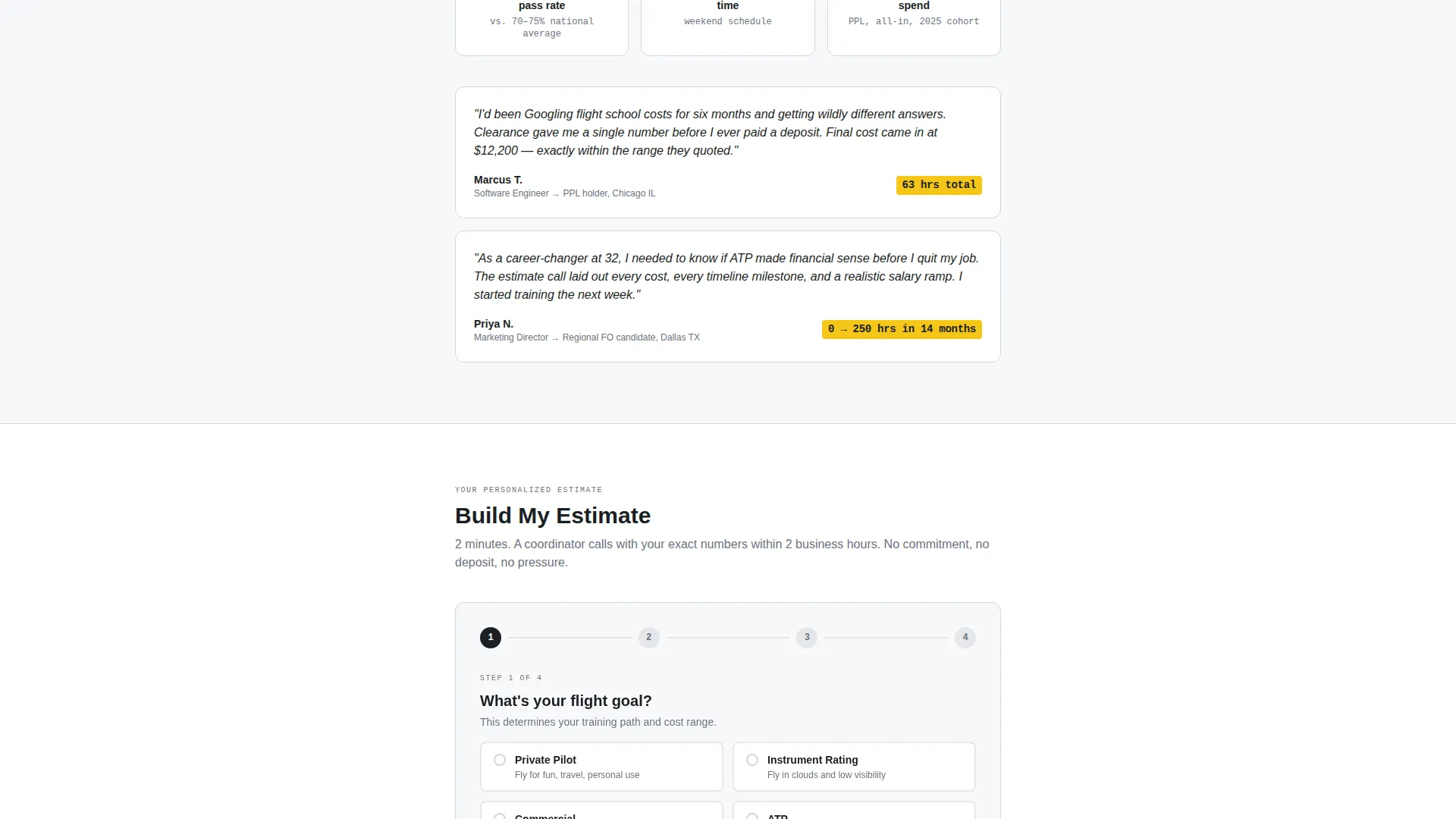
- A primary "Build My Estimate" form collecting flight goal, hours logged, availability, name, and phone, plus a secondary email-only path for a downloadable cost breakdown PDF
Feature list
This template is built around a focused set of functional components. Each one serves a specific role in moving a hesitant prospect toward a confident lead submission.
Animated Data Counters Header
Three counters tick upward on page load against a clean white background. They display the average total cost to PPL at $12,400, average calendar months at 5.8, and minimum flight hours at 40. A single anchoring line sits below: "Your estimate depends on how you fly, let's build yours."
FAQ-Driven Scroll Sections
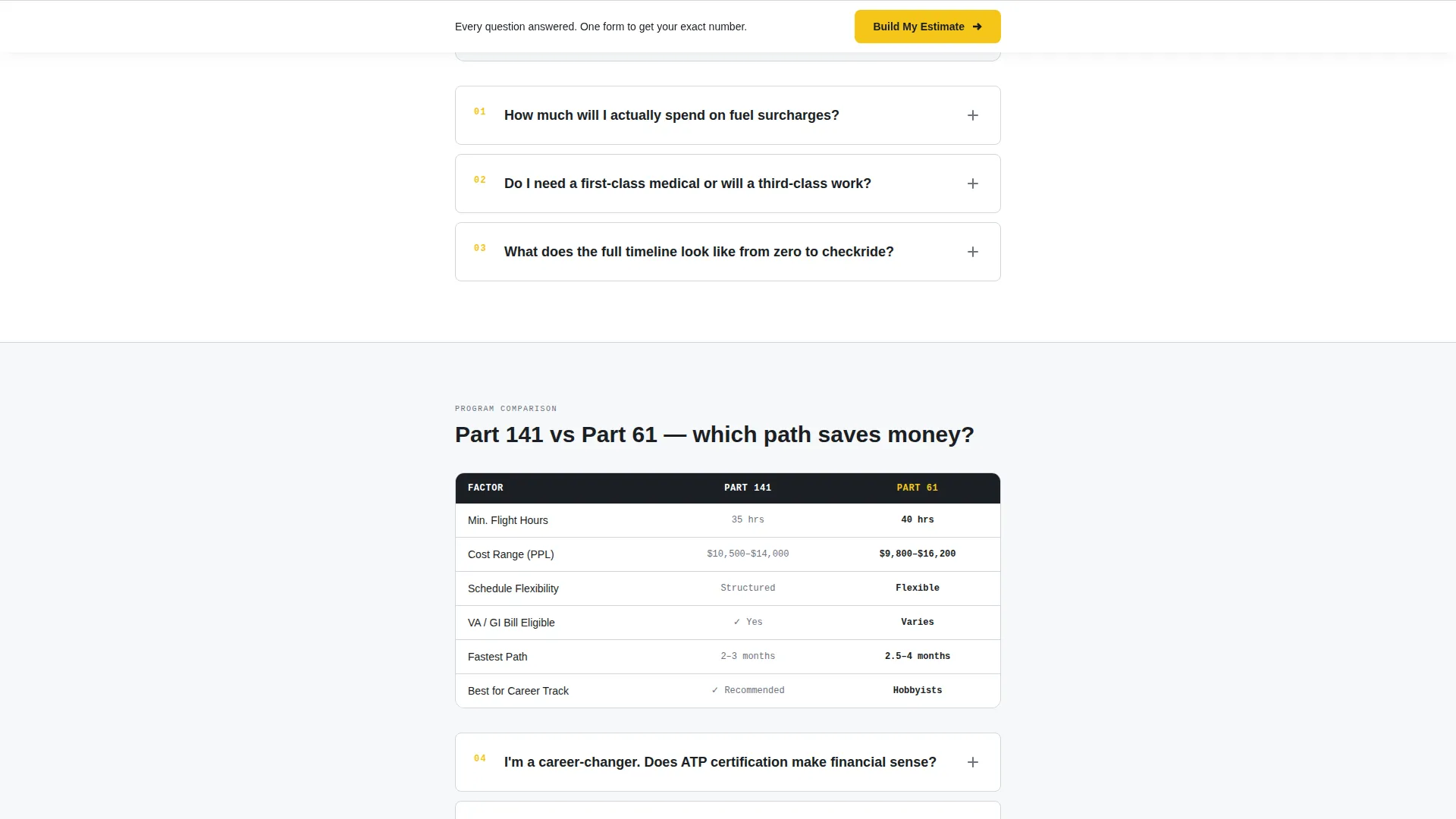
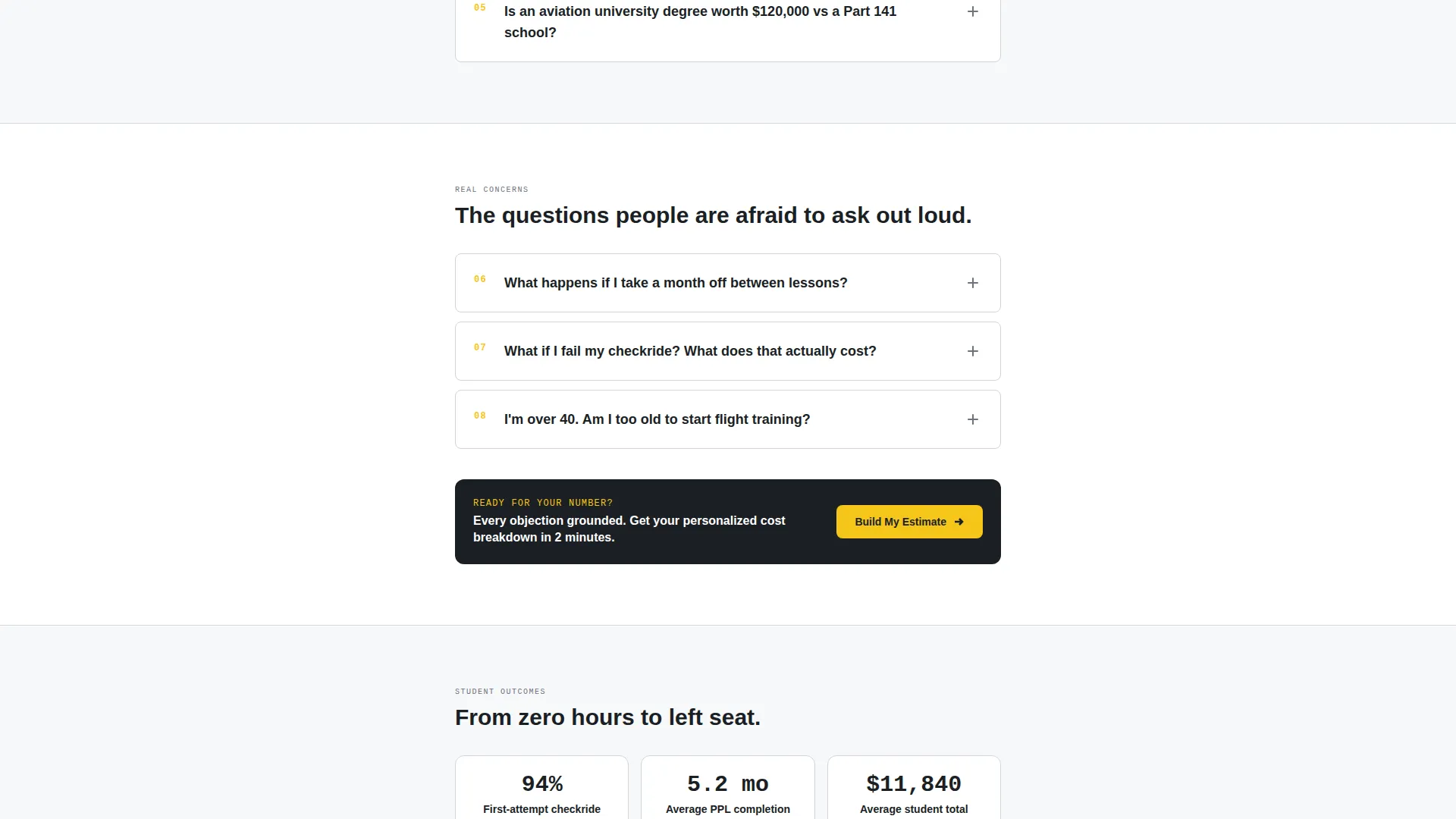
Each scroll section frames one real question a prospect asks during a discovery call. Questions escalate from simple curiosity to commitment-level concerns. Every section answers in two to three plain sentences with a supporting cost range or timeline graphic.
Goal-First Lead Capture Form
The primary form opens by asking for flight goal first, before name or phone. It steps through current hours logged, availability preference, then contact details. This sequencing lowers friction by leading with what the prospect cares about most.
Sticky Bottom Bar Call to Action
After the third FAQ section, a sticky bottom bar appears with the "Build My Estimate" call to action. It remains visible as the visitor continues scrolling, reinforcing the primary conversion path without interrupting the reading flow.
Secondary PDF Download Path
Visitors not ready to speak with admissions can enter just an email to receive a downloadable cost breakdown PDF. This secondary path captures research-stage prospects who need more time before committing to a call.
Cost and Timeline Graphics
Each FAQ section includes a supporting visual showing a cost range or timeline estimate. These graphics replace vague descriptions with specific numbers, matching the clipboard-and-checklist tone of the overall page.
Page sections overview
| Section | Purpose |
|---|---|
| Animated Counters Header | Opens with PPL cost, months, and hours data |
| Primary call to action Block | Places "Build My Estimate" button above the fold |
| FAQ Section One | Answers early curiosity questions with cost ranges |
| FAQ Section Two | Addresses medical class and eligibility concerns |
| FAQ Section Three | Covers timeline gaps and lesson interruption impact |
| Sticky call to action Bar | Reinforces lead form after third FAQ section |
| Goal-First Lead Form | Captures flight goal, hours, availability, and contact |
| PDF Download Path | Collects email for cost breakdown PDF delivery |
Design & branding system
The Arctic White color system is built to feel like a freshly cleared instrument panel. Every color has a defined role, and nothing competes for visual attention without a reason.
- Backgrounds use instrument-panel white (#F7F8FA) throughout, with sectional-chart gray (#D1D5DB) drawing quiet dividers between sections
- Taxiway centerline yellow (#F5C518) activates on buttons and cost figures, making every conversion point and key number immediately visible
- Transponder-code dark (#1B1F24) anchors all body text, keeping readability high against the white field without relying on pure black
Mobile & speed optimization
The single-column flow is structured to perform cleanly across screen sizes. Narrow viewports do not require horizontal scrolling or layout reflow.
- Single-column layout stacks all sections vertically, making the scroll sequence intuitive on phone and tablet screens
- Sticky bottom bar and form inputs are sized for thumb-friendly interaction without requiring zoom or precision tapping
How this template helps you convert
The page is engineered to reduce friction at every stage of the decision journey. By the time a prospect reaches the form, they have already seen honest numbers and had their key objections addressed.
- The animated counters replace the prospect's midnight Google search with an immediate, credible answer, establishing trust before a single word of marketing copy appears.
- The FAQ scroll sequence mirrors the exact conversation a skilled admissions coordinator runs on a discovery call, so the form feels like a natural next step rather than a cold ask.
- Two conversion paths ensure the page captures both ready buyers and research-stage visitors, expanding the total pool of leads without adding complexity to the layout.
Other information about this template
This template is categorized under Professional Services with a Flight School Marketing subcategory. It is specifically designed for the flight school free estimate landing page niche. The Service Utility theme keeps the visual language functional and data-forward rather than aspirational or lifestyle-driven. The template style is Single Column Flow, meaning all sections run in one vertical column with no sidebar or multi-column grid. The header concept is Data Storytelling, and the creative direction is FAQ-Driven, both of which are embedded directly into the layout structure rather than applied as surface-level styling choices.
- Suitable for Part 141 flight schools, independent flight instructors scaling their intake process, and aviation academies running paid search campaigns
- The "Build My Estimate" call to action is repeated in the header block and again as a sticky bar, providing two persistent touchpoints across the page
- The form sequence (goal, hours, availability, name, phone) is designed to qualify leads before contact details are captured
Theme
Service Utility
Creative direction
FAQ-Driven
Color system
Arctic White
Style
Single Column Flow
Direction
Lead Generation
Page Sections
Animated Data Counters Header
Faq-driven Scroll Flow
Goal-first Lead Capture Form
Sticky Bottom Bar Call to Action
Secondary PDF Download Path
Cost and Timeline Graphics
Related questions
What type of flight school will benefit most from this template?
Can I use this template for a paid advertising landing page?
How many lead capture paths does the template include?
Does the page include any default pricing content?
Is this template suitable for prospects with zero flying experience?



