Drive-Through Business Booking Website Template
Clipper is a bento grid landing page built for a drive-through barbershop. It leads with bold, oversized pricing cards, uses scroll-triggered tile reveals to showcase services and add-ons, and keeps a sticky upsell bar pinned to the viewport. The design is loud, geometric, and built to move busy customers from a quick glance to a booked cut.
by Rocket studio
Quick summary
Clipper is a single-page bento grid landing page for a drive-through barbershop. It opens with three staggered price cards, animates through service reveals as you scroll, and keeps a live mini-cart pinned at the corner so visitors can stack add-ons before they ever leave their car.
Who this template is for
This template is built for drive-through barbershop owners who want a landing page that earns attention and drives bookings. It fits businesses that serve time-pressed customers and need to communicate price, value, and convenience at a glance.
- Drive-through barbershop owners launching or refreshing their online presence
- Mobile-first service businesses that rely on impulse decisions and fast conversions
- Shop operators who want to upsell add-ons without a complicated booking flow
What problem this template solves
Most service landing pages bury the price, overwhelm visitors with paragraphs, and lose the customer before a decision gets made. This template flips that. It leads with the price, makes the upgrade path feel obvious, and turns scrolling into an experience rather than a chore.
- Visitors often leave before acting because pricing is hidden or unclear
- Add-ons are easy to miss when they live in a static list with no visual pull
- A generic layout does not match the energetic, convenience-first personality of a drive-through service
What you get with this template
You get a fully designed, ready-to-customize bento grid landing page with every visual element, animation behavior, and layout section already in place. The page is structured to guide visitors from the first price card all the way to a confirmed add-on selection.
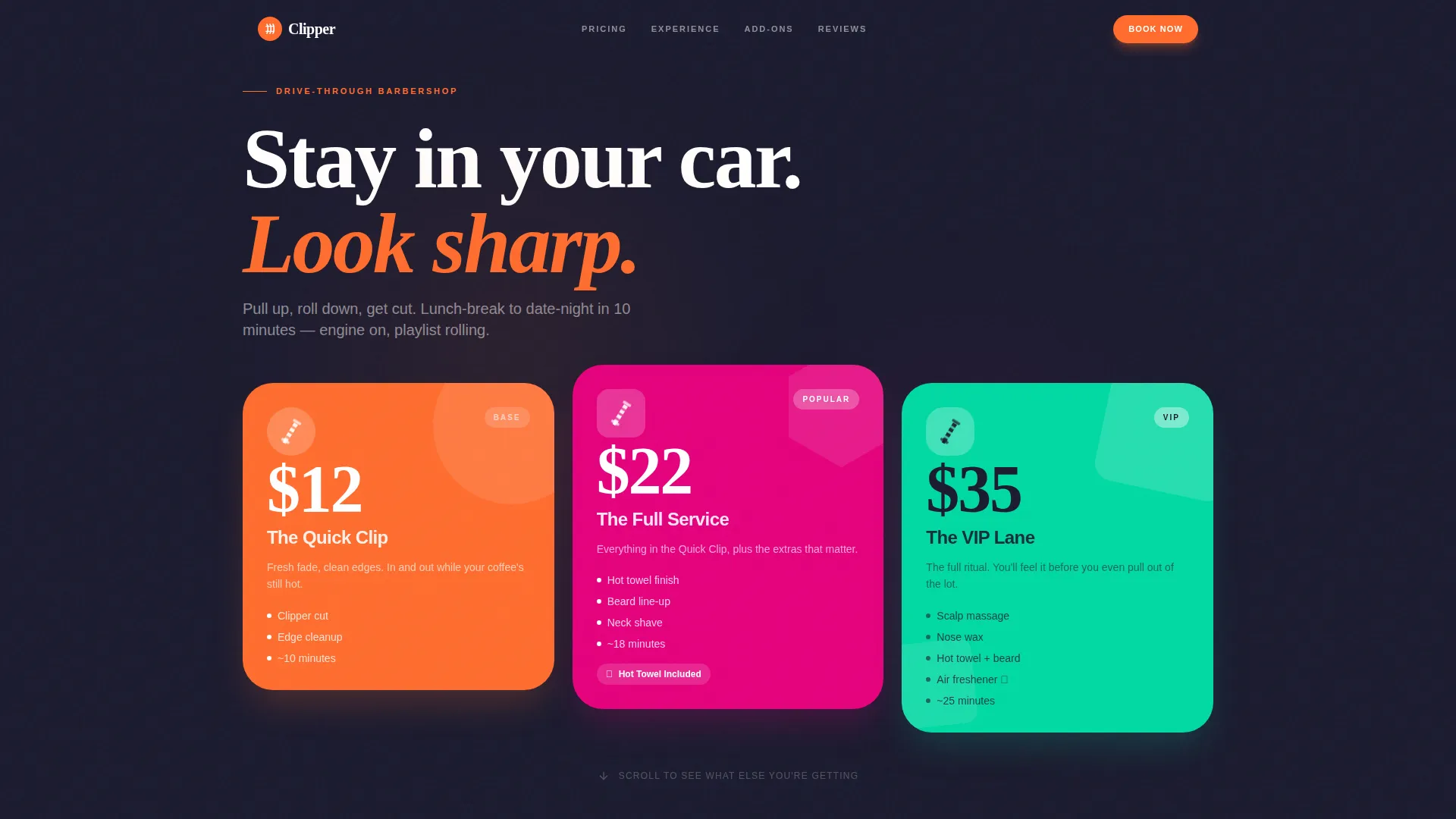
- A staggered bento header with three geometric price cards in circle, rounded square, and hexagon shapes
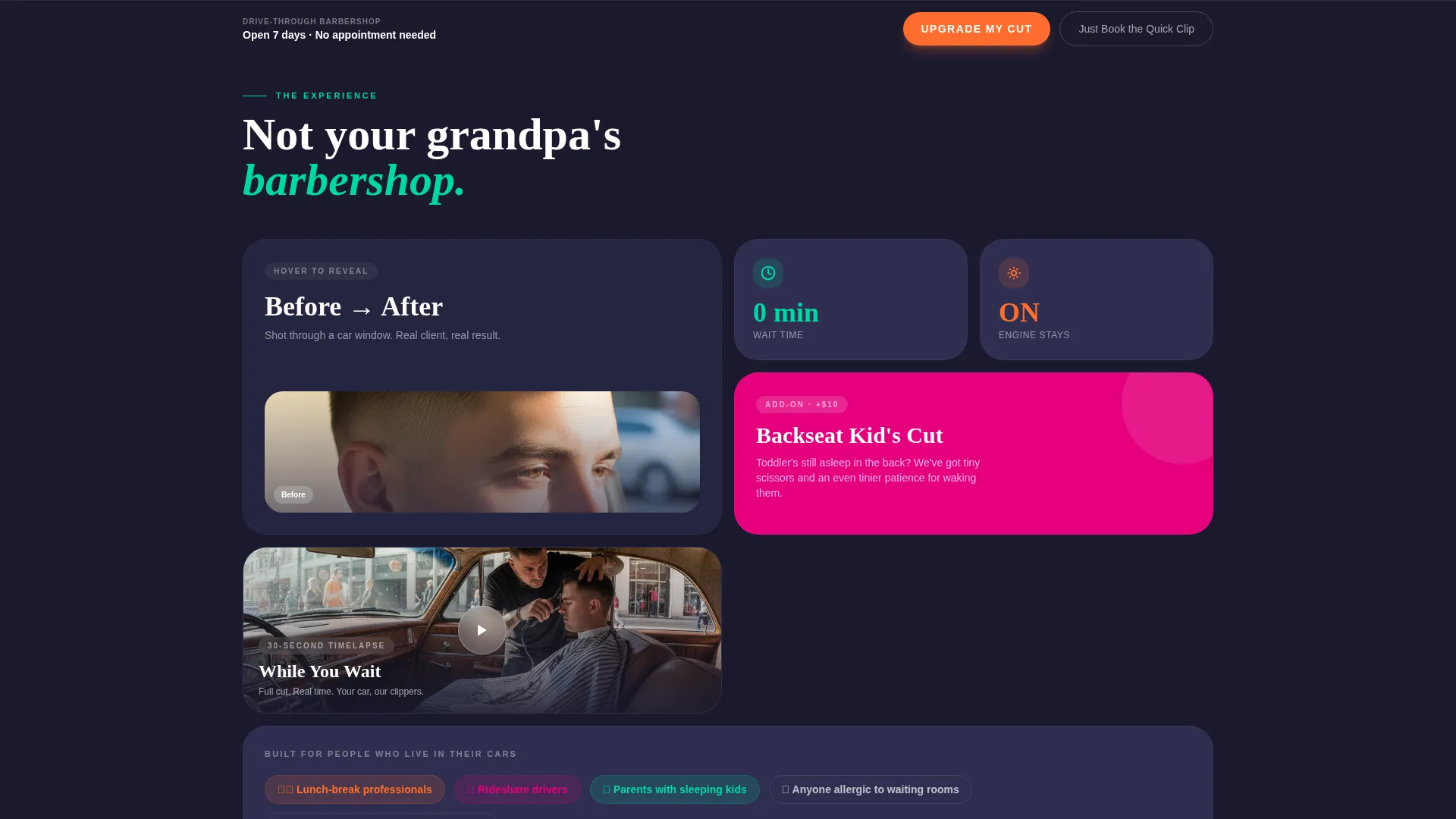
- Scroll-triggered tile reveals including a before/after card, a kid's cut tile, and a timelapse tile
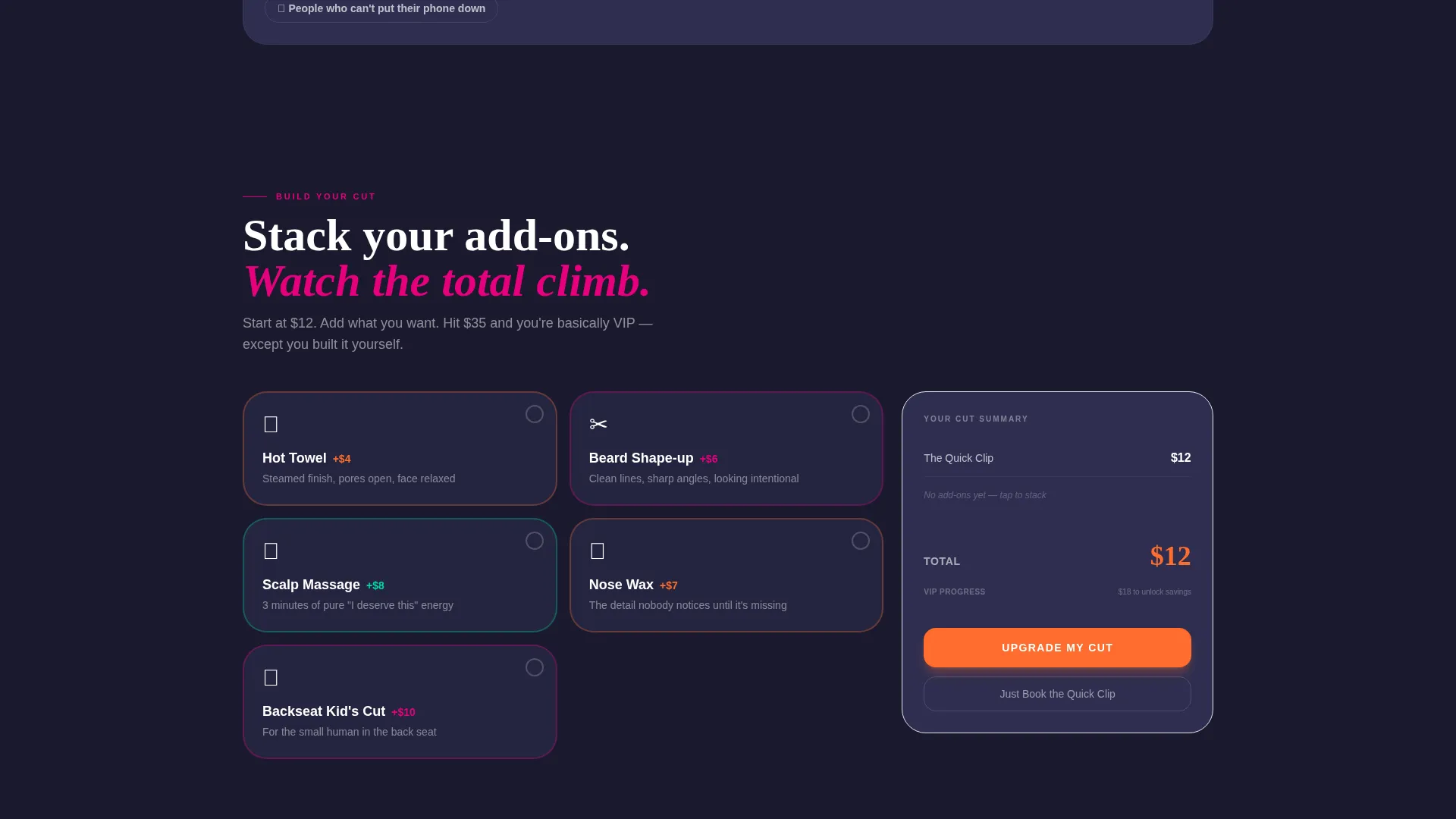
- A sticky bottom call to action bar with a live add-on tally and a progress bar toward bundle savings
Feature list
This template delivers a tightly focused set of design and interaction features rooted in the drive-through barbershop experience.
Geometric Bento Price Header
Three oversized price cards sit in a staggered bento arrangement against a deep asphalt background. Each card uses a distinct geometric shape and a Dopamine Pop color fill, with prices large enough to read from a moving car.
Looping Barber Pole Micro-Animation
A geometric barber pole spins in a looping micro-animation inside each price card shape. The animation reinforces the barbershop identity without cluttering the layout.
Scroll-Triggered Tile Reveals
Each bento tile reveals its content as the visitor scrolls. Tiles flip, expand, or pop open to surface a before/after photo, a kid's cut add-on, or a thirty-second timelapse of a full cut in progress.
Rearranging Bento Grid
The tile layout shifts subtly at each scroll breakpoint, with cards trading positions like a puzzle solving itself. The effect keeps the page feeling fresh and interactive at every stage of the scroll.
Sticky Upsell Bar with Live Tally
A pinned bottom bar shows the visitor's current selection and dynamically updates as they tap add-ons. A progress bar tracks how close they are to the bundle savings threshold, nudging them toward the higher tier.
Dual call to action Button Hierarchy
The primary call to action, "Upgrade My Cut," appears in electric tangerine and stays pinned to the viewport. A quieter ghost-outlined secondary button, "Just Book the Quick Clip," provides an exit for visitors who want the base option.
Page sections overview
| Section | Purpose |
|---|---|
| Price Card Header | Anchors attention with three staggered geometric pricing tiers |
| Before/After Tile | Shows a real fade result captured through a car window |
| Kid's Cut Tile | Introduces the Backseat Kid's Cut add-on with a bouncing lollipop icon |
| Timelapse Reveal Tile | Plays a thirty-second cut timelapse to build service confidence |
| Add-On Selector | Lists hot towel, beard shape-up, and scalp massage with live pricing |
| Sticky call to action Bar | Pins the upgrade prompt and running total to the bottom of the viewport |
Design & branding system
The visual identity uses a Playful Geometric theme driven by a Dopamine Pop color system. The palette is built around four intentional roles, keeping the layout loud but never noisy.
- Electric tangerine (#FF6D2E) fills call to action buttons and price callouts; barberpole magenta (#E5007D) highlights upgrade tiers; spearmint rush (#00D9A3) marks included-free perks
- Deep asphalt (#1A1A2E) anchors all card backgrounds and body text, grounding the vibrant palette
- Geometric shapes, bold type scales, and bouncing icon animations carry the Playful Geometric theme throughout
Mobile & speed optimization
The bento grid layout is designed with mobile viewports as a primary consideration. Tiles restack cleanly on smaller screens, and the sticky call to action bar remains accessible without covering critical content.
- Oversized price figures and geometric card shapes stay readable on phone-sized screens without zooming
- Scroll-triggered reveals are timed to work naturally on touch-based scrolling, not just mouse wheel input
- The sticky mini-cart and upsell bar are sized for thumb-friendly tapping on mobile devices
How this template helps you convert
Every layout decision in this template is pointed toward one outcome: moving the visitor from the cheapest option to the most valuable one, quickly and without friction.
- Leading with visible, oversized pricing removes the hesitation that comes from not knowing the cost upfront, making it easier for visitors to commit to a booking.
- The live add-on tally and bundle progress bar create a light sense of momentum, showing visitors they are close to saving money by choosing the fuller service package.
- The dual call to action hierarchy makes the upgrade feel like the obvious default while keeping the base option available, so no visitor feels trapped or pressured into leaving entirely.
Other information about this template
Clipper is part of the Retail and E-Commerce category under the Drive-Through Business subcategory. It was designed at an intersection match score of nine out of ten, reflecting a tight fit between the template's visual system and the drive-through service niche.
- The template style follows a Scroll Reveal Progressive structure, meaning content unfolds in stages rather than loading all at once
- The creative direction is Surprise and Delight, built to reward scrolling with unexpected content moments rather than a flat menu experience
- The header concept is Price-Anchored, a deliberate departure from the Search Box header used in the matched intersection row, chosen to suit the barbershop's impulse-booking model
- The landing page direction is Click-Through, meaning the page is designed to guide visitors toward a single conversion action rather than distributing attention across multiple goals
Theme
Playful Geometric
Creative direction
Surprise & Delight
Color system
Dopamine Pop
Style
Scroll Reveal (Progressive)
Direction
Click-Through
Page Sections
Geometric Bento Price Header
Looping Barber Pole Micro-animation
Scroll-triggered Tile Reveals
Rearranging Bento Grid Layout
Sticky Upsell Bar with Live Add-on Tally
Dual Call to Action Button Hierarchy
Related questions
Can I change the pricing and service names in this template?
Does the sticky add-on tally work as a real cart?
Can I use this template for a barbershop that is not drive-through?
Is the before/after tile designed for a specific image size?
How many add-ons can I show in the template?



