Time & Attendance Reviews Website Template
Clockin is a GPS time tracking landing page template built for field service businesses. It features a persona-selector header, a zigzag testimonial mosaic, and a quiz-driven conversion path. Roofing contractors, landscaping owners, and cleaning company operators can show prospective customers exactly how geofenced job sites and self-writing timesheets eliminate payroll guesswork.
by Rocket studio
Quick summary
Clockin is a single-page landing page template for GPS time tracking platforms serving field workers. It opens with a trade-specific persona selector, builds trust through an alternating testimonial mosaic, and converts visitors with a five-question diagnostic quiz. The Electric Indigo color system and Community Hearth theme make the page feel grounded, familiar, and action-ready.
Who this template is for
This template is built for field service business owners and the platforms that serve them. If you manage crews across multiple job sites, this layout speaks your language directly.
- Roofing contractors running multiple trucks across several counties
- Landscaping company owners dealing with buddy-punching and manual timesheets
- Cleaning company operators who need documented proof of presence for invoice disputes
What problem this template solves
Field service businesses lose money every week to inaccurate time records. Paper sign-in sheets, shared passcodes, and foreman guesswork add up to real payroll leakage. This template gives you a page structure that names those problems out loud and walks visitors straight to a solution.
- Buddy-punching and time theft erode payroll accuracy across dispersed crews
- No single screen shows where every worker is at any given moment
- Invoice disputes become costly without timestamped, location-verified attendance records
What you get with this template
You get a fully structured, single-page layout that guides three different buyer types through a tailored journey toward sign-up. Every section serves a purpose, and the visual system ties everything together.
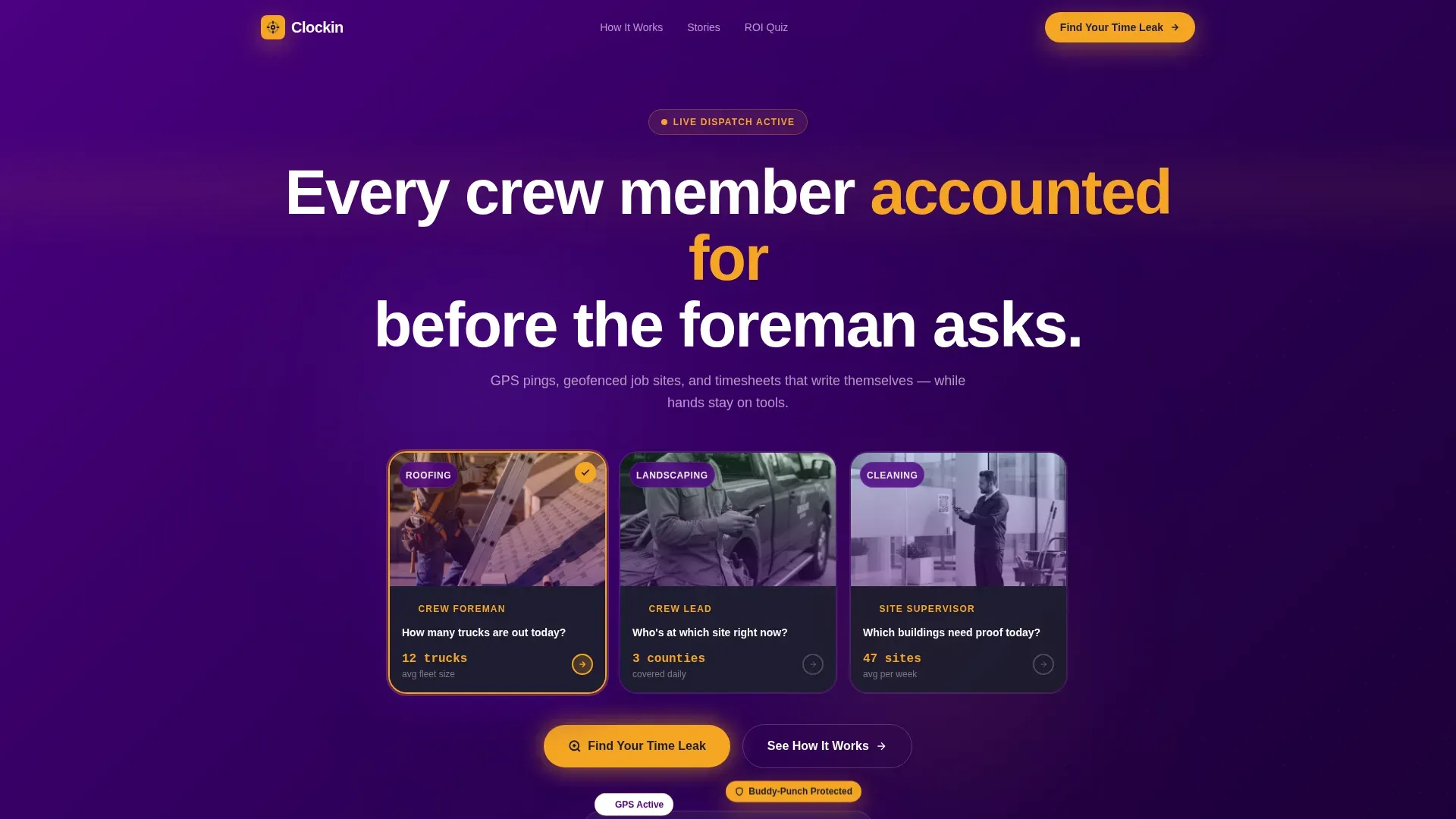
- A persona-selector header with three illustrated field-worker archetypes that reshuffles page content by trade
- A zigzag testimonial mosaic that alternates quote blocks with GPS map screenshots and payroll comparisons
- A five-question quiz conversion path that calculates a personalized time-theft estimate in amber digits
Feature list
This template delivers a set of purpose-built components that work together to convert skeptical field service buyers into engaged leads.
Persona Selector Header
Three illustrated archetypes sit side by side in indigo cards: a roofer on a ladder, a landscaping crew lead at a truck tailgate, and a janitorial supervisor scanning a building entrance. Clicking any persona reshuffles testimonials, pain points, and features to match that trade. The interaction feels like choosing your character, making the page immediately personal.
Zigzag Testimonial Mosaic
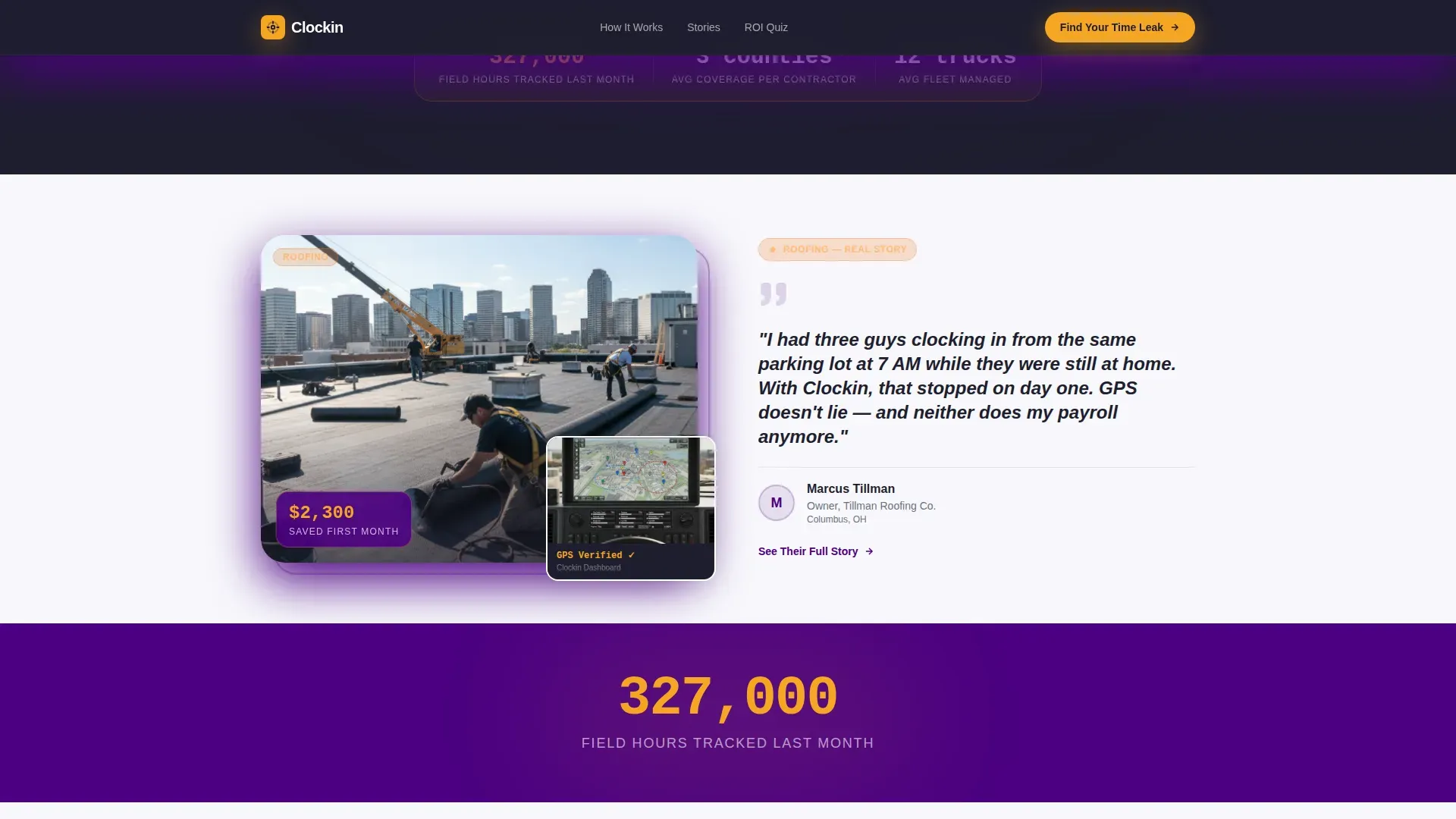
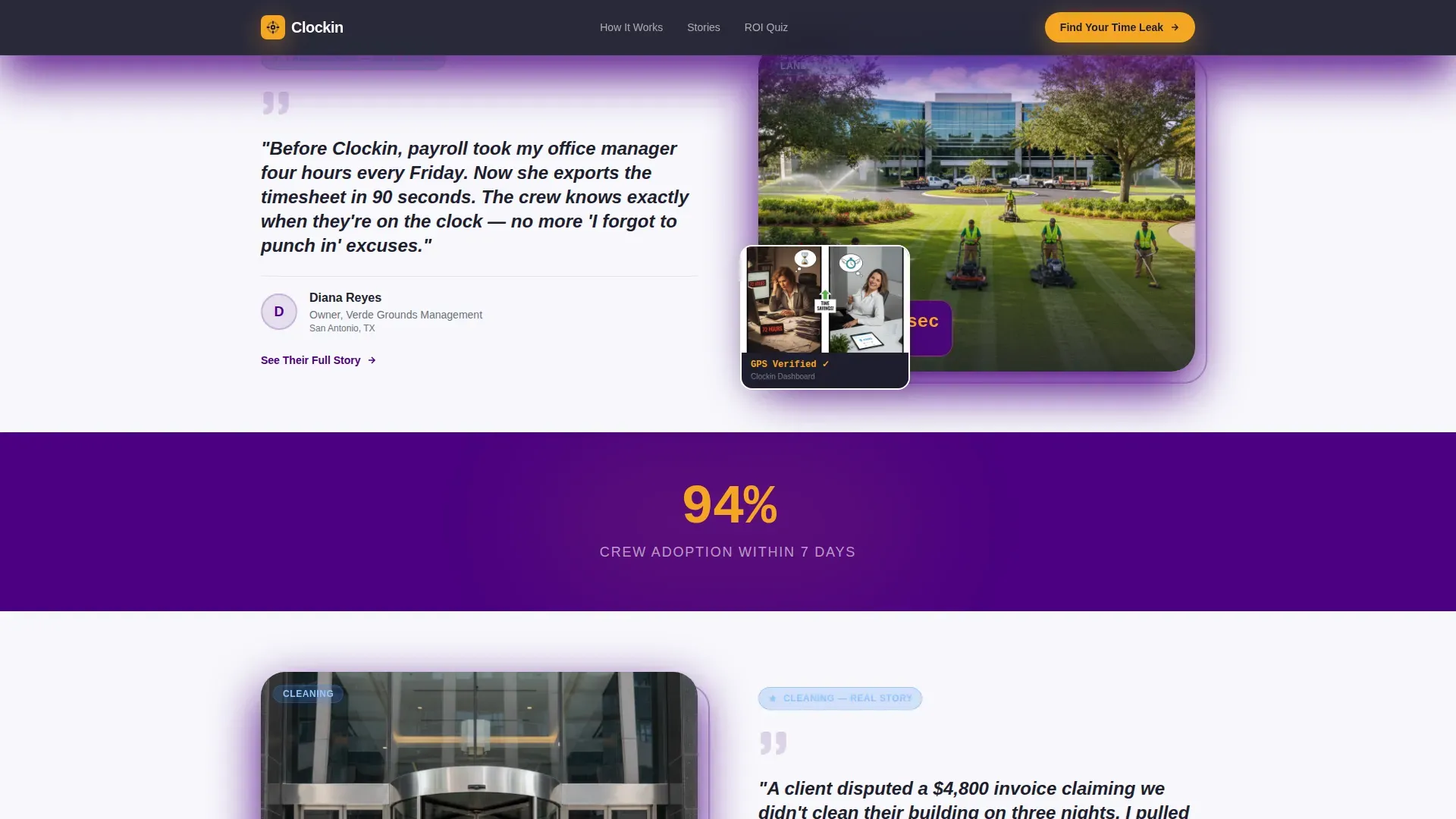
Testimonial blocks alternate left and right as the visitor scrolls, each pairing a crew-owner quote with a supporting visual. First a GPS map screenshot, then a before-and-after payroll comparison, building a growing wall of social proof. Between rows, a floating indigo stat field reinforces collective scale.
Quiz and Assessment Conversion Path
The primary call to action, "Find Your Time Leak," launches a five-question diagnostic covering team size, current tracking method, payroll frustrations, weekly job site count, and industry vertical. Each answer dynamically adjusts an amber-digit time-theft estimate. The final screen gates a personalized savings report behind a work email and phone number.
Secondary Story Lead Capture
A softer call to action, "See Their Full Story," appears beneath each testimonial block. This captures warm leads who are emotionally engaged but not yet ready to complete the quiz. It provides a low-commitment entry point that keeps interested visitors inside the conversion funnel.
Floating Stat Scoreboard
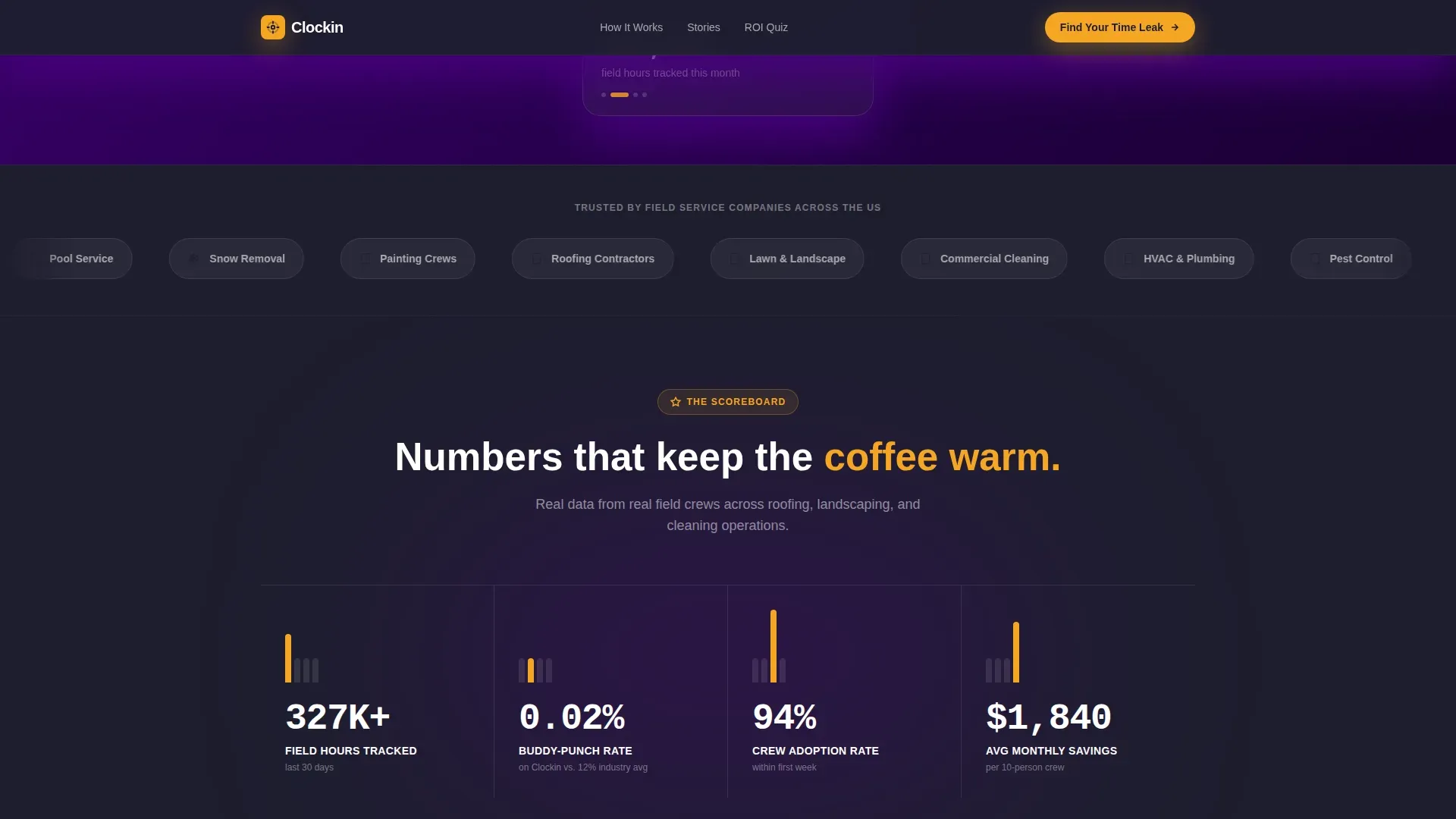
Single aggregate statistics float inside full-width indigo fields between testimonial rows. These short, punchy numbers, such as field hours tracked in a single month, shift the page's tone from personal story to collective proof. The rhythm between intimate quote and large-scale stat builds cumulative confidence.
Electric Indigo Visual System
Deep dispatch purple, warm amber, dashboard charcoal, and clean timesheet white work together across every section. Indigo dominates alternating section backgrounds, amber marks every interactive element and notification badge, and charcoal anchors all body text. The palette evokes a late-shift dispatch office without feeling cold or corporate.
Page sections overview
| Section | Purpose |
|---|---|
| Persona Selector Header | Let visitors self-identify by trade and personalize their page experience |
| Roofer Testimonial Block | Deliver a buddy-punching elimination story with a GPS map visual |
| Floating Stat Field | Reinforce scale with a single aggregate field-hours figure |
| Cleaning Company Block | Show a before-and-after payroll hours comparison for invoice credibility |
| Landscaping Story Block | Address multi-truck visibility pain with a crew lead perspective |
| Quiz Entry Section | Introduce the "Find Your Time Leak" primary call to action |
| Five-Question Diagnostic | Walk visitors through team size, tracking method, and frustration inputs |
| Savings Report Gate | Collect work email and phone number in exchange for personalized results |
| Secondary call to action Strip | Offer "See Their Full Story" beneath each testimonial for warm lead capture |
Design & branding system
The Electric Indigo color system channels the atmosphere of a late-shift dispatch office, where screens glow violet in the dark and a desk lamp casts gold over a paper route sheet. Every color carries a specific role so the hierarchy reads instantly.
- Deep dispatch purple (#4B0082) and clean timesheet white (#F7F7FB) alternate as full-section backgrounds to create visual rhythm
- Warm crew-room amber (#F5A623) marks every button, interactive element, and notification badge so action items are always visible
- Dashboard charcoal (#1E1E2E) grounds all body text and gives the layout a workboot-weight solidity
Mobile & speed optimization
Field service buyers often review vendor pages on a phone between job sites. This template is structured so the zigzag layout and persona selector read clearly on smaller screens without losing hierarchy or interaction logic.
- Alternating left-right testimonial blocks reflow into a single clean column on mobile viewports
- Amber call-to-action buttons remain large and thumb-friendly throughout the vertical scroll
- The quiz diagnostic steps are designed as single-focus screens that work naturally on touch devices
How this template helps you convert
The conversion architecture moves visitors from personal recognition to emotional proof to a committed action in a deliberate sequence.
- The persona selector creates immediate relevance by matching the page to the visitor's specific trade before they read a single testimonial.
- The testimonial mosaic stacks credible, visual stories that shift the burden of proof from claims to demonstrated results, making hesitation harder to hold onto.
- The quiz path turns passive browsers into active participants, and the gated savings report gives them a concrete reason to share their contact details.
Other information about this template
This template is categorized under HR and Hiring, specifically within the Time and Attendance subcategory, targeting the GPS time tracking niche for field workers. The Community Hearth theme informs the warm, crew-room familiarity of the layout, making a technical product feel approachable rather than clinical.
- The Zigzag and Alternating template style is well suited to sequential storytelling where each block adds a new layer of proof
- The Testimonial Mosaic creative direction works especially well for businesses that have strong customer stories but need a structure to present them convincingly
- The Quiz and Assessment landing-page direction is a proven format for capturing leads who need personalization before they commit
- The intersection of HR and Hiring, Time and Attendance, and GPS field tracking gives this template a high-specificity audience match, reducing bounce from unqualified visitors
Theme
Community Hearth
Creative direction
Testimonial Mosaic
Color system
Electric Indigo
Style
Zigzag/Alternating
Direction
Quiz/Assessment
Page Sections
Persona Selector Header
Zigzag Testimonial Mosaic
Quiz and Assessment Conversion Path
Secondary Story Lead Capture
Floating Stat Scoreboard
Electric Indigo Visual System
Related questions
Can I adapt the persona selector for industries beyond roofing, landscaping, and cleaning?
How does the quiz conversion path capture leads?
Does the testimonial mosaic require a large library of customer stories to launch?
What is the secondary call to action and when does it appear?
Is the Electric Indigo color system customizable for a different brand palette?



