Driving School Landing Page Template | Charcoal & Amber
Clutch is a split-screen landing page template built for local driving schools. It pairs press-mention social proof with instructor profiles, a structured booking form, and an amber-on-charcoal visual identity that feels authoritative and welcoming. The layout guides nervous first-timers, returning test-takers, and international license converters from first impression straight to booking their first lesson.
by Rocket studio
Quick summary
Clutch is a single-page, split-screen landing page template for local driving schools. It leads with press mentions and real review counts, then builds trust through individual instructor profiles before presenting lesson packages and a focused three-field booking form. The charcoal and amber palette projects calm confidence from the very first scroll.
Who this template is for
This template is designed for driving school owners who need a professional online presence that converts first-time visitors into booked students. It fits schools that serve a mixed local audience and want a page that speaks equally well to anxious beginners and returning test-takers.
- Local driving school owners setting up or refreshing their digital presence
- Instructors running independent lessons who need a credible, bookable page
- Driving schools serving international license holders needing a dedicated conversion path
What problem this template solves
Most driving school pages look generic and fail to answer the visitor's real question: can I trust this instructor with my nerves and my test date? Clutch solves this by front-loading credibility before any pricing appears.
- Visitors leave before booking because nothing on the page feels specific or trustworthy
- Parents and adult learners need reassurance, not just a price list
- Schools lose bookings because the path from landing to scheduling is unclear or buried
What you get with this template
You get a complete, ready-to-customize split-screen landing page that covers every stage of the decision journey. The layout handles credibility, introduction, proof, packages, and booking in one continuous scroll.
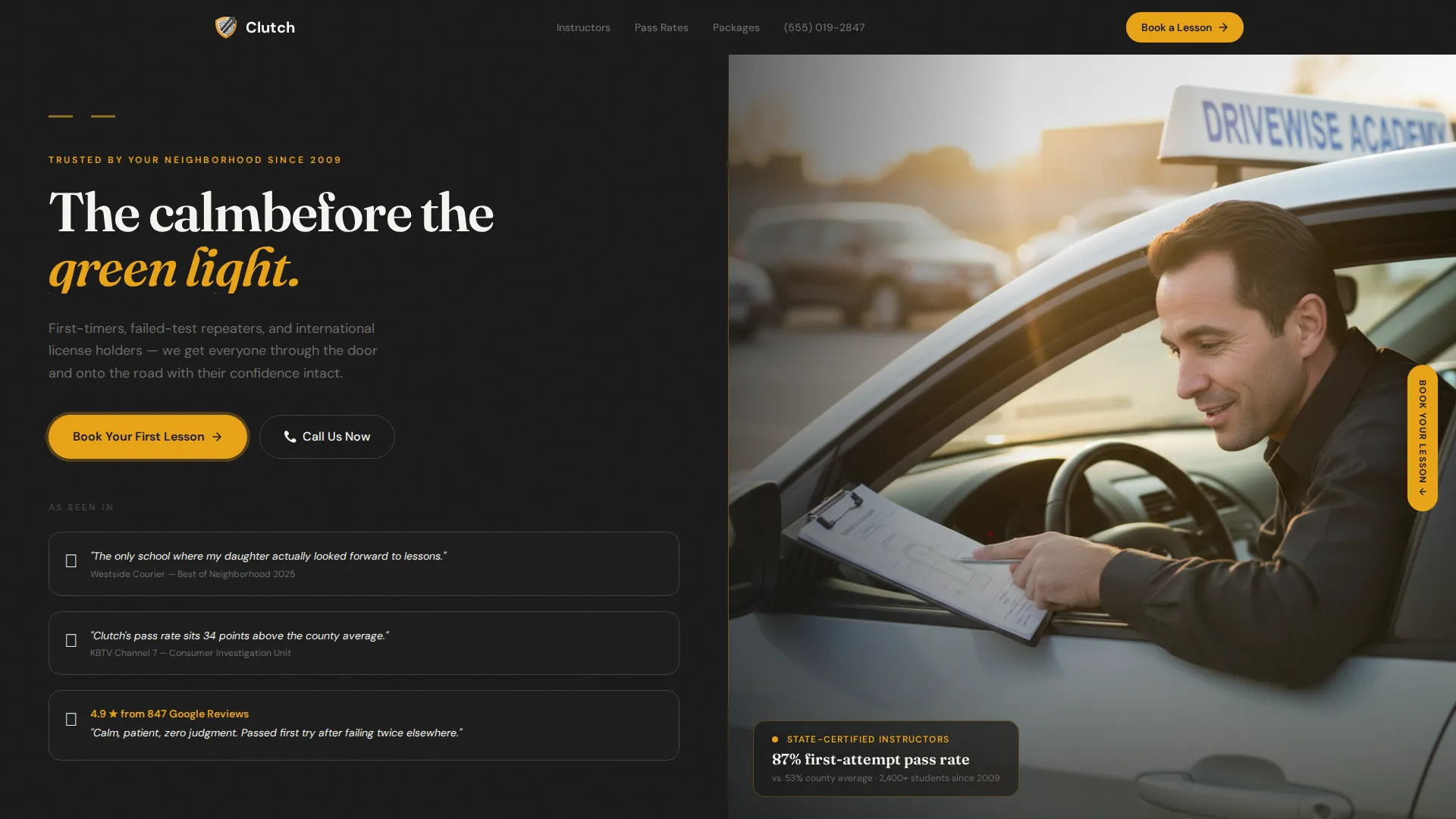
- A header split with press mentions, review counts, and an editorial instructor photograph
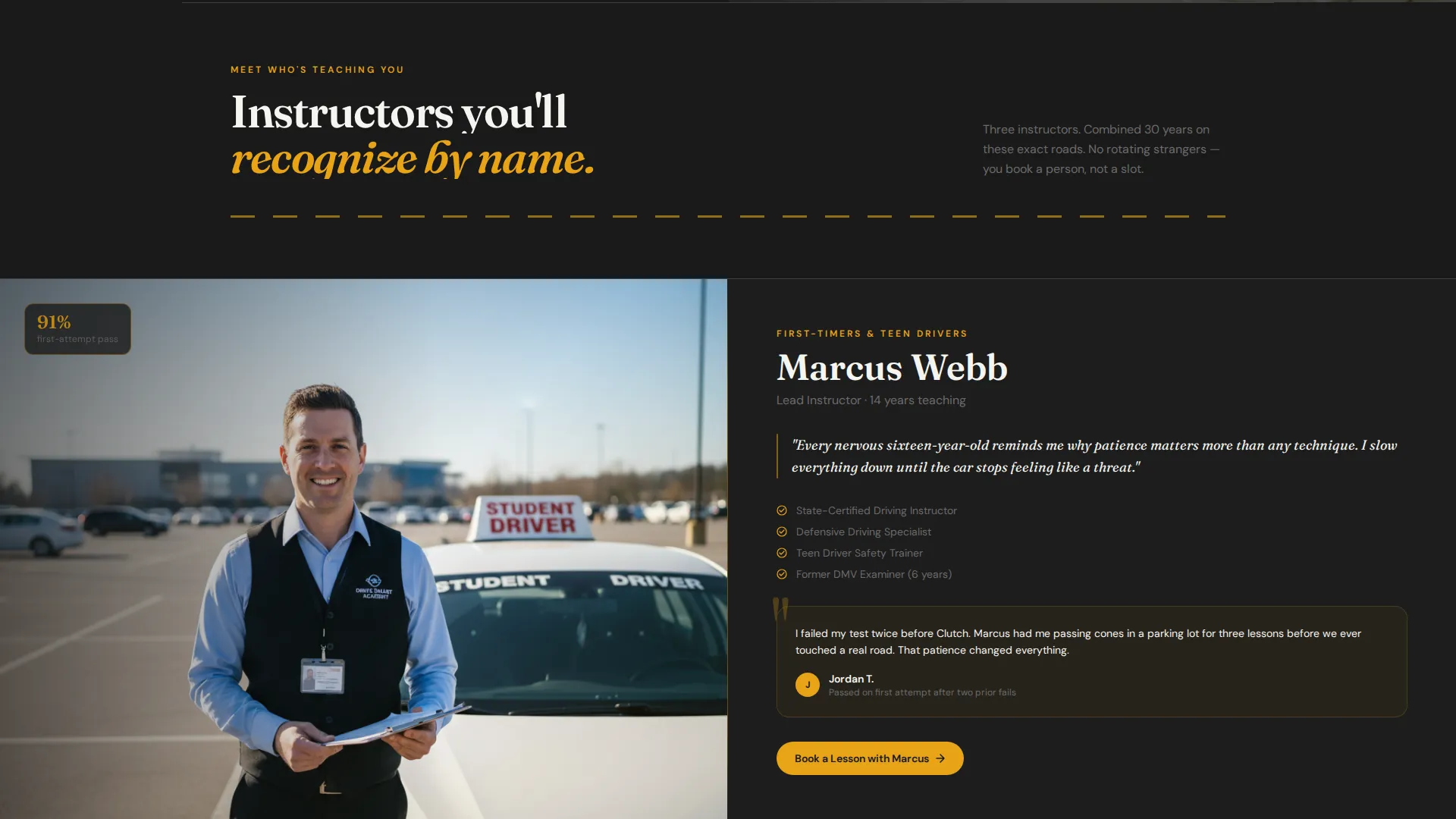
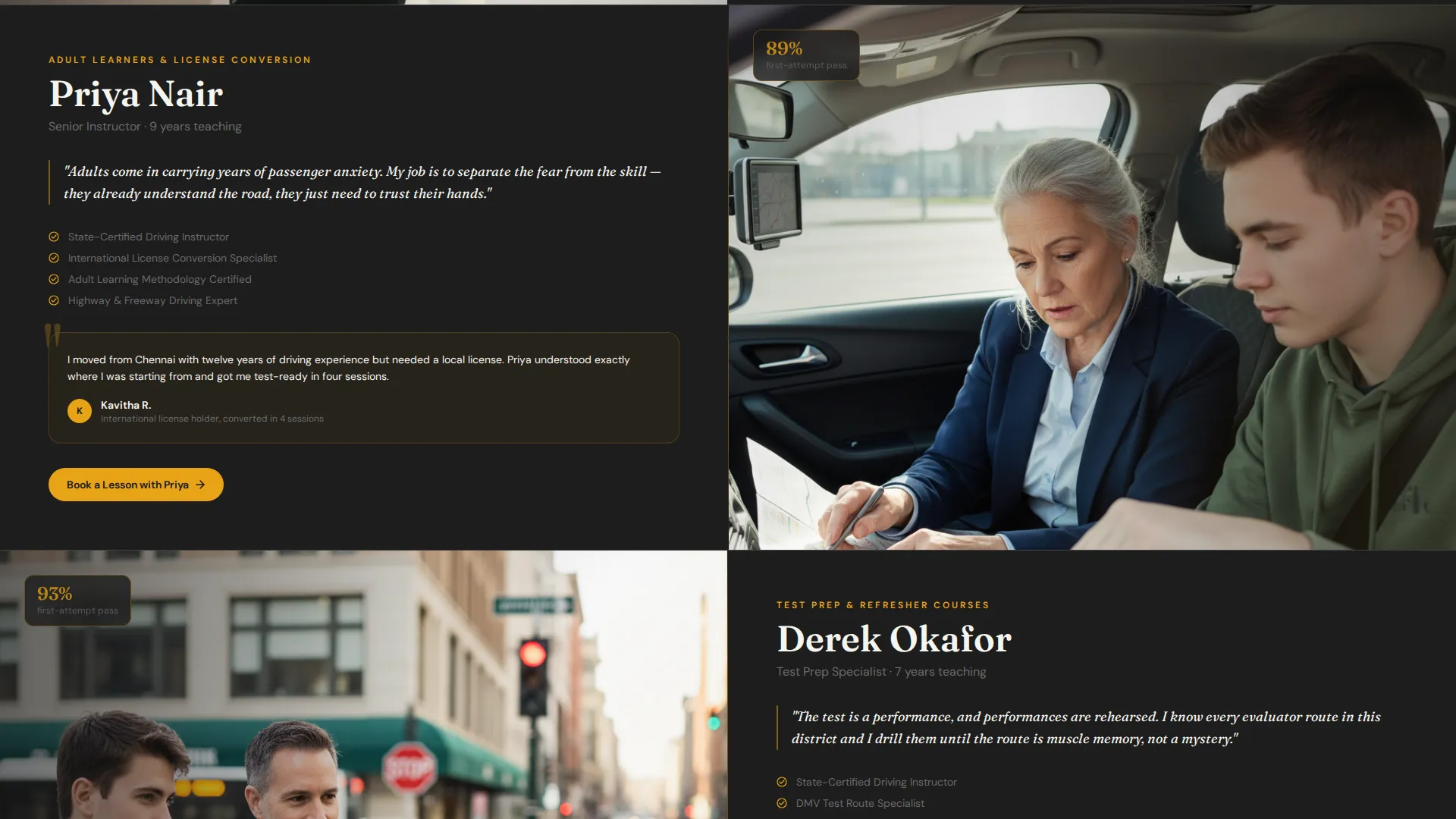
- Individual instructor panels each pairing a portrait with credentials and a student testimonial
- A three-field booking form with lesson type, preferred area, and available days
- A scrolling ticker displaying recent test results by area
- A lesson-package section structured as a curriculum rather than a price list
Feature list
Every section in this template has a defined job. Together they build a trust-first flow that ends at a booking, not a bounce.
Split-Screen Header with Press Mentions
The header divides the viewport into two equal panels. The left side displays three to four press mentions, local news logos, and a Google Reviews star count with a named number. The right side holds a single editorial-style instructor photograph taken at golden hour. First impressions carry real social weight before a single scroll.
Expert Instructor Profile Panels
Each instructor gets their own split-screen section pairing a portrait with credentials, teaching philosophy, and a standout student testimonial. The panels build progressively, turning "who teaches here" into documented proof of competence and patience.
Pinned Amber Booking call to action
The primary call to action, "Book Your First Lesson," appears in caution amber on the right side of every split panel. It stays visible throughout the scroll so the decision to book is never more than one glance away.
Structured Three-Field Booking Form
The booking form asks only three things: lesson type, preferred pickup postcode or area, and available days of the week. Keeping the form short removes friction and focuses the visitor on scheduling rather than hesitating.
Pass-Rate Proof and Results Ticker
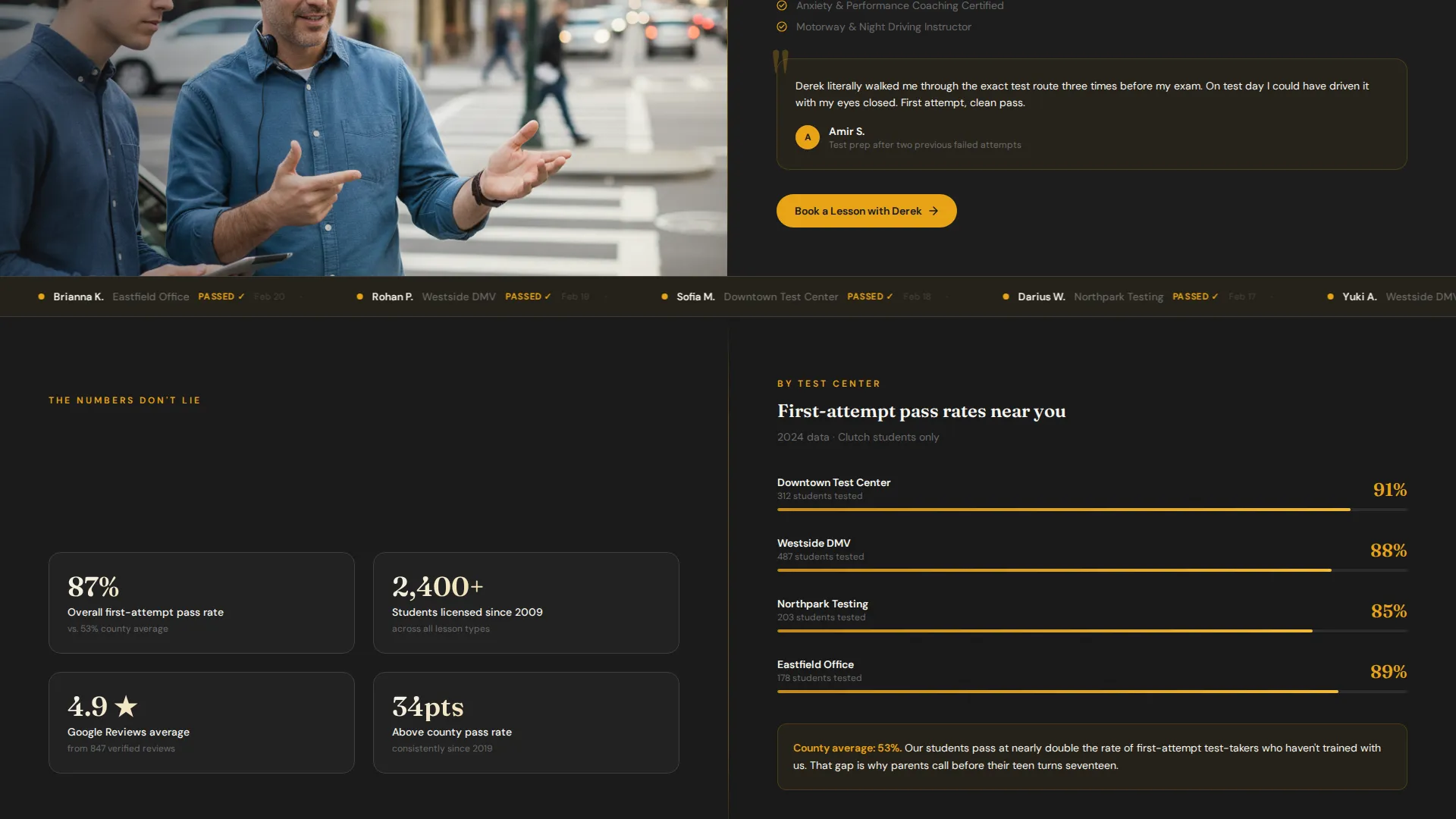
After the instructor panels, a scrolling ticker displays recent test results by area. This section shifts the conversation from reputation to evidence, showing prospective students that real people nearby have passed recently.
Curriculum-Style Lesson Packages
Lesson packages are presented as a structured curriculum rather than a flat price list. Each package is described by what the student gains, making the value clear before the cost is considered.
Page sections overview
| Section | Purpose |
|---|---|
| Header split panel | Establish credibility with press mentions and an editorial instructor photo |
| Google Reviews bar | Display star rating and review count as immediate social proof |
| Instructor profile panels | Introduce each instructor with credentials and a student testimonial |
| Pass-rate statistics | Demonstrate school-wide success with documented numbers |
| Test results ticker | Show recent local test passes in a scrolling, real-time-feel format |
| Lesson packages section | Present lesson options as a curriculum with clear learner outcomes |
| Booking form panel | Capture lesson type, area, and available days in three fields |
| Click-to-dial call to action | Offer a secondary "Call Us Now" path for parents who prefer to speak first |
Design & branding system
The visual identity follows an Educational Guide theme built on a Charcoal and Amber color system. Every color decision is intentional: charcoal grounds authority, amber directs action, and off-white breathes space between dense information panels.
- Deep asphalt charcoal (#2D2D2D) dominates backgrounds and panel fills for a confident, low-distraction base
- Caution amber (#E8A317) is reserved exclusively for interactive elements, calls to action, and key highlights so the eye always finds the next step
- Road-marking white (#F5F5F0) and dashboard-glow warm gray (#6B6B6B) handle body copy, secondary labels, and breathing room between sections
Mobile & speed optimization
The split-screen layout adapts cleanly to smaller screens, stacking panels vertically so the content hierarchy stays intact. The booking form and pinned call to action remain prominent on mobile, which matters because many parents book from a phone at the kitchen table.
- Panels restack vertically on mobile without losing the visual separation between proof content and the booking path
- The click-to-dial "Call Us Now" button becomes a native phone link on mobile devices
- The three-field booking form is touch-friendly by design, keeping field count low to reduce drop-off on smaller screens
How this template helps you convert
Clutch is built around a deliberate persuasion sequence. Every section earns the visitor's trust before asking for a commitment, so by the time the booking form appears, the visitor is choosing a time slot, not deciding whether to trust the school.
- Social proof is loaded at the top. Press mentions, a named review count, and a recognizable instructor face answer the trust question before any scrolling happens.
- Instructor profiles and the pass-rate ticker replace vague claims with specific, human evidence. The visitor sees real instructors, real results, and real student feedback, which moves the internal question from "is this school any good" to "which package fits my schedule."
- The amber booking call to action stays pinned throughout the scroll. When the visitor is ready, the next step is always visible, reducing the effort required to convert.
Other information about this template
This template is categorized under Professional Services with a focus on driving school marketing. It is specifically designed for local search intent, making it well suited for schools that depend on neighborhood reputation and word-of-mouth as much as online discovery.
- Template style: Split Screen (50/50), with the viewport divided into two equal panels throughout the page
- Theme: Educational Guide, reflecting a tone of calm authority and structured learning rather than aggressive sales pressure
- Creative direction: Expert Panel, meaning the page builds credibility instructor by instructor rather than leading with corporate-level branding
- Header concept: Press Mentions, prioritizing third-party validation over self-promotional headlines
- Landing-page direction: Booking and Scheduling, with every design decision oriented toward capturing a lesson reservation
- The secondary call to action, "Call Us Now," provides a click-to-dial path for visitors who prefer a phone conversation before committing online
Theme
Educational Guide
Creative direction
Expert Panel
Color system
Charcoal & Amber
Style
Split Screen (50/50)
Direction
Booking/Scheduling
Page Sections
Split-screen Header with Press Mentions
Expert Instructor Profile Panels
Pinned Amber Booking Call to Action
Three-field Structured Booking Form
Pass-rate Proof and Results Ticker
Curriculum-style Lesson Packages
Related questions
What types of learners is this landing page designed for?
Can I customize the instructor profiles with my own photos and bios?
How does the three-field booking form work?
Does the template include a call option for parents who prefer to speak first?
Is this template suitable for a single independent instructor?



