Painter (House) Professional Website Template
Coat is a comparison-table landing page built for house painting contractors who win clients by teaching them first. It walks visitors through prep methods, sheen levels, and pro-versus-DIY trade-offs using side-by-side tables, crew portraits, and a scroll-animated infographic. A built-in lead form collects property type, square footage, and project scope so painters capture qualified painting leads from day one.
by Rocket studio
Quick summary
Coat is a single-page template designed for painting contractors who want to convert curious visitors into booked jobs. It leads with data storytelling, deepens trust through crew-led comparison tables, and closes with a structured lead form. The result is a painting website that teaches first and sells second, matching the way serious clients actually make decisions.
Who this template is for
This template fits painting professionals whose edge is knowledge, not just price. It works best when your crew can back up every claim with real process and real results.
- Residential painters targeting homeowners before a listing or after a purchase
- Property managers who need exterior painting and interior painting completed on a tight schedule
- Painting companies that want to stand apart from competitors who rely on generic directory pages
What problem this template solves
Most painting website designs dump a phone number and a gallery on visitors and hope for the best. That approach leaves potential clients guessing about prep work quality, materials, and cost. Coat fixes that by turning the page itself into a field guide.
- Visitors leave other sites without understanding why prep work takes longer than painting itself
- Painting companies lose painting leads to contractors who simply answer questions better
- A generic homepage fails to set clear expectations around scope, timeline, and pricing
What you get with this template
Coat delivers a fully structured, education-first landing page that moves visitors from curiosity to commitment. Every section is purposeful, and the lead form at the end collects the exact project details a painting contractor needs to write a useful proposal.
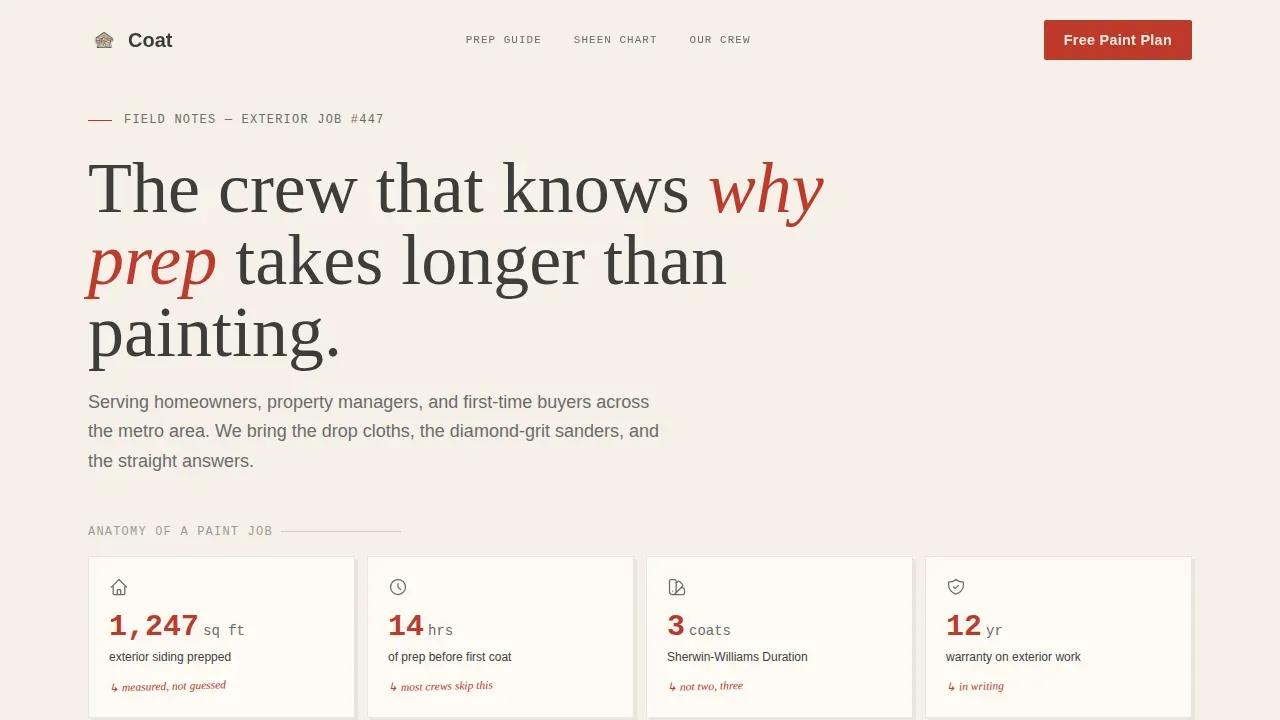
- A scroll-animated hero infographic with red-ink number counters and pencil-sketch icons
- Three tabbed comparison tables covering prep methods, sheen levels, and pro-versus-DIY outcomes
- A dual-path lead capture section with a project scoping form and a checklist download option
Feature list
Coat's feature set reflects the tools that help painting contractors convert educated visitors into signed agreements.
Scroll-Animated Data Hero
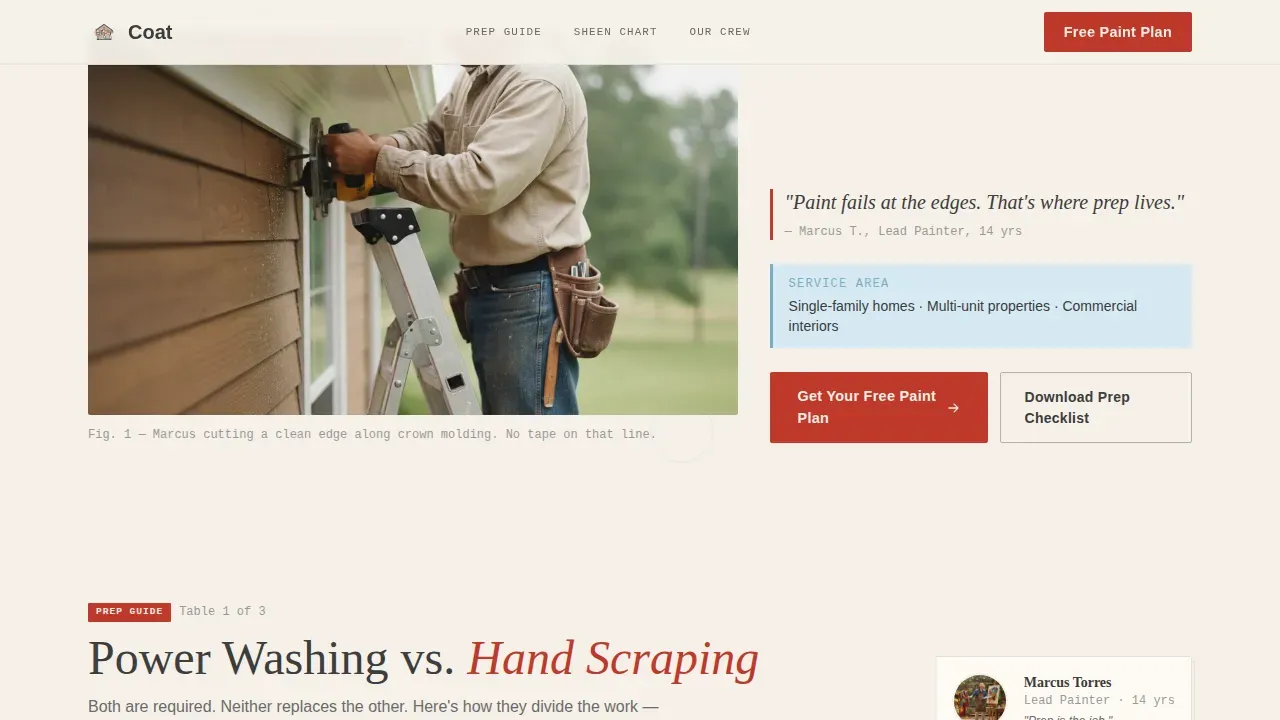
The hero opens with a hand-illustrated infographic that animates on scroll. Numbers draw themselves in a red-ink style while pencil-sketch icons of scrapers, caulk guns, and rollers appear beside each stat. A real mid-work team photograph anchors the data in credibility.
Tabbed Comparison Tables
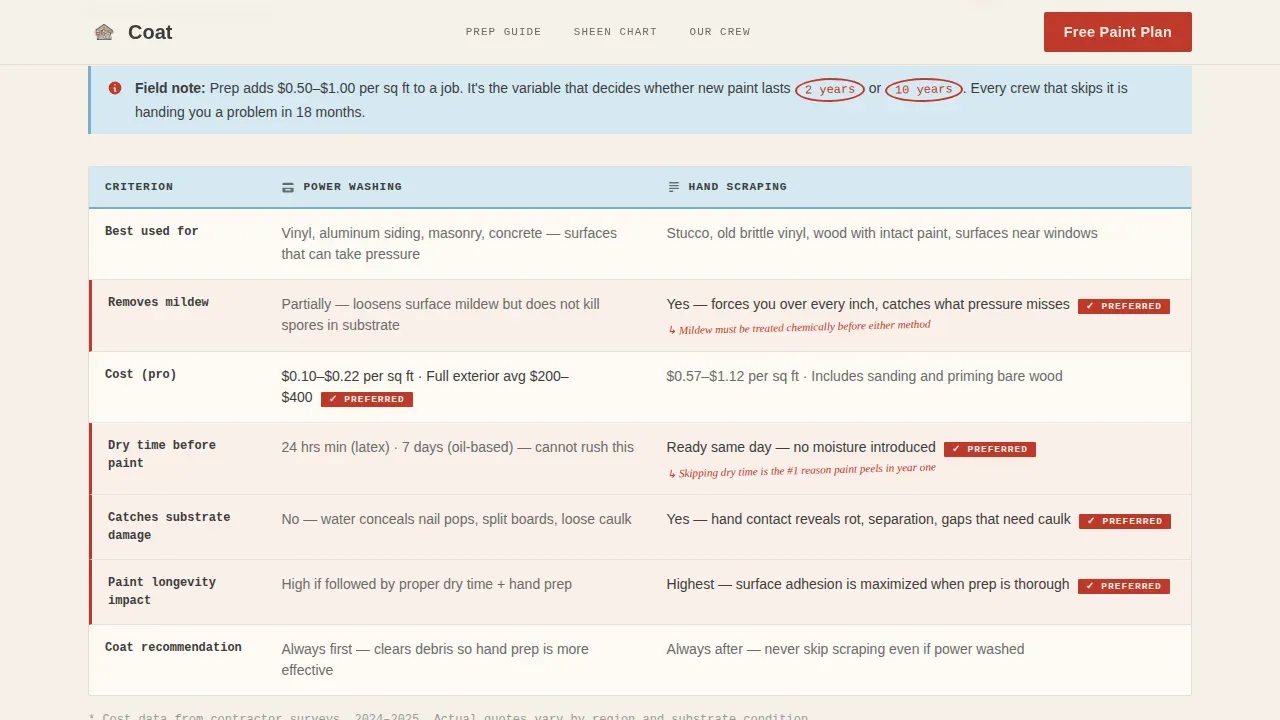
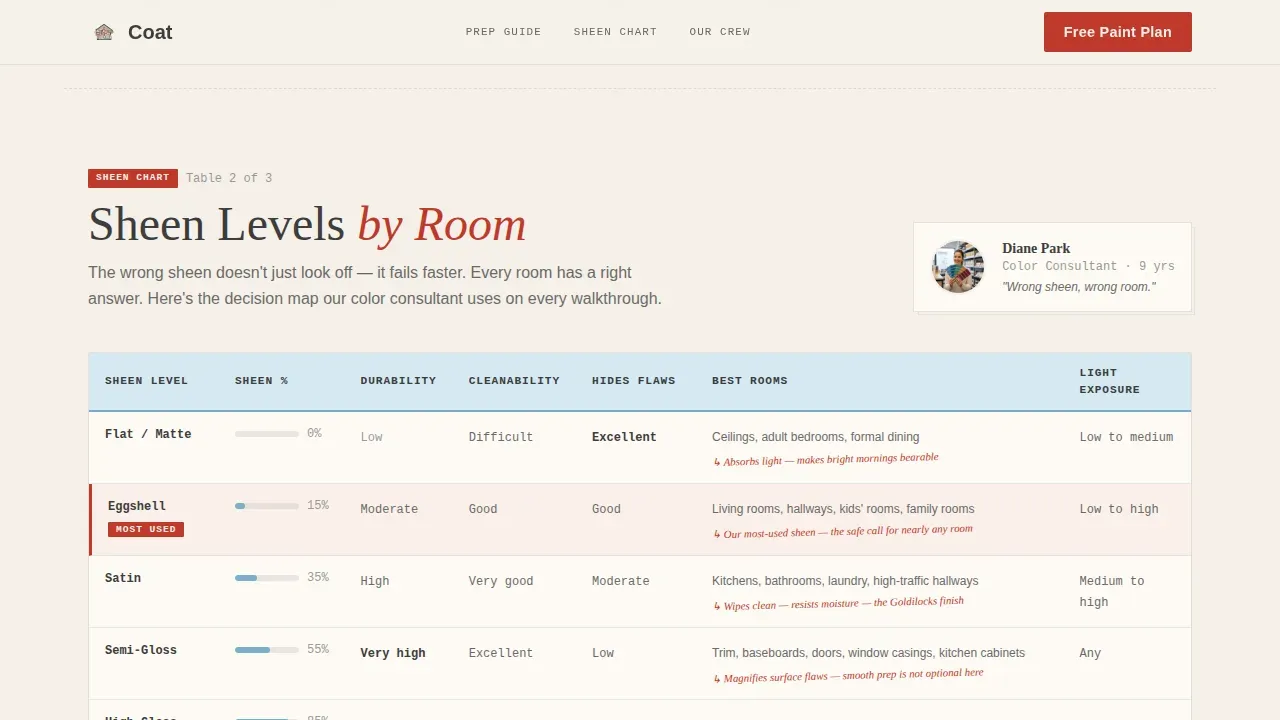
Three structured tables let visitors compare prep methods, interior painting sheen levels by room type, and professional painters versus do-it-yourself outcomes. Each table is introduced by a named crew member, making the expertise feel personal rather than promotional. Table headers use ledger blue, and data cells use JetBrains Mono for clean readability.
Crew Portrait Sections
Each comparison table section pairs a crew member photograph with the skill they explain. This Team and People direction ties specific painting skills to real faces, reinforcing that these are professionals who have rolled ten thousand walls.
Lead Generation Form
The form captures property type, square footage via a slider, interior or exterior scope selection, and a preferred start window. These project details give contractors everything they need to write a clear, accurate painting estimate or proposal without a follow-up call.
Checklist Download Path
A secondary conversion path offers a downloadable prep checklist in exchange for an email address. Visitors who are not ready to request a full estimate can still enter a nurture sequence, giving the painting business a way to generate more leads over time.
Educational Guide Visual System
The Ink and Paper color system uses warm parchment backgrounds, graphite body text, red-ink calls to action, and ledger blue table headers. Fraunces serif headlines, DM Sans body copy, and JetBrains Mono table data create a contractor's notebook aesthetic that feels earned rather than designed.
Page sections overview
| Section | Purpose |
|---|---|
| Hero infographic | Animate job stats and anchor with team photo |
| Prep method table | Compare power washing versus hand scraping |
| Sheen level table | Map flat, eggshell, satin, semi-gloss by room |
| Pro versus DIY table | Show cost, longevity, and quality outcomes |
| Lead generation form | Collect scope, square footage, and start window |
| Checklist download | Capture email with a free prep guide offer |
| Footer row | Single-row contact and navigation links |
Design & branding system
The template draws its visual identity from an Educational Guide theme built on an Ink and Paper color palette. Every design decision reinforces the idea that this crew has done the reading and the work.
- Colors: warm parchment (#F5F0E8) backgrounds, graphite (#3D3D3D) text, red-ink (#C0392B) calls to action, and ledger blue (#A8C6D8) table headers and hover states
- Typography: Fraunces for serif headlines, DM Sans for body paragraphs, and JetBrains Mono for all table data and numbers
- Visual style: pencil-sketch icon reveals, ballpoint diagram animations, and mid-work crew photography create a contractor's notebook feel across every section
Mobile & speed optimization
Over 50 percent of traffic to landing pages comes from mobile users. Coat is built desktop-first to support its wide comparison tables, but every section stacks cleanly on smaller screens.
- Comparison tables collapse into scrollable card stacks on mobile so no data is hidden
- The square footage slider and form fields are touch-friendly and sized for thumb interaction
- Static-first architecture means interactive elements load as Client Components only where needed, keeping the page responsive across devices
How this template helps you convert
High-converting landing pages for painting services focus on visual proof, trust signals, and a single clear call to action. Coat earns the click by teaching visitors before asking for their contact information.
- The animated hero and specific job-site statistics establish credibility within seconds of arrival, reducing the chance visitors bounce to another painting contractor.
- The three comparison tables answer the questions visitors were already searching for, turning passive readers into confident buyers ready to complete a painting estimate request form.
- The dual-path close lets warmer visitors request a full proposal while cooler visitors download the prep checklist, so the painting business captures leads at both stages of intent.
Other information about this template
Coat is a free template option for painting companies who want a professional way to showcase their work without starting from scratch. Ready-to-use designs for painters are available across platforms like ThemeForest and TemplateMonster, typically ranging from $14 to $79, so having a no-cost starting point with this level of depth is a meaningful consideration for growing businesses.
- The template supports display of completed projects through before-and-after image placements and crew portfolio examples alongside each comparison table
- Client testimonials and live review widgets can be embedded to add customer voice and consolidate completed work endorsements in a professional way
- A painting proposal built from the form data should specify scope, materials, labor cost, and timeline for project completion, matching the expectations the page already sets
- The painting website can be expanded with videos, additional service area pages, and other items like a dedicated testimonials section to support local search visibility
- A painting estimate delivered after form submission should cover the scope of work, materials needed, labor expenses, and payment agreement terms so clients know exactly what to expect
- The fonts, colors, and layout are fully customizable, so painting companies can write their own brand details into every section and make it their own from day one
Theme
Educational Guide
Creative direction
Team & People
Color system
Ink & Paper
Style
Comparison Table
Direction
Lead Generation
Page Sections
Scroll-animated Data Storytelling Hero
Three Tabbed Comparison Tables
Crew Portrait Education Sections
Scoped Lead Generation Form
Checklist Download Conversion Path
Ink and Paper Educational Design System
Related questions
Who is this landing page template best suited for?
Can I use this template to collect painting estimates from visitors?
Does the template support before-and-after photo galleries?
Can I add client testimonials to this template?
Is this template suitable for both interior and exterior painting services?



