Clinical Research & Trial Cost Calculator Website Template
Codex is a clinical data management landing page template built for B2B SaaS platforms that accelerate database lock. It opens with a live database lock timeline calculator, flows through side-by-side comparison tables, and drives visitors to a personalized demo. Every section is designed to turn a clinical team's own numbers into the most persuasive argument on the page.
by Rocket studio
Quick summary
Codex is a single-page, comparison table landing page template for clinical data management platforms. It leads with a live calculator that estimates database lock timelines, then builds a data-driven case through side-by-side comparison tables and a compressed trial timeline. The primary call to action sends visitors to a demo scheduling page with their inputs pre-filled.
Who this template is for
This template is built for B2B SaaS companies operating in clinical data management and life sciences. It speaks directly to the people who feel the pressure of trial timelines every day.
- Clinical Operations Directors managing multi-site Phase III trials with growing query backlogs
- Biotech Chief Technology Officers watching runway burn while waiting on database lock
- Contract Research Organization project managers committed to delivering clean data on a sponsor's deadline
What problem this template solves
Clinical data teams struggle to communicate speed and compliance value to decision-makers who are already behind schedule. A generic product page does not move these buyers. They need to see their own numbers reflected back at them before they trust a platform.
- Trial timelines slip because query resolution, discrepancy detection, and edit check deployment stay manual far too long
- Compliance-minded buyers stall on demo requests when they cannot first verify that a platform meets documentation standards
- Conversion pages that lead with features instead of outcomes fail to close clinical operations professionals who think in data, not marketing copy
What you get with this template
You get a fully structured, desktop-first landing page designed around evidence and momentum. Every section earns the next click by making the visitor's own inputs do the work.
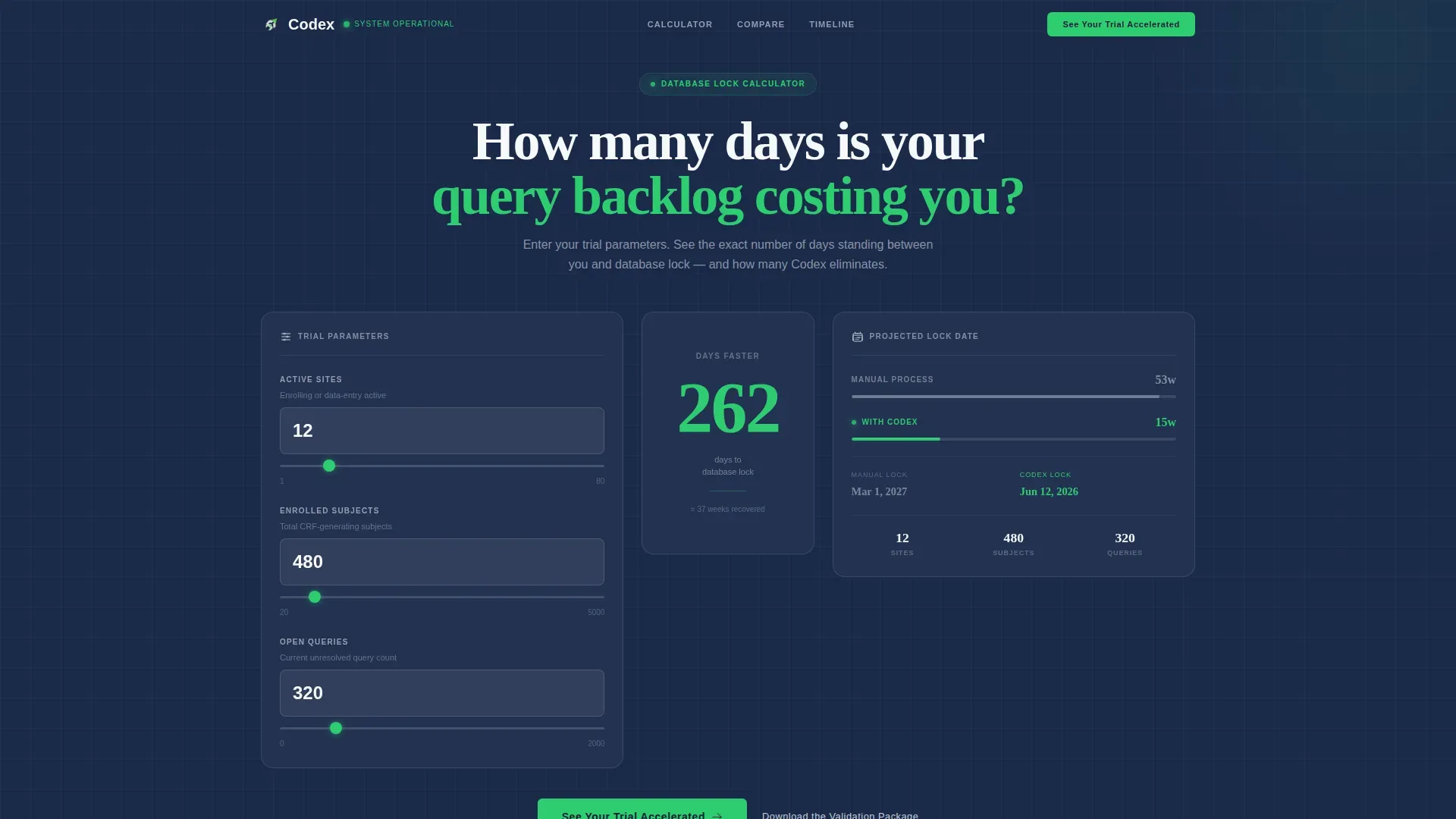
- A live database lock timeline calculator in the hero section with animated, real-time delta output
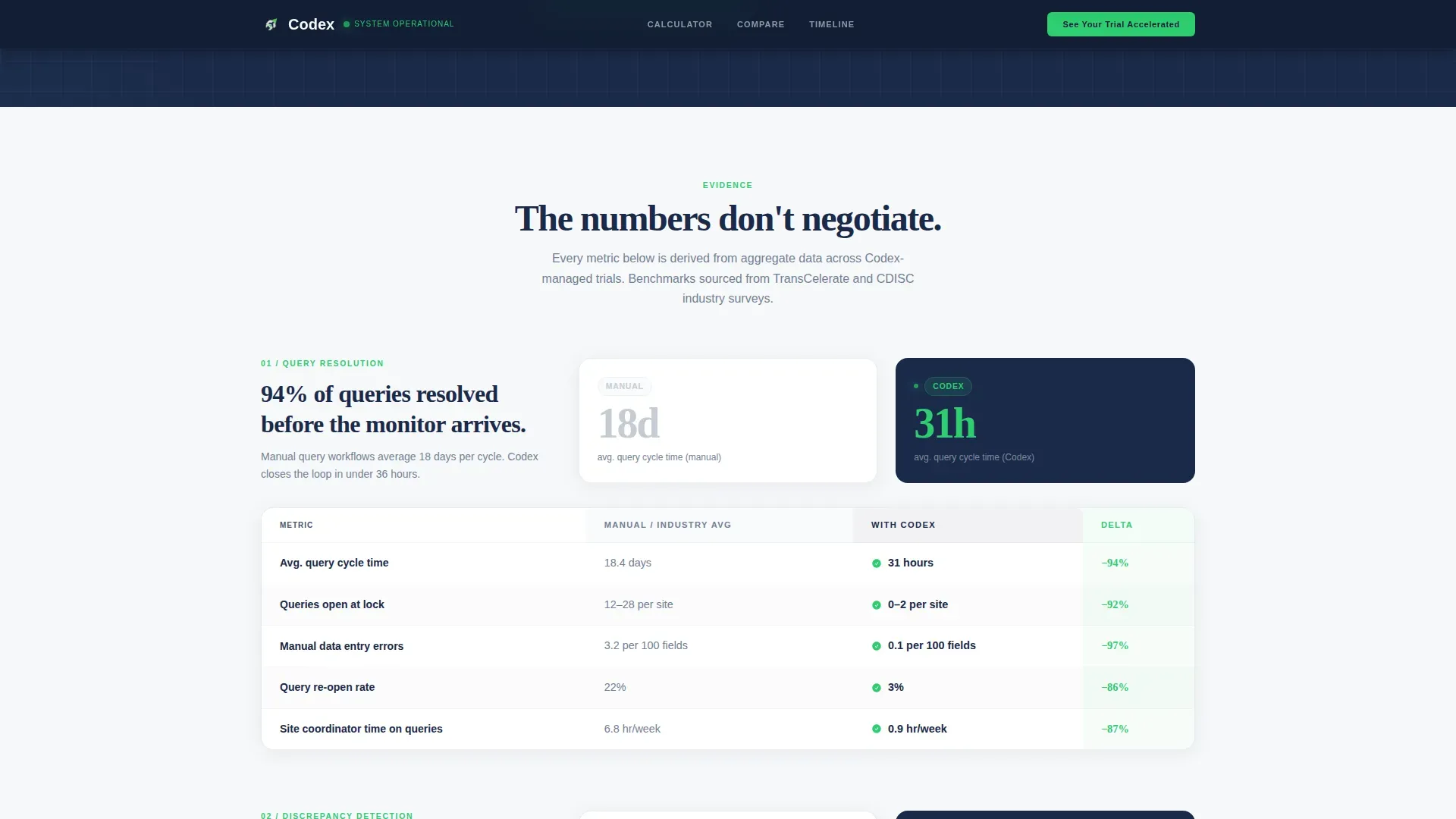
- A series of side-by-side comparison tables covering query resolution rates, discrepancy detection accuracy, and edit check deployment speed
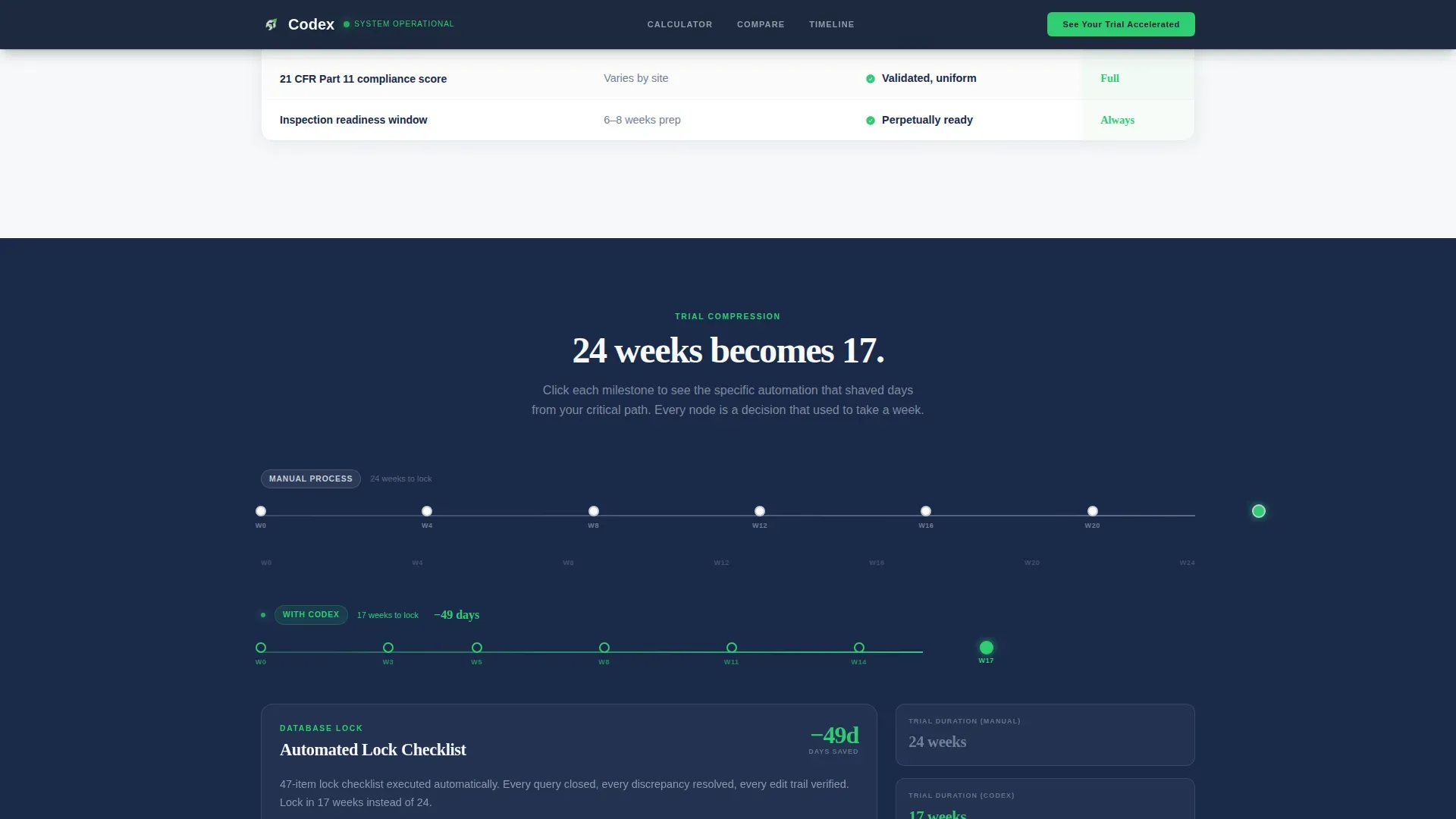
- A horizontal 24-to-17-week trial timeline with clickable milestone nodes and a compliance and audit section with a secondary call to action for documentation-minded visitors
Feature list
This template includes the following built-in components and structural features.
Live Database Lock Timeline Calculator
The hero section opens with a calculator where visitors enter their number of trial sites, enrolled subjects, and current query backlog. The tool instantly renders two projected lock dates side by side: manual process versus platform-accelerated. The time delta animates in real time and displays in large validation green type, making the value proposition immediate and specific.
Side-by-Side Comparison Tables
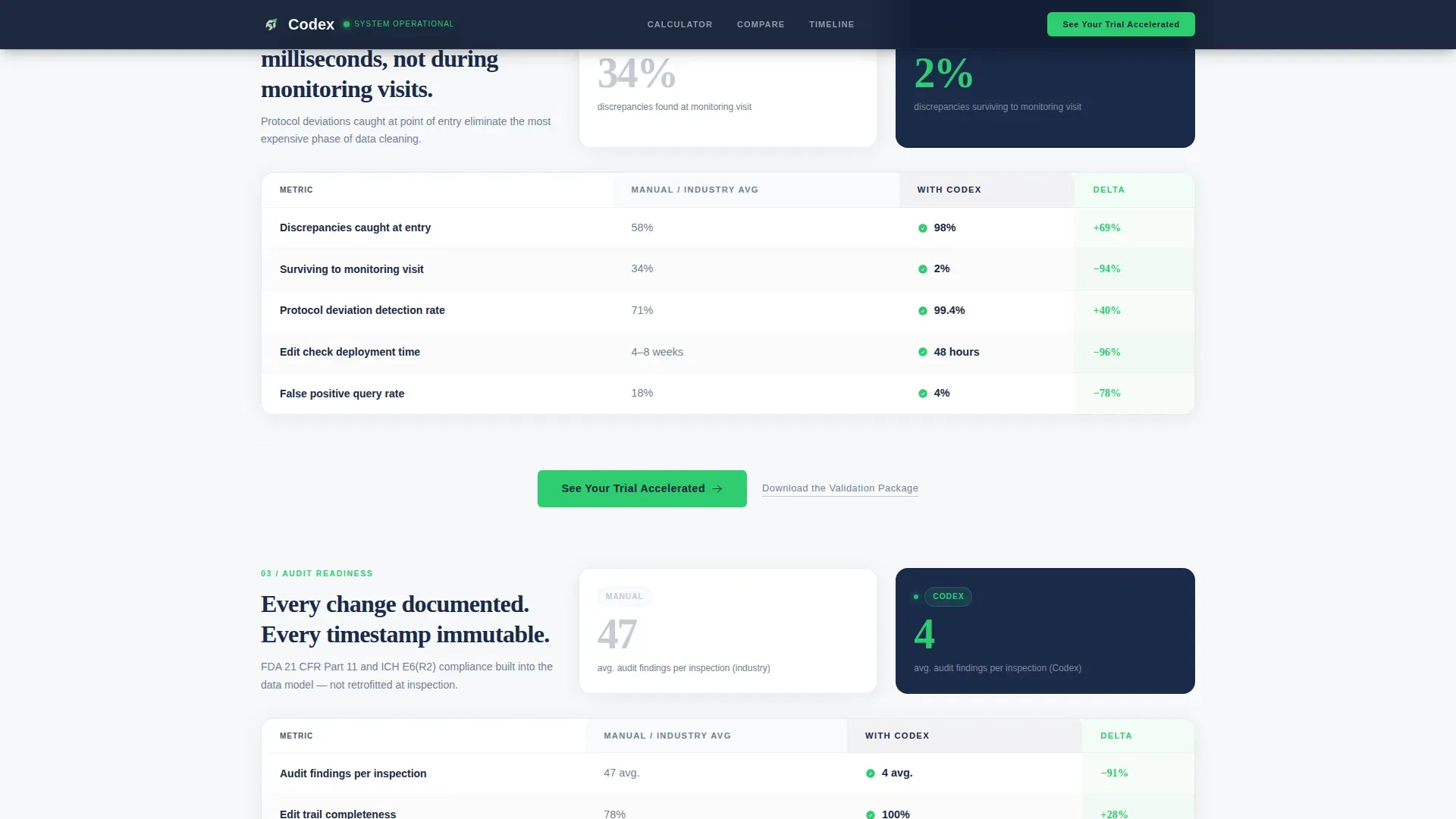
Multiple comparison tables cover query resolution rates, discrepancy detection accuracy, and edit check deployment time. Each table leads with oversized numbers before context fills in beneath, following a deliberate impact-then-explanation rhythm. The tables are structured for desktop-first readability, giving clinical operations professionals the data density they expect.
Compressed Trial Timeline Section
A horizontal timeline visualizes a typical 24-week trial compressed to 17 weeks. Each milestone node is clickable and reveals the specific automation responsible for reducing that segment. This section translates abstract efficiency gains into a concrete, week-by-week story.
Compliance and Audit Section
A dedicated section covers audit finding reduction and validation package social proof. It includes a secondary text link call to action, "Download the Validation Package," designed to capture compliance-focused visitors who need documentation before they will schedule a conversation.
Repeating Click-Through Call to Action
The primary call to action, "See Your Trial Accelerated," appears first below the calculator output and repeats after every second comparison table. No form lives on this page. The button routes to a dedicated demo scheduling page and carries the calculator inputs as pre-filled context, reducing friction at the point of conversion.
Stats-First Content Rhythm
The creative direction structures every section as impact before explanation. Numbers appear oversized and unavoidable first. Supporting context follows. This rhythm builds a cumulative argument where each comparison table makes the previous one more persuasive.
Page sections overview
| Section | Purpose |
|---|---|
| Hero Calculator | Render live lock-date delta from visitor inputs |
| Query Resolution Table | Compare manual versus automated query rates |
| Discrepancy Detection Table | Show accuracy gap with oversized stat leads |
| Edit Check Speed Table | Highlight deployment time difference |
| Trial Timeline | Visualize 24-week to 17-week compression |
| Compliance and Audit | Surface audit reduction stats and validation proof |
| Final Call to Action | Drive demo click and validation package download |
| Linear Footer | Single-row footer with minimal navigation |
Design & branding system
The visual identity follows a Corporate Precision theme. Every color serves a documented functional purpose, and decorative elements are intentionally absent.
- Regulatory navy (#1B2A4A) anchors the hero and primary backgrounds; sterile white (#F7F8FA) and compliant silver (#C5CCD6) handle content areas and borders
- Validation green (#2ECC71) is reserved exclusively for status indicators, checkmarks, and call to action buttons, preserving its signal value across the page
- Typography pairs DM Sans for body text with Fraunces for display numbers, giving oversized stats the visual weight they need to land before supporting copy follows
Mobile & speed optimization
The template is designed desktop-first, reflecting how clinical operations directors and data managers typically interact with complex comparison tables in a professional context.
- The comparison tables and side-by-side calculator output are optimized for wide monitor layouts where data density reads cleanly
- The live calculator runs entirely on the client side, keeping the initial page load fast and ensuring real-time delta computation does not depend on server round trips
- Scroll-reveal animations and counter animations are set to medium intensity, keeping motion purposeful without disrupting the data-focused reading experience
How this template helps you convert
This template is engineered as a click-through page with a single conversion goal: getting the visitor to schedule a personalized demo.
- The calculator opens the page with the visitor's own data doing the persuading. By the time they see the primary call to action, the time delta is already visible and personal, which removes the most common objection before it forms.
- The repeating call to action placement, after every second comparison table, catches visitors at the moment each evidence block peaks, maximizing the chance of a click at multiple scroll depths.
- The secondary "Download the Validation Package" text link serves compliance buyers who need documentation first, keeping a second conversion path open without diluting the primary demo flow.
Other information about this template
This template is part of the Health and Medical category, specifically built for the Clinical Research and Trial subcategory under the Clinical Data Management niche.
- The template style is Comparison Table, and the header concept is Calculator/Estimator, making it one of the more interactive landing page formats available in this category
- The landing page direction is Click-Through, meaning no lead capture form lives on the page itself; conversion happens downstream on the demo scheduling page
- The color system is Cloud Canvas, a palette that deliberately mirrors the visual language of validated electronic data capture systems used in regulated clinical environments
- Animation intensity is set to medium, covering counter animations, scroll reveals, and timeline node interactions, without overwhelming the data-heavy layout
- This template suits platforms positioning against manual clinical data processes and is well-matched to audiences familiar with electronic data capture workflows and regulatory submission timelines
Theme
Corporate Precision
Creative direction
Stats-First Impact
Color system
Cloud Canvas
Style
Comparison Table
Direction
Click-Through
Page Sections
Live Database Lock Timeline Calculator
Side-by-side Comparison Tables
Compressed Trial Timeline
Compliance and Audit Section
Repeating Click-through Call to Action
Stats-first Content Architecture
Related questions
Does this template include a form for lead capture?
Can I adapt the comparison tables for my platform's specific metrics?
Who is the intended audience for this landing page template?
How does the live calculator work within the template?
Is there a conversion path for compliance-minded visitors who are not ready to book a demo?



