HVAC Refrigeration Mechanic Business Professional Website Template
The Coil landing page template is built for a solo refrigeration diagnostic specialist who needs to win facility managers and mechanical contractors before a single phone call happens. Dark industrial design, three escalating case study comparison tables, real service data, and a streamlined contact form combine to make expertise unmistakably clear. This is the landing page that shows receipts.
by Rocket studio
Quick summary
The Coil landing page template turns raw diagnostic expertise into a compelling B2B portfolio experience. Scrolling through it feels like watching a flashlight land on a failed component in a dark mechanical room: deliberate, precise, and certain. Three comparison tables, full-bleed equipment photography, and a gated lead-magnet form give facility managers and mechanical contractors every reason to reach out.
Who this template is for
This landing page is designed for a one-person refrigeration diagnostics operation that needs to communicate hard-won technical authority to sophisticated buyers. It is not a general trades website. It is a focused, conversion-oriented portfolio built around real service data and real outcomes.
- Facility managers at grocery chains and restaurant groups who juggle EPA compliance logs and face costly product-loss risk every time a walk-in drifts above temperature overnight
- Mechanical contractors who subcontract refrigeration work and need a reliable specialist who can close a diagnosis quickly and correctly
- Independent refrigeration mechanics ready to move upmarket from residential heat pump calls to complex multi-rack grocery glycol systems
What problem this template solves
Most trade portfolio pages look identical: a logo, a list of services, and a generic contact form. That design does nothing to explain why one mechanic finds what others miss. The Coil template solves the trust gap that prevents a facility manager from picking up the phone and calling an unknown specialist.
- Potential clients arrive already skeptical because they have paid for a misdiagnosis before; the template addresses that skepticism directly with real data in comparison tables
- Contractors evaluating a subcontract partner need to see technical range and precision before they can make a confident referral; the escalating case study structure delivers exactly that
- Facility managers protecting hundreds of thousands of dollars in refrigerated inventory need proof of competence, not a list of certifications; case study narrative design provides that proof
What you get with this template
This landing page template delivers a complete, immediately deployable portfolio structure for a refrigeration diagnostics business. Every section is purposeful, and nothing is decorative filler. The design system, section architecture, and conversion flow are all defined and ready to adapt.
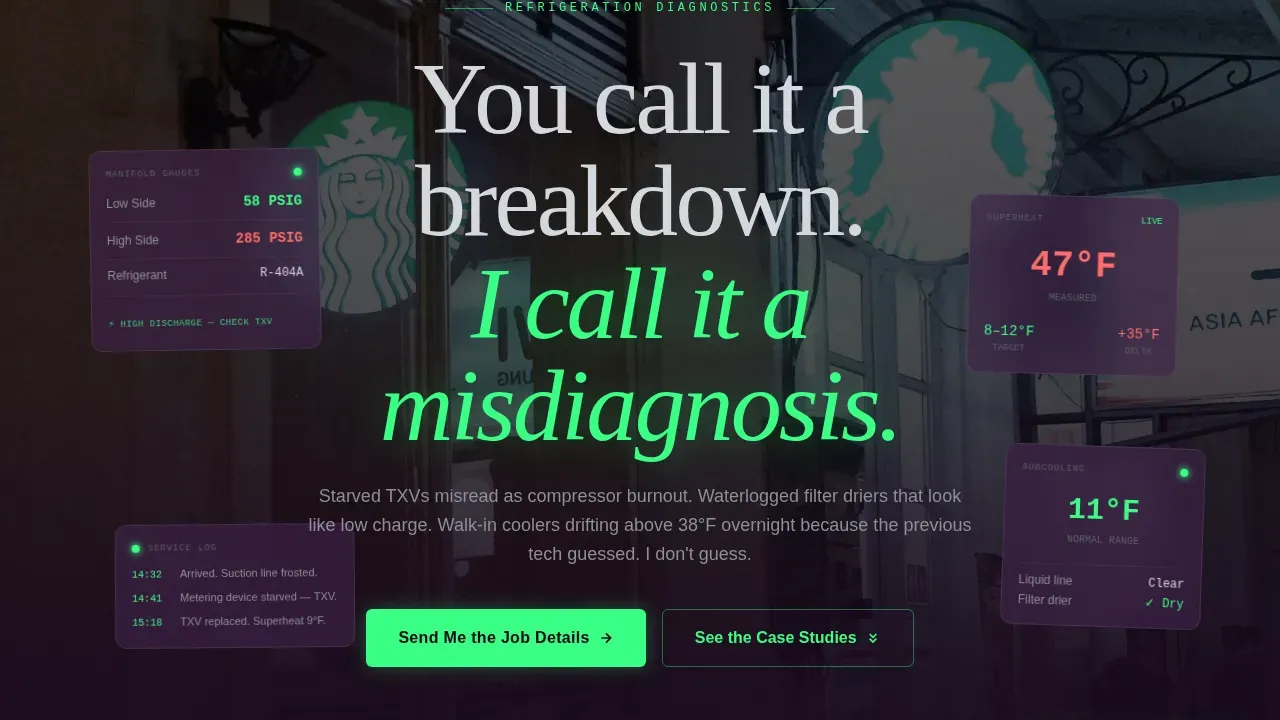
- A hero section with a dark full-bleed condensing unit photograph, a phosphor-green glowing scale readout, and a headline in silver-frost that fades up on load: "You call it a breakdown. I call it a misdiagnosis."
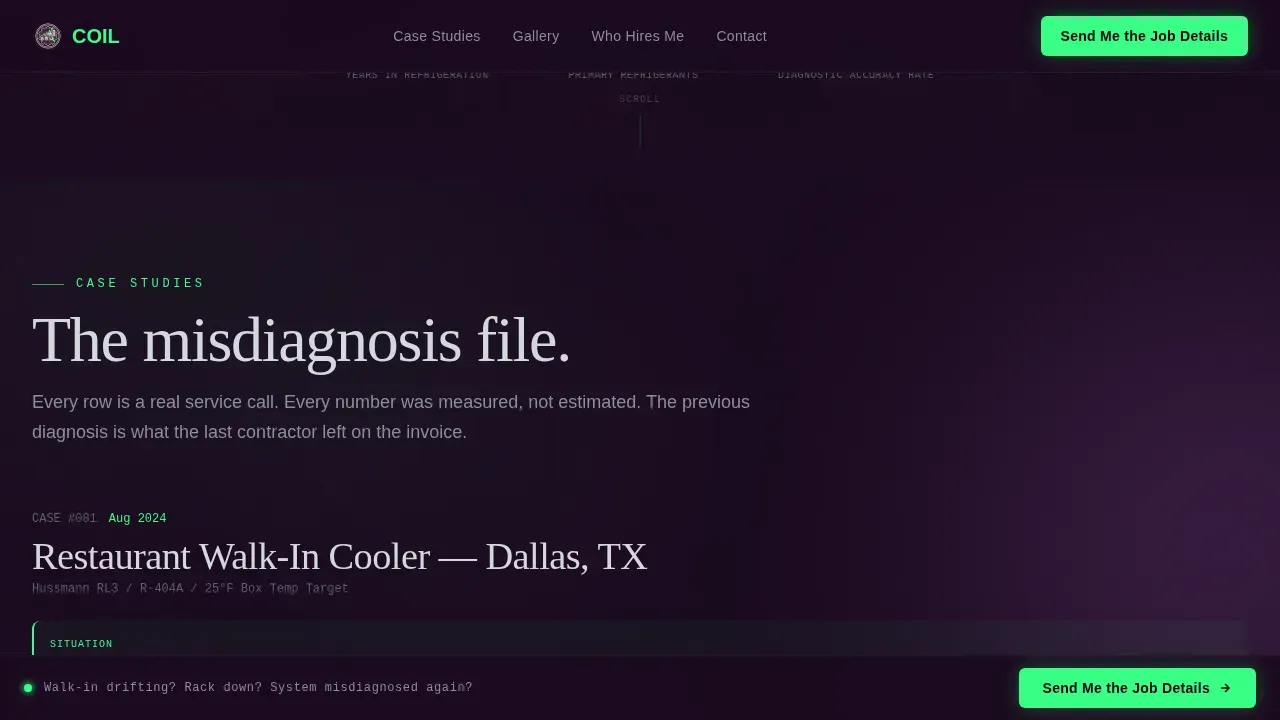
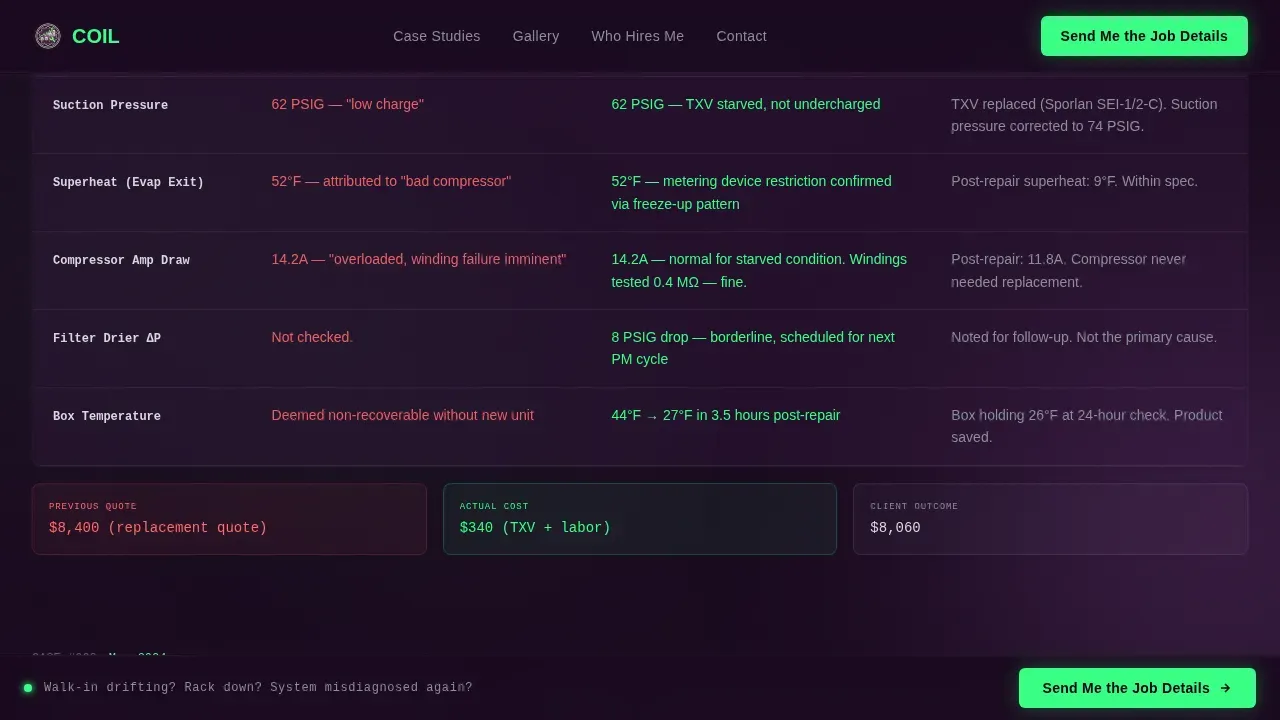
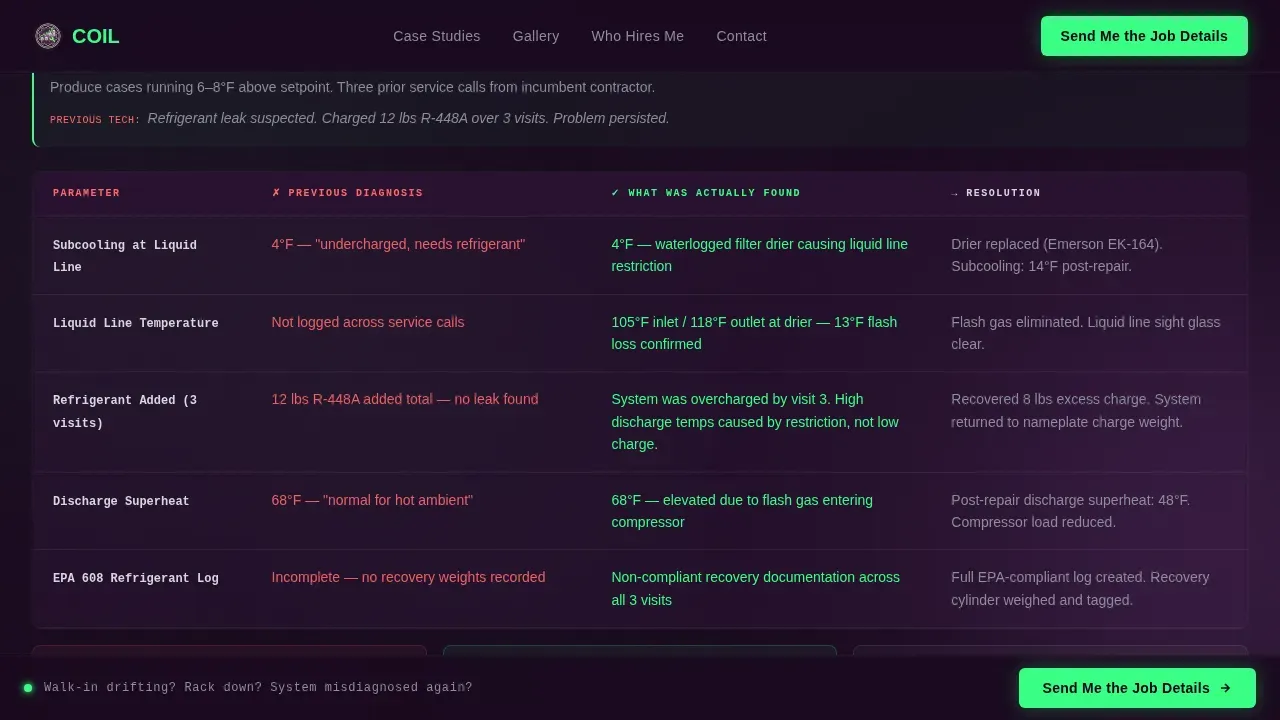
- Three escalating case study comparison tables showing the previous technician's diagnosis, the actual finding, and the resolution, each row populated with real readings such as superheat values, subcooling numbers, and amperage draws
- A full-bleed equipment gallery with one-sentence technical captions, a client types bento grid, a primary "Send Me the Job Details" contact form, and a gated PDF lead magnet titled "Refrigeration Troubleshooting Checklist for Facility Managers"
Feature list
The following features are built into the Coil landing page template based on the design and functionality defined in the source brief.
Escalating Comparison Table Case Studies
Three structured comparison tables anchor the page narrative. Each table presents what a previous technician diagnosed, what was actually found on site, and exactly how the issue was resolved. Rows include specific technical readings, refrigerant type references, and equipment model context. The difficulty of the cases escalates from a residential heat pump correction through to a complex multi-rack grocery store glycol system, teaching the visitor just enough to understand how much precision the work actually requires.
Dark Full-Bleed Hero with Glow Lighting
The hero section uses a full-bleed night photograph of a commercial condensing unit. Copper lines show condensation, solenoid valves are mid-cycle, and the only light sources are a phosphor-green refrigerant scale readout and a soft headlamp bloom reflecting off sheet metal. Navigation remains hidden until the user scrolls, removing distraction and focusing attention entirely on the opening headline and the diagnostic mood it creates.
Dual Conversion Path with Gated Lead Magnet
The primary call to action, "Send Me the Job Details," appears after the third case study and is pinned to the footer. The contact form collects company name, equipment type via dropdown, facility zip code, and a free-text field. A secondary path offers a downloadable one-page PDF checklist gated behind an email field, qualifying potential leads who are not yet ready to hire but are already losing confidence in their current contractor.
Full-Bleed Equipment Gallery with Technical Captions
Between the comparison tables, full-bleed gallery images show the actual work: brazed joints under nitrogen pressure test, recovered refrigerant cylinders tagged and weighed, control boards mid-wiring. Each photograph carries a single-sentence technical caption that functions as a micro-lesson. The gallery builds credibility through visual specificity rather than stock imagery, making it immediately clear that this is documentation of real services performed on real systems.
Client Types Bento Grid
An asymmetric bento grid section identifies the three buyer profiles the specialist serves: grocery chain facility managers, restaurant group operations directors, and mechanical contractors subcontracting refrigeration work. The grid design communicates market focus clearly. A visitor can identify their own profile within seconds, which improves relevance and accelerates the decision to make contact.
Phosphor-Green Diagnostic Accent System
The Plum Executive color system uses a deep plum-black background (#1A0A1F), aubergine card surfaces (#3D1F47), and silver-frost body text (#D4D7DD). Phosphor-green (#39FF85) is reserved for active states, highlighted data callouts, and the glowing accent that ties the visual identity to the equipment-room aesthetic. JetBrains Mono is used for all numerical data in the tables, reinforcing the precision of the readings displayed.
Page sections overview
| Section | Purpose |
|---|---|
| Hero full-bleed | Opens with a night photograph of a commercial condensing unit; headline fades up in silver-frost; no navigation visible on load |
| Case study one | Comparison table covering a residential heat pump misdiagnosis corrected with real superheat and subcooling readings |
| Gallery break one | Full-bleed equipment photograph with a one-sentence technical caption between the first and second case study |
| Case study two | Mid-complexity comparison table featuring a rooftop RTU (rooftop unit) diagnosis with amperage draw data |
| Gallery break two | Full-bleed image of brazed joints under nitrogen pressure test with a diagnostic caption |
| Case study three | High-complexity multi-rack grocery glycol system case study; primary call-to-action appears immediately after |
| Client types grid | Asymmetric bento grid presenting the three buyer profiles served by the specialist |
| Contact form | "Send Me the Job Details" form with equipment type dropdown and free-text field; pinned to footer |
| PDF lead magnet | Gated download section offering the one-page refrigeration troubleshooting checklist in exchange for an email address |
| Footer row | Linear single-row footer with contact information displayed clearly |
Design & branding system
The Coil landing page uses the Plum Executive color system to create an equipment-room atmosphere that feels calibrated rather than decorative. Every design decision reinforces the idea that precision is the core service. The palette is not chosen for aesthetics alone; it mirrors the experience of reading a digital manifold gauge in a dim mechanical room, where the dark background swallows everything unimportant and the green accent marks only what matters.
- Colors: deep plum-black (#1A0A1F) as the primary background, muted aubergine (#3D1F47) for card surfaces and table rows, cool silver-frost (#D4D7DD) for body text and diagram labels, and phosphor-green (#39FF85) for glowing highlights, active states, and diagnostic data callouts
- Typography: Fraunces is used for display headlines to give the page a confident, editorial weight; DM Sans handles all body copy for clarity and modern readability; JetBrains Mono renders every numerical reading in the comparison tables, making data values visually distinct and immediately legible
- Animation: medium-to-high intensity with floating diagnostic instrument cards in the hero, scroll-triggered section reveals, phosphor-glow pulse effects on accent elements, and staggered row animations in the comparison tables
Mobile & speed optimization
The Coil template is desktop-first in its primary design intent, which matches how facility managers and contractors typically review vendor pages during a workday. That said, the layout is fully responsive to ensure the page functions correctly on any device a user carries into a mechanical room or equipment corridor.
- The comparison tables reflow on smaller screens so that data remains readable without horizontal scrolling, and the contact form fields stack cleanly for mobile input
- Hero imagery and gallery photographs scale responsively across screen sizes, preserving the dark atmospheric quality of the design on every device
- Navigation remains hidden on initial load to keep conversion focus intact on both desktop and mobile, consistent with proven landing page design strategy for single-goal pages
How this template helps you convert
The Coil landing page is built around a single conversion philosophy: prove competence before asking for contact. Every design and content decision feeds that goal, creating a page that does the selling work so the specialist does not have to explain themselves on the first call.
- The case study comparison tables convert skepticism into confidence by showing real diagnostic data in a structured format, giving the user measurable proof of expertise rather than a list of claimed services, which directly addresses the objection that most facility managers carry after paying for a previous misdiagnosis
- The dual conversion path captures both ready-to-hire leads through the "Send Me the Job Details" form and early-stage leads through the gated checklist download, ensuring that no potential client leaves the page empty-handed, which widens the top of the funnel without adding friction for buyers who are ready to act
Other information about this template
The Coil template draws design inspiration from educational guide formatting conventions, applying them to a trade services context where precision and clarity carry real financial weight. The page is a strong example of how a modern portfolio landing page can serve both as professional showcase and as a market education tool, board-level in its strategic clarity while remaining approachable to the facility manager reading it between maintenance shifts.
- This template can save significant proposal time because the case study tables, gallery, and client grid communicate expertise before any conversation begins, allowing the specialist to explore higher-value engagements rather than repeating diagnostic credentials on every sales call
- The design system is built to help a solo operator compete in a market where larger mechanical contractors have brand recognition; the page design levels the board by making individual expertise more visible and more legible than a corporate services brochure ever could
- Visitors can learn the vocabulary of refrigeration diagnostics through the escalating case study structure, which creates a sense of guided discovery; the more a facility manager learns, the more they realize the value of the specialist and the higher the likelihood they will close on a booking
- The page serves as inspiration for other precision trades specialists who want to move beyond a generic website and create something that reflects the actual depth of their work; the template is adaptable to adjacent healthcare-adjacent technical services, diagnostic testing environments, and any field where misdiagnosis has a measurable cost
- Modern animation choices such as phosphor-glow pulse effects and scroll-reveal table rows improve engagement without distracting from the diagnostic data; every motion serves a purpose, reinforcing the board-level seriousness of the work being presented
- The template's development scope includes server-rendered static components for all content sections and client-side components for interactive elements including the contact form, the PDF download gate, and the table hover states, keeping the experience smooth across all pages of interaction
- Institutional trust signals are built into the page structure: real equipment photography, specific readings, and a named downloadable checklist all function as trust markers that help the specialist protect their positioning as a diagnostic authority in a market full of generalist mechanics
- The gated checklist is designed to store qualified lead emails and deliver immediate value, making the lead-magnet conversion path low-friction and clearly useful for facility managers who manage multiple sites and want a resource they can keep on the board room table or share with their maintenance team
Theme
Educational Guide
Creative direction
Case Study Narrative
Color system
Plum Executive
Style
Comparison Table
Direction
Partnership/B2B
Page Sections
Escalating Case Study Comparison Tables
Dark Full-bleed Hero with Glow Effects
Dual Conversion Path with PDF Lead Magnet
Full-bleed Equipment Gallery with Captions
Client Types Asymmetric Bento Grid
Plum Executive Design System with Mono Data Typography
Related questions
Who is the Coil landing page template built for?
What sections are included in the template?
Can I customize the comparison table data with my own readings?
How does the dual conversion path work?
Is this template suitable for a multi-person HVAC company?



