Beekeeper FAQ & Resource Landing Page Template
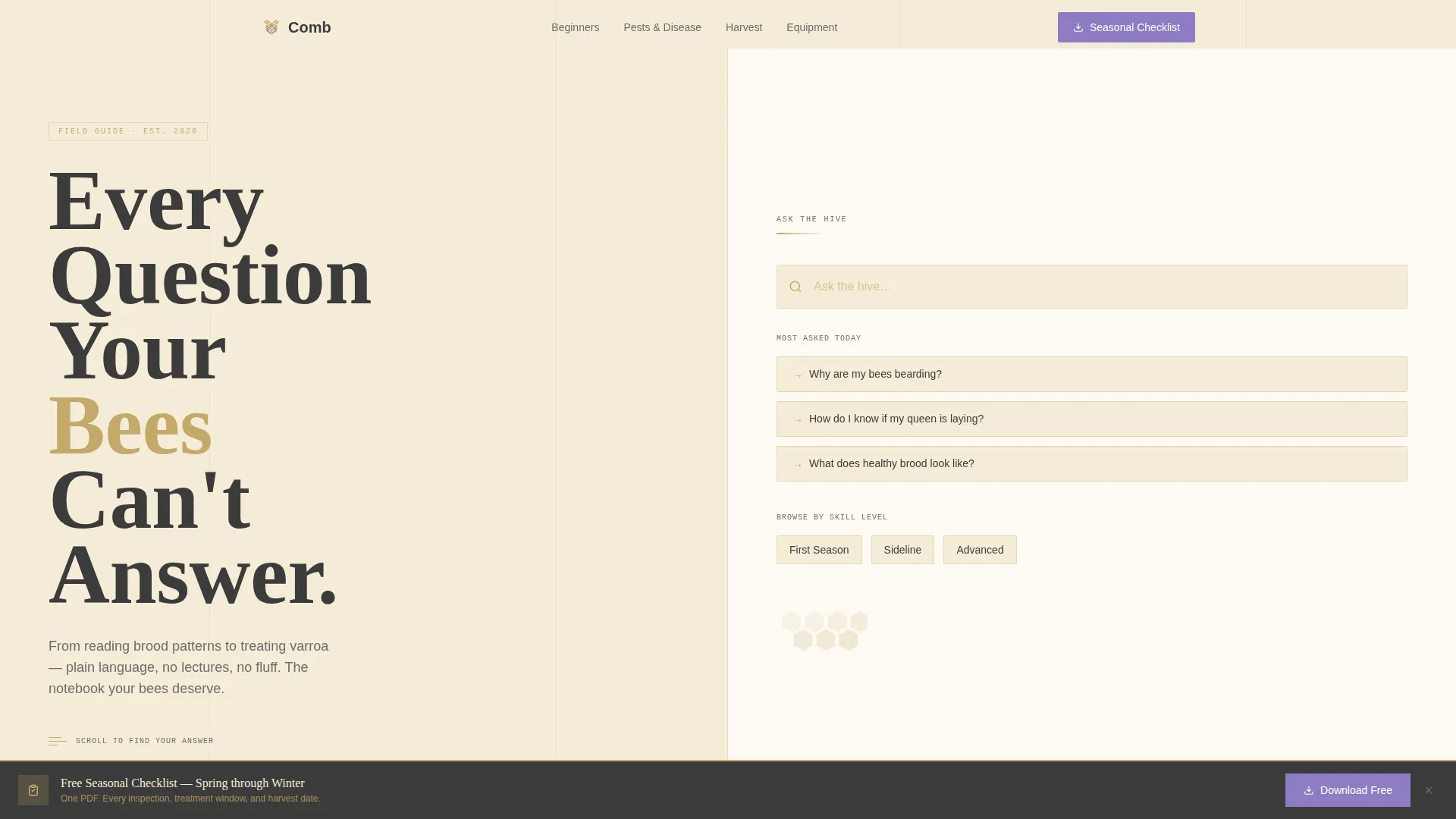
Comb is a split-screen beekeeper landing page template built as a digital field guide. It organizes beginner-to-advanced FAQ content into a scrollable conversation, using a warm Educational Guide aesthetic. The layout pairs bold typographic headlines with layered expandable answers, a sticky checklist download prompt, and anchor-linked topic clusters to help every visitor find exactly what they need.
by Rocket studio
Quick summary
Comb is a single-page FAQ and resource template for beekeepers at every experience level. The 50/50 split-screen layout pairs bold headline typography on the left with search tools and layered answers on the right. It is designed to earn reader trust through depth, then guide visitors toward a seasonal checklist download via a minimal email capture.
Who this template is for
This template is built for beekeepers and apiary educators who need a trustworthy, content-led web presence. It suits anyone who wants to publish practical knowledge and grow an audience through genuine resource value.
- First-year beekeepers launching a personal apiary blog or FAQ page
- Sideliner beekeepers scaling up and sharing hard-won colony management knowledge
- Homesteaders and apiary educators who want a calm, authoritative online resource hub
What problem this template solves
Most beekeeper pages bury answers under cluttered layouts or generic blog formats. Visitors land from search with urgent questions and leave before finding anything useful. Comb fixes that by organizing content as a structured conversation with visible, layered answers.
- Scattered FAQ content that forces visitors to hunt across multiple pages
- No clear path from a beginner question to an advanced deep-dive without losing context
- Generic layouts that feel impersonal and fail to reflect the hands-on culture of beekeeping
What you get with this template
You get a fully structured, single-page layout built around the FAQ-driven creative direction. Every component is designed to match the Educational Guide theme and Cloud Canvas color system described in the brief.
- A split-screen header with a giant serif headline block and a live search bar labeled "Ask the hive..."
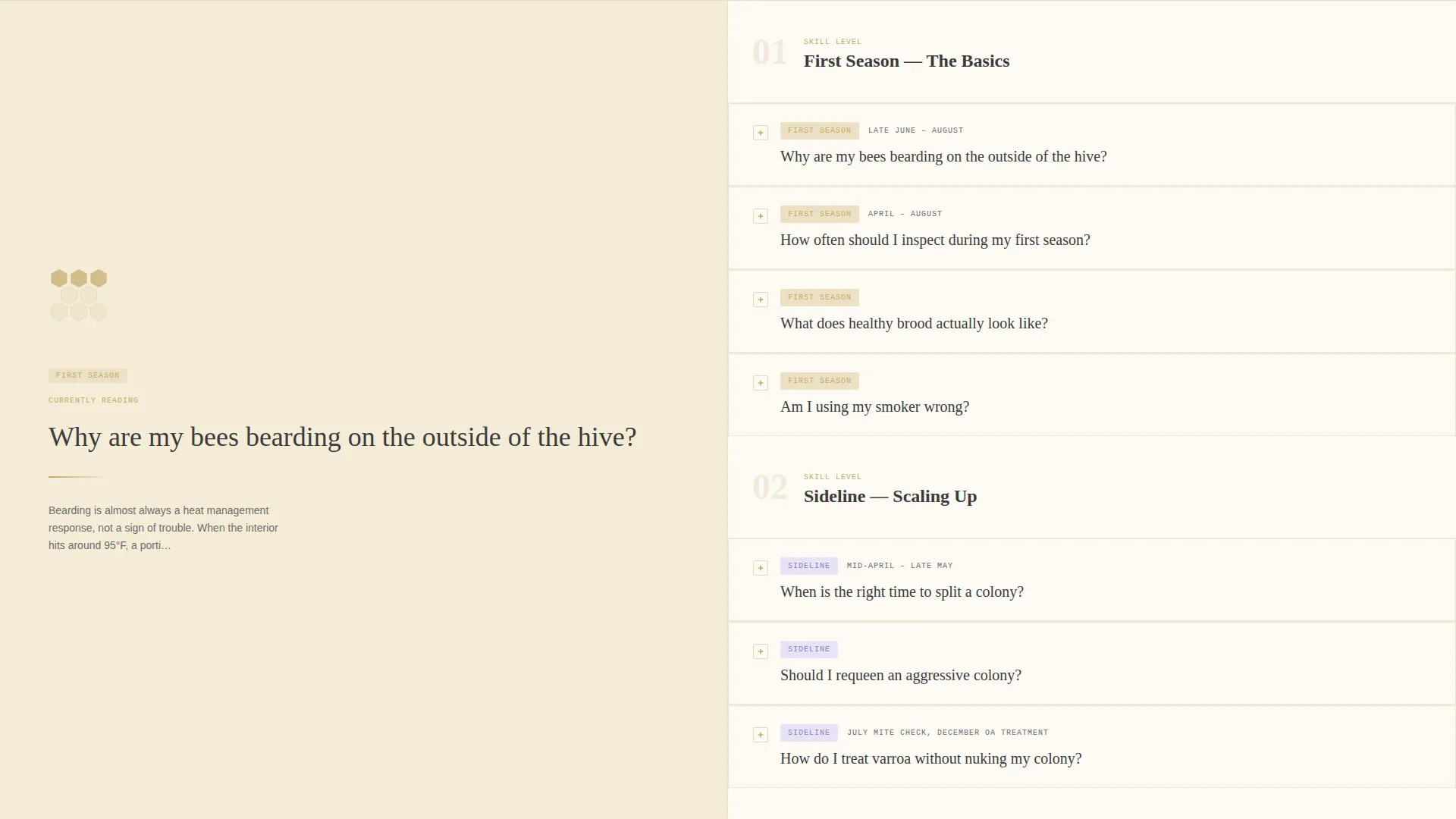
- Escalating FAQ sections from beginner through advanced, each with a short answer and an expandable deep-dive panel
- A sticky "Download the Seasonal Checklist" call-to-action bar with a single-field email capture form
Feature list
This template is built around components that serve real beekeeper content needs. Each feature below is grounded directly in the source brief.
Split-Screen Header with Typographic Hero
The header divides into two equal halves. The left side holds a stacked heavy serif headline with mixed color treatment across key words. The right side is clean cream with a search bar and three tappable question pills beneath it. No hero image is used; the typography carries the visual weight.
Escalating FAQ Conversation Layout
FAQ sections progress from beginner-level questions through intermediate and advanced topics. Each question is displayed as a bold left-panel prompt. The right panel holds a plain-language answer plus an expandable deep-dive with seasonal timelines, diagrams, and tool references.
Sticky Seasonal Checklist Download Bar
After the third FAQ section, a gentle sticky bar appears at the bottom of the viewport. It carries the primary call to action: "Download the Seasonal Checklist." The bar stays visible as the visitor continues reading without interrupting the content flow.
Single-Field Email Capture Modal
Clicking the checklist download opens a focused modal with a single email address field. There are no extra form fields or distracting copy. The minimal format reduces friction and keeps the focus on the value exchange.
Anchor-Linked Topic Cluster Navigation
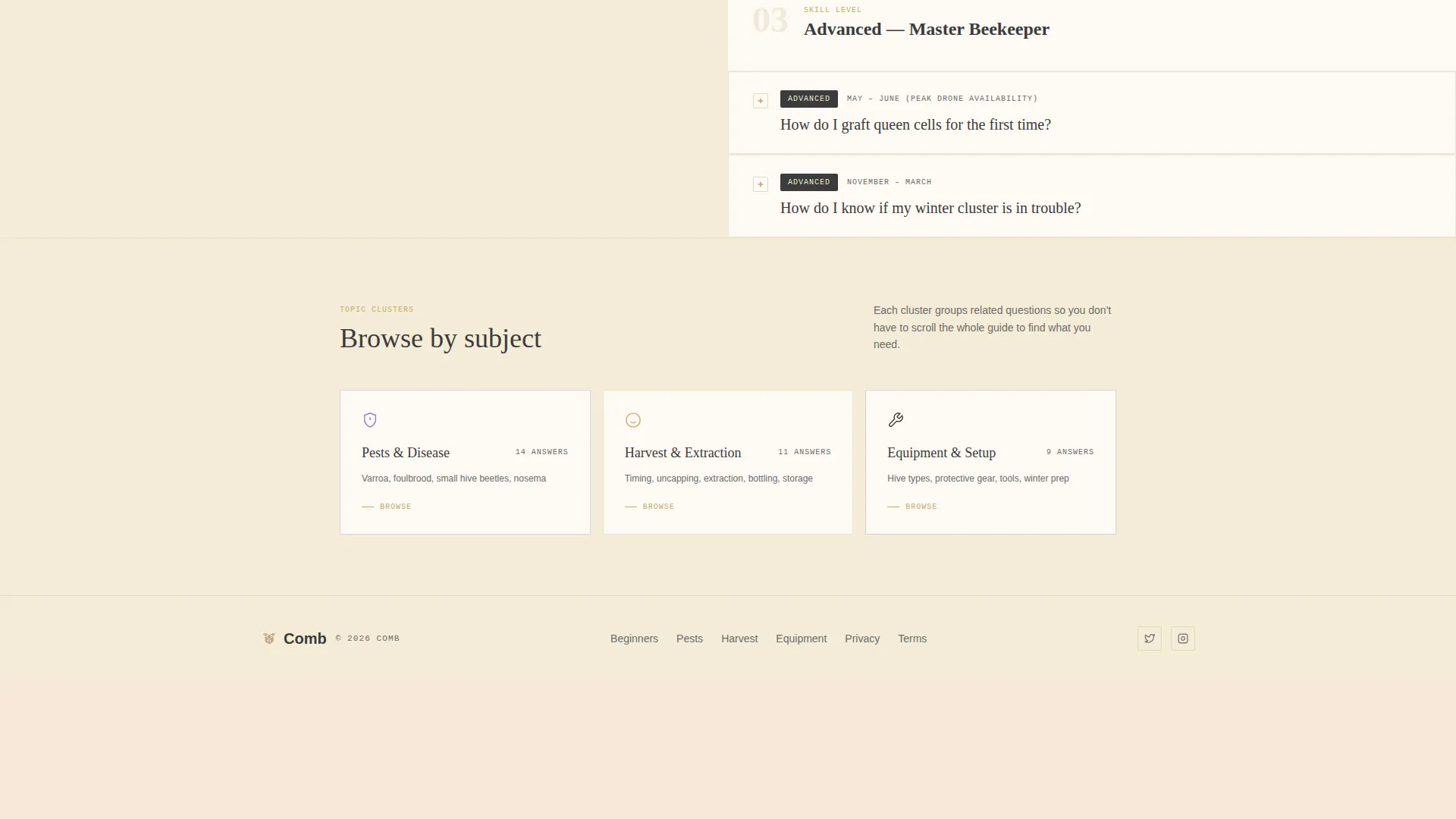
A left-rail navigation panel appears on scroll. It contains anchor links organized into topic clusters such as Pests, Harvest, and Equipment. Visitors can jump directly to the section most relevant to their current need.
Scroll-Triggered Honeycomb Animation
A honeycomb hex graphic fills progressively as the visitor scrolls down the page. This micro-animation quietly rewards continued reading without distracting from the content.
Page sections overview
| Section | Purpose |
|---|---|
| Split-Screen Header | Headline, search bar, and quick-access question pills |
| Beginner FAQ Block | Entry-level colony care questions with short answers |
| Intermediate FAQ Block | Mid-level split, swarm, and management deep-dives |
| Advanced FAQ Block | Grafting, requeening, and varroa treatment guidance |
| Sticky Download Bar | Persistent seasonal checklist call-to-action prompt |
| Left-Rail Topic Nav | Anchor links to Pests, Harvest, and Equipment clusters |
| Email Capture Modal | Single-field form triggered by checklist download click |
Design & branding system
The template uses a Cloud Canvas color system built around four specific values. The palette evokes an overcast morning in an apiary: diffused light, calm contrast, and no visual glare. Every color has a defined role that keeps the layout legible and warm.
- Soft beeswax cream (#F5ECD7) dominates all background areas; hive-box pine (#C4A96A) warms section dividers, icons, and typographic accents
- Smoker charcoal (#3B3B3B) carries all body text and the primary headline word; wildflower lavender (#8E7CC3) highlights expandable answers, links, and download buttons
- Typography is anchored by a heavy serif for headlines and a clean readable face for body text, creating clear visual hierarchy throughout the scroll
Mobile & speed optimization
The split-screen layout is designed with responsive behavior in mind so the two-column structure adapts cleanly on smaller viewports. The template keeps visual complexity low by relying on typography and color rather than heavy media assets.
- No hero image means the header renders quickly without large file dependencies
- Expandable deep-dive panels keep long-form content collapsed by default, reducing initial page weight on load
- The sticky call to action bar is positioned to remain functional and unobtrusive across both desktop and mobile screen sizes
How this template helps you convert
Comb earns the conversion before it asks for anything. The page gives visitors real answers first, building enough trust that the checklist download feels like a natural next step rather than an interruption.
- The escalating FAQ structure lets visitors self-select their experience level, so every reader finds relevant answers quickly and stays on the page longer.
- The sticky download bar appears only after three full FAQ sections, timing the ask to a moment when the visitor has already received clear value from the content.
- The single-field email capture removes every possible friction point at the moment of conversion, making the sign-up feel low-commitment and honest.
Other information about this template
Comb sits at the intersection of professional services and beekeeper online presence. It is built for content-led pages where the resource itself is the product. A few additional details are worth noting before you build.
- The template style is Split Screen (50/50), meaning the two-panel structure is core to every major section, not just the header
- The "Print This Answer" button on each expanded FAQ card supports offline use, which is practical for beekeepers working in apiaries without reliable connectivity
- The illustrated bee detail resting on the headline period is a small typographic flourish that reinforces the Educational Guide theme without relying on photography
- The page earns reader trust through content depth before the primary call to action appears, which aligns with the Content/Resource landing-page direction stated in the brief

Theme
Educational Guide
Creative direction
FAQ-Driven
Color system
Cloud Canvas
Style
Split Screen (50/50)
Direction
Content/Resource
Page Sections
Split-screen Typographic Header
Escalating FAQ Conversation Layout
Sticky Seasonal Checklist Call to Action Bar
Single-field Email Capture Modal
Anchor-linked Topic Cluster Navigation
Scroll-triggered Honeycomb Animation
Related questions
Can I customize the FAQ questions for my own apiary topics?
Does the sticky download bar appear automatically as visitors scroll?
Is the email capture form connected to a mailing list platform?
Can I add more topic clusters to the left-rail navigation?
Does the honeycomb scroll animation require custom coding to enable?



