Military Retirement Dashboard Landing Page Template
Muster is a military retirement command dashboard landing page template built for transitioning service members. It maps pension income, Thrift Savings Plan balances, and VA benefits into one clear financial picture. Animated comparison grids, an interactive rollover calculator, and a gated playbook download turn complex retirement data into actions any service member can take before separation day.
by Rocket studio
Quick summary
Muster is a dashboard-style landing page template designed for military retirement financial planning. It consolidates pension, Thrift Savings Plan (TSP), and VA benefit data into side-by-side comparison grids. Visitors self-qualify through a rank and years-of-service gate, then sign up to download a separation finance playbook built around their specific situation.
Who this template is for
This template serves active duty service members and military families who are counting down to separation. It is built for anyone who needs to see every retirement dollar mapped before transition leave starts.
- E-7s with 18 or more years tracking their points toward a full pension
- O-4s weighing a 20-year letter against a defense contractor offer
- Military spouses managing household finances across multiple Permanent Change of Station (PCS) moves
What problem this template solves
Military retirement benefits are spread across multiple systems and documents. Without a unified view, service members leave real monthly income on the table simply because they never saw the gap.
- Pension, TSP, and VA benefit data rarely appear side by side with clear comparison actions
- The cost of choosing the wrong retirement path is invisible until it shows up as a smaller monthly check
- Forms like DD Form 2656 and transition checklists get buried when there is no central reference point
What you get with this template
This template gives you a fully structured, data-driven landing page ready to customize and launch. Every section is pre-built to guide the visitor from awareness to download without friction.
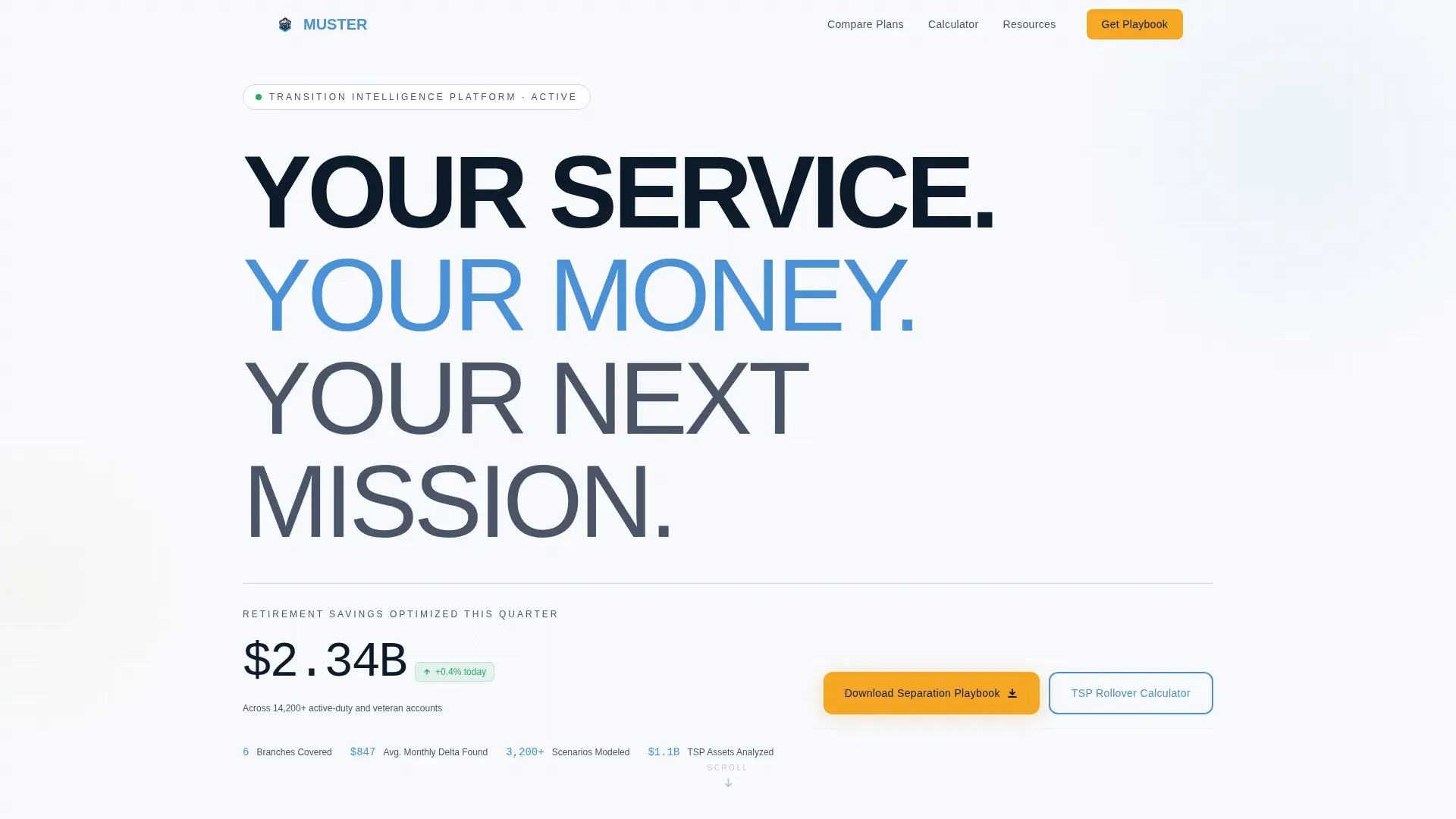
- A hero section with a stacked type tower and live aggregate retirement savings counter
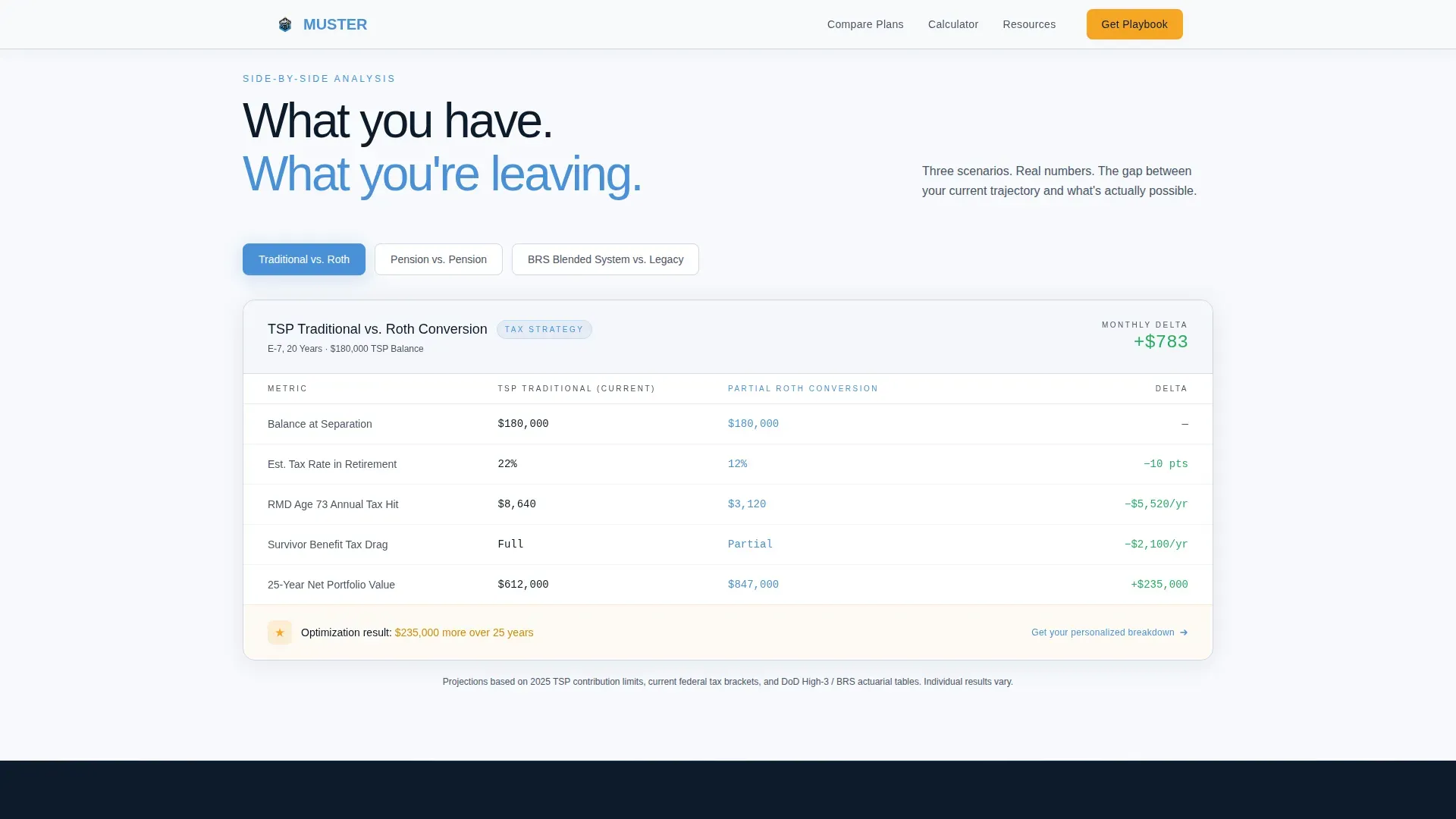
- Animated comparison grids covering TSP Traditional versus. Roth, Pension-only versus. Pension-plus-IRA bridge, and Blended Retirement System (BRS) versus. High-3
- An ungated TSP-to-IRA rollover calculator plus a gated playbook download with rank, branch, and years-of-service self-qualification fields
Feature list
This template ships with purpose-built components designed for military retirement data presentation.
Stacked Hero with Live Counter
The hero displays "YOUR SERVICE. YOUR MONEY. YOUR NEXT MISSION." in massive vertically stacked sans-serif type. A live-updating aggregate counter beneath it shows real retirement savings optimized across all users this quarter, proving the tool is active.
Animated Comparison Journey Grids
Side-by-side data grids animate left-to-right as the visitor scrolls. Each panel compares a current trajectory against an optimized alternative, populating numbers in real time so the monthly income delta becomes impossible to ignore.
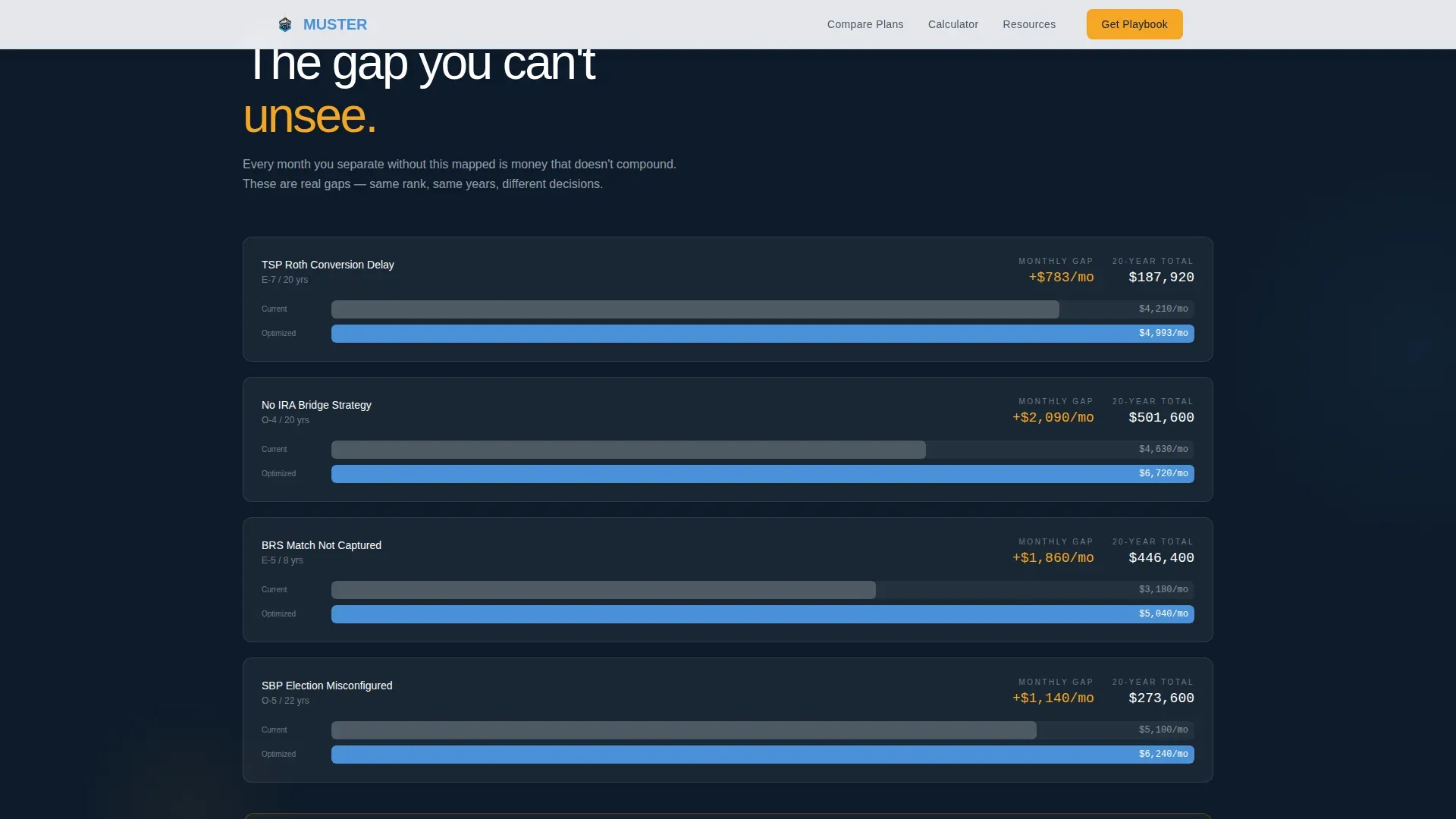
Cost-of-Inaction Delta Section
A dedicated scroll section surfaces the widening gap between retirement scenarios. The monthly income difference grows visibly with each comparison, turning inaction into a specific, readable dollar figure rather than a vague warning.
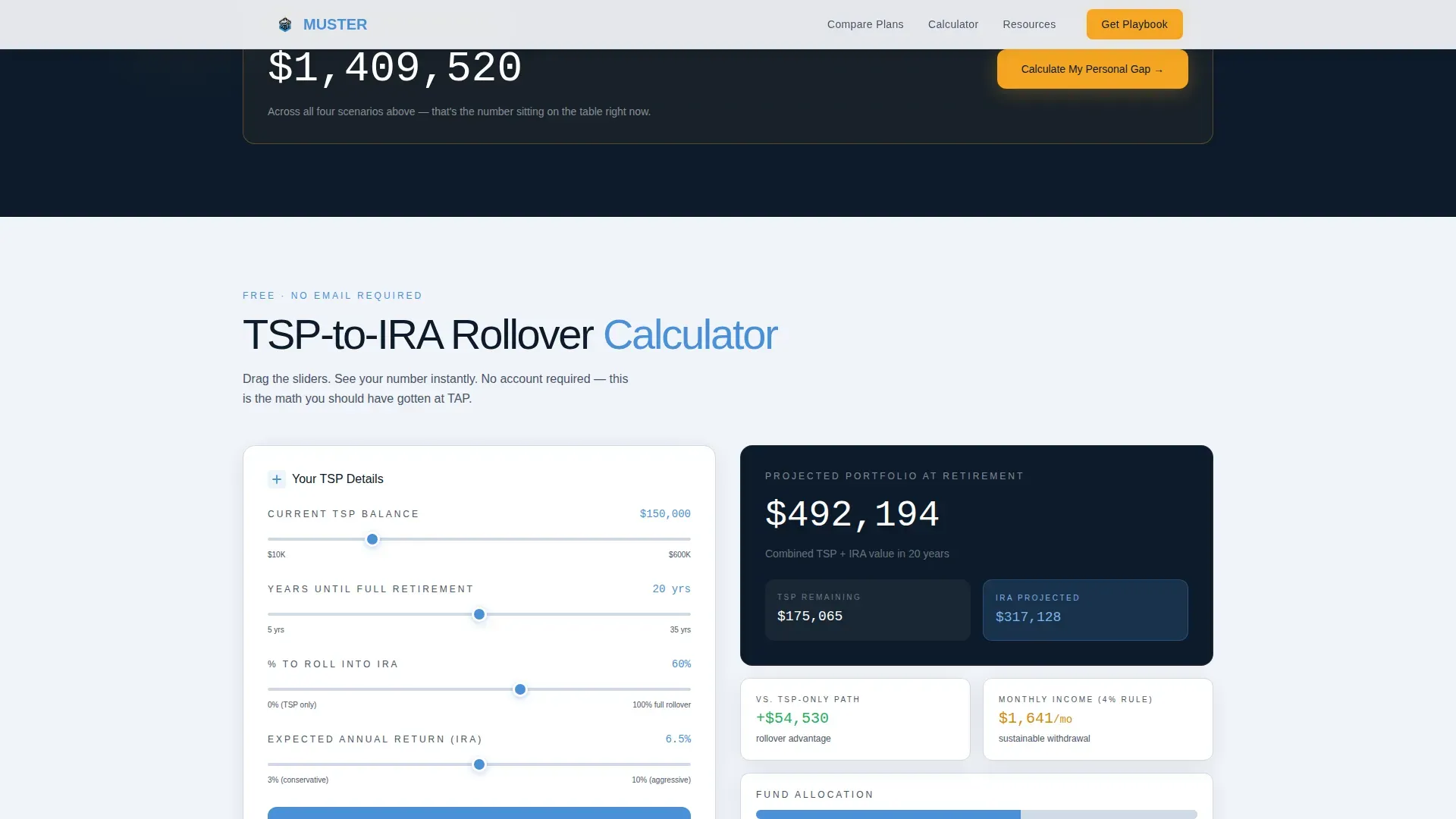
Interactive TSP-to-IRA Rollover Calculator
An ungated calculator lets visitors change variables like date of final separation to instantly update rollover projections. It builds trust by delivering real results before asking for any contact information.
Gated Separation Finance Playbook Download
The primary call-to-action gates a downloadable playbook behind a rank and branch selector, a years-of-service slider, and a single email field. Visitors sign up only after self-qualifying, so every lead is relevant.
Transition Checklist Section
A step-by-step checklist covers actions required at the 24-month, 12-month, and 6-month marks. It references DD Form 2656 preparation, medical and dental records retrieval, and terminal leave planning so no critical date is missed.
Page sections overview
| Section | Purpose |
|---|---|
| Hero Type Tower | Establish authority and show the live savings counter |
| Comparison Journey Grids | Animate TSP, pension, and BRS scenario data side by side |
| Cost of Inaction | Reveal the monthly income gap across retirement paths |
| TSP Rollover Calculator | Deliver ungated instant projections to build trust |
| Gated Playbook Download | Capture qualified leads through self-qualification gate |
| Transition Checklist | Guide actions from 24 months out through separation date |
| Footer | Single-row linear navigation and contact link |
Design & branding system
The visual identity channels a cockpit HUD projected onto cloud cover. Every number floats in breathable space with no imagery competing for attention.
- Cloud Canvas palette: open-sky white (#F7F9FC) background, high-altitude gray (#D1D9E6) for borders, horizon blue (#4A90D9) for primary actions, signal-flare amber (#F5A623) for calls to action and data highlights
- Typography: massive stacked sans-serif in the hero, monospaced numerals inside all data grids, and DM Sans for body copy
- Drag and drop widget layout lets you save preferred views and rearrange sections to match specific command requirements without writing code
Mobile & speed optimization
The template is desktop-first because the comparison data grids require horizontal space to read clearly. Mobile layouts collapse grids into stacked cards so the same data remains accessible on any screen size.
- Comparison panels reflow vertically on smaller screens, keeping all actions visible without horizontal scrolling
- Static sections use server-side rendering while the calculator and live counter load as interactive client components, keeping the initial page fast
- Note that users in the field often access planning resources on mobile devices, so the responsive collapse is a core design requirement
How this template helps you convert
The page earns trust through data before it asks for anything. Visitors see enough real comparison numbers to believe the math, then sign up because the playbook download feels like a natural next step.
- The live counter and animated grids establish credibility instantly, so visitors read the data rather than bouncing at the hero
- The ungated calculator delivers a personalized result, capturing intent without requiring a login or email at that point in the journey
- The gated download then converts engaged visitors into qualified leads by asking them to sign up only after they have already seen the value
Other information about this template
This template is designed for defense-adjacent financial service providers, transition assistance programs, and financial readiness counselors who need a credible, data-forward lead generation page.
- The muster military retirement command dashboard landing page template can be activated on your hosting with full installation support included in the service
- A visual drag and drop editor makes logo implementation, color scheme adjustments, and contact form activation straightforward without traditional programming
- Gray Area Retirees, who are not yet eligible for retired pay until age 60, are a supported audience; the template can be adapted to note key dates like the 60th birthday submission window
- Applications for retired pay are processed according to the retirement effective date, and the template content structure reflects this date-driven planning logic
- The retirement process requires applicants to accurately annotate their anticipated last day of accumulating points, and the transition checklist section supports this requirement
Theme
Startup Velocity
Creative direction
Comparison Journey
Color system
Cloud Canvas
Style
Dashboard/Data Grid
Direction
Content/Resource
Page Sections
Stacked Hero with Live Savings Counter
Animated Comparison Journey Grids
Cost-of-inaction Delta Section
Interactive Tsp-to-ira Rollover Calculator
Gated Separation Finance Playbook Download
Transition Checklist with Date-driven Actions
Related questions
Can I customize the comparison grid scenarios?
Does the TSP calculator require a login to use?
What fields does the gated download form include?
Is DD Form 2656 covered in the transition checklist?
Can this template support Gray Area Retirees?



