Regulatory & Licensing Professional Website Template
Commissioner is a civic-service landing page template built for a state insurance regulatory office. It combines a data-driven infographic header, zigzag alternating content sections, and a step-by-step complaint-filing flow to communicate regulatory authority clearly. The Alpine Fresh color system and federal-report typography make every statistic feel credible and every call to action feel purposeful.
by Rocket studio
Quick summary
Commissioner is a single-page, zigzag landing page template designed for a state insurance regulatory office. It leads with a full-width infographic dashboard, layers alternating data sections through an Industry Report creative direction, and closes with a structured complaint-filing process. The result feels like a well-designed government brief, dense with evidence, clean in layout, and built to earn the visitor's trust before asking for a click.
Who this template is for
This template is built for government and civic-service offices that need to communicate regulatory authority through data. It is especially well-suited for insurance commissioners and similar regulatory bodies that serve multiple distinct audiences at once.
- Policyholders who are fighting a denied homeowner's claim, disputing a billing charge, or seeking coverage guidance
- Independent insurance agents who need to verify a carrier's license status quickly and confidently
- Small-business owners researching workers' compensation rate filings ahead of a renewal decision
What problem this template solves
Most government office pages fail their visitors because they bury actionable information under institutional language. Policyholders arrive frustrated and leave without filing. Agents hunt for a license lookup and give up. The template solves this by leading with proof and following with process.
- Visitors rarely trust a government page they cannot read quickly, so the template replaces long text blocks with data visualizations and plain-language summaries
- The complaint-filing path is often hidden on generic government sites, so this template elevates the primary call to action at the header and again after the enforcement-actions section
- Carrier license lookups are buried on most office pages, so a dedicated search field appears beside every data section as a secondary path
What you get with this template
You get a fully structured, single-page landing page that moves visitors from awareness to action through escalating civic evidence. Every section has a clear job, and every design choice reinforces the office's authority.
- A full-width infographic header dashboard with animated counters, a comparative bar chart, and a bold active-licenses statistic
- Five alternating zigzag content sections covering complaint trends, enforcement actions, rate filing outcomes, market conduct exams, and a dollars-recovered stats strip
- A step-by-step "How to File a Complaint" section with a primary call-to-action button and a linear single-row footer
Feature list
This template is built around a small set of high-impact components. Each one does a specific job in the regulatory storytelling flow.
Infographic Header Dashboard
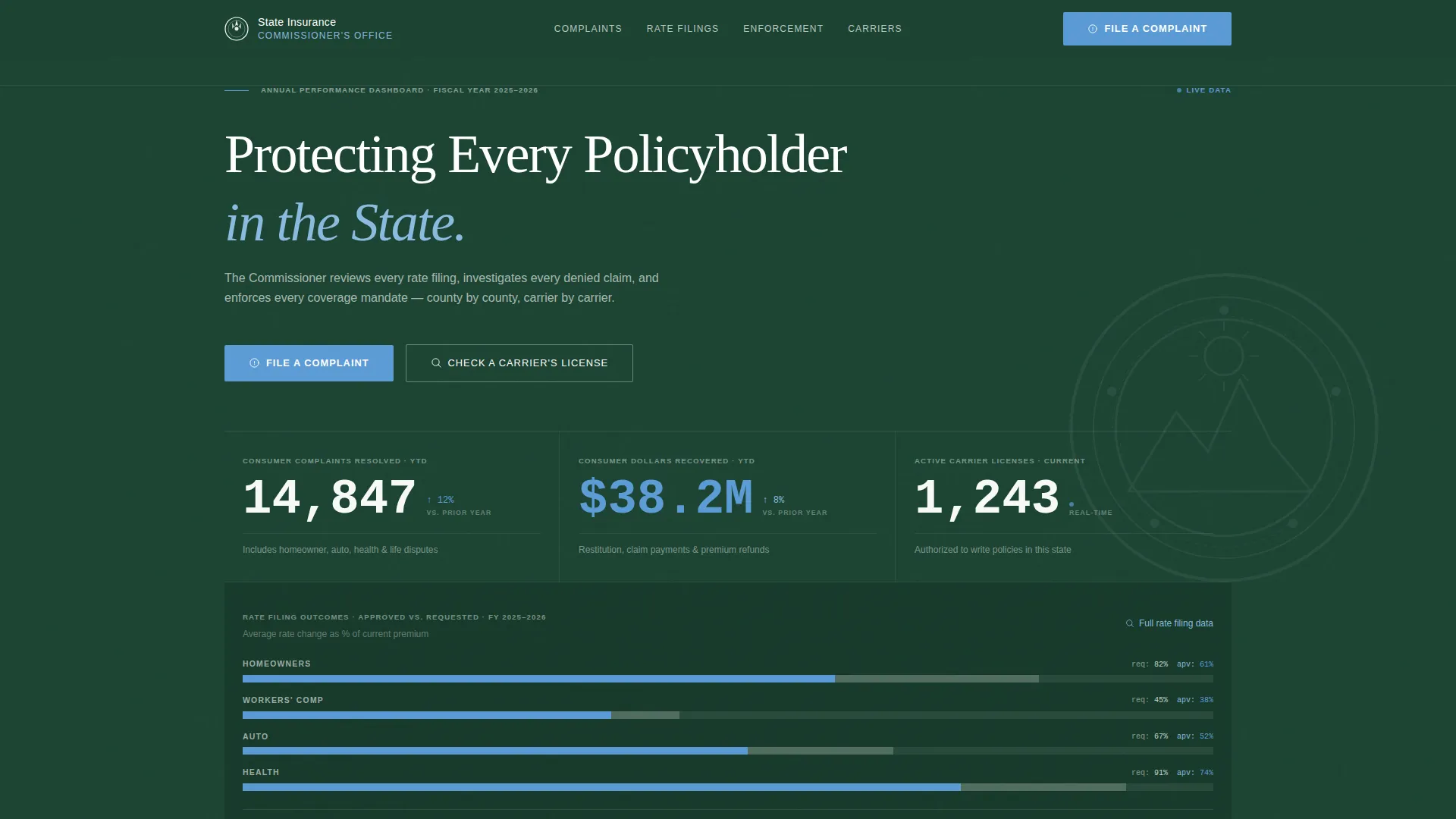
The header is a full-width data composition, not a photograph. It displays a live-counter for total consumer complaints resolved this year, a comparative bar chart showing average rate change approved versus requested, and a bold statistic for active carrier licenses. Thin ruled lines, small-caps labels, and an 8% opacity state seal watermark give it the authority of an annual report cover.
Zigzag Alternating Section Layout
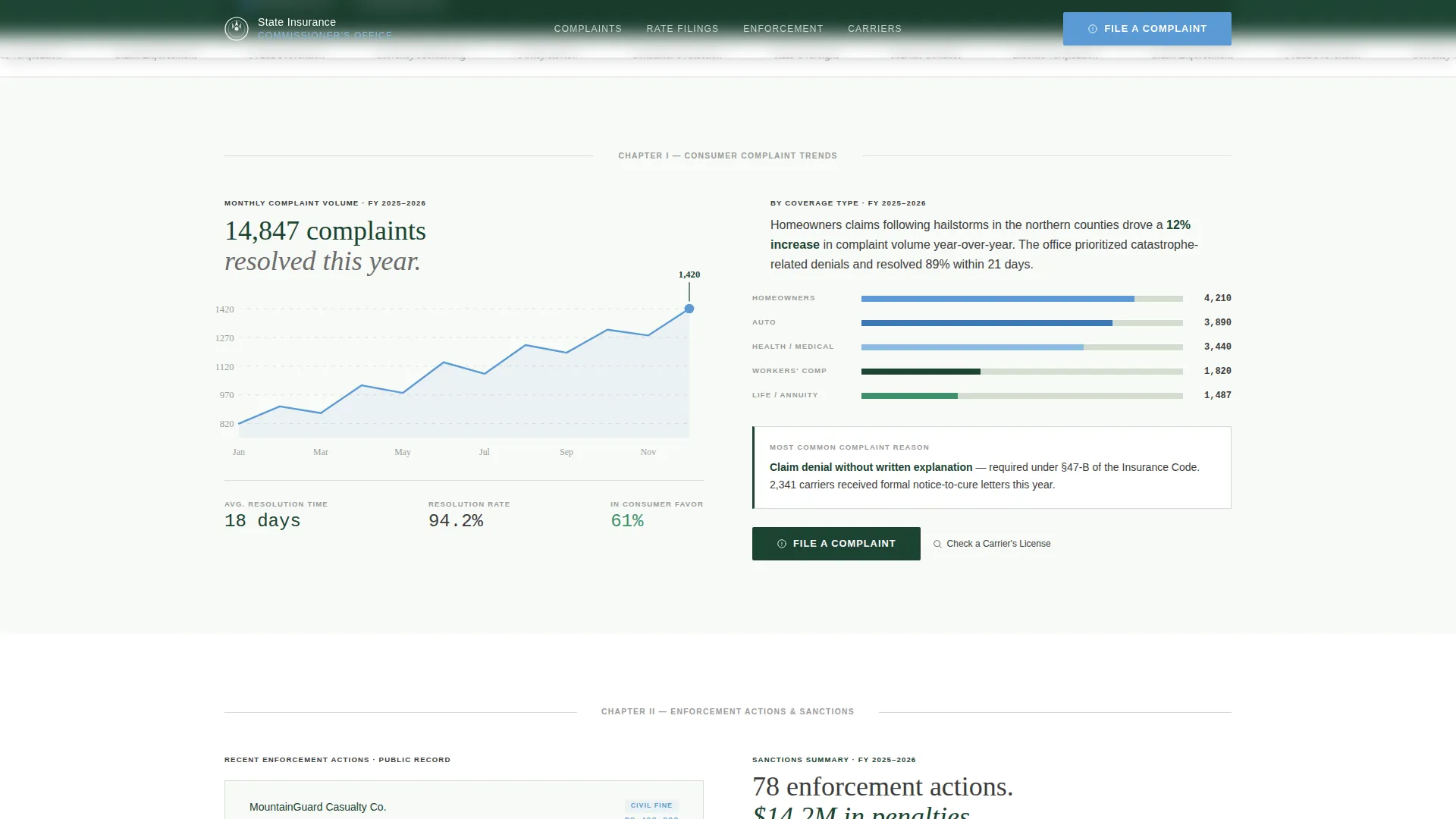
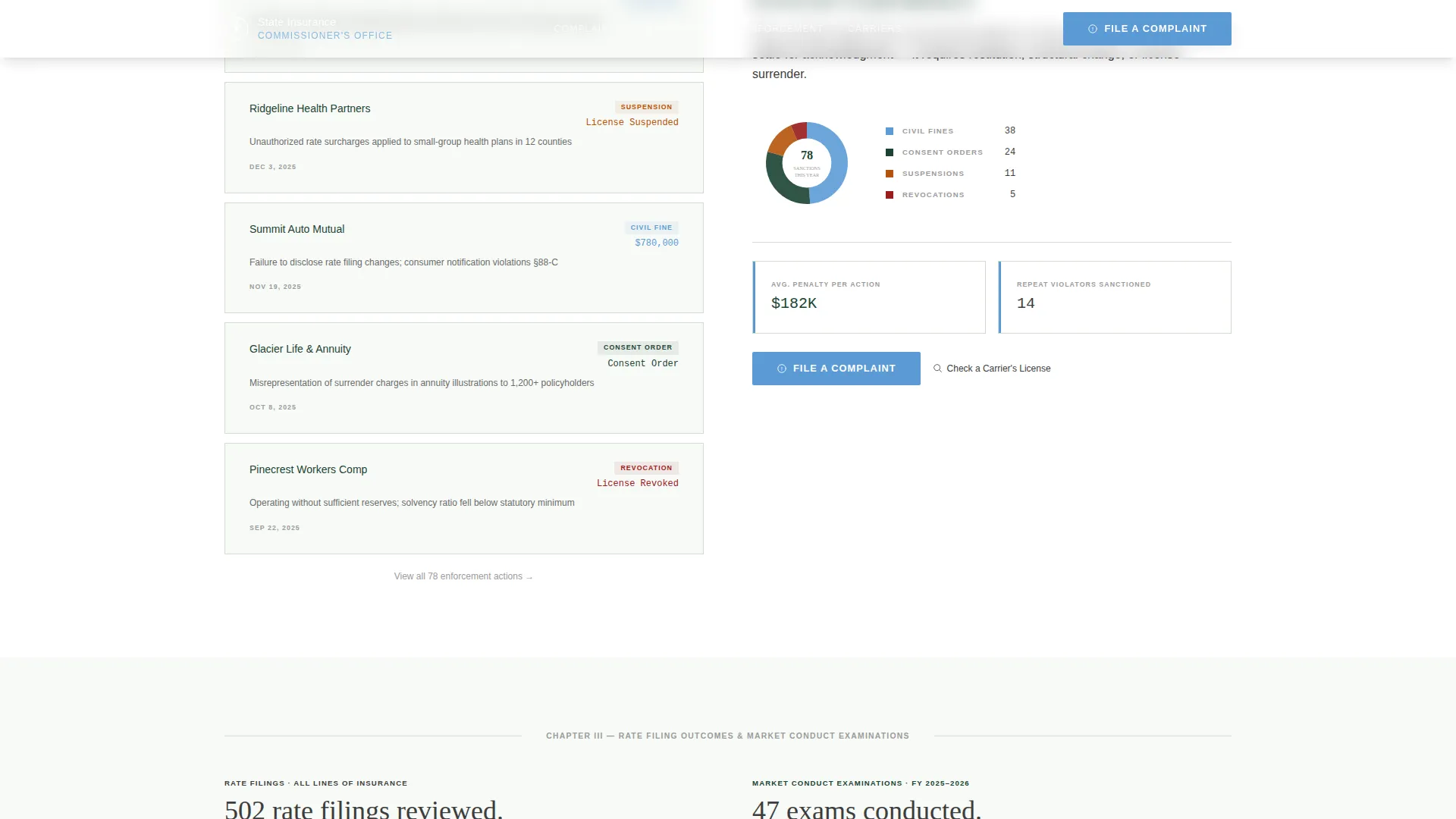
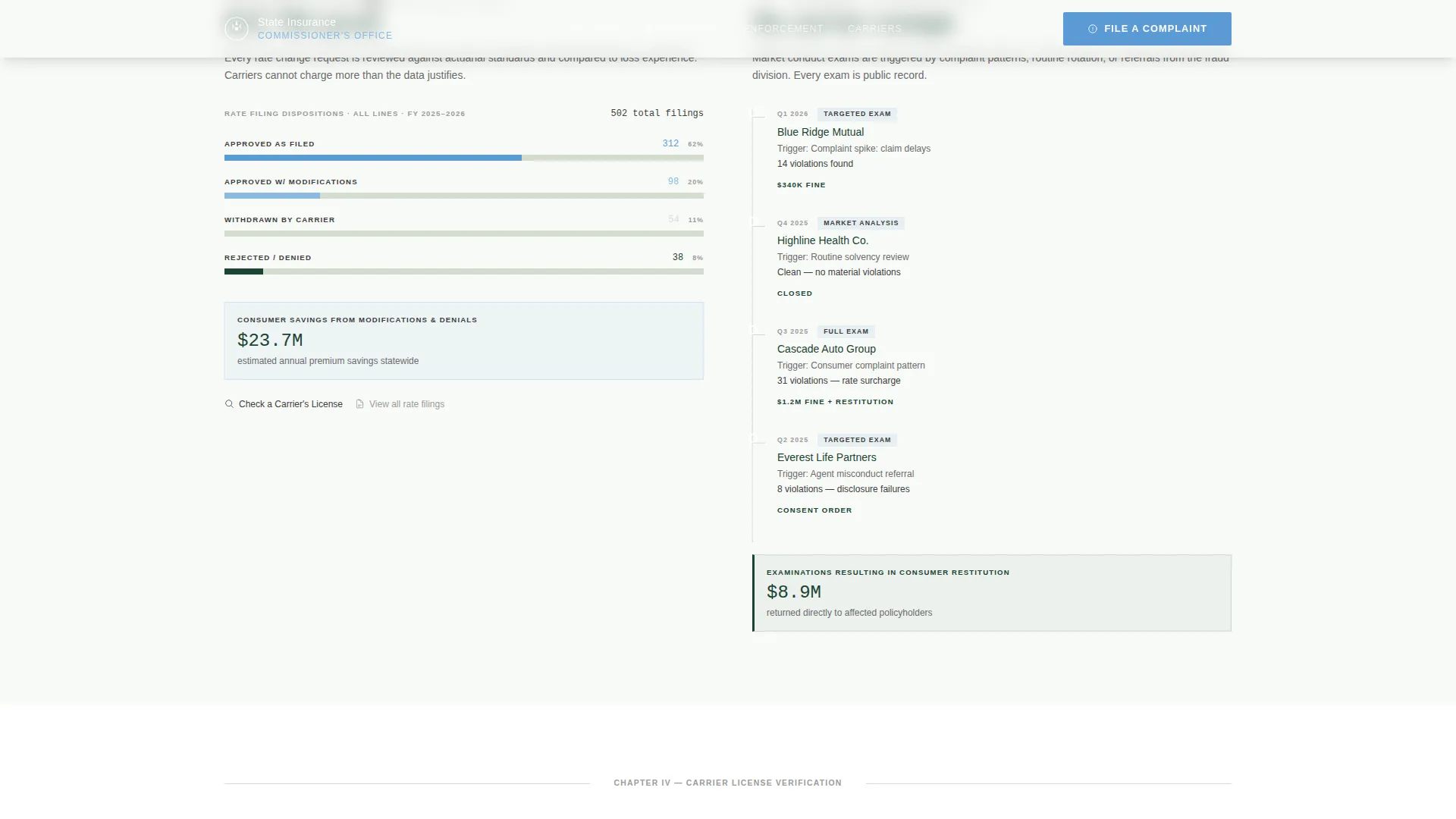
Content alternates sides as the visitor scrolls. Consumer complaint trend data appears on the left while enforcement action details appear on the right. Rate filing outcomes and market conduct exam results then swap sides in the next pair. This keeps the eye moving and prevents the page from feeling like a flat list of information.
Animated Data Visualizations
Scroll-triggered reveals bring flat, minimal bar charts to life as visitors reach each section. Charts use glacier blue on summit white, with deep evergreen annotation lines. Counter animations in the header and stats strip reinforce the sense that the numbers are live and current.
Carrier License Search Field
A search field with a search icon appears beside every data section as a secondary interactive path. Visitors can check a carrier's license status without leaving the page flow, making the template useful for agents and business owners on every scroll position.
Dollars Recovered Stats Strip
A dedicated evidence strip displays resolved complaint totals, dollars recovered for consumers, carrier sanctions issued, and market conduct exam results. These figures appear before the complaint-filing section so visitors arrive at the call to action already convinced of the office's effectiveness.
Step-by-Step Complaint Process
The "How to File a Complaint" section breaks the submission process into clear numbered steps followed by the primary call-to-action button labeled "File a Complaint." The glacier blue button against deep evergreen makes the action unmissable at the end of the evidence journey.
Page sections overview
| Section | Purpose |
|---|---|
| Hero Infographic Dashboard | Establishes authority with live data counters, a rate-change bar chart, and the active carrier licenses stat |
| Consumer Complaint Trends | Presents complaint volume and resolution data in a left-aligned zigzag panel |
| Enforcement Actions | Delivers enforcement outcomes in a right-aligned zigzag panel opposite complaint trends |
| Rate Filing Outcomes | Shows approved versus requested rate filing results in a left-aligned data panel |
| Market Conduct Exams | Summarizes exam findings in a right-aligned panel opposite rate filing data |
| Dollars Recovered Strip | Concentrates key proof statistics in a full-width evidence band |
| How to File a Complaint | Guides visitors through the complaint submission process with a primary call to action |
| Page Footer | Provides a linear single-row footer with essential navigation and office links |
Design & branding system
The template uses a Civic Service theme built on the Alpine Fresh color system. The palette references a federal building in a mountain-state capital, authoritative without being cold, grounded without being dull.
- Deep evergreen (#1B4332) anchors primary backgrounds and section dividers; summit white (#F8FAF7) provides open breathing space between data panels; glacier blue (#5B9BD5) highlights data visualizations, interactive elements, and the primary call-to-action button; granite charcoal (#3D3D3D) carries all body text and labels
- Typography uses Fraunces serif for headlines to signal institutional authority, DM Sans for body copy and data labels for clean readability, and JetBrains Mono for all numerical data to reinforce a report-grade aesthetic
Mobile & speed optimization
The template is designed desktop-first to honor the government report aesthetic, but it is fully responsive for mobile visitors. Data-heavy sections restack cleanly on smaller screens without losing hierarchy.
- Counter animations and scroll-triggered chart reveals are handled by client-side components, while static sections use server components to keep initial load lean
- The zigzag layout collapses to a single-column stacked flow on mobile, keeping the reading order logical and the calls to action reachable without horizontal scrolling
How this template helps you convert
The page earns the click before asking for it. Every section adds a layer of evidence so that by the time a visitor reaches the complaint-filing step, trust is already established through data.
- The infographic header leads with resolved complaint counts, rate change comparisons, and active license numbers, giving every visitor immediate proof of the office's reach and activity before they read a single paragraph
- The dollars-recovered stats strip appears directly above the complaint-filing section, so the most persuasive evidence is the last thing visitors see before they decide whether to act
Other information about this template
This template is categorized under Government and Public, Regulatory and Licensing, with a niche focus on insurance commissioner offices. It is a strong fit for state-level regulatory agencies that need a public-facing page combining civic transparency with a clear user action path.
- The template style is Zigzag/Alternating, which matches the Industry Report creative direction and works well for offices that have multiple data stories to tell side by side
- The Click-Through landing-page direction is built into the layout: the primary "File a Complaint" call to action appears at the header and again after the enforcement-actions section, while the secondary "Check a Carrier's License" path appears as a text link with a search icon beside every data panel
- Animation intensity is set to medium, covering counter animations, scroll-triggered section reveals, and staggered bar chart builds, giving the page energy without distracting from the data
- The footer follows Pattern 1, a linear single-row layout suited to a regulatory office that needs minimal but complete navigation
- Localization context is English, United States dollars, MM/DD/YYYY date format, and a Mountain-state USA civic setting
Theme
Civic Service
Creative direction
Industry Report
Color system
Alpine Fresh
Style
Zigzag/Alternating
Direction
Click-Through
Page Sections
Infographic Header Dashboard
Zigzag Alternating Layout
Scroll-triggered Data Animations
Carrier License Search Field
Dollars Recovered Stats Strip
Step-by-step Complaint Filing Section
Related questions
Who is this landing page template designed for?
Can the data visualizations be updated with real office statistics?
How does the template guide visitors to file a complaint?
Does the template include a carrier license lookup feature?
Is the template suitable for both desktop and mobile visitors?



