Compare — Dynamic Wage Equity Landing Page Template
The Benchmark landing page template is built for HR tech platforms that deliver real-time salary data to people leaders, founders, and CFOs. It combines animated data displays, role-specific comparison tables, and a freemium trial flow into one cohesive page. The Soft Mist color system and Family First theme make compensation benchmarking feel human, not clinical.
by Rocket studio
Quick summary
This is a single-page, comparison-table-driven landing page template designed for a real-time salary benchmarking platform. It leads with a live User Count Ticker, flows through role-specific salary data tables layered with human context, and converts visitors with a freemium trial that shows real pay ranges before asking for a sign-up. The design is warm, professional, and built for HR tech.
Who this template is for
This template is purpose-built for compensation benchmarking platforms that serve people-focused B2B buyers. It speaks directly to the professionals who make pay decisions every day and need salary data they can trust right now, not data from a survey published six months ago.
- VP of People and HR directors at 100 to 500-person SaaS companies who need up to date salary ranges to stay competitive in hiring.
- Startup CFOs and founders building their first compensation philosophy and comp bands from scratch, with no existing internal data framework.
- HR professionals and people leaders at mid-market tech firms tired of relying on outdated or incomplete data from stale industry surveys.
What problem this template solves
Compensation benchmarking platforms face a specific credibility problem. Their buyers are skeptical. They have been burned by salary surveys that were already out of date on delivery. They need to see real numbers before they sign up for anything. A generic SaaS landing page does not solve this. A page built around data, trust, and a generous free preview does.
- Stale salary data costs companies engineers. When salary expectations shift faster than annual surveys can track, leaders make offers that lose candidates to competitors.
- HR teams have no easy way to build pay ranges across multiple roles and geographies without a framework that connects internal and external data in one place.
- Free salary data sources often provide high-level salary ranges but lack the accuracy and granularity needed for formal compensation planning at scale.
What you get with this template
This template delivers a fully structured, section-led landing page optimized for a freemium or trial conversion goal. Every section is designed to build trust progressively, from the first animated number the visitor sees to the moment they type a job title and watch a blurred salary band appear.
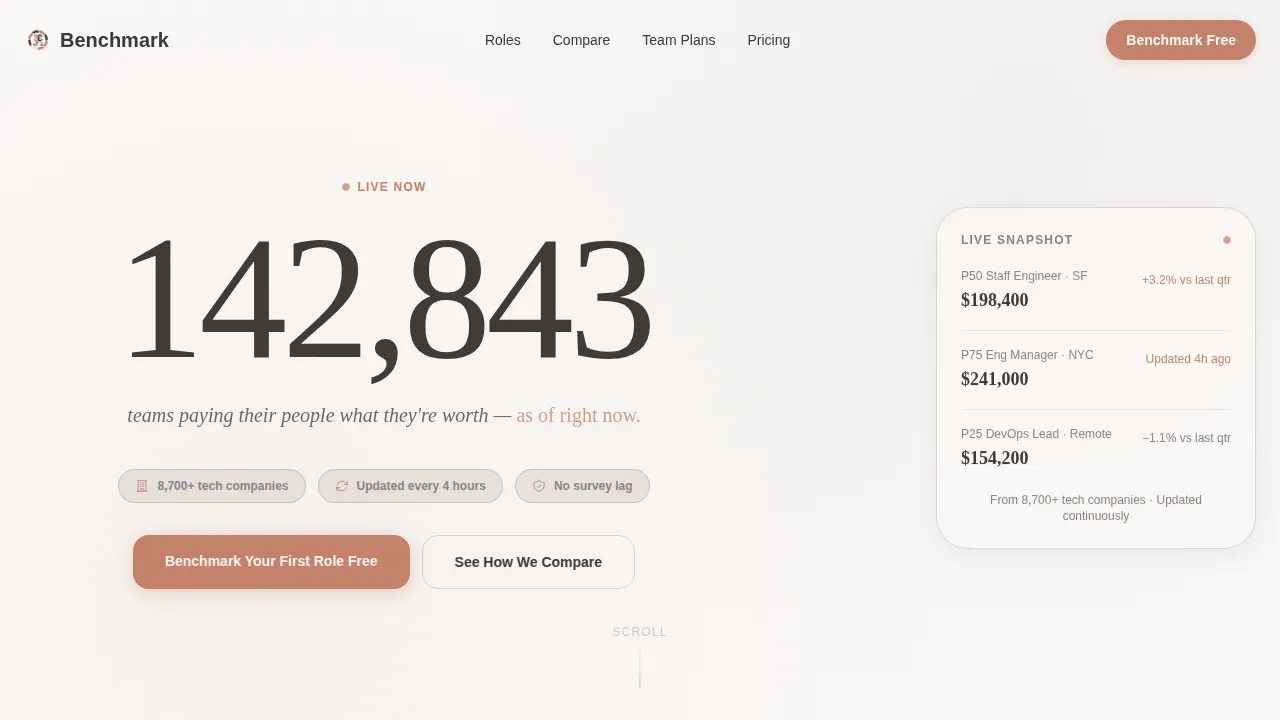
- A live User Count Ticker hero section with full-bleed linen white background, animated counter, and a single trust-anchoring tagline.
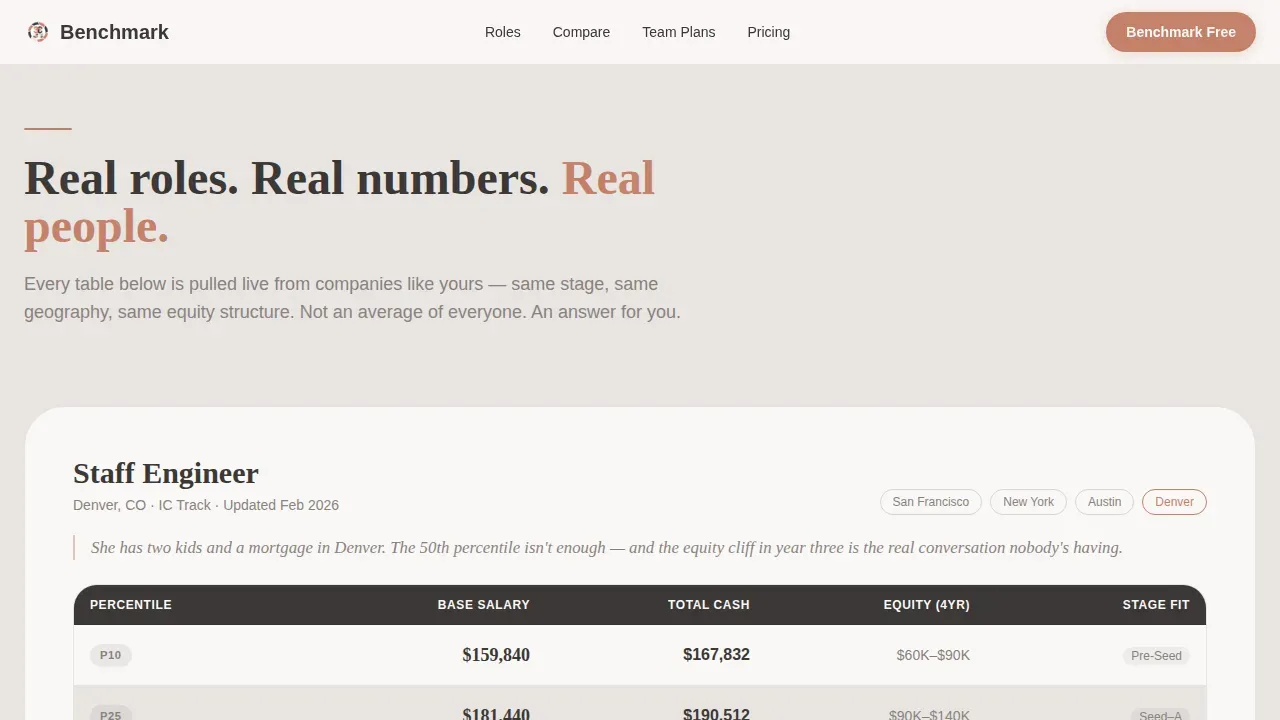
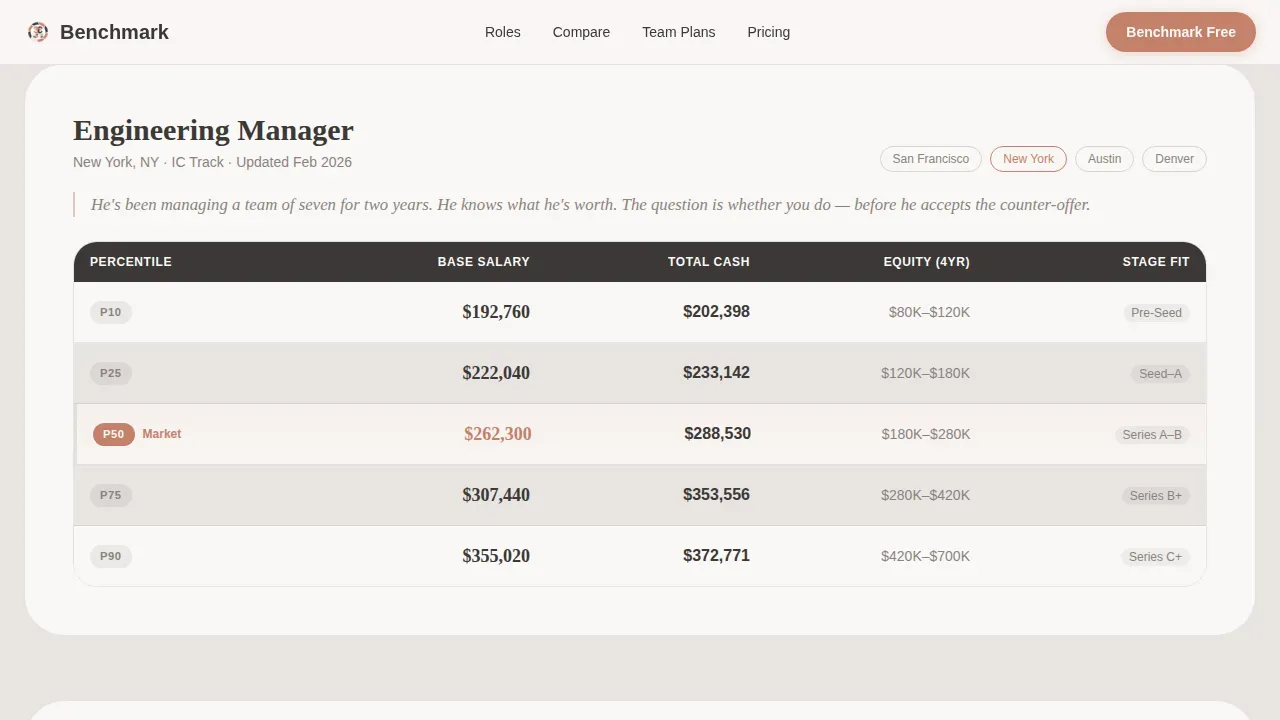
- Role-specific comparison tables for job titles like Staff Engineer, Engineering Manager, and DevOps Lead, each showing 25th, 50th, and 75th percentile salary bands across company stage, geography, and equity mix.
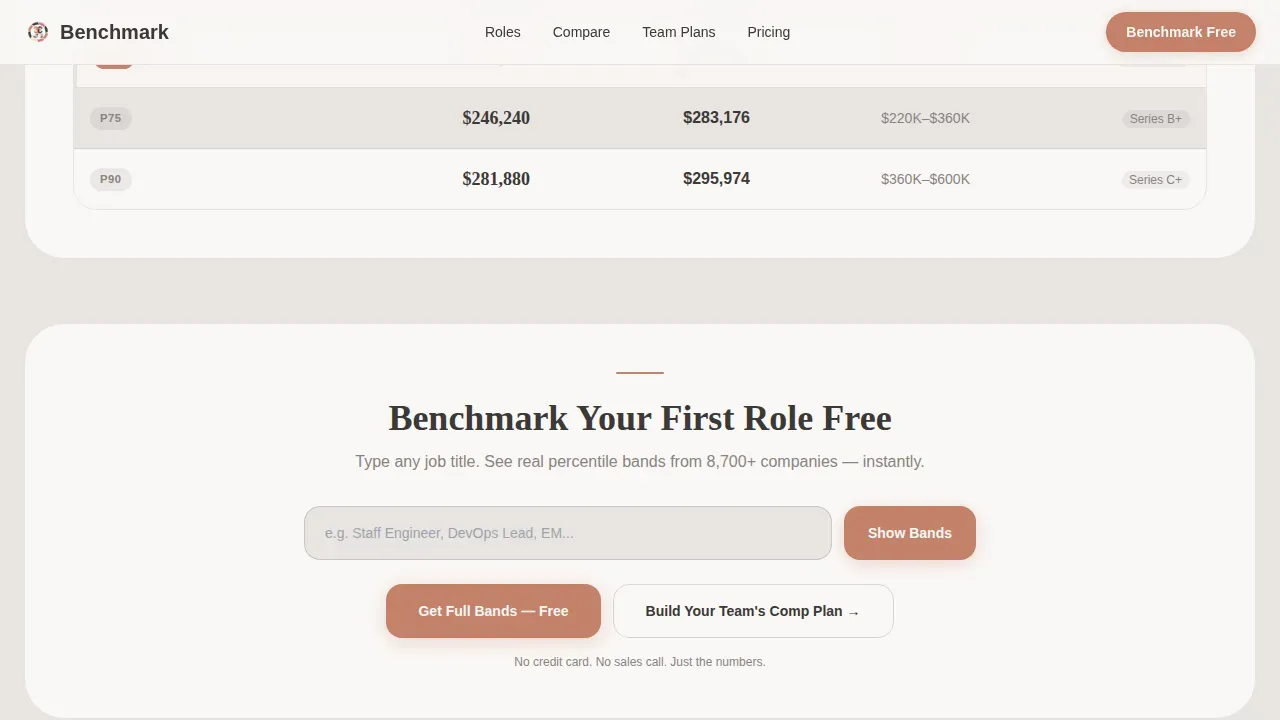
- A freemium conversion module with job title autocomplete, instant blurred pay range preview, and a secondary five-role team comp plan sign-up path requiring only a work email and company size.
Feature list
This template ships with six purpose-built feature zones. Each one is grounded in what the source brief specifies.
Animated User Count Ticker Hero
The hero section opens with a large, softly animated number rolling upward in real time. It shows how many people leaders are actively benchmarking compensation right now. The number is rendered in hearthstone charcoal against a full-bleed soft linen white background. There is no stock photography and no dashboard screenshot. Just a live count that makes the platform's community feel real and present.
Role-Specific Salary Comparison Tables
Each comparison table is built around a specific job title such as Staff Engineer, Engineering Manager, or DevOps Lead. Tables display salary data broken into the 25th, 50th, and 75th market percentiles, filtered by company stage, geography, and equity mix. Alternating linen and mist rows keep tables readable. A human context line sits beside each table to ground the salary data in a real person's situation.
Blurred Freemium Pay Preview Module
The primary call to action appears pinned after the first comparison table. It includes a job title autocomplete field. When a visitor types a job title, the system shows an instant preview of the 25th, 50th, and 75th base salary band, blurred at the edges. This gives enough salary insight to validate the data without revealing the full picture, creating a natural pull toward sign-up.
Team Comp Plan Builder Section
This section escalates the conversation from a single role benchmark to a full compensation philosophy. It allows visitors to model up to five roles in a trial sign-up flow. The sign-up path requires only a work email and company size. The section moves from "Can I pay this person fairly?" to "Can I build a compensation strategy my entire team can stay for?"
Competitor Comparison Table
A dedicated feature matrix compares the platform against other salary benchmarking tools in the market. The table uses the same alternating linen and mist row treatment. Selected plan columns receive a faint terracotta left-border glow to highlight recommended options. This section helps HR professionals make informed compensation decisions by seeing exactly what sets this platform apart.
Social Proof and Trust Section
Role-specific testimonials from VP of People, CFO, and HR Director personas anchor trust near the bottom of the page. This section pairs named testimonials with supporting metrics such as data freshness stats and a live company count. These signals reinforce that the compensation data is reliable, current, and drawn from a meaningful sample of real organizations.
Page sections overview
| Section | Purpose |
|---|---|
| Hero Ticker Section | Opens with live animated user count and a single trust-anchoring tagline |
| Role Salary Tables | Shows 25th, 50th, 75th percentile salary data by role, stage, and geography |
| Freemium Preview call to action | Job title autocomplete triggers a blurred pay band preview to earn the click |
| Competitor Feature Matrix | Side-by-side comparison of platform features versus other salary benchmarking tools |
| Team Comp Builder | Escalates from single-role benchmark to five-role compensation philosophy trial |
| Social Proof Block | Role-specific testimonials, live user count, and data freshness statistics |
| Footer Row | Linear single-row footer with navigation and compliance badge display |
Design & branding system
The visual identity follows a Family First theme. Every color and typography choice is designed to feel professional but deeply human, the kind of warmth that signals compensation is a people problem, not just a spreadsheet exercise.
- Color palette: warm fog gray (#E8E4E1) for backgrounds, hearthstone charcoal (#3B3836) for primary text, soft linen white (#FAF8F6) for card surfaces, and gentle terracotta (#C4816B) reserved for calls to action, active states, and data highlights. Comparison tables use alternating linen and mist rows; selected plan columns receive a faint terracotta left-border glow.
- Typography: Fraunces serif display is used for headlines and human context lines beside salary tables. DM Sans handles all body copy, table data, and interface elements. The pairing creates a balance between warmth and clarity.
- Animation: Medium-intensity scroll-triggered reveals, staggered table row entries, and a ticker count-up on the hero. The blurred pay range preview on the freemium call to action adds interactivity without overwhelming the experience.
Mobile & speed optimization
The template is desktop-first by design. Primary users are people leaders conducting compensation analysis at a desk during hiring reviews or offer decisions. Mobile responsive behavior is included so the page remains usable on smaller screens.
- Server Components handle static content areas like the competitor table and social proof section, keeping the initial page load lean.
- Client Components manage the live ticker and interactive freemium call to action, including the job title autocomplete and blurred band preview.
- The desktop-first layout prioritizes data table readability and comparison clarity, which are the core tasks users come to complete.
How this template helps you convert
This template earns trust before it asks for anything. The conversion strategy is built on progressive disclosure: show real salary data first, then offer more depth in exchange for a sign-up. This approach works especially well for compensation benchmarking platforms where buyers need proof before they commit.
- The animated ticker and role-specific salary comparison tables establish immediate credibility. Visitors see real compensation data structured by percentile, geography, and company stage before any form appears. Trust is earned through data, not copy.
- The blurred pay band preview on the freemium call to action is generous enough to validate the platform but leaves enough hidden to make sign-up feel like the obvious next step. Typing a job title and seeing a partially visible salary band creates a pull that static calls to action cannot replicate.
- The team comp plan builder extends the conversion path beyond a single-role benchmark. Visitors who care about building a full compensation philosophy for their team have a clear secondary path that requires only a work email and company size to begin.
Other information about this template
This section covers additional context about how the template supports broader compensation management goals, which salary benchmarking tools and data sources it references in its comparison section, and how it handles compliance and data transparency signals.
- The competitor comparison table in this template is designed to show how the platform stands against well-known salary benchmarking tools in the market, giving HR professionals a clear basis for making informed compensation decisions.
- Compensation benchmarking is not just about setting competitive salary ranges. It is about protecting pay equity across job families and ensuring that internal pay structures do not drift from market salary over time. The template surfaces this distinction through its human context lines beside each role table.
- The template's comparison tables are structured to display total compensation, including base salary, variable pay, and equity data alongside one another. Total Cash Compensation, defined as the sum of base salary and annual incentives and bonuses, is a key data point represented in the table structure.
- Salary Range Scatterplot visualization can be supported within the role comparison sections to show market data points plotted against experience or level, giving visitors a richer view of percentile distribution.
- Sample size visibility is built into the data trust layer. Users should be able to see how many companies are represented in the benchmarking data for each role, which enhances confidence in the accuracy of the salary data shown.
- Compliance badge display is included in the footer and trust section of this template. Badges can reflect adherence to SOC 2, GDPR and CCPA, and the EU Pay Transparency Directive, which is increasingly relevant for HR teams operating across borders or hiring remotely.
- The template supports Account-Based Personalization, known as ABM, which means headlines can be adapted based on the visitor's industry to increase relevance for different audience segments arriving on the page.
- Job mapping within the freemium preview module allows users to search by job title, job family, or specific responsibilities rather than relying on generic title matching alone. This improves the accuracy of the salary data returned in the blurred preview.
- Pay transparency is increasingly important as regulations in multiple jurisdictions require clearer communication about pay structures. This template reflects that shift through its open display of salary bands, percentile markers, and total rewards breakdowns.
- The landing page is built with a clear compensation philosophy narrative arc. It moves visitors from understanding a single role's market salary to building a full pay strategy for their team, which mirrors how the best HR professionals think about compensation planning in practice.
- For high growth tech companies operating in competitive tech talent markets, the template's real-time salary benchmarking data and role-specific tables offer a meaningful edge over platforms relying on wage data from annual salary surveys alone.
- Internal salaries and internal pay structures can drift from market rates quickly, especially when salary expectations shift during periods of inflation or rapid hiring. The template positions the platform as the tool that keeps internal equity aligned with external benchmarking data, updated continuously rather than annually.
- This benchmark real time salary data compensation benchmarking landing page template is designed to function as a dynamic, user-friendly dashboard entry point, allowing HR professionals to make immediate, evidence-based pay decisions from their first visit.
- Market data lite, meaning surface-level pay ranges without depth or sample transparency, is exactly what this template is designed to contrast against. The page makes clear that accurate data requires normalization, multiple sources, and role-level specificity, not just a headline salary figure.
Theme
Family First
Creative direction
Team & People
Color system
Soft Mist
Style
Comparison Table
Direction
Freemium/Trial
Page Sections
Animated Real-time User Count Ticker
Role-specific Salary Comparison Tables
Blurred Freemium Pay Band Preview
Team Compensation Plan Builder
Competitor Feature Comparison Matrix
Social Proof and Data Trust Block
Related questions
What types of salary data does this template display?
How does the freemium salary preview work for visitors?
Can this template support a team-level compensation planning flow?
Does the template include trust signals for salary benchmarking data reliability?
Is this template suitable for startups building their first salary bands?



