Specialist General Practitioner Appointment Booking Website Template
A sidebar companion landing page designed for general practitioner practices. It guides patients through a progressive symptom quiz, a condition and treatment library, and a dual conversion path that ends in either a booked appointment or a printable PDF summary. The template turns health anxiety into a calm, structured consultation experience before the patient ever walks through the door.
by Rocket studio
Quick summary
This template is a single-page sidebar companion built for general practitioner condition and treatment libraries. It opens with an illustrated multi-step symptom form, locks a progress-tracking sidebar into place as the visitor scrolls, and closes with two conversion paths: a full symptom assessment and a downloadable PDF summary. The design is warm, clinical, and built to earn trust one scroll at a time.
Who this template is for
This template is built for general practitioner practices that want to serve patients before the appointment begins. It works equally well as a patient education tool and a quiet intake companion.
- New parents searching symptoms at odd hours and needing calm, credible answers
- Retirees managing multiple medications who want to understand their conditions better
- Office workers who have delayed a health concern and finally need a clear next step
What problem this template solves
Most medical practice pages either overwhelm visitors with dense clinical text or undersell the warmth of the actual practice. Patients arrive anxious and leave without taking action. This template fixes that gap.
- Visitors land mid-conversation, not mid-sales-pitch, so they engage immediately
- The symptom arc walks patients from vague worry to specific, reassuring information
- The dual conversion path removes friction by offering a printable summary before asking for a booking
What you get with this template
You get a fully structured, single-page general practitioner landing page with an interactive symptom quiz at its center. Every section is purposefully sequenced to mirror the emotional rhythm of a real consultation.
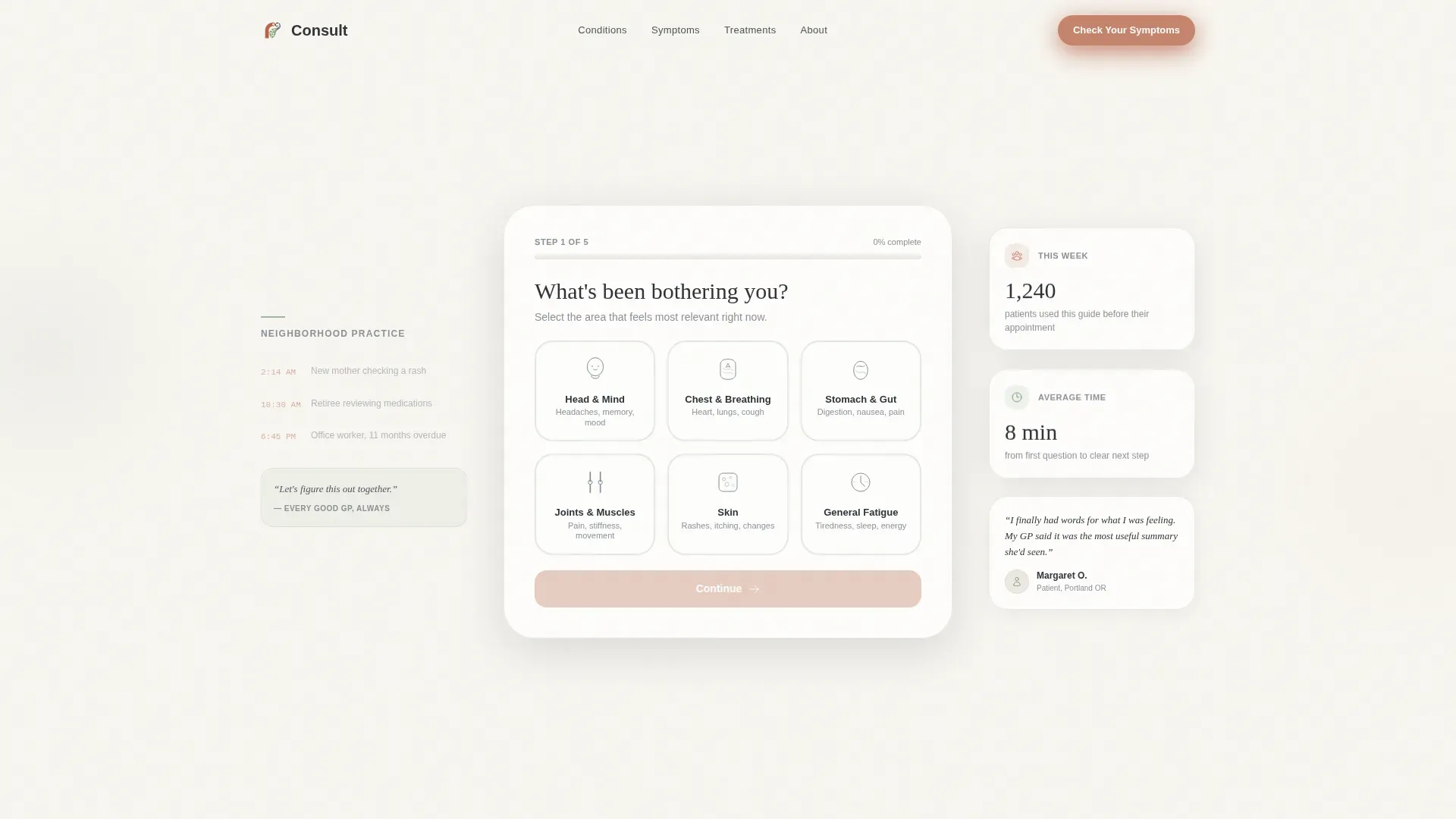
- A multi-step symptom form with illustrated body-region selectors as the page hero
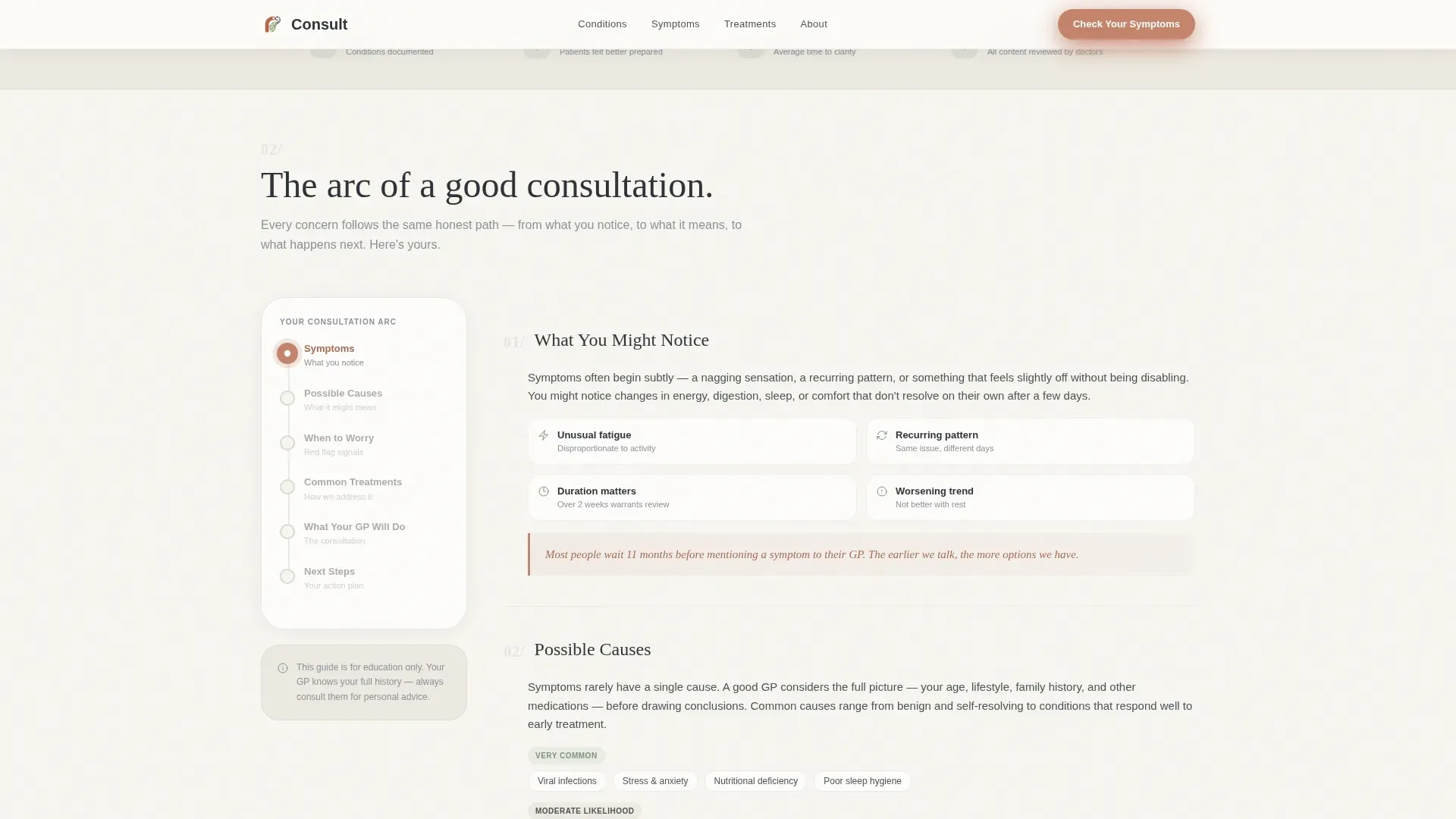
- A persistent sidebar that tracks the visitor's position across six named arc stages
- Two conversion paths: a symptom assessment call to action and a PDF summary download requiring only an email
Feature list
The template ships with six core interactive and design features, each built around the needs of health-anxious patients.
Illustrated Multi-Step Symptom Form
The hero section opens with a single serif question, "What's been bothering you?", and presents six soft line-art body-region selectors. Each selector responds to hover with a sage fill. The form floats on the cloud-white background with no stock photography competing for attention.
Persistent Sidebar Progress Tracker
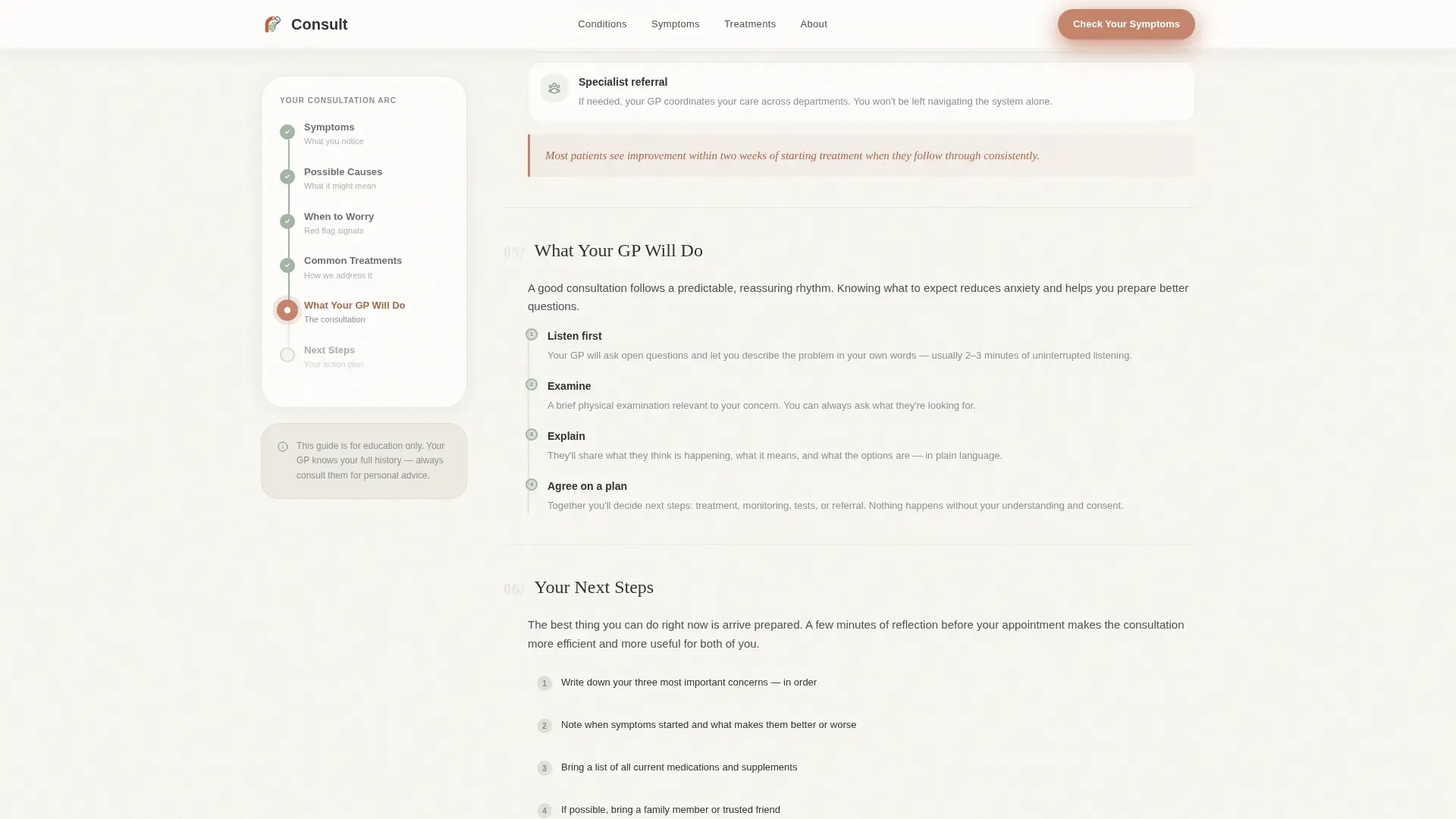
A vertical sidebar locks into place once the visitor begins scrolling. It displays six numbered dot stages: Symptoms, Possible Causes, When to Worry, Common Treatments, What Your GP Will Do, and Next Steps. The sidebar updates quietly as the reader moves through the content.
Progressive Disclosure Quiz with Branching Logic
The assessment quiz uses progressive disclosure across a maximum of seven steps. It begins with three comfort questions covering area of concern, duration, and severity, then branches into specific follow-ups based on each answer. The structure never feels like a form; it feels like a conversation.
Terracotta Pull-Quote Callouts
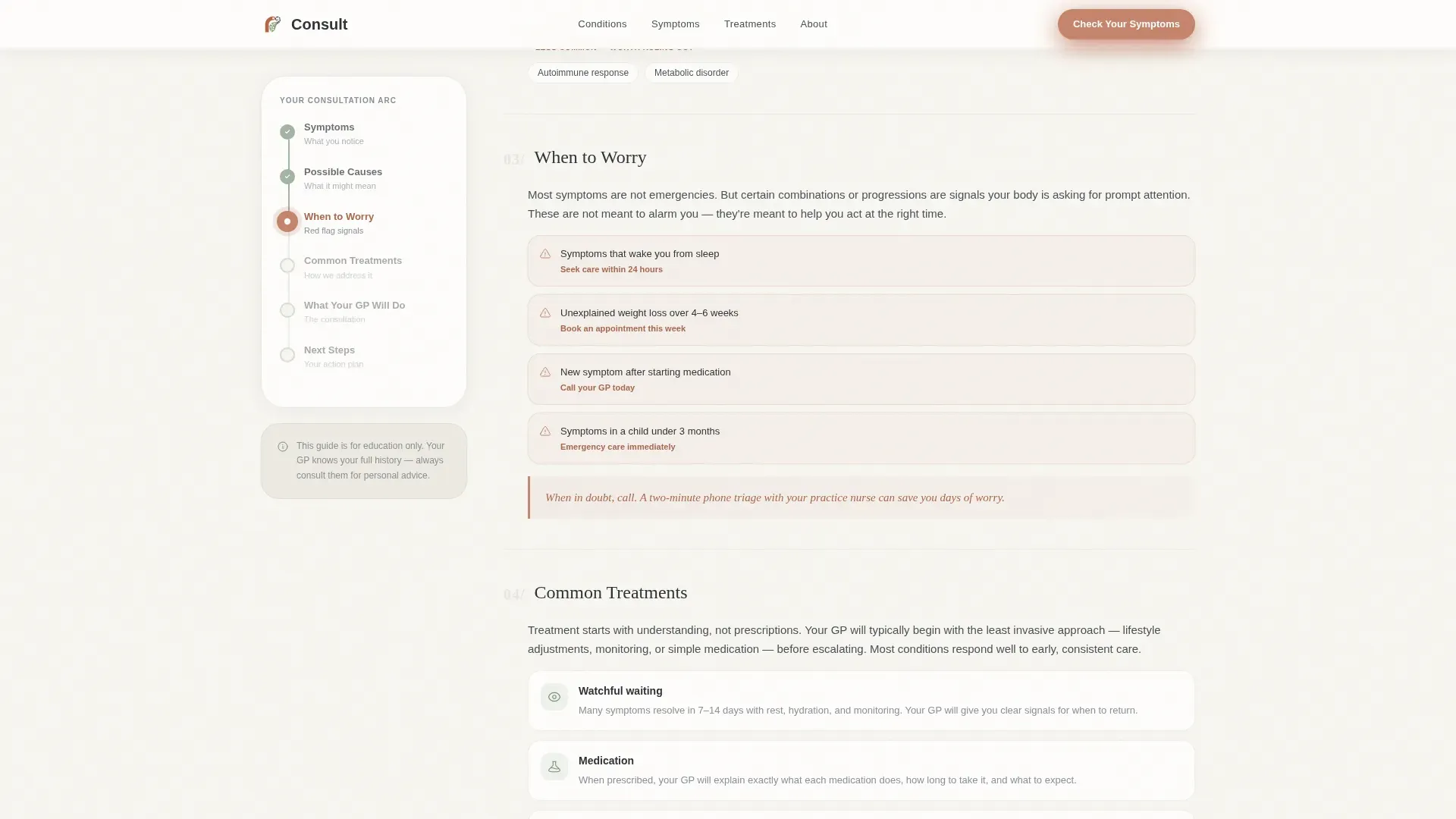
Throughout the condition arc sections, highlighted callout boxes in terracotta reinforce reassurance at key moments. These callouts carry statements like "Most patients see improvement within two weeks of starting treatment," building clinical credibility through specificity rather than generic claims.
Dual Conversion Path
The primary call to action, "Check Your Symptoms Now," appears at the hero and reappears at the bottom of every condition article as "Take the Full Assessment." A secondary path offers a printable PDF summary the patient can bring to their appointment, captured with only an email address.
Escalating Illustration System
Illustrations shift as the visitor reads deeper into each condition arc. Abstract body outlines appear in early sections, while specific anatomical close-ups appear as content becomes more clinical. This visual progression reinforces the emotional journey from general concern to informed understanding.
Page sections overview
| Section | Purpose |
|---|---|
| Hero symptom form | Opens the page as a live multi-step conversation with illustrated body-region selectors |
| Sidebar progress trail | Locks into view and tracks the visitor's position across six arc stages |
| Condition arc journey | Guides readers from symptom recognition through causes, treatments, and GP process |
| When to Worry | Highlights escalation signals using terracotta pull-quote callouts |
| Common Treatments | Provides reassurance and explains the typical general practitioner response |
| Assessment call to action | Presents the primary quiz conversion with a repeat call to action after every article |
| PDF Summary download | Offers a printable appointment-prep document in exchange for an email |
| Footer | Horizontal flow layout closing the page |
Design & branding system
The visual identity follows an Organic Flow theme built on a Cloud Canvas color palette. The result feels like a waiting room with linen curtains and a potted fern: clinical enough to trust, warm enough to exhale.
- Cloud white (#F7F5F0) fills the primary background, soft warm white resembling a freshly laundered lab coat; muted sage (#A3B4A2) marks section dividers and progress indicators; deep charcoal (#2E3338) carries all body text; terracotta (#C4846C) activates call-to-action elements and pull-quote callout boxes
- Fraunces serif handles all headings, giving the page an unhurried, authoritative tone; DM Sans carries body copy for clean readability at paragraph scale
- SVG line-art illustrations render in a soft, approachable style and respond to interaction with sage hover fills, reinforcing the warm-clinical aesthetic without stock photography
Mobile & speed optimization
The template is designed desktop-first, with the sidebar companion as the central navigation experience. On smaller screens, the layout stacks gracefully so no content is lost.
- The sidebar progress trail collapses into an inline stage indicator on mobile, keeping orientation clear without occupying screen width
- Form step transitions and sidebar scroll-lock animations are set to medium intensity, keeping the experience smooth without overwhelming lower-powered devices
- Static content delivery paired with client-side quiz state management means the page loads its core content without waiting on server calls
How this template helps you convert
Every design and copy decision moves the visitor one step closer to booking or submitting their email. The page earns that action by demonstrating value first.
- The illustrated symptom form creates immediate personal relevance, giving visitors a reason to stay before a single word of sales copy appears
- The condition arc builds trust progressively, so by the time the visitor reaches the call to action, the page has described their concern more accurately than they could themselves
- The dual conversion path removes the all-or-nothing barrier: visitors who are not ready to book can still take a meaningful action by downloading their PDF summary
Other information about this template
This template is categorized under Health and Medical as a General Practitioner Website, built specifically for the General Practitioner Condition and Treatment Library niche. It uses an Intersection Match Score of 13, reflecting a tightly aligned combination of template style, creative direction, and audience intent.
- Template style is Sidebar Companion, and creative direction follows the Problem-to-Solution Arc format
- Header concept is Multi-Step Form; landing-page direction is Quiz and Assessment
- Color system is Cloud Canvas; theme is Organic Flow
- Localization is set to English (USA) with imperial measurements and 12-hour time format
- The footer uses a horizontal flow layout pattern suited to general practitioner practice pages
Theme
Organic Flow
Creative direction
Problem→Solution Arc
Color system
Cloud Canvas
Style
Sidebar Companion
Direction
Quiz/Assessment
Page Sections
Illustrated Multi-step Symptom Form
Persistent Sidebar Progress Tracker
Progressive Disclosure Quiz
Terracotta Pull-quote Callouts
Dual Conversion Path
Escalating Illustration System
Related questions
Can I customize the body-region selectors in the symptom form?
Does the sidebar progress tracker work on mobile devices?
How does the PDF summary download work?
Can the quiz branching logic be adjusted for different condition types?
Is this template suitable for a solo general practitioner?



