Public Works Government Professional Website Template
The Countyworks transparent infrastructure event registration landing page template gives county public works offices a clean, authoritative single page to show infrastructure progress, publish project accountability data, and collect registrations for town halls and public meetings. It uses a split-screen layout, an icon-driven hero, a structured process transparency section, and a goldenrod-accented registration form to move residents from curiosity to confirmed attendance.
by Rocket studio
Quick summary
This landing page template is built for county public works offices that need to earn resident trust before asking for a seat reservation. It pairs an icon grid hero with live-feeling accountability sections, walks visitors through road repair lifecycles and budget data, then converts them through a streamlined event registration form. The design feels like a well-run civic office: organized, transparent, and built to last.
Who this template is for
Anyone responsible for communicating county infrastructure activity to the public will find this template fits their workflow immediately. It handles the full range of county audiences in one structured page, without requiring a separate website for each department.
- Taxpayers and residents checking road repair timelines, permit status, or sinkhole reports in their neighborhood
- Town supervisors and contractors tracking capital projects, bid timelines, and construction milestones
- Civic engagement staff who plan town halls, public comment periods, and board meetings across the region
What problem this template solves
County public works offices carry a heavy communication burden. Residents want to know what is happening on their street. Contractors need to find bid details fast. Supervisors want progress snapshots without digging through reports. Most county websites bury this information across several pages, making it hard for anyone to access the right data quickly.
- Scattered information forces residents to call the office or give up entirely, which erodes community trust
- No clear registration path means town halls go underattended and public comment opportunities are missed
- Existing pages often fail to show the step-by-step way a road repair or construction project moves from report to completion
What you get with this template
This template delivers a fully designed, section-led landing page ready to customize for any county public works office. Every section is intentionally placed to build confidence and drive meeting registration.
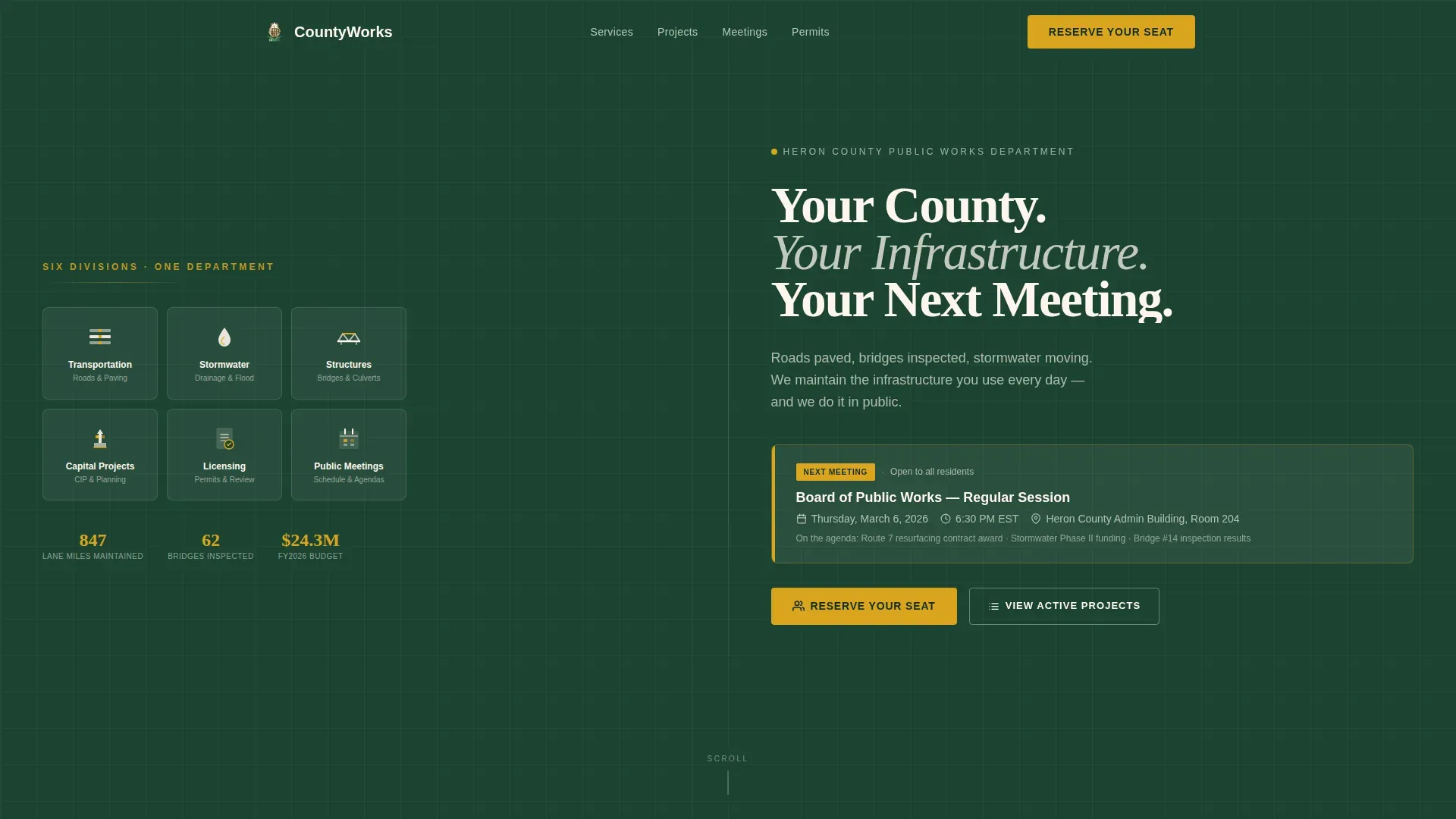
- A split-screen hero with an icon grid covering six core divisions: Transportation, Stormwater, Structures, Capital Projects, Licensing, and Public Meetings
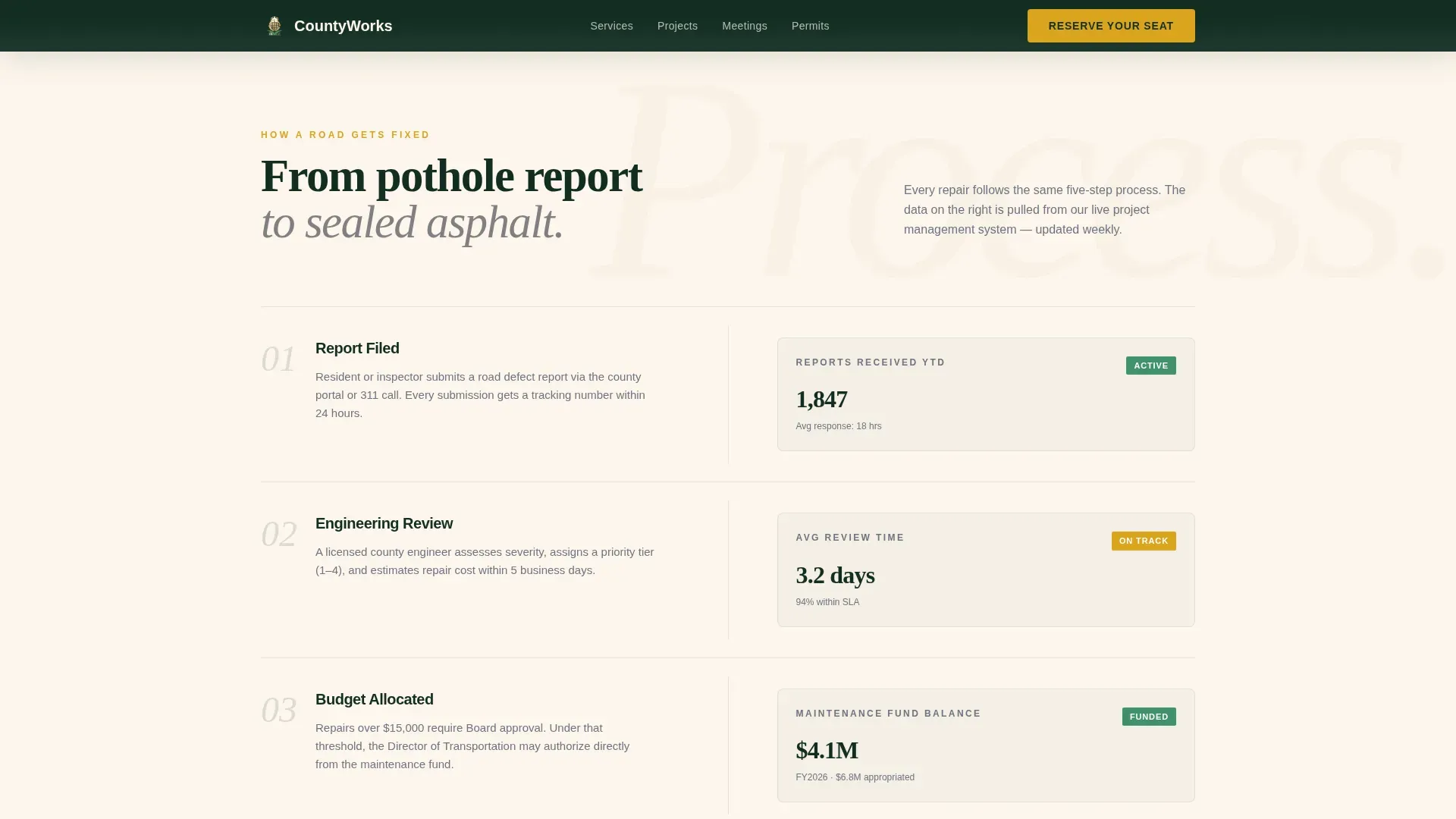
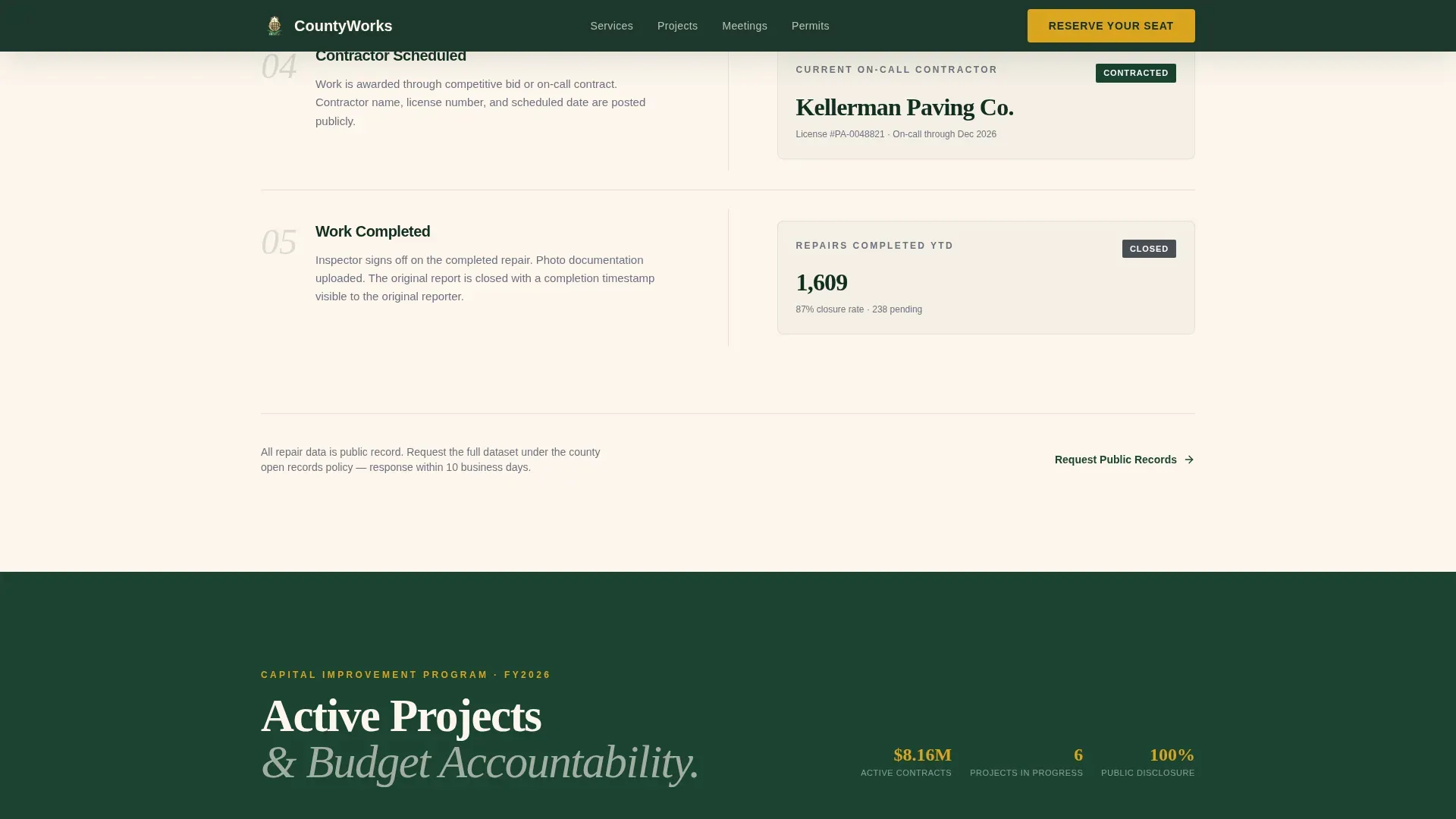
- A process transparency section that maps the road repair lifecycle alongside real budget data, inspection dates, contractor names, and completion percentages
- An event registration form with full name, email, a meeting dropdown, and an optional public comment field, plus a secondary "Get Meeting Alerts" email-only signup path
Feature list
This landing page template packages several purpose-built components that work together to inform, reassure, and convert county audiences.
Split-Screen Icon Grid Hero
The hero divides the screen evenly. The left half displays six hemlock-green icon tiles, each representing a core public works division. The right half leads with a bold serif headline and a visible event callout showing date, time, and location above the fold. Residents find the information they need before they scroll a single pixel.
Process Transparency Section
Each scroll step pairs a process stage on the left with corresponding public data on the right. Visitors can follow how a road repair gets reported, approved, funded, scheduled, and completed. Budget allocation numbers, contractor names, and inspection dates are displayed openly, so the community sees county actions in daylight rather than waiting for a quarterly report.
Active Projects Accountability Panel
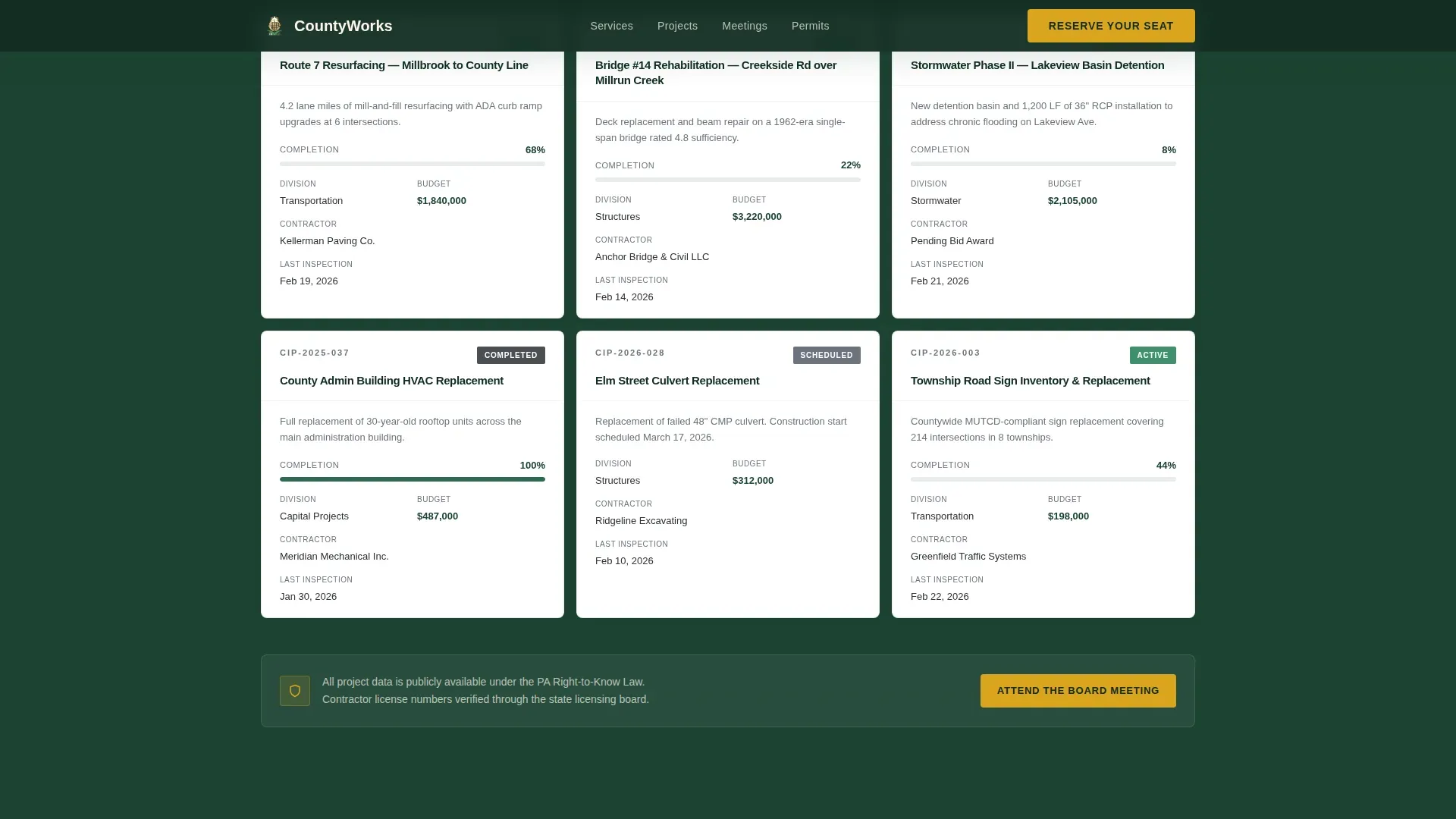
This section surfaces live-feeling project cards showing budget allocations, construction progress percentages, and scheduled inspection dates. Contractors can quickly assess active projects and find details relevant to their bids. Supervisors can scan completion status across several projects without leaving the page.
Event Registration Form
The registration form is concise by design. It asks for full name first, then email, then a dropdown to select which upcoming meeting the visitor plans to attend. An optional textarea labeled "Public Comment Topic (if any)" gives residents a low-friction way to signal their intent before they even arrive. A secondary "Get Meeting Alerts" path captures email addresses from residents who are not ready to commit to a specific date.
Meeting Alerts Secondary Signup
Not every visitor is ready to reserve a seat on their first visit. The meeting alerts signup captures email addresses with a single field. This secondary path keeps the community connected, ensures follow-up communication reaches interested residents, and reduces the pressure a hard registration wall creates for first-time visitors.
GSAP ScrollTrigger Animated Reveals
Section content enters the page through clip-in animations and staggered entry effects driven by GSAP ScrollTrigger. Each scroll reveal mirrors the pacing of reading a well-organized public record, giving the page a sense of deliberate, unhurried authority that matches the Institutional Authority design theme.
Page sections overview
| Section | Purpose |
|---|---|
| Hero Split Screen | Introduce divisions and surface the next meeting event callout |
| Process Transparency | Show road repair lifecycle with paired public budget data |
| Active Projects Panel | Display construction progress, inspection dates, and contractor names |
| Upcoming Meetings | List town halls with individual Reserve Your Seat registration triggers |
| Event Registration Form | Collect name, email, meeting selection, and optional comment topic |
| Meeting Alerts Signup | Capture email-only subscriptions for residents not ready to register |
| Footer Linear Row | Display contact links, policies, and navigation in a single clean row |
Design & branding system
The template follows an Institutional Authority visual theme anchored in the Forest Trust color system. Every design decision reinforces the sense that this office is organized, permanent, and accountable.
- Color palette: deep hemlock green (#1B4332) for headers and navigation, warm civic cream (#FDF6EC) for the background, iron bridge gray (#4A4E54) for body text and structural dividers, and goldenrod (#DAA520) reserved for buttons, badges, and active-state highlights
- Typography: Fraunces serif for headlines delivers gravitas and civic weight; DM Sans for body text keeps every sentence readable and clean at any size
- Visual tone: brass-plaque permanence, clean tile floors, and a directory that actually makes sense, the kind of design that outlasts election cycles and builds long-term community confidence
Mobile & speed optimization
The template is desktop-first by design, built for county office workers and contractors who review project data on large screens. It scales responsively for residents checking road or construction updates on a smartphone while sitting in traffic.
- The split-screen layout collapses cleanly on smaller screens so icon grids, process steps, and project cards all remain readable without horizontal scrolling
- Static sections use server components for fast initial loads; the registration form and GSAP animations load as client components only when needed, keeping the page responsive across connection types
- The registration form is minimal by intent: fewer fields mean faster completion on mobile, which is critical because many residents access civic pages via smartphone while on the go
How this template helps you convert
The page is structured so each section earns the registration ask before it appears. Residents arrive skeptical and leave informed.
- The hero places the next event callout and a "Reserve Your Seat" button above the fold so visitors know immediately what action is available, with date, time, and location already visible before they scroll.
- The process transparency and active projects sections build credibility by showing exactly what is being done, how much it costs, and how far along it is, so by the time the registration form appears, the visitor already trusts the office running the meeting.
- The secondary "Get Meeting Alerts" email path captures residents who are not ready to commit, ensuring the community stays reachable for future events without losing them to a hard conversion wall.
Other information about this template
This template was created to support the specific communication challenges county public works departments face when they try to improve resident participation and accountability. Several additional context points are worth noting for teams evaluating it.
- The Countyworks transparent infrastructure event registration landing page template is designed for USA-localized use with USD currency formatting, MM/DD/YYYY date display, and English-language copy throughout
- No-code and low-code platforms allow users to adapt templates like this one without extensive programming knowledge, enabling rapid deployment for event management and infrastructure communication projects
- Low-code development can reduce the time and cost tied to traditional software development, and this template includes pre-built components that make it easy to prototype and iterate before a full-scale launch
- AI-powered platforms can streamline backend integrations for event management systems, and this template is structured so that connecting form submissions to notification or email tools requires minimal additional development
- Effective backend integrations are essential for connecting registration data to the right county services and systems, and deployment processes are critical for ensuring those connections work correctly from day one
- The template supports eGovernment best practices: every page section can accommodate links to Privacy and Security Policy notices and Acceptable Use Policy statements to meet standard county website requirements
- The registration form uses conditional logic principles, displaying the public comment textarea only when relevant, which reduces visual clutter and keeps the form focused
- Inline validation on form fields provides real-time feedback so residents are not blocked by errors they cannot find until after submitting
- The page is built with equity in mind: clear hierarchy, readable contrast ratios, and structured navigation ensure the community across the region can find what they need regardless of their level of digital familiarity
- Teams located in any county area can update the meeting dropdown, project cards, and process data without rebuilding the page from scratch
- Social proof elements including budget numbers, completion percentages, and contractor names function as visible accountability signals that improve registration confidence
- The footer follows a linear single-row pattern and can include contact links, department policies, and navigation without crowding the conversion sections above
Theme
Institutional Authority
Creative direction
Transparent Process
Color system
Forest Trust
Style
Split Screen (50/50)
Direction
Event Registration
Page Sections
Split-screen Icon Grid Hero
Process Transparency Section
Active Projects Accountability Panel
Event Registration Form
Meeting Alerts Secondary Signup
GSAP Scrolltrigger Animated Reveals
Related questions
Can I customize the meeting dropdown to show my county's upcoming events?
Does the template support a secondary email signup for residents not ready to register?
Is the registration form designed to work on mobile devices?
Can I add project data like budget numbers and contractor names to the accountability section?
What happens after someone submits the registration form?



