Authoritative Healthcarerealestate Landing Page Template
This is a single-page comparison table landing page built for healthcare real estate compliance consulting firms. It uses an Expert Panel structure to present three side-by-side comparison tables covering lease structures, fair-market-value methodologies, and regulatory risk by transaction type. The design follows a Legal Shield theme with a dark, typographic aesthetic built to earn trust from physicians, health system CFOs, and private-equity sponsors.
by Rocket studio
Quick summary
This landing page template is designed for healthcare real estate compliance consulting firms. It leads with a dark, authoritative header and flows through three expert-anchored comparison tables. Each table demonstrates the firm's depth of knowledge before asking for the click. The page drives visitors toward scheduling a consultation or downloading a Stark Law lease checklist.
Who this template is for
This template suits firms that need to communicate regulatory expertise before a prospect will trust them with a complex transaction. It is built for high-stakes professional services where the buyer needs to see proof of knowledge, not a brochure.
- Healthcare real estate compliance consultants advising physicians, hospital systems, and private-equity health funds
- Firms offering fair-market-value opinions, Stark Law safe-harbor analysis, and lease structure review
- Consulting practices targeting orthopedic groups, health system CFOs, and private-equity sponsors closing medical real estate acquisitions
What problem this template solves
Healthcare real estate buyers often cannot tell the difference between a genuinely qualified compliance advisor and a generalist. A generic consulting page does not show enough specific knowledge to earn a call from a CFO managing a $40 million acquisition. This template solves that gap by putting the firm's expertise on display before the first call-to-action.
- Prospects cannot assess a firm's regulatory depth from a standard services page alone
- Buyers in high-risk transactions need visible proof of expertise, not promises
- A single compliance misstep in medical real estate can trigger a federal investigation, raising the stakes of choosing the wrong advisor
What you get with this template
You get a fully structured single-page layout with clearly defined sections, pre-built comparison table components, and a conversion-focused call-to-action system. Every section has a defined job, from building immediate authority in the header to closing with a direct prompt to schedule.
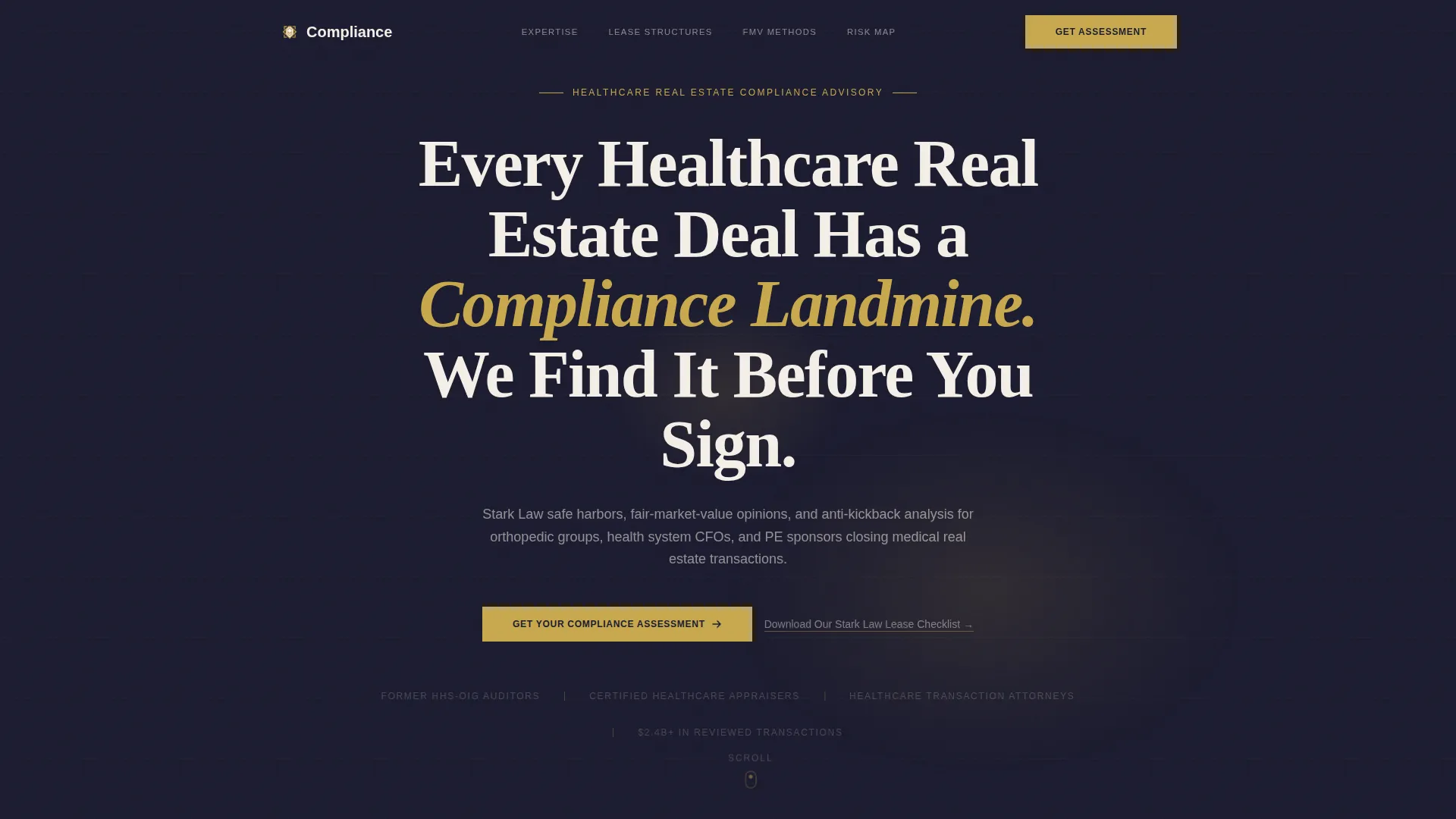
- A dark full-bleed header with a bold serif headline and a gold radial glow effect
- Three expert-anchored comparison tables covering lease compliance, fair-market-value methodologies, and regulatory risk by transaction category
- A dual call-to-action system: a primary gold button for consultation scheduling and a secondary email-capture link for the Stark Law lease checklist
Feature list
This template is built around a small set of high-impact components that work together to establish authority and drive qualified action.
Dark Full-Bleed Header with Gold Glow
The header uses a near-black (#1A1A2E) full-bleed field with a soft gold radial gradient behind a bold serif headline. The effect suggests a document under examination light. No photography is used. The visual language communicates precision and seriousness from the first second.
Expert Panel Section Architecture
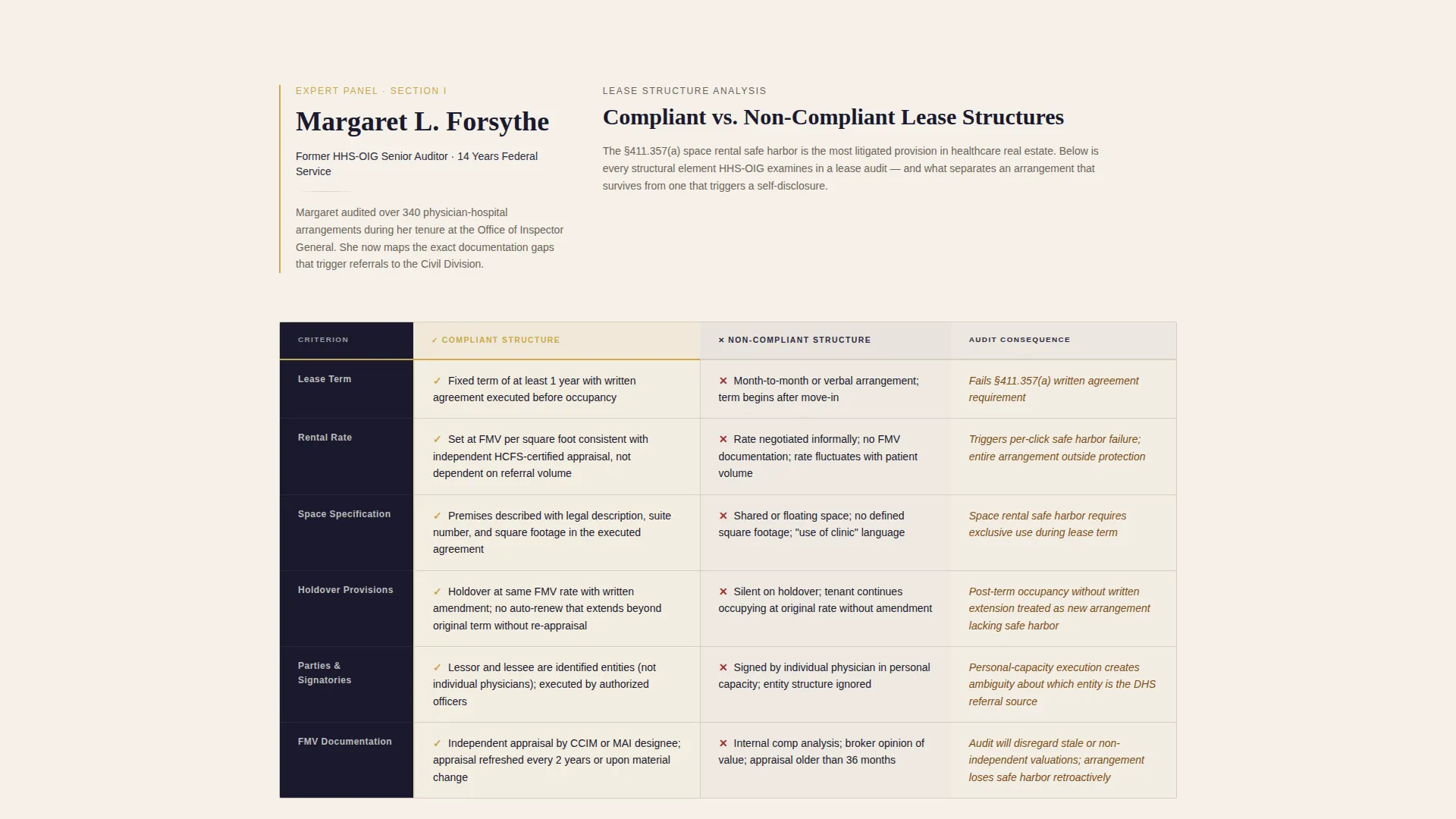
Each major content section is anchored by a named expert and their specific domain. A former HHS Office of Inspector General auditor, a healthcare transaction attorney, and a certified appraiser each frame one of the three comparison tables below them. This structure builds progressive credibility as the visitor scrolls.
Three Escalating Comparison Tables
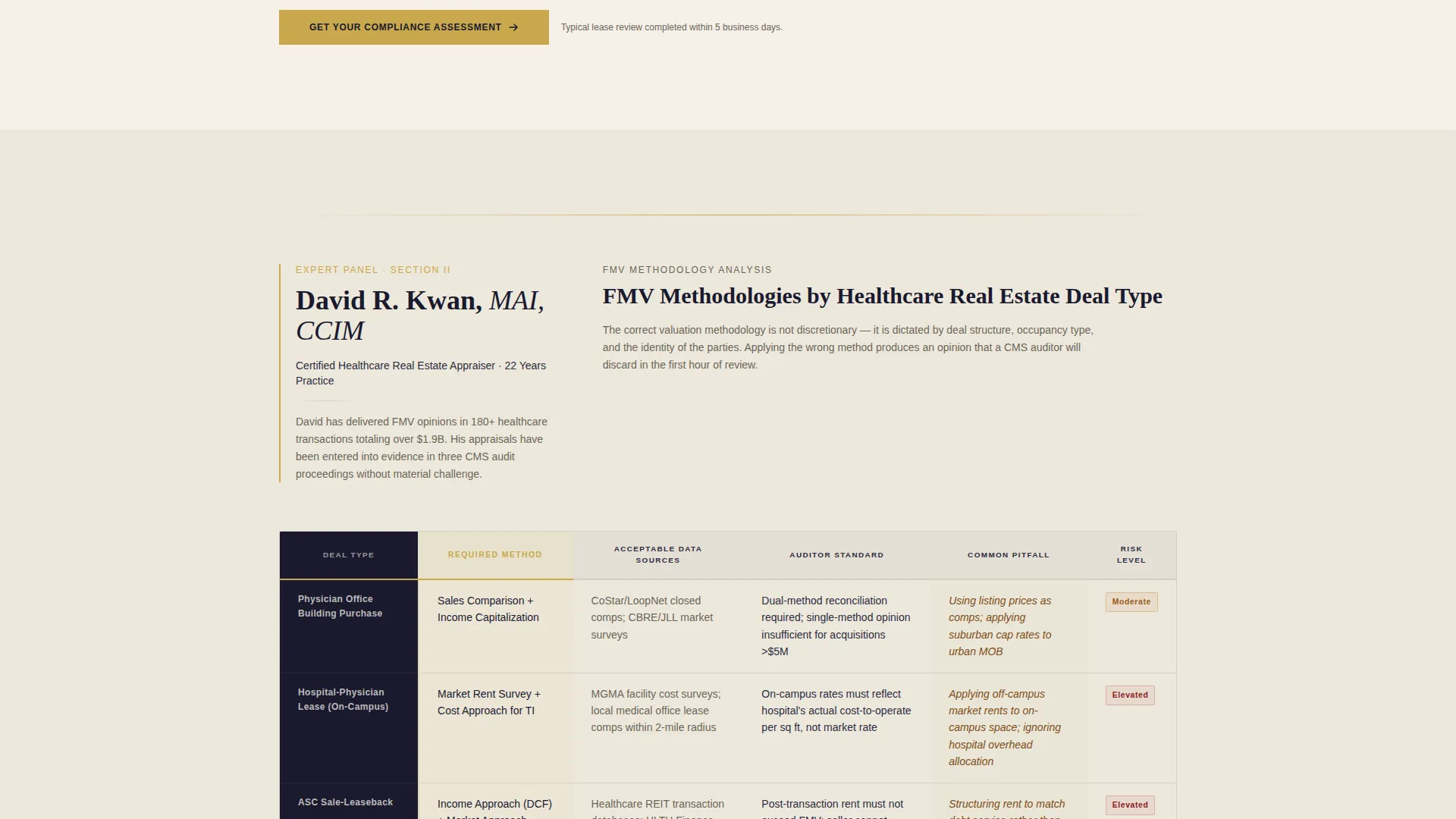
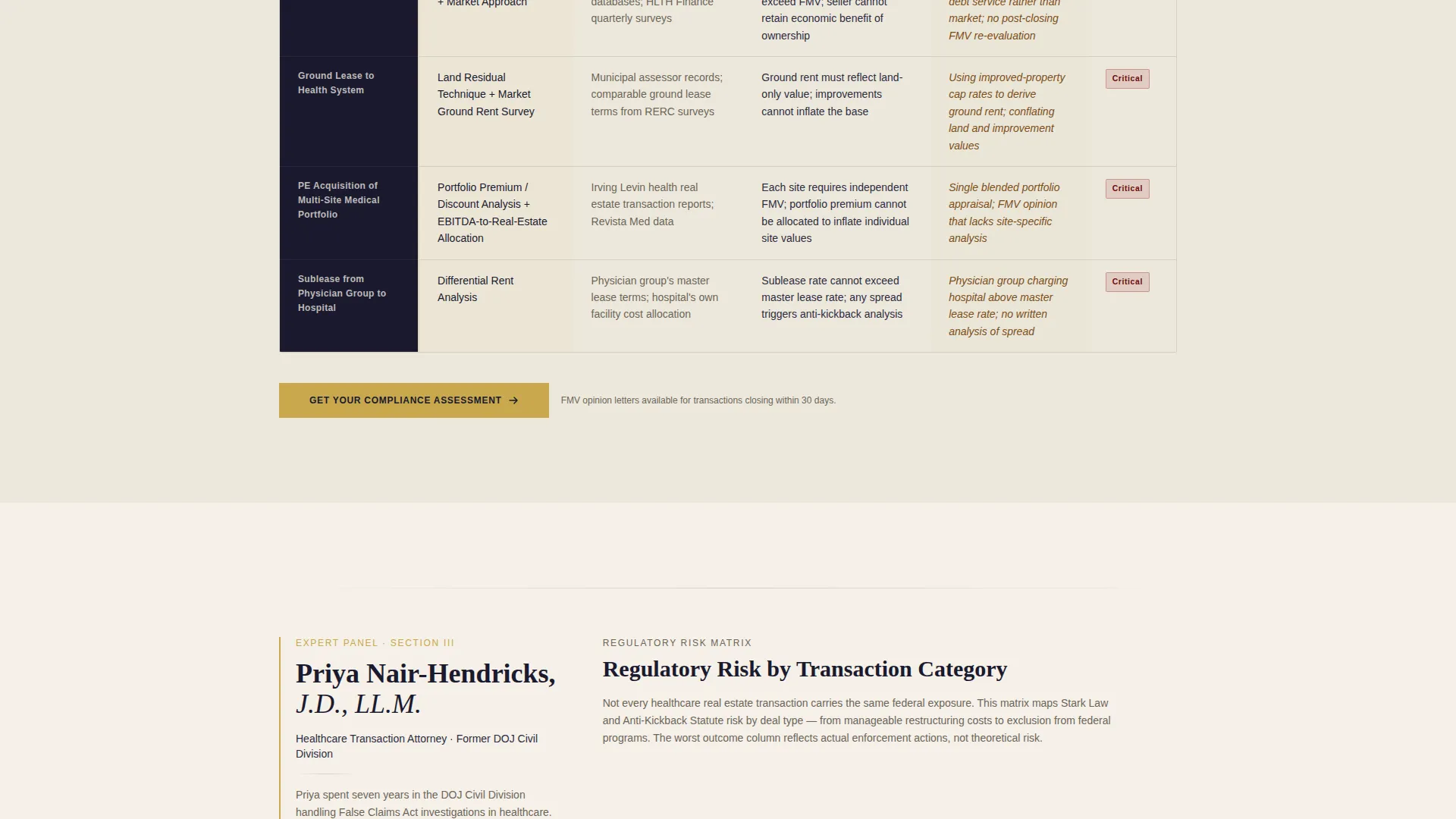
The page includes three side-by-side tables that increase in stakes. The first compares compliant versus non-compliant lease structures. The second contrasts fair-market-value methodologies across deal types. The third maps regulatory risk by transaction category, ending at exclusion from federal programs. Together, they function as a demonstration of expertise rather than a sales pitch.
Dual Call-to-Action System
A primary call-to-action button labeled "Get Your Compliance Assessment" appears below the header and repeats at the bottom of every comparison table. A secondary text link, "Download Our Stark Law Lease Checklist," captures visitors who are not yet ready to book a call. Both actions are positioned to match where a prospect's intent is highest.
Ink and Paper Color System
The design uses four colors with strict placement rules. Deep documentary black (#1A1A2E) dominates the header and section dividers. Archival parchment (#F5F0E8) carries the body. Ruling-line gray (#D4CFC4) structures the comparison grids. Regulatory-alert gold (#C9A84C) appears only on calls-to-action, key figures, and protective-shield iconography.
Typography-Led Visual Identity
The template uses no stock photography or decorative imagery. All visual authority comes from typography, spacing, and the structured grid of the comparison tables. The result feels like a printed federal register page rather than a marketing website.
Page sections overview
| Section | Purpose |
|---|---|
| Dark Header | Establish authority and present the primary headline and first call-to-action |
| Expert One Panel | Introduce the first consultant and frame the lease structure comparison table |
| Lease Structure Table | Compare compliant versus non-compliant lease arrangements side by side |
| Expert Two Panel | Introduce the second consultant and frame the fair-market-value methodology table |
| FMV Methodology Table | Contrast fair-market-value approaches across different deal types |
| Expert Three Panel | Introduce the third consultant and frame the regulatory risk mapping table |
| Regulatory Risk Table | Map compliance risk levels by transaction category, escalating to federal exclusion |
| Checklist Capture | Offer the Stark Law lease checklist via single-field email capture |
| Anchored call to action Footer | Repeat the primary consultation scheduling call-to-action to close the page |
Design & branding system
The visual identity follows a Legal Shield theme built entirely from the Ink and Paper color system. Every design decision reinforces the feeling of a precisely bound legal opinion rather than a digital marketing page. The four-color palette is applied with strict placement rules to preserve the weight of each color.
- Deep documentary black (#1A1A2E) for the header and all section dividers, parchment (#F5F0E8) for body areas, ruling-line gray (#D4CFC4) for table grids, and regulatory-alert gold (#C9A84C) reserved for calls-to-action and protective-shield icons
- Bold serif typography anchors every headline, while the absence of photography keeps the focus entirely on words, structure, and expertise
- Gold appears sparingly throughout the page so that every instance of it carries the visual weight of a seal of approval
Mobile & speed optimization
The layout is structured around a single-column scroll flow that adapts naturally to smaller screens. Comparison tables are the most complex elements on the page, and the template is designed with readable table formatting in mind for mobile viewports.
- Full-bleed sections and typographic-only headers eliminate heavy image assets that slow load times on mobile connections
- Comparison tables are structured for readability across screen sizes, keeping the side-by-side data accessible without horizontal overflow
- The single-field email capture for the checklist keeps the lead-generation component lightweight and fast to interact with on any device
How this template helps you convert
The page earns the click by showing expertise before asking for it. Every structural decision is made to move a skeptical, high-value prospect from awareness to action.
- The three comparison tables function as live proof of the firm's regulatory knowledge. By the time a visitor reaches the final call-to-action, they have already seen three demonstrations of depth that most competing advisors cannot match. This reduces skepticism before the ask.
- The dual call-to-action system captures visitors at two levels of intent. Prospects ready to engage click "Get Your Compliance Assessment." Those still evaluating download the Stark Law lease checklist with a single email field, entering a lower-commitment path that still moves them into the firm's orbit.
Other information about this template
This template is purpose-built for a niche where generic design and vague claims actively hurt conversion. Healthcare real estate compliance is a field where the buyer is sophisticated, the stakes are federal, and trust must be earned through demonstrated knowledge rather than brand promises.
- The template is categorized under Professional Services, Healthcare Consulting, and the Healthcare Real Estate Consulting niche, making it relevant for any firm operating at the intersection of medical real estate transactions and regulatory compliance
- The comparison table style is intentionally chosen over a standard services or portfolio layout because it externalizes the firm's knowledge in a format that the target buyer, a CFO, legal counsel, or PE sponsor, can evaluate on first contact
- The Legal Shield theme and Ink and Paper color system are matched design assets from the same intersection context, meaning the visual identity and structural choices are designed to reinforce each other as a unified professional impression
Theme
Legal Shield
Creative direction
Expert Panel
Color system
Ink & Paper
Style
Comparison Table
Direction
Click-Through
Page Sections
Dark Header with Gold Radial Glow
Expert Panel Section Architecture
Three Escalating Comparison Tables
Dual Call-to-action System
Ink and Paper Color System
Typography-only Visual Identity
Related questions
What kind of firm is this landing page template designed for?
How does the Expert Panel structure work on this page?
What are the two calls-to-action included in this template?
Can this template work for a firm that covers multiple transaction types?
Why does the template avoid photography and stock imagery?



