Comply - Authoritative Compliance Landing Page Template
Comply is a sidebar companion landing page template built for compliance consultancies serving startups, mid-market firms, and healthcare operators. It pairs a live-counter hero, a scrolling certification logo wall, and educational content modules with two lead capture paths. The result is a page that teaches first and sells second, earning trust before asking for a calendar slot.
by Rocket studio
Quick summary
Comply is a sidebar companion landing page template for compliance consultancies. It opens with an animated stats wall, flows through a credibility-building logo band, and locks a persistent sidebar into place for the rest of the scroll. Educational drawers explain each regulation in plain language. Two conversion paths capture both ready-to-book and top-of-funnel visitors.
Who this template is for
This template is built for compliance consultancies that serve business clients navigating complex regulatory requirements. It works equally well for solo compliance officers and growing consultancy teams who need a polished, authoritative web presence.
- Compliance consultants advising startup CTOs on their first enterprise contract audit requirements
- Mid-market financial and operations advisors helping clients navigate state-by-state privacy law obligations
- Healthcare compliance specialists who need to speak both regulatory and plain-language fluency to their clients
What problem this template solves
Most compliance service pages read like dense legal disclaimers. They establish no trust, explain no context, and give busy executives no reason to stay on the page long enough to book a call. Comply solves this by flipping the page into a structured educational experience.
- Visitors arrive confused about which regulation applies to them and leave with clear, jurisdiction-specific context
- The sidebar companion structure keeps navigation visible, so users never feel lost inside a long-scroll regulatory page
- Two separate lead capture paths serve both visitors ready to book and those still researching, so no potential client leaves empty-handed
What you get with this template
Comply delivers a complete, ready-to-customize landing page with high interactivity and a deeply considered visual hierarchy. Every section is designed to reduce visitor hesitation and move them toward one of two conversion actions.
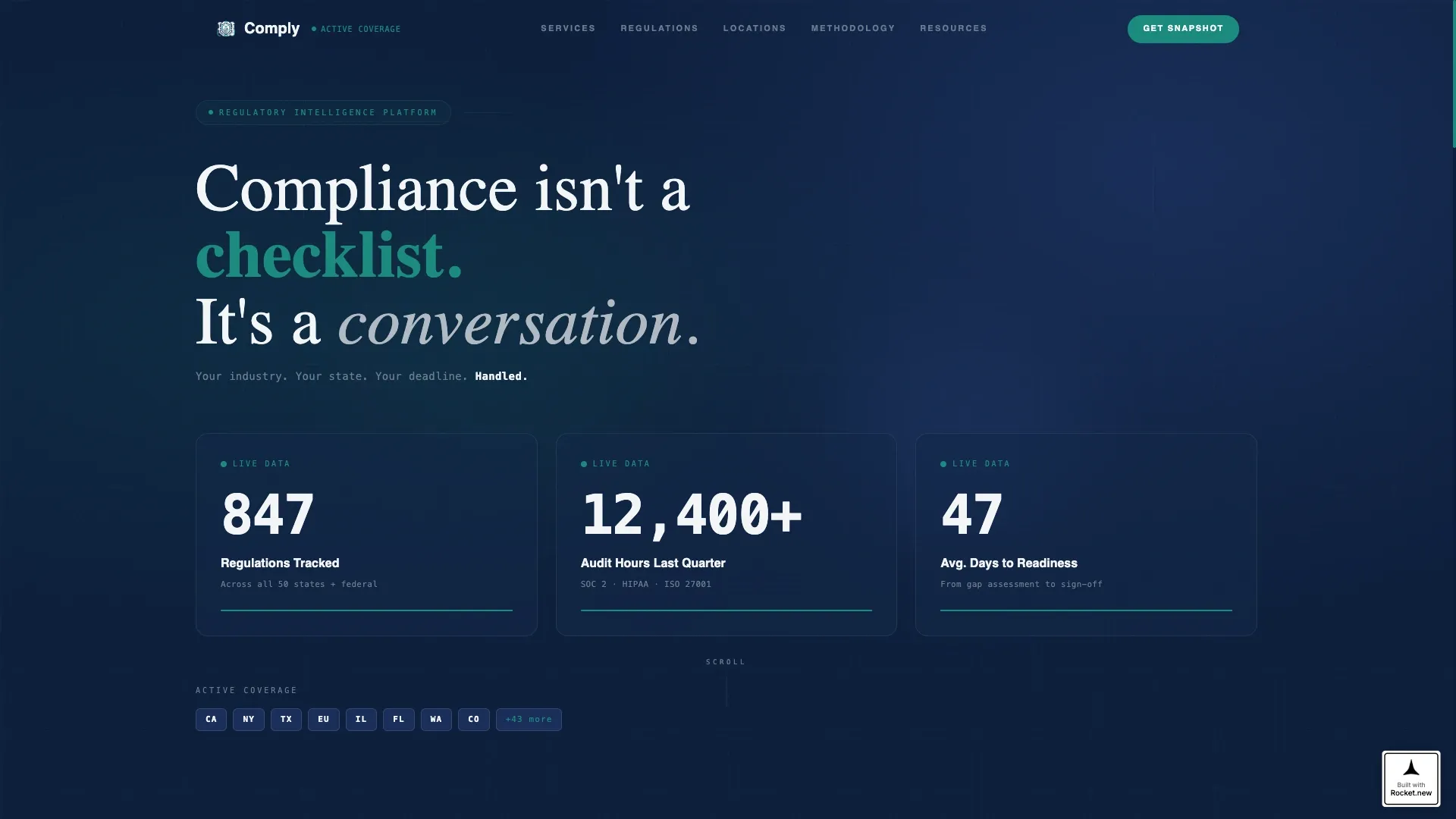
- An animated metrics hero with live-style counters, jurisdiction badges, and a single authority line of copy
- A sticky sidebar with service area navigation, a teal "Get Your Compliance Snapshot" inline form, and a secondary downloadable lead magnet gate
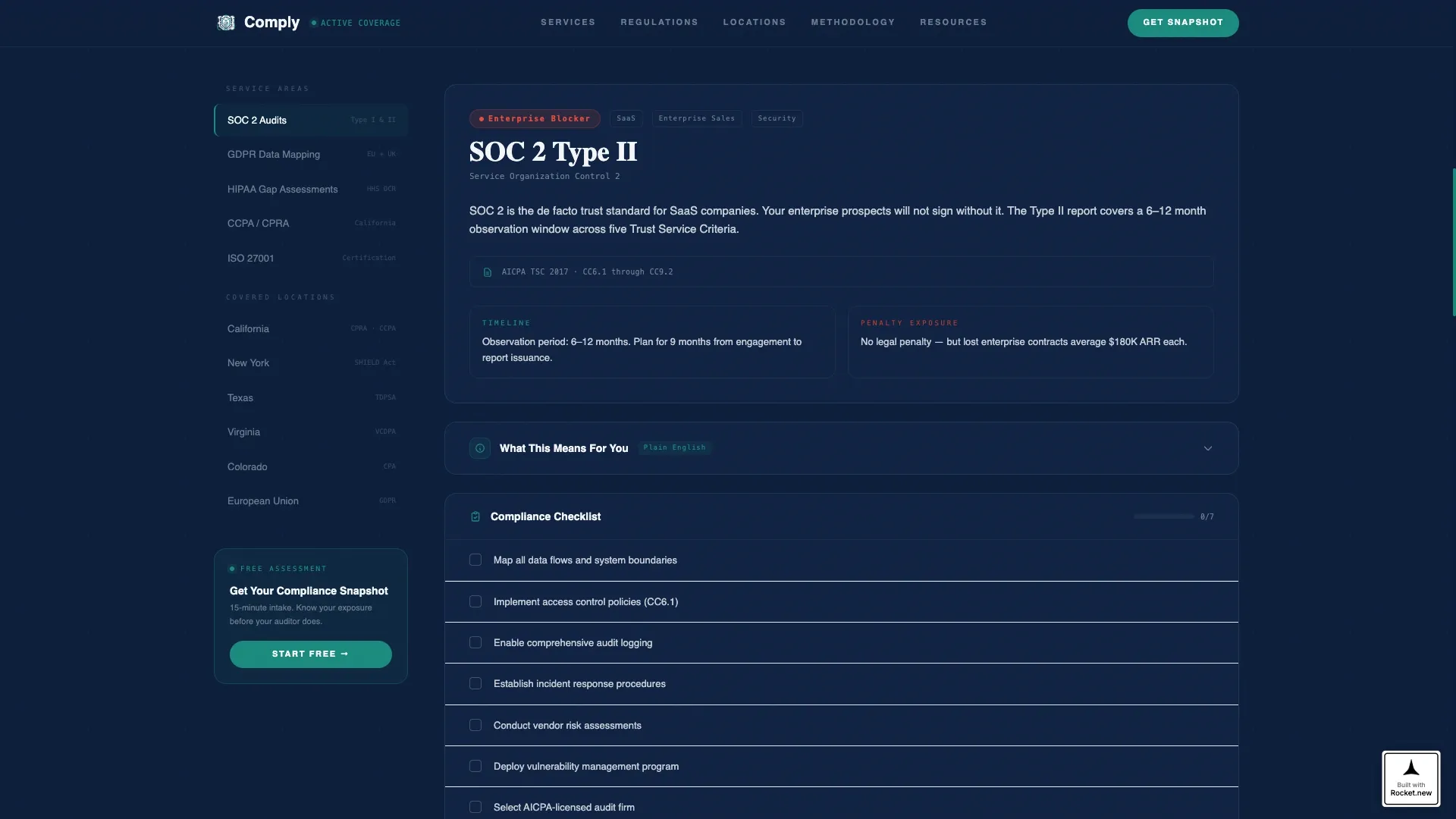
- Educational content modules with expandable "What This Means For You" drawers, jurisdiction-specific checklists, and color-coded risk-level indicators
Feature list
This section covers the core built-in capabilities that make Comply a purpose-built template for compliance service lead generation.
Animated Stats and Metrics Hero
Three oversized counters tick upward on page load against a deep navy background. Each counter is set in a monospaced typeface that reads like a live data feed. Small jurisdiction badges for California, New York, Texas, and the European Union establish geographic reach instantly, without a single paragraph of copy.
Scrolling Certification Logo Wall
A horizontal autoplay band sits directly below the hero. It carries certification marks and partner firm logos to establish professional credibility before the visitor reads any claim. The marquee motion keeps the band visually active without distracting from the educational content below.
Sidebar Companion with Sticky Navigation
The left-hand sidebar locks into a persistent position as the visitor scrolls. It lists service areas and covered locations as navigable links. The active state is highlighted in decisive teal, giving users a clear sense of where they are inside a long regulatory content page.
Expandable Regulatory Education Drawers
Each regulation covered on the page includes a plain-language explanation followed by a collapsible "What This Means For You" drawer. Jurisdiction-specific checklists sit inside each drawer. Risk-level indicators use a color scale from teal through amber to a muted warning red to help visitors self-assess urgency.
Inline Lead Capture with Segmentation Form
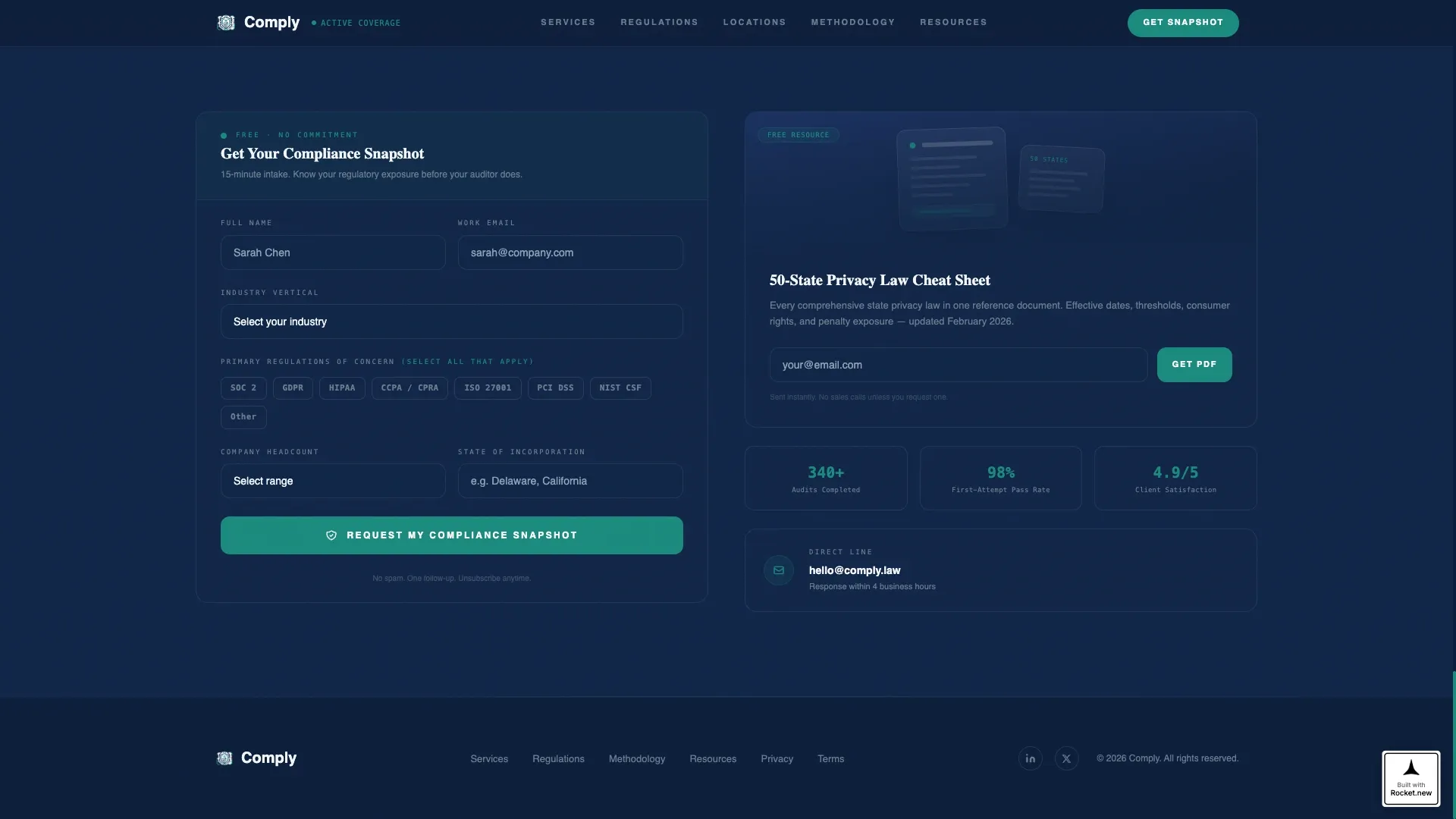
The sticky sidebar hosts a "Get Your Compliance Snapshot" call-to-action button in decisive teal. It opens an inline form with an industry vertical dropdown, a multi-select regulation checkbox group, a company headcount range selector, and a state of incorporation field. This segmentation data helps the consultancy prioritize and personalize follow-up.
Gated Downloadable Lead Magnet
A secondary conversion path offers a downloadable resource gated behind an email field. This captures top-of-funnel visitors who are still researching and are not yet ready to book a consultation. It extends the consultancy's reach without requiring the visitor to commit to a calendar slot.
Page sections overview
| Section | Purpose |
|---|---|
| Stats metrics hero | Establish authority with live-style counters and jurisdiction badges |
| Certification logo wall | Build credibility through autoplay certification and partner marks |
| Sidebar navigation panel | Provide persistent service area and location wayfinding |
| Educational content modules | Explain regulations in plain language with expandable drawers |
| Risk level indicators | Help visitors self-assess urgency with color-coded signals |
| Compliance snapshot form | Capture segmented leads through an inline multi-field form |
| Downloadable cheat sheet | Gate a 50-state privacy law resource behind an email field |
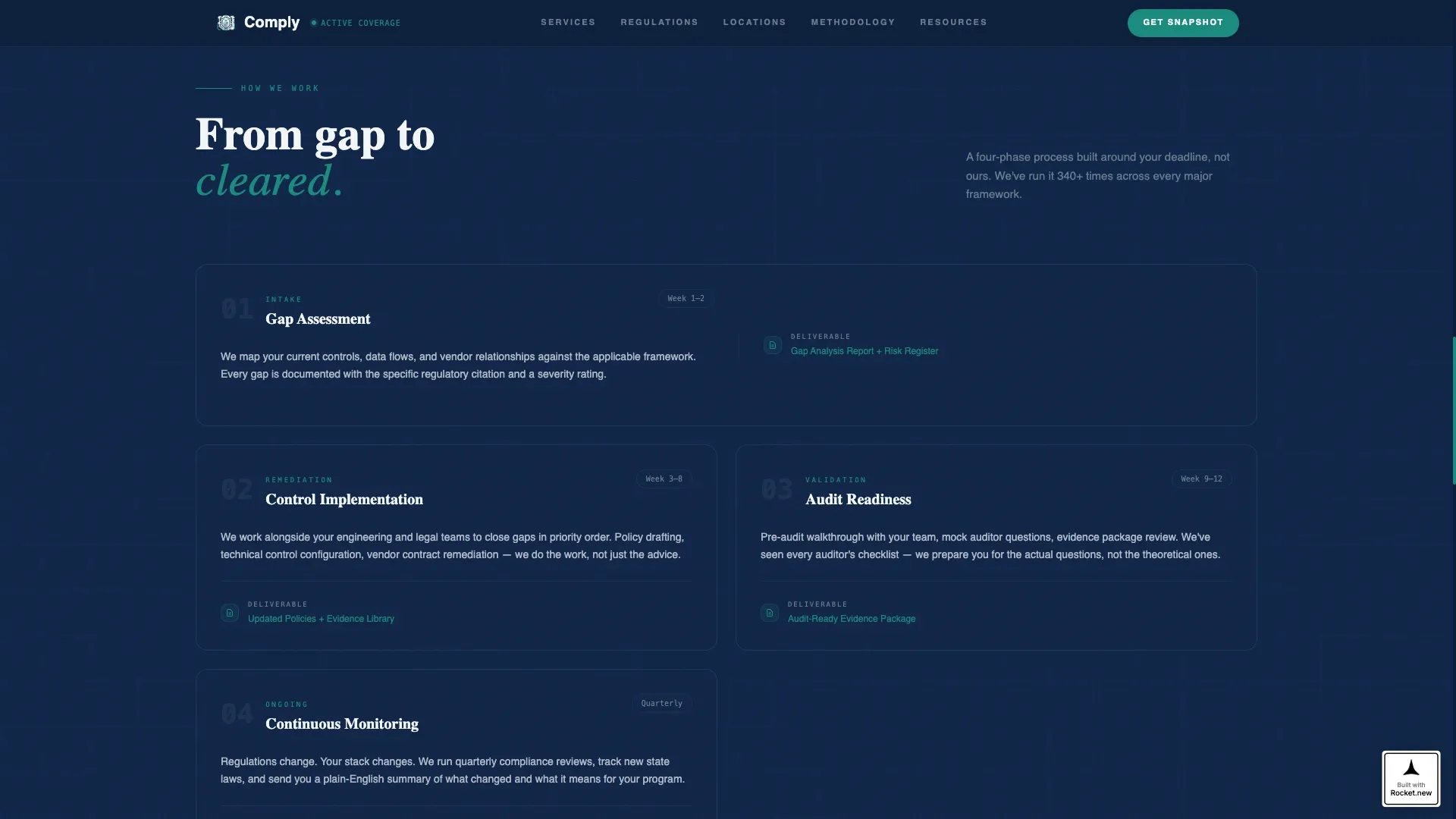
| Methodology section | Walk visitors through the consultancy's three-phase process |
| Testimonials section | Deliver named, role-specific client outcome social proof |
| Linear footer row | Close the page with a clean single-row contact and link strip |
Design & branding system
The visual identity follows an Educational Guide theme built on a Navy Authority color system. The palette is deliberately restrained, using contrast and spacing to communicate precision and reliability rather than decoration.
- Deep command navy at hex code #0B1D3A carries the hero background and primary structural elements, while policy-gray at #6B7B8D handles secondary text and metadata
- Clean compliance white at #F4F6F8 provides the content pane background, keeping long regulatory text easy to read at any hour
- Decisive teal at #1A8A7D is reserved strictly for call-to-action buttons and active sidebar states, making every conversion touchpoint immediately identifiable
- Typography combines JetBrains Mono for counter and data display, DM Sans for body copy, and Fraunces serif for display headings, creating a federal authority feel with modern legibility
Mobile & speed optimization
The template is designed with a desktop-first priority, reflecting the reality that its core audience of startup CTOs and mid-market CFOs typically reviews compliance resources on laptops during work hours. The layout is still built to reflow gracefully for other screen sizes.
- The sticky sidebar collapses on smaller viewports so the educational content pane retains full readability without layout conflict
- GSAP-powered scroll reveals, counter animations, and the marquee logo band are handled on the client side, while static structural content uses server components to keep initial load fast
How this template helps you convert
Comply is structured around the principle that education earns trust and trust drives action. Every section is sequenced to reduce objection before asking for commitment.
- The metrics hero and certification logo wall establish authority in the first five seconds, so visitors stay on the page long enough to engage with the content
- The educational drawers and risk indicators deliver genuine value during the scroll, making the "Get Your Compliance Snapshot" call-to-action feel like a natural next step rather than an interruption
- The gated downloadable resource captures email addresses from visitors who are not yet ready for a consultation, giving the consultancy a warm follow-up list from every visit
Other information about this template
Comply is a specialized template designed for one specific and high-stakes use case: a compliance officer service area and location page. It is not a generic professional services template adapted for compliance. Every design decision, from the monospaced counter font to the amber-to-red risk scale, reflects the mindset of the audience it targets.
- The template supports a Logo Wall Authority creative direction, meaning social proof is front-loaded before any written claim is made
- The three-phase methodology section gives the consultancy a structured way to present its process without overclaiming specific outcomes
- The testimonials section is designed for named, role-specific quotes with company context, which carries more credibility with a CTO or CFO audience than generic praise
- The footer uses a Pattern 1 linear single-row layout, keeping the close of the page clean and professional without additional visual noise
Theme
Educational Guide
Creative direction
Logo Wall Authority
Color system
Navy Authority
Style
Sidebar Companion
Direction
Lead Generation
Page Sections
Animated Stats and Metrics Hero
Autoplay Certification Logo Wall
Persistent Sidebar Navigation
Expandable Regulatory Education Drawers
Segmented Inline Lead Capture Form
Gated Downloadable Lead Magnet
Related questions
Who is this template designed for?
How do the two lead capture paths work?
Can I customize the regulations and jurisdictions in the content modules?
Is this a single landing page or a multi-page template?
What visual style does this template use?



