Code Enforcement Government Professional Website Template
Comply is a code enforcement landing page template built for county offices. It opens with an oversized address and case-number search bar, then walks visitors through violation categories using alternating zigzag sections and numbered checklists. Homeowners, landlords, and contractors all find their situation quickly, see the resolution path clearly, and leave feeling informed rather than overwhelmed.
by Rocket studio
Quick summary
Comply is a single-page code enforcement template designed for county government offices. It leads with a prominent search bar so visitors can look up a property or case immediately. Zigzag alternating sections then explain every violation tier from minor weeds to unsafe structures, each paired with a numbered checklist that ends in a resolved state.
Who this template is for
This template serves county code enforcement offices that need a clear, public-facing service page. It is built for departments where residents, property managers, and contractors are the primary visitors.
- Homeowners who received a violation notice and need immediate clarity on next steps
- Remote landlords who manage rental properties and need a reliable process overview
- Contractors who need to confirm setback rules or permit requirements before breaking ground
What problem this template solves
Many code enforcement office pages bury critical information inside dense PDFs or confusing navigation menus. Visitors arrive anxious and leave without answers. This template replaces that friction with a structured, searchable, process-transparent layout.
- No login wall or registration requirement before a visitor can find their case status
- Violation tiers are separated clearly so visitors locate their situation without reading everything
- Every checklist ends with a visible resolved state, reducing the dread that arrives with a violation notice
What you get with this template
You get a complete, ready-to-adapt single-page layout that handles every stage of the code enforcement visitor journey. The page is structured to serve multiple audiences from a single scroll.
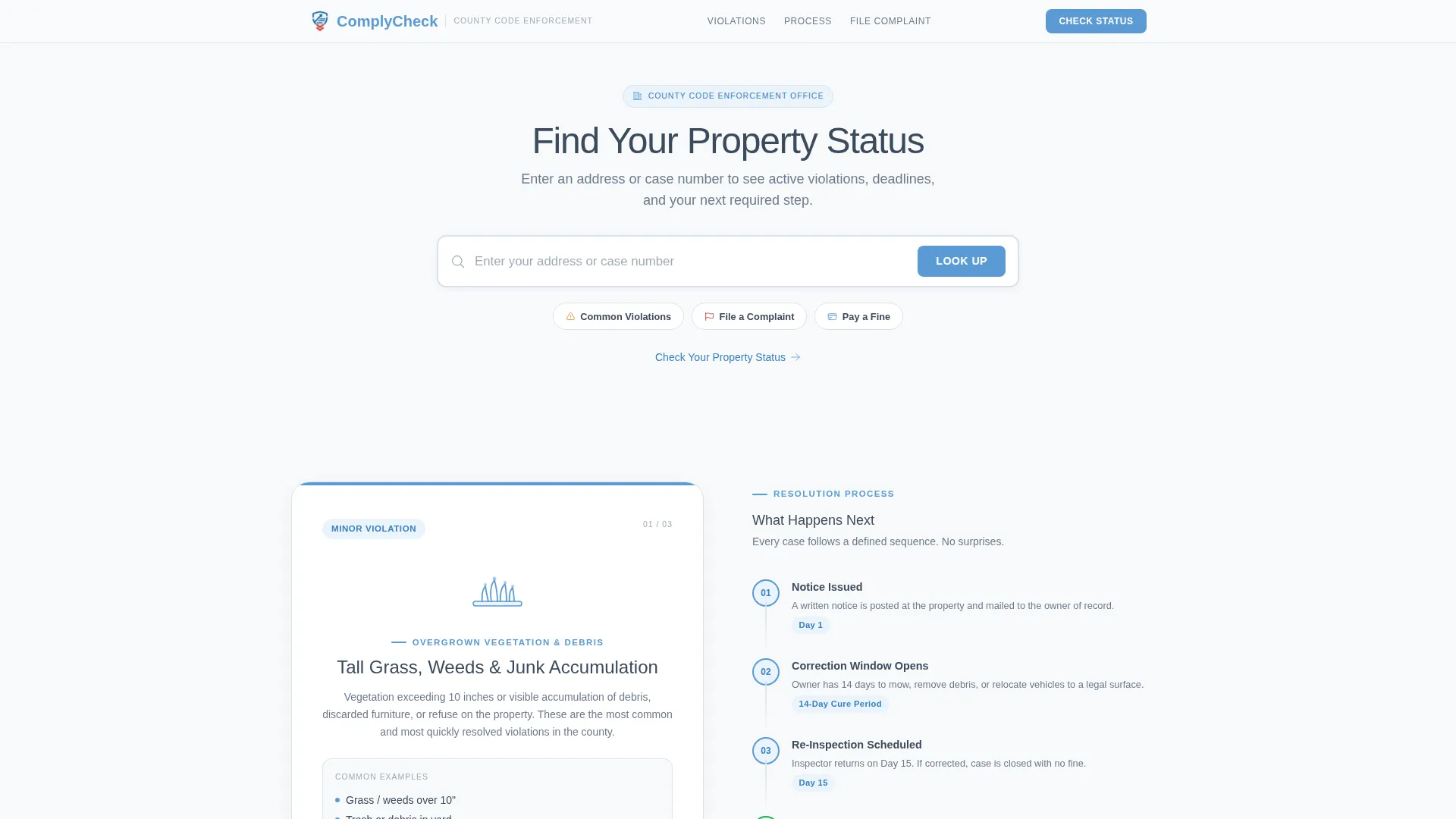
- A centered search header with an oversized input bar, ghost placeholder text, a blue action button, and three clickable category chips
- Five distinct content sections covering the full violation spectrum from minor to serious, plus a mid-page resolution timeline band
- A repeating primary call to action and a secondary complaint-reporting path, both accessible without any account requirement
Feature list
Oversized Address and Case Search Header
The page opens with a single, prominent search input bar centered on a clean white field. Ghost text reads "Enter your address or case number" and a blue "Look Up" button sits flush to the right. Three clickable category chips below the bar provide quick paths to Common Violations, File a Complaint, and Pay a Fine.
Zigzag Alternating Violation Sections
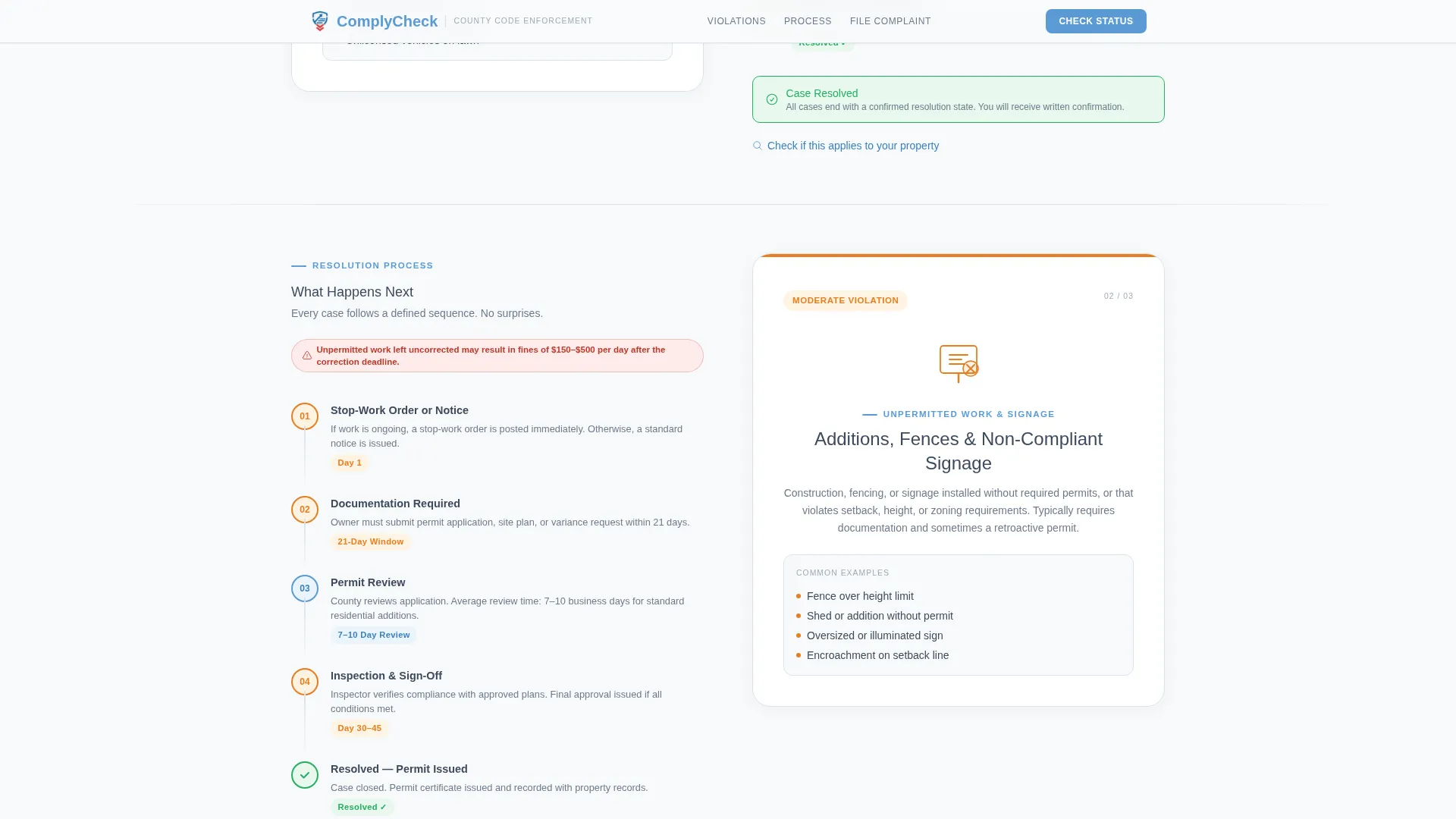
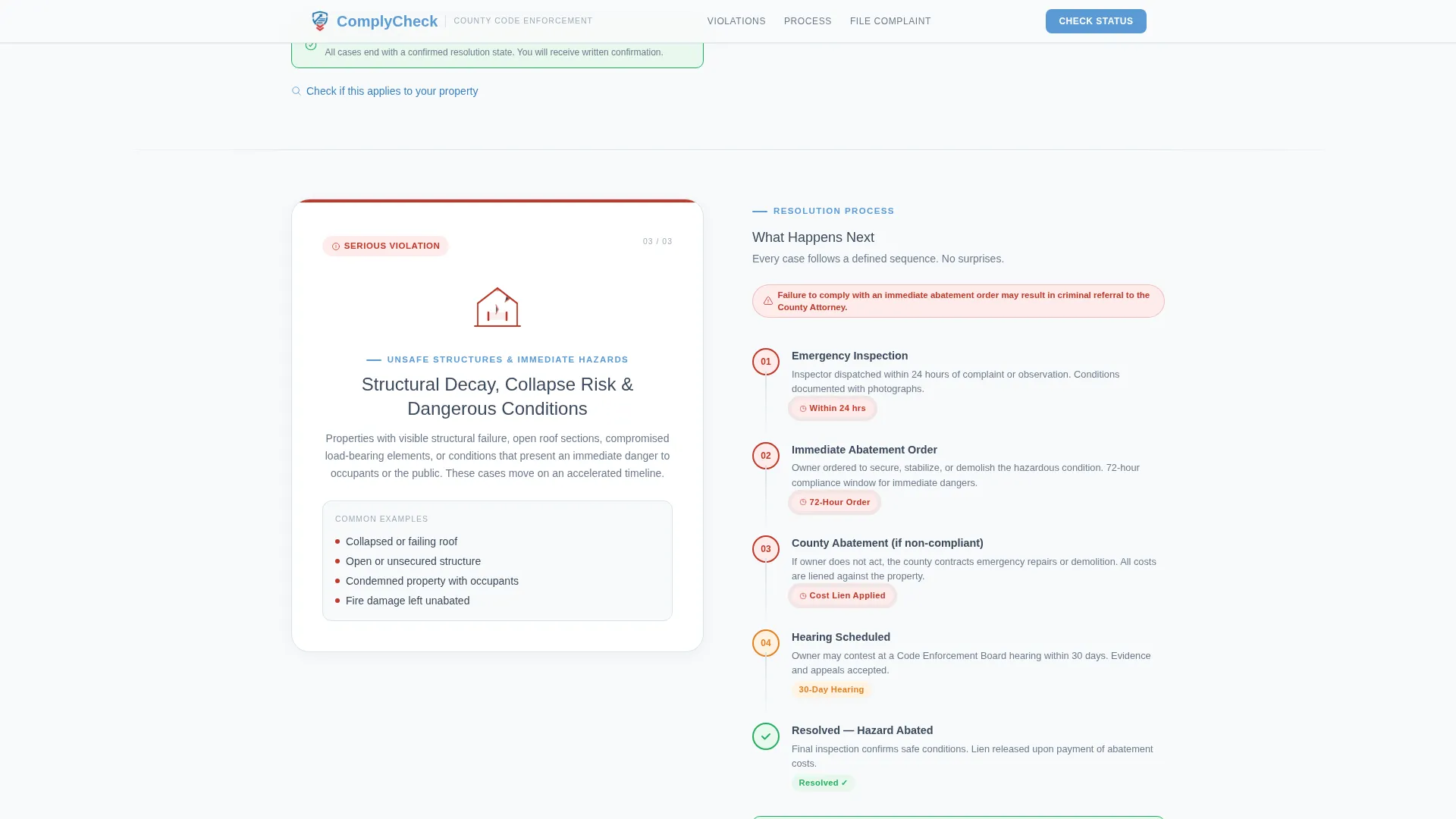
Each violation category occupies its own alternating left-right block. A simple line icon represents the violation type on one side, and a numbered checklist covers the full process on the other side. Orientation flips with each section so the eye tracks naturally down the page.
Violation Severity Progression
The page builds stakes deliberately from minor to serious. Overgrown lots and junk vehicles with 14-day cure periods appear first. Unpermitted additions and signage issues with 30-day processes follow. Unsafe structures requiring immediate abatement close the sequence, giving every visitor a clear mental map of where their case falls.
Resolution Timeline Band
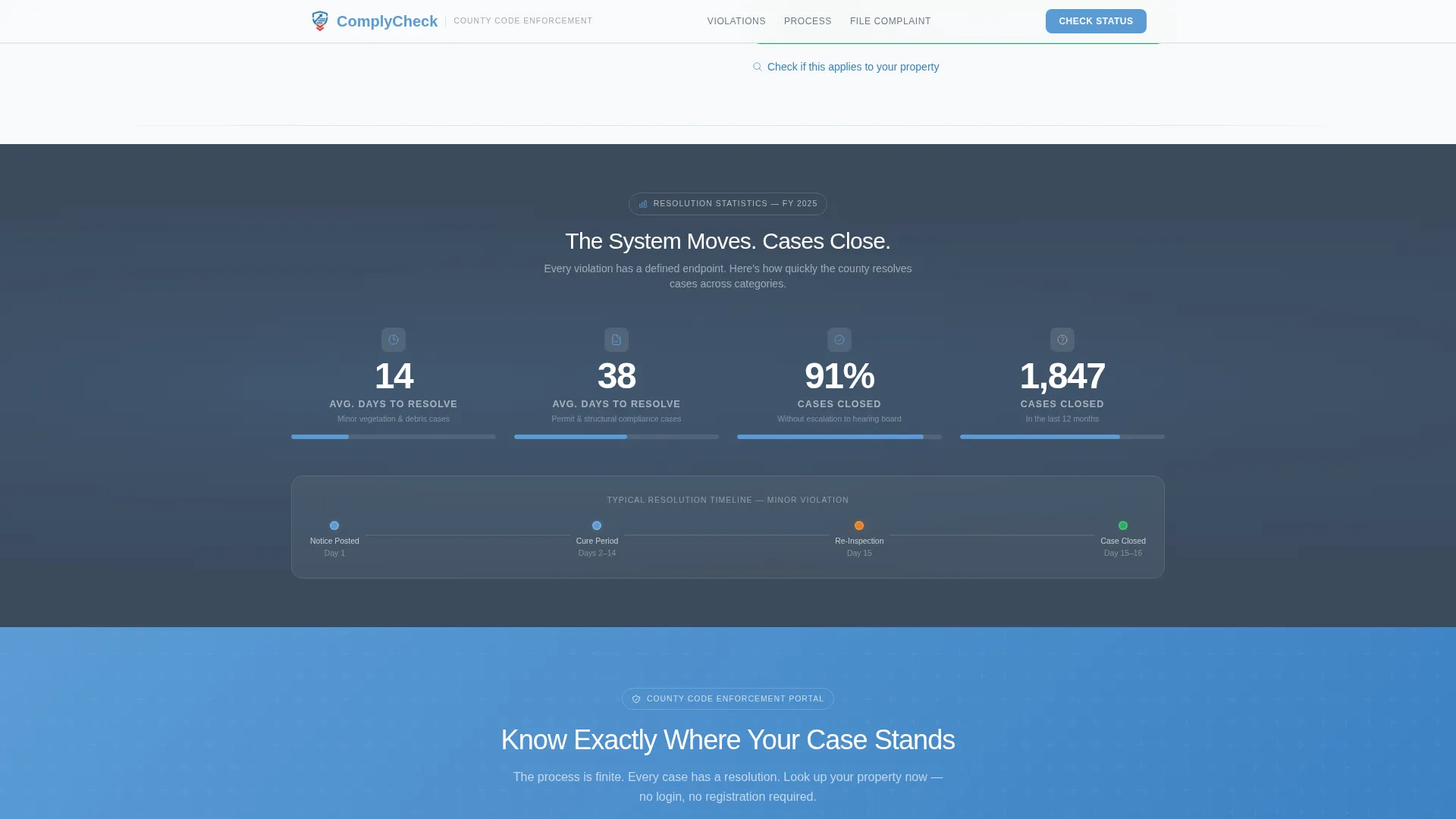
A horizontal mid-page band breaks the zigzag pattern with a visual timeline graphic. It displays average case resolution days and cases closed, reinforcing that the enforcement process is finite and that cases do reach closure.
Dual Call-to-Action Architecture
A primary "Check Your Property Status" button appears directly after the search header and repeats at the bottom of the page. A secondary "Report a Violation" link routes to the complaint intake form. Both paths are available without any login or registration requirement.
Scroll-Triggered Animation Sequence
Checklist steps animate in as the visitor scrolls. The zigzag sections stagger into view, the search bar has focus states, and category chips respond on hover. Animation intensity is set to medium so the page feels purposeful without being distracting.
Page sections overview
| Section | Purpose |
|---|---|
| Search Header | Address and case lookup with category chips |
| Minor Violations Zigzag | Overgrown lots and junk vehicle checklist |
| Moderate Violations Zigzag | Unpermitted additions and signage process |
| Resolution Timeline Band | Average days graphic and case closure stats |
| Serious Violations Zigzag | Unsafe structure and immediate abatement path |
| Footer | Linear single-row site links and contact info |
Design & branding system
The visual identity follows a Directory and Discovery theme built on an Arctic White color system. The palette reads like a freshly printed official form on bright paper: authoritative without being hostile, and structured without feeling cold.
- Arctic White (#F8FAFB) for all section backgrounds, Frozen Lake Blue (#5B9BD5) for interactive elements and iconography, and Civil-Service Slate (#3B4A5C) for body text and section dividers
- Violation-Flag Red (#C0392B) used sparingly on alerts, deadline callouts, and penalty notices to signal urgency without dominating the page
- Manrope typeface throughout, delivering a clean and authoritative sans-serif feel that suits a government utility context
Mobile & speed optimization
The template is built with equal priority given to mobile and desktop viewports. Homeowners often land on this page moments after receiving a notice at their door, meaning a phone is frequently their first device.
- Scroll-triggered reveals and zigzag stagger animations use minimal JavaScript, keeping the page responsive on mobile connections
- Server components handle static content sections, reducing the amount of client-side processing required on lower-powered devices
- The search bar, category chips, and call-to-action buttons are all sized and spaced for comfortable tap interaction on small screens
How this template helps you convert
The page earns its clicks by reducing anxiety before asking for action. Every design choice is oriented toward making the process feel finite and approachable.
- The search bar is the first element a visitor sees, signaling immediately that the office exists to answer their specific question, not to lecture them with generic policy text
- Every violation checklist ends with a green resolved state, so visitors see a light at the end of the tunnel before they click anything
- The "Check Your Property Status" call to action appears twice, at the top and bottom of the page, so no visitor has to scroll back up to take the next step
Other information about this template
Comply is part of a Government and Public category template set designed for code enforcement county office use cases. It is built as a single zigzag alternating landing page using the Checklist and Audit creative direction and the Click-Through landing page direction.
- The template style is Zigzag and Alternating, making it well suited for government portals, public service directories, and county compliance offices that need to separate content by topic
- Localization is set to English with United States date formatting (MM/DD/YYYY) and USD currency references, matching standard county government publishing conventions
- The footer uses a linear single-row pattern, keeping the page close cleanly without adding visual weight at the bottom
Theme
Directory & Discovery
Creative direction
Checklist & Audit
Color system
Arctic White
Style
Zigzag/Alternating
Direction
Click-Through
Page Sections
Oversized Address and Case Search Header
Zigzag Alternating Violation Layout
Violation Severity Progression
Resolution Timeline Band
Dual Call-to-action Architecture
Scroll-triggered Animation Sequence
Related questions
What kind of office is this template designed for?
Do visitors need to create an account to use the page?
Can this template handle multiple violation types on one page?
What sections are included in this template?
Is this template suitable for both mobile and desktop users?



