Healthcare Compliance Consultant Landing Page
Comply is a healthcare compliance consultant landing page built for the moment a compliance officer, practice manager, or CFO needs real answers fast. It uses side-by-side comparison tables to show exactly what is at stake, a confidential scheduling flow to reduce the friction of asking for help, and an authoritative Executive Suite visual identity that signals competence before a single word is read.
by Rocket studio
Quick summary
Comply is a single-page landing page template for healthcare compliance consultants. It pairs FAQ-driven comparison tables with a dark, authoritative visual identity to turn anxious compliance officers into booked consultations. Every scroll section answers a question your prospects are already asking at 11 p.m., then shows them exactly what expert guidance changes.
Who this template is for
This template is built for consultants and firms that help healthcare organizations navigate regulatory exposure. If your clients are deciding whether to call you before a surveyor arrives or after a deficiency notice lands, this page meets them at that exact moment.
- Compliance officers managing corrective action plans and audit preparation
- Practice managers who received a deficiency notice and need immediate clarity
- CFOs weighing the cost of a Medicare exclusion against the cost of proactive remediation
What problem this template solves
Healthcare compliance clients rarely search in calm moments. They search when something has gone wrong, or when they sense it is about to. A generic consulting page loses them in seconds. This template holds their attention by speaking directly to the regulatory scenarios they are already worried about, and by framing your firm as the competent guide they need right now.
- No more vague service descriptions that fail to communicate real stakes
- No more high-friction contact forms that feel like admitting defeat
- No more pages that look like every other healthcare website, blending into the background when authority is what converts
What you get with this template
The template delivers a full single-page layout structured around comparison-based storytelling and a low-friction booking flow. Every component is designed to move a worried prospect from "I found this page" to "I scheduled a confidential review."
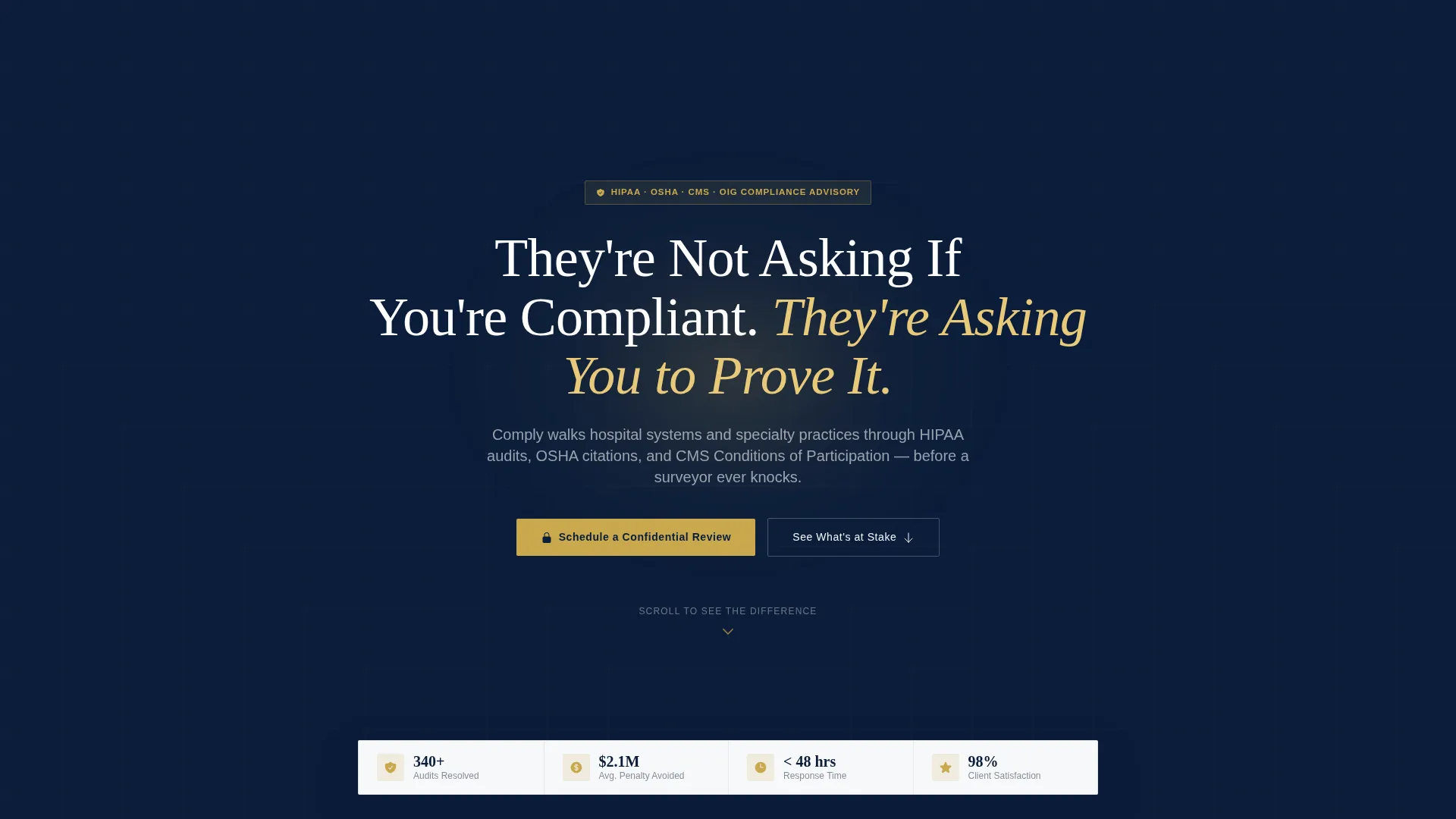
- A dark full-bleed header with a radial glow effect and a serifed headline designed to stop the scroll
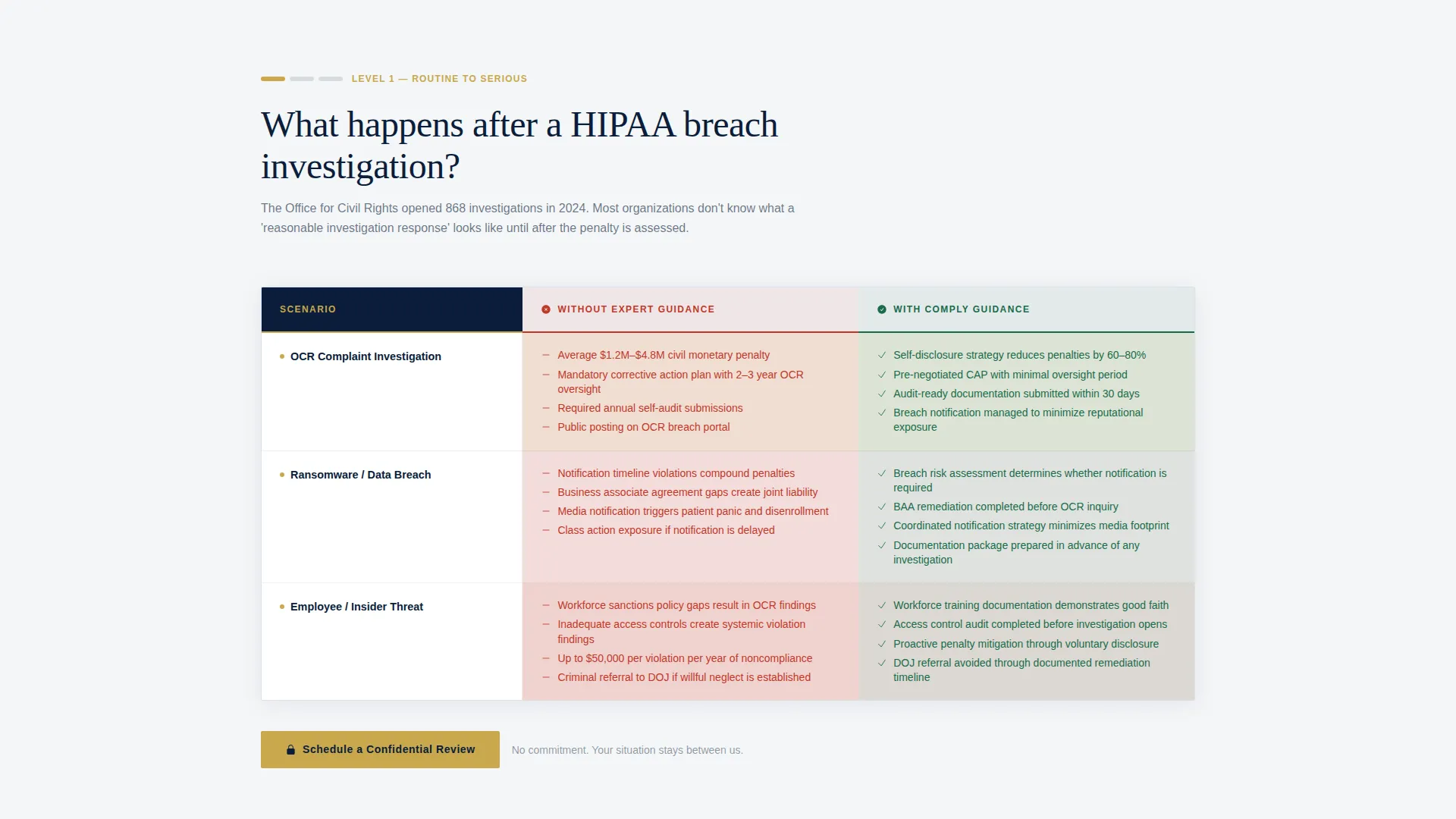
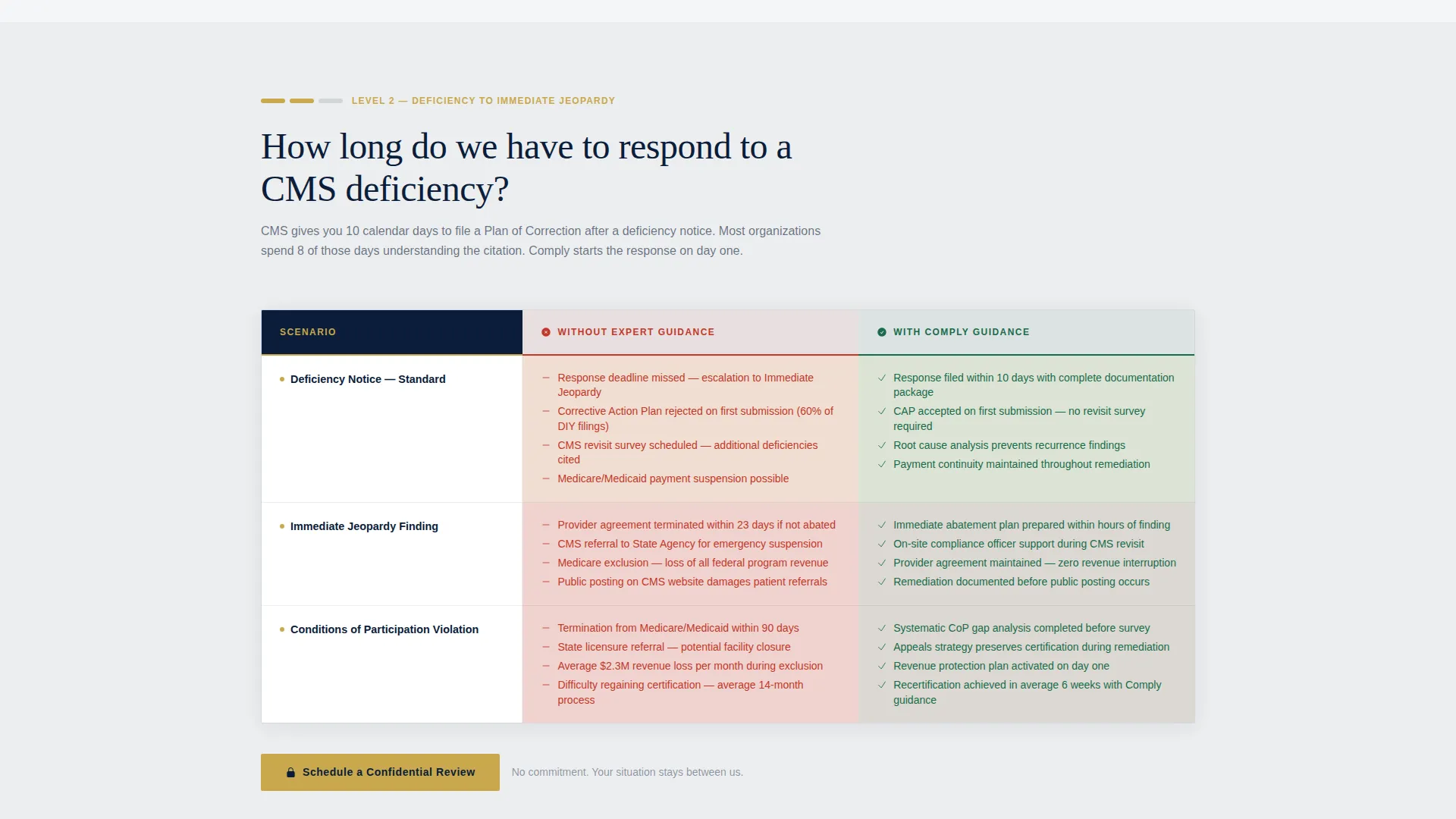
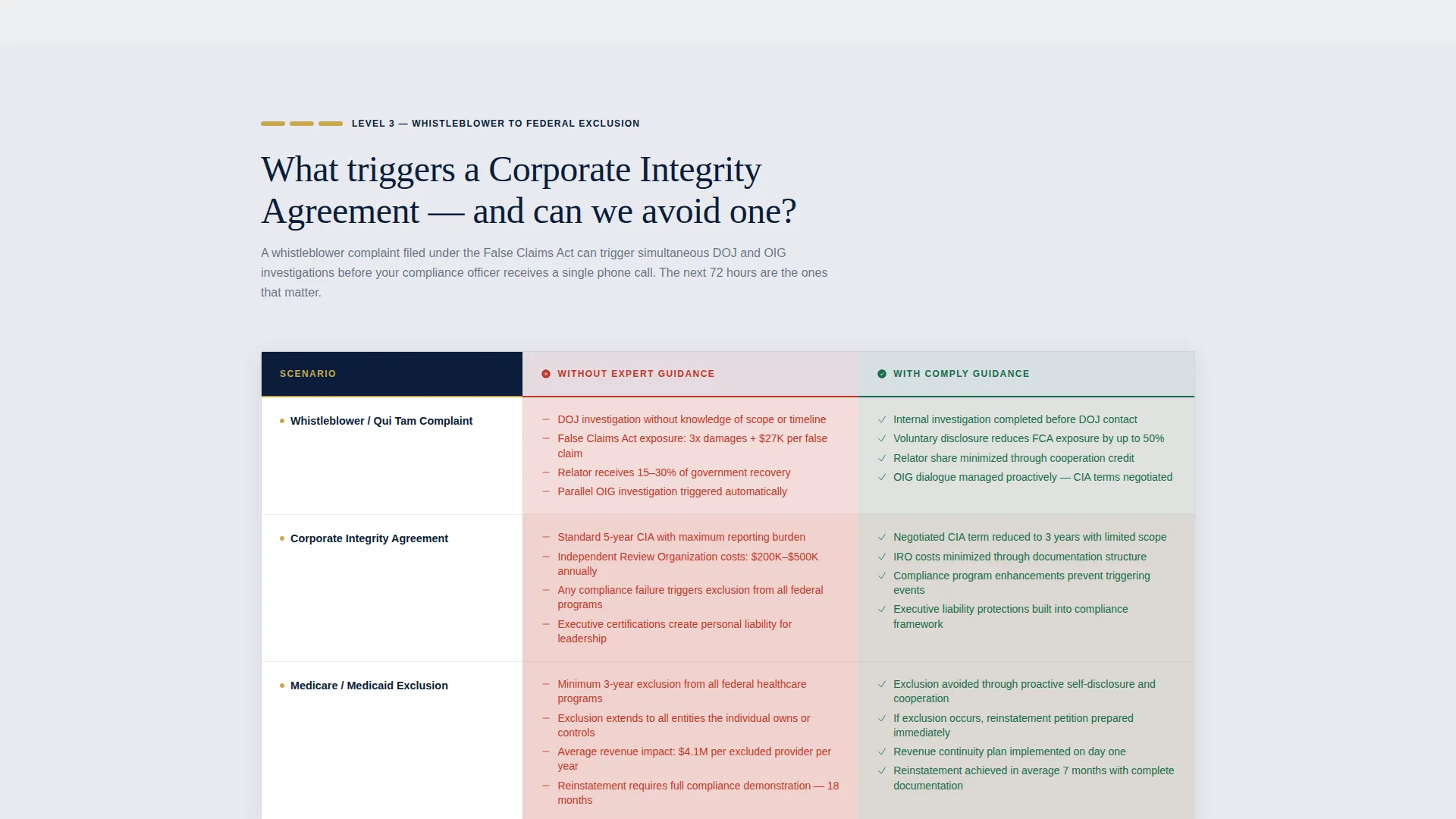
- Multiple FAQ-driven comparison table sections that escalate regulatory stakes from routine audits to corporate integrity agreements
- A two-step inline scheduler with organization-type and situation-context questions followed by a calendar view showing available 30-minute consultation slots
Feature list
This template comes with a focused set of components built specifically for a high-stakes professional services audience.
Dark Full-Bleed Header with Radial Glow
The header fills the entire viewport in deep command navy. A subtle radial glow pulses once behind the serifed headline, mimicking a single overhead light in a darkened conference room. A downward-pointing arrow anchors the eye and invites the first scroll. No stock photography, no clinical imagery.
FAQ-Driven Comparison Table Sections
Each scroll section opens with a question your prospects are already searching for, such as what happens after a Health Insurance Portability and Accountability Act breach investigation or how long an organization has to respond to a Centers for Medicare and Medicaid Services deficiency. A two-column table then contrasts the unguided outcome against the guided outcome. Rows escalate from routine audits through whistleblower complaints to corporate integrity agreements, compounding the sense of stakes with every section.
Pinned Navigation with Persistent call to action
After the first scroll, a "Schedule a Confidential Review" call-to-action button appears pinned in the navigation bar. It stays visible throughout the entire page, ensuring the booking prompt is never more than one click away regardless of how deep a visitor has scrolled.
Two-Step Inline Scheduler
The scheduling flow opens inline without redirecting the visitor. Step one captures organization type (hospital system, physician practice, long-term care, or dental and specialty), number of locations, and whether the inquiry is proactive or tied to an active investigation. Step two reveals a calendar with available 30-minute consultation slots. No pricing is displayed at any point.
Anchored call to action Below Every Table
A "Schedule a Confidential Review" prompt appears directly below each comparison table section. This placement catches visitors at the peak of their concern, immediately after reading the escalated stakes in each table.
Page sections overview
| Section | Purpose |
|---|---|
| Full-Bleed Header | Establish authority and prompt first scroll |
| HIPAA Breach Table | Compare guided versus. unguided breach outcomes |
| CMS Deficiency Table | Show response timelines and appeal strategies |
| Whistleblower Scenario Table | Escalate stakes with complaint-level risk data |
| Corporate Integrity Table | Present highest-stakes regulatory comparison |
| Inline Scheduler Block | Capture bookings with a two-step consultation flow |
Design & branding system
The visual identity follows an Executive Suite theme. Every color and type decision is intended to communicate institutional authority without resorting to clinical imagery or generic healthcare aesthetics.
- Color palette: deep command navy (#0B1D3A) as the dominant background, polished charcoal (#1E2A3A) for secondary surfaces, crisp clinical white (#F4F6F8) for body text and table content, and restrained gold (#C9A84C) reserved for call-to-action buttons, table row highlights, and trust indicators
- Typography: large, serifed headline treatment that reads unhurried and authoritative, evoking a senior attorney rather than a marketing brochure
- Visual approach: negative space and lighting metaphor replace stock photography entirely, creating an atmosphere that feels like the top floor of a hospital system's administrative building
Mobile & speed optimization
The layout is built to render cleanly on any screen size a compliance officer might be using, whether that is a desktop in an administrative office or a phone late at night.
- Comparison tables reflow gracefully on smaller screens so column contrast remains legible
- The pinned navigation call-to-action and the inline scheduler are designed to function on touch interfaces without layout breakage
- The two-step scheduler flow is compact enough to complete on a mobile screen without excessive scrolling within the component
How this template helps you convert
The entire page is structured around a single conversion goal: getting a compliance officer, practice manager, or CFO to book a confidential 30-minute consultation. Every design and copy decision supports that goal.
- The comparison tables do the persuasion work by making the cost of inaction visible, row by row, so the visitor arrives at the call-to-action already convinced rather than still evaluating.
- The word "confidential" appears in every call-to-action prompt, reducing the psychological friction of admitting regulatory vulnerability to an outside firm.
- The two-step inline scheduler qualifies the lead before the calendar appears, giving your team context on organization type and urgency before the first conversation begins.
Other information about this template
This template is designed to work as a standalone landing page within a broader consulting website or as an independent campaign page for a specific regulatory service offering. It is equally well suited to firms that handle a full spectrum of healthcare regulatory work and to specialists focused on a single area such as Health Insurance Portability and Accountability Act compliance or Occupational Safety and Health Administration citation response.
- The template style is Comparison Table, making it a strong fit for any service where outcomes with and without expert help are meaningfully different
- The FAQ-Driven creative direction means the page structure mirrors the actual search behavior of compliance professionals under pressure
- The booking flow is intentionally free of pricing, leaning on the word "confidential" to lower the threshold for reaching out
- This template is categorized under Professional Services and Healthcare Consulting, and the Navy Authority color system and Executive Suite theme were selected to reflect the boardroom gravity that high-stakes regulatory engagements demand
Theme
Executive Suite
Creative direction
FAQ-Driven
Color system
Navy Authority
Style
Comparison Table
Direction
Booking/Scheduling
Page Sections
Dark Full-bleed Header with Glow Effect
Faq-driven Comparison Tables
Pinned Navigation Call-to-action
Two-step Inline Scheduler
Anchored Ctas Below Every Table
Executive Suite Visual Identity
Related questions
Can I use this template if my firm focuses on only one compliance area?
Does the scheduler show pricing to visitors?
Who is this template best suited for?
Can the comparison tables be customized for my specific regulatory scenarios?
Does the template work for both reactive and proactive compliance clients?



