Safety Officer FAQ Website Template
Comply is a split-screen landing page built for safety professionals who need answers fast. It pairs a synchronized FAQ accordion with a live resource panel, so visitors move from question to download without losing their place. The design is clean, authoritative, and desktop-first, built to earn trust before asking for anything in return.
by Rocket studio
Quick summary
Comply is a single-page resource hub designed for safety officers, Environmental Health and Safety (EHS) coordinators, and plant managers. It uses a 50/50 split-screen layout to connect compliance questions on the left with downloadable resources on the right, all organized by regulatory domain. The page is built to convert visitors into registered library users with one well-placed call to action.
Who this template is for
This template is built for safety professionals who work under pressure and need information that is organized, current, and immediately useful.
- Newly appointed EHS coordinators navigating unfamiliar regulatory requirements for the first time
- Plant managers preparing their facilities for unannounced compliance audits
- Seasoned safety directors who need updated templates or regulation excerpts quickly, often before a morning briefing
What problem this template solves
Safety professionals spend too much time hunting across multiple sources for answers that should already be in one place. A disorganized resource page costs real time during audits and drills.
- Visitors land without knowing whether the page covers their specific compliance domain or has current information
- The gap between reading a question and accessing the matching resource breaks focus and wastes time
- No clear path to deeper resources means visitors leave before they find what they actually need
What you get with this template
Comply gives you a fully structured landing page that guides every visitor from their first question to the resource they need, then toward a single registration action.
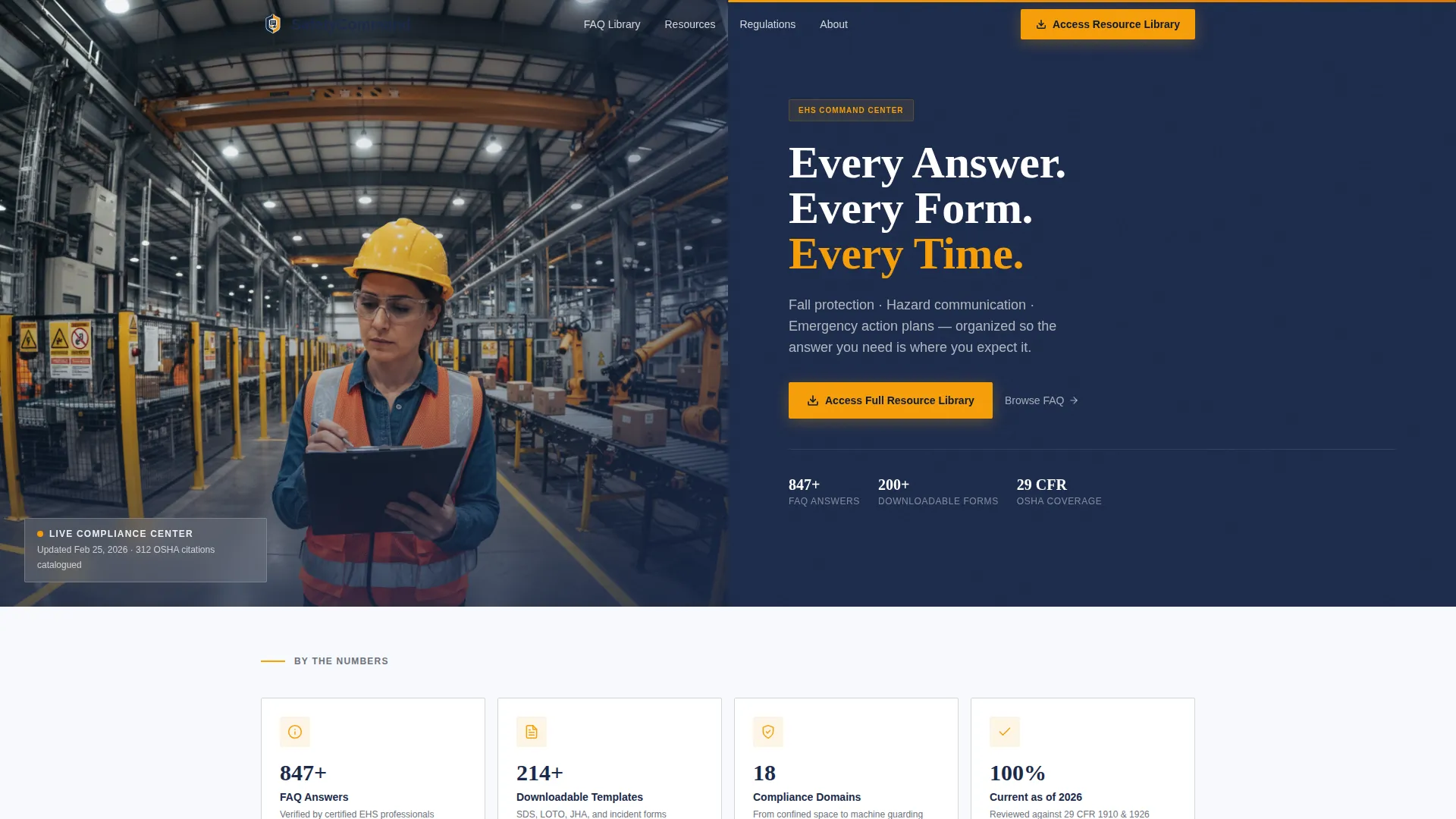
- A half-page photo-and-text hero section with a heavy navy headline and a single-line subhead naming the three resource categories
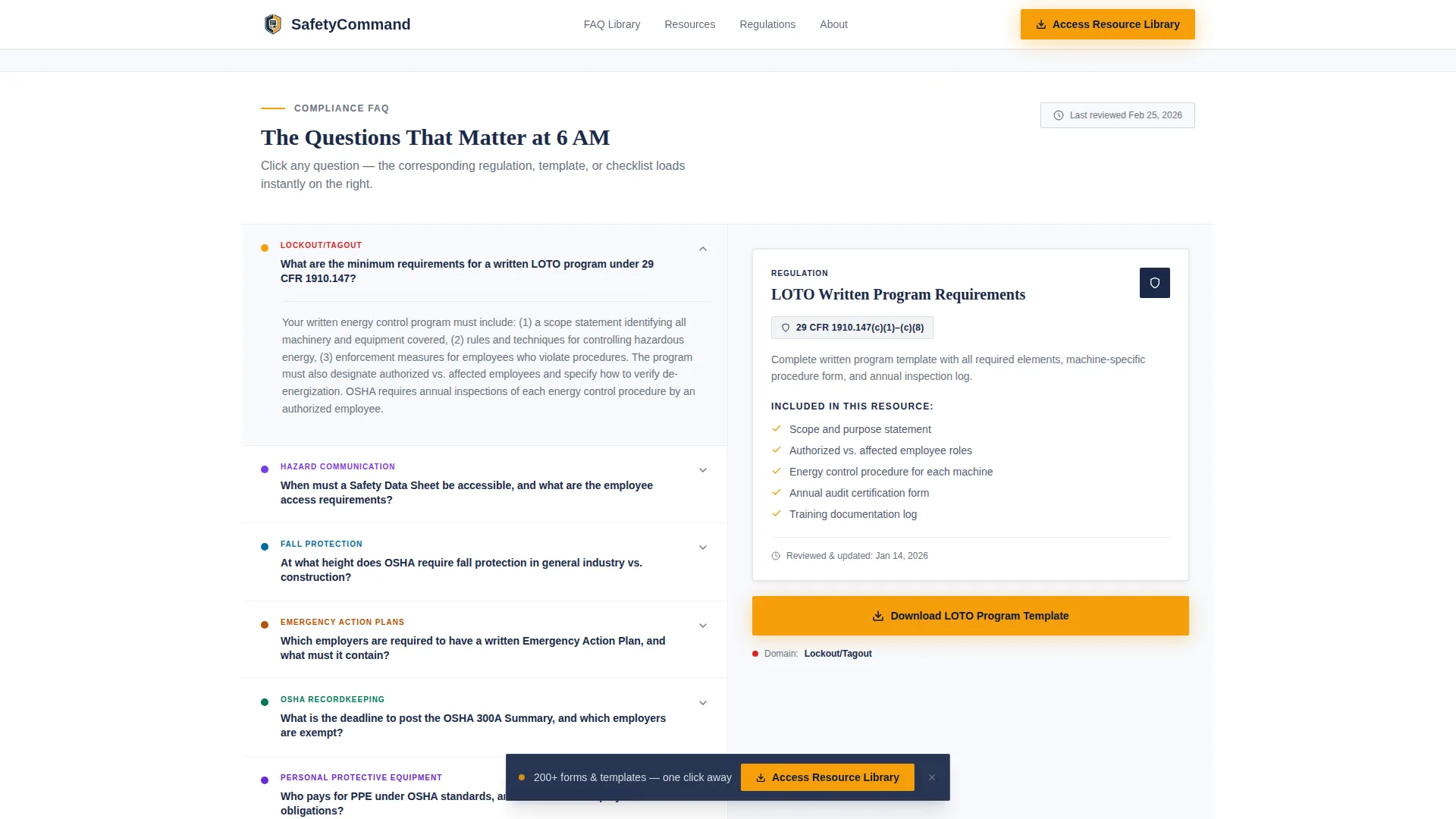
- A synchronized split-screen FAQ accordion paired with a live contextual resource panel that updates on click
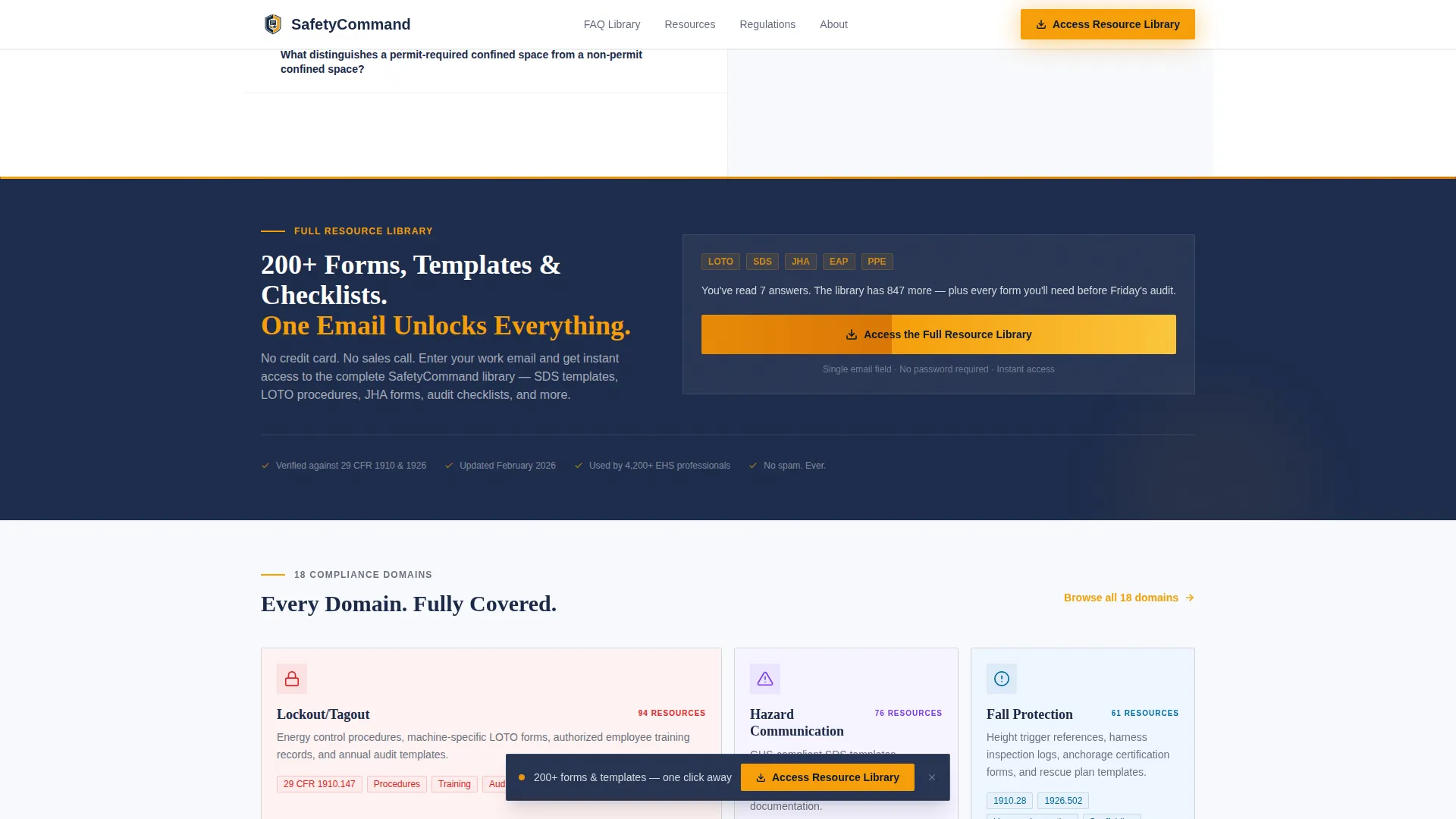
- A persistent amber call to action button anchored to the viewport, plus a full-width banner after the fifth FAQ cluster
Feature list
This template ships with purpose-built components that match how safety professionals actually use reference pages during their workday.
Synchronized FAQ and Resource Panel
The left panel holds an accordion organized by compliance domain, including fall protection, hazard communication, and emergency action plans. Each click updates the right panel instantly with the matching downloadable resource, checklist, or regulation excerpt. Visitors never leave their reading context to find what they need.
Persistent Call to Action Button
An amber button reading "Access the Full Resource Library" stays anchored to the bottom of the viewport as visitors scroll. It reappears as a full-width banner after the fifth FAQ cluster. This dual placement keeps the next step visible without interrupting the reading flow.
Half-Page Photo and Text Hero
The header uses a 50/50 split: a tightly composed photograph of a safety officer in an industrial corridor on the left, and a bold navy headline with subhead on the right. The layout communicates authority and relevance before the visitor reads a single line of body copy.
Domain-Organized FAQ Accordion
Questions are grouped by regulatory topic and ordered from common scenarios to edge cases. This structure builds confidence as visitors scroll, signaling that the page covers their specific situation no matter how detailed their question gets.
Stats and Trust Band
A dedicated section displays concrete credibility figures, including resource counts, regulations covered, and last-updated timestamps. These numbers are visible without requiring a click, giving auditors and coordinators immediate confidence in the content's currency.
Domain Coverage Grid
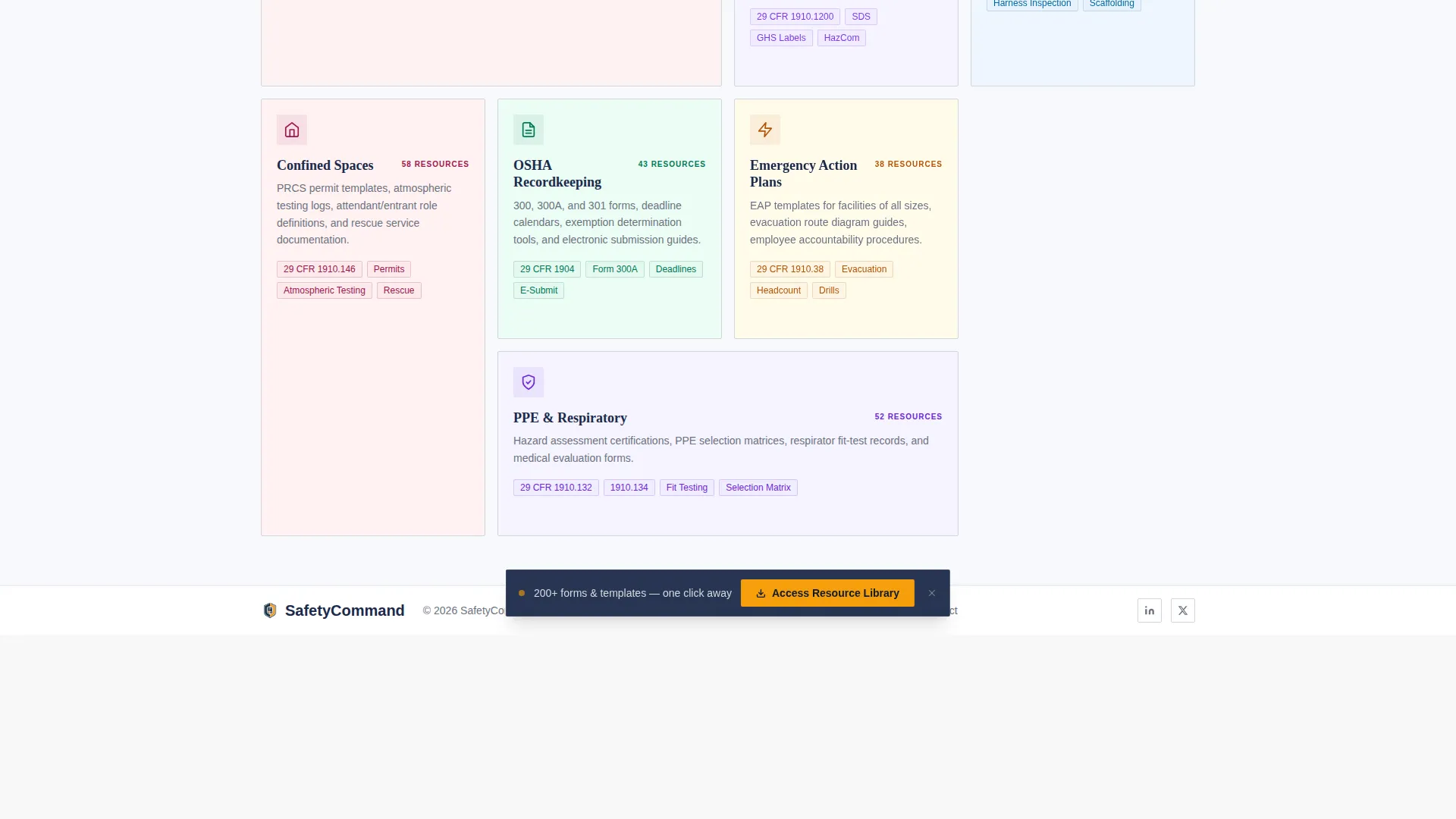
An asymmetric bento-style grid shows every compliance domain the resource library covers. It gives visitors a quick map of the full scope before they commit to registering, reducing hesitation at the call to action.
Page sections overview
| Section | Purpose |
|---|---|
| Hero split screen | Establish authority with photo and headline |
| FAQ and resource panel | Connect questions to downloadable resources |
| Stats and trust band | Display resource count and update timestamps |
| Full-width call to action banner | Drive registration after fifth FAQ cluster |
| Domain coverage grid | Show full compliance domain scope |
| Footer | Single-row navigation and legal links |
Design & branding system
The visual identity follows a Corporate Precision theme built around the Cloud Canvas color system. Every color choice has a functional role: nothing decorates for its own sake.
- Open-sky white (#F7F9FC) for backgrounds, policy-manual gray (#D1D5DB) for dividers and secondary text, and deep compliance navy (#1B2A4A) for headlines and body type
- Hi-vis amber (#F59E0B) used exclusively for interactive elements, calls to action, and critical callouts, never as a decorative color
- Plus Jakarta Sans for body text and interface labels, paired with Fraunces for display headlines to balance precision with authority
Mobile & speed optimization
The template is designed desktop-first, reflecting how safety officers most often use reference resources: at a workstation during an audit or before a morning toolbox talk. A mobile fallback layout is included for field access.
- The split-screen accordion and resource panel collapse into a stacked single-column view on smaller screens
- Accordion interactions use client-side components only, keeping the rest of the page static for faster initial load
- FAQ content is structured for server-side rendering, so the most critical information appears immediately without waiting for JavaScript
How this template helps you convert
Comply earns the registration click by giving genuine value before asking for anything. The page is structured to build trust progressively.
- Seven genuinely useful answers are visible before the call to action ever asks for an email address, so visitors arrive at the prompt already convinced the library is worth accessing
- The persistent amber button keeps the next step reachable at every scroll position without forcing a decision before the visitor is ready
- The full-width banner after the fifth FAQ cluster catches visitors who have already read deeply, presenting the registration prompt at the moment they are most likely to want more
Other information about this template
This template is built for the Professional Services category, specifically for the Safety Officer Online Presence subcategory and the Safety Officer FAQ and Resource page niche. It is localized for the United States regulatory framework, using OSHA standards, imperial measurements, and MM/DD/YYYY date formatting throughout.
- Animation is set to medium intensity: accordion transitions, panel crossfades, and scroll-reveal effects on the stats band
- The footer uses a Linear Single-Row pattern for a clean, minimal close to the page
- The no-form page design is intentional: the landing page earns the click, and the gated library behind it handles the single email field registration
Theme
Corporate Precision
Creative direction
Transparent Process
Color system
Cloud Canvas
Style
Split Screen (50/50)
Direction
Click-Through
Page Sections
Synchronized FAQ and Resource Panel
Persistent Viewport Call to Action
Half-page Photo and Text Hero
Domain-organized FAQ Accordion
Stats and Trust Band
Domain Coverage Grid
Related questions
What compliance domains does this template cover?
Does this template include a contact form or email capture on the page?
Can I update the FAQ questions and linked resources?
Is this template usable on mobile devices?
How does the call to action work across the page?



