Revenue & Tax Authority Professional Website Template
Comply is a card grid landing page template built for national tax authorities. It organizes every common tax task by life situation rather than bureaucratic category. Six icon-driven action cards give visitors instant wayfinding. A progressive disclosure lead form, flip-card clusters, and a live filing countdown turn a busy government portal into a clear, guided experience.
by Rocket studio
Quick summary
Comply is a modular card grid landing page designed for a national tax authority. It serves small-business owners, first-time filers, payroll clerks, and tax professionals with immediate, clearly labeled pathways. The Directory and Discovery theme, a Slate and Sky color system, and a three-step progressive disclosure form work together to guide every visitor from arrival to completed action.
Who this template is for
This template is built for government tax agencies and public revenue authorities that need to serve a wide, time-pressured audience without confusion. It fits organizations that handle return processing, refund issuance, tax collection, and regulatory publishing at scale.
- Small-business owners and payroll clerks who need fast answers before quarterly deadlines
- First-time individual filers who need clear direction from the very first screen
- Tax professionals who need quick access to forms, rulings, and withholding tables late at night
What problem this template solves
Government tax portals often bury the most urgent actions inside deep navigation menus. Visitors arrive under deadline pressure and leave frustrated when they cannot find the right form or payment path in seconds. This template removes that friction by organizing content around what people are actually trying to do.
- Visitors cannot quickly tell which form or tool applies to their situation
- Deadline urgency is invisible, leaving filers unaware of approaching cutoff dates
- Generic portal layouts treat a first-time filer the same as a tax professional
What you get with this template
You get a fully structured, single-page layout built around modular card components and grouped by real-life filing situations. Every section is purpose-built, from the icon grid at the top to the pinned lead form at the bottom.
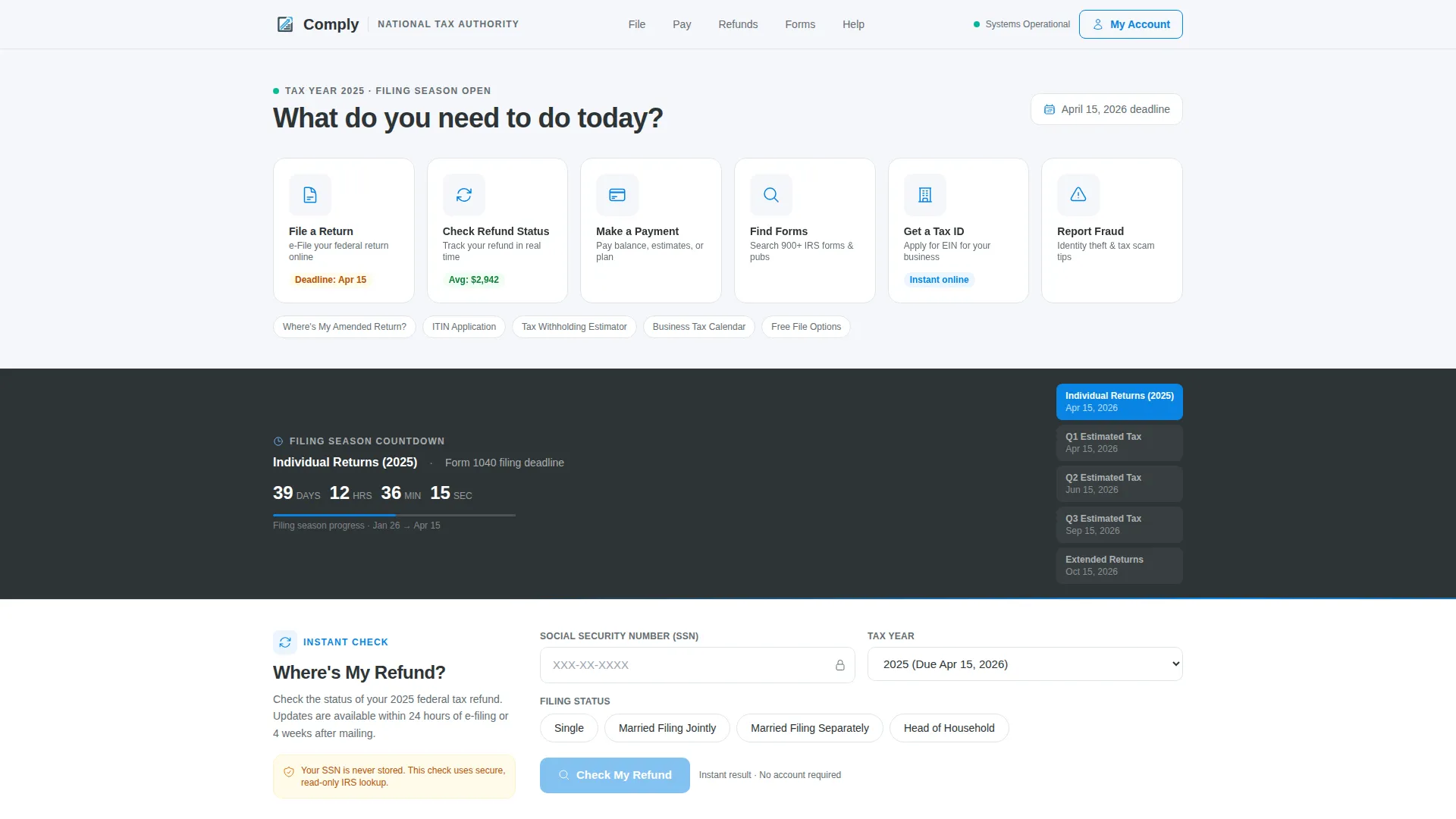
- A six-card icon grid header with sky-blue pulse animation and one-line action labels
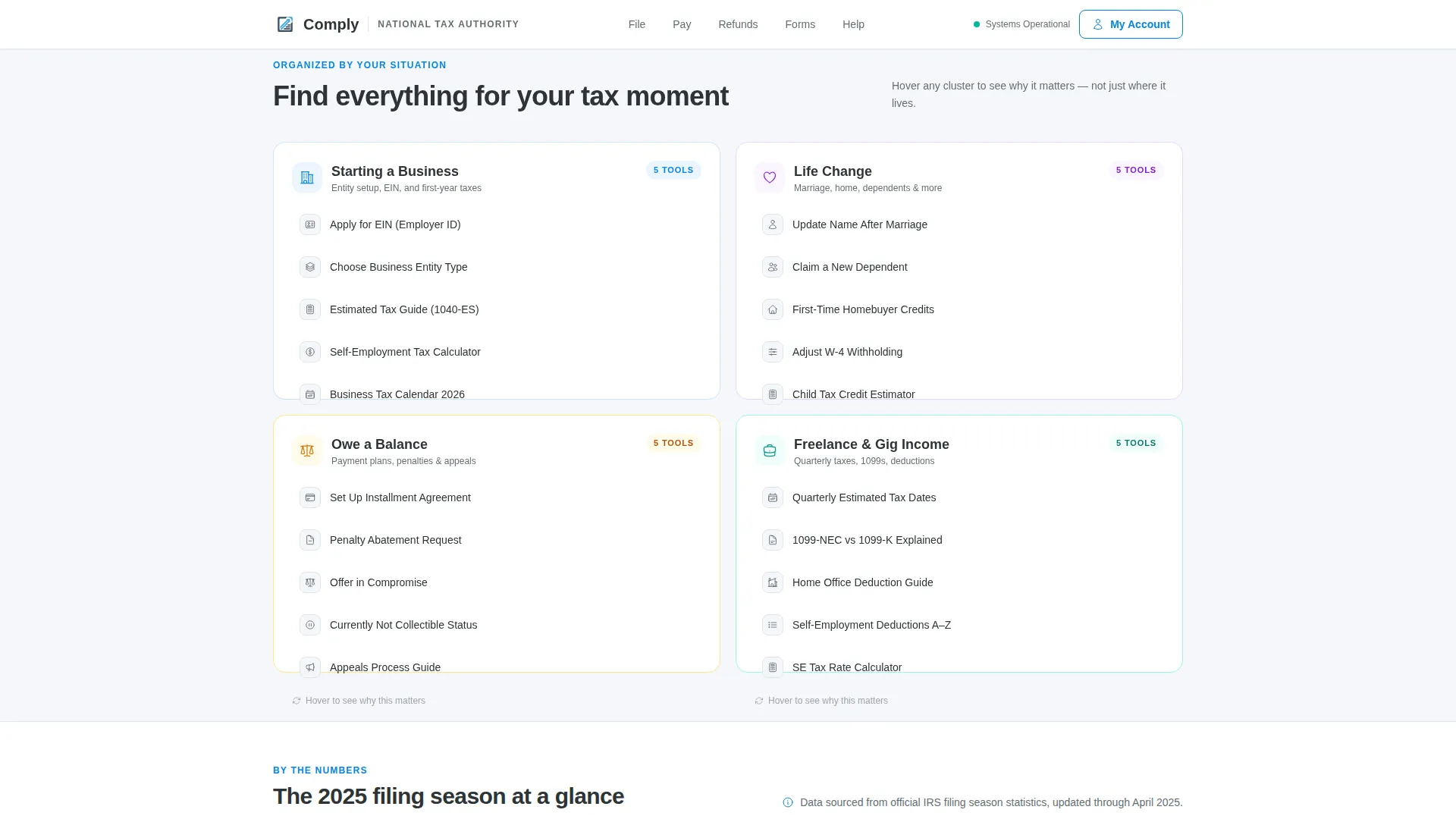
- Life situation flip-card clusters covering business startup, life changes, and outstanding balances
- A three-step progressive disclosure micro-form pinned in a bottom bar for lead capture
Feature list
This template includes components that match the specific demands of a high-traffic government tax portal.
Six-Action Icon Grid Header
Six universally recognizable line icons sit inside individual rounded cards. Each card carries a direct one-line label such as "File a Return" or "Make a Payment." On page load, every icon pulses once with a sky-blue highlight to signal that each card is interactive and clickable.
Filing Season Countdown Ticker
A live urgency ticker sits below the icon grid and counts down to the next quarterly deadline. It creates immediate temporal awareness for visitors who may not know how close the cutoff actually is, reducing late-filing errors and last-minute panic.
Life Situation Flip Cards
Modular cards group tax tasks by real cause rather than form number. Three clusters cover starting a business, navigating a life change, and managing an outstanding balance. Each card flips on hover to reveal a single supporting statistic, turning a directory into a short narrative about the tax lifecycle.
Stats and Trust Band
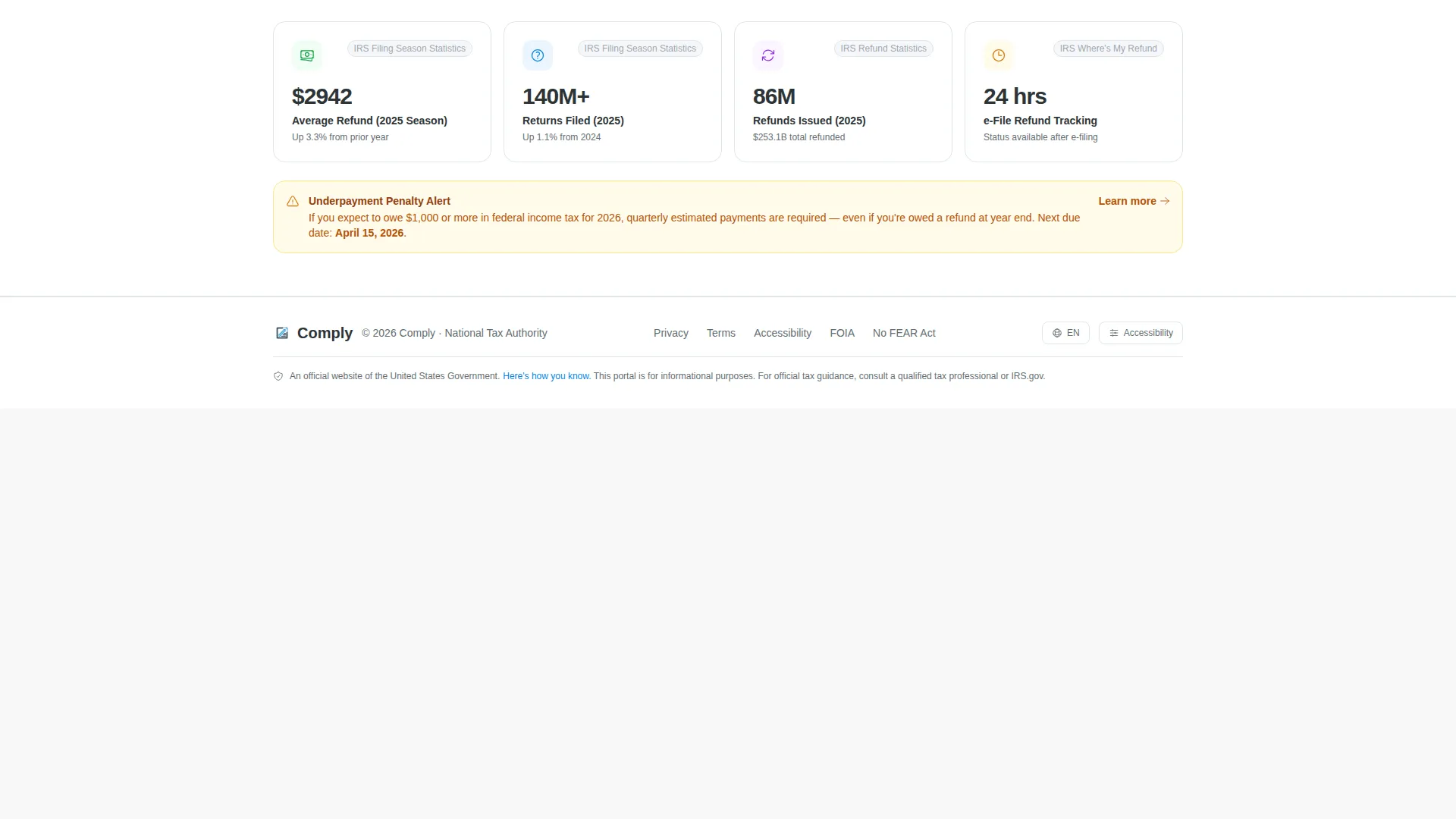
A dedicated band displays real processing statistics such as average refund amounts, total returns processed, and refunds issued. These figures build immediate credibility and reassure first-time visitors that the authority handles volume reliably.
Three-Step Progressive Disclosure Form
A bottom bar appears after the visitor interacts with any two cards. Clicking it opens a compact three-step micro-form. Step one captures filing status. Step two surfaces the top three relevant issues as selectable chips. Step three collects email address and preferred contact method.
Refund Status Quick Check
A secondary conversion path lets visitors enter a Social Security Number and filing year to check refund status instantly. This low-commitment entry point delivers immediate value and builds the trust needed to move visitors toward the deeper lead form.
Page sections overview
| Section | Purpose |
|---|---|
| Icon Grid Header | Immediate six-action wayfinding |
| Countdown Ticker | Deadline urgency signal |
| Life Situation Clusters | Task grouping by cause |
| Stats and Trust Band | Credibility through real figures |
| Progressive Disclosure Form | Three-step lead capture |
| Refund Status Checker | Quick-value secondary path |
| Footer | Single-row linear navigation |
Design & branding system
The visual identity follows a Directory and Discovery theme built on the Slate and Sky color system. The palette is designed to feel authoritative without being cold, and institutional without feeling lifeless.
- Deep bureaucratic slate (#2D3436) for primary text and navigation chrome, mid-tone graphite (#636E72) for secondary labels and divider lines
- Open-sky blue (#0984E3) on every actionable element, live-status indicator, and hover state
- Clean cloud white (#F5F6FA) across all card surfaces and the page background, with DM Sans for headings and Manrope for body text and labels
Mobile & speed optimization
The template is built desktop-first but carries strong mobile consideration, reflecting the reality that government portal users arrive on every device type. Interactive elements are sized and spaced for reliable touch use.
- Staggered icon pulse on load, card flip on hover, and scroll-triggered reveals are implemented at medium animation weight to stay smooth without overwhelming slower connections
- Server Components handle static content sections while Client Components manage interactive elements such as the flip cards, the countdown ticker, and the three-step form
- The modular card grid reflows cleanly across breakpoints so the layout remains navigable on smaller screens
How this template helps you convert
Comply uses a progressive disclosure model to build trust before asking for anything. Visitors get immediate value, then move naturally toward the lead form.
- The icon grid delivers instant wayfinding so visitors find their task in one click, reducing drop-off from frustration before any conversion opportunity even appears.
- The refund status checker provides a low-commitment entry point that gives real value without requiring sign-up, earning trust that feeds the deeper lead funnel.
- The pinned bottom bar with the three-step micro-form appears only after two card interactions, ensuring visitors who see it are already engaged and more likely to complete it.
Other information about this template
Comply is designed specifically for the Government and Public category, within the Revenue and Tax Authority subcategory, targeting the National Tax Authority niche. It carries an intersection match score of 13, indicating strong alignment between the template style, creative direction, and niche intent.
- The template style is Card Grid (Modular), the theme is Directory and Discovery, and the creative direction is Movement and Cause
- The header concept is an Icon Grid, and the landing page direction is Lead Generation, making it purpose-built for converting time-pressured visitors
- Localization is set for English, United States dollars, and the MM/DD/YYYY date format within a United States federal context

Theme
Directory & Discovery
Creative direction
Movement & Cause
Color system
Slate & Sky
Style
Card Grid (Modular)
Direction
Lead Generation
Page Sections
Six-action Icon Grid Header
Filing Season Countdown Ticker
Life Situation Flip Cards
Stats and Trust Band
Three-step Progressive Disclosure Form
Refund Status Quick Check
Related questions
Can this template be adapted for a state or regional tax authority?
How does the three-step progressive disclosure form work?
Does the template include the refund checker out of the box?
What animation effects are built into this template?
Is this template suitable for serving a wide mix of visitor types?



