Financial Advisor Recruitment & Compensation Website Template
Compound is a bento grid landing page built for financial advisor recruiting. It leads with a live-feel compensation calculator, then earns trust through data-driven tiles, payout comparison charts, and advisor transition stories. The primary call to action gates a personalized compensation report behind a single form, making every interaction feel purposeful and high-stakes.
by Rocket studio
Quick summary
Compound is a single-page financial advisor careers template built around one idea: show advisors the math before asking them to read the pitch. The header runs a terminal-style compensation calculator on sample data. Bento grid tiles deliver payout comparisons, transition stories, and culture snapshots. One gated form unlocks a full personalized report.
Who this template is for
This template is designed for firms that recruit experienced financial advisors and want to lead with earning transparency rather than brand narrative. It speaks directly to candidates who think in numbers before they think in words.
- Series 7 license holders currently inside wirehouse payout structures
- Independent registered investment advisers evaluating custodial arrangements
- Certified Financial Planner charterholders building or transitioning a first book of business
What problem this template solves
Most financial advisor recruiting pages open with mission statements and team photos. Advisors with active books of business skip straight past that. They want to know one thing: will I earn more here? This template answers that question before the visitor finishes reading the header.
- Generic recruiting pages bury compensation details, causing qualified candidates to leave early
- Advisors cannot benchmark their current payout without a conversation, which adds friction
- No immediate value exchange means no reason to submit contact information
What you get with this template
The template delivers a full single-page layout structured around a calculator-first creative flow. Every section is built to move a skeptical, financially literate visitor from curiosity to conversion.
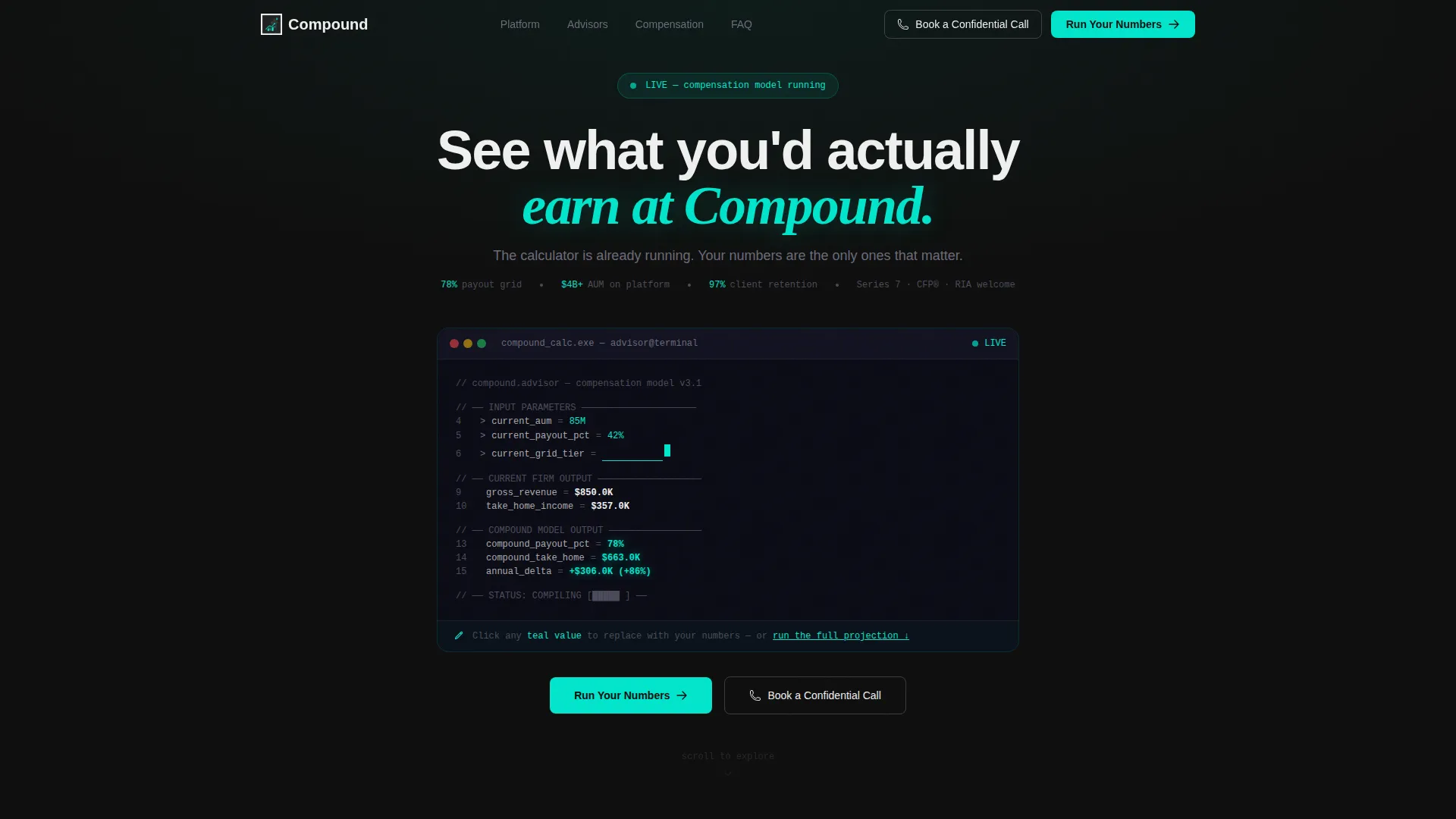
- A terminal-style header calculator showing live-feel compensation output in electric teal
- An asymmetric bento grid with a payout comparison chart, advisor transition quotes, a founder video tile, and supporting info tiles
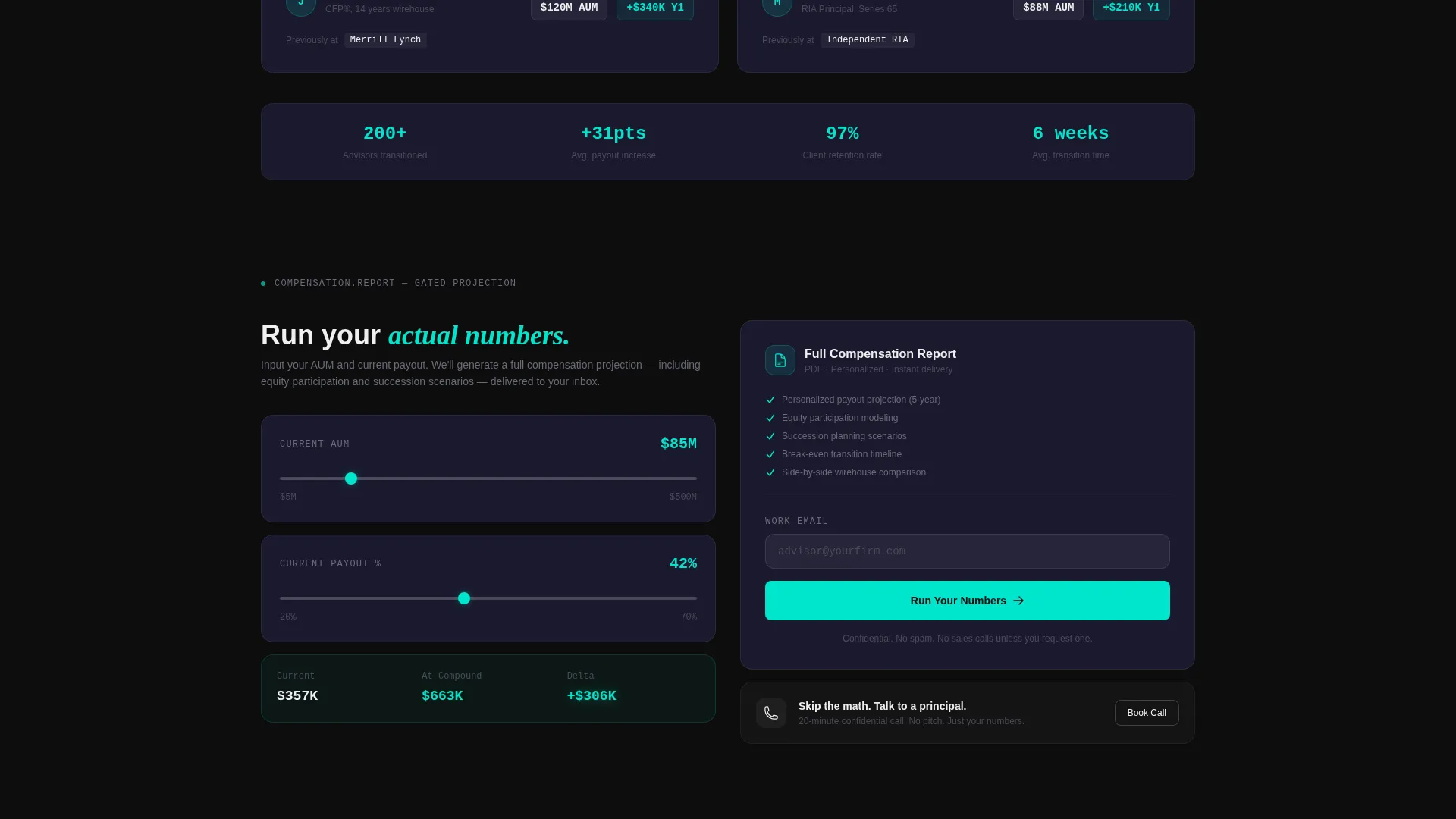
- A freemium gate that delivers a personalized compensation report after the visitor inputs their figures and email
Feature list
This template ships with a focused set of purpose-built components. Each one serves a specific role in the advisor's decision journey.
Terminal-Style Compensation Calculator
The header renders as a stylized code snippet in monospaced type inside a dark terminal window. Sample fields show current assets under management at $85 million, current payout at 42%, and current grid tier. Output lines calculate projected income under the firm's model, with figures animating upward in electric teal. A blinking cursor invites the visitor to replace sample values with their own.
Bento Grid Layout
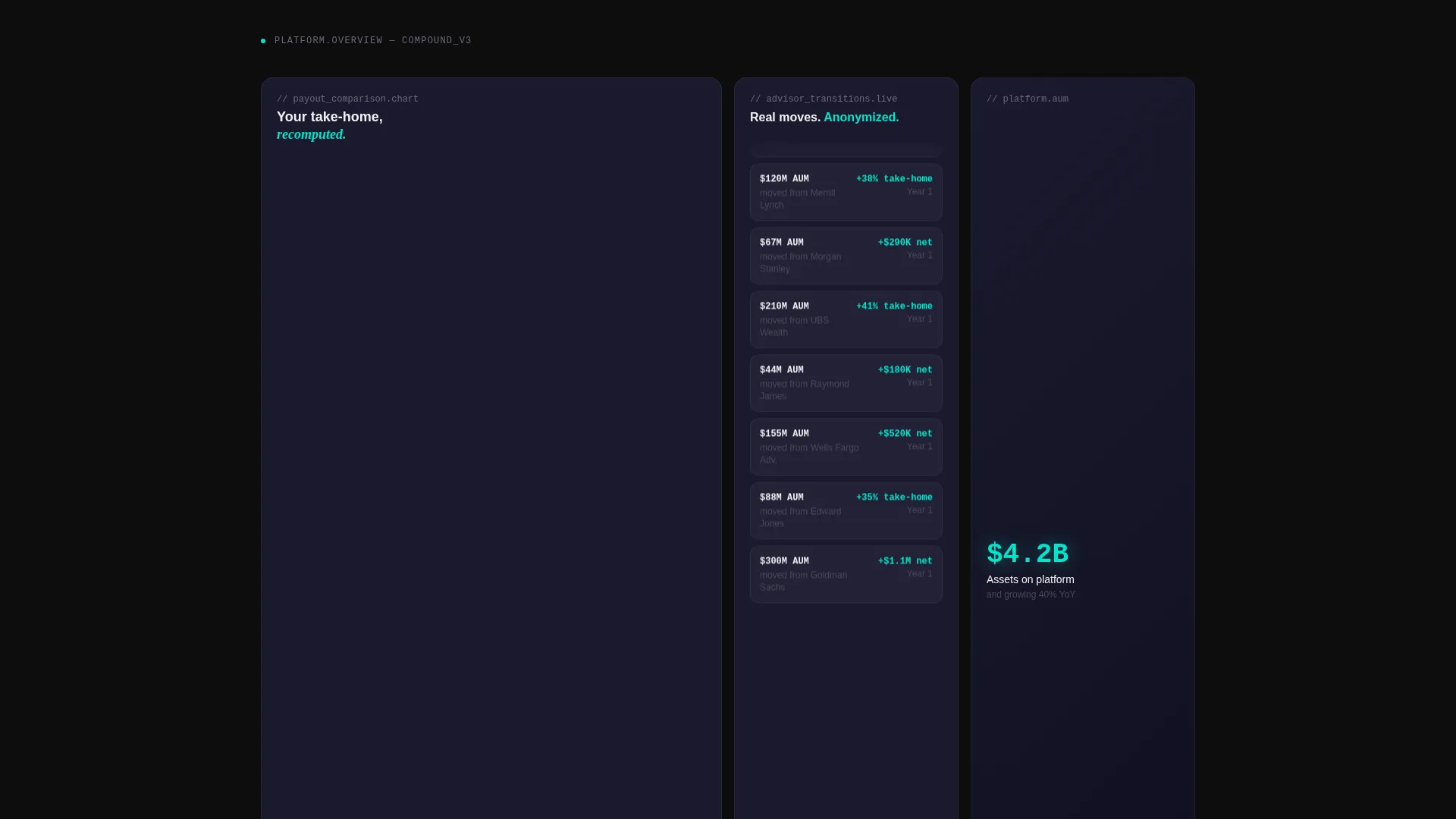
Below the header, the page breaks into asymmetric bento tiles. Each card functions as a discrete data module. The grid never lectures; it instruments.
Payout Comparison Chart Tile
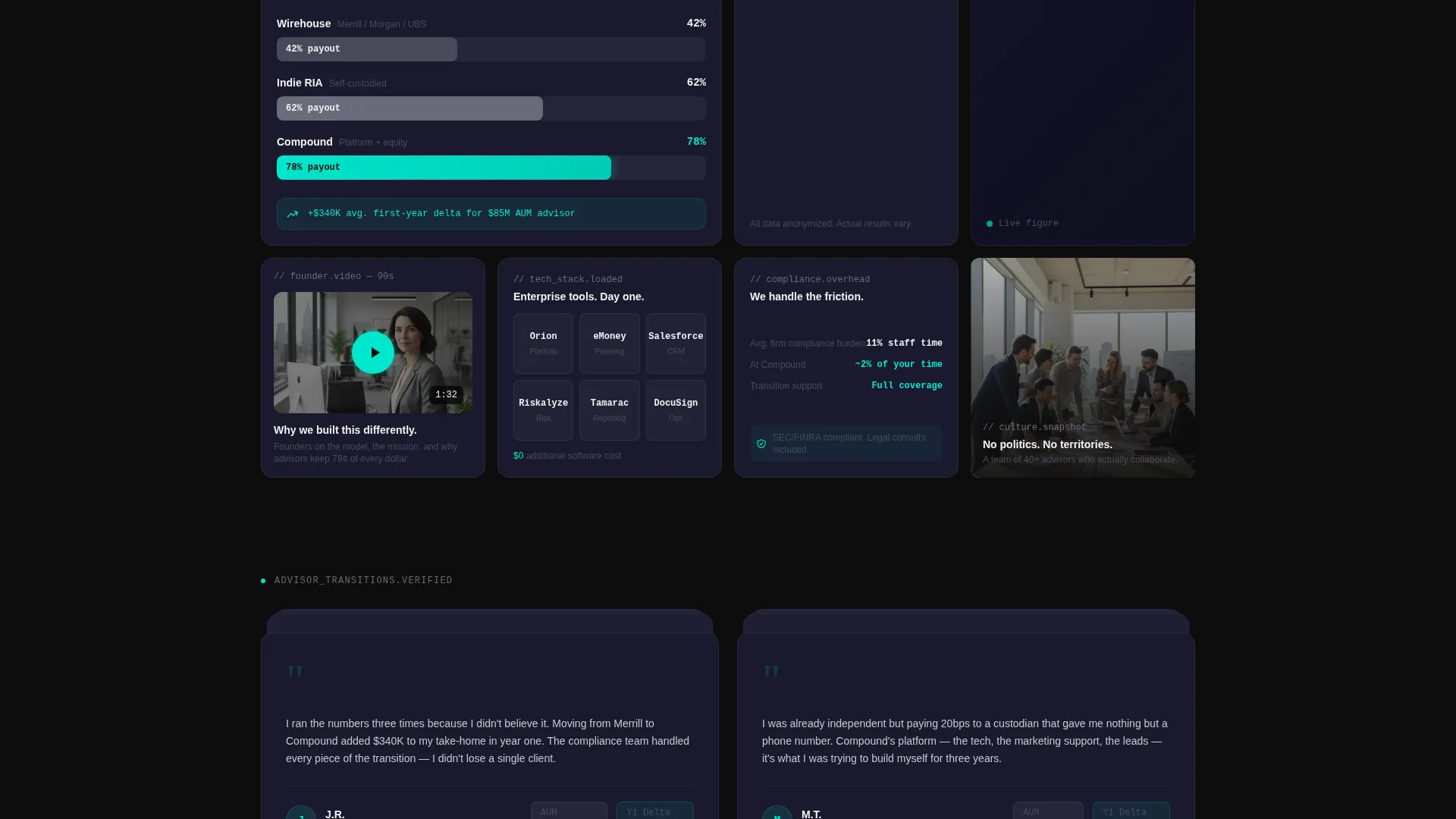
A large tile displays a dynamic side-by-side comparison of payout structures across wirehouse, independent, and the firm's own model. This single visual answers the advisor's core question without requiring them to read a paragraph.
Advisor Transition Story Ticker
A narrow tile cycles through anonymized transition stories, for example: "$120 million AUM, moved from a major wirehouse, plus 38 percent take-home in year one." These short data points build social proof without revealing identities.
Gated Personalized Report
The primary call to action, labeled "Run Your Numbers," unlocks a full personalized compensation report. The report includes equity participation modeling and succession planning scenarios. It gates behind a single form requesting assets under management, current payout percentage, and email address.
Persistent Secondary call to action
A ghost button labeled "Book a Confidential Call" floats persistently in the navigation. This gives advisors who prefer a direct conversation an always-visible path that does not compete visually with the primary calculator flow.
Page sections overview
| Section | Purpose |
|---|---|
| Header Calculator | Shows live compensation output on sample data above the fold |
| Payout Comparison Tile | Compares wirehouse, independent, and firm payout side by side |
| Transition Story Ticker | Cycles anonymized advisor move stories with income uplift figures |
| Founder Video Tile | Delivers a 90-second handheld office video for culture context |
| Tech and Compliance Tiles | Displays tech stack logos and compliance support statistics |
| Culture Snapshot Tile | Provides a quick visual read on firm environment and team |
| Gated Report Form | Captures AUM, payout rate, and email to unlock full projection |
| Persistent Nav call to action | Keeps "Book a Confidential Call" visible throughout the scroll |
Design & branding system
The visual identity follows a Startup Velocity theme built on a Carbon Fiber color system. The palette feels like the dashboard of a performance vehicle at night: dark, instrumented, and precise.
- Background tiles use deep cockpit black (#0D0D0D), with card surfaces lifting in woven carbon gray (#1A1A2E) and titanium mid-tone (#4A4A5A) for depth
- Electric teal (#00E5CC) fires exclusively on interactive states, live data output, and calls to action, making every clickable element feel like a live wire
- Typography renders in signal white (#F0F0F0) with monospaced type used in the calculator header for terminal authenticity
Mobile & speed optimization
The bento grid layout is structured to reflow cleanly from desktop to smaller screens. Heavy visual elements are designed to stay legible and functional at reduced widths without losing their data-module identity.
- Asymmetric tile proportions are defined to adapt across breakpoints without collapsing the grid hierarchy
- The terminal calculator header remains the focal entry point on mobile, keeping the conversion path intact regardless of device
How this template helps you convert
The template is built around a deliberate conversion architecture that earns trust through immediate value before asking for anything in return.
- The above-the-fold calculator delivers real output on sample data instantly, giving visitors a reason to stay and a mental model for their own numbers before any form appears.
- The gated report flow uses a single, low-friction form to exchange a personalized compensation projection for the advisor's contact details, making the ask feel proportional to the value received.
Other information about this template
This template is categorized under financial advisor website templates and is purpose-built for the financial advisor careers page niche. It is a strong fit for firms building a recruiting presence in the registered investment adviser space.
- The template style is bento grid, the theme is Startup Velocity, and the color system is Carbon Fiber
- The creative direction is Calculator/Tool First, the header concept is a Code Snippet, and the landing-page direction is Freemium/Trial
- The intersection match score for this template's niche and design configuration is 13, indicating a highly specific and deliberate alignment between the target audience and the visual system
Theme
Startup Velocity
Creative direction
Calculator/Tool First
Color system
Carbon Fiber
Style
Bento Grid
Direction
Freemium/Trial
Page Sections
Terminal-style Compensation Calculator
Asymmetric Bento Grid Layout
Payout Comparison Chart Tile
Advisor Transition Story Ticker
Gated Personalized Compensation Report
Persistent Secondary Navigation Call to Action
Related questions
Can I edit the sample numbers in the header calculator?
What does the Run Your Numbers form actually unlock?
Who is this landing page template built for?
Is the Book a Confidential Call button always visible?



