General Practitioner Booking Website Template
This directory find and book general practitioner website template gives healthcare directories a calm, trustworthy hub where patients can search vetted GPs by zip code, insurance, and next-available slot. A filterable doctor card grid, a two-step booking overlay, and a 60-second match quiz turn late-night health worries into confirmed morning appointments without friction.
by Rocket studio
Quick summary
This GP directory landing page is built for one clear outcome: a confirmed appointment. Patients arrive stressed and leave with a booking. The hub-and-spoke layout guides every visitor from a smart search bar through vetted doctor profiles, a first-visit timeline, insurance details, and real patient testimonials. Every section earns the next click before asking for a single piece of personal information.
Who this template is for
This template suits anyone building a medical directory that needs to convert nervous visitors into booked patients. It works equally well for operators running a standalone doctors directory and for medical clinic networks expanding their digital intake.
- New-to-town renters and lapsed patients who need a GP quickly and want to see availability before committing personal details.
- Parents replacing a retired pediatrician and HR managers who need a reliable, linkable resource for onboarding new hires into in-network care.
- Healthcare professionals and medical institutions looking to launch a clean, credible provider directory with a built in booking system.
What problem this template solves
Finding a doctor at 11 p.m. is stressful. Most medical website experiences bury availability behind long intake forms. Potential patients abandon the process before they ever see a real slot. This template flips that sequence entirely.
- Visitors see live appointment availability on every doctor card before they enter their name, phone number, or insurance details.
- The layout answers objections in order: credentialing trust, provider browsing, first-visit clarity, insurance cost, and social proof each appear before the visitor can form the next doubt.
- A 60-second match quiz captures undecided visitors and returns a shortlist of three recommended providers, each with its own appointment booking button.
What you get with this template
You get a fully structured, single-page landing page organized as a hub-and-spoke layout with a sticky anchor navigation bar. Every section is prompt-built and purposeful. There is no padding, no filler, and no generic stock-photo aesthetic.
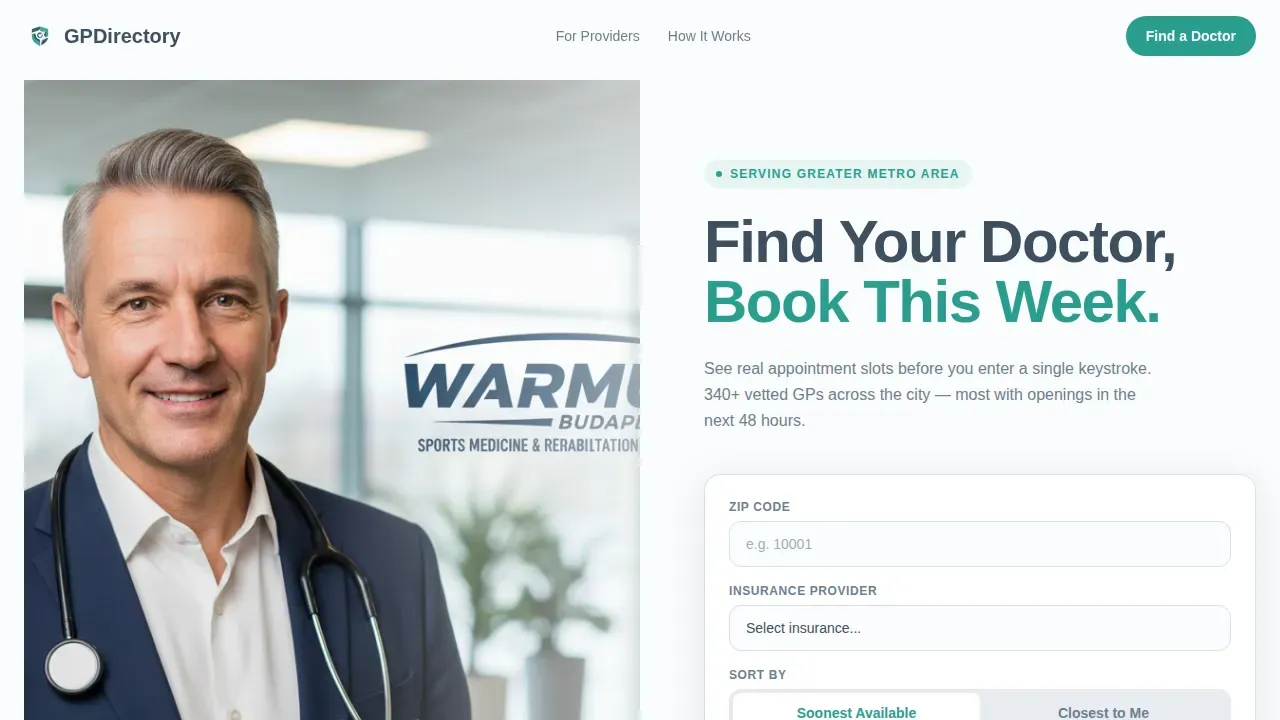
- A split-layout hero with a warm GP photo on the left and a three-field search bar on the right, covering zip code, insurance provider, and a sort toggle between "Soonest Available" and "Closest to Me."
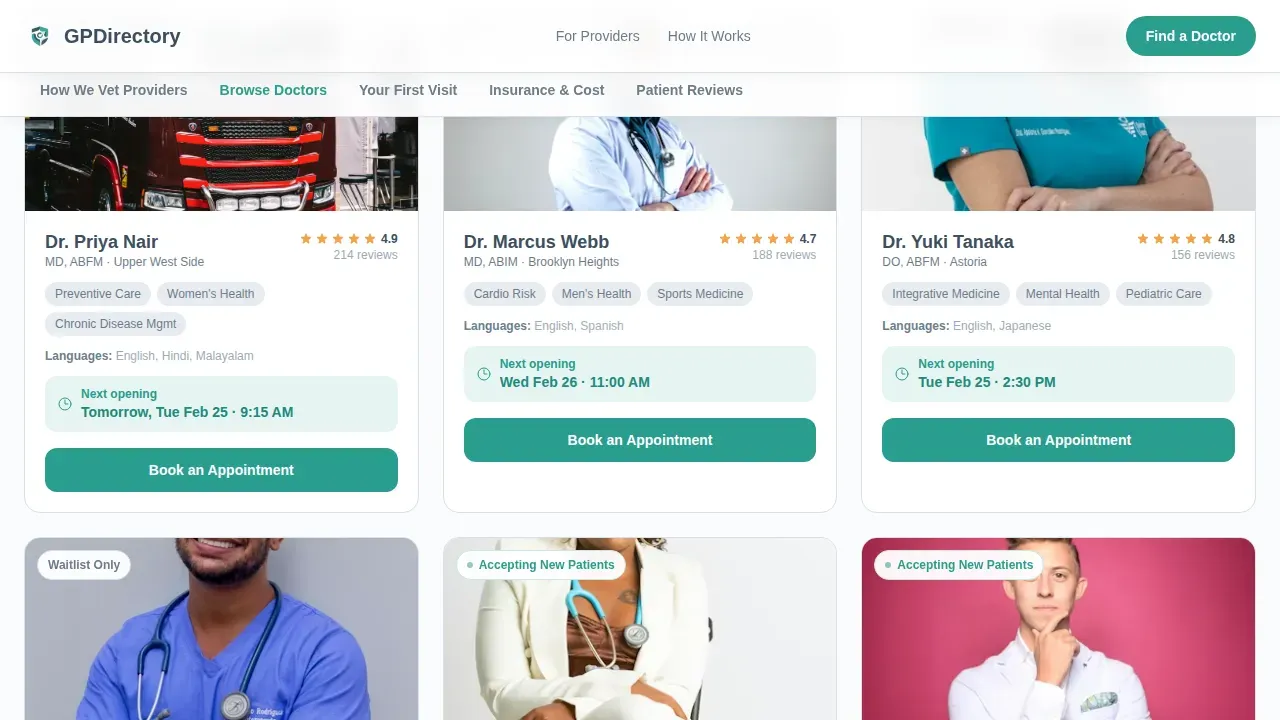
- A filterable doctor card grid where each card shows the doctor's photo, an accepting-new-patients badge, three specialty interests, a star rating, and a real-time next-opening line such as "Next opening: Wed 9:15 AM."
- A two-step booking overlay, a five-step first-visit visual timeline, an insurance lookup tool, and audio-style patient testimonial cards with transcripts.
Feature list
This template is specifically designed to deliver a comprehensive suite of booking and discovery tools. Below are the key features built into this landing page.
Filterable Doctor Card Grid
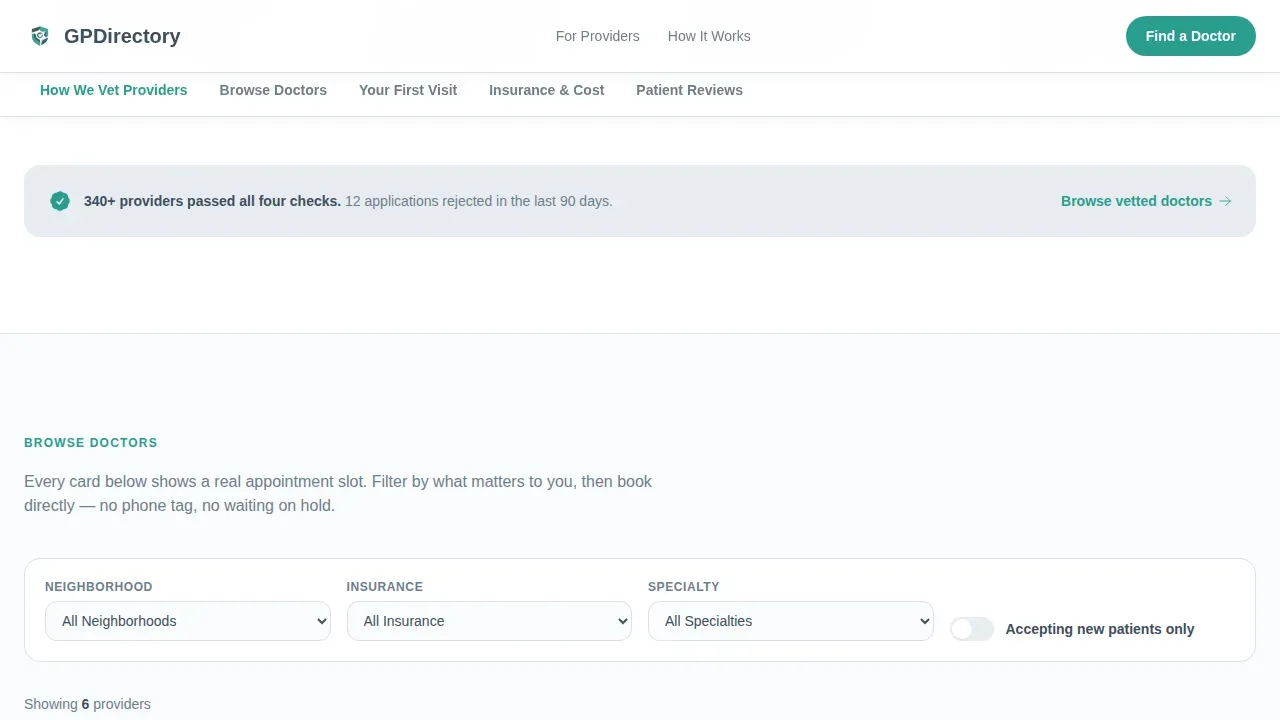
Each doctor card displays a photo, an accepting-new-patients badge, three specialty interest tags, a star rating, and a real-time next-available appointment line. Visitors can filter by neighborhood, specialty, and availability without leaving the page. The staggered card entry animation keeps browsing visually comfortable.
Two-Step Appointment Booking Overlay
Clicking "Book an Appointment" opens a focused two-step overlay. Step one shows the doctor's live calendar for date and time selection. Step two collects name, phone number, date of birth, and insurance ID. This appointment booking system shows availability first, so the visitor is already committed before they type a single character.
60-Second Provider Match Quiz
Visitors who are not ready to choose a doctor can take a three-question quiz instead. The quiz returns a shortlist of three recommended providers, each with a direct booking button. This secondary path reduces drop-off and captures potential patients who need a little guidance before they book appointments online.
Sticky Anchor Navigation Bar
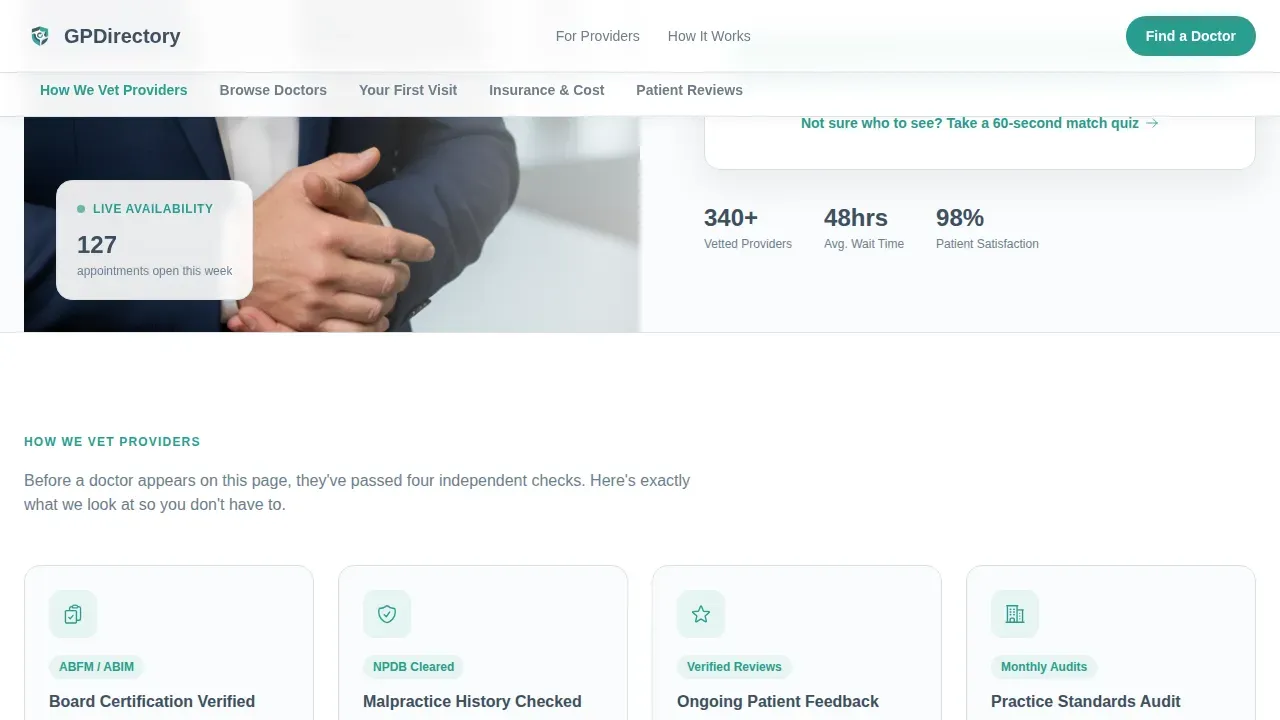
A five-spoke anchor nav appears below the hero and stays fixed during scroll. Spoke labels are: How We Vet Providers, Browse Doctors, What Your First Visit Looks Like, Insurance and Cost, and Patient Reviews. Each section opens with one clarifying sentence so the visitor always knows why they are reading what they are reading.
First-Visit Visual Timeline
A five-icon illustrated timeline walks patients through the full doctor appointment sequence: book, intake form, vitals, consultation, and follow-up plan. This section removes first-timer anxiety and improves patient experience by showing that the process is short, clear, and predictable.
Audio-Style Patient Testimonial Cards
Patient reviews appear as short audio-clip style cards with full transcripts. This format feels personal rather than manufactured, building trust more effectively than plain star ratings. Testimonials directly support patient satisfaction signals that help potential patients feel confident choosing a provider.
Page sections overview
| Section | Purpose |
|---|---|
| Hero search area | Search by zip, insurance, and sort preference; primary "Book an Appointment" call to action |
| How We Vet Providers | Credentialing process, board certification details, and the patient feedback loop |
| Browse Doctors | Filterable card grid with real-time availability, specialty tags, and per-card booking |
| First Visit Timeline | Five-step illustrated flow from booking through follow-up to reduce new-patient anxiety |
| Insurance and Cost | Insurance lookup tool and transparent pricing tables for common medical services |
| Patient Reviews | Audio-style testimonial cards with transcripts for credibility and social proof |
Design & branding system
The visual identity follows an Educational Guide theme. The palette was chosen to feel like a freshly pressed lab coat: spotless, trustworthy, and clinical without being cold. Every design element serves legibility and patient confidence.
- Arctic White (#FAFBFC) covers primary backgrounds; Glacier Gray (#E8ECF1) is used for card surfaces and section dividers; Steady Slate (#3D4F5F) handles all body text and doctor-name headings.
- Teal (#2A9D8F) appears exclusively on buttons, active anchor nav indicators, and availability badges, making every interactive element instantly recognizable.
- Typography uses Plus Jakarta Sans for body copy and user interface elements, and DM Sans for headings, producing a modern design that is readable on both desktop computers and small screens.
Mobile & speed optimization
Over 60 percent of patients search for a doctor using mobile devices, often late at night when urgency is highest. This template is built mobile-first to serve that use case without compromise. The layout is fully responsive design, adjusting cleanly from smartphone to desktop computers.
- A floating "Book an Appointment" bar appears at the bottom of the screen on mobile, keeping the primary call to action reachable at all times without scrolling back to the top.
- Interactive elements like the search filters, booking overlay, and match quiz are built as client-side components within a static shell, so the page loads fast and the interactive islands activate without blocking the rest of the content.
- The clean website structure and well-organized anchor navigation keep the experience user friendly on any screen size, reducing the chance that a stressed visitor abandons before booking.
How this template helps you convert
The page is engineered around a single principle: prove that an appointment exists before asking for any personal information. This sequence builds trust and eliminates the most common reason patients leave a medical website without booking.
- The hero search bar surfaces real availability instantly. Visitors see matching doctor profiles with next-opening times before they scroll even once, removing the biggest early objection and setting a confident tone for the rest of the page.
- Every section of the hub-and-spoke layout pre-empts the next visitor doubt. Provider vetting builds credibility. The first-visit timeline removes process fear. The insurance tool eliminates cost uncertainty. Patient testimonials confirm that real people have had a good experience. By the time the visitor reaches the booking overlay, every barrier has been addressed.
- The floating mobile booking bar and the per-card "Book an Appointment" button mean the conversion action is never more than one tap away, whether the visitor is on a smartphone at midnight or on a desktop computer during a lunch break.
Other information about this template
This landing page sits within a broader ecosystem of doctor website templates and medical directory solutions that healthcare operators use to build their professional online presence. Understanding how this template compares to common alternatives helps buyers choose the right template for their specific use case.
- This template is a theme designed specifically for GP directories and functions as a complete solution for appointment booking, provider discovery, and patient trust building in a single-page format.
- Other popular doctor website templates in the medical industry include options built on wordpress themes such as Doctreat, which includes advanced search and user profiles, and Listeo, which features a built in booking system. Mfine is a medical and doctor directory listing HTML template offering over 40 pre-built pages. Dactor is a template tailored specifically for medical doctors with pre-built booking forms and CMS integration. ProClinic is a patient-centric option featuring a robust search system for doctor profiles and appointment booking.
- The elementor page builder ecosystem also supports several medical templates and wordpress themes suited to medical clinic operators, multi specialty clinics, dental clinics, and medical centers looking to create pages quickly without custom development.
- Many doctor website templates in this category support google maps integration, which helps patients find the nearest doctor's office through a location-based search feature.
- For operators who want to track website traffic and measure how well their new website converts, tools such as google analytics can be connected to the published site independently of the template itself.
- A strong doctors directory landing page can support seo optimization efforts that help the site rank higher in search engine results, making it easier for more patients to find the practice through search engines.
- This template does not include a blog section or online pharmacy features by default. However, the design system supports customizable service pages, so operators can extend the layout if their medical practice requires additional content such as a blog section to improve search results and attract more visitors.
- Patient records and patient privacy handling depend entirely on the backend systems the operator connects. The template provides the front-end booking interface; compliance with relevant standards is the responsibility of the implementing team.
- The template also works well for alternative medicine providers, social media platforms linking to a booking hub, and professional doctor directories serving medical professionals across multiple specialties.
- Building websites in the medical industry requires balancing professional design with genuine warmth. This template achieves that balance through its documentary-style photography direction, its transparent process structure, and its focus on showing availability before collecting data, which is a core principle that separates quality medical website experiences from generic ones.
Theme
Educational Guide
Creative direction
Transparent Process
Color system
Arctic White
Style
Hub & Spoke (Anchor Nav)
Direction
Booking/Scheduling
Page Sections
Filterable Doctor Card Grid with Live Availability
Two-step Appointment Booking Overlay
Second Provider Match Quiz
Sticky Five-spoke Anchor Navigation
First-visit Visual Timeline
Audio-style Patient Testimonial Cards
Related questions
Does this template show real appointment availability?
Who is the match quiz designed for?
Is this template suitable for mobile users?
Can the design be adjusted to match a practice's branding?
What sections come built into this template?



