Surgeon (General) Booking Website Template
Consult is a sidebar companion landing page for board-certified general surgeons offering virtual consultations. It guides anxious patients from first question to confirmed appointment with a transparent three-step process, honest condition checklist, and a fixed booking sidebar visible on every scroll. The design feels clinical but warm, built for trust before commitment.
by Rocket studio
Quick summary
Consult is a single-page virtual surgical consultation template built for general surgeons. It opens with a real patient testimonial, walks visitors through an honest three-step process, and keeps a fixed booking sidebar in view throughout. Every section is designed to reduce medical anxiety and move patients toward scheduling a video consultation.
Who this template is for
This template is built for general surgeons and surgical practices offering virtual consultations to patients facing unexpected surgical recommendations. It serves both individual surgeons and small practices that want a professional, conversion-focused page without building from scratch.
- General surgeons offering video-based second opinions or post-operative follow-ups
- Surgical practices serving adult patients with hernia, gallbladder, appendix, or post-op questions
- Clinicians who want a credible booking page that earns patient trust before asking for commitment
What problem this template solves
Patients who receive a sudden surgical recommendation often spend days searching for clarity. They face long waits for referral appointments, confusing medical language, and no obvious way to ask a follow-up question at 9 PM. This template gives surgeons a page that meets patients exactly at that moment of uncertainty.
- Patients lack a fast, trustworthy path to a qualified surgical opinion without waiting weeks
- Surgeons have no structured way to present their credentials, process, and availability in one place
- Visitors who aren't ready to book need a secondary path that keeps them engaged rather than gone
What you get with this template
This template delivers a complete, ready-to-customize landing page structure with all core sections pre-built. Every element maps to a specific patient concern, from first impression through final booking action.
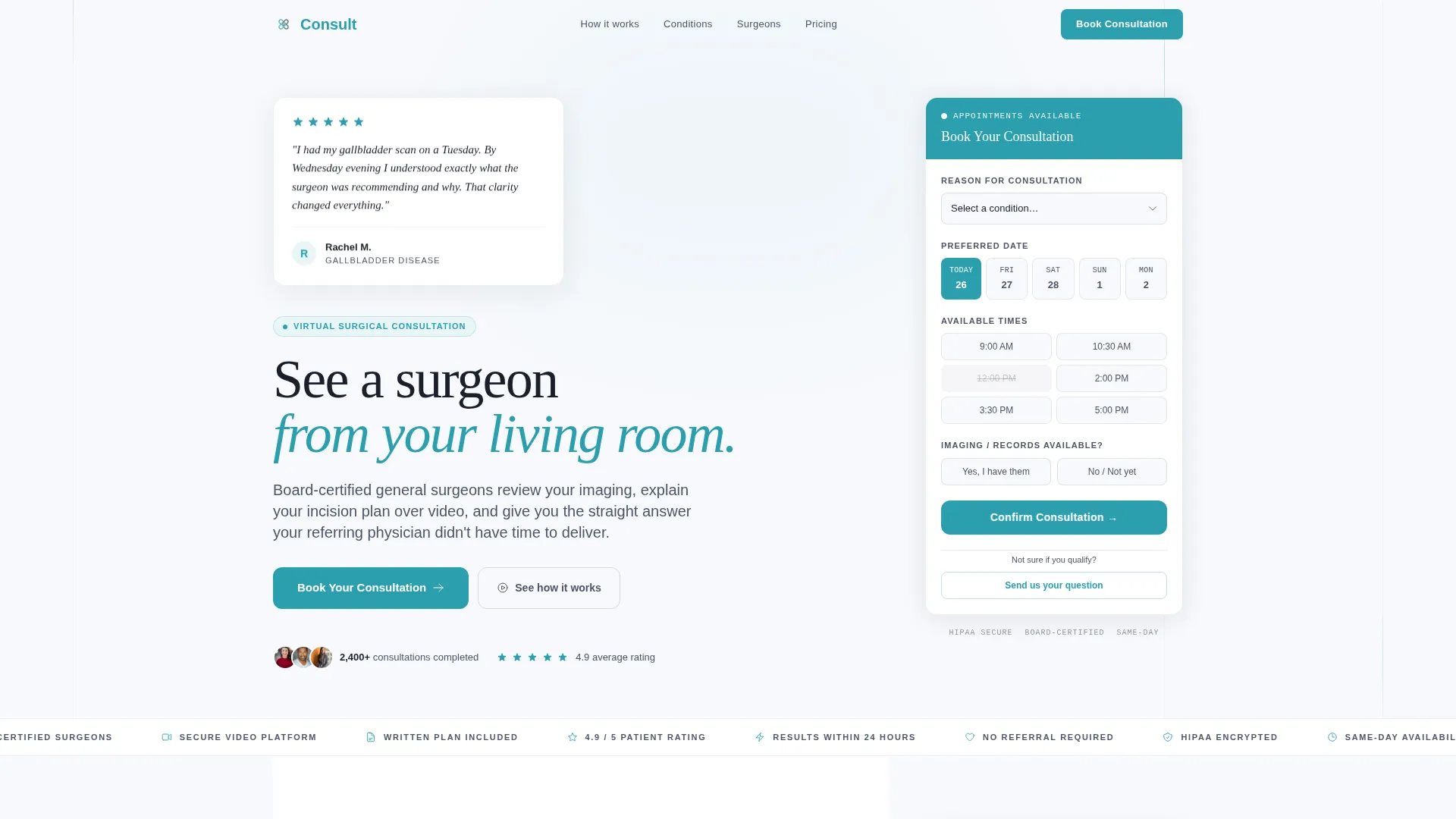
- A hero section with a floating testimonial card, editorial headline, and teal call-to-action button
- A fixed sidebar booking form with a consultation-reason dropdown, date and time selector, and imaging upload option
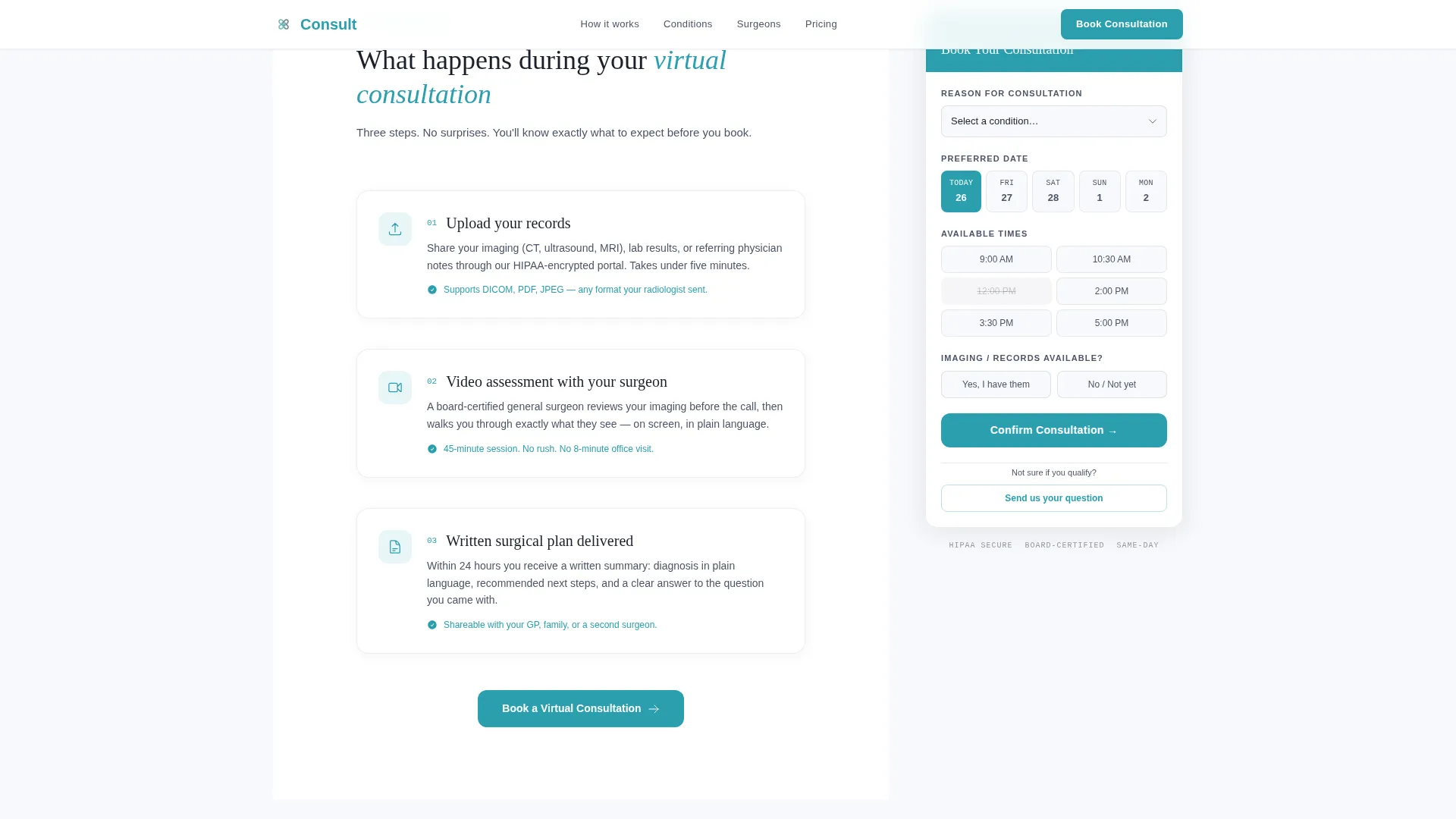
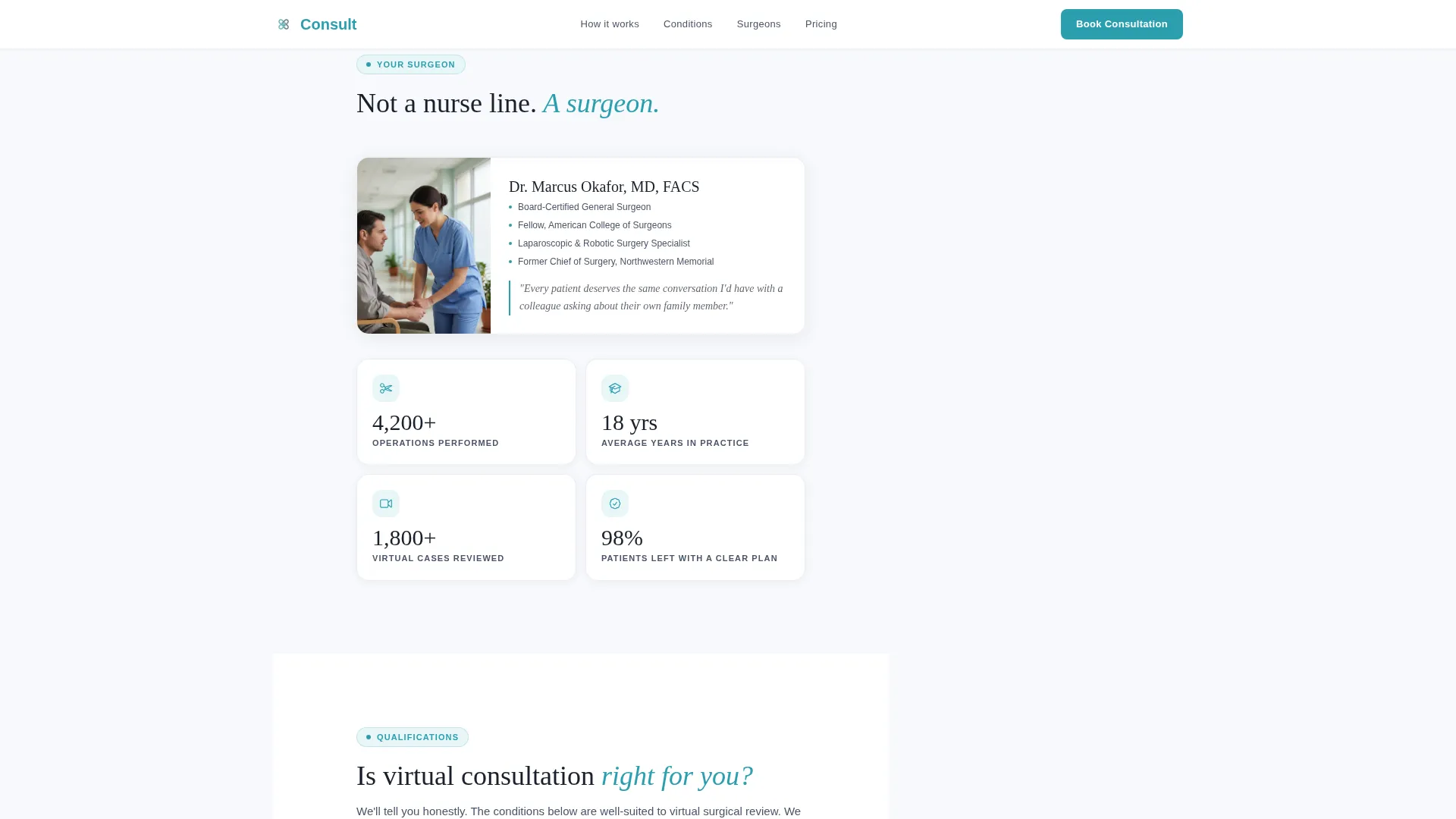
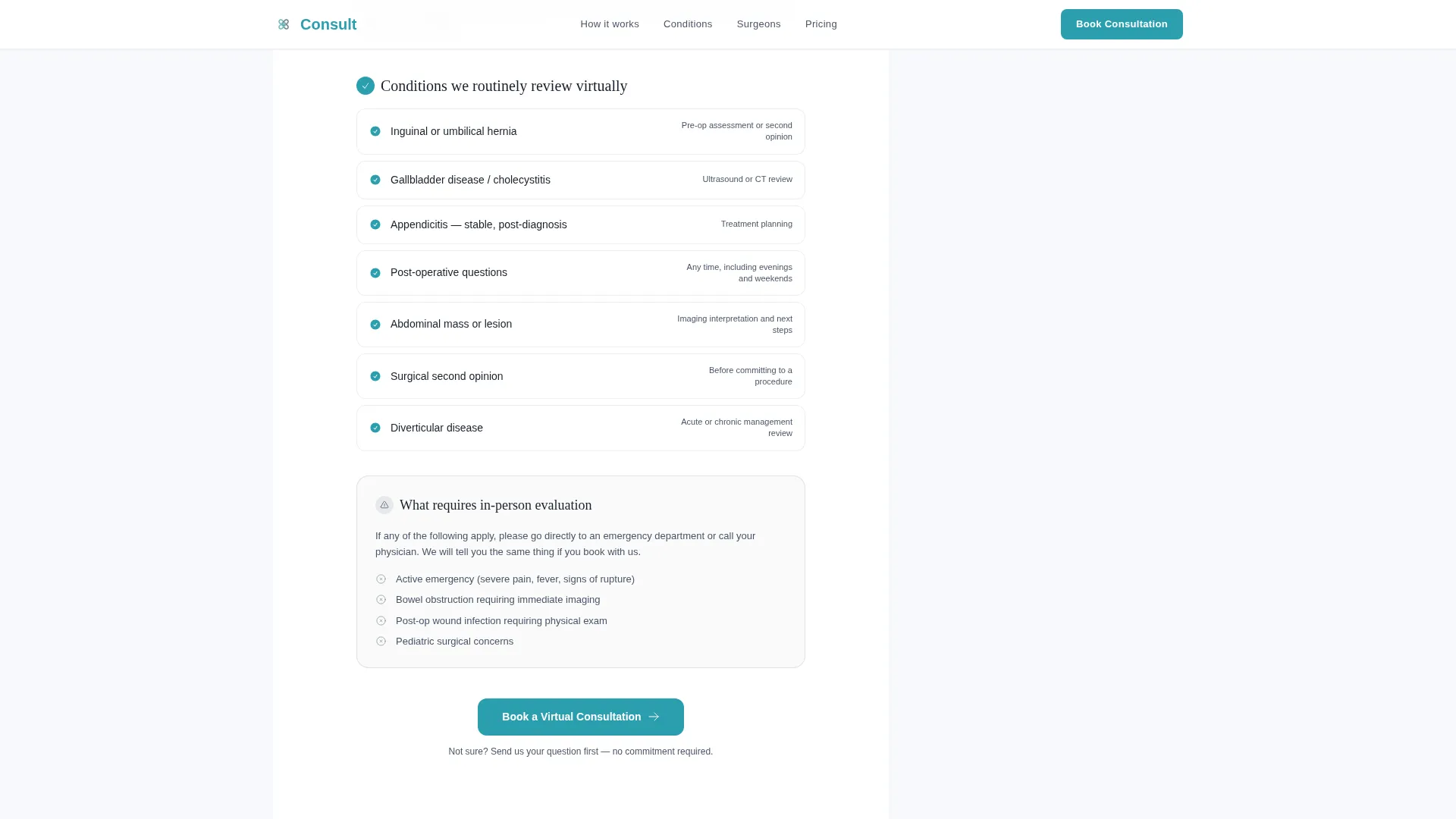
- A transparent three-step process timeline, surgeon credential stats, and an honest condition qualification checklist
Feature list
This template includes six purpose-built sections and a persistent booking companion. Each feature is grounded in the patient journey from uncertainty to scheduled appointment.
Fixed Sidebar Booking Form
A sidebar form stays visible on the right as visitors scroll the full page. It includes a dropdown for consultation reason, a preferred date and time slot selector, and a field indicating whether imaging or records are available to upload.
Floating Testimonial Hero Card
The header opens with a single patient story on clean white space. It shows a real first name and initial, a five-star indicator, and two sentences capturing the emotional before and after. No stock photography is used.
Three-Step Process Timeline
A clear timeline explains exactly what happens during a virtual surgical consultation. The three steps cover uploading medical records, completing a video assessment with the surgeon, and receiving a written plan.
Surgeon Credential Stats Grid
Surgeon credibility is shown as a bento-style grid of counts rather than a traditional resume. It displays operations performed, years in practice, and conditions reviewed virtually, giving patients immediate confidence signals.
Honest Condition Qualification Checklist
A conditions section lists what qualifies for a virtual consultation and, importantly, what requires an in-person evaluation. This transparency builds trust by volunteering the template's own scope limitations.
Secondary Inquiry Path
A soft call-to-action reads "Not sure if you qualify? Send us your question." It captures visitors who are not ready to book but need reassurance before committing to a consultation slot.
Page sections overview
| Section | Purpose |
|---|---|
| Hero Testimonial Card | Opens with patient story and primary booking button |
| Fixed Booking Sidebar | Persistent form visible throughout entire page scroll |
| Three-Step Process | Explains upload, video assessment, written plan flow |
| Surgeon Credentials Grid | Displays operative stats and years of experience |
| Conditions Checklist | Lists qualifying and non-qualifying conditions honestly |
| Final Call to Action | Closes with reassurance copy and booking confirmation prompt |
| Footer | Single-row linear footer with practice links |
Design & branding system
The visual identity follows a Medical Clarity theme using a Cloud Canvas color system. The palette feels like a sunlit consultation room: sterile without being cold, precise without being intimidating.
- Soft clinical white (#F7F9FC) dominates all backgrounds with generous spacing; calm slate (#4A5568) holds the informational structure; reassuring teal (#2B9EAF) appears only on primary buttons and progress indicators
- Typography pairs Fraunces serif for headlines with DM Sans for body text, creating an editorial yet approachable feel
- Warm graphite (#1A202C) carries all body text, ensuring strong readability without harsh contrast
Mobile & speed optimization
The template is designed desktop-first, with the fixed sidebar companion as the primary interaction layer. On smaller screens, the sidebar collapses gracefully so mobile visitors still reach the booking form without friction.
- The hero section uses a static layout for fast initial load, while the sidebar booking form runs as a client-side component
- Scroll reveal animations and staggered card entrances are set to medium intensity, keeping the page lively without slowing the experience
- Spotlight hover effects on credential cards add interactivity on desktop without affecting mobile usability
How this template helps you convert
The page is structured around a principle: earn the click by showing the process before asking for commitment. Each section answers the next question forming in the visitor's mind, building confidence in a deliberate sequence.
- The hero testimonial and headline establish emotional safety immediately, before any form or price is visible, so visitors stay rather than bounce.
- The transparent process timeline and honest conditions checklist reduce the medical unknown to a clear sequence, making scheduling feel low-risk and straightforward.
- The persistent sidebar keeps "Book a Virtual Consultation" one click away at every stage, while the secondary inquiry path retains visitors who need one more reassurance before committing.
Other information about this template
This template is categorized under Health and Medical as a Surgeon General Website template, specifically aligned with the Surgeon General Virtual Consultation Page niche. It is built as a Sidebar Companion layout, which distinguishes it from standard single-column medical landing pages.
- The template uses a Transparent Process creative direction, meaning every section is sequenced to answer the visitor's next logical question
- The header concept is a Testimonial Card, an intentional choice to lead with patient voice rather than clinical credentials
- The booking form supports consultation reasons including hernia, gallbladder, appendix, post-operative follow-up, second opinion, and other
- The footer follows Pattern 1, a linear single-row layout keeping the page clean and focused on the primary conversion goal
- Localization is set for English, USD pricing context, and United States date format
Theme
Medical Clarity
Creative direction
Transparent Process
Color system
Cloud Canvas
Style
Sidebar Companion
Direction
Booking/Scheduling
Page Sections
Fixed Sidebar Booking Form
Floating Testimonial Hero Card
Three-step Process Timeline
Surgeon Credential Stats Grid
Honest Condition Qualification Checklist
Secondary Inquiry Call to Action
Related questions
What type of surgeon practice is this landing page designed for?
Can I customize the booking form fields and consultation reasons?
Does the page address patients who are unsure whether they qualify?
What makes this template different from a standard medical website template?
Is the template suitable for both desktop and mobile visitors?



