Container Home Developer Landing Page Template
Contain is a precision-crafted landing page template for container home developers. It presents completed projects in a cinematic gallery-walk layout, guiding visitors from a location-input header through alternating project showcases to a final configuration call to action. Built for firms that deliver crane-set, code-compliant homes, it earns trust through finished evidence before asking for a click.
by Rocket studio
Quick summary
Contain is a single-page template designed for container home developers who need to prove finished results before asking for commitment. The layout walks visitors through completed projects in a curated zigzag gallery, opens with a location input, and closes with a brass-on-navy "Configure Your Build" call to action that carries the entered zip code forward.
Who this template is for
This template is built for development firms that convert decommissioned shipping containers into permanent, code-compliant residential homes. It speaks directly to the clients those firms serve and the decision-makers who fund those projects.
- Land-owning millennials priced out of traditional construction who want a credible, visual proof of concept before committing
- Rural property investors building rental portfolios on tight margins who need to see real specs and real cost
- Municipal housing directors evaluating scalable, dignified affordable housing options at volume
What problem this template solves
Container home developers face a specific trust gap. Visitors arrive skeptical, unsure whether container homes pass inspection, look livable, or actually get delivered as promised. A generic real estate template does nothing to close that gap.
- There is no visual proof that finished homes exist, are occupied, and met code requirements
- Visitors cannot quickly compare configurations, square footage, build timelines, or final costs
- The path from curiosity to a configuration conversation is unclear, so visitors leave without acting
What you get with this template
You get a fully structured, single-page layout that moves visitors through a deliberate sequence, from location discovery to project evidence to a confident call to action. Every section is designed to carry weight.
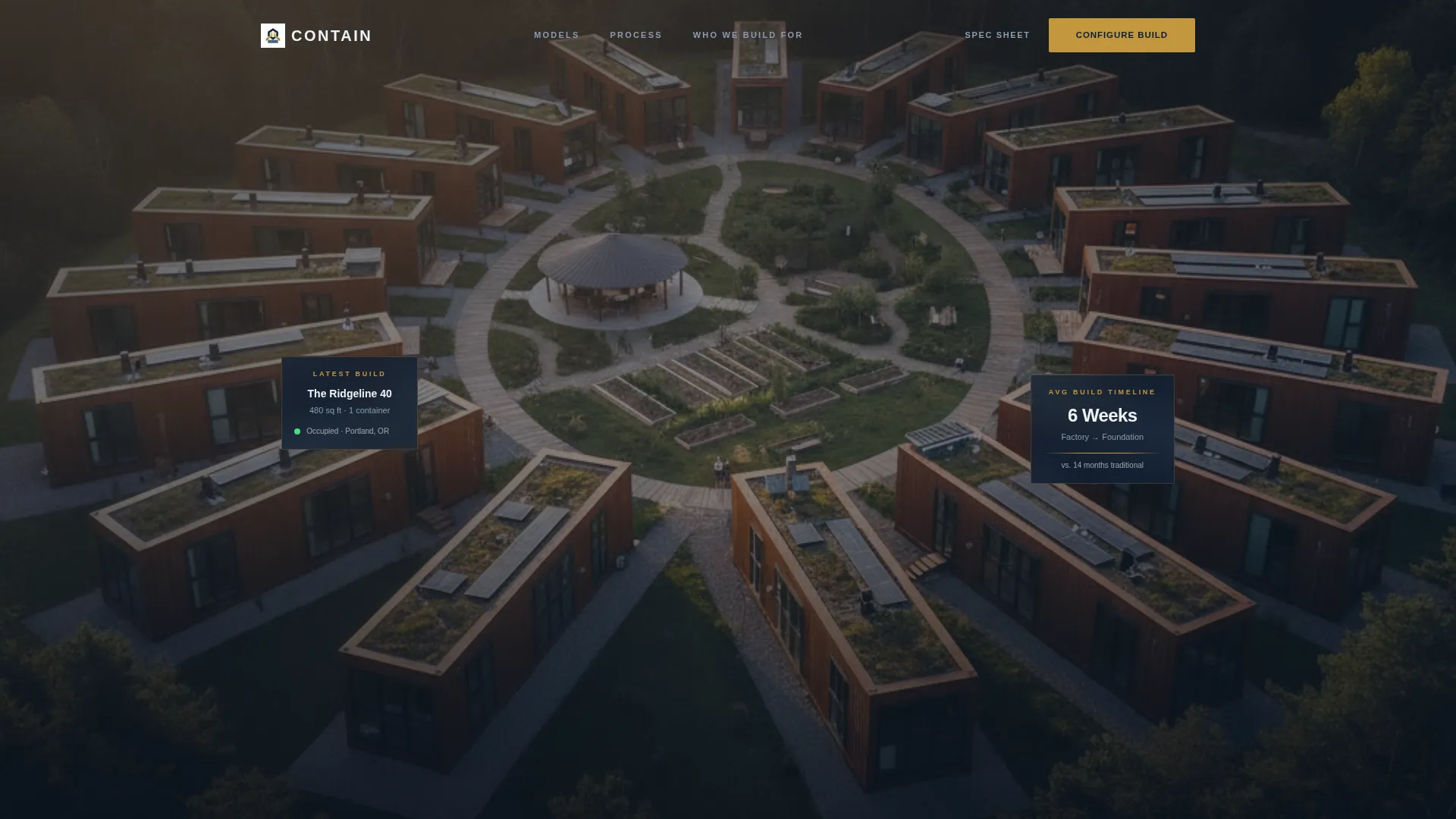
- A location-input header with zip-code autofill and a pulsing brass "Explore Models" button centered over an aerial drone-shot background
- A zigzag gallery of completed project panels, each pairing an architectural-quality photograph with museum-placard-style specs
- A full-width closing call-to-action panel and a secondary "Download the Spec Sheet" text link for visitors not yet ready to configure
Feature list
This template is built around a clear set of structural and visual capabilities drawn directly from the brief.
Location-Input Hero Header
The header centers a commanding search field over a slow aerial drone-shot background of a completed container home community at golden hour. Visitors enter their lot address, the field autofills zip codes, and a pulsing brass "Explore Models" button initiates the journey. The composition is symmetrical with tight, sans-serif typography.
Zigzag Gallery Project Panels
Each alternating section presents one completed project as a curated exhibit. The left panel holds an architectural-magazine-quality photograph. The right panel renders specs like a museum placard, showing square footage, container count, build timeline, and final cost. Orientation flips with each new project, creating a natural scroll rhythm.
Editorial Cadence Breakers
Between project panels, thin brass divider lines and pull-quotes from homeowners interrupt the scroll just enough to feel editorial rather than repetitive. This pacing mirrors walking through a gallery, keeping visitors engaged through a sequence that escalates from a single-container studio to a triple-stacked family compound.
Persistent "Configure Your Build" Call to Action
The primary call to action appears first beneath the header input and then anchors the base of every project panel. It is styled in brass on navy and carries the visitor's entered zip code forward to a detailed model configuration page, removing friction from the handoff.
Secondary Spec Sheet Lead Capture
A text-link secondary call to action, "Download the Spec Sheet," appears alongside the primary button for visitors who are not yet ready to configure. It captures email contact without requiring a full form on the page, keeping the main flow clean.
Escalating Project Sequence
The gallery is structured to build ambition across the scroll. Projects begin with a single-container studio and progress to a triple-stacked family compound. Each panel adds evidence that these homes exist, passed inspection, and are occupied, so the final call to action feels like a natural next step rather than a sales push.
Page sections overview
| Section | Purpose |
|---|---|
| Location Input Header | Captures lot address, initiates model discovery |
| First Project Panel | Presents single-container studio with specs |
| Brass Divider Pull-Quote | Breaks cadence with homeowner social proof |
| Second Project Panel | Shows mid-size configuration with specs |
| Brass Divider Pull-Quote | Reinforces credibility with editorial pacing |
| Third Project Panel | Displays triple-stacked family compound |
| Full-Width call to action Panel | Drives click to model configuration page |
Design & branding system
The visual identity follows a Corporate Precision theme. The palette draws from the hull of a cargo ship repainted for a boardroom presentation, every surface deliberate and powder-coated in restraint.
- Deep command navy (#0B1D33) anchors primary backgrounds, pressed-uniform slate (#3D5A80) fills secondary panels, and architectural white (#F0F3F7) surfaces all content areas
- Riveted brass (#C4973B) marks every call-to-action element, interactive button, and structural accent line, creating a consistent visual signal for action
- Typography is tight and sans-serif throughout, reinforcing the precision engineering story without decorative distraction
Mobile & speed optimization
The template is structured to remain readable and navigable on smaller screens without losing the visual weight of the gallery panels.
- The zigzag layout collapses to a single-column stacked sequence on mobile, keeping photograph and spec placard in clear vertical order
- The location-input header and brass call-to-action buttons remain full-width and thumb-friendly at every breakpoint
- Thin brass divider lines and pull-quote blocks scale cleanly, preserving editorial rhythm across device sizes
How this template helps you convert
The page is designed as a click-through experience. It earns the configuration click by presenting finished proof before making any ask.
- The location-input header creates immediate personal relevance, connecting the visitor's specific lot to the developer's model range before a single scroll
- Each project panel adds a layer of evidence, showing real specs, real timelines, and real costs, so objections dissolve naturally as the visitor moves down the page
- By the time the visitor reaches the closing full-width call-to-action panel, the question is no longer whether container homes work but which model fits their lot
Other information about this template
This template is part of a real estate landing page category focused on container home development. It is built around a Click-Through landing page direction, meaning the entire page flow is optimized to earn one meaningful click rather than to capture a form submission on the page itself.
- The template style follows a split-screen 50/50 approach for each project panel, placing visual evidence and structured data side by side at equal weight
- The creative direction is a Gallery Walk, where each section functions as a standalone exhibit within a continuous editorial sequence
- The header concept uses a location-input field rather than a traditional stats or metrics block, making the entry point feel personal and property-specific
- This template suits firms operating in the container home real estate space, including those serving affordable housing programs, rural investment builds, and custom residential projects
- The design system is transferable to related niches such as modular home development, prefabricated housing, and alternative construction firms that need to lead with finished visual proof



Theme
Executive Suite
Creative direction
Case Study Narrative
Color system
Midnight Blue
Style
Split Screen (50/50)
Direction
Click-Through
Page Sections
Location-input Hero Header
Zigzag Gallery Project Panels
Editorial Cadence Breakers
Persistent Configure Call to Action
Secondary Spec Sheet Capture
Escalating Project Sequence
Related questions
Does this template include a contact form?
Can I update the project panels with my own completed homes?
How many project panels are included by default?
Is this template suitable for investors and housing directors, not just homeowners?
What happens to the zip code a visitor enters in the header?



