Specialist Joint & Family Finance Professional Website Template
The Ledger precision joint checking account landing page template is a split-screen, quiz-led landing page built for two. It guides couples, partners, and family co-holders through a multi-step financial compatibility assessment and an interactive spending simulator before presenting a personalized account recommendation. The result is a page that feels like a shared financial tool, not a product brochure.
by Rocket studio
Quick summary
The Ledger template is a high-interactivity, single-page experience designed for joint and family checking account products. It opens with a split-screen compatibility quiz, deepens through a live spending simulator, and closes with a personalized call to action. Every scroll section earns attention by showing visitors their own numbers before asking them to apply.
Who this template is for
This template is built for fintech teams, consumer banking brands, and financial services product owners who need a landing page that converts two decision-makers at once. It is equally strong for boutique credit unions, digital-first banks, and professional financial services firms launching a joint account product.
- Newlyweds and cohabitating partners merging finances for the first time
- Adult children managing a shared household account with aging parents
- Unmarried partners splitting rent and recurring payments who need more structure than informal settlements
What problem this template solves
Shared financial management is genuinely complicated. Most joint account landing pages read like generic bank brochures. They list features, skip the emotional friction, and send visitors away before they feel understood. The result is high bounce rates and low application starts.
This template solves that by leading with the visitor's own situation. The quiz captures how they currently handle shared spending. The simulator reflects their actual numbers back in real time. By the time the primary call to action appears, the visitor already feels like the account was built for their household.
- Eliminates the "we'll figure it out later" friction that prevents couples from opening a joint account
- Replaces passive feature lists with an interactive account ledger experience that earns trust
- Gives financial services teams a structured format that converts two co-applicants simultaneously
What you get with this template
The template delivers a complete, interactive landing page with every section pre-built and ready to customize. The design system, animation behavior, section logic, and call-to-action flow are all defined in the source files.
- A five-section page including hero, simulator, account structure grid, testimonials, and final call to action
- A multi-step compatibility quiz and a live shared spending simulator with dynamic balance output
- A Corporate Precision design system using charcoal, amber, cream, and ink-black with DM Sans and JetBrains Mono typography
Feature list
This template is built around one principle: let visitors experience the account before they apply. Every feature below supports that goal.
Multi-Step Compatibility Quiz Header
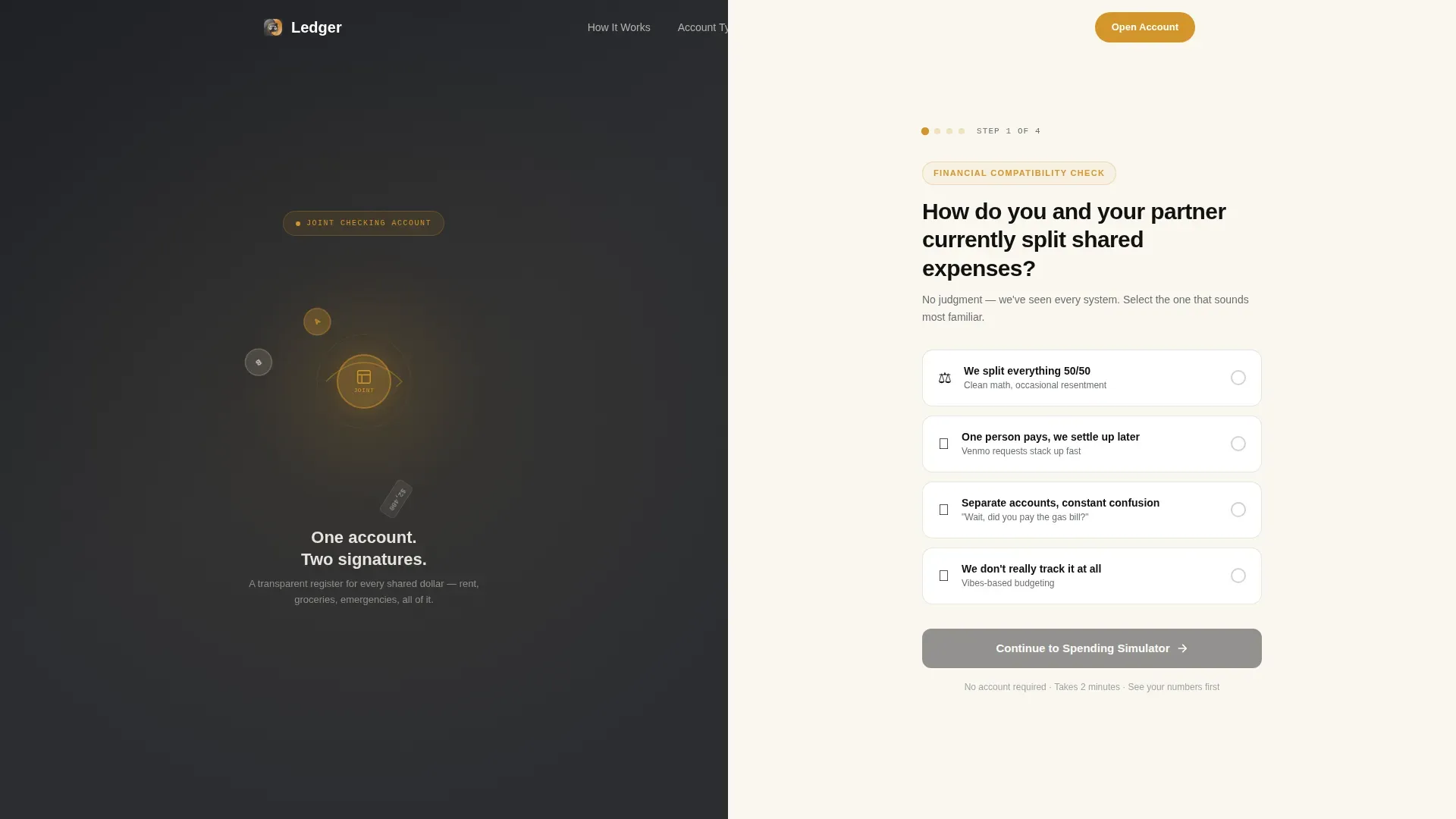
The header splits the viewport 50/50. The left panel holds an abstract orbital illustration of two connected account holders. The right panel presents the first quiz step, asking visitors how they currently split shared expenses. Four selectable cards cover the most common household arrangements. Each selection shifts the amber accent tone, giving immediate visual feedback that the page is responding to input. No sign-up is required at this stage. The quiz earns attention before asking for commitment.
Interactive Shared Spending Simulator
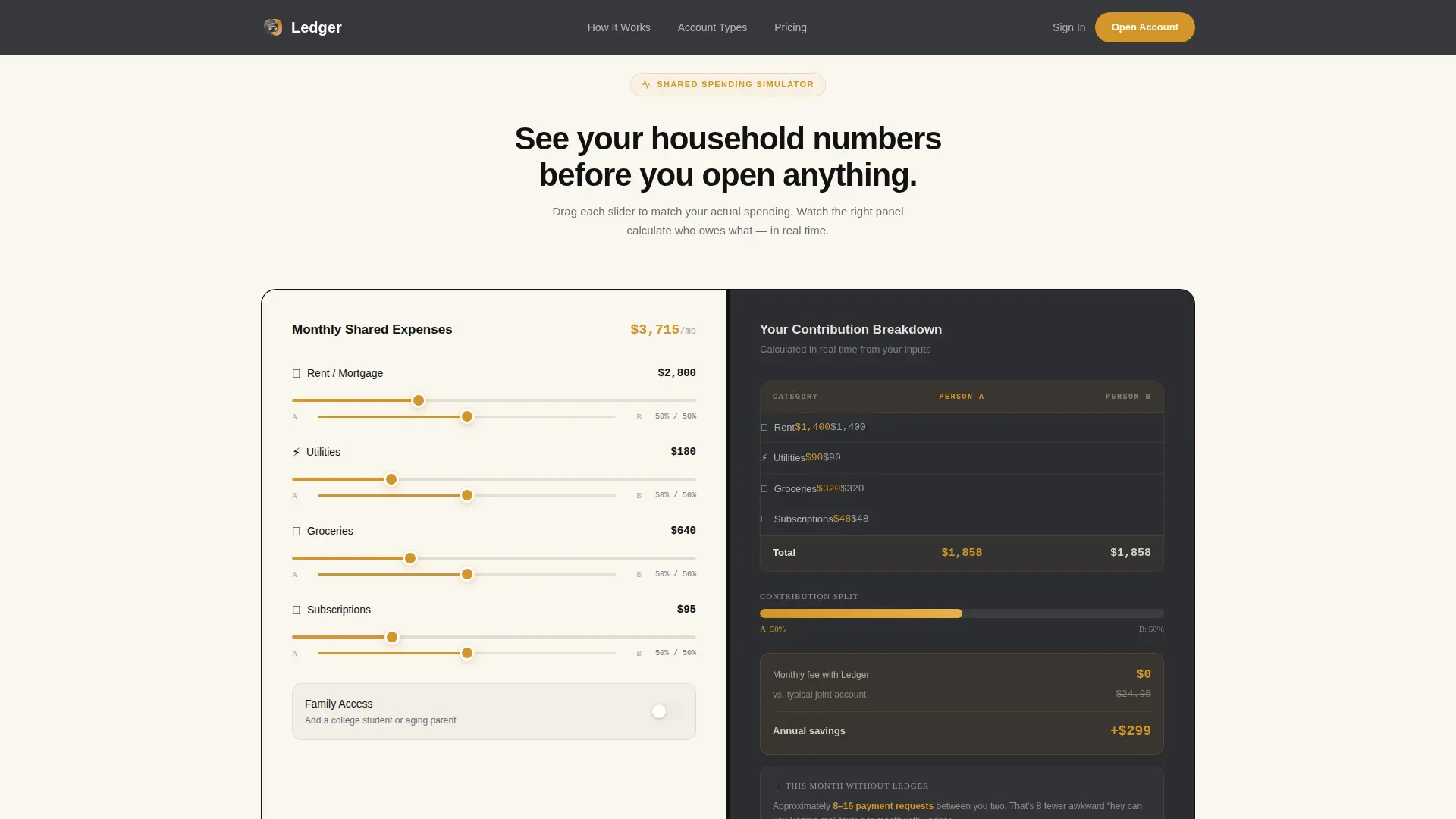
After the quiz header, the page scrolls into a two-panel simulator. The left panel accepts visitor inputs for rent, utilities, groceries, and subscriptions. The right panel calculates each person's contribution in real time, displays a projected monthly balance summary, and visualizes cash flow as a single unified timeline. This section makes the account ledger concept tangible. Visitors can see exactly how daily transactions would flow through one shared register instead of bouncing across separate accounts and manual payments.
Family Access Toggle
A dedicated toggle within the simulator section lets visitors model a third authorized user, for example a college-age child or an elderly parent. When activated, the account structure updates visually to reflect the expanded household. This feature directly addresses the adult-child and family caretaker audience segment, showing how the account can scale to support multi-generational financial operations without requiring a separate account for each person.
Account Structure Blueprint Grid
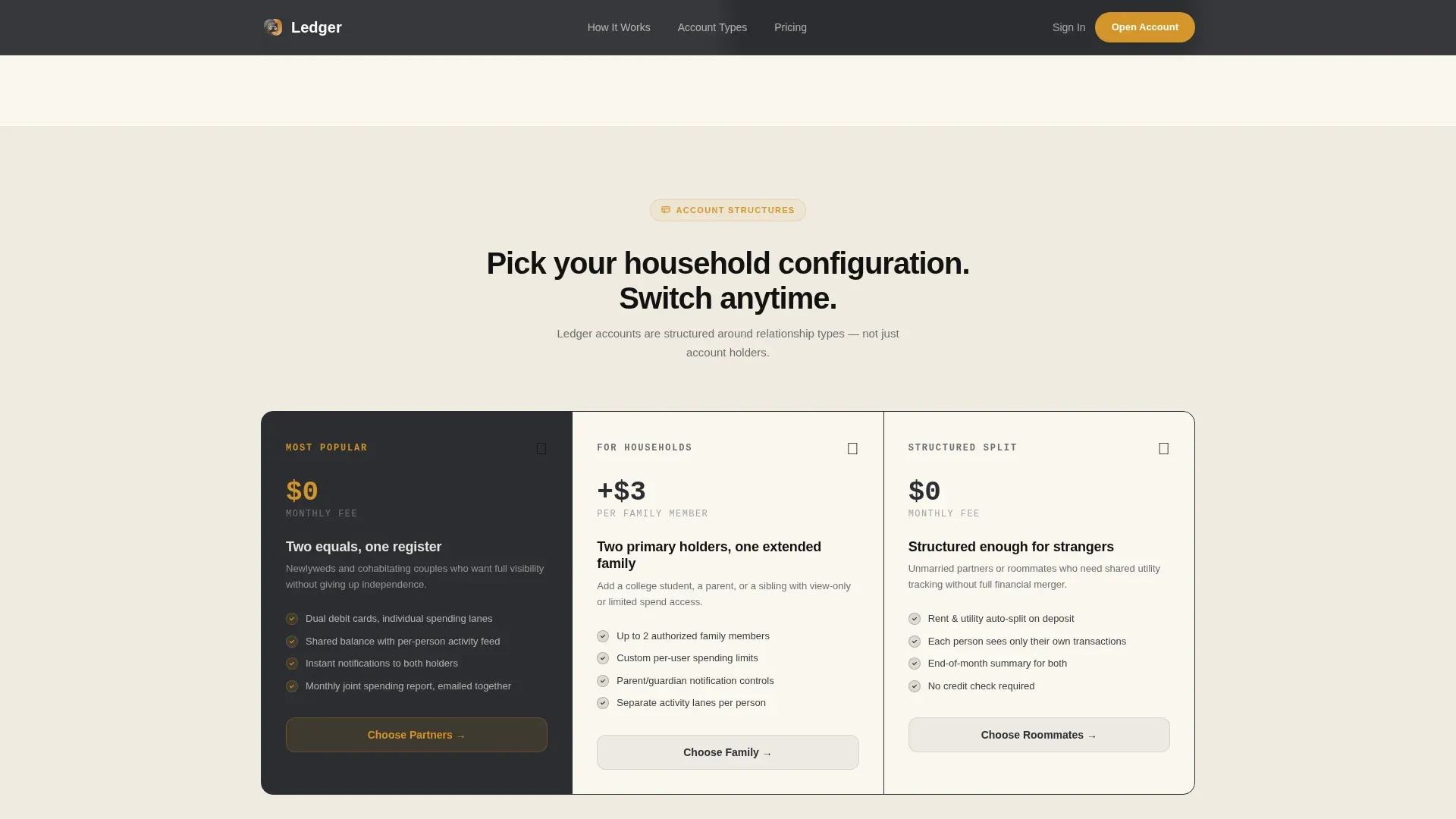
A blueprint-style grid section displays three household configurations side by side. Each configuration maps to a real relationship type: newlywed couple, parent-and-child pair, or unmarried partners. The grid gives visitors a clear description of which account tier matches their household before they reach the call to action, reducing decision fatigue and increasing application confidence.
Glassmorphic Testimonial Cards
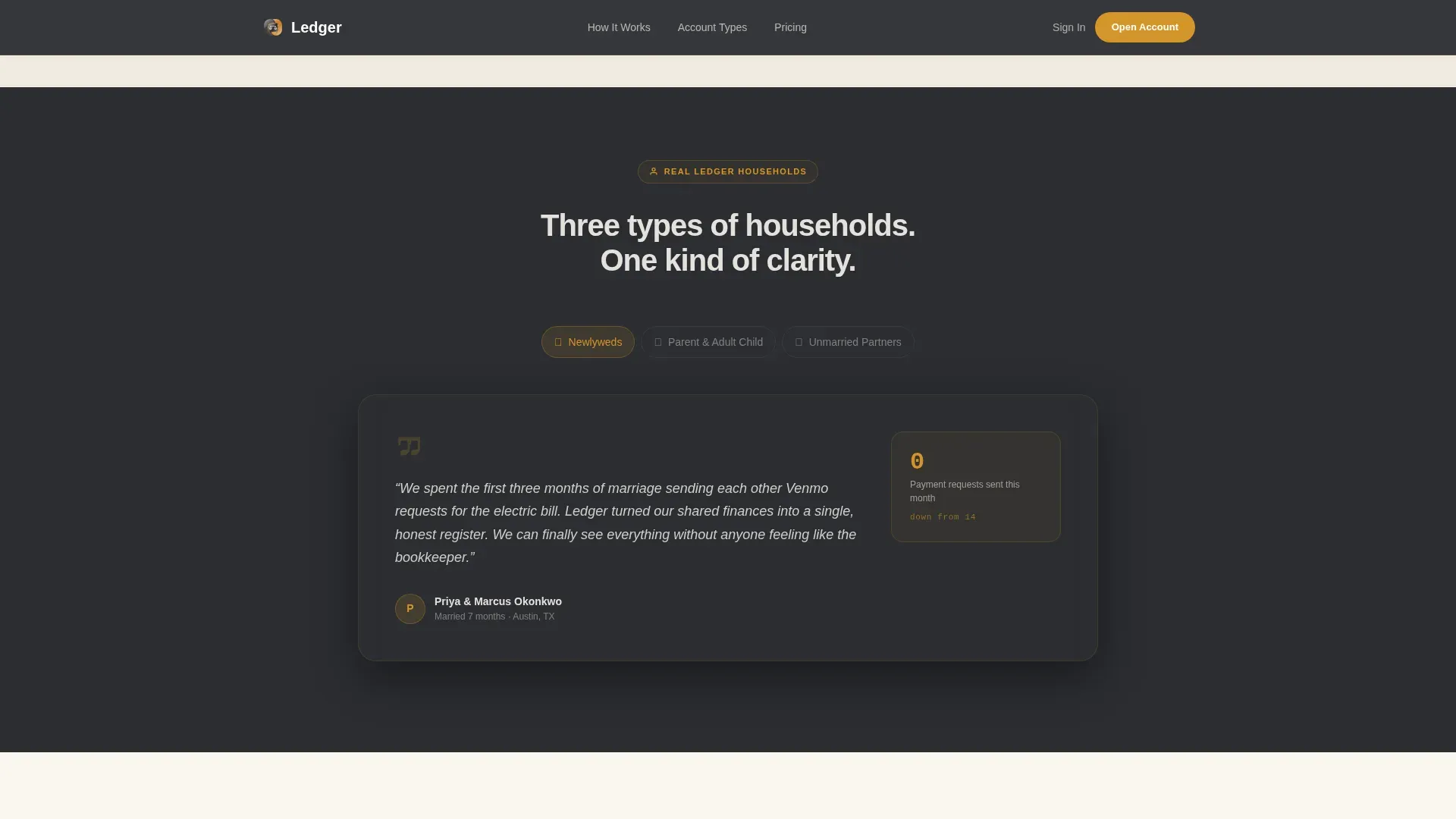
Three stacked testimonial cards represent the primary audience archetypes. Each card surfaces social proof in relation to a specific pain point: constant settlement requests, lack of visibility into a parent's spending, and the confusion of separate accounts. Testimonials and security badges are key components for building trust on any financial landing page, and this section delivers both in a single cohesive block.
Personalized call to action and Results Flow
The primary call to action, "See Your Joint Account Plan," appears after the simulator completes. It leads to a results page that recommends a specific account tier based on quiz inputs including household size, combined monthly shared spending, current banking setup, and relationship to co-holder. A secondary path, "Compare Account Types," catches visitors who want to browse before committing. The two-path structure ensures no visitor leaves without a clear next step.
Page sections overview
| Section | Purpose |
|---|---|
| Hero Quiz Header | Launches the compatibility assessment with split-screen layout and selectable cards |
| Spending Simulator | Lets visitors input shared expenses and see live contribution and balance calculations |
| Account Structure Grid | Shows three household configurations with matching account tier descriptions |
| Social Proof Block | Stacked glassmorphic testimonial cards from three relationship archetypes |
| Final Call to Action | Presents personalized account recommendation with primary and secondary conversion paths |
| Footer | Horizontal flow footer with supporting links and compliance context |
Design & branding system
The visual identity follows a Corporate Precision theme. Think of a well-kept financial ledger bound in dark leather with gilt-edged pages, serious enough for money and warm enough for a kitchen table conversation. The palette and typography reinforce credibility without feeling cold or institutional.
- Colors: deep boardroom charcoal (#2B2D31) as the primary surface, warm amber (#D4952A) for accents and interactive states, soft ledger cream (#FAF6EF) for background sections, and ink-black (#111111) for numbers and balance figures
- Typography: DM Sans for all headings and body copy, JetBrains Mono for all numerical data fields including balances, deposit figures, and transaction line items
- Animation: slideInBlur reveals on scroll, an orbital connection animation in the hero, amber accent shift on quiz card selection, and live calculation transitions in the simulator
Mobile & speed optimization
The template is built desktop-first, with the 50/50 split-screen layout as the primary experience. A mobile stack fallback reorders every split panel into a single-column flow so the quiz, simulator, and testimonials remain fully usable on smaller screens. A mobile-first layout ensures the page is seamless on smartphones, since co-applicants often complete the process on one shared device.
- Desktop-first split-screen layout with a clean single-column mobile stack fallback
- Server Components handle static sections like testimonials and the account structure grid, keeping the page responsive
- Client Components power the quiz cards, spending simulator sliders, and the Family Access toggle to maintain interactive performance
How this template helps you convert
This template is built around a specific conversion insight: two people need to feel understood before they will open a shared financial account together. Every section moves that process forward.
- The quiz header captures the visitor's current situation immediately, replacing a generic headline with a personalized entry point that identifies the household's actual pain point before any product claim is made.
- The spending simulator turns passive reading into active engagement. Visitors who input their own rent, grocery, and utility figures are already mentally using the account, which makes the "See Your Joint Account Plan" call to action feel like a natural next step rather than a cold ask.
- The two-path call-to-action structure, primary application flow plus a secondary "Compare Account Types" route, ensures that both committed visitors and browsers have a clear path forward, reducing drop-off at the decision point.
Other information about this template
This template sits at the intersection of financial product marketing and interactive financial tools. It is useful beyond the direct-to-consumer banking context. Financial professionals, accountants, and business owners who offer joint account services or co-managed financial products can adapt the structure for their own client acquisition pages.
The template's account ledger concept is grounded in sound bookkeeping principles. Accurate financial record keeping is essential for maintaining control and avoiding costly errors, and the shared ledger format displayed in the simulator reinforces that discipline visually. Regular use of a structured ledger template supports financial accuracy and accountability by providing a clear running record of transactions. A bank ledger template organizes every deposit, withdrawal, and transfer in a clear tabular format, and the simulator section mirrors that logic interactively.
The underlying data structure maps closely to professional bookkeeping standards. Each simulated entry carries a date, a description, a debit or credit value, and a running balance, which are the same data fields used in any professional account ledger. Consistent descriptions in a ledger prevent confusion and help identify spending or income trends over time. Accurate dating of transactions ensures they align with bank statements and provides a reliable audit trail. These principles are built into the simulator's output format so visitors understand the account's organizational logic before they apply.
From a broader financial management standpoint, the template also supports the reconciliation process. The reconciliation process involves line-by-line comparison of template entries against bank statements. Balance discrepancies typically result from missing transaction entries, duplicate entries, debit or credit reversal errors, or unrecorded bank fees. The simulator demonstrates how a single shared account simplifies that process by consolidating all household transactions into one register rather than across separate records.
General ledger templates offer standardized accounting frameworks without the complexity of enterprise software, and this template applies that same philosophy to the joint account onboarding experience. The Comprehensive template approach, which includes dropdown categories for standardization, avoids inconsistent naming across reporting periods. The Simplified template approach, meanwhile, eliminates standard accounting terminology for users who need basic transaction tracking without technical accounting knowledge. Both philosophies are reflected in the template's tiered account structure grid, which lets visitors self-select their complexity level.
Digital financial management tools can be set up quickly, often taking less than 30 minutes to configure for use. Templates generate tax-compliant financial records that can be exported for tax-preparation purposes, which is relevant for households tracking shared income, joint purchases, or co-owned business expenses. Sole proprietorships and small business owners who share financial operations with a partner or family member will find the account structure grid and simulator especially practical for modeling their specific use case.
The template also supports use cases beyond couples. For instance, business co-owners who need a transparent record of shared cash flow, or professional service firms that manage accounts payable and shared operating funds across two authorized signatories, can adapt the simulator and account structure sections accordingly. Accounts payable workflows that involve two approvers benefit from the same transparency logic the template applies to household spending.
From a practical build standpoint, the template is compatible with spreadsheet-based planning workflows. Teams that maintain records in Google Sheets or Excel can use the simulator's output categories, including rent, utilities, groceries, subscriptions, and transfers, as the basis for an external bookkeeping worksheet. Google Sheets users, for example, can replicate the running balance formula structure using a simple debit-minus-credit formula with a carry-forward balance column. Excel users will find the same data cleanup process applies: standardize category names, lock the date column format, and verify that each entry's debit and credit values are correct before submitting records for review.
- Joint ownership requires both applicants to provide personal details and sign for shared ownership; the quiz flow collects this context before the application step
- A straightforward onboarding process is modeled in the page flow: the quiz and simulator serve as step one, followed by identity verification and initial deposit steps
- Users need a government-issued identification document and clarity on any minimum initial deposit requirements; the account structure grid can be customized to surface these details clearly
- Security and compliance badges, including FDIC insurance indicators, should be placed near the final call to action to reduce anxiety and reinforce trust at the decision point
- The page eliminates distracting navigation links to maintain visitor focus on the quiz and application form
Theme
Corporate Precision
Creative direction
Calculator/Tool First
Color system
Charcoal & Amber
Style
Split Screen (50/50)
Direction
Quiz/Assessment
Page Sections
Split-screen Multi-step Quiz Header
Live Shared Spending Simulator
Family Access Toggle
Account Structure Blueprint Grid
Personalized Call to Action with Dual Conversion Paths
Glassmorphic Testimonial and Trust Block
Related questions
Who is this landing page template designed for?
What sections are included in the template?
Can the template support more than two account holders?
How does the quiz and simulator support conversions?
Is this template useful outside of consumer banking?



