Pediatrician Professional Website Template
Copay is a warm, lead-generation landing page built for small-practice pediatricians and their office managers. It pairs a portrait-centered hero with a zigzag step-by-step layout to explain a pediatric billing and insurance service. The page guides visitors from claim chaos to a free billing audit, using soft Healing Space visuals and two carefully designed conversion paths.
by Rocket studio
Quick summary
Copay is a single-page template designed for a pediatric billing and insurance service. It opens with a portrait-centered hero, then walks visitors through three illustrated billing steps in a zigzag layout. Every section builds trust and moves small-practice pediatricians and office managers toward booking a free billing audit or downloading a practical billing checklist.
Who this template is for
This template speaks directly to the people inside a small pediatric practice who feel the daily weight of billing complexity. It is built for the practice owner who chose medicine, not medical billing, and for the office manager toggling between payer portals before lunch.
- Small-practice pediatricians dealing with rejected claims and pre-authorization paperwork
- Office managers who manage billing in-house, through an outsourced service, or a mix of both
- New practice owners who need a full billing support structure from day one
What problem this template solves
Pediatric billing carries its own maze of well-child visit codes, immunization billing rules, and insurance pre-authorizations. Small practices often lose revenue not because of poor care, but because of denied claims that never get appealed. This template gives a billing service a clear, trust-building structure to address that pain directly.
- Claim denials and rejected codes drain time that belongs in the exam room
- Pre-authorization workflows and eligibility checks pull office managers away from patient-facing work
- New practices lack a clear system for managing billing from the start
What you get with this template
The template delivers a complete, section-led landing page with two conversion paths and a layered visual rhythm designed to feel warm and reassuring. Each component has a specific job, from the animated hero counter to the sticky call-to-action bar that appears after the third step.
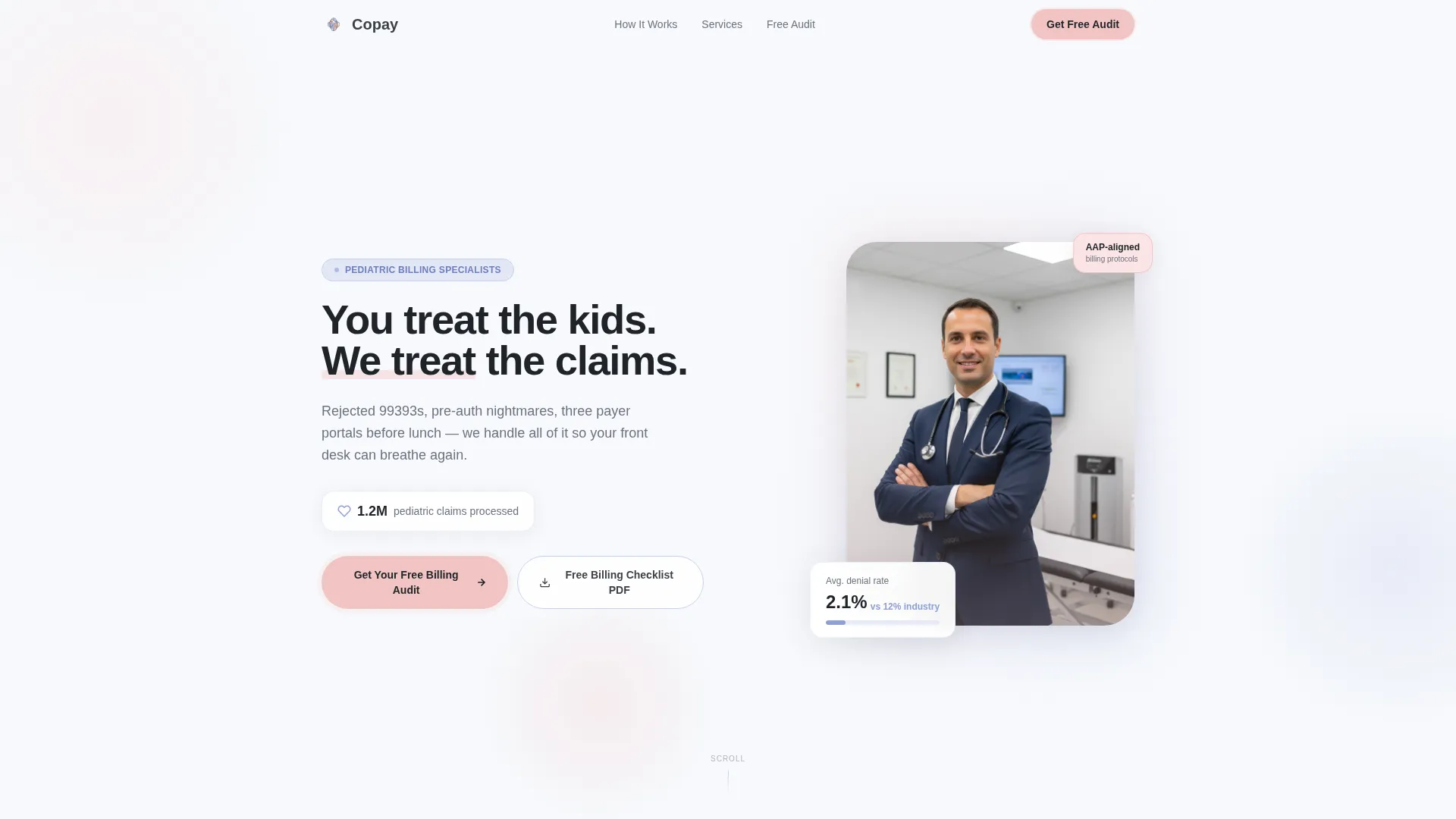
- A portrait-centered hero section with headline, animated claim counter, and dual call-to-action buttons
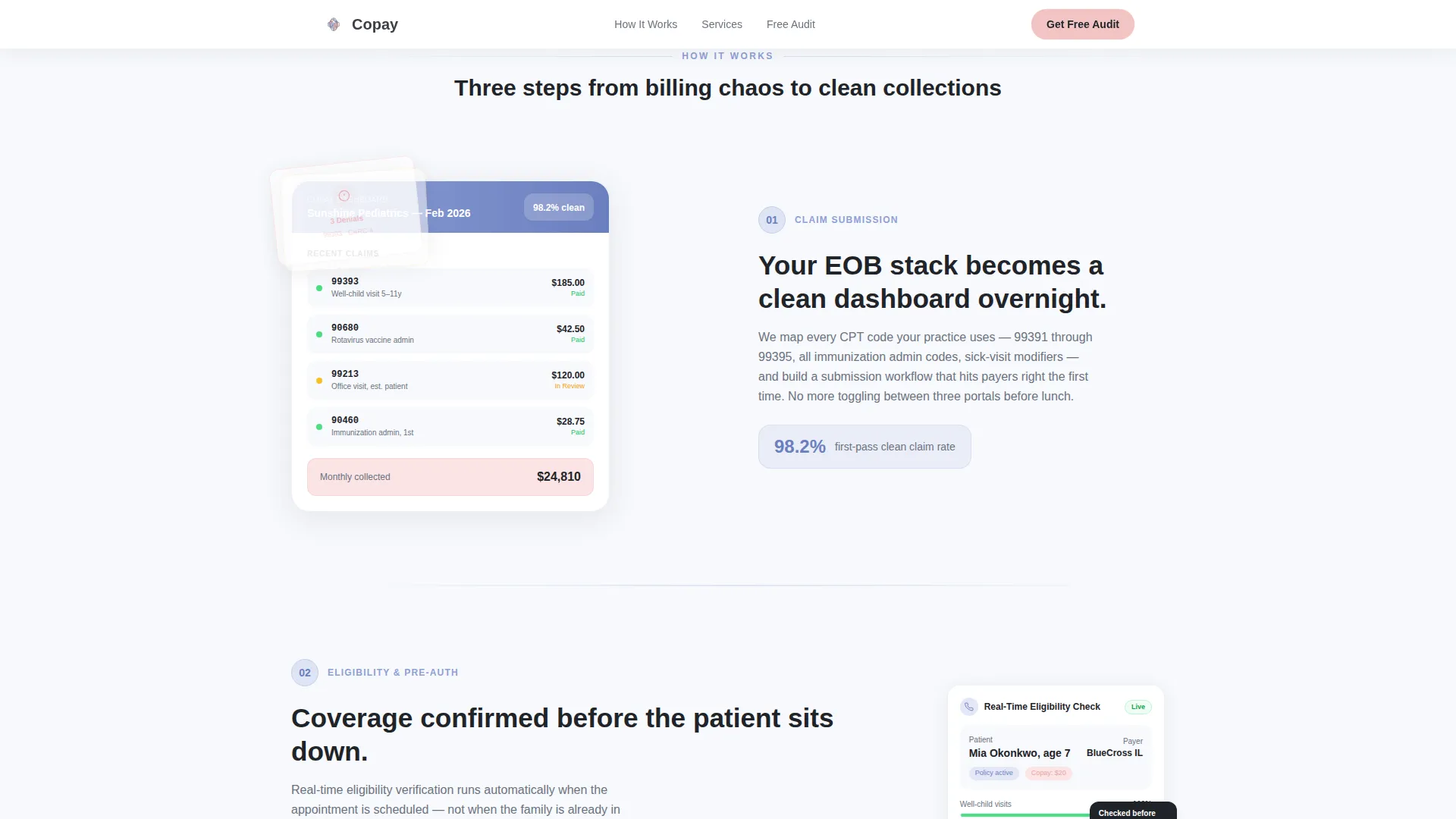
- Three zigzag illustrated billing steps, each pairing a visual moment with a numbered explanation
- A dual lead capture section with a billing audit form and a gated PDF checklist download
Feature list
This template packs in a focused set of interactive and visual features, each built to serve a specific moment in the visitor's decision journey.
Portrait-Centered Hero with Animated Counter
The hero leads with a warmly lit physician portrait set against a blush-to-cloud-white gradient. A headline reads "You treat the kids. We treat the claims." An animated counter ticks upward to display over 1.2 million pediatric claims processed, grounding trust before the visitor scrolls.
Zigzag Step-by-Step Layout
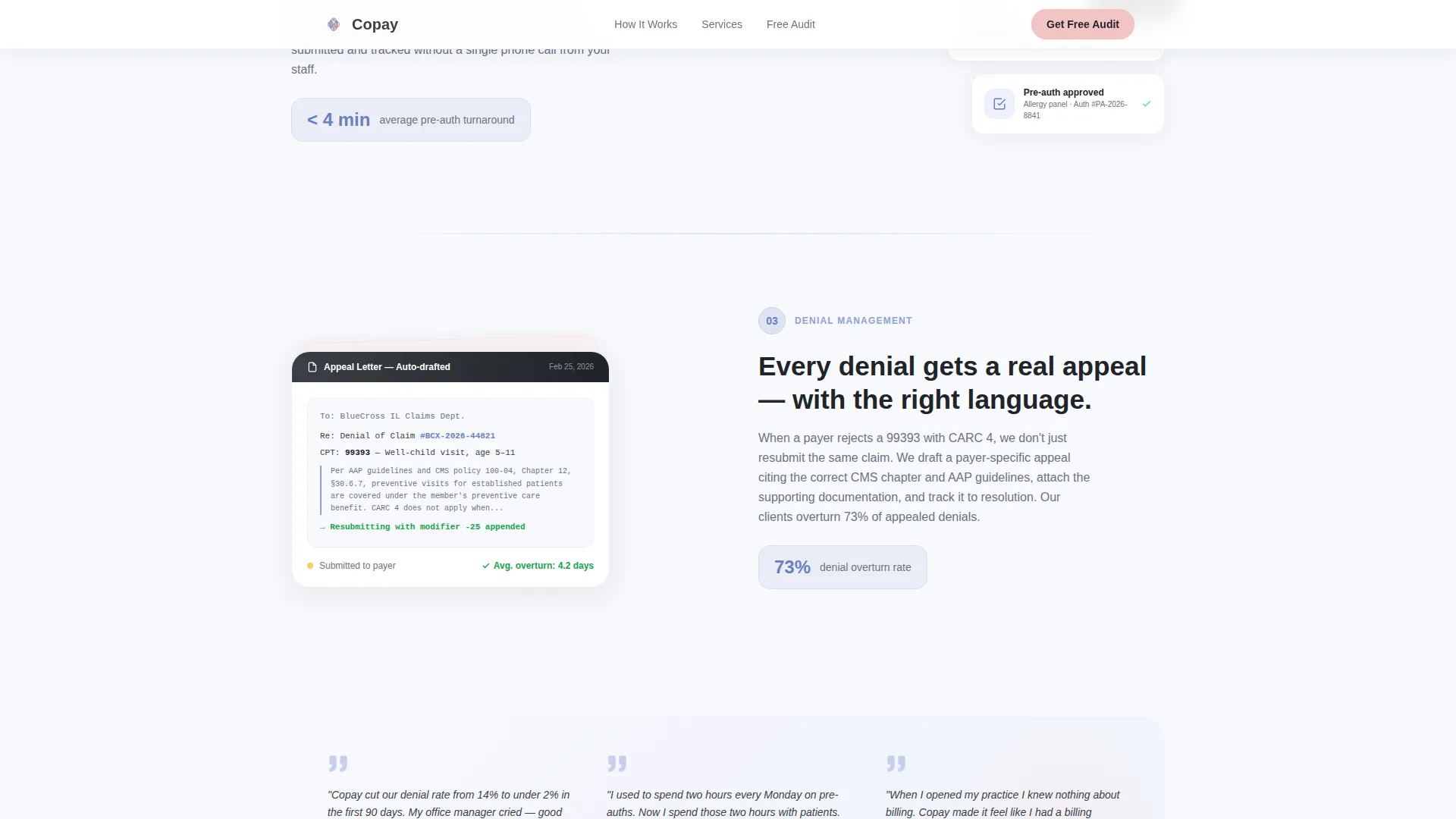
Three alternating content blocks pair illustrated billing moments with numbered steps. Step one shows explanation of benefits (EOB) documents transforming into a clean dashboard. Step two covers real-time eligibility verification mid-appointment. Step three walks through denial management with an appeal letter excerpt. The left-right alternation creates a gentle visual rhythm on every scroll.
Dual Lead Capture Section
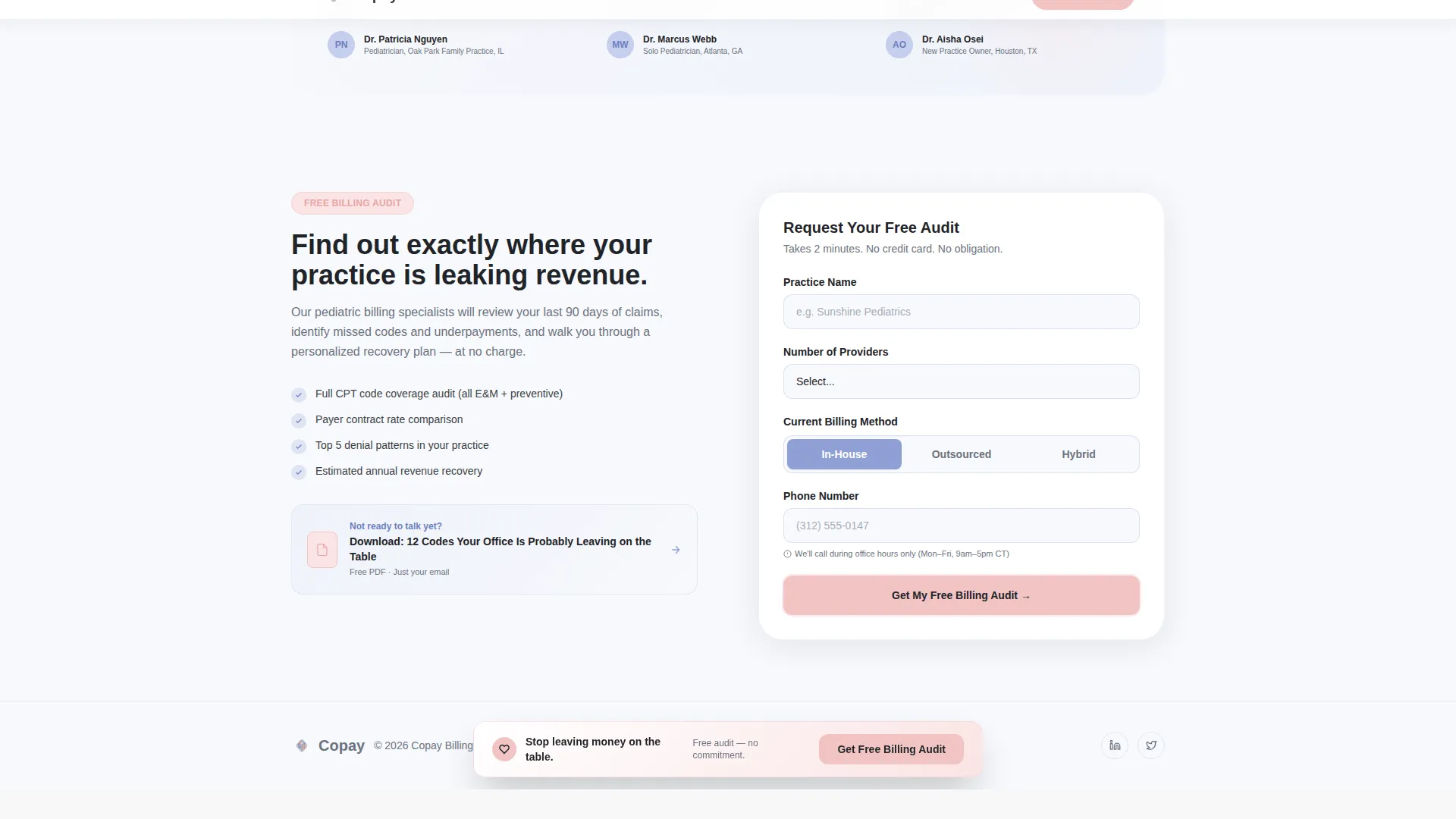
The page offers two entry points for visitors at different stages. A billing audit form collects practice name, number of providers, billing method via toggle selector, and a phone number with an office-hours note. A secondary modal gates a downloadable PDF checklist behind a single email field for visitors who are not yet ready to speak with someone.
Sticky Call-to-Action Bar
After the third zigzag step, a sticky bottom bar appears with the primary call to action. It stays visible as the visitor continues scrolling, keeping the "Get Your Free Billing Audit" prompt accessible without interrupting the reading flow.
Billing Method Toggle Selector
The audit form includes an interactive toggle that lets visitors choose their current billing setup: in-house, outsourced, or hybrid. This small interaction reduces form friction and signals that the service understands the different starting points a practice can have.
Inline Social Proof and Testimonials
Each zigzag step includes a metric callout relevant to that stage of the billing workflow. The denial management step also includes a testimonial quote, adding a human voice at the moment when trust matters most.
Page sections overview
| Section | Purpose |
|---|---|
| Hero Portrait Block | Introduce service with portrait, headline, and animated claim counter |
| Zigzag Step One | Show EOB-to-dashboard transformation with image left, text right |
| Zigzag Step Two | Explain real-time eligibility verification with text left, image right |
| Zigzag Step Three | Walk through denial management and include a testimonial quote |
| Lead Generation Form | Capture audit leads with a multi-field form and billing method toggle |
| PDF Checklist Gate | Offer downloadable billing checklist gated behind an email field |
| Footer | Linear single-row footer with practice-facing links and contact info |
Design & branding system
The Healing Space theme shapes every visual decision in this template. The palette feels like watercolor paint on nursery paper, with no sharp edges and no clinical sterility. Typography pairs Plus Jakarta Sans for headings with DM Sans for body text, keeping the hierarchy clear and readable.
- Cloud white (#F7F9FC) background, periwinkle (#8E9FD5) for section dividers and secondary headings, warm blush (#F2C4C4) for buttons and interactive highlights, and charcoal (#3B3F45) for body text
- Rounded corners, soft gradients, and scroll-reveal entrance animations on each zigzag block
- The physician portrait uses generous crop and breathing room, with visible warmth rather than stock-photo distance
Mobile & speed optimization
The template is built desktop-first, reflecting the office manager seated at a desk during a typical billing workday. Full mobile responsiveness ensures the page holds together on any screen size, and the layout uses static-first rendering with client-side components reserved for animations.
- Zigzag blocks reflow cleanly into a single-column stack on smaller screens
- Sticky call-to-action bar and form validation remain fully functional across device sizes
- Scroll-reveal and counter animations are handled on the client side to keep the base layout fast to load
How this template helps you convert
The page is built around two clear conversion goals: booking a billing audit call and capturing email leads through the PDF checklist. Every design and copy decision supports one of those two outcomes.
- The hero section places the primary call-to-action button immediately below the headline, then repeats it in the sticky bar after step three, giving visitors multiple low-friction moments to act without feeling pressured.
- The secondary PDF checklist path captures visitors who are curious but not yet ready to commit to a phone call, turning a hesitant reader into a warm lead through a single email field.
Other information about this template
This template is part of the Copay template collection, designed specifically for healthcare billing service providers targeting small practices. It fits naturally within the Health & Medical category and the Pediatrician Website subcategory, making it a strong starting point for any billing service that wants to speak the language of a pediatric practice.
- The template style is Zigzag/Alternating, following a Step-by-Step Guide creative direction
- The header concept is Portrait-Centered, and the landing page direction is Lead Generation
- The color system is Cloud Canvas, and the theme is Healing Space
- Localization is set for the United States, using USD currency, MM/DD/YYYY date format, and US phone number formatting
- The PDF checklist download is titled "The Pediatric Billing Checklist: 12 Codes Your Office Is Probably Leaving on the Table"
Theme
Healing Space
Creative direction
Step-by-Step Guide
Color system
Cloud Canvas
Style
Zigzag/Alternating
Direction
Lead Generation
Page Sections
Portrait-centered Hero with Animated Counter
Zigzag Step-by-step Billing Guide
Dual Lead Capture Section
Sticky Call-to-action Bar
Billing Method Toggle Selector
Inline Social Proof Per Step
Related questions
Who is this landing page template designed for?
What are the two conversion paths in this template?
Can I customize the illustrated billing steps?
What information does the billing audit form collect?
When does the sticky call-to-action bar appear?



