Neurosurgeon Booking Website Template
Cortex is a neurosurgeon patient portal landing page built to guide frightened patients from confusion to confident consultation requests. It combines a split-hero layout, surgical comparison tables with video introductions, a credentials panel, a gated patient guide download, and a progressive three-step consultation form, all designed to build trust before the first appointment.
by Rocket studio
Quick summary
Cortex is a single-page neurosurgeon patient portal designed for lead generation. It moves anxious patients through structured authority, from a warm surgeon portrait in the hero section to detailed surgical comparison tables, credential panels, and a progressive consultation form, giving them the clarity they need to take the next step toward care.
Who this template is for
This template is built for practicing neurosurgeons who treat complex brain, spine, and nerve conditions and need a professional digital presence that earns patient trust before the consultation room.
- Middle-aged patients holding MRI results and researching surgical options for conditions such as acoustic neuromas, trigeminal neuralgia, or cervical disc herniations
- Adult children helping aging parents navigate a specialist referral after an emergency room visit
- Referring neurologists evaluating a surgeon's credentials and case experience before sending patients forward
What problem this template solves
Patients facing serious neurological diagnoses spend terrifying hours searching online without finding clear, organized information. Most surgeon websites offer credentials with no context and no pathway to understanding. Cortex solves this directly.
- Patients arrive frightened and leave informed, because every section is built to reduce anxiety and answer the real questions
- Referring clinicians can quickly scan credentials, case volumes, and affiliations without digging through dense blocks of text
- The template converts passive research sessions into active consultation requests through multiple strategically placed calls to action
What you get with this template
Cortex delivers a fully structured, single-page layout with every major section a neurosurgeon's patient portal needs. The design system, content structure, and interactive components are all included out of the box.
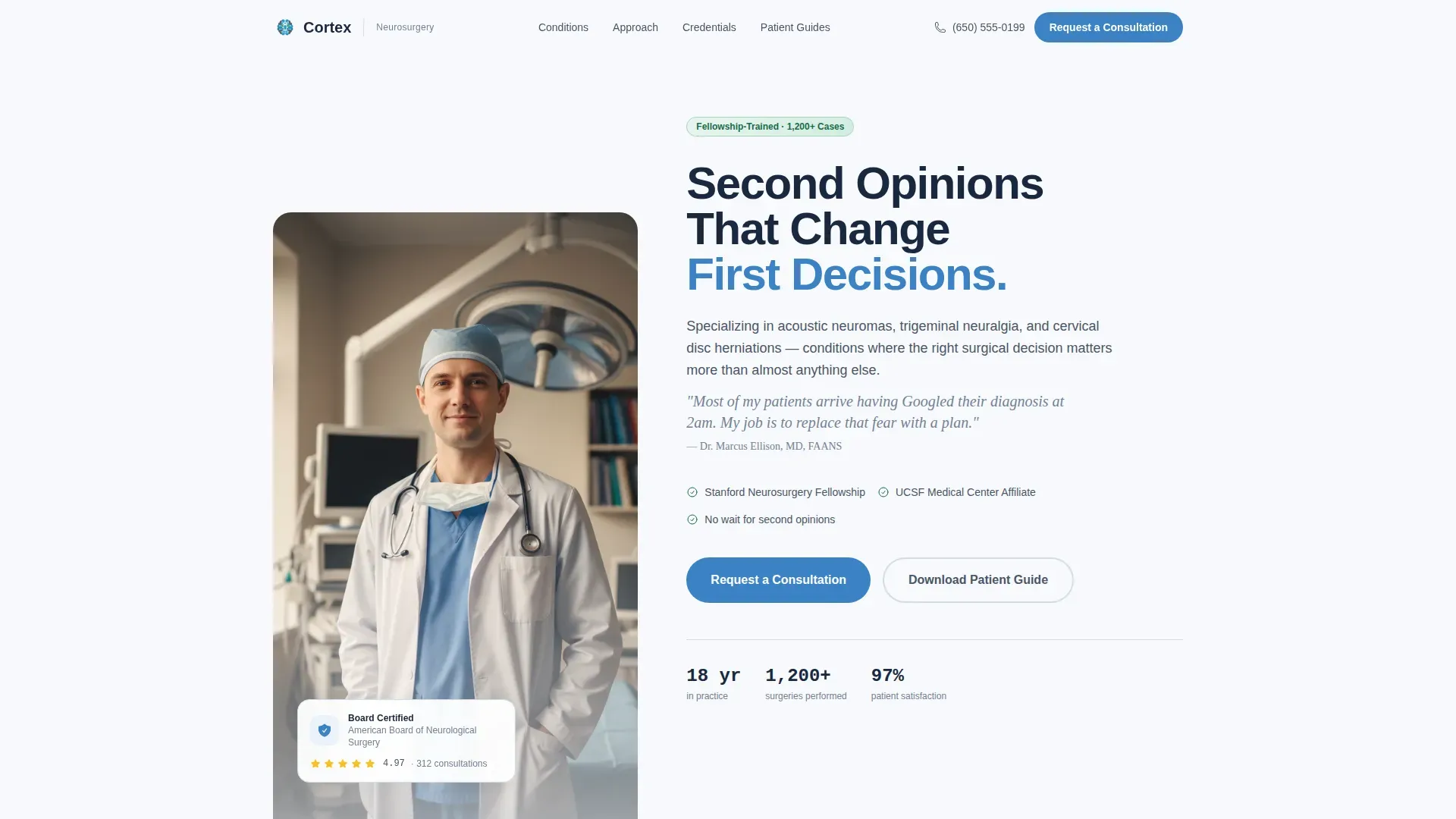
- A half-page split hero with a surgeon portrait, headline, and primary call-to-action button
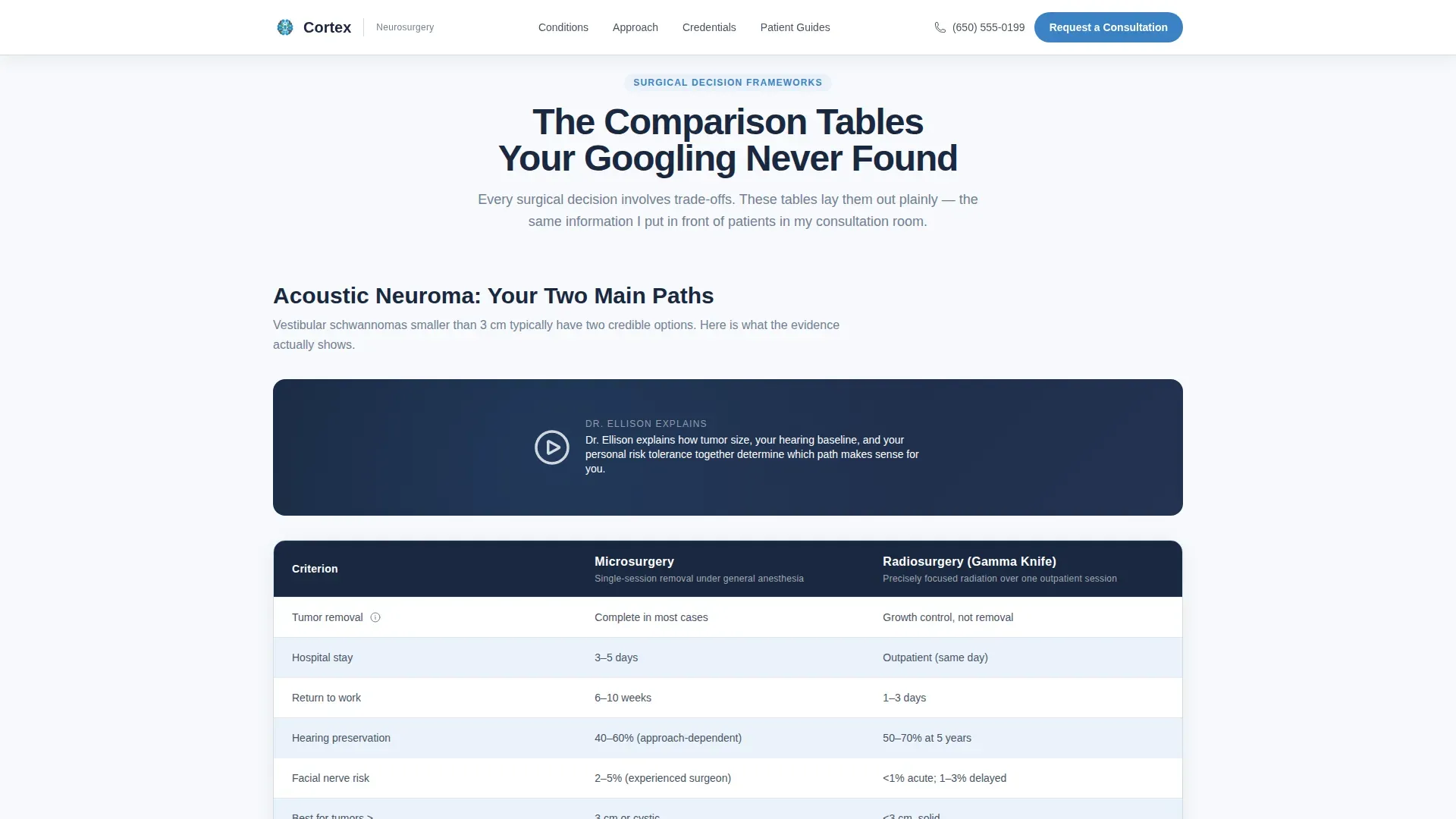
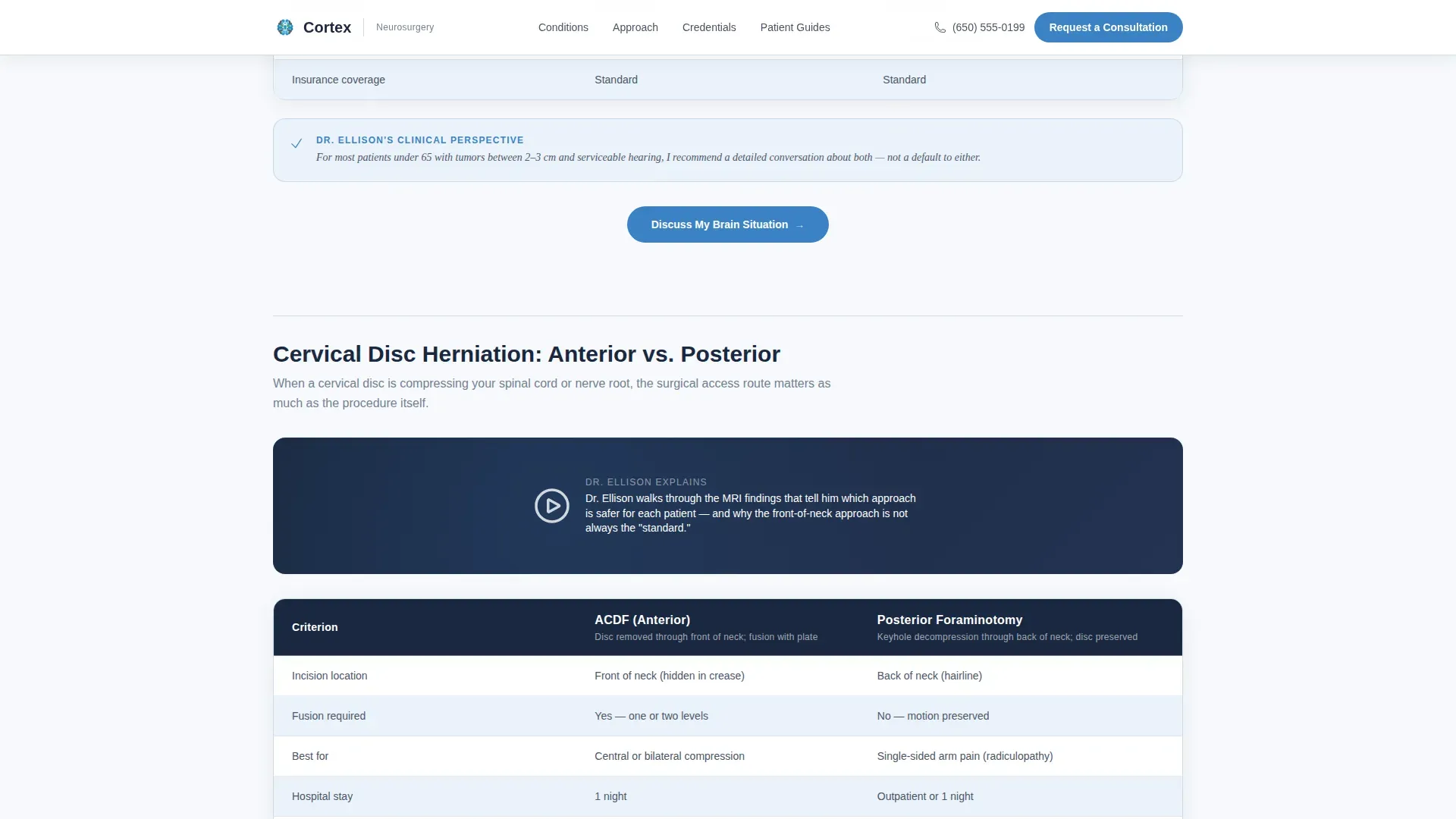
- Surgical approach comparison tables with alternating row colors, short video introductions, and a credentials panel presenting fellowship details, case volumes, and hospital affiliations
- A progressive three-step consultation form with condition dropdown, contact fields, and an optional MRI upload field, plus a secondary email-capture path through a gated patient guide download
Feature list
This section highlights the core built-in components that make Cortex effective for patient-facing lead generation.
Split-Hero with Surgeon Portrait
The header uses a half-page composition. The left side holds a portrait-style photograph of the surgeon in a white coat under natural window light. The right side carries the headline and a "Request a Consultation" button. The layout creates immediate human warmth and professional trust at the same moment.
Surgical Approach Comparison Tables
Mid-page comparison tables contrast approaches such as microsurgery versus radiosurgery and anterior versus posterior cervical access. Each table includes columns for recovery time, success rates, and candidacy criteria. A short face-to-camera video clip of the surgeon introduces each table in plain language, keeping the experience personal rather than clinical.
Progressive Three-Step Consultation Form
The consultation form uses progressive disclosure across three steps. Step one asks for condition category and whether the visit is a second opinion. Step two collects name, phone number, and preferred contact method. Step three offers an optional MRI file upload field, lowering the barrier to a first submission while gathering useful clinical context.
Gated Patient Guide Download
A secondary conversion path captures email addresses from visitors who are not yet ready to call. Visitors can download a condition-specific patient guide PDF. This path reinforces the same calm expertise as the rest of the page and keeps potential patients engaged with the practice.
Credentials Panel
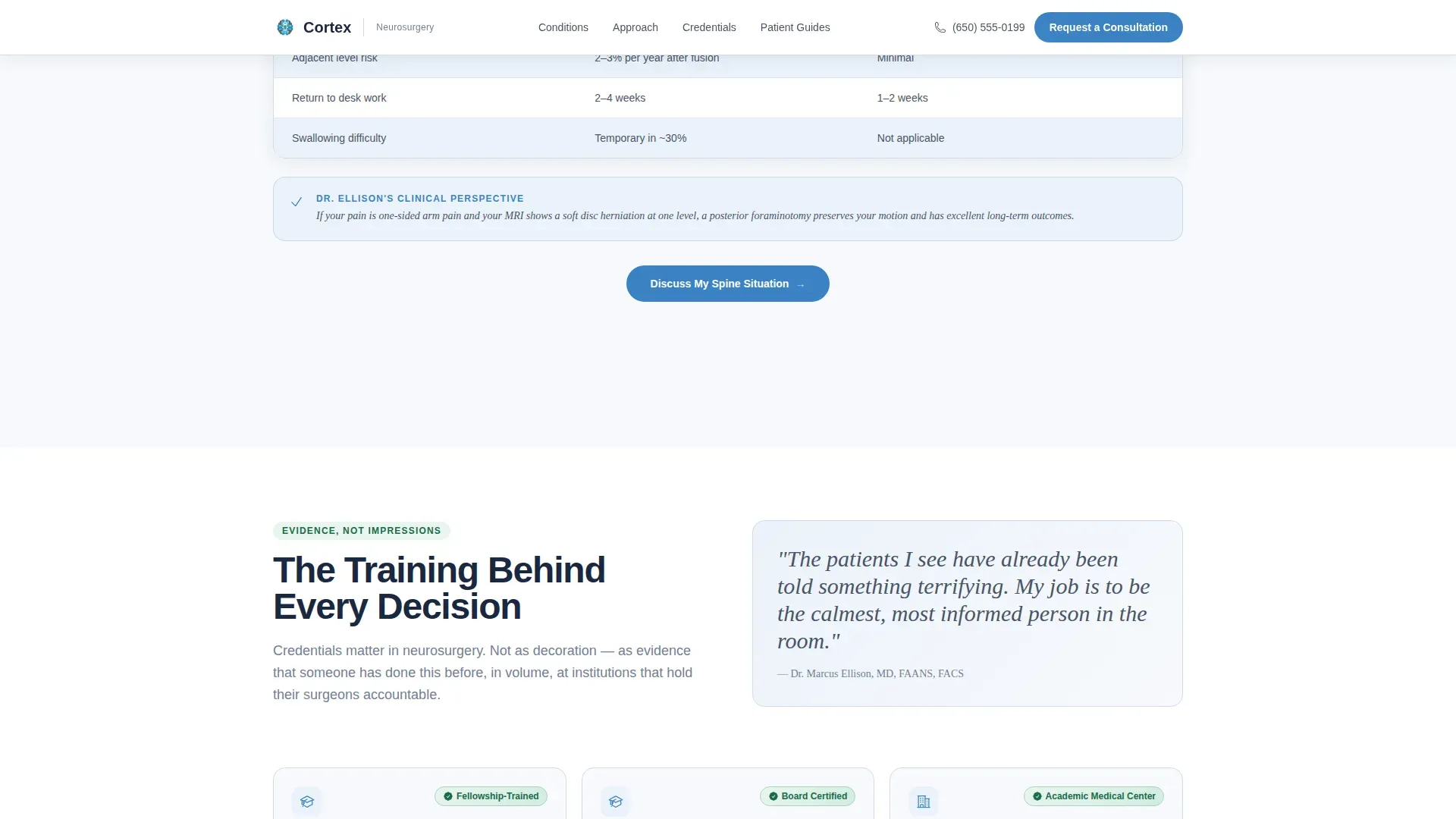
Fellowship details, published case volumes, board certifications, and hospital affiliations are presented as a calm evidence panel below the comparison tables. The layout avoids a trophy-wall feeling and instead presents qualifications the way a good clinician presents imaging findings, clearly, without drama.
Fixed Mobile Consultation Bar
On mobile devices, a fixed bottom bar keeps the primary "Request a Consultation" call to action visible at all times. This ensures patients who are researching on a phone after an emergency room visit can act immediately without scrolling back to the top.
Page sections overview
| Section | Purpose |
|---|---|
| Hero Split Layout | Introduce the surgeon and primary call to action |
| Comparison Tables | Show surgical approach options side by side |
| Video Introductions | Explain each table in plain spoken language |
| Credentials Panel | Present fellowship, case volumes, and affiliations |
| Patient Guide Download | Capture emails with a gated condition-specific PDF |
| Consultation Form | Convert visitors into booked consultation requests |
| Footer | Provide linear single-row navigation and contact details |
Design & branding system
The visual identity follows a Medical Clarity theme. The palette is named Alpine Fresh, and every color choice is deliberate: clean and precise without feeling cold or institutional.
- Summit white (#F7F9FC) backgrounds keep the page open and breathable; surgical steel (#4A5568) handles body text and table borders for calm legibility
- Glacier blue (#3B82C6) drives all interactive elements and trust signals, including buttons and links, while alpine evergreen (#1B6B4A) marks confirmation states and credential badges
- Typography uses DM Sans for headings, Crimson Text for pull quotes and editorial emphasis, and JetBrains Mono for data and statistics such as case volumes and recovery timelines
Mobile & speed optimization
The template is built desktop-first, reflecting how patients typically research surgical options. However, the mobile experience is fully considered, especially for users accessing the page immediately after an urgent medical event.
- The fixed bottom bar on mobile keeps the primary consultation call to action permanently visible, so no scroll is needed to take action
- Scroll-reveal animations, table row hover states, and form step transitions are set to medium intensity, keeping the page responsive and engaging without sacrificing load speed
How this template helps you convert
Cortex is built around a deliberate scroll journey that moves a visitor from fear to understanding to readiness. Every structural decision supports this conversion path.
- The hero section places the surgeon's face and the primary call to action at the very first scroll position, establishing trust and offering a clear next step before the visitor reads a single word of clinical content
- Comparison tables give patients the organized framework their anxious late-night research never provided, and each table is followed immediately by a repeat "Request a Consultation" button so the moment of clarity converts directly into action
- The progressive form lowers commitment friction step by step, and the gated patient guide captures leads from visitors who need more time before they are ready to call
Other information about this template
Cortex is designed for the Health and Medical category, specifically the Neurosurgeon Website subcategory, and targets the Neurosurgeon Patient Portal niche. A few additional details worth knowing before you build:
- The template is localized for English-speaking audiences in the United States, using imperial measurements and the standard US date format
- The footer follows a linear single-row pattern, keeping the bottom of the page clean and uncluttered
- The FAQ accordion built into the page uses high interactivity settings alongside the multi-step form, comparison table highlights, and embedded video clips
- The page type is a single-page landing structure with a clear linear scroll flow, not a multi-page site
- The intersection match for this template aligns the Expert Panel creative direction, the Half-Page Photo and Text header concept, and the Lead Generation landing-page direction into one coherent design system
Theme
Medical Clarity
Creative direction
Expert Panel
Color system
Alpine Fresh
Style
Comparison Table
Direction
Lead Generation
Page Sections
Split-hero with Surgeon Portrait
Surgical Approach Comparison Tables
Progressive Three-step Consultation Form
Gated Patient Guide Download
Credentials Evidence Panel
Fixed Mobile Consultation Bar
Related questions
Who is this landing page template designed for?
Can I customize the comparison tables for different surgical conditions?
How does the progressive consultation form work?
What is the patient guide download feature?
Is this template suitable for a solo neurosurgeon or a group practice?



