Proven Neuroscience Landing Page Template
Synapse is a hub-and-spoke neurology patient education landing page built for practices and platforms connecting patients with board-certified neurologists. It pairs warm, unhurried design with a structured content system covering five neurological conditions. A pinned booking call-to-action and a downloadable condition guide give visitors two clear paths forward.
by Rocket studio
Quick summary
Synapse is a single-page neurology patient education template built on a hub-and-spoke structure with anchor navigation. It guides newly diagnosed patients and their families from confusion to clarity across five condition areas, then moves them toward a bookable consultation or a downloadable condition guide. The layout is warm, steady, and built to earn trust before asking for a click.
Who this template is for
This template is designed for neurology practices, patient education platforms, and specialist groups that need to communicate complex medical information in an approachable way. It works especially well for teams serving patients who arrive already overwhelmed.
- Neurology clinics and subspecialty practices publishing condition-specific patient education
- Patient education platforms connecting diagnosed individuals with board-certified specialists
- Healthcare marketing teams building a scheduling-focused presence for multiple neurological conditions
What problem this template solves
Patients researching neurological conditions online often land on dense clinical text that raises more questions than it answers. This template closes that gap by presenting clear, structured information at the moment someone needs reassurance most.
- Newly diagnosed patients cannot parse clinical language into actionable next steps
- Family caregivers researching on behalf of a loved one struggle to find credible, specialist-sourced guidance
- Practices lose potential consultation bookings because no clear, trusted path from information to appointment exists
What you get with this template
The template delivers a complete, single-page hub-and-spoke layout organized around five neurological condition areas. Every section follows a consistent, compassionate structure so visitors feel oriented from the moment they arrive.
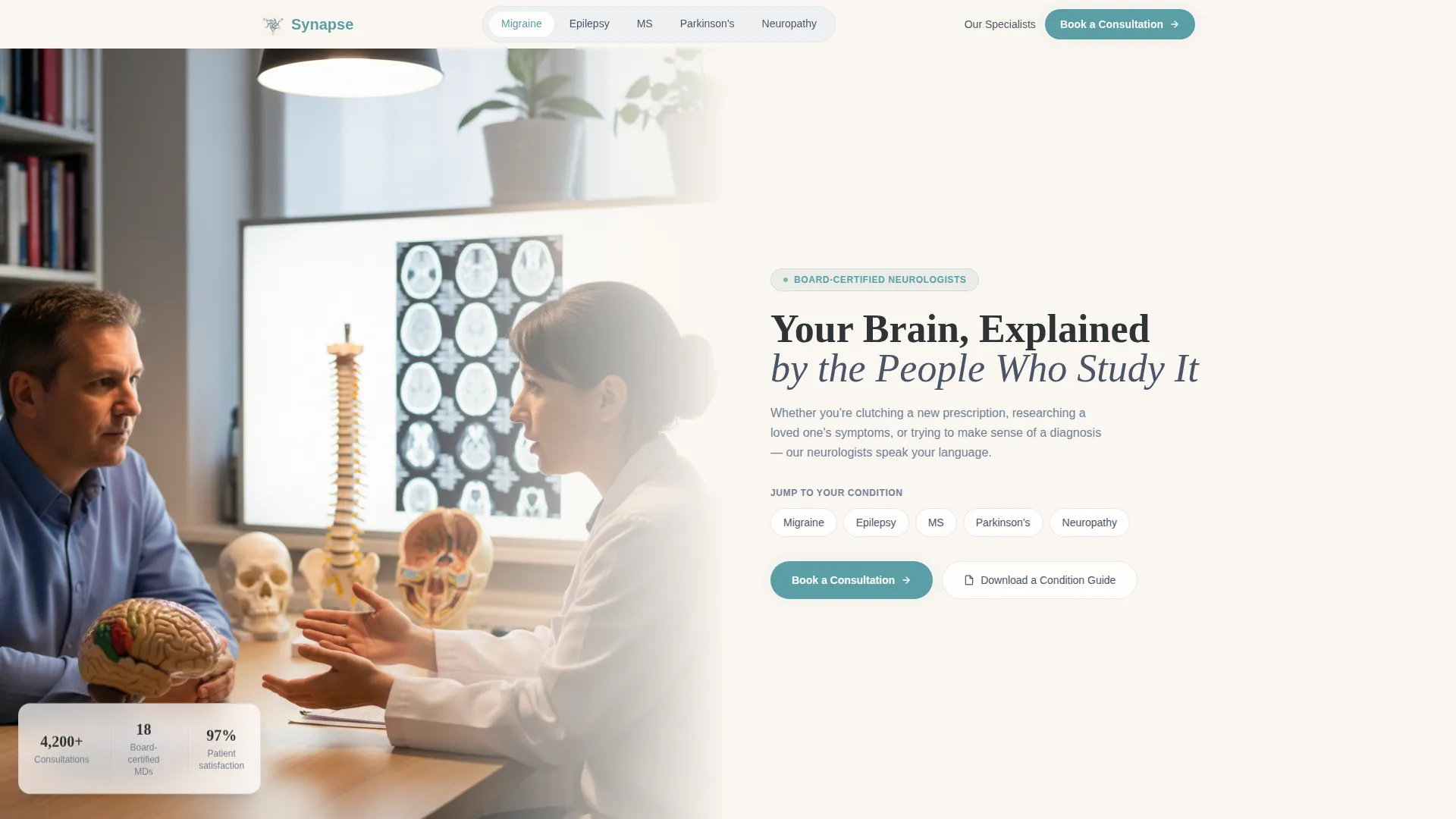
- A half-page hero with anchor navigation linking directly to each condition spoke
- Five condition spoke sections, each containing a specialist video thumbnail, symptom breakdown, annotated neural-pathway diagram, treatment options, and a patient-question FAQ
- A two-step booking lightbox with condition pre-fill, plus a separate PDF guide gate for visitors not yet ready to schedule
Feature list
A paragraph introduces the feature set before the individual items below.
Each feature below is directly present in the template as described in the source brief. Together they form a patient-centered experience that moves from education to consultation.
Pinned Anchor Navigation Bar
The anchor nav travels with the visitor as they scroll. It lists five condition names as clickable spokes and keeps the "Book a Consultation" call-to-action button always visible. The bar highlights the active section so visitors always know where they are on the page.
Hub-and-Spoke Condition Sections
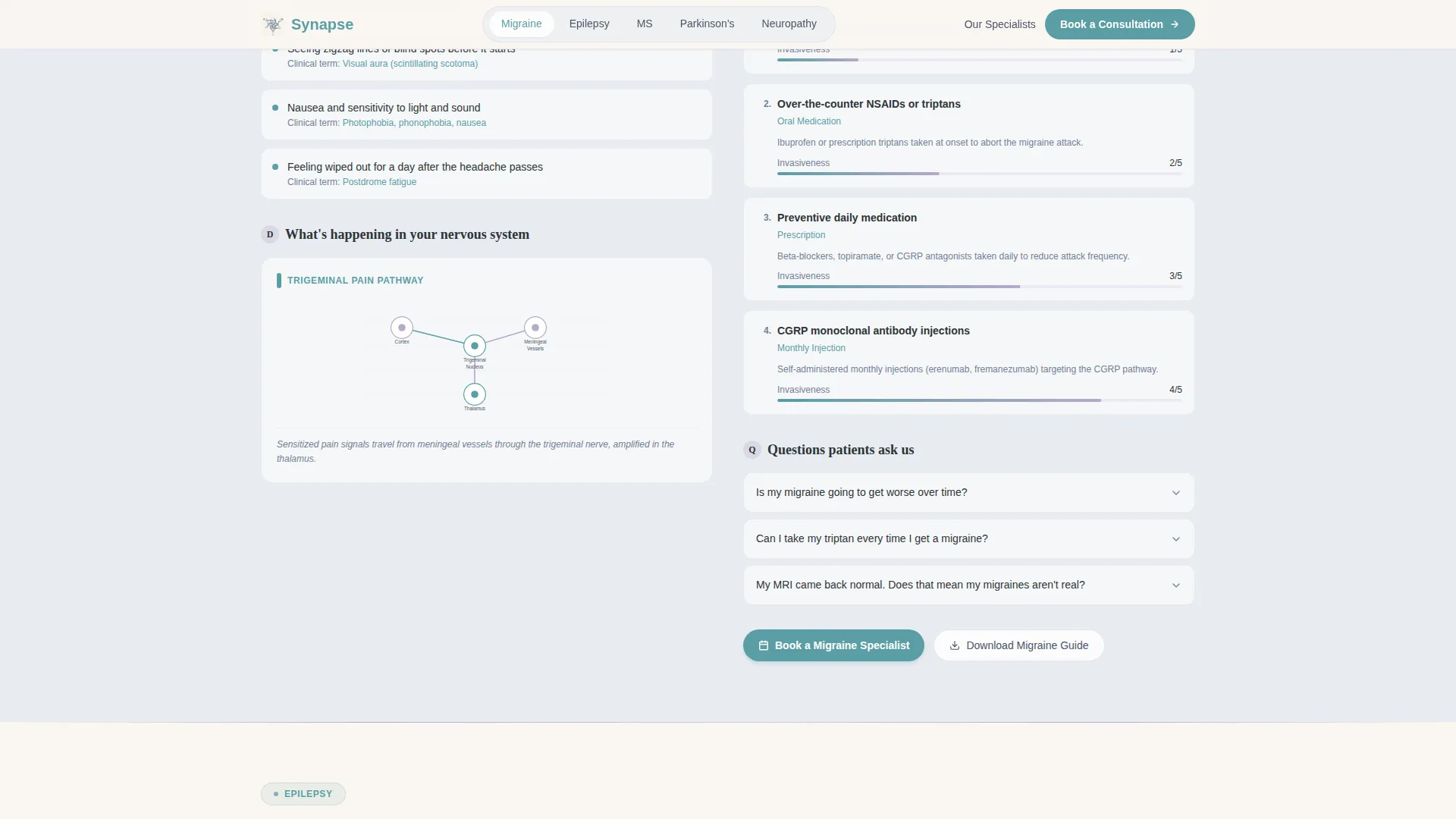
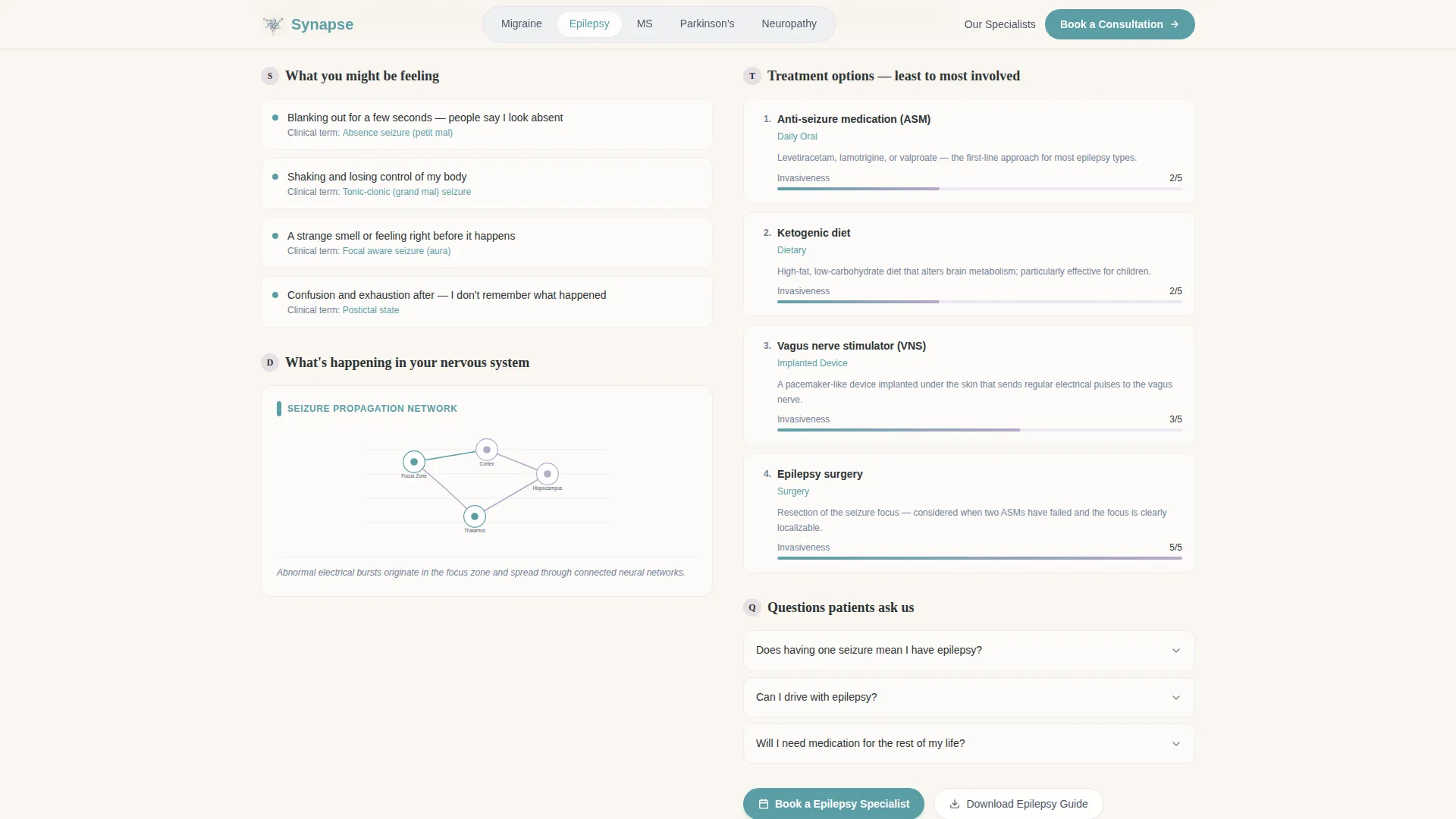
Five dedicated condition sections cover Migraine, Epilepsy, Multiple Sclerosis (MS), Parkinson's disease, and Neuropathy. Each spoke opens with a named specialist video thumbnail, then layers in patient-vocabulary symptoms, an annotated diagram of the relevant neural pathway, treatment options ranked by invasiveness, and a sourced patient FAQ accordion.
Two-Step Booking Lightbox
The primary call-to-action opens a focused two-step modal. Step one captures the visitor's condition area, pre-filled when they arrive from a spoke, and whether they are newly diagnosed or managing an ongoing condition. Step two surfaces filtered neurologist profiles with available calendar slots displayed in teal.
PDF Condition Guide Gate
A secondary conversion path offers a downloadable condition guide in exchange for a first name and email address. This nurtures visitors who are researching early and not yet ready to book a consultation.
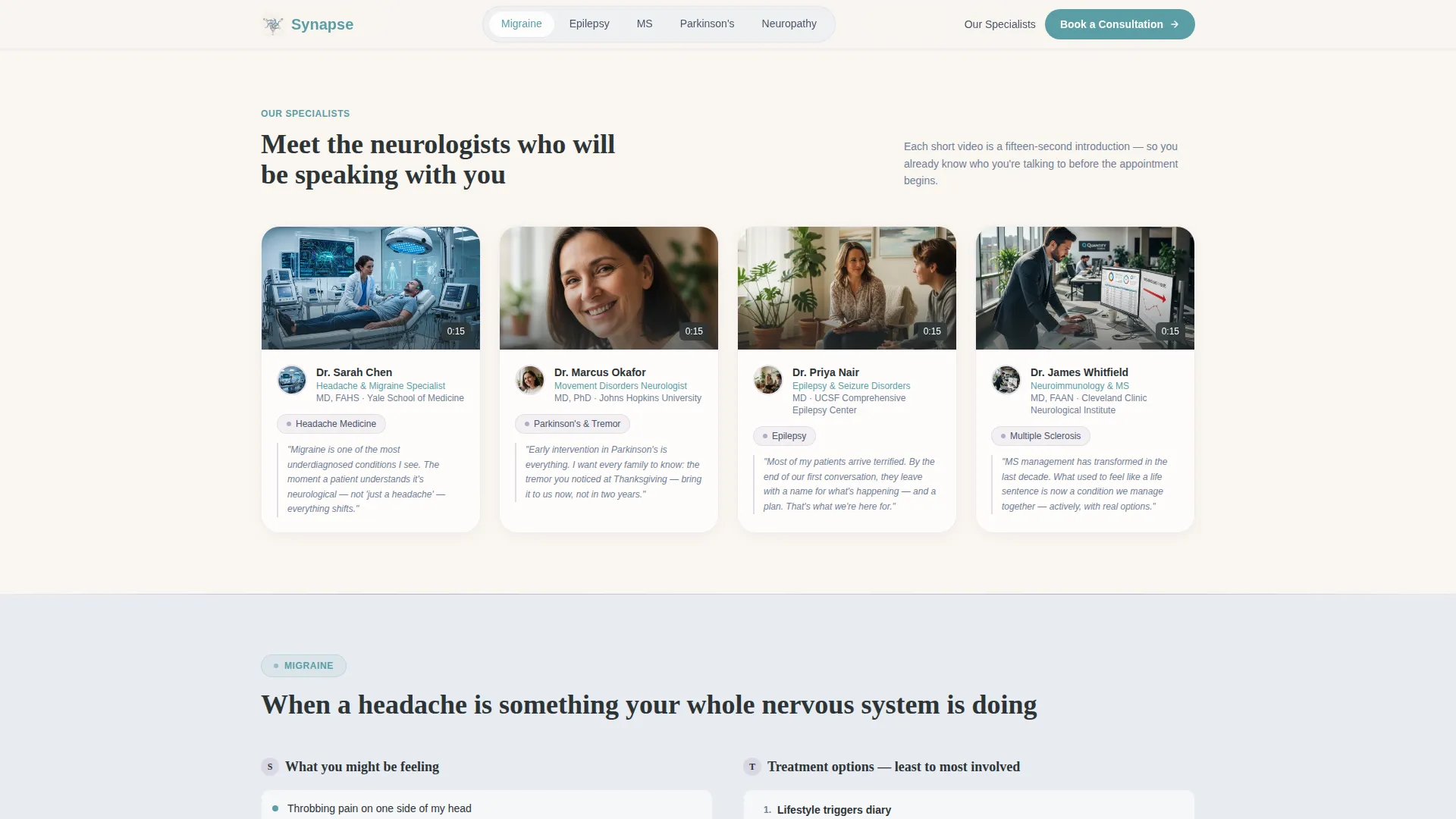
Expert Panel with Specialist Cards
The expert panel section presents named, board-certified neurologists with subspecialty details and video thumbnails. Credential badges and real patient FAQ quotes provide social proof that supports trust before any call-to-action is encountered.
FAQ Accordions per Condition
Every condition spoke includes an accordion FAQ block built from real patient questions. The accordion keeps the page scannable while letting curious visitors go deeper without leaving the section.
Page sections overview
| Section | Purpose |
|---|---|
| Hero with anchor nav | Introduce the platform and provide one-click access to each condition spoke |
| Expert panel cards | Present named neurologists with credentials and subspecialty video thumbnails |
| Migraine spoke section | Deliver symptoms, diagram, treatments, and FAQ for migraine patients |
| Epilepsy spoke section | Deliver symptoms, diagram, treatments, and FAQ for epilepsy patients |
| MS spoke section | Deliver symptoms, diagram, treatments, and FAQ for MS patients |
| Parkinson's spoke section | Deliver symptoms, diagram, treatments, and FAQ for Parkinson's patients |
| Neuropathy spoke section | Deliver symptoms, diagram, treatments, and FAQ for neuropathy patients |
| Booking lightbox call to action | Capture consultation intent with a two-step specialist-matching flow |
| PDF guide gate | Collect name and email in exchange for a downloadable condition guide |
| Footer | Provide horizontal navigation and supporting links |
Design & branding system
The visual identity follows an Organic Flow theme. Every color and type choice serves a single purpose: making medical information feel approachable rather than clinical or cold.
- Color palette uses warm parchment (#FAF6F0) and morning fog gray (#E8ECF1) for alternating section backgrounds, neural-pathway lavender (#B8A9C9) for dividing lines, calm teal (#5B9EA6) for interactive elements and call-to-action accents, and deep graphite (#2D3436) for all body text
- Typography pairs Fraunces serif for headlines with DM Sans for body copy and interface elements, creating an unhurried yet readable tone across all screen sizes
- Section backgrounds alternate between parchment and fog, lavender traces thin dividing lines between content areas, and teal pulses on active navigation states and calendar slots
Mobile & speed optimization
The template is built desktop-first with full mobile responsiveness so patients researching on their phones encounter the same clear, navigable experience as desktop visitors.
- Smooth scroll behavior connects anchor nav links to condition spokes cleanly on all devices
- Intersection Observer scroll reveals activate section animations as content enters the viewport, keeping interactions lightweight and progressive
- The booking lightbox and PDF gate modal are designed to work cleanly across screen sizes, with form fields and specialist cards stacking appropriately on smaller displays
How this template helps you convert
Conversion is earned here, not assumed. The template builds credibility through education first, so by the time a visitor reaches a call-to-action they have already engaged with specialist-level content relevant to their condition.
- The pinned "Book a Consultation" button stays visible throughout the entire scroll journey, removing any friction in finding the next step when a visitor is ready to act
- The two-step lightbox reduces decision fatigue by pre-filling the condition area and filtering neurologist options by relevance before showing calendar slots
- The PDF guide gate provides a lower-commitment conversion path, capturing contact details from visitors still in the research phase and nurturing them toward a future consultation
Other information about this template
This template is a strong fit for neurology patient education platforms, specialist group practices, and digital health teams building a credible, scheduling-ready presence for multiple neurological conditions. A few additional details worth knowing before you build with it:
- The hub-and-spoke structure is designed for exactly five condition areas as described, but the section pattern is consistent enough that a developer could adapt the layout for additional specialties
- Social proof is built into the design through credential badges, named specialist cards, and patient-sourced FAQ quotes rather than generic testimonials
- The footer uses a horizontal flow layout suited to multi-link navigation across condition guides, specialist bios, and practice information
- Animation intensity is set to medium, using scroll reveals, video thumbnail hover states, and booking lightbox transitions to add life without overwhelming a patient who may be anxious
- The template is localized for English-language use in the United States, with date formatting in MM/DD/YYYY and currency references in USD
Theme
Organic Flow
Creative direction
Expert Panel
Color system
Soft Mist
Style
Hub & Spoke (Anchor Nav)
Direction
Booking/Scheduling
Page Sections
Pinned Anchor Navigation Bar
Hub-and-spoke Condition Sections
Two-step Booking Lightbox
PDF Condition Guide Gate
Expert Panel with Credential Badges
Per-condition FAQ Accordions
Related questions
Can I customize the five condition spokes for different neurological specialties?
How does the booking lightbox pre-fill the condition area?
Is the PDF guide gate connected to an email marketing platform?
Does this template work for a solo neurologist or a multi-specialist group?
Can the Soft Mist color palette be adjusted to match an existing practice brand?



