Franchise Law Firm Landing Page Template
Counsel is an editorial-style franchise law landing page template built for franchise law firms that need to earn trust before asking for contact information. It uses a split-screen layout, case study narratives, and two conversion paths to move FDD-overwhelmed clients from curiosity to consultation. The design feels like a premium legal journal, not a generic law firm website.
by Rocket studio
Quick summary
Counsel is a single-page, split-screen landing page template for franchise law firms. It leads with a typographic guarantee seal, walks visitors through three escalating case studies, and closes with two distinct lead capture forms. The editorial design earns authority before asking anything of the reader.
Who this template is for
This template is built for franchise law practitioners who serve clients navigating complex franchise disclosure documents (FDDs). It suits firms that want to demonstrate analytical depth before a prospect ever fills out a form.
- Franchise attorneys serving first-time franchisee buyers reviewing a 200-page FDD for the first time
- Legal practices advising multi-unit operators on resale negotiations or renewal terms
- Law firms supporting emerging franchisors preparing regulatory filings and Item 19 financial disclosures
What problem this template solves
Most law firm pages list credentials and ask for a call. They never show the work. Franchise clients arrive with real fear: a document they cannot decode, a deadline closing in, or a clause that could cost them six figures. Generic pages do not address that fear with evidence.
- Visitors leave before converting because they see no proof of analytical capability
- Lead capture forms appear too early, before trust is established through demonstrated expertise
- The firm's actual value, clause-level contract review and negotiation, stays invisible behind vague service descriptions
What you get with this template
You get a fully structured, single-page layout that places case study evidence before every call to action. The template is designed desktop-first for sophisticated buyers who review documents on screen, with a mobile fallback built in.
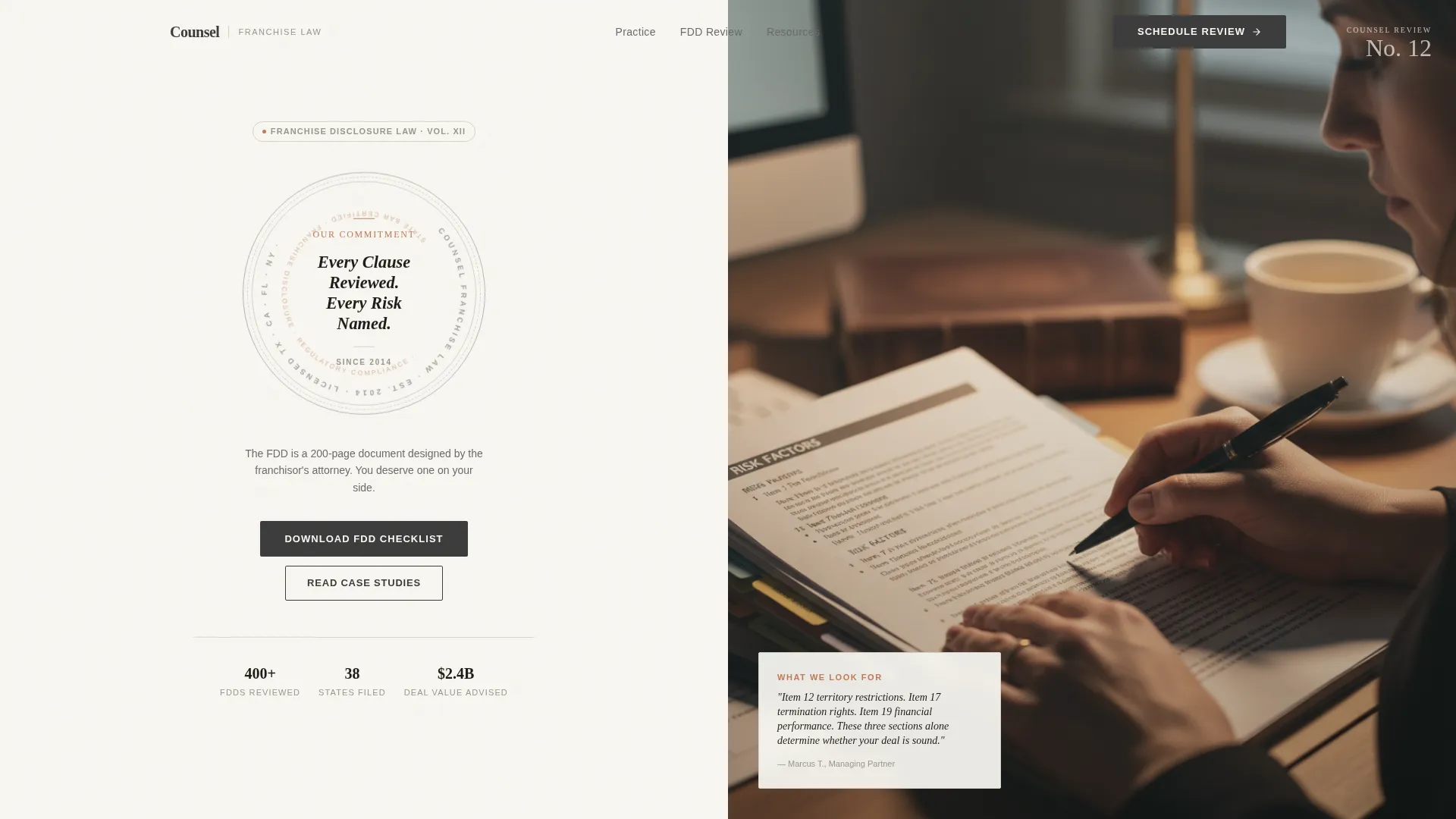
- A hero section with a typographic guarantee seal and an editorial FDD photograph
- Three sequential case study sections, each pairing a narrative with a visual artifact such as a comparison table or regulatory timeline
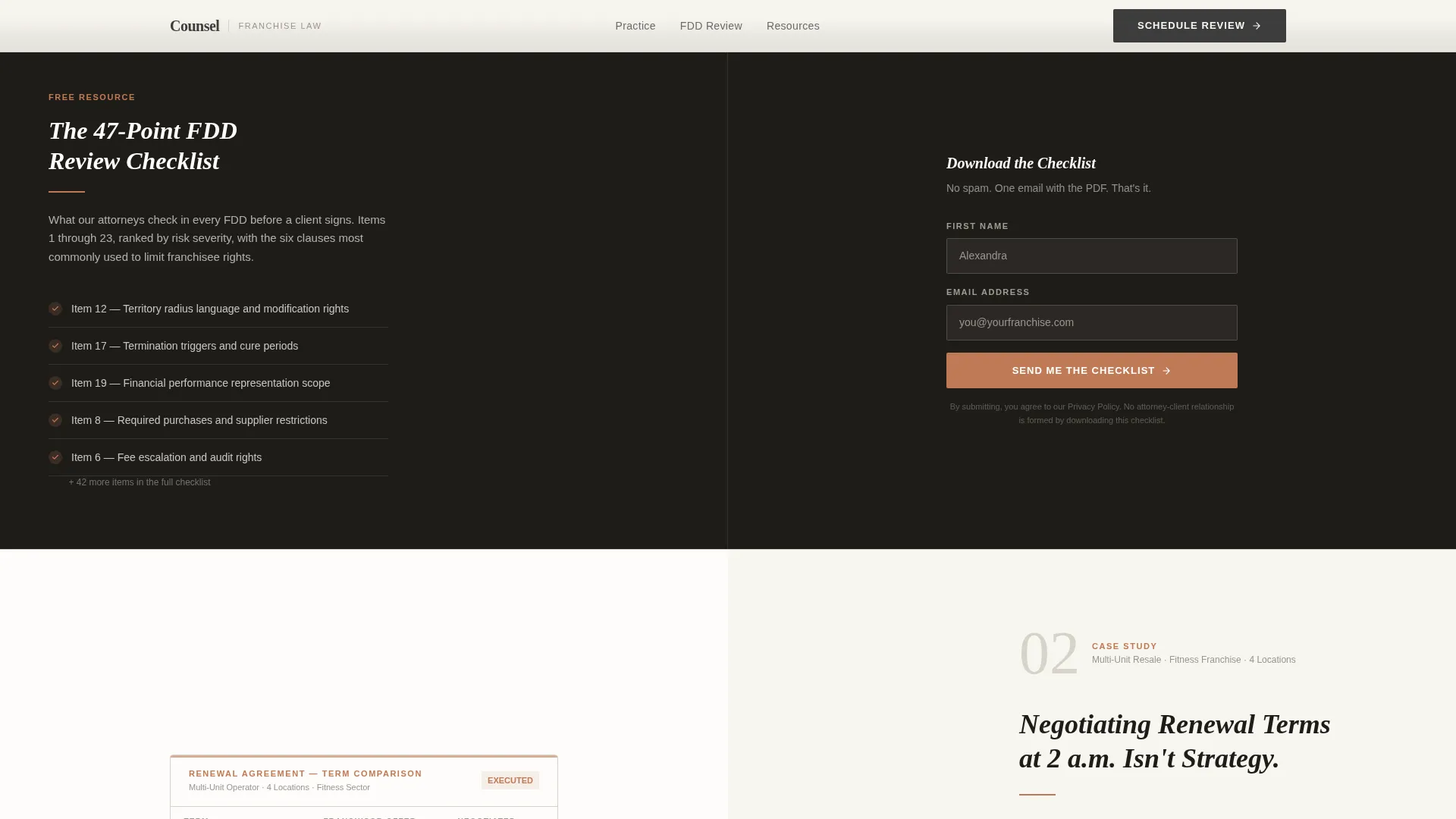
- Two lead capture paths: an FDD Checklist download form and a confidential FDD upload form with a drag-and-drop file field
Feature list
Typographic Guarantee Seal
The hero section opens with a large, serif-typeset seal on the left panel reading "Every Clause Reviewed. Every Risk Named." It is surrounded by a thin circular border referencing the firm's founding year and state bar credentials. This sets authoritative tone before the visitor reads a single word of body copy.
Split-Screen Case Study Layout
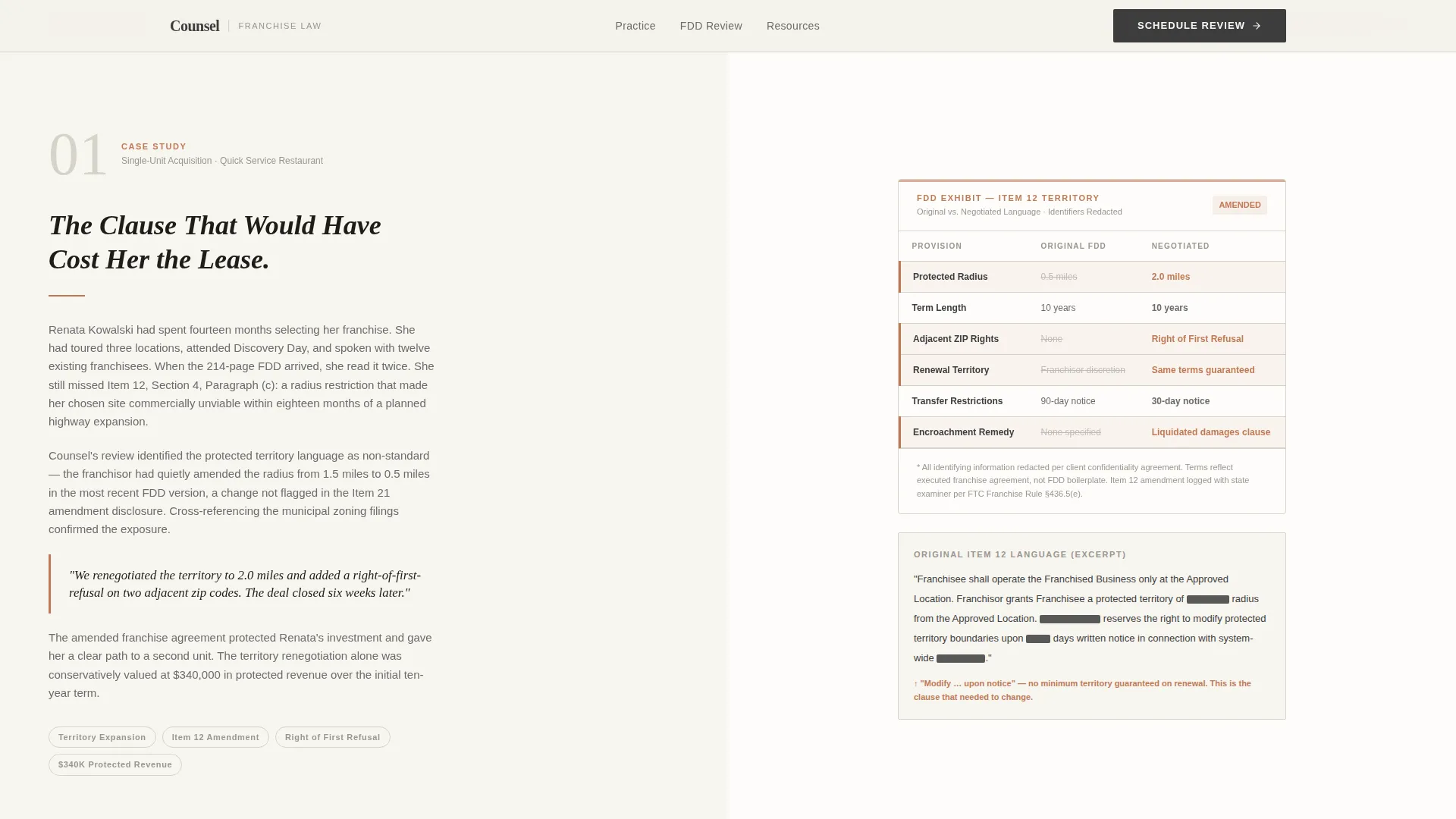
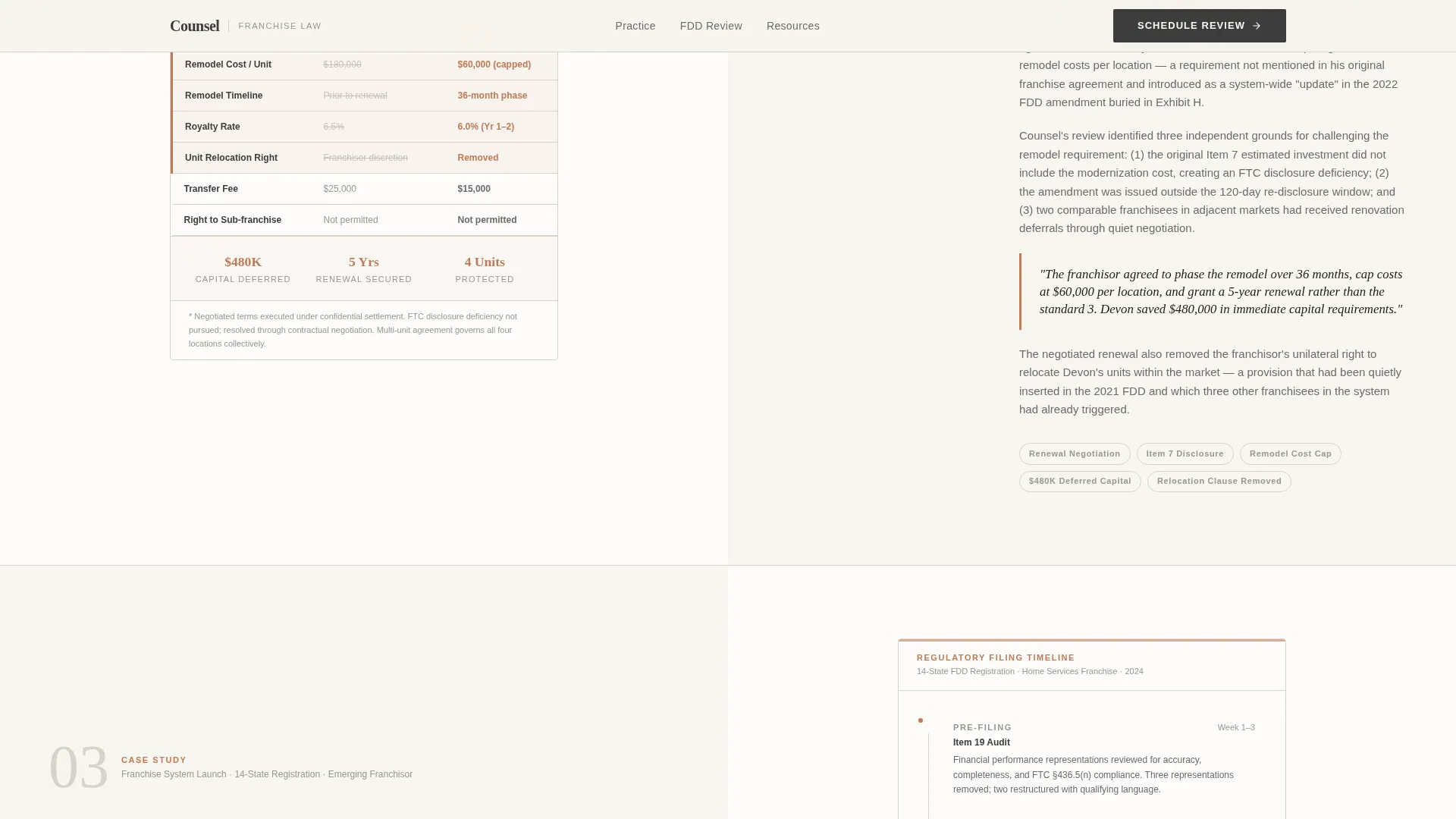
Each scroll section is a self-contained story divided across two panels. The left panel carries a three-paragraph narrative covering the client situation, the hidden contractual risk identified, and the outcome. The right panel presents a corresponding artifact: a redacted FDD excerpt, an original-versus-negotiated terms table, or a regulatory filing timeline.
Escalating Complexity Narrative Structure
The three case studies increase in scope deliberately. The first covers a single-unit franchise buyer. The second addresses a multi-unit resale negotiation. The third covers a full franchise system launch with regulatory filing requirements. This progression mirrors the real decision journey of a franchise law prospect.
Dual Conversion Path Design
The template places a lighter ask after the first case study: download an FDD Checklist with just a first name and email. A second, deeper form appears after the third case study, inviting visitors to upload their own FDD for a confidential review. The dropdown on that form captures transaction type: buying, selling, renewing, or launching.
GSAP ScrollTrigger Animations
Scroll-triggered reveals and staggered case study entrances use GSAP ScrollTrigger to animate content into view as the reader progresses. A subtle parallax effect on editorial photography adds visual depth without distracting from the legal content.
Accordion FAQ and Form Validation
Interactive accordion elements handle frequently asked questions inline without requiring a page reload. The lead capture forms include client-side validation to reduce incomplete submissions before the visitor moves to the next step.
Page sections overview
| Section | Purpose |
|---|---|
| Hero Split Screen | Introduce the firm with a guarantee seal and editorial FDD photograph |
| Case Study One | Single-unit buyer narrative with FDD comparison table |
| FDD Checklist call to action | First lead capture after case study one, low-friction download form |
| Case Study Two | Multi-unit resale narrative with original versus negotiated terms artifact |
| Case Study Three | Franchise system launch narrative with regulatory timeline artifact |
| Dual Lead Capture | FDD Checklist download form paired with confidential FDD upload form |
| Footer | Horizontal flow footer pattern with firm information |
Design & branding system
The visual identity follows an Editorial Magazine theme using a warm, restrained palette that feels closer to a premium quarterly journal than a typical law firm website. Typography is set in Fraunces, a high-contrast serif, for all display text and headlines, paired with DM Sans for body copy and interface elements.
- Color palette: warm white (#F7F5F0) for backgrounds, muted graphite (#3D3D3D) for body text, light fog gray (#D6D2C9) for section dividers, and muted terracotta (#C07A56) used sparingly for pull quotes, bylines, and hover states
- Terracotta appears infrequently by design, so each instance reads as a deliberate editorial underline rather than a decorative pattern
- The editorial photograph in the hero features a hand holding a pen over a tabbed FDD, shot with shallow depth of field and warm sidelight, chosen to feel candid and documentary rather than staged
Mobile & speed optimization
The template is built desktop-first because franchise attorneys and sophisticated buyers typically review detailed documents on larger screens. A mobile fallback ensures the layout and forms remain usable on smaller devices without sacrificing the editorial structure.
- Server Components handle static content sections for fast initial rendering, while Client Components manage interactive forms and GSAP animations separately
- The drag-and-drop FDD upload field and form validation logic are isolated to Client Components, keeping the static narrative sections lightweight
- The split-screen layout adapts for mobile without breaking the case study narrative sequence
How this template helps you convert
The conversion strategy is built on a principle of demonstrated value before any request. Visitors read through three increasingly complex case studies before they encounter a serious ask. By the time the confidential FDD upload form appears, the firm has already shown its analytical method three times over.
- The FDD Checklist download after Case Study One creates a low-stakes first conversion. It captures a name and email while delivering immediate value, building the relationship before the visitor is ready for a consultation.
- The confidential FDD upload form after Case Study Three meets prospects at the moment they are most convinced. The dropdown for transaction type helps the firm qualify leads and route them to the right attorney from the first touchpoint.
Other information about this template
This template is built for the United States market and uses USD currency formatting and the MM/DD/YYYY date format throughout. The footer uses a horizontal flow pattern consistent with clean, modern legal web layouts.
- The template supports accordion FAQ elements, making it straightforward to add common franchise law questions directly on the page
- Animation intensity is set at a medium level. Scroll reveals and parallax effects are present but restrained, keeping focus on the legal content rather than the motion
- The case study format is designed to support real outcome data: specific clause details, dollar figures, and negotiated term comparisons can be inserted directly into the artifact panels
- The page uses a single-page, section-led structure with no internal navigation to secondary pages, keeping the reader focused on the narrative progression
Theme
Editorial Magazine
Creative direction
Case Study Narrative
Color system
Cloud Canvas
Style
Split Screen (50/50)
Direction
Content/Resource
Page Sections
Typographic Guarantee Seal Hero
Split-screen Case Study Sections
Escalating Narrative Complexity
Dual Lead Capture Forms
GSAP Scroll Animations
Accordion FAQ and Form Validation
Related questions
What type of law firm is this landing page template designed for?
How do the two lead capture forms work on this template?
Can I replace the placeholder case study content with my firm's real cases?
Is this template optimized for desktop or mobile users?
What animation and interactivity does this template include?