International Expat Insurance Professional Website Template
Covered is a dark-themed, data-driven landing page template built for an international expat health insurance brokerage. It uses an interactive coverage audit with a live gap counter to turn passive visitors into engaged leads. The design follows a Data Command aesthetic in deep navy, tactical slate, and alert teal, with animated stats and a gated lead-generation form.
by Rocket studio
Quick summary
Covered is a single-column landing page template for an international expat health insurance brokerage. The page opens with three animating statistics, then walks visitors through a toggleable coverage audit that tallies gaps in real time. By the final form, each visitor has already quantified their own vulnerabilities, making the download feel earned and personal.
Who this template is for
This template is built for financial services brands and insurance brokerages that serve globally mobile professionals. It fits teams who need a lead-generation page that earns trust through data rather than imagery.
- HR directors managing cross-border team relocations and employee benefits
- Freelance consultants and digital nomads moving between jurisdictions
- Insurance brokers and advisors serving expat families, trailing spouses, and mobile executives
What problem this template solves
Most international health insurance pages lead with generic reassurance. They bury the real risk, and visitors leave without understanding what their current plan actually fails to cover. This template flips that dynamic.
- Visitors do not know which coverage gaps apply to their specific situation
- Domestic health plans often void the moment a policyholder crosses a border
- Generic lead magnets feel impersonal, so conversion rates suffer
What you get with this template
You get a fully structured single-column landing page that guides visitors from cold awareness to warm lead submission through an escalating audit experience. Every section is purposefully sequenced.
- A hero stats wall with three animated counter figures that load on page entry
- A scrollable interactive audit with toggleable covered, not covered, and do not know states per scenario
- A sticky sidebar gap counter that updates in real time as visitors work through the checklist
- A gated lead-generation form offering a Coverage Gap Report download and a secondary plan audit upload path
- A credibility section using specific claim outcomes and jurisdiction-referenced denial rate data
- A linear single-row footer
Feature list
This template is built around functional components that serve the specific demands of an expat insurance brokerage audience.
Animated Stats Hero Wall
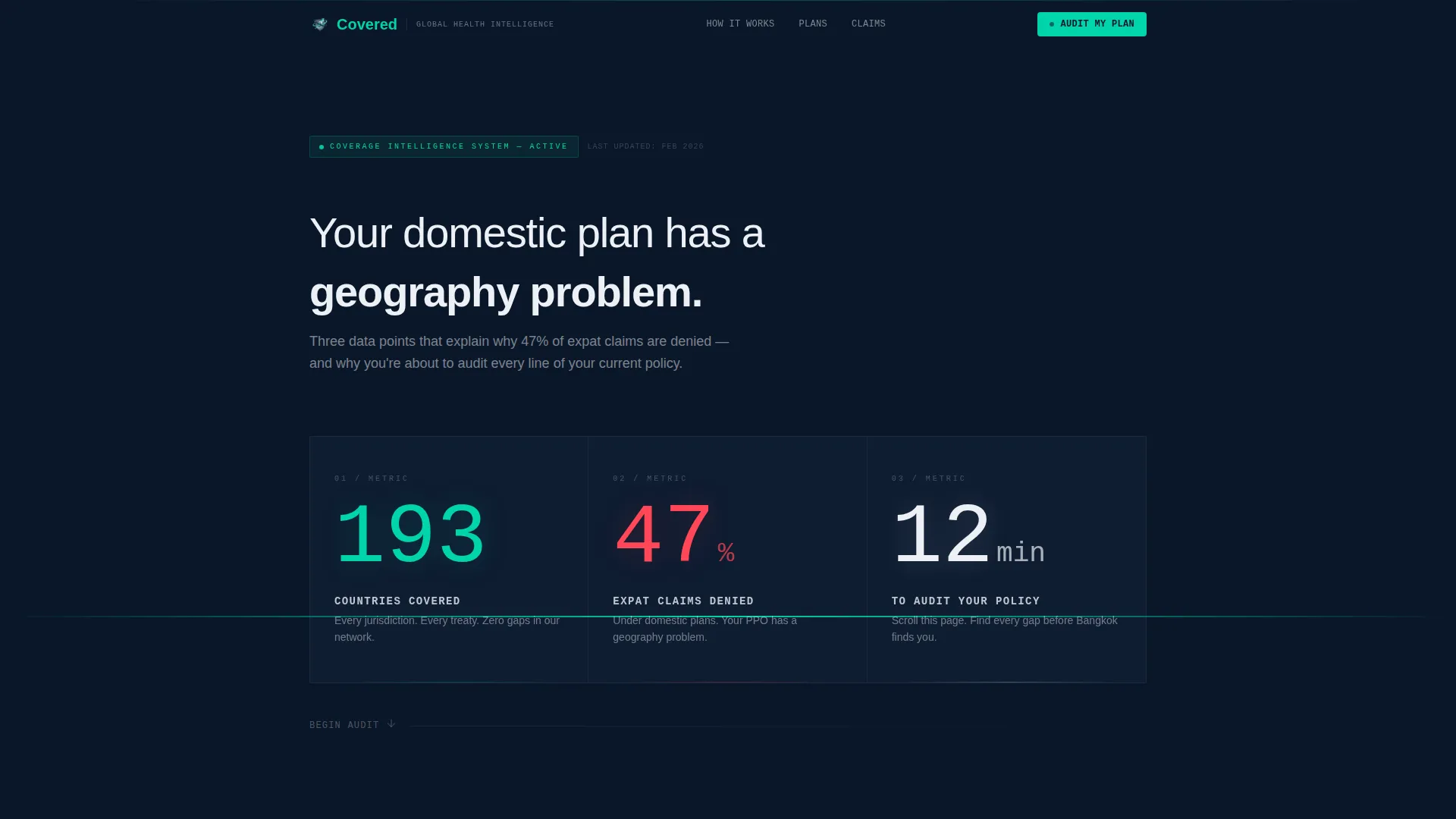
Three enormous figures tick upward on page load using monospaced counter animation. The numbers cover global country reach, domestic plan claim denial rates, and the time required for a policy audit. There are no hero images or illustrations, only data against deep navy.
Interactive Coverage Audit Checklist
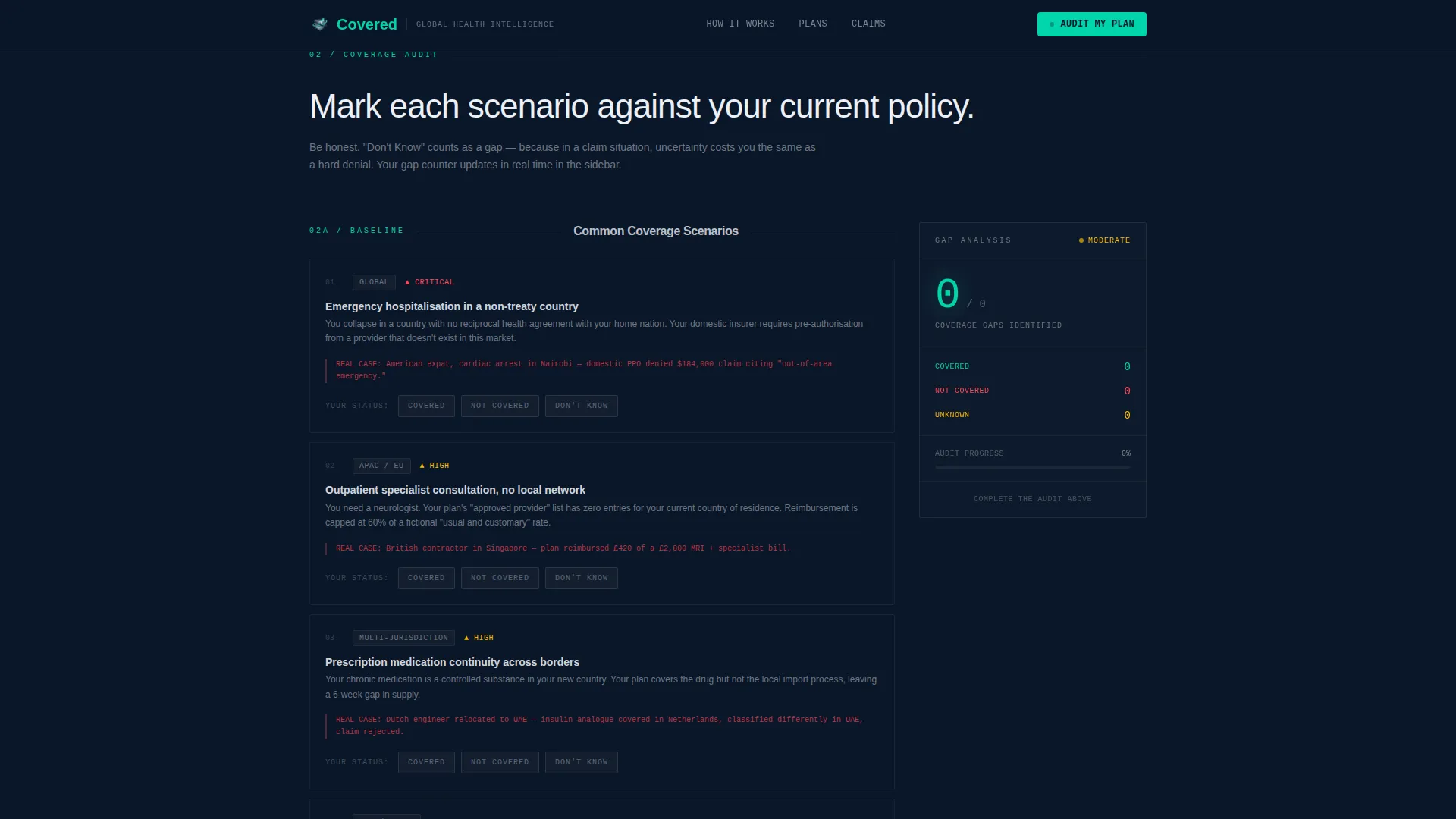
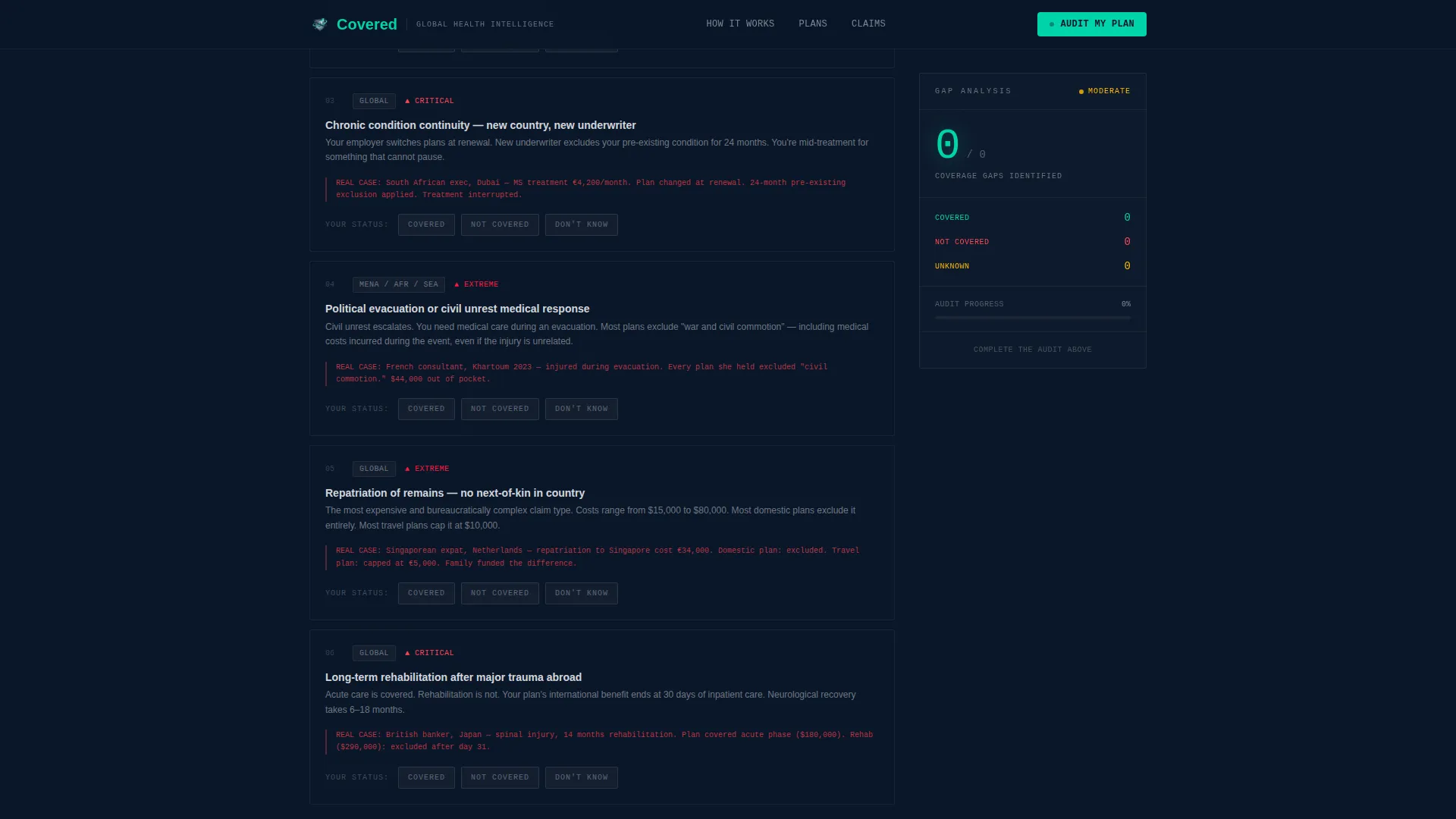
Each scroll section presents a real-world coverage scenario: emergency evacuation, outpatient care in a non-treaty country, maternity across jurisdictions, repatriation of remains, political evacuation, and chronic condition continuity. Visitors toggle each item between covered, not covered, or do not know.
Live Gap Counter Sidebar
A sticky sidebar element tracks the visitor's running gap count as they progress through the audit. The counter updates in real time and stays visible throughout the scroll, building a sense of accumulated risk that motivates form completion.
Gated Lead-Gen Form with Dual Path
The primary call to action is a Coverage Gap Report download gated behind three fields: current country of residence, nationality, and email address. A secondary path offers an Audit My Existing Plan option requiring a plan name and policy document upload.
Escalating Nightmare Scenario Sections
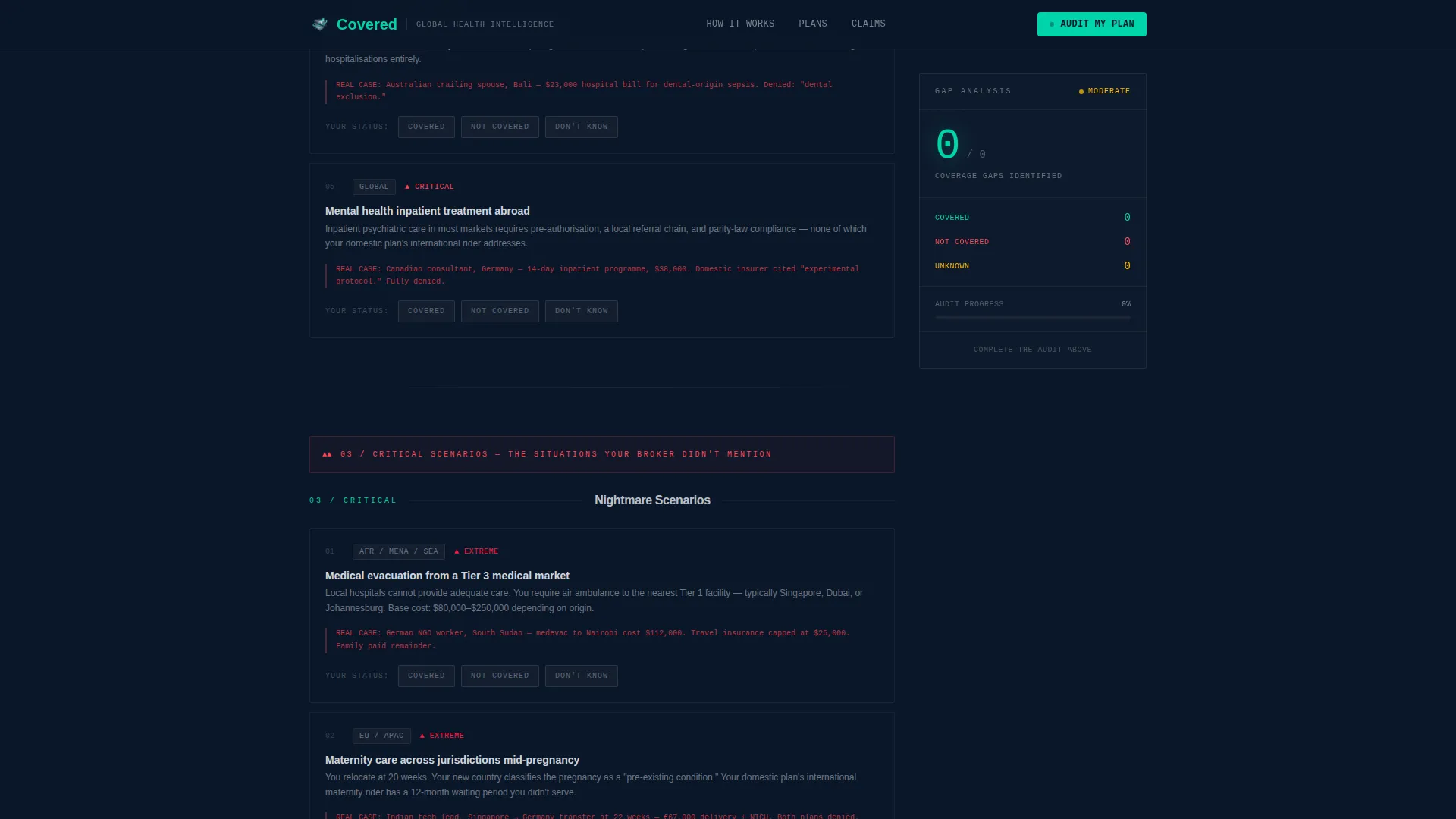
After the standard audit, the template escalates to high-stakes coverage scenarios. Each section tightens the pressure by introducing situations most domestic plans exclude entirely. The sequence is designed to make a visitor's gap count undeniable before they reach the form.
Jurisdiction-Referenced Credibility Section
Instead of testimonials, this section presents specific claim outcomes, denial rate statistics, and case references tied to real jurisdictions and claim amounts. This approach builds trust through verifiable data rather than anonymous quotes.
Page sections overview
| Section | Purpose |
|---|---|
| Hero Stats Wall | Open with three animated figures to establish authority and manufacture urgency |
| Coverage Audit Checklist | Let visitors self-assess common scenarios with toggleable covered or not covered states |
| Nightmare Scenario Escalation | Introduce high-stakes situations that surface deeper gaps and raise the gap count |
| Trust and Credibility | Reinforce brokerage authority with jurisdiction-specific claim outcomes and denial data |
| Lead-Gen Gap Report Form | Convert accumulated anxiety into a form submission via gated download or plan upload |
| Linear Footer | Close the page with a clean single-row footer |
Design & branding system
The visual identity follows a Data Command theme. The palette evokes a ship's bridge at night: dark, instrument-lit, and quietly authoritative. Every color choice serves legibility and emotional tone.
- Deep command-center navy (#0A1628) as the primary background, tactical slate (#1B2A4A) for card and panel surfaces, and clinical white (#EDF0F5) for body text
- Alert teal (#00D4AA) reserved for interactive states, checkmarks, progress indicators, and active counters
- JetBrains Mono for all numerical data and counter elements; Manrope for body text and section headings
Mobile & speed optimization
The template is designed desktop-first, reflecting the primary audience of HR directors reviewing plans during working hours. The layout remains fully responsive for mobile visitors.
- Static content sections are structured for server-side rendering to keep initial load light
- The interactive audit checklist and live gap counter are scoped as client-side components to isolate interactivity
- Single-column flow ensures the mobile reading experience requires no horizontal navigation or layout adaptation
How this template helps you convert
The conversion strategy is built into the page structure. Each section adds to the visitor's personal gap count before the form ever appears.
- The animated stats hero creates immediate credibility and surfaces the scale of the problem in seconds, compelling the visitor to scroll further.
- The interactive audit transforms passive reading into active self-diagnosis, so by the mid-point the visitor owns their own gap data.
- The gated form reframes the download as a personalized report the visitor has already built, lowering the perceived cost of submitting their details.
Other information about this template
This template is suited for international expat health insurance brokerages that compete in a space where trust is hard to establish quickly. A few additional details worth noting before you build with it.
- The template is designed for English-language audiences and uses currency-agnostic and international-format date conventions
- Animation intensity is high on load and scroll; teams with lower animation budgets can simplify the counter tick without changing the page structure
- The secondary audit path requires a file upload field, which will need backend handling configured separately outside the template scope
- The Data Command aesthetic suits any financial services or insurance brokerage brand that wants authority over warmth as its primary emotional register
Theme
Data Command
Creative direction
Checklist & Audit
Color system
Midnight Blue
Style
Single Column Flow
Direction
Content/Resource
Page Sections
Animated Stats Hero Wall
Interactive Coverage Audit Checklist
Live Gap Counter Sidebar
Gated Lead-gen Form with Dual Path
Jurisdiction-referenced Credibility Section
Related questions
Who is the primary audience for this landing page template?
Does the interactive audit work without a developer?
Can I adapt the coverage scenarios to match my brokerage's products?
What happens after a visitor submits the lead-gen form?
Is this template suitable for both B2B and B2C insurance audiences?



